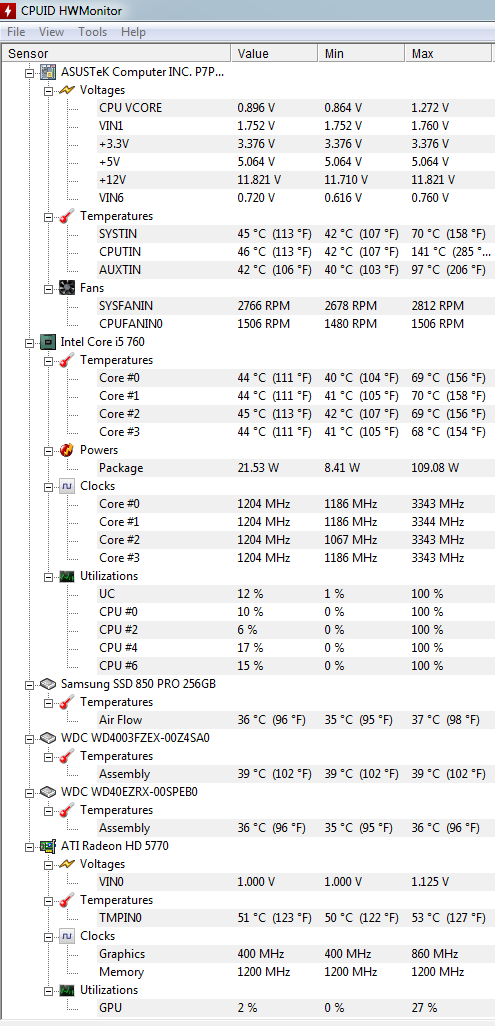
Is there anything wrong with my power stats?

pcwin

New member
Member
VIP
Local time
5:35 AM
Messages
112
JJ9m3vv.png


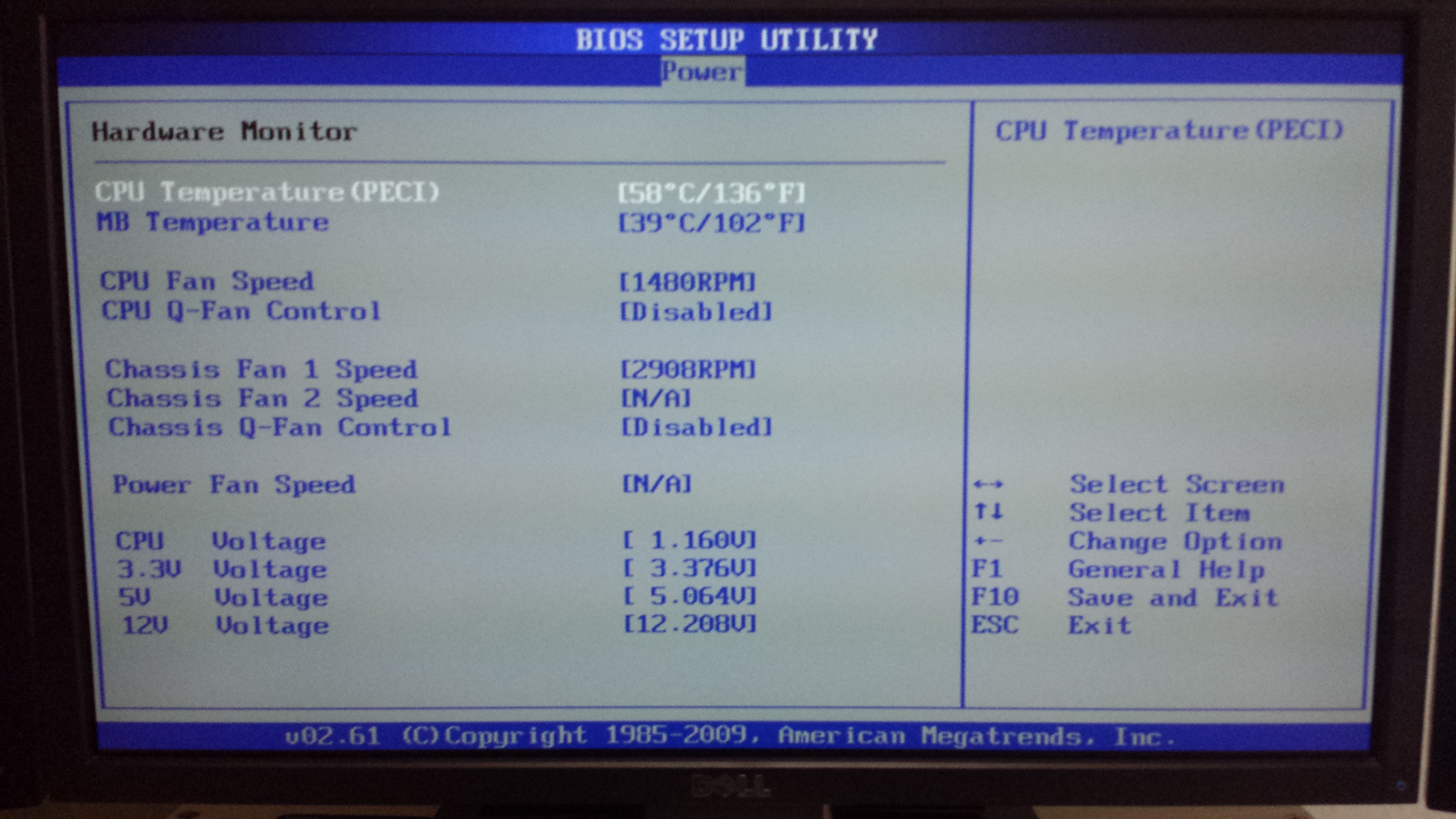
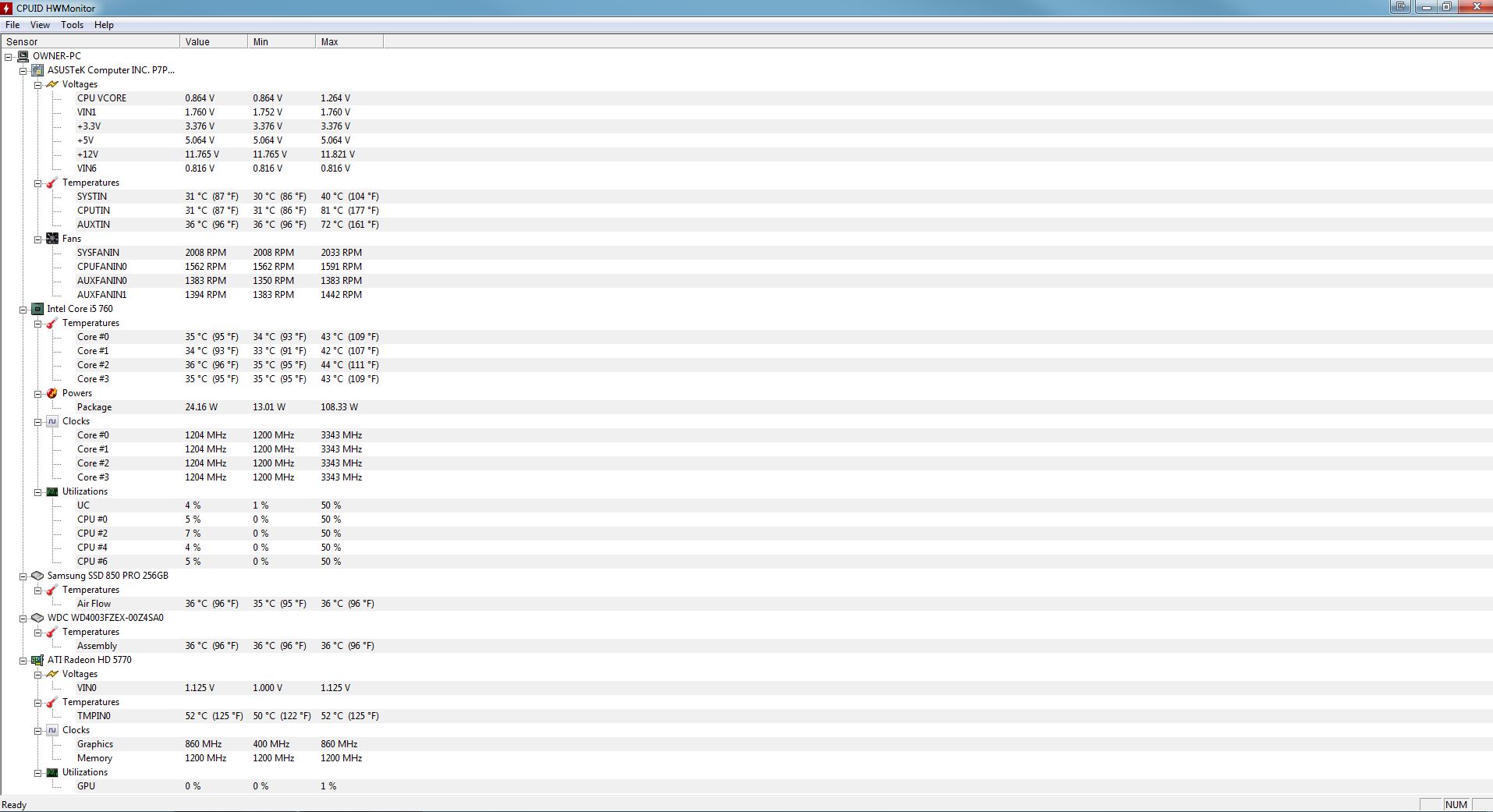
May I know is there anything wrong with my power/voltage/psu stats?

I am using Seasonic M12ii 520 bronze PSU

I am suspecting my power supply might have problem as I read that poor power supply might cause bad sectors. I have been changing a WD Black disk every 1 to 2 years due to bad sectors.
 

My Computer My Computer

At a glance

Windows 7 Home Premium 64 BitIntel8GBRadeon HD 5770
Computer type
PC/Desktop
Computer Manufacturer/Model Number
Custom Build
OS
Windows 7 Home Premium 64 Bit
CPU
Intel
Motherboard
ASUS P7P55DE-PRO
Memory
8GB
Graphics Card(s)
Radeon HD 5770
Hard Drives
WD Black
Antivirus
MSE
A power supply can not cause bad sectors.

Your cpu is rather warm for idle browsing and 1 hard drive is at 102 degrees, everything else looks fine.

If you are having bad luck with WD`s then switch to Seagates. Hard drives are hard drives, as long as they work it doesn`t matter who makes em.

If you think there`s something wrong with your PSU, then by all means replace it. A PSU is a very important part of the pc.
 

My Computer My Computer

At a glance

Windows 10 Pro x64Intel Core i7 6700KGSkill TridentZ RGB 16GB 3600 16-16-16-36EVGA GTX 980 Ti SC x2
Computer type
PC/Desktop
Computer Manufacturer/Model Number
Skylake Special #666
OS
Windows 10 Pro x64
CPU
Intel Core i7 6700K
Motherboard
Asus Sabertooth Z170 Mark 1
Memory
GSkill TridentZ RGB 16GB 3600 16-16-16-36
Graphics Card(s)
EVGA GTX 980 Ti SC x2
Sound Card
Realtek High Definition
Monitor(s) Displays
AOC G2460PG
Screen Resolution
1920 x 1080 144Hz
Hard Drives
Samsung 860 Pro 256GB, Seagate Barracuda 4TB x2
PSU
EVGA 1000 P2, EVGA White Custom Braided Cables
Case
Corsair Vengeance C70 Gunmetal Black
Cooling
Corsair H100i v2, Corsair ML120 x2, Thermal Grizzly Kryonaut
Keyboard
Logitech G910 Orion Spectrum
Mouse
Logitech G700s
Internet Speed
Verizon Fios Quantum Gateway 75/75
Antivirus
Windows Defender, Malwarebytes Free 3.8.3
Browser
Chrome
Other Info
Corsair SP120 x4, LG Blu-ray Drive, Durabrand HT-395 100 Watt Dolby Digital Amp, Corsair H2100 Wireless 7.1 Headset
I think the PSU voltages are within specifications---I think the allowance is plus or minus 5% or possibly 10% from 3.3 volts, 5 volts, and 12 volts. You are will within that, reading from the first group of numbers in the "voltages" section.

You show one temp of 141 C. That's very hot if accurate. I don't known how long it lasted or from where it came. Also several temps well beyond 90 C. I don't know if they are accurate either, but any temp beyond 90 C on any component would concern me, if accurate. I'd at least try to find out if it's abnormal for that particular sensor for that program (CPUID) on your hardware.

Hard drive temps are good, under 40 max.

Max core temps are OK--70 or lower.
 

My Computer My Computer

At a glance

Windows 7 Home Premium SP1, 64-bitIntel Skylake i5-6600K, not overclocked8 GB HyperX DDR4-2666 (2 x 4 GB)none; graphics are integrated on CPU
Computer type
PC/Desktop
Computer Manufacturer/Model Number
Ignatz Special; 4 speed manual gearbox; factory air conditioning; one of one
OS
Windows 7 Home Premium SP1, 64-bit
CPU
Intel Skylake i5-6600K, not overclocked
Motherboard
AsRock Z170M Extreme 4, micro ATX
Memory
8 GB HyperX DDR4-2666 (2 x 4 GB)
Graphics Card(s)
none; graphics are integrated on CPU
Sound Card
onboard: Realtek ALC1150; external: USB Behringer UF0-202
Monitor(s) Displays
Dell S2340M 23 inch IPS
Screen Resolution
1600 x 900
Hard Drives
System: Crucial MX100 series SSD, 128 GB;
Data: Samsung Spinpoint 103SJ, 1 TB;
Backup: WD Caviar Green WD30EZRX-00D8PB0, 3 TB
PSU
Rosewill SilentNight 500 watt fanless, semi-modular
Case
Antec Solo II
Cooling
Noctua NH-U12S; Noctua F12 intake, Noctua S12A exhaust
Keyboard
Microsoft 200 6JH-00001 USB
Mouse
Dell or Microsoft optical wired; USB
Antivirus
Microsoft Security Essentials and Malwarebytes Premium
Browser
Pale Moon
Other Info
All fans PWM; speeds at idle: CPU circa 500 rpm; intake circa 600 rpm; exhaust circa 600 rpm; CPU temps 27 idle and 47 C load in a warm room (27 C/81 F) when running Intel Extreme Tuning Utility stress test.
Qu09WOf.jpg

dQNASTN.jpg

5ClNDJO.jpg


Is BIOS more accurate? Is BIOS power OK?
 

My Computer My Computer

At a glance

Windows 7 Home Premium 64 BitIntel8GBRadeon HD 5770
Computer type
PC/Desktop
Computer Manufacturer/Model Number
Custom Build
OS
Windows 7 Home Premium 64 Bit
CPU
Intel
Motherboard
ASUS P7P55DE-PRO
Memory
8GB
Graphics Card(s)
Radeon HD 5770
Hard Drives
WD Black
Antivirus
MSE
Power is fine, but your CPU temp is way too high for idling in BIOS. The MB temp is rather high too, leading me to believe that your case doesn't have adequate ventilation.

How many fans do you have in the case? And what kind of CPU heatsink/fan are you using?
 

My Computer My Computer

At a glance

Win 7 Pro x64/Win 10 Pro x64 dual bootAMD FX 8350 Vishera @ 420016 GB Mushkin Blackline DDR3-2400 @ 1866 (9-1...XFX Radeon R9 280 Double D Black Edition
Computer type
PC/Desktop
Computer Manufacturer/Model Number
Mellon Labs (custom build)
OS
Win 7 Pro x64/Win 10 Pro x64 dual boot
CPU
AMD FX 8350 Vishera @ 4200
Motherboard
ASUS M5A97 R2.0
Memory
16 GB Mushkin Blackline DDR3-2400 @ 1866 (9-10-10-10-31)
Graphics Card(s)
XFX Radeon R9 280 Double D Black Edition
Sound Card
Realtek HD Audio on MB. Sounds great.
Monitor(s) Displays
Acer 24", Acer 22"
Screen Resolution
3840 x 1080
Hard Drives
1 x Mushkin Chronos 120 GB SSD (Win 10)
1 x Samsung 850 EVO 250 GB SSD (Win 7)
1 x WD 1TB SATA Blue
1 x WD 1TB SATA Green
PSU
Corsair TX-750
Case
CoolerMaster HAF 912+
Cooling
Coolermaster Seidon 240M Liquid AIO. 6 case fans
Keyboard
Logitech G710+
Mouse
Logitech G500s
Internet Speed
Much better since I got fiber, but still way overpriced.
Antivirus
MSE, Malware Bytes for scanning
Browser
Firefox
Other Info
Corsair VOID USB headphones.

A Mellon Labs X-1 - LCD Smartie driven system status display.

Brought to you by the letter E
CPU heatsink/fan is the stock one that came with the intel chip.

I have 1 front fan 140mm (inwards), one top fan 140mm (outwards), 1 back fan 120mm (outwards)
()=(flow of air)

CM690II Advanced casing.

What should be a good CPU temp?
 

My Computer My Computer

At a glance

Windows 7 Home Premium 64 BitIntel8GBRadeon HD 5770
Computer type
PC/Desktop
Computer Manufacturer/Model Number
Custom Build
OS
Windows 7 Home Premium 64 Bit
CPU
Intel
Motherboard
ASUS P7P55DE-PRO
Memory
8GB
Graphics Card(s)
Radeon HD 5770
Hard Drives
WD Black
Antivirus
MSE
A standard CPU idle temp would be in the mid 30s in a decently built desktop.

For most recent Intel CPUs.

You have an i5-760 from 2010. 4 cores. Tcase 72.7 degrees. TDP 95 watts.

I'm not sure if they tend to run hot?

I have a 95 watt TDP processor myself (Intel i5-2500). Currently idling in the high 30s with good cooling in a warm room (27 C, 81 F)

The cores will vary from one to another--they won't all be the same temp.

Idle can be below 30 in relatively cool room if you have excellent cooling.

Idle can be maybe 40 in a warm room with average cooling.

But load temperatures are MUCH more important. Idling at 58 won't hurt anything, but it might mean something and your load temps are likely much higher--if accurate.

What are your ambient temperatures?

Are you positive that Intel cooler is mounted properly on all 4 corners? That push-pin mechanism can be touchy about that. It might look OK at first glance, but be loose on one corner.
 

My Computer My Computer

At a glance

Windows 7 Home Premium SP1, 64-bitIntel Skylake i5-6600K, not overclocked8 GB HyperX DDR4-2666 (2 x 4 GB)none; graphics are integrated on CPU
Computer type
PC/Desktop
Computer Manufacturer/Model Number
Ignatz Special; 4 speed manual gearbox; factory air conditioning; one of one
OS
Windows 7 Home Premium SP1, 64-bit
CPU
Intel Skylake i5-6600K, not overclocked
Motherboard
AsRock Z170M Extreme 4, micro ATX
Memory
8 GB HyperX DDR4-2666 (2 x 4 GB)
Graphics Card(s)
none; graphics are integrated on CPU
Sound Card
onboard: Realtek ALC1150; external: USB Behringer UF0-202
Monitor(s) Displays
Dell S2340M 23 inch IPS
Screen Resolution
1600 x 900
Hard Drives
System: Crucial MX100 series SSD, 128 GB;
Data: Samsung Spinpoint 103SJ, 1 TB;
Backup: WD Caviar Green WD30EZRX-00D8PB0, 3 TB
PSU
Rosewill SilentNight 500 watt fanless, semi-modular
Case
Antec Solo II
Cooling
Noctua NH-U12S; Noctua F12 intake, Noctua S12A exhaust
Keyboard
Microsoft 200 6JH-00001 USB
Mouse
Dell or Microsoft optical wired; USB
Antivirus
Microsoft Security Essentials and Malwarebytes Premium
Browser
Pale Moon
Other Info
All fans PWM; speeds at idle: CPU circa 500 rpm; intake circa 600 rpm; exhaust circa 600 rpm; CPU temps 27 idle and 47 C load in a warm room (27 C/81 F) when running Intel Extreme Tuning Utility stress test.
My room temperature is 29.7 Deg
 

My Computer My Computer

At a glance

Windows 7 Home Premium 64 BitIntel8GBRadeon HD 5770
Computer type
PC/Desktop
Computer Manufacturer/Model Number
Custom Build
OS
Windows 7 Home Premium 64 Bit
CPU
Intel
Motherboard
ASUS P7P55DE-PRO
Memory
8GB
Graphics Card(s)
Radeon HD 5770
Hard Drives
WD Black
Antivirus
MSE
My room temperature is 29.7 Deg

That's 85 F.

Hot, but not hot enough to explain a 58 idle, barring further information.
 

My Computer My Computer

At a glance

Windows 7 Home Premium SP1, 64-bitIntel Skylake i5-6600K, not overclocked8 GB HyperX DDR4-2666 (2 x 4 GB)none; graphics are integrated on CPU
Computer type
PC/Desktop
Computer Manufacturer/Model Number
Ignatz Special; 4 speed manual gearbox; factory air conditioning; one of one
OS
Windows 7 Home Premium SP1, 64-bit
CPU
Intel Skylake i5-6600K, not overclocked
Motherboard
AsRock Z170M Extreme 4, micro ATX
Memory
8 GB HyperX DDR4-2666 (2 x 4 GB)
Graphics Card(s)
none; graphics are integrated on CPU
Sound Card
onboard: Realtek ALC1150; external: USB Behringer UF0-202
Monitor(s) Displays
Dell S2340M 23 inch IPS
Screen Resolution
1600 x 900
Hard Drives
System: Crucial MX100 series SSD, 128 GB;
Data: Samsung Spinpoint 103SJ, 1 TB;
Backup: WD Caviar Green WD30EZRX-00D8PB0, 3 TB
PSU
Rosewill SilentNight 500 watt fanless, semi-modular
Case
Antec Solo II
Cooling
Noctua NH-U12S; Noctua F12 intake, Noctua S12A exhaust
Keyboard
Microsoft 200 6JH-00001 USB
Mouse
Dell or Microsoft optical wired; USB
Antivirus
Microsoft Security Essentials and Malwarebytes Premium
Browser
Pale Moon
Other Info
All fans PWM; speeds at idle: CPU circa 500 rpm; intake circa 600 rpm; exhaust circa 600 rpm; CPU temps 27 idle and 47 C load in a warm room (27 C/81 F) when running Intel Extreme Tuning Utility stress test.
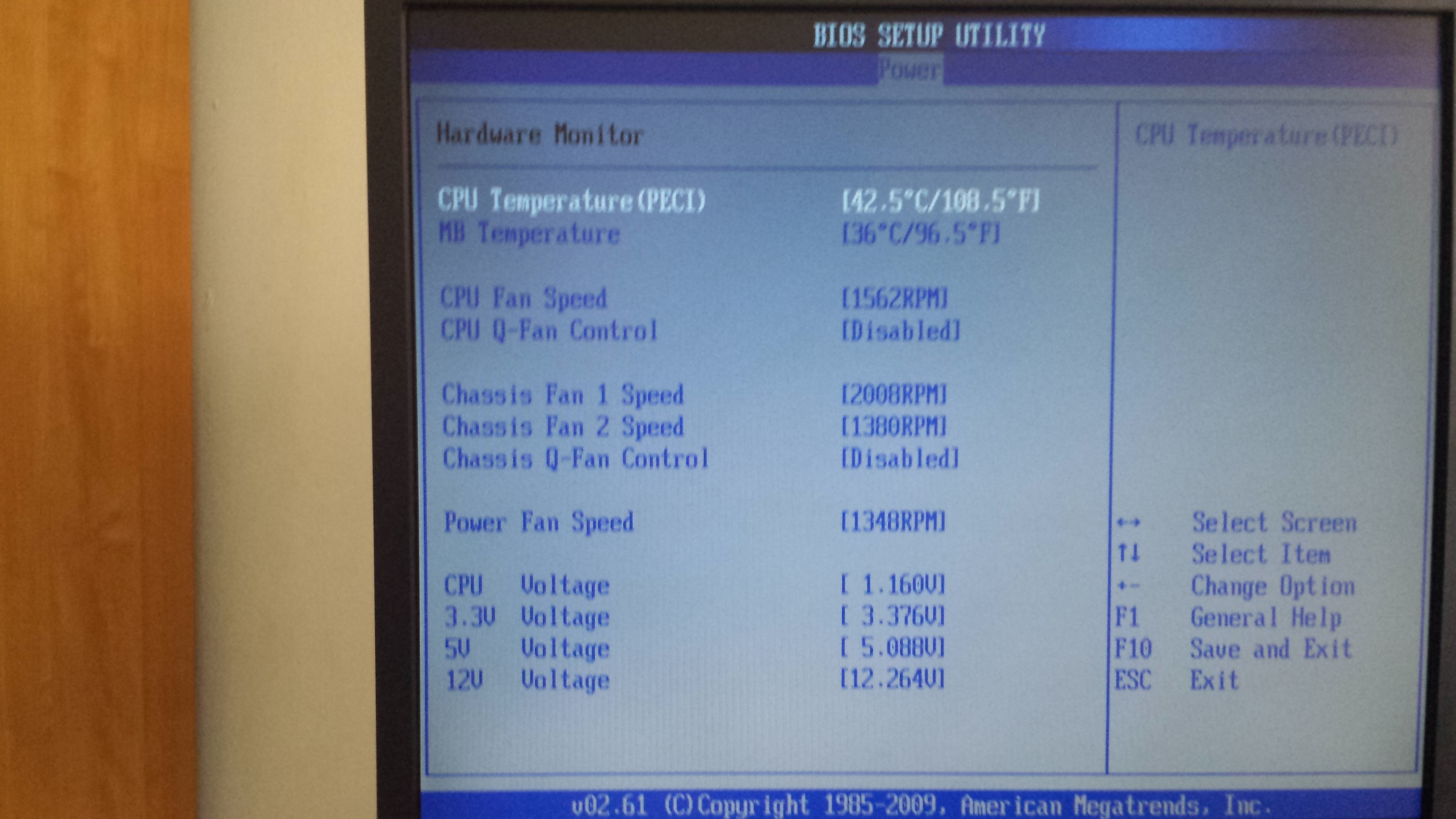
I changed the stock fan/heatsink to a new cooler master hyper 212 plus. Here are the temps. Is it ok?

What is a good MB temp and CPU temp in the BIOS?

ldagW25.png

DtYNFqk.jpg
 

My Computer My Computer

At a glance

Windows 7 Home Premium 64 BitIntel8GBRadeon HD 5770
Computer type
PC/Desktop
Computer Manufacturer/Model Number
Custom Build
OS
Windows 7 Home Premium 64 Bit
CPU
Intel
Motherboard
ASUS P7P55DE-PRO
Memory
8GB
Graphics Card(s)
Radeon HD 5770
Hard Drives
WD Black
Antivirus
MSE
Back
Top