
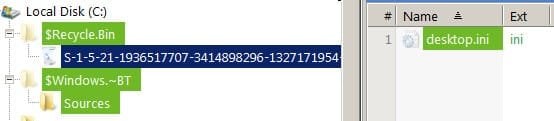
What is this folder names "Souces"?

jadinolf

Very Senior Member
Power User
VIP
Local time
4:14 AM
Messages
1,596
Location
California
For the last few days, I discovered a folder on my C drive named "Sources". Usually it has a long list of files. Today nothing (yet).

I have Googled it every day- found nothing that I was smart enough to understand so I deleted it. Next morning it is back.

So, I have come to the experts here for advice. What the heck is it and how do I stop it from coming back?

I have run all of my malware programs but they find nothing.

Thanks

Excuse the errors in the title but I don't know how to correct it. I am the worlds worst typist.
 

Attachments
  • sources.jpg
    sources.jpg
    10.8 KB · Views: 24
Last edited:

My Computer My Computer

Computer type
PC/Desktop
Computer Manufacturer/Model Number
Home Built
OS
Windows `10 Professional 64bit
CPU
Intel i5 [email protected]
Motherboard
MSI P67A-GD55 (MS7681)
Memory
Corsair Vengeance DDR3 1600 16G
Graphics Card(s)
NVIDIA GeForce GT520 1GHz
Sound Card
Realtek High Definition Audio
Monitor(s) Displays
Haans G 241
Screen Resolution
1600X1024
Hard Drives
Crucial MX100 256GB SSD
PSU
OCZ ModXStream Modular High Performance 500 Watt
Case
Rosewill Challenger-U3
Cooling
Just Fans
Keyboard
Kensington K64338B
Mouse
Microsoft wheel mouse 1.1A
Internet Speed
240.0 Mbps
Antivirus
ESET Internet Security
Browser
Firefox
Other Info
SuperAntiSpyware-Pro
Malwarebytes (Premium)
Kerish Doctor
The key is in the $Windows.~BT folder that contains it. It's used for the Windows 10 download media, the files inside it are the Win10 installation disk, that the Microsoft adware for Win10 downloads (without your knowledge or consent).
If you've used the official tool for media creation it also creates this folder at the user request.
 

My Computer My Computer

Computer type
Laptop
Computer Manufacturer/Model Number
Toshiba Sattelite A665-S6092
OS
Windows 7 Ultimate x64
CPU
Intel Core i7-740QM
Memory
8 GB DDR3
Graphics Card(s)
NVIDIA GeForce 330GT
Screen Resolution
1366x768
Hard Drives
Samsung 840 SSD 500GB
1TB USB3 external HD
Cooling
Coolermaster Notepal U3 notebook cooling pad
Internet Speed
3mbps ASDL
Antivirus
ClamWin 0.98.7
Browser
Opera 12.17 x86 (main), Firefox 38 (sec), IE11 (last resort)
The key is in the $Windows.~BT folder that contains it. It's used for the Windows 10 download media, the files inside it are the Win10 installation disk, that the Microsoft adware for Win10 downloads (without your knowledge or consent).
If you've used the official tool for media creation it also creates this folder at the user request.

Well, thanks for the reply. It's a bit over my head but what is the official tool for media creation and is there any way to stop this daily occurrence?
 

My Computer My Computer

Computer type
PC/Desktop
Computer Manufacturer/Model Number
Home Built
OS
Windows `10 Professional 64bit
CPU
Intel i5 [email protected]
Motherboard
MSI P67A-GD55 (MS7681)
Memory
Corsair Vengeance DDR3 1600 16G
Graphics Card(s)
NVIDIA GeForce GT520 1GHz
Sound Card
Realtek High Definition Audio
Monitor(s) Displays
Haans G 241
Screen Resolution
1600X1024
Hard Drives
Crucial MX100 256GB SSD
PSU
OCZ ModXStream Modular High Performance 500 Watt
Case
Rosewill Challenger-U3
Cooling
Just Fans
Keyboard
Kensington K64338B
Mouse
Microsoft wheel mouse 1.1A
Internet Speed
240.0 Mbps
Antivirus
ESET Internet Security
Browser
Firefox
Other Info
SuperAntiSpyware-Pro
Malwarebytes (Premium)
Kerish Doctor
The media creation tool is the one pointed out at this tutorial:
Windows 10 ISO Download - Windows 10 Forums

It also describes how to get the legit Windows 10 downloads. This creates such folders, at your explicit request.

The other way to get Windows 10 is that though the malware bundled in Windows Updates, that will try to put advertisments and download it without your consent. This forum contains many threads on how to clean your system from those:
http://www.sevenforums.com/general-...windows-10-upgrade-updates-windows-7-8-a.html
 

My Computer My Computer

Computer type
Laptop
Computer Manufacturer/Model Number
Toshiba Sattelite A665-S6092
OS
Windows 7 Ultimate x64
CPU
Intel Core i7-740QM
Memory
8 GB DDR3
Graphics Card(s)
NVIDIA GeForce 330GT
Screen Resolution
1366x768
Hard Drives
Samsung 840 SSD 500GB
1TB USB3 external HD
Cooling
Coolermaster Notepal U3 notebook cooling pad
Internet Speed
3mbps ASDL
Antivirus
ClamWin 0.98.7
Browser
Opera 12.17 x86 (main), Firefox 38 (sec), IE11 (last resort)
The media creation tool is the one pointed out at this tutorial:
Windows 10 ISO Download - Windows 10 Forums

It also describes how to get the legit Windows 10 downloads. This creates such folders, at your explicit request.

The other way to get Windows 10 is that though the malware bundled in Windows Updates, that will try to put advertisments and download it without your consent. This forum contains many threads on how to clean your system from those:
http://www.sevenforums.com/general-...windows-10-upgrade-updates-windows-7-8-a.html
Thanks for the post. It is most appreciated.

I really don't want Windows 10 on any more computers right now. I have Evaluation Copy 10532 on one computer and that's enough for now. I have had 10 on that computer ever since it was available last Autumn.

What I want to do is stop Microsoft from loading stuff on my computers. I know, stay off the Internet, right?:D
 

My Computer My Computer

Computer type
PC/Desktop
Computer Manufacturer/Model Number
Home Built
OS
Windows `10 Professional 64bit
CPU
Intel i5 [email protected]
Motherboard
MSI P67A-GD55 (MS7681)
Memory
Corsair Vengeance DDR3 1600 16G
Graphics Card(s)
NVIDIA GeForce GT520 1GHz
Sound Card
Realtek High Definition Audio
Monitor(s) Displays
Haans G 241
Screen Resolution
1600X1024
Hard Drives
Crucial MX100 256GB SSD
PSU
OCZ ModXStream Modular High Performance 500 Watt
Case
Rosewill Challenger-U3
Cooling
Just Fans
Keyboard
Kensington K64338B
Mouse
Microsoft wheel mouse 1.1A
Internet Speed
240.0 Mbps
Antivirus
ESET Internet Security
Browser
Firefox
Other Info
SuperAntiSpyware-Pro
Malwarebytes (Premium)
Kerish Doctor
Staying off internet is one option, for sure. Read the thread I linked to remove the updates that attempt to infect the computer with unwanted downloads. Make sure that Windows Update is NOT on automatic install so that it doesn't install again on its own.
 

My Computer My Computer

Computer type
Laptop
Computer Manufacturer/Model Number
Toshiba Sattelite A665-S6092
OS
Windows 7 Ultimate x64
CPU
Intel Core i7-740QM
Memory
8 GB DDR3
Graphics Card(s)
NVIDIA GeForce 330GT
Screen Resolution
1366x768
Hard Drives
Samsung 840 SSD 500GB
1TB USB3 external HD
Cooling
Coolermaster Notepal U3 notebook cooling pad
Internet Speed
3mbps ASDL
Antivirus
ClamWin 0.98.7
Browser
Opera 12.17 x86 (main), Firefox 38 (sec), IE11 (last resort)
Staying off internet is one option, for sure. Read the thread I linked to remove the updates that attempt to infect the computer with unwanted downloads. Make sure that Windows Update is NOT on automatic install so that it doesn't install again on its own.
Right- I keep "I don't want Windows 10.exe" on all of my hard drives and have set up Update for "Download update but let me choose when to install them."

And still sources is found on my hard drive every morning.

Thanks Alejandro.
 

My Computer My Computer

Computer type
PC/Desktop
Computer Manufacturer/Model Number
Home Built
OS
Windows `10 Professional 64bit
CPU
Intel i5 [email protected]
Motherboard
MSI P67A-GD55 (MS7681)
Memory
Corsair Vengeance DDR3 1600 16G
Graphics Card(s)
NVIDIA GeForce GT520 1GHz
Sound Card
Realtek High Definition Audio
Monitor(s) Displays
Haans G 241
Screen Resolution
1600X1024
Hard Drives
Crucial MX100 256GB SSD
PSU
OCZ ModXStream Modular High Performance 500 Watt
Case
Rosewill Challenger-U3
Cooling
Just Fans
Keyboard
Kensington K64338B
Mouse
Microsoft wheel mouse 1.1A
Internet Speed
240.0 Mbps
Antivirus
ESET Internet Security
Browser
Firefox
Other Info
SuperAntiSpyware-Pro
Malwarebytes (Premium)
Kerish Doctor
But have you uninstalled the malware updates that have already infected your computer? That's the critical part to prevent the big download to appear again. Disabling the auto updates will prevent automatic re-infection. That thread list them so you can track them down and remove.

"I don't want Windows 10.exe" :D Nice one!
 

My Computer My Computer

Computer type
Laptop
Computer Manufacturer/Model Number
Toshiba Sattelite A665-S6092
OS
Windows 7 Ultimate x64
CPU
Intel Core i7-740QM
Memory
8 GB DDR3
Graphics Card(s)
NVIDIA GeForce 330GT
Screen Resolution
1366x768
Hard Drives
Samsung 840 SSD 500GB
1TB USB3 external HD
Cooling
Coolermaster Notepal U3 notebook cooling pad
Internet Speed
3mbps ASDL
Antivirus
ClamWin 0.98.7
Browser
Opera 12.17 x86 (main), Firefox 38 (sec), IE11 (last resort)
But have you uninstalled the malware updates that have already infected your computer? That's the critical part to prevent the big download to appear again. Disabling the auto updates will prevent automatic re-infection. That thread list them so you can track them down and remove.

"I don't want Windows 10.exe" :D Nice one!
I have not found any malware updates.

Everything I have has found nothing.

Anyone have Bill Gates' private number?;)
 

My Computer My Computer

Computer type
PC/Desktop
Computer Manufacturer/Model Number
Home Built
OS
Windows `10 Professional 64bit
CPU
Intel i5 [email protected]
Motherboard
MSI P67A-GD55 (MS7681)
Memory
Corsair Vengeance DDR3 1600 16G
Graphics Card(s)
NVIDIA GeForce GT520 1GHz
Sound Card
Realtek High Definition Audio
Monitor(s) Displays
Haans G 241
Screen Resolution
1600X1024
Hard Drives
Crucial MX100 256GB SSD
PSU
OCZ ModXStream Modular High Performance 500 Watt
Case
Rosewill Challenger-U3
Cooling
Just Fans
Keyboard
Kensington K64338B
Mouse
Microsoft wheel mouse 1.1A
Internet Speed
240.0 Mbps
Antivirus
ESET Internet Security
Browser
Firefox
Other Info
SuperAntiSpyware-Pro
Malwarebytes (Premium)
Kerish Doctor
Back
Top