Windows Update using over a GB of RAM constantly

nev

New member
Local time
2:14 PM
Messages
6
Location
United States
First off let me say that I do have a large backlog of updates (upwards of 96) that I haven't done. Reasons for not doing them include not needing to, not wanting to, and just the idea of one of them having or doing something I don't want.

I've noticed for quite a while now when I boot up my computer and when the 'delayed start' services kick in, Windows Update is the one that takes all my resources. As soon as they kick in, I see a lone svchost.exe fly up to around 1,400,000 K on the memory usage and around 12% of my CPU. This goes on for about fifteen minutes and then will settle on its own, usually. Sometimes it takes longer than others to finally settle down.

I'm not sure if doing the backlog of updates I have would even solve the issue, since this issue lies within the checking for updates. If I were to try to check for updates manually, it hangs. It gets stuck in an infinite check and then the memory usage will never go down until a reboot or termination of the service.

I've considered completely disabling Windows Update altogether, my only concern is MSE. I use that for anti-virus and I've noticed it seems to be directly tied to Windows Update. I've observed on a virtual machine that installing MSE after disabling Windows Update will actually result in it turning back on automatically. Not sure if I like this behavior.

Anyway, could anyone shed some light on this abnormally large usage of my RAM from Windows Update? What deems it necessary to use that much? On my system, this weighs in at around 20-23% of my total physical memory usage.
 

My Computer

Computer type
PC/Desktop
Computer Manufacturer/Model Number
Custom Build
OS
Windows 7 Home Premium 64-bit
Well my observations are:

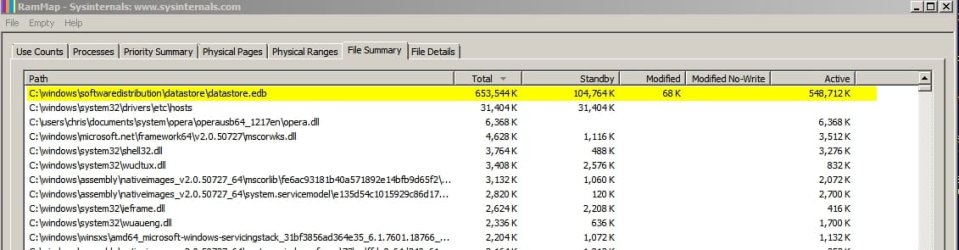
When this high svchost.exe memory usage occurs and wuauserv is running under that particular instance of svchost.exe if you use a tool like RAMmap from SysInternals you will see the following file is locked and using a lot of RAM.

C:\Windows\SoftwareDistribution\DataStore\DataStore.edb

Datastore edb.jpg

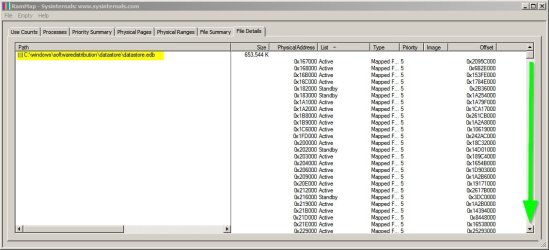
Then the following screenshot shows the file's RAM usage in more detail. There is only a small section of the window shown and if you note the position of the scroll arrow you can see that the list is pretty huge.

Datastore edb 2.jpg

I've fixed the problem on my own machine a few times now but it's actually really very complicated to fix. I've also heard tales of people resorting to clean installing windows only to encounter the same problem.

My fix involves:

Running advanced disk cleanup.
Reset IE completely (32bit and 64bit)
Running MicrosoftFixit50202.msi in aggressive mode more than once.
Reset Windows Update components manually.
Clear Windows Update history and temp files.
Force reinstalling Windows Update Agent.
Reconfigure Windows Update settings.

It's probably too tricky to explain properly and in detail.

Nobody seems to have worked out why it happens in the first place!
 
Last edited:

My Computer

Computer type
Laptop
Computer Manufacturer/Model Number
ASUS
OS
Microsoft Windows 7 Home Premium 64-bit 7601 Multiprocessor Free Service Pack 1
CPU
AMD C-60 APU with Radeon(tm) HD Graphics
Motherboard
ASUSTeK COMPUTER INC. X501U
Memory
4.00 GB
Graphics Card(s)
AMD Radeon HD 6290 Graphics
Sound Card
(1) AMD High Definition Audio Device (2) Realtek High Defi
Screen Resolution
1366 x 768 x 32 bits (4294967296 colors) @ 60 Hz
Hard Drives
Hitachi HTS545050A7E380 SATA Disk Device
Antivirus
Comodo CIS & FW, SecureAplus App Whitelisting, Threatfire
Browser
Cyberfox 64bit, Opera 64bit, Airfox
Other Info
Spy-The-Spy, HitmanPro.Alert, Norton Connect Safe, MJRegWatcher, BitDefender TrafficLight, Voodoo Shield, Zemana AntiMalware
I look at a lot simpler.

Ram is designed to be used when needed.

If your system determines that more resources is need when doing Windows 7 Updates, oh well.

You need Windows 7 Updates.

When I have a Windows 7 Updates I do nothing on the computer until the Updates are completed.
If you don't fall behind on the updates it doesn't take long.
You have fallen behind so it will take some time to complete the Updates.
 

My Computer

Computer type
PC/Desktop
Computer Manufacturer/Model Number
Home made Desktop
OS
Windows 10 Pro. 64/ version 1709 Windows 7 Pro/64
CPU
Intel i7-6800K @ 4.3
Motherboard
ASUS X-99 Deluxe II
Memory
Corsair Platinum 16 gig @2400
Graphics Card(s)
EVGA GTX 1070 OC
Monitor(s) Displays
Asus 27" LED LCD/VE278Q
Screen Resolution
1920-1080 or 1280-720 HDMI
Hard Drives
INTEL SSD 730-240 Gb Sata 3.0/
PSU
EVGA Platium 1200W
Case
Phanteks Luxe Tempered Glass 8 fans/ one radiator
Cooling
XSPC/ Water Cooled CPU
Keyboard
Das 4 Professional
Mouse
Logitech M705/MX Anywhere 2-S
Internet Speed
100 mbits
Antivirus
Microsoft Security Essentials/ Malwarebytes Premium 3.0/ SAS
Browser
I.E. 11 default/Firefox/ ISP Time Warner Cable/Spectrum
Other Info
LG BluRay Burner/
Sound system-KLipsch-THX/
Icy Dock ssd Hot Swap bays.
Okay well the problem re-appeared again and as you can probably guess that's why I was able to capture the screenshots in Post #2.

Here's more screenshots showing normal memory usage by svchost running wuaserv after the fix as opposed to the 1GB to 2GB earlier usage and indeed shows installation of this month's updates in progress. My logic would be that memory leaks need fixing in order to avoid bringing the system to a crawl but if adding more RAM works then try it and let us know if it works. It would sure help a lot of users who seem to have the same problem at the moment.

WU.jpg
 
Last edited:

My Computer

Computer type
Laptop
Computer Manufacturer/Model Number
ASUS
OS
Microsoft Windows 7 Home Premium 64-bit 7601 Multiprocessor Free Service Pack 1
CPU
AMD C-60 APU with Radeon(tm) HD Graphics
Motherboard
ASUSTeK COMPUTER INC. X501U
Memory
4.00 GB
Graphics Card(s)
AMD Radeon HD 6290 Graphics
Sound Card
(1) AMD High Definition Audio Device (2) Realtek High Defi
Screen Resolution
1366 x 768 x 32 bits (4294967296 colors) @ 60 Hz
Hard Drives
Hitachi HTS545050A7E380 SATA Disk Device
Antivirus
Comodo CIS & FW, SecureAplus App Whitelisting, Threatfire
Browser
Cyberfox 64bit, Opera 64bit, Airfox
Other Info
Spy-The-Spy, HitmanPro.Alert, Norton Connect Safe, MJRegWatcher, BitDefender TrafficLight, Voodoo Shield, Zemana AntiMalware
This is quite normal - Windows Update tests the integrity of all updates as they come down - and again when you do a Check for updates, as well as at install time.
This is NOT a memory 'leak' - it's simply normal memory usage.
As Layback Bear said, memory is there to be used - my take on it is that if it's not in use then it may as well be hung on the wall as artwork.
 

My Computer

Computer type
Laptop
Computer Manufacturer/Model Number
Asus K52F or Lenovo B51-80
OS
Win 7 x64 Home Premium (and x86 VirtualBox VM)/Win10
CPU
i3 370M/i7 6500U
Motherboard
Asus/Lenovo
Memory
8GB - finally :)/8GB
Graphics Card(s)
it's an i3, dude!/dual Intel&nVidia
Sound Card
onboard
Monitor(s) Displays
15.6" built-in
Screen Resolution
1366x768/1920x1080
Hard Drives
750GB Seagate internal
Sundry external drives attached to other computers on the local network
1TB SSD on the Lenovo
PSU
n/a
Internet Speed
as much as I can get - usually on a dongle/phone, so <1MB/s
Antivirus
MSE/Defender
Browser
IE11/12/Edge/Chrome/FF(if I must)
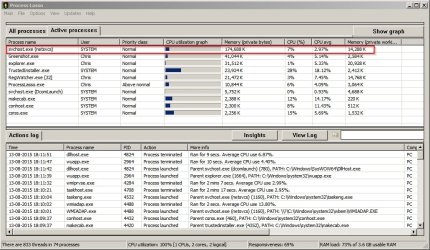
NoelDP is the Windows Updates expert here and knows a lot! I'd go with his advice. It still doesn't explain why today's windows update check shows svchost.exe (netsvcs) memory usage as shown below - when before the fix it was running at over 1.2Gb daily.

svchost netsvcs.jpg

Then there's this strange article here: How to fix: Svchost.exe (netsvcs) memory leak or high CPU usage problems - wintips.org - Windows Tips & How-tos

Apparently though, high svchost - netsvcs RAM usage isn't a memory leak so just have a read and ask the experts here if they've got any advice on how to fix any possible issues.
 

My Computer

Computer type
Laptop
Computer Manufacturer/Model Number
ASUS
OS
Microsoft Windows 7 Home Premium 64-bit 7601 Multiprocessor Free Service Pack 1
CPU
AMD C-60 APU with Radeon(tm) HD Graphics
Motherboard
ASUSTeK COMPUTER INC. X501U
Memory
4.00 GB
Graphics Card(s)
AMD Radeon HD 6290 Graphics
Sound Card
(1) AMD High Definition Audio Device (2) Realtek High Defi
Screen Resolution
1366 x 768 x 32 bits (4294967296 colors) @ 60 Hz
Hard Drives
Hitachi HTS545050A7E380 SATA Disk Device
Antivirus
Comodo CIS & FW, SecureAplus App Whitelisting, Threatfire
Browser
Cyberfox 64bit, Opera 64bit, Airfox
Other Info
Spy-The-Spy, HitmanPro.Alert, Norton Connect Safe, MJRegWatcher, BitDefender TrafficLight, Voodoo Shield, Zemana AntiMalware
Not Normal

I disagree that this is just "normal behaviour".

It is not normal for W7 to sit there for several hours:

  • Using ever increasing amounts of RAM
  • With CPU usage of 50% - 100% constantly
MS released something in May or June that caused this (convenient considering the release of W10 in July).

My VMs have all started doing this (the last time they were updated was June).
One of the updates in August or September seems to fix the issue though.

Of course, you need to let your machine run for several hours, before Windows Update will even show any available updates.
 

My Computer

Computer type
PC/Desktop
Computer Manufacturer/Model Number
n/a
OS
W7 Ultimate SP1, LM19.2 MATE, W10 Home 1703, W10 Pro 1703 VM, #All 64 bit
CPU
AMD Phenom II x6 1100T, 3.3 GHz
Motherboard
ASUS M4A88T-M/USB3 (AM3)
Memory
12GB DDR3 1333 G-Skill (4GB x 2), G-Skill (2GB x 2)
Graphics Card(s)
NVIDIA GeForce GTX 660
Sound Card
Realtek?
Monitor(s) Displays
Samsung S23B350
Screen Resolution
1920x1080
Hard Drives
WD Green 2TB (SATA), WD Green 3TB (SATA), WD Blue 4TB (SATA), WD Blue 6TB (SATA)
PSU
Cooler Master
Case
Antec GX300 Tower
Cooling
3x Antec TRICOOL 120mm Fans
Mouse
Wired Optical
Internet Speed
DSL
Antivirus
Avast
Browser
Pale Moon (64 bit)
Other Info
2018-12-27 Upgraded HDDs
2015-12-10 Upgraded case, graphics card, storage
2015-08-15 Upgraded motherboard & RAM
2015-07-15 Upgraded LM17.1 to LM17.2
I disagree that this is just "normal behaviour".

It is not normal for W7 to sit there for several hours:

  • Using ever increasing amounts of RAM
  • With CPU usage of 50% - 100% constantly
MS released something in May or June that caused this (convenient considering the release of W10 in July).

My VMs have all started doing this (the last time they were updated was June).
One of the updates in August or September seems to fix the issue though.

Of course, you need to let your machine run for several hours, before Windows Update will even show any available updates.

Well at least someone else finally agrees! Like I said I've experienced the same high RAM usage on my machine and the only way I found to fix it was actually pretty complicated to explain. Once fixed RAM usage when checking for updates is "normal"

There is an update for Windows Update Agent that has been released recently that also has options to block W10 upgrade updates but I have not tried installing it yet. Here's the details:
   Note

Windows Update Client for Windows 7: June 2015


Fixes that are included in this update

This update addresses an issue in which system performance can be decreased during scans. This issue has the greatest effect on computers that have a small amount of physical memory.
This update addresses an issue in which Windows Update scans can fail and generate a 0x8007000E error.
General improvements are made to support upgrades to a later version of Windows.
This update installs a new Group Policy object that enables you to block upgrades to the latest version of Windows through Windows Update.

Microsoft is making Windows 10 available for free for one year from the date of availability to Windows 7 and Windows 8.1 customers for non-Enterprise editions. If you have Windows 7 or Windows 8.1 Pro deployed in your organization, Windows 10 will be offered to you. Computers that have this Group Policy object enabled will never detect, download, or install an upgrade to the latest version of Windows.

You can configure this Group Policy object by using Group Policy (if the update is installed and if you use the updated WindowsUpdate.admx file by copying the file from where the editing policy is located). You can also do this by going to Computer Configuration > Policies > Administrative Templates > Windows Components > Windows Update, double-clicking Turn off the upgrade to the latest version of Windows through Windows Update, and then clicking Enabled.

Policy path Computer Configuration / Administrative Templates / Windows Components / Windows Update

Policy setting Turn off the upgrade to the latest version of Windows through Windows Update (enabled or disabled)

To suppress this offer through the registry, set the following registry key:
HKLM\SOFTWARE\Policies\Microsoft\Windows\WindowsUpdate
DWORD: DisableOSUpgrade = 1
 
Last edited:

My Computer

Computer type
Laptop
Computer Manufacturer/Model Number
ASUS
OS
Microsoft Windows 7 Home Premium 64-bit 7601 Multiprocessor Free Service Pack 1
CPU
AMD C-60 APU with Radeon(tm) HD Graphics
Motherboard
ASUSTeK COMPUTER INC. X501U
Memory
4.00 GB
Graphics Card(s)
AMD Radeon HD 6290 Graphics
Sound Card
(1) AMD High Definition Audio Device (2) Realtek High Defi
Screen Resolution
1366 x 768 x 32 bits (4294967296 colors) @ 60 Hz
Hard Drives
Hitachi HTS545050A7E380 SATA Disk Device
Antivirus
Comodo CIS & FW, SecureAplus App Whitelisting, Threatfire
Browser
Cyberfox 64bit, Opera 64bit, Airfox
Other Info
Spy-The-Spy, HitmanPro.Alert, Norton Connect Safe, MJRegWatcher, BitDefender TrafficLight, Voodoo Shield, Zemana AntiMalware
NoelDP is the Windows Updates expert here and knows a lot! I'd go with his advice. It still doesn't explain why today's windows update check shows svchost.exe (netsvcs) memory usage as shown below - when before the fix it was running at over 1.2Gb daily.
~~~
Perhaps using disk cleanup against the WU files reduces the RAM usage for the next scan.

When I start with a VM that only has SP1, the first thing offered is Windows Update Agent version 7.6.7600.320. That WU agent was released in the middle of 2014.

Yes, there was an update in June and one that got pulled this month, but as best I can tell, I'm using a 2014 WU "agent" or "client". If I watch the network traffic and the RAM/CPU usage, I see a few files come in and then no traffic while WU chews on those files. Then the cycle repeats itself.

If I assign a VM 512MB of RAM, WU peaks around 333MB (but the VM is still responsive for other apps). Assigning the VM 2GB of RAM lets WU reach ~1.4GB. Assigning the VM 4GB of RAM made no difference. The CPU usage was around 50% for all three setups.

There were long periods of time where no network traffic happened... just file validation. The RAM usage went up and down drastically until a certain group of updates were being processed. Then it held pretty steady for 20 minutes straight.

There was no memory leak - at least not how I define a leak. Leaks never stop using more RAM. WU definitely reached a plateau.


If I exit the VM, it reverts to its frozen state. Instead of asking WU to update the WU agent, I manually installed the June WU client. The CPU usage was still around 50%, but the RAM stayed under 500MB (with 2GB assigned to the VM). The scan completed much faster* than using the 2014 WU agent - however, I only ran one test with each version.

*about 20 minutes for 200+ updates. Perhaps I just got lucky.
 

My Computer

Computer type
Laptop
Computer Manufacturer/Model Number
Employer provided Dell Latitude
OS
W7 Pro SP1 64bit
CPU
i7
Memory
8GB
Graphics Card(s)
Intel HD Graphics
Hard Drives
crappy SSD
Antivirus
Employer mandated Symantec Endpoint Protection
Browser
Pale Moon 64bit, IE11 64bit & Chrome 64bit
I have fixed this (two different PCs) by manually installing June 2015 Update Agent. As far as I can remember, I had to stop BITS in order to install it.
 

My Computer

Computer type
PC/Desktop
Computer Manufacturer/Model Number
Custom Build
OS
Windows 7 Ultimate x64 SP1
CPU
AMD Phenom 2 1090T
Motherboard
Gigabyte GA-890FXA-UD5
Memory
2x8GB Kingston HyperX Fury Black 1600Mhz Unganged
Graphics Card(s)
MSI GTX 970 Gaming 4G
Sound Card
Realtek On-Board HD 7.1 Audio / Logitech G35
Monitor(s) Displays
3xAcer GD245HQ
Screen Resolution
1920x1080
Hard Drives
Samsung 850 Pro 512GB SSD - OS /
WD Caviar Black SATA 3 - 1 TBx2 - Dynamic RAID 0 /
WD Caviar Green SATA 2 - 640GBx2 - Dynamic RAID 0 /
WD Caviar Green SATA 2 - 640GB - Internal Backup /
Seagate Barracude SATA 3 - 3TB - External Backup/ Sync
PSU
HighPower 1000W
Case
Cooler Master HAF 932
Cooling
Noctua NH-D14
Keyboard
Logitech G19
Mouse
Logitech G500
Internet Speed
100/4 Mbit Cable (100GB quota)
Antivirus
ZoneAlarm Extreme Security / MBAM Pro / MBAE Free / SAS Free
Browser
IE 11 - Firefox - Chrome
Other Info
Logitech F710/ G27/ G940/ Z5500 // TrackIR 5 // Nvidia 3D Surround Vision
I force installed Update for Windows 7 for x64-based Systems (KB3006137)\WindowsUpdateAgent-7.6-x64.exe (Windows Update Merged Standalone Setup) and ran a few fixes including resetting BITS. After the fixes WU behaves itself and also has updated to 7.6.7601.18937. The following update then installed on July 21 (2015)

Windows Update Client for Windows 7 and Windows Server 2008 R2: August 2015

I haven't had any WU problems for over one month.

RAM usage during Windows Update checks has never been above 175Mb

Previously it was running at anywhere between 1 - 2 GB for hours at a time several times per day.
 

My Computer

Computer type
Laptop
Computer Manufacturer/Model Number
ASUS
OS
Microsoft Windows 7 Home Premium 64-bit 7601 Multiprocessor Free Service Pack 1
CPU
AMD C-60 APU with Radeon(tm) HD Graphics
Motherboard
ASUSTeK COMPUTER INC. X501U
Memory
4.00 GB
Graphics Card(s)
AMD Radeon HD 6290 Graphics
Sound Card
(1) AMD High Definition Audio Device (2) Realtek High Defi
Screen Resolution
1366 x 768 x 32 bits (4294967296 colors) @ 60 Hz
Hard Drives
Hitachi HTS545050A7E380 SATA Disk Device
Antivirus
Comodo CIS & FW, SecureAplus App Whitelisting, Threatfire
Browser
Cyberfox 64bit, Opera 64bit, Airfox
Other Info
Spy-The-Spy, HitmanPro.Alert, Norton Connect Safe, MJRegWatcher, BitDefender TrafficLight, Voodoo Shield, Zemana AntiMalware
The weird thing is it behaves differently on my various real machines and VMs.
Some of my VMs are crippled by excessive CPU usage, but others are barely affected.

The only consistent behaviour is the excessive RAM usage and ridiculously slow update downloads.

Some of my machines have never been offered KB3050265. :confused:

It is not:

  • Installed
  • In the new updates list
  • Hidden
Update

I told one of my VMs to download KB3075851.
It has just spent the past hour trying to download it (it hasn't downloaded a single byte).
 
Last edited:

My Computer

Computer type
PC/Desktop
Computer Manufacturer/Model Number
n/a
OS
W7 Ultimate SP1, LM19.2 MATE, W10 Home 1703, W10 Pro 1703 VM, #All 64 bit
CPU
AMD Phenom II x6 1100T, 3.3 GHz
Motherboard
ASUS M4A88T-M/USB3 (AM3)
Memory
12GB DDR3 1333 G-Skill (4GB x 2), G-Skill (2GB x 2)
Graphics Card(s)
NVIDIA GeForce GTX 660
Sound Card
Realtek?
Monitor(s) Displays
Samsung S23B350
Screen Resolution
1920x1080
Hard Drives
WD Green 2TB (SATA), WD Green 3TB (SATA), WD Blue 4TB (SATA), WD Blue 6TB (SATA)
PSU
Cooler Master
Case
Antec GX300 Tower
Cooling
3x Antec TRICOOL 120mm Fans
Mouse
Wired Optical
Internet Speed
DSL
Antivirus
Avast
Browser
Pale Moon (64 bit)
Other Info
2018-12-27 Upgraded HDDs
2015-12-10 Upgraded case, graphics card, storage
2015-08-15 Upgraded motherboard & RAM
2015-07-15 Upgraded LM17.1 to LM17.2
Some of my machines have never been offered KB3050265. :confused:

I was never offered that update either. As far as I know it was for machines with a low amount of installed RAM and you had to know that the update was available then manually search for it and download it.

I did indeed download and install that one but it didn't work well on my machine - after installation and a reboot there was some sort of extended delay when navigating files and folders using explorer. I removed the update.

The fix for me was to run a script to reset WU components but instead if running the script I copied and pasted commands one at a time into a command prompt window and for some commands used Powershell. Also where folders or files needed to be deleted I manually confirmed that they were indeed deleted - force deleting them where commands failed.

Also it was necessary to reboot without an internet connection for some of the fixes.
 
Last edited:

My Computer

Computer type
Laptop
Computer Manufacturer/Model Number
ASUS
OS
Microsoft Windows 7 Home Premium 64-bit 7601 Multiprocessor Free Service Pack 1
CPU
AMD C-60 APU with Radeon(tm) HD Graphics
Motherboard
ASUSTeK COMPUTER INC. X501U
Memory
4.00 GB
Graphics Card(s)
AMD Radeon HD 6290 Graphics
Sound Card
(1) AMD High Definition Audio Device (2) Realtek High Defi
Screen Resolution
1366 x 768 x 32 bits (4294967296 colors) @ 60 Hz
Hard Drives
Hitachi HTS545050A7E380 SATA Disk Device
Antivirus
Comodo CIS & FW, SecureAplus App Whitelisting, Threatfire
Browser
Cyberfox 64bit, Opera 64bit, Airfox
Other Info
Spy-The-Spy, HitmanPro.Alert, Norton Connect Safe, MJRegWatcher, BitDefender TrafficLight, Voodoo Shield, Zemana AntiMalware
Some of my machines have never been offered KB3050265. :confused:

I was never offered that update either. As far as I know it was for machines with a low amount of installed RAM and you had to know that the update was available then manually search for it and download it.

I did indeed download and install that one but it didn't work well on my machine - after installation and a reboot there was some sort of extended delay when navigating files and folders using explorer. I removed the update.

The fix for me was to run a script to reset WU components but instead if running the script I copied and pasted commands one at a time into a command prompt window and for some commands used Powershell. Also where folders or files needed to be deleted I manually confirmed that they were indeed deleted - force deleting them where commands failed.

Also it was necessary to reboot without an internet connection for some of the fixes.

This one kb3050265 had been offered to my machine as Optional update...but it does refer to Windows Update Client for Windows 7: June 2015

Nothing to do with for machines with a low amount of installed RAM.:rolleyes:

Fixes that are included in this update


  • This update addresses an issue in which system performance can be decreased during scans. This issue has the greatest effect on computers that have a small amount of physical memory.
  • This update addresses an issue in which Windows Update scans can fail and generate a 0x8007000E error.
  • General improvements are made to support upgrades to a later version of Windows.
  • This update installs a new Group Policy object that enables you to block upgrades to the latest version of Windows through Windows Update.
It's just for machines that have small amount of physical memory that can hit higher than what they have in amount of RAM. But i guess it had always been like that, for my concern i have always see WU jumping in RAM usage.


When checking for Windows Updates, it can go on my machine as up as 800Mb then slow down to 470MB and pending for a quater. In task manager it can go during this WU check, up to 4.25Go Ram utilized on my machine but for less than half hour.
 

My Computer

Computer type
PC/Desktop
Computer Manufacturer/Model Number
Custom Build
OS
Windows 7 Professional SP1 - x64 [Non-UEFI Boot]
CPU
Ivy Bridge Core i5 3570K (Delidded)
Motherboard
Asus P8Z77-V LE PLUS
Memory
G.Skill "Ares" DDR3 PC3-12800 - 1600MHz (16Gb)
Graphics Card(s)
Asus Dual-RX480-O4G
Sound Card
Creative Sound Blaster Z w/5.1 sound system
Monitor(s) Displays
Asus IPS 23"
Screen Resolution
16/9
Hard Drives
Internal:
500Go Sata 6Gb/s (x2)
500Go Sata 3Gb/s (x2)
SSD 60Go Sata 6Gb/s
PSU
In Win C 900W Series 80+ Platinum
Case
Thermaltake Chaser A71
Cooling
Custom Water Cooling Loop
Keyboard
Cooler Master QuickFire XTi
Mouse
Razer Imperator 2012 (4G)
Antivirus
MSE
Browser
IE 11.0.xxx Rtm
Other Info
"Raid0" with Intel Smart Response Technology (HDD/SSD)

My Computer

Computer type
Laptop
Computer Manufacturer/Model Number
ASUS
OS
Microsoft Windows 7 Home Premium 64-bit 7601 Multiprocessor Free Service Pack 1
CPU
AMD C-60 APU with Radeon(tm) HD Graphics
Motherboard
ASUSTeK COMPUTER INC. X501U
Memory
4.00 GB
Graphics Card(s)
AMD Radeon HD 6290 Graphics
Sound Card
(1) AMD High Definition Audio Device (2) Realtek High Defi
Screen Resolution
1366 x 768 x 32 bits (4294967296 colors) @ 60 Hz
Hard Drives
Hitachi HTS545050A7E380 SATA Disk Device
Antivirus
Comodo CIS & FW, SecureAplus App Whitelisting, Threatfire
Browser
Cyberfox 64bit, Opera 64bit, Airfox
Other Info
Spy-The-Spy, HitmanPro.Alert, Norton Connect Safe, MJRegWatcher, BitDefender TrafficLight, Voodoo Shield, Zemana AntiMalware
Got that kb3083324 offered in WU as Optional too, on Sept 03rd, 2015 (install went fine). It hasn't increase nor decrease the amount of RAM used during the WU check.
 

My Computer

Computer type
PC/Desktop
Computer Manufacturer/Model Number
Custom Build
OS
Windows 7 Professional SP1 - x64 [Non-UEFI Boot]
CPU
Ivy Bridge Core i5 3570K (Delidded)
Motherboard
Asus P8Z77-V LE PLUS
Memory
G.Skill "Ares" DDR3 PC3-12800 - 1600MHz (16Gb)
Graphics Card(s)
Asus Dual-RX480-O4G
Sound Card
Creative Sound Blaster Z w/5.1 sound system
Monitor(s) Displays
Asus IPS 23"
Screen Resolution
16/9
Hard Drives
Internal:
500Go Sata 6Gb/s (x2)
500Go Sata 3Gb/s (x2)
SSD 60Go Sata 6Gb/s
PSU
In Win C 900W Series 80+ Platinum
Case
Thermaltake Chaser A71
Cooling
Custom Water Cooling Loop
Keyboard
Cooler Master QuickFire XTi
Mouse
Razer Imperator 2012 (4G)
Antivirus
MSE
Browser
IE 11.0.xxx Rtm
Other Info
"Raid0" with Intel Smart Response Technology (HDD/SSD)
Re: kb:3050265

Well maybe I'm reading it wrong but from:

https://support.microsoft.com/en-us/kb/3050265

   Note

This update addresses an issue in which system performance can be decreased during scans. This issue has the greatest effect on computers that have a small amount of physical memory.


Or: http://blogs.technet.com/b/sus/arch...client-for-microsoft-windows-7-available.aspx

   Note

This update addresses an issue in which the Windows Update Client displays an out-of-memory error during the scan operation (0x8007000E) on systems that have small amounts of physical RAM.
 

My Computer

Computer type
Laptop
Computer Manufacturer/Model Number
ASUS
OS
Microsoft Windows 7 Home Premium 64-bit 7601 Multiprocessor Free Service Pack 1
CPU
AMD C-60 APU with Radeon(tm) HD Graphics
Motherboard
ASUSTeK COMPUTER INC. X501U
Memory
4.00 GB
Graphics Card(s)
AMD Radeon HD 6290 Graphics
Sound Card
(1) AMD High Definition Audio Device (2) Realtek High Defi
Screen Resolution
1366 x 768 x 32 bits (4294967296 colors) @ 60 Hz
Hard Drives
Hitachi HTS545050A7E380 SATA Disk Device
Antivirus
Comodo CIS & FW, SecureAplus App Whitelisting, Threatfire
Browser
Cyberfox 64bit, Opera 64bit, Airfox
Other Info
Spy-The-Spy, HitmanPro.Alert, Norton Connect Safe, MJRegWatcher, BitDefender TrafficLight, Voodoo Shield, Zemana AntiMalware
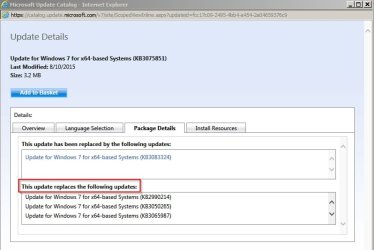
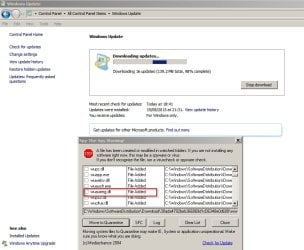
Currently downloading/ installing today's updates and look what has downloaded:

2015-09-08 19_40_56-Windows Update.jpg

Will need to check file version after installation has completed.
 

My Computer

Computer type
Laptop
Computer Manufacturer/Model Number
ASUS
OS
Microsoft Windows 7 Home Premium 64-bit 7601 Multiprocessor Free Service Pack 1
CPU
AMD C-60 APU with Radeon(tm) HD Graphics
Motherboard
ASUSTeK COMPUTER INC. X501U
Memory
4.00 GB
Graphics Card(s)
AMD Radeon HD 6290 Graphics
Sound Card
(1) AMD High Definition Audio Device (2) Realtek High Defi
Screen Resolution
1366 x 768 x 32 bits (4294967296 colors) @ 60 Hz
Hard Drives
Hitachi HTS545050A7E380 SATA Disk Device
Antivirus
Comodo CIS & FW, SecureAplus App Whitelisting, Threatfire
Browser
Cyberfox 64bit, Opera 64bit, Airfox
Other Info
Spy-The-Spy, HitmanPro.Alert, Norton Connect Safe, MJRegWatcher, BitDefender TrafficLight, Voodoo Shield, Zemana AntiMalware

My Computer

Computer type
Laptop
Computer Manufacturer/Model Number
Employer provided Dell Latitude
OS
W7 Pro SP1 64bit
CPU
i7
Memory
8GB
Graphics Card(s)
Intel HD Graphics
Hard Drives
crappy SSD
Antivirus
Employer mandated Symantec Endpoint Protection
Browser
Pale Moon 64bit, IE11 64bit & Chrome 64bit

My Computer

Computer type
Laptop
Computer Manufacturer/Model Number
ASUS
OS
Microsoft Windows 7 Home Premium 64-bit 7601 Multiprocessor Free Service Pack 1
CPU
AMD C-60 APU with Radeon(tm) HD Graphics
Motherboard
ASUSTeK COMPUTER INC. X501U
Memory
4.00 GB
Graphics Card(s)
AMD Radeon HD 6290 Graphics
Sound Card
(1) AMD High Definition Audio Device (2) Realtek High Defi
Screen Resolution
1366 x 768 x 32 bits (4294967296 colors) @ 60 Hz
Hard Drives
Hitachi HTS545050A7E380 SATA Disk Device
Antivirus
Comodo CIS & FW, SecureAplus App Whitelisting, Threatfire
Browser
Cyberfox 64bit, Opera 64bit, Airfox
Other Info
Spy-The-Spy, HitmanPro.Alert, Norton Connect Safe, MJRegWatcher, BitDefender TrafficLight, Voodoo Shield, Zemana AntiMalware
Back
Top