Corrupted 4 drives with momentary DBAN autonuke - now what?

spoolin01

New member
Local time
7:29 AM
Messages
21
I really stepped in it this time. I was trying to find a wipe utility for an external USB HDD, and without knowing what I was doing, started DBAN autonuke. Within 10 secs I saw it was wiping all 4 of my internal HDDs and hit the power button. I'm hoping it didn't get very far.

This is a Windows 7 Pro x64 desktop with 3x 1TB drives - one is the Win 7 boot drive, one is an XP second boot drive, and one is just for files - and 1x 2TB drive also for files. I'm pretty sure the 1TB all used MBR, and the 2TB had GPT structure. I recall I couldn't see it when booted into XP.

I ran a Windows Recovery CD I had made some time back, choosing Startup Repair, which ran to the point where it said to reboot (it didn't). With a docking station and my laptop, I can see the data files partition (I always partition boot drives for OS and files to be separate partitions) on the Win 7 boot drive, but the 100MB System, and OS partitions are gone. At least I was able to get some important files off this drive already.

The other drives show as needing initialization when I put them on the docking station.

I have a Windows System Image of the Win 7 OS partition from back in December, and probably a Clonezilla image from that time as well. If the partition structure and MBR can be restored, there are probably recent System Restore points as well. I'm assuming nothing can be done w/o a functioning partition table and MBR - is that right? I'm not too concerned about which manner I use to restore Win7.

I'm way more concerned about the two drives with personal files. These are nowhere near properly backed up, and most of the files are irreplaceable.

How can I go about fixing these disks w/o losing the files?

I'm re-running Startup Repair on the Win7 boot disk as I type, but it's taking forever.
 

My Computer My Computer

At a glance

Windows 7 Pro x64Intel i7 6th Gen16GB
Computer type
PC/Desktop
Computer Manufacturer/Model Number
custom
OS
Windows 7 Pro x64
CPU
Intel i7 6th Gen
Motherboard
Asus Z170e
Memory
16GB
Antivirus
Eset NOD32
Browser
Firefox
I'm way more concerned about the two drives with personal files. These are nowhere near properly backed up, and most of the files are irreplaceable.

If that is the case I would look into taking the drives to a professional data recovery service. The less you tinker with them the more data the techs will likely be able to recover.

If you cannot afford a technician then you might check into one of those free OS forensic utilities. I believe this one is free and portable:
OSForensics - Digital investigation for a new era by PassMark Software®

In any case it is easy to warn after the fact I know but also for those reading, a disk wipe utility is probably the most dangerous software you can play with not having a backup. I would back up to externals, unplug them, and store them in a drawer or closet before I satisfied my curiosity about the wiper. It is designed to prevent recovery after all.
 

My Computer My Computer

At a glance

Windows 7 32 bitAMD 5200+ dual core2 GBNVidia GeForce 6150SE 128 MB
Computer Manufacturer/Model Number
HP Media Center
OS
Windows 7 32 bit
CPU
AMD 5200+ dual core
Memory
2 GB
Graphics Card(s)
NVidia GeForce 6150SE 128 MB
Monitor(s) Displays
CRT
Screen Resolution
1280x1024
Hard Drives
500 GB Sata internal :

SIIG USB 3.0 docking stations w/WD Caviar Black 6 Gb/s drives
Keyboard
PS/2
Mouse
PS/2 Wheel Mouse
Other Info
SIIG USB 3.0 PCIexpress card.
Your Windows 7 boot disk - At least I was able to get some important files off this drive already.

How did you do that? Just curious.

Now your laptop + dock:

Install MiniTools Partition Wizard Free Edition 9.1 on your laptop. Best Free Partition Manager for Windows | MiniTool Partition Free

Put only the 1TB data drive into it. (We shall take only one small step at a time.)

Post a screenshot of Windows Disk Management. (as per guidelines here http://www.sevenforums.com/tutorials/274797-disk-management-post-screen-capture-image.html )

Post a screenshot of Partition Wizard - the first screen when you launch the application.

This is only exploratory. I do not promise a moon, not even a candy. :D
 

My Computer My Computer

At a glance

Windows 7 Home Premium 32 bit
OS
Windows 7 Home Premium 32 bit
I'm way more concerned about the two drives with personal files. These are nowhere near properly backed up, and most of the files are irreplaceable.

If that is the case I would look into taking the drives to a professional data recovery service. The less you tinker with them the more data the techs will likely be able to recover.

If you cannot afford a technician then you might check into one of those free OS forensic utilities. I believe this one is free and portable:
OSForensics - Digital investigation for a new era by PassMark Software®

In any case it is easy to warn after the fact I know but also for those reading, a disk wipe utility is probably the most dangerous software you can play with not having a backup. I would back up to externals, unplug them, and store them in a drawer or closet before I satisfied my curiosity about the wiper. It is designed to prevent recovery after all.

I agree with MilesAhead. Professional recovery may be your best hope, especially since mucking about with the drives yourself could do further damage to any recoverable data. And that is a long shot that could wind up costing you a ton of money and still not be successful (professional recovery will cost well north $1k per drive with no guarantees). Once data has been overwritten (which is what wiping utilities do), it is lost forever...period.

I've very sorry for your data loss; I only hope it wasn't critical data. HDDs, SSDs, optical disks, etc. are volatile media that are subject to failure, taking any data on them with them when they fail. Even healthy media can lose data due to human error, malware, thefts, etc.

The only way to ensure one's data is reasonably safe is to have multiple copies in multiple locations. While even one extra copy of one's data is better than nothing, ideally, one's should exist in at least three places, such as on the computer, on an onsite backup and on an offsite backup. The onsite backup typically is an external drive that gets connected to the computer only when updating the backup. An offsite backup can be another external drive that is stored offsite, such as at a trusted friend's or relative's home, at work in a locked drawer or locker, or bank safe deposit box, or it could be a reliable paid-for cloud backup service, such as Carbonite.com, CrashPlan, or Backblaze (cloud storage is not the same and should not be trusted, especially the freebies).
 

My Computer My Computer

At a glance

Win 7 Ultimate 64 bitIntel i7-3930KKingston HyperX Genesis 32GB Kit (8x4GB Modul...MSI R7850 Twin Frozr 2GD5/OC Radeon HD 7850 2...
Computer type
PC/Desktop
Computer Manufacturer/Model Number
Custom Build
OS
Win 7 Ultimate 64 bit
CPU
Intel i7-3930K
Motherboard
ASUS P9X79 WS
Memory
Kingston HyperX Genesis 32GB Kit (8x4GB Modules) 1600MHz DDR
Graphics Card(s)
MSI R7850 Twin Frozr 2GD5/OC Radeon HD 7850 2GB 256-bit GDDR
Sound Card
Asus Xonar Essence STX
Monitor(s) Displays
3x Asus VG248QE 24", Vizio 32" TV
Screen Resolution
1920 x 1080, ?
Hard Drives
Samsung 128GB 840 Pro SSD (1),
Samsung 4TB 850 EVO SSDs (4)
Samsung 4TB 850 EVO SSDs (16) external backup drives used in 2.5" hot swap bays in the computer.
PSU
Corsair HX750w
Case
Antec Two Hundred v2 (modified)
Cooling
Cooler Master GeminII S524 120mm (fan replaced with a 140mm)
Keyboard
Logitech G510s
Mouse
Logitech M525 (two in use)
Internet Speed
=< 32Mbps down, 8Mbps up
Antivirus
AVAST!, MBAM, SAS, Spybot S&D (all but MBAM free) Glary Util
Browser
IE11
Other Info
LSI 9211-8i HBA card (8 SATA III ports), 2.5" & 3.5" Hot Swap Bays, HooToo HT-CR001 PCI-E to USB 3.0 Internal Hub + 6 Slot Card Reader, and LG Model CH12LS28 BD-ROM Optical Drive. Also, ScanSnap S1500 ADF duplexing scanner, Canon 9000F flat bed scanner, Corsair SP2500 2.1 speakers, Samsung CLP 415nw laser color printer, Cyberpower PP2200SW UPS
I'm way more concerned about the two drives with personal files. These are nowhere near properly backed up, and most of the files are irreplaceable.

If that is the case I would look into taking the drives to a professional data recovery service. The less you tinker with them the more data the techs will likely be able to recover.

If you cannot afford a technician then you might check into one of those free OS forensic utilities. I believe this one is free and portable:
OSForensics - Digital investigation for a new era by PassMark Software®

In any case it is easy to warn after the fact I know but also for those reading, a disk wipe utility is probably the most dangerous software you can play with not having a backup. I would back up to externals, unplug them, and store them in a drawer or closet before I satisfied my curiosity about the wiper. It is designed to prevent recovery after all.
I'm ready to go the recovery service route if needed. I'll try OSForensics - the free version appears to only permit one-at-a-time file recovery, but even that would be helpful for a couple of key files from the one financial records disk. Fortunately the bulk of what can't be easily reconstructed was on the data partition of the boot disk, which is accessible.

I've tried Easus Partition Manager and TestDisk on one of the other 1TB drives (unfortunately I don't know which of those was the XP boot drive and which was the financial records). Easus couldn't fix the partition (Fast scan), and while TestDisk appeared to find something it could work with, it was asking to write something to the disk and I didn't want to do that.

The DNAB blunder was avoidable - I had already seen that the manual method permitted disk selection. I had been swayed by the "choose autonuke, it's always gentle and appropriate" junk that I'd read on the DL site, and naively assumed that meant simply it would use default settings, not that it would nuke every drive in the vicinity without further ado (though ironically, it didn't appear to have a taste for the external USB drive I was actually trying to wipe).

Your Windows 7 boot disk - At least I was able to get some important files off this drive already.

How did you do that? Just curious.

Now your laptop + dock:

Install MiniTools Partition Wizard Free Edition 9.1 on your laptop. Best Free Partition Manager for Windows | MiniTool Partition Free

Put only the 1TB data drive into it. (We shall take only one small step at a time.)

Post a screenshot of Windows Disk Management. (as per guidelines here http://www.sevenforums.com/tutorials/274797-disk-management-post-screen-capture-image.html )

Post a screenshot of Partition Wizard - the first screen when you launch the application.

This is only exploratory. I do not promise a moon, not even a candy. :D
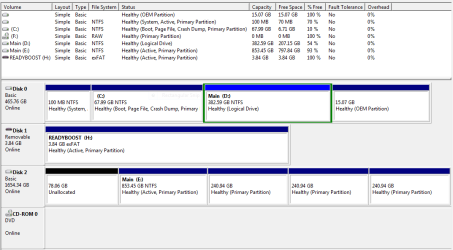
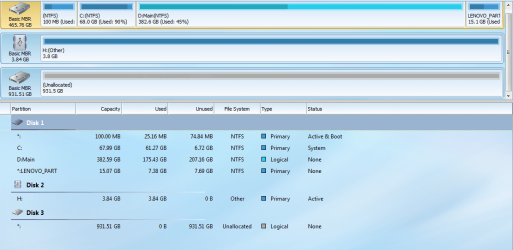
I ran Startup Repair on the Win7 boot disk, prior to looking at it, and when I moved it to the dock, the data partition was there. As you can see below, the 100MB System and OS partitions were merged into 79GB of unallocated space. I guess the DNAB overwrite was halted somewhere while munching the partition table - possibly partially mitigated by Startup Repair? - is that how that could happen?

Here is the DM snip - it's clear something's wrong with the disk administration, it's only a 1TB disk. Thankfully the data partition seemed intact and I backed up all those files from it. The Partition MiniTool snip follows.

The Win Recovery disk recognizes a System Image I saved on that data partition, so if need be it seems I can restore to last December from there. Not the worst outcome for that drive but if I can repair the installation to where it was yesterday, or even a recent System Restore, that would be ideal.

By the way, many thanks to both of you for the help. I was pretty bummed yesterday, and freaked at the loss of all my pics and videos, and of the results of scores of hours of business records work-up for some tax 'oversight' I've been enjoying. I have been on a long project to upgrade my hardware and properly back up my files, but never having had a drive fail, I got complacent and this happened with things in the worst state of backup pretty much ever.
 

Attachments

  • Win7diskindock_DiskManagement.PNG
    Win7diskindock_DiskManagement.PNG
    18.5 KB · Views: 1
  • Win7Diskindock_PartMini.PNG
    Win7Diskindock_PartMini.PNG
    95.6 KB · Views: 1

My Computer My Computer

At a glance

Windows 7 Pro x64Intel i7 6th Gen16GB
Computer type
PC/Desktop
Computer Manufacturer/Model Number
custom
OS
Windows 7 Pro x64
CPU
Intel i7 6th Gen
Motherboard
Asus Z170e
Memory
16GB
Antivirus
Eset NOD32
Browser
Firefox
Don't those "forensic repair" guys cost a fortune? I would ask for a "bench check" before I turned them loose on recovery. If it were me, I would hopefully have a recent image backup of my most important drive and restore that one. If no backup (shame on you), then you may now have 4 expensive boat anchors unless you can reformat and reload from scratch.

Just yesterday I was 'playing with tools' and totally messed things up, but I had a recent Macrium Reflect Free image. It took me a few clicks and 1 hour for a full recovery with verification. Link: Macrium Software (thanks to Brink). It saved 'my bacon'! I remember when my 'old man' caught me playing with his tools in my sandbox, and naturally left them out in the rain ... he was right, I'll never learn.
 

My Computer My Computer

At a glance

Windows 7 Professional (SP1) 64 bit
Computer type
PC/Desktop
OS
Windows 7 Professional (SP1) 64 bit
Back
Top