Solved 64-bit system finds only 3328 MB RAM

higgins

New member
Member
VIP
Local time
12:48 AM
Messages
144
64-bit system finds only 3 GB RAM with 5 GB installed

Hi all!

Weird issue with this setup:
MSI P35 Platinum Combo
Intel E8200 CPU
2x2GB DDR2 RAM
dedicated graphics card

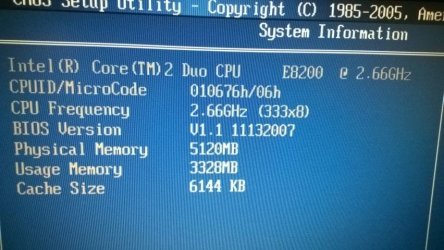
BIOS shows recognizes 4096 MB RAM, but shows only 3328 MB as usable (yes, that number is from BIOS, too).

Best tip I found was to enable Memory Remap, but I can't find such option. It has some weird BIOS where I can change voltages and stuff. I've never really dealt with OC'ing.

I don't have another stick handy to see if the cap holds with added RAM.

Any ideas how to get the full RAM into use?
 
Last edited:

My Computer My Computer

At a glance

Windows 7 x64AMD Athlon(tm) II X2 250 Processor4GB DDR3 (PC3-10700H) Apacer TechnologyNVIDIA GeForce GTX 560
Computer type
PC/Desktop
OS
Windows 7 x64
CPU
AMD Athlon(tm) II X2 250 Processor
Motherboard
N68C-GS FX
Memory
4GB DDR3 (PC3-10700H) Apacer Technology
Graphics Card(s)
NVIDIA GeForce GTX 560
Screen Resolution
1920x1080
Hard Drives
SSD + 2x HDD
PSU
450W
Case
Codegen SuperPower M608-CA 450W
Cooling
Fan
Antivirus
Microsoft Security Essentials
Generally its around 3.5GB of useable out of 4GB of RAM. A 64 bit OS uses a tad bit more memory than a 32 bit OS and may account for the extra RAM usage.
 

My Computer My Computer

At a glance

Windows 10 64 bitIntel i7 6700K16GB Corsair DominatorIntel CPU Graphics
Computer type
PC/Desktop
Computer Manufacturer/Model Number
My Own Build
OS
Windows 10 64 bit
CPU
Intel i7 6700K
Motherboard
ASUS ROG Maximus VIII Hero
Memory
16GB Corsair Dominator
Graphics Card(s)
Intel CPU Graphics
Sound Card
RealTek
Monitor(s) Displays
27" Dell S2719dgf
Screen Resolution
2560X1440
Hard Drives
1 TB Samsung 850 EVO SSD for Win 10 Pro
500GB Samsung 850 EVO SSD for Win 10 Insider
2 TB drive for backup
PSU
EVGA Supernova 750G2
Case
BeQuiet Silent Base 600
Cooling
Deepcool Captain 120EX
Keyboard
Microsoft Wireless 2000
Mouse
Microsoft wireless
Internet Speed
100 MB/sec (Cable)
Antivirus
Microsoft Defender and Malwarebytes
Browser
Edge/Firefox
Other Info
Cakewalk (Sonar) by BandLab and Studio One 4.1 Pro recording studio software. MOTU 896Mk3 Hybrid recording interface, Frontier Tranzport wireless control unit, Behringer X-Touch Control Surface.
Five USB connected optical drives for CD Audio production using Nero BurningROM
Generally its around 3.5GB of useable out of 4GB of RAM. A 64 bit OS uses a tad bit more memory than a 32 bit OS and may account for the extra RAM usage.
So, this allocation happens at BIOS level? As I said, BIOS claims I have usable 3328 MB.
 

My Computer My Computer

At a glance

Windows 7 x64AMD Athlon(tm) II X2 250 Processor4GB DDR3 (PC3-10700H) Apacer TechnologyNVIDIA GeForce GTX 560
Computer type
PC/Desktop
OS
Windows 7 x64
CPU
AMD Athlon(tm) II X2 250 Processor
Motherboard
N68C-GS FX
Memory
4GB DDR3 (PC3-10700H) Apacer Technology
Graphics Card(s)
NVIDIA GeForce GTX 560
Screen Resolution
1920x1080
Hard Drives
SSD + 2x HDD
PSU
450W
Case
Codegen SuperPower M608-CA 450W
Cooling
Fan
Antivirus
Microsoft Security Essentials
I've never seen that in a BIOS. I missed that part.
To add, if its not showing the correct amount in the BIOS, it has nothing to do with 64 bit or 32 bit OS. Maybe a BIOS reset will fix it.
 
Last edited:

My Computer My Computer

At a glance

Windows 10 64 bitIntel i7 6700K16GB Corsair DominatorIntel CPU Graphics
Computer type
PC/Desktop
Computer Manufacturer/Model Number
My Own Build
OS
Windows 10 64 bit
CPU
Intel i7 6700K
Motherboard
ASUS ROG Maximus VIII Hero
Memory
16GB Corsair Dominator
Graphics Card(s)
Intel CPU Graphics
Sound Card
RealTek
Monitor(s) Displays
27" Dell S2719dgf
Screen Resolution
2560X1440
Hard Drives
1 TB Samsung 850 EVO SSD for Win 10 Pro
500GB Samsung 850 EVO SSD for Win 10 Insider
2 TB drive for backup
PSU
EVGA Supernova 750G2
Case
BeQuiet Silent Base 600
Cooling
Deepcool Captain 120EX
Keyboard
Microsoft Wireless 2000
Mouse
Microsoft wireless
Internet Speed
100 MB/sec (Cable)
Antivirus
Microsoft Defender and Malwarebytes
Browser
Edge/Firefox
Other Info
Cakewalk (Sonar) by BandLab and Studio One 4.1 Pro recording studio software. MOTU 896Mk3 Hybrid recording interface, Frontier Tranzport wireless control unit, Behringer X-Touch Control Surface.
Five USB connected optical drives for CD Audio production using Nero BurningROM
I added 1GB of memory. BIOS shows the 5120 MB correctly, and at the same time, still shows only 3328 MB as usable.

E8200 is 64-bit as per Intel's website.
 

Attachments

  • WP_20151002.jpg
    WP_20151002.jpg
    109.5 KB · Views: 2

My Computer My Computer

At a glance

Windows 7 x64AMD Athlon(tm) II X2 250 Processor4GB DDR3 (PC3-10700H) Apacer TechnologyNVIDIA GeForce GTX 560
Computer type
PC/Desktop
OS
Windows 7 x64
CPU
AMD Athlon(tm) II X2 250 Processor
Motherboard
N68C-GS FX
Memory
4GB DDR3 (PC3-10700H) Apacer Technology
Graphics Card(s)
NVIDIA GeForce GTX 560
Screen Resolution
1920x1080
Hard Drives
SSD + 2x HDD
PSU
450W
Case
Codegen SuperPower M608-CA 450W
Cooling
Fan
Antivirus
Microsoft Security Essentials
Did you try the BIOS reset?
 

My Computer My Computer

At a glance

Windows 10 64 bitIntel i7 6700K16GB Corsair DominatorIntel CPU Graphics
Computer type
PC/Desktop
Computer Manufacturer/Model Number
My Own Build
OS
Windows 10 64 bit
CPU
Intel i7 6700K
Motherboard
ASUS ROG Maximus VIII Hero
Memory
16GB Corsair Dominator
Graphics Card(s)
Intel CPU Graphics
Sound Card
RealTek
Monitor(s) Displays
27" Dell S2719dgf
Screen Resolution
2560X1440
Hard Drives
1 TB Samsung 850 EVO SSD for Win 10 Pro
500GB Samsung 850 EVO SSD for Win 10 Insider
2 TB drive for backup
PSU
EVGA Supernova 750G2
Case
BeQuiet Silent Base 600
Cooling
Deepcool Captain 120EX
Keyboard
Microsoft Wireless 2000
Mouse
Microsoft wireless
Internet Speed
100 MB/sec (Cable)
Antivirus
Microsoft Defender and Malwarebytes
Browser
Edge/Firefox
Other Info
Cakewalk (Sonar) by BandLab and Studio One 4.1 Pro recording studio software. MOTU 896Mk3 Hybrid recording interface, Frontier Tranzport wireless control unit, Behringer X-Touch Control Surface.
Five USB connected optical drives for CD Audio production using Nero BurningROM
This seems incredibly similar to this other post:
windows 7 - Why does my sytem only uses 3.2GB of my 4GM RAM? - Super User

In short, it's possible to be a limitation on the motherboard rather than Windows itself. Even though Windows 64 bits hasn't the ridiculous 4GB arbitrary limitation of the x86 version, it's still bound to the hardware limits and maybe other hardware is using that address space for its own purpose.
 

My Computer My Computer

At a glance

Windows 7 Ultimate x64Intel Core i7-740QM8 GB DDR3NVIDIA GeForce 330GT
Computer type
Laptop
Computer Manufacturer/Model Number
Toshiba Sattelite A665-S6092
OS
Windows 7 Ultimate x64
CPU
Intel Core i7-740QM
Memory
8 GB DDR3
Graphics Card(s)
NVIDIA GeForce 330GT
Screen Resolution
1366x768
Hard Drives
Samsung 840 SSD 500GB
1TB USB3 external HD
Cooling
Coolermaster Notepal U3 notebook cooling pad
Internet Speed
3mbps ASDL
Antivirus
ClamWin 0.98.7
Browser
Opera 12.17 x86 (main), Firefox 38 (sec), IE11 (last resort)
Did you try the BIOS reset?
Pulled the plug. Took out the CMOS battery. Held the power button down for 20 seconds. Didn't to the jumper reset. Nothing changed.

This seems incredibly similar to this other post:
windows 7 - Why does my sytem only uses 3.2GB of my 4GM RAM? - Super User

In short, it's possible to be a limitation on the motherboard rather than Windows itself. Even though Windows 64 bits hasn't the ridiculous 4GB arbitrary limitation of the x86 version, it's still bound to the hardware limits and maybe other hardware is using that address space for its own purpose.
I don't think it's either. According to the mobo manual, it recognizes up to 4GB DDR3 or up to 8GB DDR2 memory, so, it shouldn't be a hardware limitation, especially given that I use DDR2.

I have currently 5GB RAM installed and BIOS still shows 3328MB usable. With 4GB RAM it showed 3328MB usable, too, and as such, I'm ruling out the GPU use that other guy had trouble with. The GPU address should take away a fixed amount, not set a cap.
 

My Computer My Computer

At a glance

Windows 7 x64AMD Athlon(tm) II X2 250 Processor4GB DDR3 (PC3-10700H) Apacer TechnologyNVIDIA GeForce GTX 560
Computer type
PC/Desktop
OS
Windows 7 x64
CPU
AMD Athlon(tm) II X2 250 Processor
Motherboard
N68C-GS FX
Memory
4GB DDR3 (PC3-10700H) Apacer Technology
Graphics Card(s)
NVIDIA GeForce GTX 560
Screen Resolution
1920x1080
Hard Drives
SSD + 2x HDD
PSU
450W
Case
Codegen SuperPower M608-CA 450W
Cooling
Fan
Antivirus
Microsoft Security Essentials
*bump*
 

My Computer My Computer

At a glance

Windows 7 x64AMD Athlon(tm) II X2 250 Processor4GB DDR3 (PC3-10700H) Apacer TechnologyNVIDIA GeForce GTX 560
Computer type
PC/Desktop
OS
Windows 7 x64
CPU
AMD Athlon(tm) II X2 250 Processor
Motherboard
N68C-GS FX
Memory
4GB DDR3 (PC3-10700H) Apacer Technology
Graphics Card(s)
NVIDIA GeForce GTX 560
Screen Resolution
1920x1080
Hard Drives
SSD + 2x HDD
PSU
450W
Case
Codegen SuperPower M608-CA 450W
Cooling
Fan
Antivirus
Microsoft Security Essentials
it depends on manufacturers specs of RAM ;)
 

My Computer My Computer

At a glance

Windows 7 Ultimate 64bit Service Pack 1Intel core i5 2500K Sandy Bridge overclock @ ...G Skill Ripjaws X 2 X 2 gigabyteSapphire AMD Radeon HD 6870 Toxic edition ove...
Computer Manufacturer/Model Number
All around gaming desktop
OS
Windows 7 Ultimate 64bit Service Pack 1
CPU
Intel core i5 2500K Sandy Bridge overclock @ 4.2 Ghz
Motherboard
Gigabyte Z68MA D2H B3
Memory
G Skill Ripjaws X 2 X 2 gigabyte
Graphics Card(s)
Sapphire AMD Radeon HD 6870 Toxic edition overclock @ 970 Mh
Sound Card
built in
Monitor(s) Displays
Samsung 23" S23A300B LED
Screen Resolution
1920 X 1080 pixels
Hard Drives
WD Caviar Black 640 gb. Systems disk

WD Caviar Blue 500 gb. Storage disk
PSU
Corsair HX 650 watts power supply
Case
Antec 300 AB black edition modded
Cooling
Cooler master V6 gt CPU cooler
Keyboard
Logitech G110
Mouse
Logitech mx 518
Internet Speed
768 kbps
Other Info
GameWarNow!
My greatest suspicion so far is that despite the BIOS info on the processor model, I'm probably dealing with a 32-bit processor after all.

Intel® Coreâ„¢2 Duo Processor E8200 (6M Cache, 2.66 GHz, 1333 MHz FSB) Specifications

If the official website wouldn't claim it 64-bit, I'd just have believed it's 32-bit due to how it performed. Is there some smart way that I could "test" the bit type or... just to make sure which bit type it really is?
 

My Computer My Computer

At a glance

Windows 7 x64AMD Athlon(tm) II X2 250 Processor4GB DDR3 (PC3-10700H) Apacer TechnologyNVIDIA GeForce GTX 560
Computer type
PC/Desktop
OS
Windows 7 x64
CPU
AMD Athlon(tm) II X2 250 Processor
Motherboard
N68C-GS FX
Memory
4GB DDR3 (PC3-10700H) Apacer Technology
Graphics Card(s)
NVIDIA GeForce GTX 560
Screen Resolution
1920x1080
Hard Drives
SSD + 2x HDD
PSU
450W
Case
Codegen SuperPower M608-CA 450W
Cooling
Fan
Antivirus
Microsoft Security Essentials
My greatest suspicion so far is that despite the BIOS info on the processor model, I'm probably dealing with a 32-bit processor after all.

Intel® Coreâ„¢2 Duo Processor E8200 (6M Cache, 2.66 GHz, 1333 MHz FSB) Specifications

If the official website wouldn't claim it 64-bit, I'd just have believed it's 32-bit due to how it performed. Is there some smart way that I could "test" the bit type or... just to make sure which bit type it really is?

No, it's 64 bits. Look in the link you posted, it clearly says "Instruction Set 64-bit".
A quick and dirty test to actually probe that is that it was capable of booting a 64 bits OS. If it were a 32 bits one, a x64 Windows disk wouldn't have even installed to begin with.
Nowadays it's very difficult to come by a 32 bits CPU, anything built in the last 8/10 years is already using 64 bits capable CPUs, even if only running 32 bits OSs.
 

My Computer My Computer

At a glance

Windows 7 Ultimate x64Intel Core i7-740QM8 GB DDR3NVIDIA GeForce 330GT
Computer type
Laptop
Computer Manufacturer/Model Number
Toshiba Sattelite A665-S6092
OS
Windows 7 Ultimate x64
CPU
Intel Core i7-740QM
Memory
8 GB DDR3
Graphics Card(s)
NVIDIA GeForce 330GT
Screen Resolution
1366x768
Hard Drives
Samsung 840 SSD 500GB
1TB USB3 external HD
Cooling
Coolermaster Notepal U3 notebook cooling pad
Internet Speed
3mbps ASDL
Antivirus
ClamWin 0.98.7
Browser
Opera 12.17 x86 (main), Firefox 38 (sec), IE11 (last resort)
If you look at control panel>system how much memory does it show as installed/usuable
 

My Computer My Computer

At a glance

Win7 Ultimate X64Intel i5 3570K8GB DDR3 1600Onboard
Computer type
PC/Desktop
Computer Manufacturer/Model Number
Pauly Special
OS
Win7 Ultimate X64
CPU
Intel i5 3570K
Motherboard
Gigabyte Z77X-DS3H
Memory
8GB DDR3 1600
Graphics Card(s)
Onboard
Sound Card
Onboard
Screen Resolution
1280x1024
Hard Drives
Samsung 840 Evo SSD (OS)
1TB Spinner (Data)
PSU
800W Arctic
Case
Cooler Master
Cooling
3x120mm Fans
Keyboard
MS Wireless
Mouse
MS Wireless
Internet Speed
20M
If you look at control panel>system how much memory does it show as installed/usuable
That's from BIOS, but here you go:
372775d1443771208t-64-bit-system-finds-only-3328-mb-ram-wp_20151002.jpg


No, it's 64 bits. Look in the link you posted, it clearly says "Instruction Set 64-bit".
What I meant is... the BIOS claims it's E8200. I haven't taken off the heat sink to make sure what it actually says on the chip.

Nowadays it's very difficult to come by a 32 bits CPU, anything built in the last 8/10 years is already using 64 bits capable CPUs, even if only running 32 bits OSs.
The rig is around 7 years old. I mean, did you check out the freaking mobo? It's sick. Both DDR2 and DDR3 support with HW RAID on top. Never seen anything like it.

A quick and dirty test to actually probe that is that it was capable of booting a 64 bits OS. If it were a 32 bits one, a x64 Windows disk wouldn't have even installed to begin with.
I'll try that, but one other guy here recommended doing a BIOS reset. As I just discovered, doing that dicked up the whole RAID array and I'm kind of out of my depth with HW RAID. This needs be fixed before I can proceed trying a 64-bit OS.

*sighs and digs into the MOBO manual*
 

My Computer My Computer

At a glance

Windows 7 x64AMD Athlon(tm) II X2 250 Processor4GB DDR3 (PC3-10700H) Apacer TechnologyNVIDIA GeForce GTX 560
Computer type
PC/Desktop
OS
Windows 7 x64
CPU
AMD Athlon(tm) II X2 250 Processor
Motherboard
N68C-GS FX
Memory
4GB DDR3 (PC3-10700H) Apacer Technology
Graphics Card(s)
NVIDIA GeForce GTX 560
Screen Resolution
1920x1080
Hard Drives
SSD + 2x HDD
PSU
450W
Case
Codegen SuperPower M608-CA 450W
Cooling
Fan
Antivirus
Microsoft Security Essentials

My Computer My Computer

At a glance

Windows 10 Pro. 64/ version 1709 Windows 7 Pr...Intel i7-6800K @ 4.3Corsair Platinum 16 gig @2400EVGA GTX 1070 OC
Computer type
PC/Desktop
Computer Manufacturer/Model Number
Home made Desktop
OS
Windows 10 Pro. 64/ version 1709 Windows 7 Pro/64
CPU
Intel i7-6800K @ 4.3
Motherboard
ASUS X-99 Deluxe II
Memory
Corsair Platinum 16 gig @2400
Graphics Card(s)
EVGA GTX 1070 OC
Monitor(s) Displays
Asus 27" LED LCD/VE278Q
Screen Resolution
1920-1080 or 1280-720 HDMI
Hard Drives
INTEL SSD 730-240 Gb Sata 3.0/
PSU
EVGA Platium 1200W
Case
Phanteks Luxe Tempered Glass 8 fans/ one radiator
Cooling
XSPC/ Water Cooled CPU
Keyboard
Das 4 Professional
Mouse
Logitech M705/MX Anywhere 2-S
Internet Speed
100 mbits
Antivirus
Microsoft Security Essentials/ Malwarebytes Premium 3.0/ SAS
Browser
I.E. 11 default/Firefox/ ISP Time Warner Cable/Spectrum
Other Info
LG BluRay Burner/
Sound system-KLipsch-THX/
Icy Dock ssd Hot Swap bays.
This needs be fixed before I can proceed trying a 64-bit OS.

But you already have a 64 bits OS!!!!!!
Your specs say so, and so does this thread's title, everything pointing in that direction. With a 64 bits OS already running, there is no way to have a 32 bits only CPU.
It's trivial to actually check, just open "computer" properties and it will say if it's 32 or 64 bits OS.

Even then, that's not the reason of the missing RAM. 32 bits CPUs and OSs support up to 64 GB, not only 4.
 

My Computer My Computer

At a glance

Windows 7 Ultimate x64Intel Core i7-740QM8 GB DDR3NVIDIA GeForce 330GT
Computer type
Laptop
Computer Manufacturer/Model Number
Toshiba Sattelite A665-S6092
OS
Windows 7 Ultimate x64
CPU
Intel Core i7-740QM
Memory
8 GB DDR3
Graphics Card(s)
NVIDIA GeForce 330GT
Screen Resolution
1366x768
Hard Drives
Samsung 840 SSD 500GB
1TB USB3 external HD
Cooling
Coolermaster Notepal U3 notebook cooling pad
Internet Speed
3mbps ASDL
Antivirus
ClamWin 0.98.7
Browser
Opera 12.17 x86 (main), Firefox 38 (sec), IE11 (last resort)
Another thing could be mismatched ram.
Speccy will also let you know exactly what ram is installed and in what slot of the motherboard.
 

My Computer My Computer

At a glance

Windows 10 Pro. 64/ version 1709 Windows 7 Pr...Intel i7-6800K @ 4.3Corsair Platinum 16 gig @2400EVGA GTX 1070 OC
Computer type
PC/Desktop
Computer Manufacturer/Model Number
Home made Desktop
OS
Windows 10 Pro. 64/ version 1709 Windows 7 Pro/64
CPU
Intel i7-6800K @ 4.3
Motherboard
ASUS X-99 Deluxe II
Memory
Corsair Platinum 16 gig @2400
Graphics Card(s)
EVGA GTX 1070 OC
Monitor(s) Displays
Asus 27" LED LCD/VE278Q
Screen Resolution
1920-1080 or 1280-720 HDMI
Hard Drives
INTEL SSD 730-240 Gb Sata 3.0/
PSU
EVGA Platium 1200W
Case
Phanteks Luxe Tempered Glass 8 fans/ one radiator
Cooling
XSPC/ Water Cooled CPU
Keyboard
Das 4 Professional
Mouse
Logitech M705/MX Anywhere 2-S
Internet Speed
100 mbits
Antivirus
Microsoft Security Essentials/ Malwarebytes Premium 3.0/ SAS
Browser
I.E. 11 default/Firefox/ ISP Time Warner Cable/Spectrum
Other Info
LG BluRay Burner/
Sound system-KLipsch-THX/
Icy Dock ssd Hot Swap bays.
It`s time for a new board, that thing is old :)

That board is kind of unique, it supports ddr2 and ddr3 :what:

At least pull the ddr2 and put 4 GB of ddr3 in it.
 

My Computer My Computer

At a glance

Windows 10 Pro x64Intel Core i7 6700KGSkill TridentZ RGB 16GB 3600 16-16-16-36EVGA GTX 980 Ti SC x2
Computer type
PC/Desktop
Computer Manufacturer/Model Number
Skylake Special #666
OS
Windows 10 Pro x64
CPU
Intel Core i7 6700K
Motherboard
Asus Sabertooth Z170 Mark 1
Memory
GSkill TridentZ RGB 16GB 3600 16-16-16-36
Graphics Card(s)
EVGA GTX 980 Ti SC x2
Sound Card
Realtek High Definition
Monitor(s) Displays
AOC G2460PG
Screen Resolution
1920 x 1080 144Hz
Hard Drives
Samsung 860 Pro 256GB, Seagate Barracuda 4TB x2
PSU
EVGA 1000 P2, EVGA White Custom Braided Cables
Case
Corsair Vengeance C70 Gunmetal Black
Cooling
Corsair H100i v2, Corsair ML120 x2, Thermal Grizzly Kryonaut
Keyboard
Logitech G910 Orion Spectrum
Mouse
Logitech G700s
Internet Speed
Verizon Fios Quantum Gateway 75/75
Antivirus
Windows Defender, Malwarebytes Free 3.8.3
Browser
Chrome
Other Info
Corsair SP120 x4, LG Blu-ray Drive, Durabrand HT-395 100 Watt Dolby Digital Amp, Corsair H2100 Wireless 7.1 Headset
DDR2 and DDR3 motherboard is a great way to get mismatch ram.
 

My Computer My Computer

At a glance

Windows 10 Pro. 64/ version 1709 Windows 7 Pr...Intel i7-6800K @ 4.3Corsair Platinum 16 gig @2400EVGA GTX 1070 OC
Computer type
PC/Desktop
Computer Manufacturer/Model Number
Home made Desktop
OS
Windows 10 Pro. 64/ version 1709 Windows 7 Pro/64
CPU
Intel i7-6800K @ 4.3
Motherboard
ASUS X-99 Deluxe II
Memory
Corsair Platinum 16 gig @2400
Graphics Card(s)
EVGA GTX 1070 OC
Monitor(s) Displays
Asus 27" LED LCD/VE278Q
Screen Resolution
1920-1080 or 1280-720 HDMI
Hard Drives
INTEL SSD 730-240 Gb Sata 3.0/
PSU
EVGA Platium 1200W
Case
Phanteks Luxe Tempered Glass 8 fans/ one radiator
Cooling
XSPC/ Water Cooled CPU
Keyboard
Das 4 Professional
Mouse
Logitech M705/MX Anywhere 2-S
Internet Speed
100 mbits
Antivirus
Microsoft Security Essentials/ Malwarebytes Premium 3.0/ SAS
Browser
I.E. 11 default/Firefox/ ISP Time Warner Cable/Spectrum
Other Info
LG BluRay Burner/
Sound system-KLipsch-THX/
Icy Dock ssd Hot Swap bays.
Any particular reason I should use Speccy over HWinfo? Just curious.

At the moment of the posting, I had dicked up the original 32-bit Windows XP installation with my failed attempts to install 64-bit Windows 7, so, hence BIOS screenshots.

That board is kind of unique, it supports ddr2 and ddr3 :what:
That was my first reaction as well. I mean, my personal board is also a transitional one, with two DDR2 slots and two DDR3 slots, but it doesn't hold a candle to this... Six slots, two for configuring between DDR2/DDR2 and four slots for RAM. It's absolutely sick. Plus it supports HW RAID. And did you see the bling on the transitioning sticks? You just... don't see this every day.

At least pull the ddr2 and put 4 GB of ddr3 in it.
Mobo manual said it supports 4GB DDR3 or 8GB DDR2. It'll go to a graphics person, so, I was thinking upgrading it to 8GB DDR2 would make more sense than 4GB DDR3. I mean, I know it'll go to 5GB DDR2, so it will probably go to 8GB as well, but I don't have enough spare DDR3 sticks to see if the 4GB DDR3 cap is real or not. I'd have to buy some to find out, which I currently can't do. Capacity is more important to graphics than clock, as I get it.

In addition, I've heard that pre i3, i5, i7 etc processors can't take the full advantage of DDR3 memory. Not sure if it's substantiated though.

I'll mark the thread solved (since the original question is solved now), but I'd be happy to continue discussing this topic.

But you already have a 64 bits OS!!!!!!
Your specs say so, and so does this thread's title, everything pointing in that direction. With a 64 bits OS already running, there is no way to have a 32 bits only CPU.
It's trivial to actually check, just open "computer" properties and it will say if it's 32 or 64 bits OS.
Ah, it's not my personal PC under my profile I'm dealing with. The rig in question had 32-bit Windows XP installed and Windows 7 volume license upgrade doesn't care what bit rating the computer was licensed to before, so, I had the option to install either 32-bit or 64-bit copy of Windows 7 on it.

64-bit Windows 7 installation took a loooong time and had problems, but 32-bit Windows 7 installed fine. Then I noticed the RAM limitation under BIOS and thought maybe it was 32-bit despite what the Intel page said. So, being encouraged here that it should indeed be the 64-bit, I tried another USB stick.

Looks like my old 64-bit USB was bad, as the new one installed correctly and indeed shows 5GB RAM under computer properties. BIOS still shows 3328 usable though, so, go figure.

Rep goes to Alejandro85 and Pauly as those two answers helped me the most.
 

My Computer My Computer

At a glance

Windows 7 x64AMD Athlon(tm) II X2 250 Processor4GB DDR3 (PC3-10700H) Apacer TechnologyNVIDIA GeForce GTX 560
Computer type
PC/Desktop
OS
Windows 7 x64
CPU
AMD Athlon(tm) II X2 250 Processor
Motherboard
N68C-GS FX
Memory
4GB DDR3 (PC3-10700H) Apacer Technology
Graphics Card(s)
NVIDIA GeForce GTX 560
Screen Resolution
1920x1080
Hard Drives
SSD + 2x HDD
PSU
450W
Case
Codegen SuperPower M608-CA 450W
Cooling
Fan
Antivirus
Microsoft Security Essentials
Back
Top