Solved USB Ports Corrupted After Graphics Driver Update

Wooo-Hoooo! You're most welcome. Glad you fixed your controllers! Glad I was able to help!

Here's the post play addendum:

I kept trying to imagine a scenario where this AMD graphics driver needed a hook into the USB controllers to support its functional features. I came up blank. So I tried searching online. Attached something I found
  1. The attachment defines h/w configs where usbfilter applies. Does it apply to your h/w spec? (i'm a s/w not a h/w guy.) So if you have any question the about the h/w i invite others to jump in to answer
  2. Navigate to C:\Windows\System32\drivers. Right click Properties->Detals tab. Take a snapshot and post it. Out of curioiusity and for the record let's see the driver version and date for the file
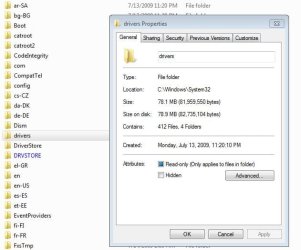
Well, we're back to not being in sync again. Here's a snapshot of the System32 folder after I have right-clicked the Drivers folder. There is no Details tab.
 

Attachments

  • Capture.JPG
    Capture.JPG
    43.7 KB · Views: 20

My Computer My Computer

Computer type
Laptop
OS
Windows 7 home premium 64 bit
CPU
AMD K10
Motherboard
Hewlett-Packard 1444 (Socket S1G4)
Memory
3.00GB Dual-Channel DDR3 @ 532MHz
Graphics Card(s)
ATI AMD M880G with ATI Mobility Radeon HD 4250 (HP)
Sound Card
Realtek
Screen Resolution
1366 x 768
Hard Drives
465GB Western Digital
Antivirus
MSE
Well, we're back to not being in sync again.
Ugh. Yes, I'm sorry but i did it again. I shouldn't write a post just before having to run out of the house.

I'm guessing the filter file usbfilter.sys is still there (which is OK). My step 2 should have read

2. Navigate to C:\Windows\System32\drivers. Right click on file usbfilter.sys Properties->Details tab. Take a snapshot and post it.
 

My Computer My Computer

Computer type
PC/Desktop
Computer Manufacturer/Model Number
Dell Optiplex 360 and Optiplex 755
OS
Desk 1: Win 7 Pro x32; Desk 2: Windows 10 x64
Hard Drives
500GB Crucial SSD in both Desktops
Other Info
Buffalo 6TB NAS, Raid 1
Here we go....
 

Attachments

  • Capture.JPG
    Capture.JPG
    51.4 KB · Views: 2

My Computer My Computer

Computer type
Laptop
OS
Windows 7 home premium 64 bit
CPU
AMD K10
Motherboard
Hewlett-Packard 1444 (Socket S1G4)
Memory
3.00GB Dual-Channel DDR3 @ 532MHz
Graphics Card(s)
ATI AMD M880G with ATI Mobility Radeon HD 4250 (HP)
Sound Card
Realtek
Screen Resolution
1366 x 768
Hard Drives
465GB Western Digital
Antivirus
MSE
@Boweasel
In summary, I'm writing this to you (and anyone else who finds and reads this thread anytime future)
  1. To my surprise, I found the AMD USB Filter (usbfilter) is installed by the AMD High Definition Graphics Driver (along with the graphics and audio drivers we expect)
  2. The AMD USB Filter was the reason your USB Controllers stopped working. (Device Manager showed all your USB controllers with a Device status of Windows cannot start this hardware... Code 19)
  3. The AMD USB Filter doesn't usually cause a problem. But for you and a few other unlucky souls, I found similar cases of this problem dating back to 2011!
That said, when the problem occurs, the AMD USB Filter should be removed. I believe there's an easier and safer way to do so (no registry edit required). I found these instructions for an earlier version of the AMD Graphics driver. Boweasel, could you please check if it's still true for the current version you just installed? (Just check. We are not going to change anything)
  • Open Control Panel then Programs and Features
  • Double click the ATI Catalyst Install Manager or click Change
  • Select Uninstall Manager
  • Choose Custom
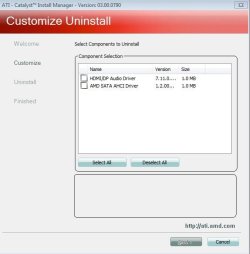
  • Do you see an option to select AMD USB Controller as the component to uninstall?
  • If yes, that's the preferred method to uninstall the filter if ever needed to do so again

 
Last edited:

My Computer My Computer

Computer type
PC/Desktop
Computer Manufacturer/Model Number
Dell Optiplex 360 and Optiplex 755
OS
Desk 1: Win 7 Pro x32; Desk 2: Windows 10 x64
Hard Drives
500GB Crucial SSD in both Desktops
Other Info
Buffalo 6TB NAS, Raid 1
To my surprise, I found the AMD USB Filter (usbfilter) is installed by the AMD High Definition Graphics Driver (along with the graphics and audio drivers we expect)
  1. The AMD USB Filter was the reason your USB Controllers stopped working. (Device Manager showed all your USB controllers with a Device status of Windows cannot start this hardware... Code 19)
  2. The AMD USB Filter doesn't usually cause a problem. But for you and a few other unlucky souls, I found similar cases of this problem dating back to 2011!
That said, when the problem occurs, the AMD USB Filter should be removed. I believe there's an easier and safer way to do so (no registry edit required). I found these instructions for an earlier version of the AMD Graphics driver. Boweasel, could you please check if it's still true for the current version you just installed? (Just check. We are not going to change anything)
  • Open Control Panel then Programs and Features
  • Double click the ATI Catalyst Install Manager or click Change
  • Select Uninstall Manager
  • Choose Custom
  • Do you see an option to select AMD USB Controller as the component to uninstall?
  • If yes, that's the preferred method to uninstall the filter if ever needed to do so again
Unfortunately I see no option to uninstall that component
 

Attachments

  • Capture.JPG
    Capture.JPG
    31.7 KB · Views: 12

My Computer My Computer

Computer type
Laptop
OS
Windows 7 home premium 64 bit
CPU
AMD K10
Motherboard
Hewlett-Packard 1444 (Socket S1G4)
Memory
3.00GB Dual-Channel DDR3 @ 532MHz
Graphics Card(s)
ATI AMD M880G with ATI Mobility Radeon HD 4250 (HP)
Sound Card
Realtek
Screen Resolution
1366 x 768
Hard Drives
465GB Western Digital
Antivirus
MSE
Too bad that option's no longer there.

Hope you never see that problem again but, if needed, that registry edit will do the trick.
 

My Computer My Computer

Computer type
PC/Desktop
Computer Manufacturer/Model Number
Dell Optiplex 360 and Optiplex 755
OS
Desk 1: Win 7 Pro x32; Desk 2: Windows 10 x64
Hard Drives
500GB Crucial SSD in both Desktops
Other Info
Buffalo 6TB NAS, Raid 1
Too bad that option's no longer there.

Hope you never see that problem again but, if needed, that registry edit will do the trick.
And hopefully this topic will be 'findable' in Google, Bing, Ixquick and all the other lesser search engines.
 

My Computer My Computer

Computer type
Laptop
OS
Windows 7 home premium 64 bit
CPU
AMD K10
Motherboard
Hewlett-Packard 1444 (Socket S1G4)
Memory
3.00GB Dual-Channel DDR3 @ 532MHz
Graphics Card(s)
ATI AMD M880G with ATI Mobility Radeon HD 4250 (HP)
Sound Card
Realtek
Screen Resolution
1366 x 768
Hard Drives
465GB Western Digital
Antivirus
MSE
Back
Top