Windows 7 no longer NOTIFIES me about updates

up2trix

New member
Member
Local time
3:43 PM
Messages
13
I have long set my Windows Update policy to be "Check for updates but let me choose whether to download and install them".

See the first attachment for a screen shot of my settings for precise details.

It used to be that whenever M$ had updates available, they would pop up a notice dialog telling me to look into this.

But I noticed a couple of months ago that that notice dialog no longer appears. Instead, I have to manually open the Windows Update control panel and see if anything is available.

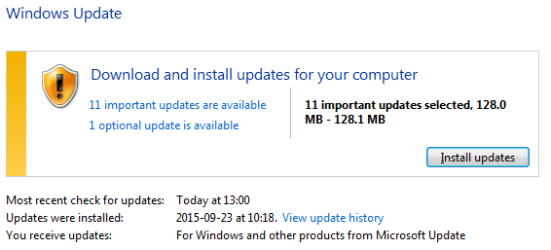
For example, doing that just now revealed a bunch of updates; see the second attachment for what it found.

Have you guys seen this too?

Is there any setting I can do to get the old notification back?

Or is this a sneaky plot to force us into choosing auto updating (which I detest).
 

Attachments

  • WindowsUpdatesSettings.png
    WindowsUpdatesSettings.png
    12 KB · Views: 34
  • LatestWindowsUpdatesFound.png
    LatestWindowsUpdatesFound.png
    7.8 KB · Views: 34

My Computer My Computer

At a glance

Windows 7 ProXeon E3-1245 v3
Computer type
PC/Desktop
Computer Manufacturer/Model Number
Dell
OS
Windows 7 Pro
CPU
Xeon E3-1245 v3
Browser
Firefox
hey up2trix - i just posted the same issue 2 days ago... i guess i'm not the only procrastinator around here :)

http://www.sevenforums.com/windows-...fication-check-updates-but-let-me-choose.html

unfortunately there's no response yet.

i found that first the notifications stopped showing, but a 'windows update' icon still appeared in the notification area. Then the icon eventually stopped showing up as well.

you could verify that in 'control panel/notification area icons' that 'windows update' is set to 'show icon and notifications' - but i have this set correctly and get no notification so i doubt this is your issue
 

My Computer My Computer

At a glance

windows 7 home premium 64 bit
Computer type
PC/Desktop
OS
windows 7 home premium 64 bit
Hi,

I've experienced exactly the same as you guys and it bothered me as well. I've read many posts from others about this and it has to do with either KB3075851 (AUG '15) / KB3083324 (SEPT '15) / KB3083710 (OCT '15) - Windows Update Client.

If you un-install -whichever one is installed- your update history disappears.

Two days ago I un-installed 3083710, went back to windows update and I had an error that said 'Windows could not search for new updates' error found Code 8007000E. I clicked on 'Get help with this error' and it downloaded a WindowsUpdateDiagnostic troubleshooting pack.
I let it run and it fixed the above error and returned the icon to the taskbar. The Update history had disappeared but searching for updates was able to be run and updates were found.

This is my experience (so I don't know if this will work for you) but if you wait for one of the experts to reply they know more than me!
 

My Computer My Computer

At a glance

Windows 7 Home Premium x32Intel Pentium T4300 @ 2.10GHz4.00 GBIntel Mobile Intel 4 Series Express Chipset F...
Computer type
Laptop
Computer Manufacturer/Model Number
Toshiba
OS
Windows 7 Home Premium x32
CPU
Intel Pentium T4300 @ 2.10GHz
Motherboard
Toshiba Portable PC (CPU)
Memory
4.00 GB
Graphics Card(s)
Intel Mobile Intel 4 Series Express Chipset Family (Toshiba)
Sound Card
Realtek High Defintion Audio
Monitor(s) Displays
BenQ GW2250
Screen Resolution
1920 x 1080@60Hz
Hard Drives
Samsung SSD 840 EVO 250G
Keyboard
Logitech K270
Mouse
Logitech M525
Antivirus
Eset Nod32
Browser
Chrome
A small number of forum members are seeing this issue.

A large number of forum members have not noticed that they too have this issue.

An unknown number of forum members manually check updates so often that they will never know if they have this issue :-)

I don't know of a cure. It has been happening to some for months now.
 

My Computer My Computer

At a glance

W7 Pro SP1 64biti78GBIntel HD Graphics
Computer type
Laptop
Computer Manufacturer/Model Number
Employer provided Dell Latitude
OS
W7 Pro SP1 64bit
CPU
i7
Memory
8GB
Graphics Card(s)
Intel HD Graphics
Hard Drives
crappy SSD
Antivirus
Employer mandated Symantec Endpoint Protection
Browser
Pale Moon 64bit, IE11 64bit & Chrome 64bit
Hi,

I've experienced exactly the same as you guys and it bothered me as well. I've read many posts from others about this and it has to do with either KB3075851 (AUG '15) / KB3083324 (SEPT '15) / KB3083710 (OCT '15) - Windows Update Client.

thanks for the info... i'm guessing i stopped getting notifications around April/May though. have you read of an earlier update that is causing problems?
 

My Computer My Computer

At a glance

windows 7 home premium 64 bit
Computer type
PC/Desktop
OS
windows 7 home premium 64 bit
Guys, thanks much for your replies.

missminx: I do not think that I messed with any of the updates you list.

Historically, back when M$ was trustworthy, I accepted just about every update, both security and optional.

The evil Win10 nag (KB3035583) was the first one that I have ever uninstalled and hid.

I subsequently removed the 4 spyware M$ updates (KB3068708, KB3022345, KB3075249, KB3080149) as per link1 and link2.

A coworker suggested to me today that one of those uninstalls may possibly have altered the notification dialog behavior.
 

My Computer My Computer

At a glance

Windows 7 ProXeon E3-1245 v3
Computer type
PC/Desktop
Computer Manufacturer/Model Number
Dell
OS
Windows 7 Pro
CPU
Xeon E3-1245 v3
Browser
Firefox
Guys, thanks much for your replies.

missminx: I do not think that I messed with any of the updates you list.

Historically, back when M$ was trustworthy, I accepted just about every update, both security and optional.

The evil Win10 nag (KB3035583) was the first one that I have ever uninstalled and hid.

I subsequently removed the 4 spyware M$ updates (KB3068708, KB3022345, KB3075249, KB3080149) as per link1 and link2.

A coworker suggested to me today that one of those uninstalls may possibly have altered the notification dialog behavior.
my update icon/notifications disappeared before blocking the spyware updates. for some reason i don't get the w10 nag even though i have KB3035583 installed...hmm
 

My Computer My Computer

At a glance

windows 7 home premium 64 bit
Computer type
PC/Desktop
OS
windows 7 home premium 64 bit
Back
Top