User Profiles - Create and Move During Windows 7 Installation

How to Create User Accounts on another Partition or Disk During Windows 7 Installation

   Information
There are several methods to move user profiles to another disk or partition after you have installed Windows 7. The easiest way is to use Audit Mode and System Preparation Tool, both built-in Windows 7 features, to permanently move the location of the folder Users.

This tutorial shows how to relocate both Users and ProgramData to another disk or partition when doing a new, fresh and clean install of Windows 7. If you have already installed Seven, and you'd like to move those folders away from their default location in C: drive, please read first post number 22 in this thread. Follow the steps told in that post, and continue then from beginning of the page 4 in this tutorial.
When Windows 7 is installed, 5 or 6 system folders are created depending on chosen bit-version:

  • PerfLogs (Performance Logs), where Windows stores performance and reliability logs
  • Program Files, where applications and software are installed. Windows x86 (32-bit) stores all applications here, Windows x64 (64-bit) only native 64-bit applications
  • Program Files (x86), only in Windows x64. All non-x64 applications are stored here
  • Windows, which contains core operating system files and drivers
  • ProgramData, where some applications store application and user specific settings and configuration files
  • Users. This is the "home" of all user folders. When a new user account is created and this new user logs in first time, Windows creates a set of user specific folders Users\New_User
Moving Windows and Program Files folders is not recommend by Microsoft. However, moving both Users and ProgramData folders is safe and can save a lot of space on system disk. Pictures, mp3’s videos, documents and so on, a user folder with its subfolders can be tens, sometimes hundreds of gigabytes.

For instance, using this laptop of mine as an example, the total size of Users folder and subfolders is at the moment about 240 GB. The size of ProgramData folder is at the moment almost 18 GB. I simply could not have these folders stored in my system C: drive, there’s not enough space.

When installing Windows 7, I recommend using Windows System Preparation Tool (Sysprep) in so called Audit Mode to relocate Users and ProgramData, leaving C: drive only for Windows and applications.

   Warning

An upgraded Windows cannot be sysprepped. As this method is based in sysprepping, this tutorial is valid only for Windows setups which have not been upgraded.

This means that if you have for instance in-place upgraded Vista to Seven, you cannot sysprep. The same applies if you have upgraded from a lesser edition to a better edition, for instance from Windows 7 Home Premium to Professional.

Notice that a repair install is also an upgrade install, so if you have ever done a repair install (= in-place upgrade to same edition), you cannot sysprep.

In other words, when sysprepping an existing Windows setup it only works if the Windows was installed clean and has never been upgraded or repaired using repair install, or if it is the original pre-installed Windows.

Using this method causes Windows 7 to lose activation information, and it needs to be reactivated afterwards. If your Windows 7 is an OEM version, you might not be able to reactivate it, at least not without phone activation option.

   Warning
IE10 Users: Please read this article first: Sysprep Fatal Error With IE 10 (FIX) | System Administration


Complete tutorial as PDF: View attachment Relocate User folders during Windows 7 installation.pdf (1.22 MB)

Kari


Last edited:
Not hard at all? Did exactly that when trying to install manually...several times. I think I specified that in the overclock thread. Anyhoo...I'll figure it out one way or another. Just thought I'd save some time asking the experts if they new what might be going on.

I am naturally not aware of any of your posts in threads I do not participate and subscribe.

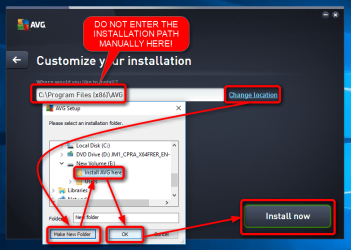
I have never used AVG, in fact I installed it today first time in my life to get the screenshot in my previous post. I repeated the install process on another computer and a virtual machine, it does not fail and I cannot make it fail. I simply cannot get it to fail. I select Custom installation, click Change location, select an existing folder on any drive or click the Make a new folder button to create a new one, click OK and install.

If you are getting "specified path not found" error as you told it means you are most definitely doing something wrong, for instance trying to manually add a a non existing path in the dialog where you should not enter anything but instead just click the Change location link. You should only enter the location manually if the whole path already exists, for instance if you want to install AVG in X:\Programs\Security\AVG, you should be sure that the folders X:\Programs and X:\Programs\Security already exist; AVG installer can then create the AVG folder there by itself but it needs the folders above it to exist.

2015-09-01_12h12_18.png
 

My Computer My Computer

Computer type
Laptop
Computer Manufacturer/Model Number
HP ENVY 17-1150eg
OS
Windows 10 Pro x64 EN-GB
CPU
1.6 GHz Intel Core i7-720QM Processor
Memory
6 GB
Graphics Card(s)
ATI Mobility Radeon HD 5850 Graphics
Sound Card
Beats sound system with integrated subwoofer
Monitor(s) Displays
17" laptop display, 22" LED and 32" Full HD TV through HDMI
Screen Resolution
1600*900 (1), 1920*1080 (2&3)
Hard Drives
Internal: 2 x 500 GB SATA Hard Disk Drive 7200 rpm
External: 2TB for backups, 3TB USB3 network drive for media
Cooling
As Envy runs a bit warm, I have it on a Cooler Master pad
Keyboard
Logitech diNovo Media Desktop Laser (bluetooth)
Mouse
Logitech Performance Mouse MX
Internet Speed
50/10 Mbps VDSL
Antivirus
Windows Defender 4.3.9431.0
Browser
Maxthon 3.5.2., IE11
In my previous post I assumed that the error you get might be because of an "unintelligent" installer. But no, that was a wrong assumption; I can't get the AVG installation to fail even when done "wrong" by entering a long installation path manually. AVG installer is clever enough to create the full path, all folder levels.

I think I specified that in the overclock thread.
Strange. I decided to check what you had posted in overclocking thread. Found nothing. According to your user profile you have posted 5 posts at the Seven Forums, all of them in this thread:

2015-09-01_16h09_58.png
 

My Computer My Computer

Computer type
Laptop
Computer Manufacturer/Model Number
HP ENVY 17-1150eg
OS
Windows 10 Pro x64 EN-GB
CPU
1.6 GHz Intel Core i7-720QM Processor
Memory
6 GB
Graphics Card(s)
ATI Mobility Radeon HD 5850 Graphics
Sound Card
Beats sound system with integrated subwoofer
Monitor(s) Displays
17" laptop display, 22" LED and 32" Full HD TV through HDMI
Screen Resolution
1600*900 (1), 1920*1080 (2&3)
Hard Drives
Internal: 2 x 500 GB SATA Hard Disk Drive 7200 rpm
External: 2TB for backups, 3TB USB3 network drive for media
Cooling
As Envy runs a bit warm, I have it on a Cooler Master pad
Keyboard
Logitech diNovo Media Desktop Laser (bluetooth)
Mouse
Logitech Performance Mouse MX
Internet Speed
50/10 Mbps VDSL
Antivirus
Windows Defender 4.3.9431.0
Browser
Maxthon 3.5.2., IE11
"I am naturally not aware of any of your posts in threads I do not participate and subscribe."

My mistake, I thought it was you for some reason. It was just some user that linked me your tutorial and thought he had said it was his.

I just manually installed CCleaner and Revo Uninstaller without a problem to the D drive. So we can get past the manual install hang up, right? It clearly seems to be a an AVG specific issue? Or maybe it can only be installed to the C drive? I don't know. All I know is that I've used it for years, ever since it first came out in fact, and never had an issue installing it...until now. Just sayin.
 

My Computer My Computer

Computer type
PC/Desktop
Computer Manufacturer/Model Number
Custom
OS
Massachusetts
CPU
i5-4690K
Motherboard
MSI Z97-G45
Memory
Corsair Vengeance 16GB
Graphics Card(s)
MSI GTX 970
Hard Drives
Seagate 1TB HDD
Crucial 120GB SSD
Antivirus
AVG Free
Browser
Chrome
It was in another persons thread for an alternate method:

How to: Setup SSD boot drive with secondary Hard disc optimization

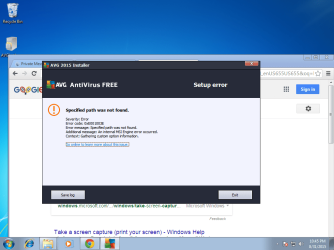
Here's the error message:
 

Attachments

  • 7fd0de18_error.png
    7fd0de18_error.png
    75.3 KB · Views: 130

My Computer My Computer

Computer type
PC/Desktop
Computer Manufacturer/Model Number
Custom
OS
Massachusetts
CPU
i5-4690K
Motherboard
MSI Z97-G45
Memory
Corsair Vengeance 16GB
Graphics Card(s)
MSI GTX 970
Hard Drives
Seagate 1TB HDD
Crucial 120GB SSD
Antivirus
AVG Free
Browser
Chrome
It clearly seems to be a an AVG specific issue? Or maybe it can only be installed to the C drive?

No, it most certainly is not an AVG issue. Yes, it can be installed on any drive.

Recap of my previous posts: I have no issues in installing AVG on any drive. I've never used it before, downloaded it first time ever today, have now tried various installing scenarios (drive C:, drive E:, manually entering installation path, system with relocated Users folder and so on). I cannot get the AVG installer to fail, it installs without any issues every time.
 

My Computer My Computer

Computer type
Laptop
Computer Manufacturer/Model Number
HP ENVY 17-1150eg
OS
Windows 10 Pro x64 EN-GB
CPU
1.6 GHz Intel Core i7-720QM Processor
Memory
6 GB
Graphics Card(s)
ATI Mobility Radeon HD 5850 Graphics
Sound Card
Beats sound system with integrated subwoofer
Monitor(s) Displays
17" laptop display, 22" LED and 32" Full HD TV through HDMI
Screen Resolution
1600*900 (1), 1920*1080 (2&3)
Hard Drives
Internal: 2 x 500 GB SATA Hard Disk Drive 7200 rpm
External: 2TB for backups, 3TB USB3 network drive for media
Cooling
As Envy runs a bit warm, I have it on a Cooler Master pad
Keyboard
Logitech diNovo Media Desktop Laser (bluetooth)
Mouse
Logitech Performance Mouse MX
Internet Speed
50/10 Mbps VDSL
Antivirus
Windows Defender 4.3.9431.0
Browser
Maxthon 3.5.2., IE11
"No, it most certainly is not an AVG issue."

Then why am I able to install other programs without issue? And again, I've never had an issue installing AVG over the years on my computers, and other peoples computers. Soooo...yeah.
 

My Computer My Computer

Computer type
PC/Desktop
Computer Manufacturer/Model Number
Custom
OS
Massachusetts
CPU
i5-4690K
Motherboard
MSI Z97-G45
Memory
Corsair Vengeance 16GB
Graphics Card(s)
MSI GTX 970
Hard Drives
Seagate 1TB HDD
Crucial 120GB SSD
Antivirus
AVG Free
Browser
Chrome
I have told that I have now installed AVG several times on various machines, real and virtual, with various setups. Works every time. You have told you have always before been able to install AVG but now, this one time it's not working. From that you draw a conclusion "It clearly seems to be an AVG specific issue".

It clearly seems that we have different definition for logical reasoning...
 

My Computer My Computer

Computer type
Laptop
Computer Manufacturer/Model Number
HP ENVY 17-1150eg
OS
Windows 10 Pro x64 EN-GB
CPU
1.6 GHz Intel Core i7-720QM Processor
Memory
6 GB
Graphics Card(s)
ATI Mobility Radeon HD 5850 Graphics
Sound Card
Beats sound system with integrated subwoofer
Monitor(s) Displays
17" laptop display, 22" LED and 32" Full HD TV through HDMI
Screen Resolution
1600*900 (1), 1920*1080 (2&3)
Hard Drives
Internal: 2 x 500 GB SATA Hard Disk Drive 7200 rpm
External: 2TB for backups, 3TB USB3 network drive for media
Cooling
As Envy runs a bit warm, I have it on a Cooler Master pad
Keyboard
Logitech diNovo Media Desktop Laser (bluetooth)
Mouse
Logitech Performance Mouse MX
Internet Speed
50/10 Mbps VDSL
Antivirus
Windows Defender 4.3.9431.0
Browser
Maxthon 3.5.2., IE11
It seems we do. Your handful of installations in one day to my installations of various versions over the span of several years. I was merely trying to go in some direction to resolve the issue as opposed to your, "hey, works on my end, on a handful of (virtual) machines". Of course there are other reasons why it wouldn't be installing properly. To be honest I was beating around the bush..as I think it is related to the move process. And no, not saying it was your script or anything.

Anyway, just tried installing java on both C and D. Didn't work.

At this point a I think another fresh install is in order.
 

My Computer My Computer

Computer type
PC/Desktop
Computer Manufacturer/Model Number
Custom
OS
Massachusetts
CPU
i5-4690K
Motherboard
MSI Z97-G45
Memory
Corsair Vengeance 16GB
Graphics Card(s)
MSI GTX 970
Hard Drives
Seagate 1TB HDD
Crucial 120GB SSD
Antivirus
AVG Free
Browser
Chrome
OK, I have tested a new, different scenario now on three PC's, and it works. Here's what you should do if installing Seven on SSD and relocating User folders using this method, or if for any reason wanting to move ProgramData and / or Users after Windows is already installed. This method can be used whenever you want to relocate Users to another disk on an existing installation of Seven.

If you want to install Seven on an SSD: Install Seven normally to SSD, disconnecting all other disks. After Windows has booted first time normally after installation, shut the computer down and reconnect other disks. Reboot Windows.

Relocating Users and ProgramData folders when Windows Seven is already installed:

Run Command Prompt as administrator by clicking Start Menu > All Programs > Accessories, then right clicking Command Prompt and selecting Run as Administrator:

View attachment 128354

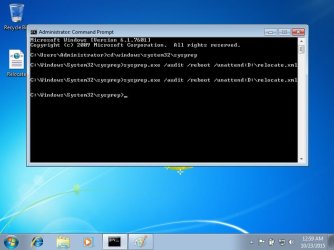
Type this to command prompt: C:\Windows\System32\Sysprep\Sysprep.exe /audit /reboot, hit Enter.

View attachment 128355

Windows reboots now to Audit Mode, "thinking" it's been started first time as the message on screen shows:

View attachment 128356

Now continue from beginning of page 4 in tutorial, and follow the steps described. Running the script causes Windows to move ProgramData and Users folders from C: to another disk or partition, also moving all content of said folders. The later you do this, the longer it takes because Windows has more to move.

Notice that this really makes Windows think it's first boot, so you have to select country and keyboard layout and again create a user account when first time booted in OOBE (normal) mode after running the script. Because the Users folder already contains your user account folders, you get an error message if trying to input the same name:

View attachment 128342

Use a temporary name, for instance Test to continue first boot routine. When Windows stops for login, choose your old account to login, for instance in my case I chose here Kari and not the account Test which I just created:

View attachment 128343

When finally in Windows desktop, go to User Accounts and remove the unnecessary Test account. That account has yet no folders to remove because Windows does not create user folders when user account is created; the user folders are only created when user logs in first time.

That's it. Works without any problems whatsoever.

Kari

When I attempted to try this method, I get a momentary pop-up that appears to be processing the command, but then I get an indication of a "fatal error" and nothing happens.

Do you have a solution?

EDIT:

Solution Found: For me, it was to run the command from SAFE Mode Command Prompt
 
Last edited:

My Computer My Computer

Computer type
PC/Desktop
Computer Manufacturer/Model Number
Custom Build
OS
Windows 7 Professional x64 SP1
CPU
Intel i7-980x @ 3.6GHz
Motherboard
Intel DX58SO
Memory
Corsair 12GB DDR3 RAM (3x4GB)
Graphics Card(s)
EVGA NVIDIA GeForce GTX 760 SC
Sound Card
Intel High Definition 7.1 Audio Subsystem - Realtek ALC889
Monitor(s) Displays
Dual Display - LG Electronics Flatron L227WTG
Screen Resolution
1680 x 1050 60Hz 32-bit
Hard Drives
2 Seagate Constellation ST1000NM0033 1TB SATA 6Gb/s HDDs configured as Intel SATA Array 0, RST RAID 1, Vol. 0 (C:\) & Vol. 1 (D:\), & 2 Seagate Barracuda ST500DM002 500GB SATA 6Gb/s HDDs configured as Intel SATA Array 1 RST RAID 1, Vol. 0 (E:\)
PSU
Corsair HX850W
Case
Antec P182
Cooling
Stock Intel i7-980x Cooling Solution + 4 120mm Case Fans
Keyboard
Microsoft Wireless Multimedia Keyboard 1.1
Mouse
Microsoft Standard Wireless Optical Mouse
Internet Speed
DSL - 3.0 Mb/s download 768 Kb/s upload
Antivirus
ESET Smart Security 12, Defender & SuperAntiSpyware Pro
Browser
Firefox Quantum 64-bit
Other Info
Optical Drives: Pioneer DVR-216R & TSSTcorp SH-S223Q, Anker USB 3.0 PCI-E Card, Hauppauge WinTV-HVR 2250 Dual TV Tuner Board for Windows Media Center, Bose Companion 3 Series II multimedia speaker system, APC Smart-UPS SMT1500
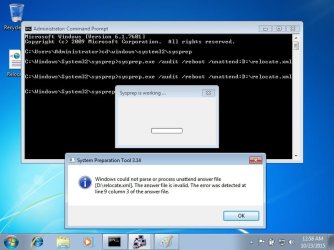
My XML script won't run. I keep getting an error message that indicates: Windows could not parse or process unattend answer file [c:\relocate.xml]. The answer file is invalid. The error was detected at line 9 column 3 of the answer file.

I've checked my transcription of the text for this file many times and I'm moved the line 9 indent forward and backward. If I move the indent to 0, the error message indicates that the error was detected at column 0. If I move the indent one space bar in, I get error at column 2. As I've indicated, I've retyped, and checked syntax many times and I always get the error.

Line 9 is the text: </component>

I've also stopped the other service, WMPNetworkSvc. Nothing seems to resolve this error.

Do you have any idea what I am doing wrong?

Thank you for your assistance.

Regards
 

My Computer My Computer

Computer type
PC/Desktop
Computer Manufacturer/Model Number
Custom Build
OS
Windows 7 Professional x64 SP1
CPU
Intel i7-980x @ 3.6GHz
Motherboard
Intel DX58SO
Memory
Corsair 12GB DDR3 RAM (3x4GB)
Graphics Card(s)
EVGA NVIDIA GeForce GTX 760 SC
Sound Card
Intel High Definition 7.1 Audio Subsystem - Realtek ALC889
Monitor(s) Displays
Dual Display - LG Electronics Flatron L227WTG
Screen Resolution
1680 x 1050 60Hz 32-bit
Hard Drives
2 Seagate Constellation ST1000NM0033 1TB SATA 6Gb/s HDDs configured as Intel SATA Array 0, RST RAID 1, Vol. 0 (C:\) & Vol. 1 (D:\), & 2 Seagate Barracuda ST500DM002 500GB SATA 6Gb/s HDDs configured as Intel SATA Array 1 RST RAID 1, Vol. 0 (E:\)
PSU
Corsair HX850W
Case
Antec P182
Cooling
Stock Intel i7-980x Cooling Solution + 4 120mm Case Fans
Keyboard
Microsoft Wireless Multimedia Keyboard 1.1
Mouse
Microsoft Standard Wireless Optical Mouse
Internet Speed
DSL - 3.0 Mb/s download 768 Kb/s upload
Antivirus
ESET Smart Security 12, Defender & SuperAntiSpyware Pro
Browser
Firefox Quantum 64-bit
Other Info
Optical Drives: Pioneer DVR-216R & TSSTcorp SH-S223Q, Anker USB 3.0 PCI-E Card, Hauppauge WinTV-HVR 2250 Dual TV Tuner Board for Windows Media Center, Bose Companion 3 Series II multimedia speaker system, APC Smart-UPS SMT1500
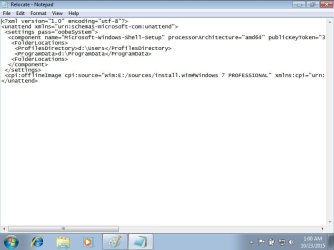
My XML script won't run. I keep getting an error message that indicates: Windows could not parse or process unattend answer file [c:\relocate.xml]. The answer file is invalid. The error was detected at line 9 column 3 of the answer file.

I've checked my transcription of the text for this file many times and I'm moved the line 9 indent forward and backward. If I move the indent to 0, the error message indicates that the error was detected at column 0. If I move the indent one space bar in, I get error at column 2. As I've indicated, I've retyped, and checked syntax many times and I always get the error.

The error message is clear and is only shown when there really is something wrong with the answer file.

Please post the answer file exactly as it is. Use the CODE tags when posting it ([CODE]The Answer file here[/CODE]).

Kari
 

My Computer My Computer

Computer type
Laptop
Computer Manufacturer/Model Number
HP ENVY 17-1150eg
OS
Windows 10 Pro x64 EN-GB
CPU
1.6 GHz Intel Core i7-720QM Processor
Memory
6 GB
Graphics Card(s)
ATI Mobility Radeon HD 5850 Graphics
Sound Card
Beats sound system with integrated subwoofer
Monitor(s) Displays
17" laptop display, 22" LED and 32" Full HD TV through HDMI
Screen Resolution
1600*900 (1), 1920*1080 (2&3)
Hard Drives
Internal: 2 x 500 GB SATA Hard Disk Drive 7200 rpm
External: 2TB for backups, 3TB USB3 network drive for media
Cooling
As Envy runs a bit warm, I have it on a Cooler Master pad
Keyboard
Logitech diNovo Media Desktop Laser (bluetooth)
Mouse
Logitech Performance Mouse MX
Internet Speed
50/10 Mbps VDSL
Antivirus
Windows Defender 4.3.9431.0
Browser
Maxthon 3.5.2., IE11
Code:
<?xml version="1.0" encoding="utf-8"?>
<unattend xmlns="urn:schemas-microsoft-com:unattend">
<settings pass="oobeSystem">
<component name="Microsoft-Windows-Shell-Setup" 
processorArchitecture="amd64" publicKeyToken="31bf3856ad364e35" 
language="neutral" versionScope="nonSxS" 
xmlns:wcm="http://schemas.microsoft.com/WMIConfig/2002/State" 
xmlns:xsi="http://www.w3.org/2001/XMLSchema-instance">
<FolderLocations>
<ProfilesDirectory>d:\Users</ProfilesDirectory>
<ProgramData>d:\ProgramData</ProgramData>
<FolderLocations>
</component>
</settings>
<cpi:offlineImage cpi:source="wim:E:/sources/install.wim#Windows 7 
PROFESSIONAL" xmlns:cpi="urn:schemas-microsoft-com:cpi" />
</unattend>

The code above is my file.

I've attempted runs from both C:\ & D:\.

I've disabled all third party services except some NVIDIA and Intel RST.

I couldn't enter audit mode from the command prompt window, I had to do it from SAFE Mode command prompt.

Now, I can't get out of audit mode. When I change the Sysprep pop-up to OOBE boot, I get a fatal error. When I reboot, I'm back in audit mode.

These two issues may be related.

Another general observation about the Audit Mode install was that I couldn't download updates in Audit Mode. Is that typical? For my install, once I entered the OOBE and installed the software key, the downloads were activated.
 
Last edited:

My Computer My Computer

Computer type
PC/Desktop
Computer Manufacturer/Model Number
Custom Build
OS
Windows 7 Professional x64 SP1
CPU
Intel i7-980x @ 3.6GHz
Motherboard
Intel DX58SO
Memory
Corsair 12GB DDR3 RAM (3x4GB)
Graphics Card(s)
EVGA NVIDIA GeForce GTX 760 SC
Sound Card
Intel High Definition 7.1 Audio Subsystem - Realtek ALC889
Monitor(s) Displays
Dual Display - LG Electronics Flatron L227WTG
Screen Resolution
1680 x 1050 60Hz 32-bit
Hard Drives
2 Seagate Constellation ST1000NM0033 1TB SATA 6Gb/s HDDs configured as Intel SATA Array 0, RST RAID 1, Vol. 0 (C:\) & Vol. 1 (D:\), & 2 Seagate Barracuda ST500DM002 500GB SATA 6Gb/s HDDs configured as Intel SATA Array 1 RST RAID 1, Vol. 0 (E:\)
PSU
Corsair HX850W
Case
Antec P182
Cooling
Stock Intel i7-980x Cooling Solution + 4 120mm Case Fans
Keyboard
Microsoft Wireless Multimedia Keyboard 1.1
Mouse
Microsoft Standard Wireless Optical Mouse
Internet Speed
DSL - 3.0 Mb/s download 768 Kb/s upload
Antivirus
ESET Smart Security 12, Defender & SuperAntiSpyware Pro
Browser
Firefox Quantum 64-bit
Other Info
Optical Drives: Pioneer DVR-216R & TSSTcorp SH-S223Q, Anker USB 3.0 PCI-E Card, Hauppauge WinTV-HVR 2250 Dual TV Tuner Board for Windows Media Center, Bose Companion 3 Series II multimedia speaker system, APC Smart-UPS SMT1500
I couldn't enter audit mode from the command prompt window, I had to do it from SAFE Mode command prompt.
The answer file seems to be OK.

From the beginning, you have done this wrong. If you can't enter Audit Mode as told in instructions, something is wrong in your system and you should post or search for advice instead if thinking "OK I'll try it in another way". Safe Mode and Sysprep are no friends.

Anyway, let's now try to get you out of the Audit Mode. While still in Audit Mode, please copy the file SETUPACT.LOG from the folder C:\Windows\System32\Sysprep\Panther to desktop. When copied, right click the file and select Send to > Compressed (zipped) folder.

This creates a ZIP archive of your log file. Attach that ZIP file here in your next post, I will check the log to see what's causing your fatal error.

Tutorial about how to attach files in your post: http://www.sevenforums.com/tutorials/9733-screenshots-files-upload-post-seven-forums.html

Kari
 

My Computer My Computer

Computer type
Laptop
Computer Manufacturer/Model Number
HP ENVY 17-1150eg
OS
Windows 10 Pro x64 EN-GB
CPU
1.6 GHz Intel Core i7-720QM Processor
Memory
6 GB
Graphics Card(s)
ATI Mobility Radeon HD 5850 Graphics
Sound Card
Beats sound system with integrated subwoofer
Monitor(s) Displays
17" laptop display, 22" LED and 32" Full HD TV through HDMI
Screen Resolution
1600*900 (1), 1920*1080 (2&3)
Hard Drives
Internal: 2 x 500 GB SATA Hard Disk Drive 7200 rpm
External: 2TB for backups, 3TB USB3 network drive for media
Cooling
As Envy runs a bit warm, I have it on a Cooler Master pad
Keyboard
Logitech diNovo Media Desktop Laser (bluetooth)
Mouse
Logitech Performance Mouse MX
Internet Speed
50/10 Mbps VDSL
Antivirus
Windows Defender 4.3.9431.0
Browser
Maxthon 3.5.2., IE11
View attachment setupact.zip

Thank you Kari. Attached is my log file.

I know that my attempt didn't exactly follow the instructions on the tutorial, but that's because I'm prepared to start over from scratch if necessary.

I'm attempting to have a perfect new clean install so I can get a good image for security. Originally, I attempted to follow your Audit Mode install, but that didn't work out as planned, because I couldn't download updates in Audit Mode. So, I started over in regular mode and after loading all updates, drivers, and a few utilities, I attempted to move my User folder to the D:\ drive by following one of Brink's tutorials. That wasn't fully successful either. So, I removed all traces of that attempt and confirmed no issues in the Windows logs and then attempted this tutorial, moving the User Folders and Program Data Folder to the D:\ after Windows is installed. It appeared that this modified procedure was for SSD drives, but I'm not using a SSD drive, but I attempted it anyway. It didn't work as I mentioned so I attempted from SAFE Mode. I've rebooted several times before I attempted to run the script. That worked, but then I couldn't run the script or exit Audit Mode. If this install is diseased, I'll start over.

Regards
 

My Computer My Computer

Computer type
PC/Desktop
Computer Manufacturer/Model Number
Custom Build
OS
Windows 7 Professional x64 SP1
CPU
Intel i7-980x @ 3.6GHz
Motherboard
Intel DX58SO
Memory
Corsair 12GB DDR3 RAM (3x4GB)
Graphics Card(s)
EVGA NVIDIA GeForce GTX 760 SC
Sound Card
Intel High Definition 7.1 Audio Subsystem - Realtek ALC889
Monitor(s) Displays
Dual Display - LG Electronics Flatron L227WTG
Screen Resolution
1680 x 1050 60Hz 32-bit
Hard Drives
2 Seagate Constellation ST1000NM0033 1TB SATA 6Gb/s HDDs configured as Intel SATA Array 0, RST RAID 1, Vol. 0 (C:\) & Vol. 1 (D:\), & 2 Seagate Barracuda ST500DM002 500GB SATA 6Gb/s HDDs configured as Intel SATA Array 1 RST RAID 1, Vol. 0 (E:\)
PSU
Corsair HX850W
Case
Antec P182
Cooling
Stock Intel i7-980x Cooling Solution + 4 120mm Case Fans
Keyboard
Microsoft Wireless Multimedia Keyboard 1.1
Mouse
Microsoft Standard Wireless Optical Mouse
Internet Speed
DSL - 3.0 Mb/s download 768 Kb/s upload
Antivirus
ESET Smart Security 12, Defender & SuperAntiSpyware Pro
Browser
Firefox Quantum 64-bit
Other Info
Optical Drives: Pioneer DVR-216R & TSSTcorp SH-S223Q, Anker USB 3.0 PCI-E Card, Hauppauge WinTV-HVR 2250 Dual TV Tuner Board for Windows Media Center, Bose Companion 3 Series II multimedia speaker system, APC Smart-UPS SMT1500
No clear reason for the error shown in the log. Next you could try this command (elevated command prompt):
Code:
%windir%\system32\sysprep\sysprep.exe /oobe /quit
When done, reboot normally and see if Windows boots to normal mode. I am afraid that if this does not work, the options are limited: a system restore, restoring a system image or reinstall.
 

My Computer My Computer

Computer type
Laptop
Computer Manufacturer/Model Number
HP ENVY 17-1150eg
OS
Windows 10 Pro x64 EN-GB
CPU
1.6 GHz Intel Core i7-720QM Processor
Memory
6 GB
Graphics Card(s)
ATI Mobility Radeon HD 5850 Graphics
Sound Card
Beats sound system with integrated subwoofer
Monitor(s) Displays
17" laptop display, 22" LED and 32" Full HD TV through HDMI
Screen Resolution
1600*900 (1), 1920*1080 (2&3)
Hard Drives
Internal: 2 x 500 GB SATA Hard Disk Drive 7200 rpm
External: 2TB for backups, 3TB USB3 network drive for media
Cooling
As Envy runs a bit warm, I have it on a Cooler Master pad
Keyboard
Logitech diNovo Media Desktop Laser (bluetooth)
Mouse
Logitech Performance Mouse MX
Internet Speed
50/10 Mbps VDSL
Antivirus
Windows Defender 4.3.9431.0
Browser
Maxthon 3.5.2., IE11
No clear reason for the error shown in the log. Next you could try this command (elevated command prompt):
Code:
%windir%\system32\sysprep\sysprep.exe /oobe /quit
When done, reboot normally and see if Windows boots to normal mode. I am afraid that if this does not work, the options are limited: a system restore, restoring a system image or reinstall.

I attempted a similar command, without the /quit, and it didn't work. I give the command a try, but I'm getting the impression that this install is diseased and I'll start over with a new clean install. I'd like to do it from Audit Mode, but I had the issue with the updates. Is it normal for updates not to install in Audit Mode?

Thanks for the help.

Regards
 

My Computer My Computer

Computer type
PC/Desktop
Computer Manufacturer/Model Number
Custom Build
OS
Windows 7 Professional x64 SP1
CPU
Intel i7-980x @ 3.6GHz
Motherboard
Intel DX58SO
Memory
Corsair 12GB DDR3 RAM (3x4GB)
Graphics Card(s)
EVGA NVIDIA GeForce GTX 760 SC
Sound Card
Intel High Definition 7.1 Audio Subsystem - Realtek ALC889
Monitor(s) Displays
Dual Display - LG Electronics Flatron L227WTG
Screen Resolution
1680 x 1050 60Hz 32-bit
Hard Drives
2 Seagate Constellation ST1000NM0033 1TB SATA 6Gb/s HDDs configured as Intel SATA Array 0, RST RAID 1, Vol. 0 (C:\) & Vol. 1 (D:\), & 2 Seagate Barracuda ST500DM002 500GB SATA 6Gb/s HDDs configured as Intel SATA Array 1 RST RAID 1, Vol. 0 (E:\)
PSU
Corsair HX850W
Case
Antec P182
Cooling
Stock Intel i7-980x Cooling Solution + 4 120mm Case Fans
Keyboard
Microsoft Wireless Multimedia Keyboard 1.1
Mouse
Microsoft Standard Wireless Optical Mouse
Internet Speed
DSL - 3.0 Mb/s download 768 Kb/s upload
Antivirus
ESET Smart Security 12, Defender & SuperAntiSpyware Pro
Browser
Firefox Quantum 64-bit
Other Info
Optical Drives: Pioneer DVR-216R & TSSTcorp SH-S223Q, Anker USB 3.0 PCI-E Card, Hauppauge WinTV-HVR 2250 Dual TV Tuner Board for Windows Media Center, Bose Companion 3 Series II multimedia speaker system, APC Smart-UPS SMT1500

My Computer My Computer

Computer type
Laptop
Computer Manufacturer/Model Number
HP ENVY 17-1150eg
OS
Windows 10 Pro x64 EN-GB
CPU
1.6 GHz Intel Core i7-720QM Processor
Memory
6 GB
Graphics Card(s)
ATI Mobility Radeon HD 5850 Graphics
Sound Card
Beats sound system with integrated subwoofer
Monitor(s) Displays
17" laptop display, 22" LED and 32" Full HD TV through HDMI
Screen Resolution
1600*900 (1), 1920*1080 (2&3)
Hard Drives
Internal: 2 x 500 GB SATA Hard Disk Drive 7200 rpm
External: 2TB for backups, 3TB USB3 network drive for media
Cooling
As Envy runs a bit warm, I have it on a Cooler Master pad
Keyboard
Logitech diNovo Media Desktop Laser (bluetooth)
Mouse
Logitech Performance Mouse MX
Internet Speed
50/10 Mbps VDSL
Antivirus
Windows Defender 4.3.9431.0
Browser
Maxthon 3.5.2., IE11
The command failed with the same indications as before. I checked the log file and I see some error messages with error codes, but I don't have a way to decode them. I think I'm at the point of starting over.

I'll attempt a clean install in Audit Mode and once I get to Audit Mode desktop, I'll attemp to run the script per the tutorial. If I run into any issues, I'll post first to get a recommendation.

Thank you for all the support. I think you create some excellent tutorials.

Regards
 

My Computer My Computer

Computer type
PC/Desktop
Computer Manufacturer/Model Number
Custom Build
OS
Windows 7 Professional x64 SP1
CPU
Intel i7-980x @ 3.6GHz
Motherboard
Intel DX58SO
Memory
Corsair 12GB DDR3 RAM (3x4GB)
Graphics Card(s)
EVGA NVIDIA GeForce GTX 760 SC
Sound Card
Intel High Definition 7.1 Audio Subsystem - Realtek ALC889
Monitor(s) Displays
Dual Display - LG Electronics Flatron L227WTG
Screen Resolution
1680 x 1050 60Hz 32-bit
Hard Drives
2 Seagate Constellation ST1000NM0033 1TB SATA 6Gb/s HDDs configured as Intel SATA Array 0, RST RAID 1, Vol. 0 (C:\) & Vol. 1 (D:\), & 2 Seagate Barracuda ST500DM002 500GB SATA 6Gb/s HDDs configured as Intel SATA Array 1 RST RAID 1, Vol. 0 (E:\)
PSU
Corsair HX850W
Case
Antec P182
Cooling
Stock Intel i7-980x Cooling Solution + 4 120mm Case Fans
Keyboard
Microsoft Wireless Multimedia Keyboard 1.1
Mouse
Microsoft Standard Wireless Optical Mouse
Internet Speed
DSL - 3.0 Mb/s download 768 Kb/s upload
Antivirus
ESET Smart Security 12, Defender & SuperAntiSpyware Pro
Browser
Firefox Quantum 64-bit
Other Info
Optical Drives: Pioneer DVR-216R & TSSTcorp SH-S223Q, Anker USB 3.0 PCI-E Card, Hauppauge WinTV-HVR 2250 Dual TV Tuner Board for Windows Media Center, Bose Companion 3 Series II multimedia speaker system, APC Smart-UPS SMT1500
I'll attempt a clean install in Audit Mode and once I get to Audit Mode desktop, I'll attemp to run the script per the tutorial. If I run into any issues, I'll post first to get a recommendation.
Thanks for the compliments :)

If updating Windows before you even start customizing is important, this works but includes a bit extra work:
  • Install Windows normally, creating the initial admin user
  • Update Windows
  • Boot to Audit Mode
  • Remove the user you created if no longer needed
  • Customize and sysprep
Keep us posted :)
 

My Computer My Computer

Computer type
Laptop
Computer Manufacturer/Model Number
HP ENVY 17-1150eg
OS
Windows 10 Pro x64 EN-GB
CPU
1.6 GHz Intel Core i7-720QM Processor
Memory
6 GB
Graphics Card(s)
ATI Mobility Radeon HD 5850 Graphics
Sound Card
Beats sound system with integrated subwoofer
Monitor(s) Displays
17" laptop display, 22" LED and 32" Full HD TV through HDMI
Screen Resolution
1600*900 (1), 1920*1080 (2&3)
Hard Drives
Internal: 2 x 500 GB SATA Hard Disk Drive 7200 rpm
External: 2TB for backups, 3TB USB3 network drive for media
Cooling
As Envy runs a bit warm, I have it on a Cooler Master pad
Keyboard
Logitech diNovo Media Desktop Laser (bluetooth)
Mouse
Logitech Performance Mouse MX
Internet Speed
50/10 Mbps VDSL
Antivirus
Windows Defender 4.3.9431.0
Browser
Maxthon 3.5.2., IE11
This is a different new clean install with the same xml script problem. Below are some screen shots, the code, the xml file in compressed folder, and the log files.

Screen Shot 1.jpg

Screen Shot 2.jpg

Screen Shot 3.jpg

Code:
<?xml version="1.0" encoding="utf-8"?>
<unattend xmlns="urn:schemas-microsoft-com:unattend">
 <settings pass="oobeSystem">
  <component name="Microsoft-Windows-Shell-Setup" processorArchitecture="amd64" publicKeyToken="31bf3856ad364e35" language="neutral" versionScope="nonSxS" xmlns:wcm="[URL]http://schemas.microsoft.com/WMIConfig/2002/State[/URL]" xmlns:xsi="[URL]http://www.w3.org/2001/XMLSchema-instance[/URL]">
   <FolderLocations>
    <ProfilesDirectory>d:\Users</ProfilesDirectory>
    <ProgramData>d:\ProgramData</ProgramData>
   <FolderLocations>
  </component>
 </settings>
 <cpi:offlineImage cpi:source="wim:E:/sources/install.wim#Windows 7 PROFESSIONAL" xmlns:cpi="urn:schemas-microsoft-com:cpi" />
</unattend>

View attachment Sysprep Log Files.zip

View attachment Relocate.zip

This was a clean install per your tutorial. I didn't load any drivers or software once I booted into Audit Mode. The only thing different from most on this install is that I'm running an Intel RST Raid 1 (mirror) with two partitions, one is C:\ (200 GB) and the other is D:\ (735 GB). In the motherboard BIOS, I set the SATA drives to RAID and I configure the RAID type and partition size in the Intel utility during POST. During the Win 7 install, I F6 the RST driver. This is an Intel DX58SO motherboard and the Intel Desktop RAID is a feature of this board. As far as I've experienced using Intel RST for about six years, the feature is completely invisible to Win 7. I've had no issues with Intel RST.

Also, I'm installing an OEM version of Win 7 Pro x64

When I first booted into Audit Mode, I setup and quick formatted Drive D:\ so that it would be available for the relocation. I then shutdown to add a disk to an available SATA port on the mb. The added disk has my Intel hardware drivers in folders. I then restarted and the system booted into Audit Mode without issue.

Also, I can change between Audit Mode and OOBE Mode with this install.

Do the attached log files give any indication as to the problem with the xml script? Are there any other log files in Audit Mode that would give an indication as to why the xml script failed to run?

There are no Windows Updates downloaded and installed. Does the xml script require any Windows Updates to run properly?

Regards
 
Last edited:

My Computer My Computer

Computer type
PC/Desktop
Computer Manufacturer/Model Number
Custom Build
OS
Windows 7 Professional x64 SP1
CPU
Intel i7-980x @ 3.6GHz
Motherboard
Intel DX58SO
Memory
Corsair 12GB DDR3 RAM (3x4GB)
Graphics Card(s)
EVGA NVIDIA GeForce GTX 760 SC
Sound Card
Intel High Definition 7.1 Audio Subsystem - Realtek ALC889
Monitor(s) Displays
Dual Display - LG Electronics Flatron L227WTG
Screen Resolution
1680 x 1050 60Hz 32-bit
Hard Drives
2 Seagate Constellation ST1000NM0033 1TB SATA 6Gb/s HDDs configured as Intel SATA Array 0, RST RAID 1, Vol. 0 (C:\) & Vol. 1 (D:\), & 2 Seagate Barracuda ST500DM002 500GB SATA 6Gb/s HDDs configured as Intel SATA Array 1 RST RAID 1, Vol. 0 (E:\)
PSU
Corsair HX850W
Case
Antec P182
Cooling
Stock Intel i7-980x Cooling Solution + 4 120mm Case Fans
Keyboard
Microsoft Wireless Multimedia Keyboard 1.1
Mouse
Microsoft Standard Wireless Optical Mouse
Internet Speed
DSL - 3.0 Mb/s download 768 Kb/s upload
Antivirus
ESET Smart Security 12, Defender & SuperAntiSpyware Pro
Browser
Firefox Quantum 64-bit
Other Info
Optical Drives: Pioneer DVR-216R & TSSTcorp SH-S223Q, Anker USB 3.0 PCI-E Card, Hauppauge WinTV-HVR 2250 Dual TV Tuner Board for Windows Media Center, Bose Companion 3 Series II multimedia speaker system, APC Smart-UPS SMT1500
Back
Top