Disable vbs warning in Word 2013

SoFine409

New member
Local time
12:27 PM
Messages
12
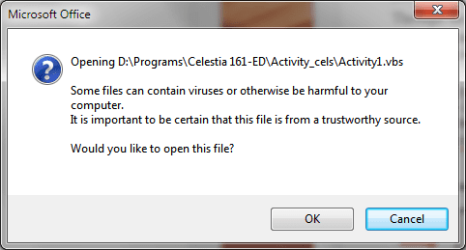
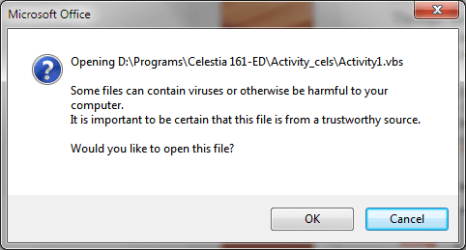
I'm running a MS Word 2103 document to manage an astronomy demo (Celestia 1.6.1 ED) and the document has links to various vb scripts. When I click the links I get a warning (see below). This is a serious interruption to the flow of the presentation. Since the scripts are stored with one of the programs subfolders there is obviously no risk in running them. I there a way that I can suppress this warning dialogue?
 

Attachments
  • warning1.png
    warning1.png
    9.5 KB · Views: 30

My Computer My Computer

At a glance

Win7 Pro 64-bit
Computer type
PC/Desktop
Computer Manufacturer/Model Number
Dell XPS 8700
OS
Win7 Pro 64-bit

My Computer My Computer

At a glance

Windows 7 Home Premium 64 bit sp1Intel i5 3570 3.4Ghz Ivy Bridge SKT 1155 quad...G-Skill Rip Jaws 16Gb (8x2) DDR3 -1600 PC3 12...Gigabyte NVIDIA GT610 1Gb DDR3 810/1200 PCI-E...
Computer type
PC/Desktop
Computer Manufacturer/Model Number
Self built using existing case
OS
Windows 7 Home Premium 64 bit sp1
CPU
Intel i5 3570 3.4Ghz Ivy Bridge SKT 1155 quad core
Motherboard
Gigabyte Z77-HD3 SKT 1155 2xSata 3, 4x USB 3.0
Memory
G-Skill Rip Jaws 16Gb (8x2) DDR3 -1600 PC3 12800 CL 10 red
Graphics Card(s)
Gigabyte NVIDIA GT610 1Gb DDR3 810/1200 PCI-E 2.0 Silent
Sound Card
NVIDIA High Definition & Realtech High Definition Audio
Monitor(s) Displays
2 x Philips 226V4L 16:9 aspect ratio
Screen Resolution
1920 x 1080 HD
Hard Drives
Samsung 840 Pro 256gb SSD, SATA 3.
Hitachi Touro Portable 1tb, USB 3.0 HDD used for image b/ups.
PSU
Corsair VS450
Case
Codeng
Cooling
PSU fan & CPU fan
Keyboard
Logitech
Mouse
Logitech Wireless trackball M570
Internet Speed
Wireless 3G. 3mg down & 550kb up.
Antivirus
Bitdefender Internet Security 2020
Browser
Opera (Current Version) & Firefox
Other Info
MS Office 2013 Pro. Davis weather station software. MGE Nova 600 avr UPS.

Hi Ranger4. Thanks for the idea. I tried the various solutions recommended in this link but nothing helped. To backtrack a bit, this 2013 Word document has links the produce two distinct warnings. The "This location may be unsafe" warning that uses a hyperlink to pass parameters to a running program was solved by adding the following registry key:

HKEY_CURRENT_USER\Software\Microsoft\Office\15.0\Common\Security\
Dword: DisableHyperlinkWarning
Value: 1

Regarding the Microsoft Office Warning, I have yet to find a way to eliminate it. I have tried editing the Local Group Policy to add VBS files to the "low-risk category" but no luck. When I run the VBS from outside of the Word document there is no warning dialogue so the warning can not be suppressed by modifying the script itself. I'm beginning to think that this warning dialogue might be too deeply embedded in Office to be suppressed.

Any additional thoughts?
 

Attachments

  • Warning 2.png
    Warning 2.png
    11 KB · Views: 24
  • warning1.png
    warning1.png
    9.5 KB · Views: 23

My Computer My Computer

At a glance

Win7 Pro 64-bit
Computer type
PC/Desktop
Computer Manufacturer/Model Number
Dell XPS 8700
OS
Win7 Pro 64-bit
What happens if you press Yes in the first & OK in the second warnings that you have posted. Does the program run as expected?.

I see that you have that program on your D drive. What would happen if you copied it to your C drive, assuming that is your main OS drive. Doing that might eliminate the possibility that it thinks it's being imported from a foreign source. This is probably stupid thinking but it might work.
 

My Computer My Computer

At a glance

Windows 7 Home Premium 64 bit sp1Intel i5 3570 3.4Ghz Ivy Bridge SKT 1155 quad...G-Skill Rip Jaws 16Gb (8x2) DDR3 -1600 PC3 12...Gigabyte NVIDIA GT610 1Gb DDR3 810/1200 PCI-E...
Computer type
PC/Desktop
Computer Manufacturer/Model Number
Self built using existing case
OS
Windows 7 Home Premium 64 bit sp1
CPU
Intel i5 3570 3.4Ghz Ivy Bridge SKT 1155 quad core
Motherboard
Gigabyte Z77-HD3 SKT 1155 2xSata 3, 4x USB 3.0
Memory
G-Skill Rip Jaws 16Gb (8x2) DDR3 -1600 PC3 12800 CL 10 red
Graphics Card(s)
Gigabyte NVIDIA GT610 1Gb DDR3 810/1200 PCI-E 2.0 Silent
Sound Card
NVIDIA High Definition & Realtech High Definition Audio
Monitor(s) Displays
2 x Philips 226V4L 16:9 aspect ratio
Screen Resolution
1920 x 1080 HD
Hard Drives
Samsung 840 Pro 256gb SSD, SATA 3.
Hitachi Touro Portable 1tb, USB 3.0 HDD used for image b/ups.
PSU
Corsair VS450
Case
Codeng
Cooling
PSU fan & CPU fan
Keyboard
Logitech
Mouse
Logitech Wireless trackball M570
Internet Speed
Wireless 3G. 3mg down & 550kb up.
Antivirus
Bitdefender Internet Security 2020
Browser
Opera (Current Version) & Firefox
Other Info
MS Office 2013 Pro. Davis weather station software. MGE Nova 600 avr UPS.
What happens if you press Yes in the first & OK in the second warnings that you have posted. Does the program run as expected?.

I see that you have that program on your D drive. What would happen if you copied it to your C drive, assuming that is your main OS drive. Doing that might eliminate the possibility that it thinks it's being imported from a foreign source. This is probably stupid thinking but it might work.

The program runs fine after the dialogues are answered

The program and all of its media files are too big to install on the C Drive (SSD) so I tried it on another PC and it made no difference in the warning dialogue..
 

My Computer My Computer

At a glance

Win7 Pro 64-bit
Computer type
PC/Desktop
Computer Manufacturer/Model Number
Dell XPS 8700
OS
Win7 Pro 64-bit
I have just had a look at my Word 2013 & in the Options settings, under Trust Centre there are a number of selectable options & one that might be applicable is Macro Settings & below the Developer Macro Settings is a box that can be ticked to Trust access to VBA project object model.

Would that be any help?. I know one should not fiddle with trust settings, but it might be worth having a look at it.
 

My Computer My Computer

At a glance

Windows 7 Home Premium 64 bit sp1Intel i5 3570 3.4Ghz Ivy Bridge SKT 1155 quad...G-Skill Rip Jaws 16Gb (8x2) DDR3 -1600 PC3 12...Gigabyte NVIDIA GT610 1Gb DDR3 810/1200 PCI-E...
Computer type
PC/Desktop
Computer Manufacturer/Model Number
Self built using existing case
OS
Windows 7 Home Premium 64 bit sp1
CPU
Intel i5 3570 3.4Ghz Ivy Bridge SKT 1155 quad core
Motherboard
Gigabyte Z77-HD3 SKT 1155 2xSata 3, 4x USB 3.0
Memory
G-Skill Rip Jaws 16Gb (8x2) DDR3 -1600 PC3 12800 CL 10 red
Graphics Card(s)
Gigabyte NVIDIA GT610 1Gb DDR3 810/1200 PCI-E 2.0 Silent
Sound Card
NVIDIA High Definition & Realtech High Definition Audio
Monitor(s) Displays
2 x Philips 226V4L 16:9 aspect ratio
Screen Resolution
1920 x 1080 HD
Hard Drives
Samsung 840 Pro 256gb SSD, SATA 3.
Hitachi Touro Portable 1tb, USB 3.0 HDD used for image b/ups.
PSU
Corsair VS450
Case
Codeng
Cooling
PSU fan & CPU fan
Keyboard
Logitech
Mouse
Logitech Wireless trackball M570
Internet Speed
Wireless 3G. 3mg down & 550kb up.
Antivirus
Bitdefender Internet Security 2020
Browser
Opera (Current Version) & Firefox
Other Info
MS Office 2013 Pro. Davis weather station software. MGE Nova 600 avr UPS.
I have just had a look at my Word 2013 & in the Options settings, under Trust Centre there are a number of selectable options & one that might be applicable is Macro Settings & below the Developer Macro Settings is a box that can be ticked to Trust access to VBA project object model.

Would that be any help?. I know one should not fiddle with trust settings, but it might be worth having a look at it.
I tried all of those before I posted the thread but nothing worked. I'm thinking this is something so deeply embedded in the OS that we users cannot circumvent it. I might just have to put up with it. FYI when I use dual monitors with the program on one and the Word document/script on the other the warning dialogue stay on the monitor with the doc so it's not all that intrusive. Thanks for helping.
 

My Computer My Computer

At a glance

Win7 Pro 64-bit
Computer type
PC/Desktop
Computer Manufacturer/Model Number
Dell XPS 8700
OS
Win7 Pro 64-bit
Thanks for getting back & it looks like a deeply embedded issue that we just have to sometimes live with, even though it can be very frustrating.
 

My Computer My Computer

At a glance

Windows 7 Home Premium 64 bit sp1Intel i5 3570 3.4Ghz Ivy Bridge SKT 1155 quad...G-Skill Rip Jaws 16Gb (8x2) DDR3 -1600 PC3 12...Gigabyte NVIDIA GT610 1Gb DDR3 810/1200 PCI-E...
Computer type
PC/Desktop
Computer Manufacturer/Model Number
Self built using existing case
OS
Windows 7 Home Premium 64 bit sp1
CPU
Intel i5 3570 3.4Ghz Ivy Bridge SKT 1155 quad core
Motherboard
Gigabyte Z77-HD3 SKT 1155 2xSata 3, 4x USB 3.0
Memory
G-Skill Rip Jaws 16Gb (8x2) DDR3 -1600 PC3 12800 CL 10 red
Graphics Card(s)
Gigabyte NVIDIA GT610 1Gb DDR3 810/1200 PCI-E 2.0 Silent
Sound Card
NVIDIA High Definition & Realtech High Definition Audio
Monitor(s) Displays
2 x Philips 226V4L 16:9 aspect ratio
Screen Resolution
1920 x 1080 HD
Hard Drives
Samsung 840 Pro 256gb SSD, SATA 3.
Hitachi Touro Portable 1tb, USB 3.0 HDD used for image b/ups.
PSU
Corsair VS450
Case
Codeng
Cooling
PSU fan & CPU fan
Keyboard
Logitech
Mouse
Logitech Wireless trackball M570
Internet Speed
Wireless 3G. 3mg down & 550kb up.
Antivirus
Bitdefender Internet Security 2020
Browser
Opera (Current Version) & Firefox
Other Info
MS Office 2013 Pro. Davis weather station software. MGE Nova 600 avr UPS.
SoFine409, I know you have indicated that you have played with the trusted source settings, but this looks like it makes too much sense to not work for your situation.

View attachment 375732

View attachment 375733


ADD NEW LOCATION to the list of where the origination point of where the file is coming from makes too much sense. Please tell me what you think.
 
Last edited:

My Computer My Computer

At a glance

Microsoft Windows 7 Ultimate 64-bit 7601 Mult...AMD FX(tm)-6100 Six-Core Processor4.00 GBAMD Radeon HD 6450
Computer type
PC/Desktop
Computer Manufacturer/Model Number
custom build
OS
Microsoft Windows 7 Ultimate 64-bit 7601 Multiprocessor Free Service Pack 1
CPU
AMD FX(tm)-6100 Six-Core Processor
Motherboard
ASUSTeK Computer INC. M5A78L-M LX PLUS
Memory
4.00 GB
Graphics Card(s)
AMD Radeon HD 6450
Sound Card
(1) AMD High Definition Audio Device (2) Realtek High Defi
Monitor(s) Displays
Toshiba 47ZV650U 47" LCD 240Hz
Screen Resolution
1920 x 1080 x 32 bits (4294967296 colors) @ 60 Hz
Hard Drives
(1) HDT722516DLA380 ATA Device (2) Hitachi HDS721025CLA382 ATA Device (3) ST4000VN000-1H4168 ATA Device (4) Generic STORAGE DEVICE USB Device (5) Generic STORAGE DEVICE USB Device (6) Generic STORAGE DEVICE USB Device (7) Generic STORAGE
PSU
Corsair CX430M
Case
WMI (Waste Management Incorporated)
Cooling
Yes, it's very cool.
Keyboard
Bluetooth KB & Mousepad
Internet Speed
Fios 15/5 and it sucks when Verizon is throttling it down
Antivirus
Avast, MSE and Malwarebytes
Browser
Firefox v.41.0.2 and IE 11
Other Info
2 years old and so far this rig still kicks butt
Yes, I already did that with the program folder as well as its sub-folders. After reading your post I added the folder on my desktop where the word docs reside. No luck as well. I've also allowed all documents on my (private) home network to be trusted. I also tried checking allow all locations on my network to be trusted. After I tried that I switched it back off.
Still no luck but your suggestion is much appreciated.
 

My Computer My Computer

At a glance

Win7 Pro 64-bit
Computer type
PC/Desktop
Computer Manufacturer/Model Number
Dell XPS 8700
OS
Win7 Pro 64-bit
Sorry, not my area of expertise for sure. Good luck
 

My Computer My Computer

At a glance

Microsoft Windows 7 Ultimate 64-bit 7601 Mult...AMD FX(tm)-6100 Six-Core Processor4.00 GBAMD Radeon HD 6450
Computer type
PC/Desktop
Computer Manufacturer/Model Number
custom build
OS
Microsoft Windows 7 Ultimate 64-bit 7601 Multiprocessor Free Service Pack 1
CPU
AMD FX(tm)-6100 Six-Core Processor
Motherboard
ASUSTeK Computer INC. M5A78L-M LX PLUS
Memory
4.00 GB
Graphics Card(s)
AMD Radeon HD 6450
Sound Card
(1) AMD High Definition Audio Device (2) Realtek High Defi
Monitor(s) Displays
Toshiba 47ZV650U 47" LCD 240Hz
Screen Resolution
1920 x 1080 x 32 bits (4294967296 colors) @ 60 Hz
Hard Drives
(1) HDT722516DLA380 ATA Device (2) Hitachi HDS721025CLA382 ATA Device (3) ST4000VN000-1H4168 ATA Device (4) Generic STORAGE DEVICE USB Device (5) Generic STORAGE DEVICE USB Device (6) Generic STORAGE DEVICE USB Device (7) Generic STORAGE
PSU
Corsair CX430M
Case
WMI (Waste Management Incorporated)
Cooling
Yes, it's very cool.
Keyboard
Bluetooth KB & Mousepad
Internet Speed
Fios 15/5 and it sucks when Verizon is throttling it down
Antivirus
Avast, MSE and Malwarebytes
Browser
Firefox v.41.0.2 and IE 11
Other Info
2 years old and so far this rig still kicks butt
Back
Top