
I have a word document with a picture inserted into it. I right clicked the picture and added a hyperlink to an mpg video clip that is stored on my computer. Now, every time I click on the picture, instead of going immediately to the video clip and running it, I get this really annoying warning about trusting this file. How do I prevent this warning message from being displayed every time I click on the hyper linked picture in Word? I am running Windows 7 professional 64 bit and Word as Administrator. I am the only person on this machine – it is a stand alone pc in my home – not connected to any company network.
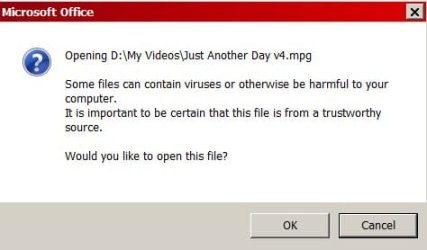
I have scoured the internet for potential solutions and none of the suggestions have worked. A screen shot of the warning msg is attached.
Thanks in advance for ANY help.
I have scoured the internet for potential solutions and none of the suggestions have worked. A screen shot of the warning msg is attached.
Thanks in advance for ANY help.
Attachments
My Computer
- Computer type
- PC/Desktop
- Computer Manufacturer/Model Number
- Custom Build
- OS
- Windows 7 Professional 64 bit
- CPU
- Intel Core i-5 4590
- Motherboard
- ASUS H97-Plus
- Memory
- 16 GB Corsair Vengeance
- Graphics Card(s)
- EVGA GeForce GTX 970
- Hard Drives
- WD 500 GB Blue
WD 1 TB Black
- Browser
- Sea Monkey

