Windows 7 freezes randomly

ih8fish

New member
Local time
5:48 PM
Messages
4
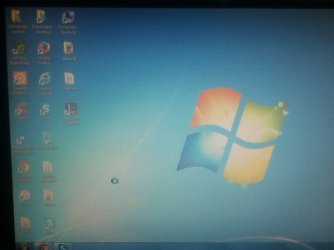
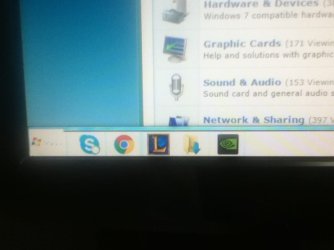
Prior to last week, I haven't used my computer for the whole week due to my exams. I have started it up last week and i have encountered this problem. About 6-10 minutes after startup, My taskbar randomly changes its theme to the theme you see in safe mode (I think its the basic theme). Following up, The background becomes completely unresponsive,but the programs already opened are still working.The background has this sort of opaque filter on it and the cursor shows the circle thing when something is loading (Not an accurate description, but I'm sure you know what i mean).After about 2 minutes of this, it asks me if i want to restart,close or wait for "this program" to respond. If i restart or close, the screen becomes completely blank, showing no programs, just the background. If i wait, nothing happens. The only way to be able to use my computer again is by restarting it.This happens every time I start up. A virus may have played a part in this issue but i got rid of it and IT STILL DOES IT EVERY TIME I STARTUP.I need help ASAP. Thank you

Specs: Intel Core i3 550 @3.20 GHz
GeForce GT 220
4 GB ram
500 GB HDD
Custom Build


P.S: This is my first thread here, so it might not look so professional like the other threads in here. Just bear with me :D
 
Last edited:

My Computer My Computer

At a glance

Windows 7 Home Premium 32bitIntel core i3 550 @ 3.20 GHzGeForce GT 220
Computer type
PC/Desktop
Computer Manufacturer/Model Number
Custom Build
OS
Windows 7 Home Premium 32bit
CPU
Intel core i3 550 @ 3.20 GHz
Graphics Card(s)
GeForce GT 220
Antivirus
Malwarebytes
Browser
Chrome
It might be a hardware problem; you could try booting from an usb stick (maybe into ubuntu) to see if it might be.

Otherwise it might be a broken driver module, which might be solved by either reinstalling drivers (especially the video driver), or by repairing or reinstalling the system.
 

My Computer My Computer

At a glance

Microsoft Windows 7 Ultimate 64-bit 7601 Mult...Intel(R) Core(TM) i5-4690 CPU @ 3.50GHz8.00 GBNVIDIA GeForce GTX 770
Computer type
PC/Desktop
OS
Microsoft Windows 7 Ultimate 64-bit 7601 Multiprocessor Free Service Pack 1
CPU
Intel(R) Core(TM) i5-4690 CPU @ 3.50GHz
Motherboard
ASUSTeK COMPUTER INC. B85-PLUS
Memory
8.00 GB
Graphics Card(s)
NVIDIA GeForce GTX 770
Sound Card
(1) Realtek High Definition Audio (2) SB X-Fi Go! Pro (3
Screen Resolution
1920 x 1080 x 32 bits (4294967296 colors) @ 60 Hz
Hard Drives
(1) Samsung SSD 840 EVO 120G SCSI Disk Device
(2) WDC WD3200BPVT-22ZES SCSI Disk Device
Other Info
http://hastebin.com/wabotarite.vhdl
The problem is that the time taken by the drivers to reinstall is too long which will cause the PC to freeze before the process is done. I dont think i can reinstall them in safe mode (Safe mode works well and does not freeze, which means that it cant be a hardware problem).
 

My Computer My Computer

At a glance

Windows 7 Home Premium 32bitIntel core i3 550 @ 3.20 GHzGeForce GT 220
Computer type
PC/Desktop
Computer Manufacturer/Model Number
Custom Build
OS
Windows 7 Home Premium 32bit
CPU
Intel core i3 550 @ 3.20 GHz
Graphics Card(s)
GeForce GT 220
Antivirus
Malwarebytes
Browser
Chrome
It might be a hardware problem; you could try booting from an usb stick (maybe into ubuntu) to see if it might be.

Otherwise it might be a broken driver module, which might be solved by either reinstalling drivers (especially the video driver), or by repairing or reinstalling the system.

The problem is that the time taken by the drivers to reinstall is too long which will cause the PC to freeze before the process is done. I dont think i can reinstall them in safe mode (Safe mode works well and does not freeze, which means that it cant be a hardware problem).
 

My Computer My Computer

At a glance

Windows 7 Home Premium 32bitIntel core i3 550 @ 3.20 GHzGeForce GT 220
Computer type
PC/Desktop
Computer Manufacturer/Model Number
Custom Build
OS
Windows 7 Home Premium 32bit
CPU
Intel core i3 550 @ 3.20 GHz
Graphics Card(s)
GeForce GT 220
Antivirus
Malwarebytes
Browser
Chrome
Here are some pictures of what happens in this issue
 

Attachments

  • IMG_1542.JPG
    IMG_1542.JPG
    49.9 KB · Views: 0
  • IMG_1543.JPG
    IMG_1543.JPG
    44.2 KB · Views: 0

My Computer My Computer

At a glance

Windows 7 Home Premium 32bitIntel core i3 550 @ 3.20 GHzGeForce GT 220
Computer type
PC/Desktop
Computer Manufacturer/Model Number
Custom Build
OS
Windows 7 Home Premium 32bit
CPU
Intel core i3 550 @ 3.20 GHz
Graphics Card(s)
GeForce GT 220
Antivirus
Malwarebytes
Browser
Chrome
Back
Top