How can I keep the start menu open?

LowStrung

New member
Local time
2:43 AM
Messages
24
Is there a way to keep the start menu from closing after clicking or editing a shortcut? I often want to do several things in succession from the All Programs list, but am faced with having to reopen the start menu each time and navigate it all over again. Somewhere I read that it could be kept open by holding the shift key down, but apparently that only worked in Windows XP. What I'm looking for is a tweak, not a 3rd party utility.
 

My Computer My Computer

Computer type
Laptop
OS
Windows 7 Starter 32bit
I like what you want to do with Start Menu. It would be handy.
I know of no way of doing that.
We will just have to wait for a member that does. (If it can be done)
 

My Computer My Computer

Computer type
PC/Desktop
Computer Manufacturer/Model Number
Home made Desktop
OS
Windows 10 Pro. 64/ version 1709 Windows 7 Pro/64
CPU
Intel i7-6800K @ 4.3
Motherboard
ASUS X-99 Deluxe II
Memory
Corsair Platinum 16 gig @2400
Graphics Card(s)
EVGA GTX 1070 OC
Monitor(s) Displays
Asus 27" LED LCD/VE278Q
Screen Resolution
1920-1080 or 1280-720 HDMI
Hard Drives
INTEL SSD 730-240 Gb Sata 3.0/
PSU
EVGA Platium 1200W
Case
Phanteks Luxe Tempered Glass 8 fans/ one radiator
Cooling
XSPC/ Water Cooled CPU
Keyboard
Das 4 Professional
Mouse
Logitech M705/MX Anywhere 2-S
Internet Speed
100 mbits
Antivirus
Microsoft Security Essentials/ Malwarebytes Premium 3.0/ SAS
Browser
I.E. 11 default/Firefox/ ISP Time Warner Cable/Spectrum
Other Info
LG BluRay Burner/
Sound system-KLipsch-THX/
Icy Dock ssd Hot Swap bays.
I like what you want to do with Start Menu. It would be handy.
I know of no way of doing that.
We will just have to wait for a member that does. (If it can be done)
I hope there's a way, because when properly organized, the start menu can be a lot handier as a program launcher than the desktop, since it can be popped up over existing windows, even if they're in fullscreen mode.

By the way, I now bypass the pinned items and get to the All Programs list automatically on pressing the Windows key. I had to make an exception for that and install a third-party utility, which I discovered in this post a while back: http://www.sevenforums.com/customiz...ms-automatically-post1849390.html#post1849390
It's a standalone EXE file, but seems to be based on a script.
 

My Computer My Computer

Computer type
Laptop
OS
Windows 7 Starter 32bit

My Computer My Computer

Computer type
Laptop
Computer Manufacturer/Model Number
Sager NP9170
OS
Win 7 Pro x64 / Win 10 Pro
CPU
Intel(R) Core(TM) i7-3630QM CPU @ 2.40GHz
Motherboard
CLEVO P170EM
Memory
12 GB
Graphics Card(s)
(1) Intel(R) HD Graphics 4000 (2) NVIDIA GeForce GTX 675M
Sound Card
(1) Realtek High Definition Audio (2) Intel(R) Display Aud
Monitor(s) Displays
17.3
Screen Resolution
1920x1080
Hard Drives
(1) Samsung 860 EVO 500GB(OS) (1) Samsung 860 EVO 500GB(Data)
Keyboard
Backlite
Antivirus
MSE, Malwarebytes Pro
Browser
Firefox
Other Info
DESKTOP: Custom-built.
OS: Win 10 Pro x64.
CASE: Rosewill R5.
CPU: Intel I5 4670K CPU @ 3.40GHz.
CPU COOLER: Cool Master Hyper 212 EVO.
MOTHERBOARD: Asus Z87-A.
MEMORY: Kingston HyperX 2x4 GB.
GPU: Nvidia Geforce 650 TI.
PSU: Corsair TX750.
DRIVES: (1) Samsung 840 120 GB SSD (2) Western Digital blue 500 GB 7200 RPM.
You can edit it at
C:\ProgramData\Microsoft\Windows\Start Menu

C:\Users\YOUR USER NAME\AppData\Roaming\Microsoft\Windows\Start Menu\Programs

AppData and ProgramData is hidden use step 3 of this tutorial to unhide it http://www.sevenforums.com/tutorials/56005-file-folder-hide-unhide.html


Jerry
Thank you, Jerry. I've been a regular Windows user since the early days of version 3.1, and a DOS user before that, so I already knew about hidden and system files, but that has nothing to do with the original question. I'm not trying to hide or unhide anything in the Start Menu. All I want to do is keep the Start Menu from closing after each operation -- such as a following a shortcut, renaming it or changing its properties -- so that I can perform several operations in succession.
 

My Computer My Computer

Computer type
Laptop
OS
Windows 7 Starter 32bit
I was just saying you could do several things in succession from the All Programs list in those locations. I did not know that you new about hidden files so I added it.

Jerry

Jerry
 

My Computer My Computer

Computer type
Laptop
Computer Manufacturer/Model Number
Sager NP9170
OS
Win 7 Pro x64 / Win 10 Pro
CPU
Intel(R) Core(TM) i7-3630QM CPU @ 2.40GHz
Motherboard
CLEVO P170EM
Memory
12 GB
Graphics Card(s)
(1) Intel(R) HD Graphics 4000 (2) NVIDIA GeForce GTX 675M
Sound Card
(1) Realtek High Definition Audio (2) Intel(R) Display Aud
Monitor(s) Displays
17.3
Screen Resolution
1920x1080
Hard Drives
(1) Samsung 860 EVO 500GB(OS) (1) Samsung 860 EVO 500GB(Data)
Keyboard
Backlite
Antivirus
MSE, Malwarebytes Pro
Browser
Firefox
Other Info
DESKTOP: Custom-built.
OS: Win 10 Pro x64.
CASE: Rosewill R5.
CPU: Intel I5 4670K CPU @ 3.40GHz.
CPU COOLER: Cool Master Hyper 212 EVO.
MOTHERBOARD: Asus Z87-A.
MEMORY: Kingston HyperX 2x4 GB.
GPU: Nvidia Geforce 650 TI.
PSU: Corsair TX750.
DRIVES: (1) Samsung 840 120 GB SSD (2) Western Digital blue 500 GB 7200 RPM.
You can edit it at
C:\ProgramData\Microsoft\Windows\Start Menu

C:\Users\YOUR USER NAME\AppData\Roaming\Microsoft\Windows\Start Menu\Programs

AppData and ProgramData is hidden use step 3 of this tutorial to unhide it http://www.sevenforums.com/tutorials/56005-file-folder-hide-unhide.html


Jerry
Thank you, Jerry. I've been a regular Windows user since the early days of version 3.1, and a DOS user before that, so I already knew about hidden and system files, but that has nothing to do with the original question. I'm not trying to hide or unhide anything in the Start Menu. All I want to do is keep the Start Menu from closing after each operation -- such as a following a shortcut, renaming it or changing its properties -- so that I can perform several operations in succession.

Any particular reason why you will not consider a third party utility? It would appear to be the easy option.

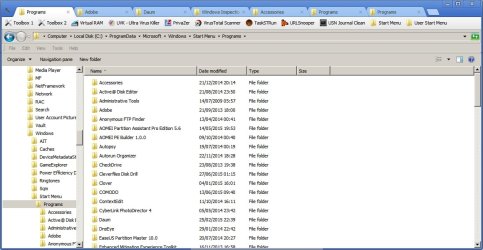
Examples from my machine:

Tabbed and bookmarked browsing of Start Menu with multiple windows.

Clover.jpg

Explorer++ [Administrators].jpg

I use several (portable) Explorer replacements. I will post back with a proper reply to your question if I ever find a way of doing what you ask. [Customize Start Menu so that it remains open]
 

My Computer My Computer

Computer type
Laptop
Computer Manufacturer/Model Number
ASUS
OS
Microsoft Windows 7 Home Premium 64-bit 7601 Multiprocessor Free Service Pack 1
CPU
AMD C-60 APU with Radeon(tm) HD Graphics
Motherboard
ASUSTeK COMPUTER INC. X501U
Memory
4.00 GB
Graphics Card(s)
AMD Radeon HD 6290 Graphics
Sound Card
(1) AMD High Definition Audio Device (2) Realtek High Defi
Screen Resolution
1366 x 768 x 32 bits (4294967296 colors) @ 60 Hz
Hard Drives
Hitachi HTS545050A7E380 SATA Disk Device
Antivirus
Comodo CIS & FW, SecureAplus App Whitelisting, Threatfire
Browser
Cyberfox 64bit, Opera 64bit, Airfox
Other Info
Spy-The-Spy, HitmanPro.Alert, Norton Connect Safe, MJRegWatcher, BitDefender TrafficLight, Voodoo Shield, Zemana AntiMalware
Back
Top