Task Scheduler: running skipped task when it shouldn't?

AndreyT

New member
Member
Local time
6:31 AM
Messages
14
I have a secondary computer in the network, which is supposed to stay in sleep mode most of the time. I always wake it up when necessary and put it back to sleep when it is no longer needed. I don't want it to fall asleep by itself during the day, so I set the sleep time to "Never" in Power Settings. However, I want it to automatically fall asleep at 9PM (if at the time it is not sleeping already).

So, in order to satisfy these requirements I created a .bat file containing the following line

Code:
%windir%\System32\rundll32.exe powrprof.dll,SetSuspendState Standby

and I added that .bat file to Task Scheduler, asking it to run it every evening at 9PM. I made sure that "Wake the computer to run this task" flag is cleared. I also made sure that "Run task as soon as possible after a scheduled start is missed" flag is also cleared.

However, the next morning when I come to that computer and wake it up for the first time, it wakes up and then immediately falls asleep again. Then I wake it up again and it stays on. Looking into the Task Scheduler reveals that Task Scheduler actually decides to run this task immediately after I wake up the computer, thus putting it back to sleep.

Why does this happen? I believe my set of settings is telling Task Scheduler not to try to run this task if the original scheduled time (9PM) is missed. Why then does it attempt to run it when I wake the computer the next morning? What else do I need to specify to make Task Scheduler to quietly ignore missed attempts to run this task?
 

My Computer

Computer type
PC/Desktop
OS
Windows 7 Pro x64
Hey there AndreyT,

It isn't immediately obvious to what the problem could be. It would help if we could see all the configurations of this task you've made, allowing us to create a similar task ourselves and report back a possible solution.

Would you care to open a PowerShell session and enter the lines below in sequence,
Code:
$TskSch = New-Object -ComObject Schedule.Service;
$TskSch.Connect()
$TskSch.GetFolder('\').GetTasks(1) | ?{$_.Name -match '[COLOR="Red"]taskname[/COLOR]'}
substituting taskname with the name of the task in question, and censoring any information you don't wish to reveal. Post the command's output here.
 

My Computer

Computer type
PC/Desktop
OS
Windows 10, Windows 8.1 Pro, Windows 7 Professional, OS X El Capitan
Why not set it to hibernate then perform the sleep operation as and when required.

Roy
 

My Computer

Computer type
PC/Desktop
Computer Manufacturer/Model Number
medionl/Aspire 6930G/acer x55a
OS
W7 home premium 32bit/W7HP 64bit/w10 tp insider ring
CPU
E5300 dual core
Motherboard
medion MS7366
Memory
3gb
Graphics Card(s)
Nvidia Geforce 7100 Nforce 630i
Monitor(s) Displays
avixc
Internet Speed
n (isp resticted to 72)
Antivirus
mse/pands
Browser
palemoon
Other Info
Belkin Fd7050 n USB using Railink RT2870 drivers, more upto date
Why not set it to hibernate then perform the sleep operation as and when required.

Well, firstly, I don't see why I would want to consider Hibernate. I don't see any purpose in Hibernate besides being a "last resort" measure for sleeping battery-powered laptops that are about to run out of battery. (In fact, this is really what Hibernate is for.) In my case it is a desktop system constantly connected to AC power. So I use Sleep as a natural way to quickly "suspend"/"unsuspend" the system. Hibernate would simply make the whole thing a lot slower, which I do not want to tolerate.

Secondly, is there any reason you think that Hibernate will behave differently in the context of the question? Meaning, a Task Scheduler-initiated Hibernate won't force the computer back to sleep when I wake it up next morning?
 

My Computer

Computer type
PC/Desktop
OS
Windows 7 Pro x64
Hibernate is a >>>faster<<< start up than sleep, its not purely for battery saving.
secondly it would remove any conflict in your Bat file operation, which uses the sleep option.

Roy
 

My Computer

Computer type
PC/Desktop
Computer Manufacturer/Model Number
medionl/Aspire 6930G/acer x55a
OS
W7 home premium 32bit/W7HP 64bit/w10 tp insider ring
CPU
E5300 dual core
Motherboard
medion MS7366
Memory
3gb
Graphics Card(s)
Nvidia Geforce 7100 Nforce 630i
Monitor(s) Displays
avixc
Internet Speed
n (isp resticted to 72)
Antivirus
mse/pands
Browser
palemoon
Other Info
Belkin Fd7050 n USB using Railink RT2870 drivers, more upto date
Hibernate is a >>>faster<<< start up than sleep, its not purely for battery saving.
secondly it would remove any conflict in your Bat file operation, which uses the sleep option.

Er... What? No. Startup from Hibernate is significantly slower than startup than Sleep. And "significantly" means an order of magnitude slower. It is not even remotely comparable.

Startup from Sleep is almost instant. Startup from Hibernate requres a full-blown regular power up and boot sequence.

Which is, again, why Hibernate is normally excluded from the menus by default. It has no uses aside from what I mentioned before.

That is unless you are talking about some unorthodox Hibernate.
 

My Computer

Computer type
PC/Desktop
OS
Windows 7 Pro x64
Hibernate is a >>>faster<<< start up than sleep, its not purely for battery saving.
secondly it would remove any conflict in your Bat file operation, which uses the sleep option.

Roy

Roy, are you confusing hibernate with hybrid sleep?
Hibernate does take longer to power up than hybrid sleep.
Hybrid is almost instant and opens the logon screen straight away. Hibernate has to power up past the BIOS and post screen as it's the lowest power state.

Hibernate is designed more for laptops to save battery, although it can be used on desktops too.
 

My Computer

Computer type
PC/Desktop
Computer Manufacturer/Model Number
Custom Build
OS
Win 7 Ultimate, Win 8.1 Pro, Linux Mint 19 Cinnamon (All 64-Bit)
CPU
Intel i5 4690K
Motherboard
Gigabyte Z97X-UD3H
Memory
Corsair Vengeance LP 32GB DDR3
Graphics Card(s)
MSI GTX 1060 GAMING X 6GB
Sound Card
Onboard
Hard Drives
Samsung 850 EVO 250GB SSD (x2)
Samsung 860 EVO 1TB SSD (x2)
Crucial MX300 525GB SSD
WD Blue 2TB 5400rpm Intellipark Disabled (x2)
PSU
Corsair HX750i
Case
Phanteks Enthoo Pro
Cooling
CM Hyper 212 EVO on CPU, Noctua Redux NF-P14S 1500rpm (x6)
Keyboard
Corsair K70 RGB LUX
Mouse
Corsair Sabre RGB
Antivirus
Avast Free, MalwareBytes, SAS & CryptoPrevent
Browser
Chrome
Other Info
StarTech PEXESAT322I 2 Port PCI-E SATA Card
ASUS PCE-AC56 Dual-band AC1300 Wireless Card
Akasa FC.Six Manual Fan Controller
And a Partridge in a Pear Tree!
Hybrid sleep does a Sleep and Hibernate when the PC Sleeps.
- It saves the current Windows session in RAM for Sleep/Wakeup.
- It also saves the current Windows session in the hiberfil.sys file for Hibernate/Resume.

With Hybrid sleep:
- If the power goes out when the PC is Sleeping it can't wake from sleep, the Windows session in RAM is "lost".
- It will resume from hibernate.

I have desktops and use Hybrid sleep.
I've been using Hybrid Sleep since 2009 for W7, W8.x, and W10, and it works reliably for me.
There are various reasons i depend on hybrid sleep/hibernate such as:
Power goes out when the PC is sleeping, nearby electrical storms and i want to disconnect the power, i need to reset my KVM.

Startup for me:
- Wake from Sleep is fastest
- Resume from Hibernate is slower, if i did a manual hibernate
- Resume from hibernate is MUCH slower if i did a Sleep, power went out, and it resumed from hibernate using the hybrid sleep option

In all cases, it restores my Windows session correctly, with all programs/data working as i last used them.
 

My Computer

Computer type
PC/Desktop
Computer Manufacturer/Model Number
home built
OS
Multi-Boot W7_Pro_x64 W8.1_Pro_x64 W10_Pro_x64 +Linux_VMs +Chromium_VM
CPU
AMD Athlon II x4 620
Motherboard
Gigabyte GA-MA785G-UD3H
Memory
6GB GSkill DDR2 800
Graphics Card(s)
AMD 4670 GPU + AMD 4200 IGP
Sound Card
on board Realtek ALC889A
Monitor(s) Displays
RCA 40" LCD TV, Insignia 32" LCD TV, HP 15" LCD monitor
Screen Resolution
1680 x 1050
Hard Drives
OCZ Vertex 3 120GB,
Samsung F3 1TB (3),
Several others - WD, Seagate, Hitachi, ...
PSU
Corsair 500 W
Case
Rosewill mid tower
Cooling
CM 90mm rifle
Keyboard
Gyration wireless, Logitech wireless, Dell USB wired
Mouse
Gyration wireless, Logitech wireless, V7 USB wired
Internet Speed
Spectrum - 100Mbps D / 10Mbps U
Antivirus
Avast, MBAM3, EMET, WinPatrol
Browser
Pale Moon, Firefox, IE
Other Info
2 multi-boot PC's
Mainly HTPC/Office/Gen purpose (no gaming).
Trendnet USB KVM.
LG DVD burner/Blue Ray Player.
Tray system for removable SATA backup drives.

Not currently OCd, under-volted.
I use Hybrid sleep, rarely re-boot or shutdown.

Hauppauge HD-PVR, Avermedia PCIe TV Tuner, Hauppauge PCI TV Tuner.
Post the command's output here.

This is what I got from running the command sequence. (Note that `LastRunTime` is reported as `9:50:13 AM`, which is from my attempt to wake up the computer this morning.)

Code:
Name               : Sleep at 9pm
Path               : \Sleep at 9pm
State              : 3
Enabled            : True
LastRunTime        : 12/7/2015 9:50:13 AM
LastTaskResult     : 0
NumberOfMissedRuns : 0
NextRunTime        : 12/7/2015 9:00:00 PM
Definition         : System.__ComObject
Xml                : <?xml version="1.0" encoding="UTF-16"?>
                     <Task version="1.3" xmlns="http://schemas.microsoft.com/windows/2004/02/mit/task">
                       <RegistrationInfo>
                         <Date>2015-12-01T17:02:11.6578378</Date>
                         <Author>STAMP\andreyt</Author>
                       </RegistrationInfo>
                       <Triggers>
                         <CalendarTrigger>
                           <StartBoundary>2015-12-01T21:00:00</StartBoundary>
                           <Enabled>true</Enabled>
                           <ScheduleByDay>
                             <DaysInterval>1</DaysInterval>
                           </ScheduleByDay>
                         </CalendarTrigger>
                       </Triggers>
                       <Principals>
                         <Principal id="Author">
                           <RunLevel>LeastPrivilege</RunLevel>
                           <UserId>STAMP\andreyt</UserId>
                           <LogonType>InteractiveToken</LogonType>
                         </Principal>
                       </Principals>
                       <Settings>
                         <MultipleInstancesPolicy>IgnoreNew</MultipleInstancesPolicy>
                         <DisallowStartIfOnBatteries>false</DisallowStartIfOnBatteries>
                         <StopIfGoingOnBatteries>true</StopIfGoingOnBatteries>
                         <AllowHardTerminate>true</AllowHardTerminate>
                         <StartWhenAvailable>false</StartWhenAvailable>
                         <RunOnlyIfNetworkAvailable>false</RunOnlyIfNetworkAvailable>
                         <IdleSettings>
                           <StopOnIdleEnd>true</StopOnIdleEnd>
                           <RestartOnIdle>false</RestartOnIdle>
                         </IdleSettings>
                         <AllowStartOnDemand>true</AllowStartOnDemand>
                         <Enabled>true</Enabled>
                         <Hidden>false</Hidden>
                         <RunOnlyIfIdle>false</RunOnlyIfIdle>
                         <DisallowStartOnRemoteAppSession>false</DisallowStartOnRemoteAppSession>
                         <UseUnifiedSchedulingEngine>false</UseUnifiedSchedulingEngine>
                         <WakeToRun>false</WakeToRun>
                         <ExecutionTimeLimit>PT1H</ExecutionTimeLimit>
                         <Priority>7</Priority>
                       </Settings>
                       <Actions Context="Author">
                         <Exec>
                           <Command>C:\Utils\sleep.bat</Command>
                         </Exec>
                       </Actions>
                     </Task>
 

My Computer

Computer type
PC/Desktop
OS
Windows 7 Pro x64
AndreyT, I created a task similar to that of the task specifications you've posted, though I was unable to replicate the issue you describe; the task I made seemed to work just fine. I was, however, testing the task out with a Windows 8.1 laptop machine, so I didn't bother going too in-depth with this (as I believe the sleep and hibernate functions work slightly differently between desktops and laptops)...

Perhaps someone else with a machine setup closer to yours can confirm if the attached task behaves well, i.e., the task doesn't run upon turning the computer on after the trigger time (9am) has passed.
 

Attachments

Last edited:

My Computer

Computer type
PC/Desktop
OS
Windows 10, Windows 8.1 Pro, Windows 7 Professional, OS X El Capitan
One thing I forgot to mention, and which might prove to be important, is that I use Wake On Lan functionality to wake that computer. The behavior I described above takes place in response to a WoL magic packet. The computer wakes up and then immediately falls asleep again. The next WoL packet wakes it up permanently.

I'll try to wake it up using the power button and see it it makes a difference. It shouldn't... but who knows?
 

My Computer

Computer type
PC/Desktop
OS
Windows 7 Pro x64
However, the next morning when I come to that computer and wake it up for the first time, it wakes up and then immediately falls asleep again. Then I wake it up again and it stays on. Looking into the Task Scheduler reveals that Task Scheduler actually decides to run this task immediately after I wake up the computer, thus putting it back to sleep.
You are looking at the history for that task - correct?

Capture.PNG

Are the time stamps in the history for your task correct?

I'm grasping at straws here. I cannot fathom why your task would run once the time is missed - no matter how you wake the computer.
 

My Computer

Computer type
Laptop
Computer Manufacturer/Model Number
Employer provided Dell Latitude
OS
W7 Pro SP1 64bit
CPU
i7
Memory
8GB
Graphics Card(s)
Intel HD Graphics
Hard Drives
crappy SSD
Antivirus
Employer mandated Symantec Endpoint Protection
Browser
Pale Moon 64bit, IE11 64bit & Chrome 64bit
You are looking at the history for that task - correct?

I'm looking at the value in the "Last Run Time" column of Task Scheduler. Yes, for that specific task.

For some reason when I open task properties, the "History" tab is shown as "(disabled)". No history is shown. (It is the case for all other tasks in Task Scheduler as well).
 

My Computer

Computer type
PC/Desktop
OS
Windows 7 Pro x64
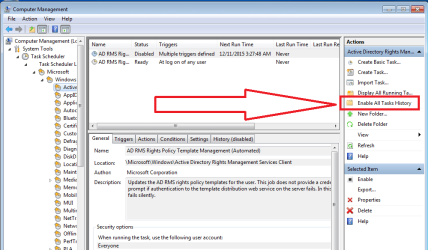
History is disabled by default.

Try selecting "Enable All Tasks History".

Capture.PNG
 

My Computer

Computer type
Laptop
Computer Manufacturer/Model Number
Employer provided Dell Latitude
OS
W7 Pro SP1 64bit
CPU
i7
Memory
8GB
Graphics Card(s)
Intel HD Graphics
Hard Drives
crappy SSD
Antivirus
Employer mandated Symantec Endpoint Protection
Browser
Pale Moon 64bit, IE11 64bit & Chrome 64bit
Enabled task history, put the computer to sleep yesterday (way before 9pm).
This morning I sent it a WoL command at 9:41am. It woke up and, as usual, went to sleep immediately after that. The next WoL command woke it up successfully.

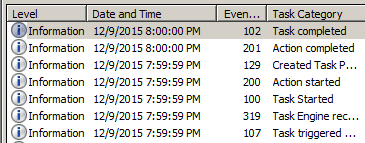
Here's the history. (As you can see, nothing new there. For some reason Task Scheduler believed that there was a "time trigger condition" for launching that task at 9:41am)
 

Attachments

  • TS.png
    TS.png
    26.9 KB · Views: 2

My Computer

Computer type
PC/Desktop
OS
Windows 7 Pro x64
I made sure that "Wake the computer to run this task" flag is cleared.
Change that setting so the PC does wake-up to run your task at 9 PM even if it is sleeping, and immediately goes back to sleep.
Then when you wake the PC in the morning see if it stays awake with the "first wake-up".
 

My Computer

Computer type
PC/Desktop
Computer Manufacturer/Model Number
home built
OS
Multi-Boot W7_Pro_x64 W8.1_Pro_x64 W10_Pro_x64 +Linux_VMs +Chromium_VM
CPU
AMD Athlon II x4 620
Motherboard
Gigabyte GA-MA785G-UD3H
Memory
6GB GSkill DDR2 800
Graphics Card(s)
AMD 4670 GPU + AMD 4200 IGP
Sound Card
on board Realtek ALC889A
Monitor(s) Displays
RCA 40" LCD TV, Insignia 32" LCD TV, HP 15" LCD monitor
Screen Resolution
1680 x 1050
Hard Drives
OCZ Vertex 3 120GB,
Samsung F3 1TB (3),
Several others - WD, Seagate, Hitachi, ...
PSU
Corsair 500 W
Case
Rosewill mid tower
Cooling
CM 90mm rifle
Keyboard
Gyration wireless, Logitech wireless, Dell USB wired
Mouse
Gyration wireless, Logitech wireless, V7 USB wired
Internet Speed
Spectrum - 100Mbps D / 10Mbps U
Antivirus
Avast, MBAM3, EMET, WinPatrol
Browser
Pale Moon, Firefox, IE
Other Info
2 multi-boot PC's
Mainly HTPC/Office/Gen purpose (no gaming).
Trendnet USB KVM.
LG DVD burner/Blue Ray Player.
Tray system for removable SATA backup drives.

Not currently OCd, under-volted.
I use Hybrid sleep, rarely re-boot or shutdown.

Hauppauge HD-PVR, Avermedia PCIe TV Tuner, Hauppauge PCI TV Tuner.
Back
Top