Hello:
I have Windows 7 Ultimate, 64-bit.
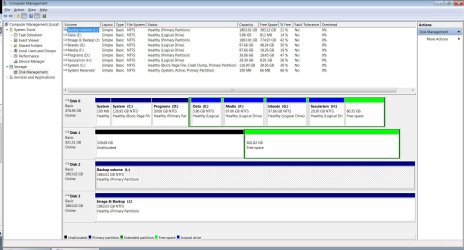
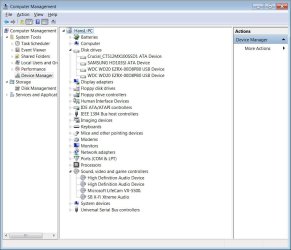
I do not know when my dvd/cd drive disappeared, but it has. It is not shown in Disk Management. However, it works insofar as that I can boot from it with a boot disk. I cannot run disks in it.
Disk Manager shows drives C-H (SSD), J (ext), L (ext) and Z (mapped drive of other computer), but not my DVD/CD drive.
What can I do to get the DVD/CD (optical) disk to show? (I seem to remember , way back, that you had to make sure drive letters were activated. Don't know how these days; have looked!)
Thanks in advance.
Hans L
I have Windows 7 Ultimate, 64-bit.
I do not know when my dvd/cd drive disappeared, but it has. It is not shown in Disk Management. However, it works insofar as that I can boot from it with a boot disk. I cannot run disks in it.
Disk Manager shows drives C-H (SSD), J (ext), L (ext) and Z (mapped drive of other computer), but not my DVD/CD drive.
What can I do to get the DVD/CD (optical) disk to show? (I seem to remember , way back, that you had to make sure drive letters were activated. Don't know how these days; have looked!)
Thanks in advance.
Hans L
My Computer
At a glance
Windows 7 UltimateIntel Core Duo E6600 @ 2.40 GHz3 GBNvidia eVGA GeForce 8600 GTS & 7600 GT
- Computer Manufacturer/Model Number
- BIOS American MegaTrend 1238
- OS
- Windows 7 Ultimate
- CPU
- Intel Core Duo E6600 @ 2.40 GHz
- Motherboard
- ASUS P5B-Deluxe
- Memory
- 3 GB
- Graphics Card(s)
- Nvidia eVGA GeForce 8600 GTS & 7600 GT
- Monitor(s) Displays
- Iiyama PLE431S/PLH431S