WD My Book Not initialized / Unallocated

DeadlyKnight

New member
Local time
2:47 PM
Messages
35
Greetings, I will cut right down to the issue at hand seeing that I've spent two hours on this so far and no luck. The drive worked perfectly yesterday. It might of been connected through the USB port when I had an error screen (blue screen) about my SD port and then the system restarted itself. I guess the external HD failure could come from this. At the same time, even the active torrents I had, on my internal HD with no link to my external one, got deleted from Utorrent.

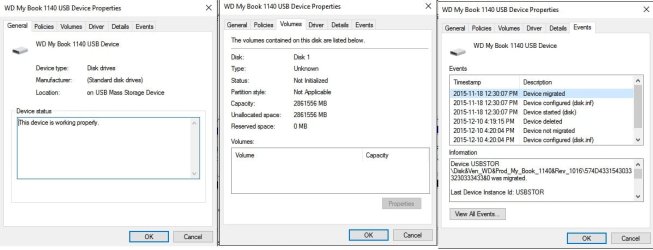
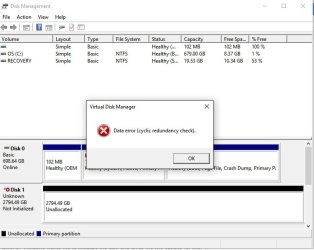
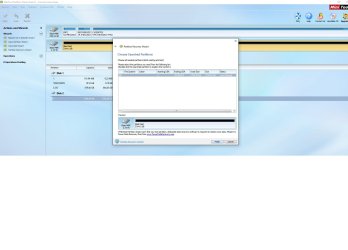
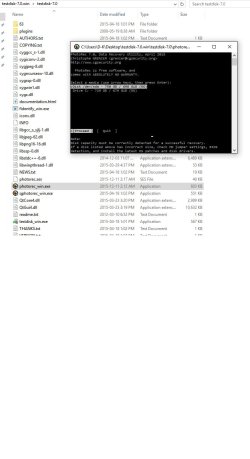
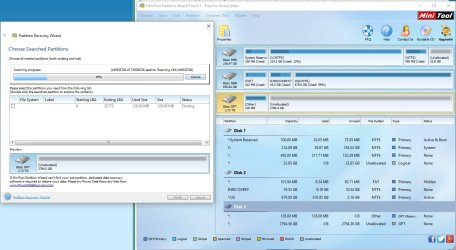
I have followed Jumanji steps from another thread regarding the MiniTool Partition Wizard as well as TestDisk. TestDisk does not list Mybook in the drives list nor does chkdsk command. Here are the screenshots. Any help would be appreciated. Thank you!
 

Attachments

  • My Book Properties.jpg
    My Book Properties.jpg
    64.3 KB · Views: 6
  • Disk Management- 1.jpg
    Disk Management- 1.jpg
    42.4 KB · Views: 2
  • MiniTool Partition Wizard - 1.jpg
    MiniTool Partition Wizard - 1.jpg
    114.7 KB · Views: 7
  • MiniTool Partition Wizard - 2.jpg
    MiniTool Partition Wizard - 2.jpg
    57.8 KB · Views: 1
  • Testdisk - 2.jpg
    Testdisk - 2.jpg
    67.4 KB · Views: 5

My Computer My Computer

Computer type
PC/Desktop
Computer Manufacturer/Model Number
Dell
OS
Windows 10 Pro X64
CPU
Intel Core i7-2670QM @ 2.20GHz
Memory
16 GB
Browser
Chrome
Hello DeadlyKnight and I am sorry to hear about the My Book! :/

Unfortunately, if the drive was connected to the system in the moment of the BSOD happening, it really could be a good enough reason for the drive's state now. The Cyclic redundancy check normally occurs because of damaged or faulty drives.

Additionally, the MiniTool software shows the drive as “Bad disk”. So retrieving the data may be hard for home environment. You could try booting a Linux-based Live CD and checking if the drive is there and accessible.

http://www.sevenforums.com/tutorials/256518-peppermint-live-cd-dvd-usb-create-emergency-backup.html

Otherwise, you may have to turn to professional data recovery help, if you need the data from the drive. :/ WD has partners in the field:

Support Answers

Last thing you could try on your own is to try and fix the CRC error, but it could also be not possible. This tutorial may help you:

How to Fix a Cyclic Redundancy Check Error: 8 Steps

Best of luck and post back!

CK_WD
 

My Computer My Computer

Computer type
PC/Desktop
OS
Windows 7 Home Premium x64
Hello! Sorry for the late reply. Computer stopped working entirely when I did a reboot as my main internal hard drive became unstable as well. I decided to finally install my Samsung 850 Pro SSD that I bought at Black Friday in 2014. Did the tweaks and all, installed Win 7, then Win 10 x64. Now, I'm back online but with two bad discs. It is essential that I salvage everything from my internal HD. My external one, if nothing works, I will need to format it. 3TB of data will be sad to lose, but less than losing the drive.

I refuse to think I have no other options than to format both drives. I will keep trying to retrieve the data and be back here with the end results. Thanks for trying to help.

As for:

How to Fix a Cyclic Redundancy Check Error: 8 Steps

I can't do that as my bad discs have no letters attached to them as it can be seen in the pictures
 

Attachments

  • Untitled.jpg
    Untitled.jpg
    130.1 KB · Views: 7

My Computer My Computer

Computer type
PC/Desktop
Computer Manufacturer/Model Number
Dell
OS
Windows 10 Pro X64
CPU
Intel Core i7-2670QM @ 2.20GHz
Memory
16 GB
Browser
Chrome
Just one question for I am confused now. :)

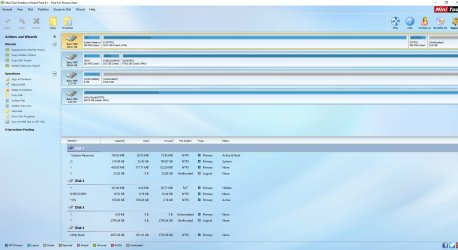
Your 3 TB external drive shows as an MBR BAD Disk in one shot and ReadOnly BAD Disk in the other PW screenshot in post #1. Now with the new Win10x64 on the SSD, the same PW shows your 3 TB external drive as a GPT drive with a 128MB MSR partition and and the rest unallocated in post#3. Did you format the 3TB external drive as a GPT drive?
 

My Computer My Computer

OS
Windows 7 Home Premium 32 bit
Just one question for I am confused now. :)

Your 3 TB external drive shows as an MBR BAD Disk in one shot and ReadOnly BAD Disk in the other PW screenshot in post #1. Now with the new Win10x64 on the SSD, the same PW shows your 3 TB external drive as a GPT drive with a 128MB MSR partition and and the rest unallocated in post#3. Did you format the 3TB external drive as a GPT drive?

I first tried to initialize the disk using the first option which failed and gave me a cycle redundancy error, then tried the second option and it worked. Disc was now online and initialized. However, this hasn't changed anything at all.

Both bad discs are not formatted in any way. All the data is still present, just inaccessible.
 

My Computer My Computer

Computer type
PC/Desktop
Computer Manufacturer/Model Number
Dell
OS
Windows 10 Pro X64
CPU
Intel Core i7-2670QM @ 2.20GHz
Memory
16 GB
Browser
Chrome
You might have to try either Stellar or R-Studio. Not free, but, one of those two might help you recover whatever is recoverable.
 

My Computer My Computer

Computer type
PC/Desktop
Computer Manufacturer/Model Number
Antec desktop; Acer Aspire laptops
OS
Windows 7 Professional 64-bit
CPU
Desktop i5; Acers i5 & i7
Memory
desktop 16GB; 1 Acer 8GB & 1 Acer 16GB
Hard Drives
1TB split into 2 equal partitions [OS and data] usable by RJS
Internet Speed
AT&T DSL
Browser
FF, GChrome, msIE
Other Info
Windows 7 Firewall, Emsisoft AM/AV, MSE [scan-only], SpywareBlaster, Ruiware/BillP combine
You might have to try either Stellar or R-Studio. Not free, but, one of those two might help you recover whatever is recoverable.

Will try! Thanks
 

My Computer My Computer

Computer type
PC/Desktop
Computer Manufacturer/Model Number
Dell
OS
Windows 10 Pro X64
CPU
Intel Core i7-2670QM @ 2.20GHz
Memory
16 GB
Browser
Chrome
Before trying any other software, please download the trial version of GetDataBack Simple, https://www.runtime.org/data-recovery-software.htm scan your drives and check whether you can see all the data. We have had many success stories with that. If it shows your data you can also preview and determine whether all your data is intact.
 

My Computer My Computer

OS
Windows 7 Home Premium 32 bit
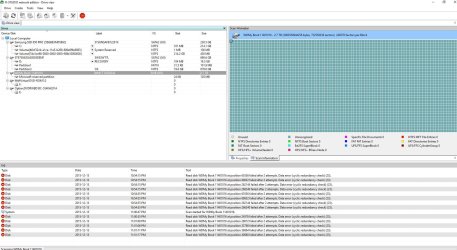
I'm trying R-Studio but it seems the drive keeps suffering from 'cyclic redundancy check'.
 

Attachments

  • Untitled1.jpg
    Untitled1.jpg
    258.9 KB · Views: 7

My Computer My Computer

Computer type
PC/Desktop
Computer Manufacturer/Model Number
Dell
OS
Windows 10 Pro X64
CPU
Intel Core i7-2670QM @ 2.20GHz
Memory
16 GB
Browser
Chrome

My Computer My Computer

Computer type
PC/Desktop
Computer Manufacturer/Model Number
Dell
OS
Windows 10 Pro X64
CPU
Intel Core i7-2670QM @ 2.20GHz
Memory
16 GB
Browser
Chrome
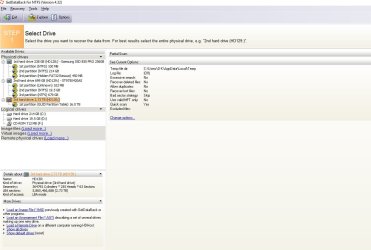
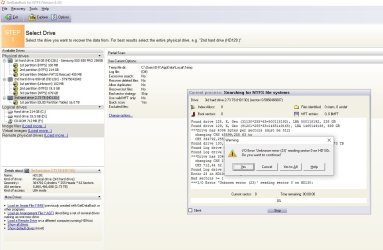
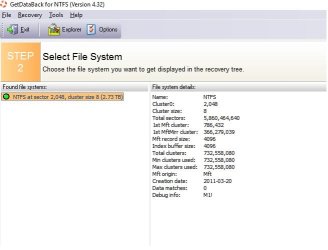
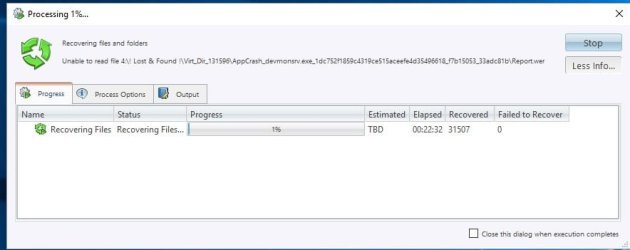
This is with GetDataBack. Will update when the scan finishes up.
 

Attachments

  • Untitled3.jpg
    Untitled3.jpg
    79.5 KB · Views: 2
  • Untitled4.jpg
    Untitled4.jpg
    124.8 KB · Views: 3
  • Untitled5.jpg
    Untitled5.jpg
    29.7 KB · Views: 23

My Computer My Computer

Computer type
PC/Desktop
Computer Manufacturer/Model Number
Dell
OS
Windows 10 Pro X64
CPU
Intel Core i7-2670QM @ 2.20GHz
Memory
16 GB
Browser
Chrome
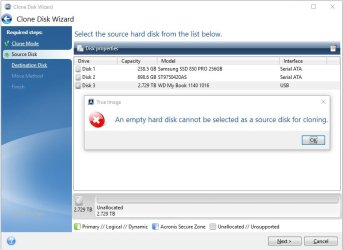
Meanwhile, with True Acronis Clone Disk, this is what I am getting off my 3TB external hard drive. I know it's not empty!! 3TB of data just can't disappear.
 

Attachments

  • Untitled6.jpg
    Untitled6.jpg
    46.2 KB · Views: 0

My Computer My Computer

Computer type
PC/Desktop
Computer Manufacturer/Model Number
Dell
OS
Windows 10 Pro X64
CPU
Intel Core i7-2670QM @ 2.20GHz
Memory
16 GB
Browser
Chrome
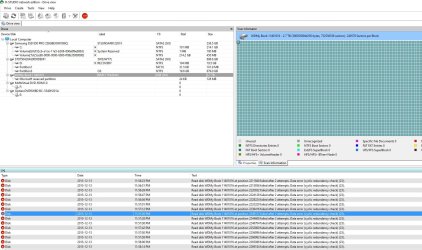
R-Studio update: error after error
 

Attachments

  • Untitled7.jpg
    Untitled7.jpg
    242.9 KB · Views: 1

My Computer My Computer

Computer type
PC/Desktop
Computer Manufacturer/Model Number
Dell
OS
Windows 10 Pro X64
CPU
Intel Core i7-2670QM @ 2.20GHz
Memory
16 GB
Browser
Chrome
I have converted back the external hard drive to MBR, successfully.
 

Attachments

  • Untitled8.jpg
    Untitled8.jpg
    92.7 KB · Views: 3

My Computer My Computer

Computer type
PC/Desktop
Computer Manufacturer/Model Number
Dell
OS
Windows 10 Pro X64
CPU
Intel Core i7-2670QM @ 2.20GHz
Memory
16 GB
Browser
Chrome
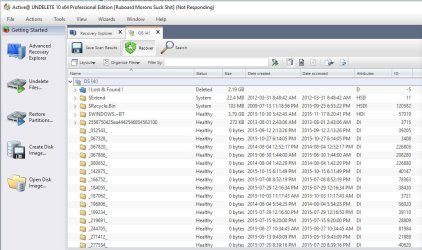
Active Data Studio was able to find every files in my internal hard drive. Nothing has been lost.
 

Attachments

  • Untitled9.jpg
    Untitled9.jpg
    99.8 KB · Views: 2

My Computer My Computer

Computer type
PC/Desktop
Computer Manufacturer/Model Number
Dell
OS
Windows 10 Pro X64
CPU
Intel Core i7-2670QM @ 2.20GHz
Memory
16 GB
Browser
Chrome
I will come back later on today and update you on the scan results from various software. Thanks again.
 

My Computer My Computer

Computer type
PC/Desktop
Computer Manufacturer/Model Number
Dell
OS
Windows 10 Pro X64
CPU
Intel Core i7-2670QM @ 2.20GHz
Memory
16 GB
Browser
Chrome
UPDATE: I am currently recovering my internal hard drive with Active Data Studio. Had issues with a brand new external hard drive I had just connected as well. However, I only had to assign it a letter for it to appear under 'My computer'.
 

Attachments

  • Untitled11.jpg
    Untitled11.jpg
    24.8 KB · Views: 1
Last edited:

My Computer My Computer

Computer type
PC/Desktop
Computer Manufacturer/Model Number
Dell
OS
Windows 10 Pro X64
CPU
Intel Core i7-2670QM @ 2.20GHz
Memory
16 GB
Browser
Chrome
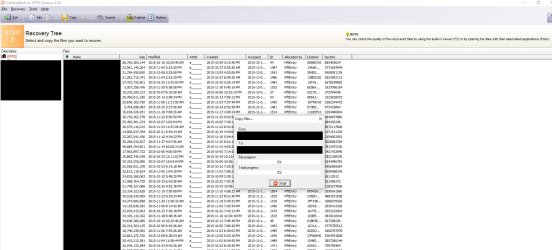
UPDATE: GetDataBack shows promise! 3TB worth of files are being transferred to a 5TB external HD.
 

Attachments

  • Untitled10.jpg
    Untitled10.jpg
    178 KB · Views: 4

My Computer My Computer

Computer type
PC/Desktop
Computer Manufacturer/Model Number
Dell
OS
Windows 10 Pro X64
CPU
Intel Core i7-2670QM @ 2.20GHz
Memory
16 GB
Browser
Chrome
Yes sir, you actually made a mistake converting your 3TB external drive- rather initialsing it - as a GPT drive.

Older external drives larger than 2TB use advanced formatting with logical sector size of 4096. Those are initialised as MBR drives and a drive translation circuitry in the SATA to USB bridge inside the enclosure converts the 4096byte sector size data to 512 byte sector size data and presents it in the OS readable form..

Because MBR at sector 0 was already there Windows refused to initialise it as MBR again. By initialising it as a GPT drive you have overwritten the original MBR with the protective MBR of a GPT drive. Fortunately initialising the drive as an MBR or GPT, writes only some initialisation data to a specific handful of sectors. As long as you do not create new volumes and format it either way - either as an MBR drive or a GPT drive - all your data will still be there but you have only made the data recovery a little difficult.

I just wanted to see what Getdataback tells you. Now that you have converted the GPT drive back to MBR - which I would have proposed if Getdataback was not successful with the drive initialised as GPT - let us see whether it can present all the files. If done, please preview the files and buy it only if all the files are intact.

Again you seem to have downloaded getdataback for NTFS instead of Getdataback simple as advised. Getdataback simple combines all other getdataback (NTFS and FAT) in one single entity.You seem to be doing things on your own at a faster pace than I could react - I am a slow couch :) - but with data recovery doing things blindly can prove to be disastrous and can make matters worse - just like your converting the MBR drive to GPT.

Anyway go ahead with Getdataback Simple again and see whether you can see all the files intact before buying it.

(Ignore these observations if you had already bought Getdataback or using a pirated version - anything is possible. :D)

( I also think with MBR written back, Testdisk should see your drive. If it does one should only select Intel/PC partition ( Not EFI/GPT) with this specific 3TB external and then go to Geometry and change the Sector size from 512 to 4096 for it to read the data from the drive.

Warning to those who read this post: Before you start/attempt data recovery on larger than 3TB external drives, you should, should, should know whether your drive is initialised as MBR drive or GPT drive. Be aware that older larger than 3TB drives came as MBR drives(4096 byte logical sector size) ( for compatibility with Windows XP). With support for Windows XP terminated, new larger than 2TB external drives come as a GPT drive.)

 

My Computer My Computer

OS
Windows 7 Home Premium 32 bit
Read your reply jumanji and will try to post the info you need by tomorrow. So far, the external drive went into sleep mode >_> and since I can't access it, I can't change its settings with WD software. Had to reboot it and restart the transfer. Only about 200 GB was transferred. By the looks of it, it will take a few days to copy the 3TB of data.

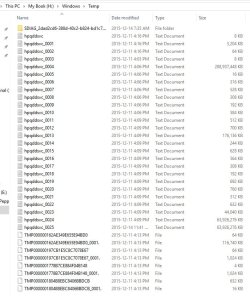
As for the internal drive, it went into error mode when it was at 97% transfer. I will be copying the rest as soon as I can. Gladly, I only have 679 GB to transfer from this one. However, I have no clue why it states that the drive has over 700 GB of data. The hard drive is a 700 GB one (679 GB). You can see in the picture some heavy log files!
 

Attachments

  • Untitled12.jpg
    Untitled12.jpg
    83.3 KB · Views: 1
  • Untitled13.jpg
    Untitled13.jpg
    146.4 KB · Views: 2

My Computer My Computer

Computer type
PC/Desktop
Computer Manufacturer/Model Number
Dell
OS
Windows 10 Pro X64
CPU
Intel Core i7-2670QM @ 2.20GHz
Memory
16 GB
Browser
Chrome
Back
Top