
No Sound With Realtek HD Audio Manager

Powerpuff Girls

New member
Local time
4:27 PM
Messages
32
Location
Townsville
I had it working last night, I had speakers hooked up, but I moved the computer to it's primary location, and it delivers sound via HDMI cable. When I went clicked on Realtek, it shows it was blank. It gave a message as to why, I forget what it was.

When I go sound, it shows that's it's working because I can see the green line moving up and down. I've tried connecting audio cables from the computer to the TV, which is what is used for monitor. It still didn't work.

I had did updates since last night, not sure if that had anything to do with it.

I have deleted the sound drivers, and tried to reinstall Realtek HD Audio Manager. The sound driver came back (still no sound). but Realtek HD Audio Manger did not come back. I noticed there were two listing under audio/sound. One had a triangle with an exclamation point in it.
 

My Computer My Computer

At a glance

Windows 7: Home Premium x64Intel Core i5-4670K 3.4GHz x4Kingston HyperX 8GB DDR3 @1600MHz x1Intel HD Graphics 4600 (Integrated)
Computer type
PC/Desktop
Computer Manufacturer/Model Number
Custom Build
OS
Windows 7: Home Premium x64
CPU
Intel Core i5-4670K 3.4GHz x4
Motherboard
ASUS Z87-K
Memory
Kingston HyperX 8GB DDR3 @1600MHz x1
Graphics Card(s)
Intel HD Graphics 4600 (Integrated)
Sound Card
Realtek® ALC887-VD HD Audio (Integrated)
Monitor(s) Displays
SAMSUNG 46" SmartTV
Screen Resolution
1600x900
Hard Drives
Silicon Power S60 120GB - Ubuntu 12.04 x64
Samsung 850 EVO 250GB SSD - Windows 7: Home Premium x64
Western Digital Caviar Black 1TB (7200PM/64MB Cache) - No OS
PSU
Xtreme 525
Cooling
Intel CPU Fan
Keyboard
Logitech K330 Combo
Mouse
Logitech K330 Combo
Internet Speed
Varies (WLAN Via High-Speed)
Antivirus
Emsisoft Anti-Malware
Browser
Mozilla Firefox 43.0
Other Info
WLAN: Penguin Wireless N USB Adapter for GNU / Linux (TPE-N150USB)
WLAN: Realtek RTL8187B 802.11B/G USB 2.0 (For Windows)
First, if you have HDMI connected, Windows automatically changes the default audio playback device to HDMI and there is no sound from the PC speakers. You have to manually change it to "Speakers". However, from your post the Realtek is no longer working.

First thing, post a screenshot of the Device Manager, Sound, Video and Game Controller section.
http://www.sevenforums.com/tutorials/9733-screenshots-files-upload-post-seven-forums.html
 

My Computer My Computer

At a glance

Windows 10 64 bitIntel i7 6700K16GB Corsair DominatorIntel CPU Graphics
Computer type
PC/Desktop
Computer Manufacturer/Model Number
My Own Build
OS
Windows 10 64 bit
CPU
Intel i7 6700K
Motherboard
ASUS ROG Maximus VIII Hero
Memory
16GB Corsair Dominator
Graphics Card(s)
Intel CPU Graphics
Sound Card
RealTek
Monitor(s) Displays
27" Dell S2719dgf
Screen Resolution
2560X1440
Hard Drives
1 TB Samsung 850 EVO SSD for Win 10 Pro
500GB Samsung 850 EVO SSD for Win 10 Insider
2 TB drive for backup
PSU
EVGA Supernova 750G2
Case
BeQuiet Silent Base 600
Cooling
Deepcool Captain 120EX
Keyboard
Microsoft Wireless 2000
Mouse
Microsoft wireless
Internet Speed
100 MB/sec (Cable)
Antivirus
Microsoft Defender and Malwarebytes
Browser
Edge/Firefox
Other Info
Cakewalk (Sonar) by BandLab and Studio One 4.1 Pro recording studio software. MOTU 896Mk3 Hybrid recording interface, Frontier Tranzport wireless control unit, Behringer X-Touch Control Surface.
Five USB connected optical drives for CD Audio production using Nero BurningROM
I've reinstalled the Realtek drivers, same as before except Realtek HD Audio Manager doesn't show empty.
Sound1.png

- Blossom
 

My Computer My Computer

At a glance

Windows 7: Home Premium x64Intel Core i5-4670K 3.4GHz x4Kingston HyperX 8GB DDR3 @1600MHz x1Intel HD Graphics 4600 (Integrated)
Computer type
PC/Desktop
Computer Manufacturer/Model Number
Custom Build
OS
Windows 7: Home Premium x64
CPU
Intel Core i5-4670K 3.4GHz x4
Motherboard
ASUS Z87-K
Memory
Kingston HyperX 8GB DDR3 @1600MHz x1
Graphics Card(s)
Intel HD Graphics 4600 (Integrated)
Sound Card
Realtek® ALC887-VD HD Audio (Integrated)
Monitor(s) Displays
SAMSUNG 46" SmartTV
Screen Resolution
1600x900
Hard Drives
Silicon Power S60 120GB - Ubuntu 12.04 x64
Samsung 850 EVO 250GB SSD - Windows 7: Home Premium x64
Western Digital Caviar Black 1TB (7200PM/64MB Cache) - No OS
PSU
Xtreme 525
Cooling
Intel CPU Fan
Keyboard
Logitech K330 Combo
Mouse
Logitech K330 Combo
Internet Speed
Varies (WLAN Via High-Speed)
Antivirus
Emsisoft Anti-Malware
Browser
Mozilla Firefox 43.0
Other Info
WLAN: Penguin Wireless N USB Adapter for GNU / Linux (TPE-N150USB)
WLAN: Realtek RTL8187B 802.11B/G USB 2.0 (For Windows)
The device manager shows errors for "Other Devices" and for the High Definition Audio Device.
The High Definition Audio Device, is a generic Windows installed driver and not the correct driver for probably the Intel HD Audio (for HDMI).

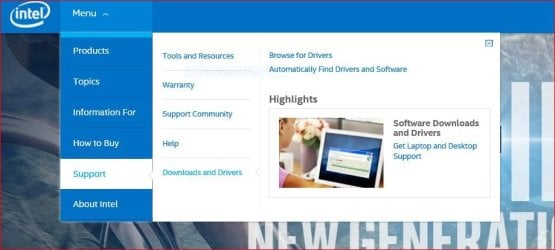
As there are more than one driver error, this suggests first thing to install is the Intel Motherboard Chipset drivers, and then the Intel Video drivers (which include HDMI Audio) for your i5. Go to Intel: Tablet, 2in1, Laptop, Desktop, Smartphone, Server, Embedded and click on Support/Downloads and Drivers and fintally Automatically Find Drivers and Software. You will need to install a small utility program to do this. This should get you the latest chipset driver, CPU Video drivers and if there are any other Intel devices for those too.

The chipset drivers are critical, as they define (identify) all the devices on the motherboard.

I have two Nova Scotia "snowbird" friends down here in Florida right now.

See this from the Intel site.
 

Attachments

  • Capture.JPG
    Capture.JPG
    52.1 KB · Views: 1

My Computer My Computer

At a glance

Windows 10 64 bitIntel i7 6700K16GB Corsair DominatorIntel CPU Graphics
Computer type
PC/Desktop
Computer Manufacturer/Model Number
My Own Build
OS
Windows 10 64 bit
CPU
Intel i7 6700K
Motherboard
ASUS ROG Maximus VIII Hero
Memory
16GB Corsair Dominator
Graphics Card(s)
Intel CPU Graphics
Sound Card
RealTek
Monitor(s) Displays
27" Dell S2719dgf
Screen Resolution
2560X1440
Hard Drives
1 TB Samsung 850 EVO SSD for Win 10 Pro
500GB Samsung 850 EVO SSD for Win 10 Insider
2 TB drive for backup
PSU
EVGA Supernova 750G2
Case
BeQuiet Silent Base 600
Cooling
Deepcool Captain 120EX
Keyboard
Microsoft Wireless 2000
Mouse
Microsoft wireless
Internet Speed
100 MB/sec (Cable)
Antivirus
Microsoft Defender and Malwarebytes
Browser
Edge/Firefox
Other Info
Cakewalk (Sonar) by BandLab and Studio One 4.1 Pro recording studio software. MOTU 896Mk3 Hybrid recording interface, Frontier Tranzport wireless control unit, Behringer X-Touch Control Surface.
Five USB connected optical drives for CD Audio production using Nero BurningROM
The device manager shows errors for "Other Devices" and for the High Definition Audio Device.
The High Definition Audio Device, is a generic Windows installed driver and not the correct driver for probably the Intel HD Audio (for HDMI).

As there are more than one driver error, this suggests first thing to install is the Intel Motherboard Chipset drivers, and then the Intel Video drivers (which include HDMI Audio) for your i5. Go to Intel: Tablet, 2in1, Laptop, Desktop, Smartphone, Server, Embedded and click on Support/Downloads and Drivers and fintally Automatically Find Drivers and Software. You will need to install a small utility program to do this. This should get you the latest chipset driver, CPU Video drivers and if there are any other Intel devices for those too.

The chipset drivers are critical, as they define (identify) all the devices on the motherboard.

I have two Nova Scotia "snowbird" friends down here in Florida right now.

See this from the Intel site.

I am doing this now, thanks. Should I uninstall the other drivers first or will this program take care of it?

- Blossom
 

My Computer My Computer

At a glance

Windows 7: Home Premium x64Intel Core i5-4670K 3.4GHz x4Kingston HyperX 8GB DDR3 @1600MHz x1Intel HD Graphics 4600 (Integrated)
Computer type
PC/Desktop
Computer Manufacturer/Model Number
Custom Build
OS
Windows 7: Home Premium x64
CPU
Intel Core i5-4670K 3.4GHz x4
Motherboard
ASUS Z87-K
Memory
Kingston HyperX 8GB DDR3 @1600MHz x1
Graphics Card(s)
Intel HD Graphics 4600 (Integrated)
Sound Card
Realtek® ALC887-VD HD Audio (Integrated)
Monitor(s) Displays
SAMSUNG 46" SmartTV
Screen Resolution
1600x900
Hard Drives
Silicon Power S60 120GB - Ubuntu 12.04 x64
Samsung 850 EVO 250GB SSD - Windows 7: Home Premium x64
Western Digital Caviar Black 1TB (7200PM/64MB Cache) - No OS
PSU
Xtreme 525
Cooling
Intel CPU Fan
Keyboard
Logitech K330 Combo
Mouse
Logitech K330 Combo
Internet Speed
Varies (WLAN Via High-Speed)
Antivirus
Emsisoft Anti-Malware
Browser
Mozilla Firefox 43.0
Other Info
WLAN: Penguin Wireless N USB Adapter for GNU / Linux (TPE-N150USB)
WLAN: Realtek RTL8187B 802.11B/G USB 2.0 (For Windows)
The chipset and video drivers will overwrite (replace) whatever is there now.
After the Intel install, reboot the PC then reinstall the Realtek drivers again.
 

My Computer My Computer

At a glance

Windows 10 64 bitIntel i7 6700K16GB Corsair DominatorIntel CPU Graphics
Computer type
PC/Desktop
Computer Manufacturer/Model Number
My Own Build
OS
Windows 10 64 bit
CPU
Intel i7 6700K
Motherboard
ASUS ROG Maximus VIII Hero
Memory
16GB Corsair Dominator
Graphics Card(s)
Intel CPU Graphics
Sound Card
RealTek
Monitor(s) Displays
27" Dell S2719dgf
Screen Resolution
2560X1440
Hard Drives
1 TB Samsung 850 EVO SSD for Win 10 Pro
500GB Samsung 850 EVO SSD for Win 10 Insider
2 TB drive for backup
PSU
EVGA Supernova 750G2
Case
BeQuiet Silent Base 600
Cooling
Deepcool Captain 120EX
Keyboard
Microsoft Wireless 2000
Mouse
Microsoft wireless
Internet Speed
100 MB/sec (Cable)
Antivirus
Microsoft Defender and Malwarebytes
Browser
Edge/Firefox
Other Info
Cakewalk (Sonar) by BandLab and Studio One 4.1 Pro recording studio software. MOTU 896Mk3 Hybrid recording interface, Frontier Tranzport wireless control unit, Behringer X-Touch Control Surface.
Five USB connected optical drives for CD Audio production using Nero BurningROM
I did the Intel scan and there was nothing for new drivers, just 2 things in Old Drivers even though I have already installed the graphics driver from ASUS website from the Motherboard profile.

I've installed the Chipset and reinstalled the Graphics driver from ASUS website and then Realtek HD Audio from Realtek's website. The only thing I haven't yet did was install the audio drivers from ASUS website.

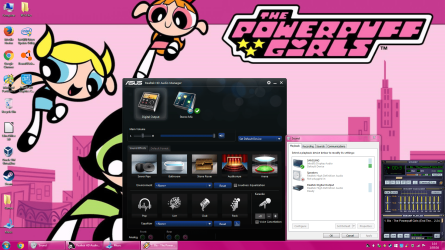
Update: I have removed the sound drivers and install the drivers from ASUS website. I got the Realtek HD Audio manager and the sound shows that it works, but I hear no sound like before. I also have 2 things under sound like in my first screenshot.

Update: I have tried plugging in red and white audio cables to the TV from the computer and still no sound, which is weird.

- Blossom
 
Last edited:

My Computer My Computer

At a glance

Windows 7: Home Premium x64Intel Core i5-4670K 3.4GHz x4Kingston HyperX 8GB DDR3 @1600MHz x1Intel HD Graphics 4600 (Integrated)
Computer type
PC/Desktop
Computer Manufacturer/Model Number
Custom Build
OS
Windows 7: Home Premium x64
CPU
Intel Core i5-4670K 3.4GHz x4
Motherboard
ASUS Z87-K
Memory
Kingston HyperX 8GB DDR3 @1600MHz x1
Graphics Card(s)
Intel HD Graphics 4600 (Integrated)
Sound Card
Realtek® ALC887-VD HD Audio (Integrated)
Monitor(s) Displays
SAMSUNG 46" SmartTV
Screen Resolution
1600x900
Hard Drives
Silicon Power S60 120GB - Ubuntu 12.04 x64
Samsung 850 EVO 250GB SSD - Windows 7: Home Premium x64
Western Digital Caviar Black 1TB (7200PM/64MB Cache) - No OS
PSU
Xtreme 525
Cooling
Intel CPU Fan
Keyboard
Logitech K330 Combo
Mouse
Logitech K330 Combo
Internet Speed
Varies (WLAN Via High-Speed)
Antivirus
Emsisoft Anti-Malware
Browser
Mozilla Firefox 43.0
Other Info
WLAN: Penguin Wireless N USB Adapter for GNU / Linux (TPE-N150USB)
WLAN: Realtek RTL8187B 802.11B/G USB 2.0 (For Windows)
I would then download and manually reinstall the chipset drivers. Seems like some devices are not being recognized by Windows. If the devices are legitimate, the chipset drivers should fix that (let them be recognized and drivers installed).

The one Nova Scotia snowbird friend is from Hubbards, just west of Halifax.
 

My Computer My Computer

At a glance

Windows 10 64 bitIntel i7 6700K16GB Corsair DominatorIntel CPU Graphics
Computer type
PC/Desktop
Computer Manufacturer/Model Number
My Own Build
OS
Windows 10 64 bit
CPU
Intel i7 6700K
Motherboard
ASUS ROG Maximus VIII Hero
Memory
16GB Corsair Dominator
Graphics Card(s)
Intel CPU Graphics
Sound Card
RealTek
Monitor(s) Displays
27" Dell S2719dgf
Screen Resolution
2560X1440
Hard Drives
1 TB Samsung 850 EVO SSD for Win 10 Pro
500GB Samsung 850 EVO SSD for Win 10 Insider
2 TB drive for backup
PSU
EVGA Supernova 750G2
Case
BeQuiet Silent Base 600
Cooling
Deepcool Captain 120EX
Keyboard
Microsoft Wireless 2000
Mouse
Microsoft wireless
Internet Speed
100 MB/sec (Cable)
Antivirus
Microsoft Defender and Malwarebytes
Browser
Edge/Firefox
Other Info
Cakewalk (Sonar) by BandLab and Studio One 4.1 Pro recording studio software. MOTU 896Mk3 Hybrid recording interface, Frontier Tranzport wireless control unit, Behringer X-Touch Control Surface.
Five USB connected optical drives for CD Audio production using Nero BurningROM
I got the problem half fixed. I was installing the drivers for the wrong motherboard. I forgot that I had switched motherboards, now I have switched them back.

I got sound, but the problem is that the sound profile is not working in Realtek HD Audio Manager. The sound is working only through "Samsung Speakers". When I select Realtek HD Audio, there is no sound. I somehow added a profile to Realtek HD Aidio Manager, but there is not sound effects in the profile like in the screenshot.
Sound3.png

- Blossom
 

My Computer My Computer

At a glance

Windows 7: Home Premium x64Intel Core i5-4670K 3.4GHz x4Kingston HyperX 8GB DDR3 @1600MHz x1Intel HD Graphics 4600 (Integrated)
Computer type
PC/Desktop
Computer Manufacturer/Model Number
Custom Build
OS
Windows 7: Home Premium x64
CPU
Intel Core i5-4670K 3.4GHz x4
Motherboard
ASUS Z87-K
Memory
Kingston HyperX 8GB DDR3 @1600MHz x1
Graphics Card(s)
Intel HD Graphics 4600 (Integrated)
Sound Card
Realtek® ALC887-VD HD Audio (Integrated)
Monitor(s) Displays
SAMSUNG 46" SmartTV
Screen Resolution
1600x900
Hard Drives
Silicon Power S60 120GB - Ubuntu 12.04 x64
Samsung 850 EVO 250GB SSD - Windows 7: Home Premium x64
Western Digital Caviar Black 1TB (7200PM/64MB Cache) - No OS
PSU
Xtreme 525
Cooling
Intel CPU Fan
Keyboard
Logitech K330 Combo
Mouse
Logitech K330 Combo
Internet Speed
Varies (WLAN Via High-Speed)
Antivirus
Emsisoft Anti-Malware
Browser
Mozilla Firefox 43.0
Other Info
WLAN: Penguin Wireless N USB Adapter for GNU / Linux (TPE-N150USB)
WLAN: Realtek RTL8187B 802.11B/G USB 2.0 (For Windows)
You are using HDMI for speakers and not the Realtek.
To use the Realtek you must have speakers connected to the PC's (Realtek) sound and then select the Speakers as the default audio playback device.

With an HDMI cable connected, Windows will automatically set the HDMI as the audio playback device.
 

My Computer My Computer

At a glance

Windows 10 64 bitIntel i7 6700K16GB Corsair DominatorIntel CPU Graphics
Computer type
PC/Desktop
Computer Manufacturer/Model Number
My Own Build
OS
Windows 10 64 bit
CPU
Intel i7 6700K
Motherboard
ASUS ROG Maximus VIII Hero
Memory
16GB Corsair Dominator
Graphics Card(s)
Intel CPU Graphics
Sound Card
RealTek
Monitor(s) Displays
27" Dell S2719dgf
Screen Resolution
2560X1440
Hard Drives
1 TB Samsung 850 EVO SSD for Win 10 Pro
500GB Samsung 850 EVO SSD for Win 10 Insider
2 TB drive for backup
PSU
EVGA Supernova 750G2
Case
BeQuiet Silent Base 600
Cooling
Deepcool Captain 120EX
Keyboard
Microsoft Wireless 2000
Mouse
Microsoft wireless
Internet Speed
100 MB/sec (Cable)
Antivirus
Microsoft Defender and Malwarebytes
Browser
Edge/Firefox
Other Info
Cakewalk (Sonar) by BandLab and Studio One 4.1 Pro recording studio software. MOTU 896Mk3 Hybrid recording interface, Frontier Tranzport wireless control unit, Behringer X-Touch Control Surface.
Five USB connected optical drives for CD Audio production using Nero BurningROM
Is there a work around? I've tried plugging to audio cables from my computer to the TV, but still no sound.

- Blossom
 

My Computer My Computer

At a glance

Windows 7: Home Premium x64Intel Core i5-4670K 3.4GHz x4Kingston HyperX 8GB DDR3 @1600MHz x1Intel HD Graphics 4600 (Integrated)
Computer type
PC/Desktop
Computer Manufacturer/Model Number
Custom Build
OS
Windows 7: Home Premium x64
CPU
Intel Core i5-4670K 3.4GHz x4
Motherboard
ASUS Z87-K
Memory
Kingston HyperX 8GB DDR3 @1600MHz x1
Graphics Card(s)
Intel HD Graphics 4600 (Integrated)
Sound Card
Realtek® ALC887-VD HD Audio (Integrated)
Monitor(s) Displays
SAMSUNG 46" SmartTV
Screen Resolution
1600x900
Hard Drives
Silicon Power S60 120GB - Ubuntu 12.04 x64
Samsung 850 EVO 250GB SSD - Windows 7: Home Premium x64
Western Digital Caviar Black 1TB (7200PM/64MB Cache) - No OS
PSU
Xtreme 525
Cooling
Intel CPU Fan
Keyboard
Logitech K330 Combo
Mouse
Logitech K330 Combo
Internet Speed
Varies (WLAN Via High-Speed)
Antivirus
Emsisoft Anti-Malware
Browser
Mozilla Firefox 43.0
Other Info
WLAN: Penguin Wireless N USB Adapter for GNU / Linux (TPE-N150USB)
WLAN: Realtek RTL8187B 802.11B/G USB 2.0 (For Windows)
Back
Top