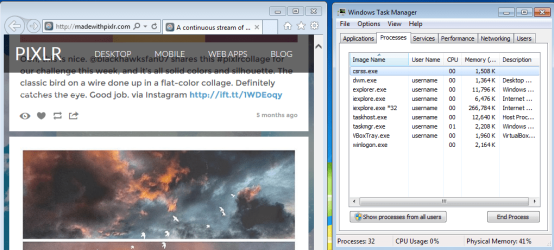
Multiple iexplore.exe *32 when opening Internet Explorer

Bluepoet3

New member
Local time
12:48 PM
Messages
1
Recently I have encountered an issue of one or more extra iexplore.exe *32 in my task manager window, that use high physical memory, when I open Internet Explorer. If I close the instance of IE I originally opened, they all will close as well. However if I browse on IE for a while, eventually the extra iexplore.exe *32 (single or multiples) get so high, that pages stop loading proper.

Things I have tried to fix the issue:

- Manually close the extra iexplore.exe *32 in the Task Manager. They immediately open again, and begin rising, unless I close the original IE I opened. Then they will all close.

-I have ran various virus scans including Malwarebytes, AVG, SUPERAntiSpyware, Spybot A&D, and Kaspersky. And even ran CCleaner after a scan with both Spybot and SUPERAntiSpyware.

-The problem, although primarily effecting IE, seems to go beyond. I attempted to browse through Google Chrome, and began getting multiple instances of it opening in the Task Manager window.

- At one point during my poking around the internet for a solution, someone had a similar issue, and it was recommended that they try temporarily disabling IE Add-ons, to see if it was the source of the problem. I tried this, and it did not correct the issue. In fact, I am pretty sure it reactivated the add-ons, without me having to go back in, and turn them back on.

As stated before, the main issue with this multiple iexplore.exe *32, is that it increases the Physical Memory to a point where pages will stop loading.

Any advice or assistance on this would be appreciated. I am a bit of a computer tech novice, but have been able to problem solve many issues over the years, with various computers, by just poking around, and researching online.

Thank you in advance.
CMJ
 

My Computer

Computer type
Laptop
OS
Windows 7 Home Premium
Hi and welcome to SevenForums,
If you have a ie11 icon pinned to your taskbar close all open windows.. and right click it and click on Start In-private browsing
See if the issue returns.
 

My Computer

Computer type
PC/Desktop
Computer Manufacturer/Model Number
Custom assembled by me :}
OS
Win-7-Pro64bit 7-H-Prem-64bit
CPU
i7-5930K 2nd i9-9940x both water blocked VRM's too
Motherboard
ASUS SABERTOOTH X99 2nd ASUS x299 Apex
Memory
Trident-z 3200C14 2nd Trident-z 3600C16
Graphics Card(s)
EVGA 1080ti ftw3 2nd Titan Xp both water blocked
Sound Card
Built-in Realtek
Monitor(s) Displays
1-AOC G2460PG 24"G-Sync 144Hz/ 2nd 1-ASUS VG248QE 24" 144Hz
Screen Resolution
1920 x 1080 144Hz
Hard Drives
2-Samsung M.2 Evo & Evo Plus
2-Samsung 850 EVO 500GB SSD's/ 3-2.5 W.D. Black 1tb-&3-1tb/3-3.5 WD Black 1tb hdd's
PSU
EVGA SuperNOVA 1000-P2 2nd 1200-P2
Case
2-Corsair Obsidian Series 450D Black ATX Mid Tower
Cooling
Custom water loops
Keyboard
Logitech G710+/ 2nd Logitech G910
Mouse
2-RedDragon M901 Perdition 16400 dpi Gaming mouse = wired
Internet Speed
Comcast Ping 19ms 89.31mbps download speed 6.12mbps upload
Antivirus
Malwarebytes Pro/ Superantispyware Pro
Browser
FireFox & Pale moon
Other Info
2nd ASUS X299 Apex/Intel i9-9940x with Custom water loop/7H-Prem-x64/Corsair 450D case/Ram Trident-z 3600C16 4x8gb / Samsung970Evo plus 500gb SSD/Dual ssd EZ swap evo/PSU EVGA SuperNova 1200w-P2 80+Platinum/GPU Titan Xp /8-ML-140 on push-pull on 2-280GTX rads
What you see is perfectly normal and expectable. It's a known design flaw intentionally put in IE to make it more "reliable". Fundamentally, the browser starts a new process for each tab and addin in order to keep them isolated from each other. As far as I know, there is no way to disable this "feature".
It's documented here: https://blogs.msdn.microsoft.com/ie/2008/07/28/ie8-and-reliability/

Since you also mention Chrome, it also has the very same feature, that works in a similar way. Google also has documented this here: Chromium Blog: Multi-process Architecture

Other browsers may or may not be subject to this abomination. Firefox, for example, does everything in a single process (except some particular plugin tasks). It's also not related to something particular in your computer, you just happened to try with 2 browsers flawed in the very same way.
 

My Computer

Computer type
Laptop
Computer Manufacturer/Model Number
Toshiba Sattelite A665-S6092
OS
Windows 7 Ultimate x64
CPU
Intel Core i7-740QM
Memory
8 GB DDR3
Graphics Card(s)
NVIDIA GeForce 330GT
Screen Resolution
1366x768
Hard Drives
Samsung 840 SSD 500GB
1TB USB3 external HD
Cooling
Coolermaster Notepal U3 notebook cooling pad
Internet Speed
3mbps ASDL
Antivirus
ClamWin 0.98.7
Browser
Opera 12.17 x86 (main), Firefox 38 (sec), IE11 (last resort)
What you see is perfectly normal and expectable. It's a known design flaw intentionally put in IE to make it more "reliable". Fundamentally, the browser starts a new process for each tab and addin in order to keep them isolated from each other. As far as I know, there is no way to disable this "feature".
It's documented here: https://blogs.msdn.microsoft.com/ie/2008/07/28/ie8-and-reliability/

Since you also mention Chrome, it also has the very same feature, that works in a similar way. Google also has documented this here: Chromium Blog: Multi-process Architecture

Other browsers may or may not be subject to this abomination. Firefox, for example, does everything in a single process (except some particular plugin tasks). It's also not related to something particular in your computer, you just happened to try with 2 browsers flawed in the very same way.
No, IE does not do that. Not even close.

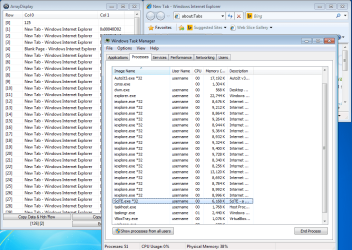
Here is a screenshot showing 120+ IE8 tabs open:

IE8.PNG

Do you see 120+ IE8 processes running?

Here is another post where I counter the same type of information about IE:
http://www.sevenforums.com/browsers...ndows-perform-screen-capture.html#post3174874

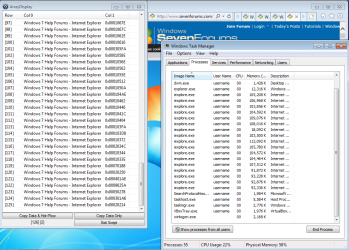
IE11 seems to only launch 16 children...
...no matter how many tabs are opened
...unless tabs crash and are recovered.

120+ IE11 tabs using 32bit children:

IE11--32bit-125.PNG

120+ IE11 tabs using 64bit children:

IE11--64bit-125.PNG

See this post and the tutorial above it to enable 64bit children.
edit: IE11 gets a bit wacky around 1100 64bit tabs on W7 with 4GB ram.


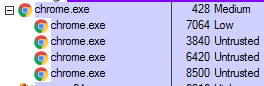
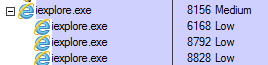
Chrome and IE use this as a security feature. The "children" present the websites to the user and they operate with fewer privileges.

chrome.PNG

IE11.PNG


Pale Moon (based on Firefox) uses the less secure - single process...

PM.PNG

...that runs at the Medium* integrity level.

*unless the user turns off the UAC - then Firefox runs at the extremely dangerous High integrity level. Chrome protects these users by using children that use "Untrusted" integrity levels - even with the UAC turned off.


We don't have enough info from the OP to say if the high memory usage is normal/expected. "High" is a very subjective term. Let's see what happens when the OP follows ThrashZone steps.
 
Last edited:

My Computer

Computer type
Laptop
Computer Manufacturer/Model Number
Employer provided Dell Latitude
OS
W7 Pro SP1 64bit
CPU
i7
Memory
8GB
Graphics Card(s)
Intel HD Graphics
Hard Drives
crappy SSD
Antivirus
Employer mandated Symantec Endpoint Protection
Browser
Pale Moon 64bit, IE11 64bit & Chrome 64bit
No, IE does not do that. Not even close.

Your own screenshots shows IE opening multiple processes. The fact that it limits itself to 16 is a nice thing, but it's an implementation detail anyway, it's not my intention to discuss the exact behavior (which I don't know in detail), just noting the general, relevant things.

What the OP says and what I've pointed out remains, IE (and Chrome) opens multiple processes, when only one is really needed.


Chrome and IE use this as a security feature. The "children" present the websites to the user and they operate with fewer privileges.

That's not the idea of the multiple processes. Security is irrelevant to each design, multiple processes don't provide any security benefit by themselves. What actually makes improvements is the low integrity thing, that some of them use. That's nice, but also flawed. If you look at your own screenshots, you'll see that the master process has still medium integrity, so that one remains at the same level as the rest of the computer.

Looking closer, you'll see that the windows are owned by that master process too. That implies that there is some communication from all others, so it knows what to draw to the screen and can direct user input. Problem with that is that this minimizes benefit of the low integrity, as still a medium integrity process is receiving data from an unreliable source, at least indirectly, effectively making IE very similar to the Firefox in that regard.
To get any protection from UAC you need to run the whole thing as low integrity (which has an impact on usability), be one or millions of processes.

The real usefulness of that whole design is to isolate addins. They are run in its own private memory space, so they can't corrupt the whole thing. They're threated as unsafe, since it's fundamentally third-party code.
Everything else in the multiprocess architecture are drawbacks, including higher system resources consumption, slower processing and possible leaks.
 

My Computer

Computer type
Laptop
Computer Manufacturer/Model Number
Toshiba Sattelite A665-S6092
OS
Windows 7 Ultimate x64
CPU
Intel Core i7-740QM
Memory
8 GB DDR3
Graphics Card(s)
NVIDIA GeForce 330GT
Screen Resolution
1366x768
Hard Drives
Samsung 840 SSD 500GB
1TB USB3 external HD
Cooling
Coolermaster Notepal U3 notebook cooling pad
Internet Speed
3mbps ASDL
Antivirus
ClamWin 0.98.7
Browser
Opera 12.17 x86 (main), Firefox 38 (sec), IE11 (last resort)
As I stated: IE does not create one process for each tab. Your "general" claim that it does was not even close.

IE's low integrity processes render the websites. Exploits in a website's code can attempt to overcome the isolation between the low integrity processes and the single medium integrity process (parent). That parent process paints the frame(s) that holds the tabs. The frame does not process code from websites.

For Firefox, the single process that is running at the medium integrity level is the process that has to deal with exploits from websites. Exploits in a website's code already have access to a process that is running at the medium integrity level.


As far as RAM usage, that depends very much on the website.
A continuous stream of stellar images made by the community

FF-43.0.4.PNG

IE11.PNG

Firefox 43.0.4 stopped loading the images once I reached 2 months ago on that website. I restarted the VM (W7pro64bit 4GB RAM) and tried again. It took 5 tests to get 4 months back and FF was using 1.3GB. I used an AutoIt script to repeatedly click on the scroll bar. The same script was used for both FF and IE11 - clicking/scrolling/loading the website at the same rate. IE11 never missed an image. I stopped the comparison at 5 months back in IE11 and it took far less RAM.

Chrome 47.0.2526.111 (32bit or 64bit) has no problems with the images. It rendered them faster than IE or FF. But Chrome crashes most of the time on that website. It took 2GB of RAM to go 5 months back.

You can let me know how Opera handles that website :-)
 

My Computer

Computer type
Laptop
Computer Manufacturer/Model Number
Employer provided Dell Latitude
OS
W7 Pro SP1 64bit
CPU
i7
Memory
8GB
Graphics Card(s)
Intel HD Graphics
Hard Drives
crappy SSD
Antivirus
Employer mandated Symantec Endpoint Protection
Browser
Pale Moon 64bit, IE11 64bit & Chrome 64bit
The only issues I've noticed with ie10-11 is lingering processes after tabs being closed
But yes usually the amount of resources is much lower than Pale moon 64 it's the only other browser I use in win-7
I doubt Firefox is any different

I did test a few other browsers Chrome included in win-10 and they do use a lot more resources than ie11
I did not really look at edge at all.
 

My Computer

Computer type
PC/Desktop
Computer Manufacturer/Model Number
Custom assembled by me :}
OS
Win-7-Pro64bit 7-H-Prem-64bit
CPU
i7-5930K 2nd i9-9940x both water blocked VRM's too
Motherboard
ASUS SABERTOOTH X99 2nd ASUS x299 Apex
Memory
Trident-z 3200C14 2nd Trident-z 3600C16
Graphics Card(s)
EVGA 1080ti ftw3 2nd Titan Xp both water blocked
Sound Card
Built-in Realtek
Monitor(s) Displays
1-AOC G2460PG 24"G-Sync 144Hz/ 2nd 1-ASUS VG248QE 24" 144Hz
Screen Resolution
1920 x 1080 144Hz
Hard Drives
2-Samsung M.2 Evo & Evo Plus
2-Samsung 850 EVO 500GB SSD's/ 3-2.5 W.D. Black 1tb-&3-1tb/3-3.5 WD Black 1tb hdd's
PSU
EVGA SuperNOVA 1000-P2 2nd 1200-P2
Case
2-Corsair Obsidian Series 450D Black ATX Mid Tower
Cooling
Custom water loops
Keyboard
Logitech G710+/ 2nd Logitech G910
Mouse
2-RedDragon M901 Perdition 16400 dpi Gaming mouse = wired
Internet Speed
Comcast Ping 19ms 89.31mbps download speed 6.12mbps upload
Antivirus
Malwarebytes Pro/ Superantispyware Pro
Browser
FireFox & Pale moon
Other Info
2nd ASUS X299 Apex/Intel i9-9940x with Custom water loop/7H-Prem-x64/Corsair 450D case/Ram Trident-z 3600C16 4x8gb / Samsung970Evo plus 500gb SSD/Dual ssd EZ swap evo/PSU EVGA SuperNova 1200w-P2 80+Platinum/GPU Titan Xp /8-ML-140 on push-pull on 2-280GTX rads
I have a script that watches for IE's processes to exit RAM - then the script lets me know that it is clearing temp files and things. Sometimes, IE exits RAM in less than a second after I've closed IE's window. Other times, it can take about 20 seconds. I have wondered what it is doing during that time.
 

My Computer

Computer type
Laptop
Computer Manufacturer/Model Number
Employer provided Dell Latitude
OS
W7 Pro SP1 64bit
CPU
i7
Memory
8GB
Graphics Card(s)
Intel HD Graphics
Hard Drives
crappy SSD
Antivirus
Employer mandated Symantec Endpoint Protection
Browser
Pale Moon 64bit, IE11 64bit & Chrome 64bit
I have guessed ie gets confused by wanting to keep browser history but doesn't keep it in open tabs or really keep track of other open tabs inside the original tab or window,

So tab browsing in general ie has no clue how to retain the history and sort of freezes it and doesn't close the process

You've been lucky if the process closes I have not and have to kill it manually.
 

My Computer

Computer type
PC/Desktop
Computer Manufacturer/Model Number
Custom assembled by me :}
OS
Win-7-Pro64bit 7-H-Prem-64bit
CPU
i7-5930K 2nd i9-9940x both water blocked VRM's too
Motherboard
ASUS SABERTOOTH X99 2nd ASUS x299 Apex
Memory
Trident-z 3200C14 2nd Trident-z 3600C16
Graphics Card(s)
EVGA 1080ti ftw3 2nd Titan Xp both water blocked
Sound Card
Built-in Realtek
Monitor(s) Displays
1-AOC G2460PG 24"G-Sync 144Hz/ 2nd 1-ASUS VG248QE 24" 144Hz
Screen Resolution
1920 x 1080 144Hz
Hard Drives
2-Samsung M.2 Evo & Evo Plus
2-Samsung 850 EVO 500GB SSD's/ 3-2.5 W.D. Black 1tb-&3-1tb/3-3.5 WD Black 1tb hdd's
PSU
EVGA SuperNOVA 1000-P2 2nd 1200-P2
Case
2-Corsair Obsidian Series 450D Black ATX Mid Tower
Cooling
Custom water loops
Keyboard
Logitech G710+/ 2nd Logitech G910
Mouse
2-RedDragon M901 Perdition 16400 dpi Gaming mouse = wired
Internet Speed
Comcast Ping 19ms 89.31mbps download speed 6.12mbps upload
Antivirus
Malwarebytes Pro/ Superantispyware Pro
Browser
FireFox & Pale moon
Other Info
2nd ASUS X299 Apex/Intel i9-9940x with Custom water loop/7H-Prem-x64/Corsair 450D case/Ram Trident-z 3600C16 4x8gb / Samsung970Evo plus 500gb SSD/Dual ssd EZ swap evo/PSU EVGA SuperNova 1200w-P2 80+Platinum/GPU Titan Xp /8-ML-140 on push-pull on 2-280GTX rads
Internet Explorer (from versions 10 to 11 IIRC) use the multithreded architecture, as @Alejandro85 says, this isolates extensions, tabs, main browser process, another windows and plugins into their own processes. The purpose is to prevent the loss of data during a browser crash, making it faster and reliable, since it's split up in many processes.

There are 3 browsers I know cappable of this, and are Internet Explorer (latest builds), Chrome, and Opera (yes, they have switched to Chomium engine, and works faster than Chrome, and without all the spying...) Firefox is still on works with Electrolysis (but can be enabled even in stable builds tweaking some values in about:config), thouhg, it's not totally multiprocess...

Don't worry about this, it's normal that IE shows multiple processes, same with Chrome and Opera...

I have guessed ie gets confused by wanting to keep browser history but doesn't keep it in open tabs or really keep track of other open tabs inside the original tab or window,

So tab browsing in general ie has no clue how to retain the history and sort of freezes it and doesn't close the process

You've been lucky if the process closes I have not and have to kill it manually.

There seems to be a conflict when you choose to erase all browsiing data at exit in IE, I had that issue too in which one process remains on memory until you kill it... Doesn't seem to affect (at meast for me) or exhibit problems if you choose to not clear browsing data at exit... InPrivate browsing seems unaffected...
 

My Computer

Computer type
PC/Desktop
Computer Manufacturer/Model Number
Assembled Desktop PC
OS
Microsoft Windows 7 Home Premium SP1 64-bit Build 7600
CPU
AMD Athlon 64 X2 5200+ Dual Core CPU @ 2.7 Ghz (Brisbane)
Motherboard
PCChips A13G+ v3.0
Memory
2x2 GB DDR2 PC-5300 (667 Mhz) Kingston ValueRAM
Graphics Card(s)
XFX ATI Radeon HD 4350 GPU (512 MB + 512 MB HM)
Sound Card
Realtek High Definition Audio Driver ALC660 @ MCP61S
Monitor(s) Displays
HP S2031 20" LED HD Widescreen Display Monitor
Screen Resolution
1600 x 900 px
Hard Drives
Maxtor Diamond Max 10 (160 GB, 7200 RPM, SATA-II Hard Disk)
Western Digital Scorpion Blue (250 GB, 5400 RPM, SATA-II External Hard Disk - Personal Data)
Toshiba MQ01ABD050 (500 GB, 5400 RPM, SATA-II External Hard Disk - Software & ISOs)
PSU
Pixxo Transformer 850W 80+ Certification PSU
Case
Compaq 5BW353 Case
Cooling
Many solutions, see other info...
Keyboard
Green Leaf (Mitzu) Standard Keyboard
Mouse
Microsoft USB Lasser Pointing Device
Internet Speed
10 MB
Antivirus
Avast Antivirus Free
Browser
Firefox, Chrome, Internet Explorer
Other Info
Windows Experience Index Result: 3.8 of 7.9.

Cooling solutions:
- AVC @ 2000/5000 RPM Copper Heatpipes (For Athlon 64 X2 6000+ CPU used in an Athlon 64 X2 5200+)
- Rear Fan 80 mm @ 2700 RPM for heat extraction
- Manhatan Chipset Cooler @ 4700/7200 RPM (For nVidia Chipset in MoBo)
- Foxconn @ 2500 RPM (Old Pentium III heatsink fan) in XFX ATI Radeon HD 4350
I was referring to while I'm still surfing
Say I have 3 tabs open and close 2 of them the other 2 or at least one would stay showing in processes

Closing all it wouldn't do it
I do delete on exit and it's always been okay I do use tfc.exe periodically to get rid of anything that might not of been removed usually it removes 0 bytes.
 

My Computer

Computer type
PC/Desktop
Computer Manufacturer/Model Number
Custom assembled by me :}
OS
Win-7-Pro64bit 7-H-Prem-64bit
CPU
i7-5930K 2nd i9-9940x both water blocked VRM's too
Motherboard
ASUS SABERTOOTH X99 2nd ASUS x299 Apex
Memory
Trident-z 3200C14 2nd Trident-z 3600C16
Graphics Card(s)
EVGA 1080ti ftw3 2nd Titan Xp both water blocked
Sound Card
Built-in Realtek
Monitor(s) Displays
1-AOC G2460PG 24"G-Sync 144Hz/ 2nd 1-ASUS VG248QE 24" 144Hz
Screen Resolution
1920 x 1080 144Hz
Hard Drives
2-Samsung M.2 Evo & Evo Plus
2-Samsung 850 EVO 500GB SSD's/ 3-2.5 W.D. Black 1tb-&3-1tb/3-3.5 WD Black 1tb hdd's
PSU
EVGA SuperNOVA 1000-P2 2nd 1200-P2
Case
2-Corsair Obsidian Series 450D Black ATX Mid Tower
Cooling
Custom water loops
Keyboard
Logitech G710+/ 2nd Logitech G910
Mouse
2-RedDragon M901 Perdition 16400 dpi Gaming mouse = wired
Internet Speed
Comcast Ping 19ms 89.31mbps download speed 6.12mbps upload
Antivirus
Malwarebytes Pro/ Superantispyware Pro
Browser
FireFox & Pale moon
Other Info
2nd ASUS X299 Apex/Intel i9-9940x with Custom water loop/7H-Prem-x64/Corsair 450D case/Ram Trident-z 3600C16 4x8gb / Samsung970Evo plus 500gb SSD/Dual ssd EZ swap evo/PSU EVGA SuperNova 1200w-P2 80+Platinum/GPU Titan Xp /8-ML-140 on push-pull on 2-280GTX rads
I was referring to while I'm still surfing
Say I have 3 tabs open and close 2 of them the other 2 or at least one would stay showing in processes

Closing all it wouldn't do it
I do delete on exit and it's always been okay I do use tfc.exe periodically to get rid of anything that might not of been removed usually it removes 0 bytes.

Maybe has something to do with early tab isolation... If I'm not mistaken IE was the first one to adopt this, and was prone to have lot's of bugs with multiple processes handled by a main one...

My best bet on that :(
 

My Computer

Computer type
PC/Desktop
Computer Manufacturer/Model Number
Assembled Desktop PC
OS
Microsoft Windows 7 Home Premium SP1 64-bit Build 7600
CPU
AMD Athlon 64 X2 5200+ Dual Core CPU @ 2.7 Ghz (Brisbane)
Motherboard
PCChips A13G+ v3.0
Memory
2x2 GB DDR2 PC-5300 (667 Mhz) Kingston ValueRAM
Graphics Card(s)
XFX ATI Radeon HD 4350 GPU (512 MB + 512 MB HM)
Sound Card
Realtek High Definition Audio Driver ALC660 @ MCP61S
Monitor(s) Displays
HP S2031 20" LED HD Widescreen Display Monitor
Screen Resolution
1600 x 900 px
Hard Drives
Maxtor Diamond Max 10 (160 GB, 7200 RPM, SATA-II Hard Disk)
Western Digital Scorpion Blue (250 GB, 5400 RPM, SATA-II External Hard Disk - Personal Data)
Toshiba MQ01ABD050 (500 GB, 5400 RPM, SATA-II External Hard Disk - Software & ISOs)
PSU
Pixxo Transformer 850W 80+ Certification PSU
Case
Compaq 5BW353 Case
Cooling
Many solutions, see other info...
Keyboard
Green Leaf (Mitzu) Standard Keyboard
Mouse
Microsoft USB Lasser Pointing Device
Internet Speed
10 MB
Antivirus
Avast Antivirus Free
Browser
Firefox, Chrome, Internet Explorer
Other Info
Windows Experience Index Result: 3.8 of 7.9.

Cooling solutions:
- AVC @ 2000/5000 RPM Copper Heatpipes (For Athlon 64 X2 6000+ CPU used in an Athlon 64 X2 5200+)
- Rear Fan 80 mm @ 2700 RPM for heat extraction
- Manhatan Chipset Cooler @ 4700/7200 RPM (For nVidia Chipset in MoBo)
- Foxconn @ 2500 RPM (Old Pentium III heatsink fan) in XFX ATI Radeon HD 4350
This thread came to mind today when I closed IE11 while it had a dozen or so tabs open. Each with fairly busy/complex websites. Unexpectedly, IE left RAM in a second or two.


Not that most users would ever had need of this info, but:

IE11 gets a bit flaky around 1100 64bit tabs on W7 pro 64bit with 8GB of RAM.

Pale Moon 25 (64bit) works (ever so slowly) with 4000+ tabs. It was using 12GB of RAM and about 20GB of the swap file on a W7 pro 64bit system with 16GB of RAM. I had a problem with RDC/RDP and the help desk was convinced that the issue was simply that the computer was busy. Well, 4000 tabs - each hitting an internal website that auto-refreshes a large table of data every few minutes - sure kept the computer "busy". FYI: "busy" was not the problem.


There are still some things that IE can do that no other browser can do. Most notably for me is the ability to run scripts (text files) on the Favorites bar. IE was designed to allow other apps to communicate with it. Some of my scripts do just that :-)
 

My Computer

Computer type
Laptop
Computer Manufacturer/Model Number
Employer provided Dell Latitude
OS
W7 Pro SP1 64bit
CPU
i7
Memory
8GB
Graphics Card(s)
Intel HD Graphics
Hard Drives
crappy SSD
Antivirus
Employer mandated Symantec Endpoint Protection
Browser
Pale Moon 64bit, IE11 64bit & Chrome 64bit
Sounds pretty silly to have that many tabs open.
 

My Computer

Computer type
PC/Desktop
Computer Manufacturer/Model Number
Custom assembled by me :}
OS
Win-7-Pro64bit 7-H-Prem-64bit
CPU
i7-5930K 2nd i9-9940x both water blocked VRM's too
Motherboard
ASUS SABERTOOTH X99 2nd ASUS x299 Apex
Memory
Trident-z 3200C14 2nd Trident-z 3600C16
Graphics Card(s)
EVGA 1080ti ftw3 2nd Titan Xp both water blocked
Sound Card
Built-in Realtek
Monitor(s) Displays
1-AOC G2460PG 24"G-Sync 144Hz/ 2nd 1-ASUS VG248QE 24" 144Hz
Screen Resolution
1920 x 1080 144Hz
Hard Drives
2-Samsung M.2 Evo & Evo Plus
2-Samsung 850 EVO 500GB SSD's/ 3-2.5 W.D. Black 1tb-&3-1tb/3-3.5 WD Black 1tb hdd's
PSU
EVGA SuperNOVA 1000-P2 2nd 1200-P2
Case
2-Corsair Obsidian Series 450D Black ATX Mid Tower
Cooling
Custom water loops
Keyboard
Logitech G710+/ 2nd Logitech G910
Mouse
2-RedDragon M901 Perdition 16400 dpi Gaming mouse = wired
Internet Speed
Comcast Ping 19ms 89.31mbps download speed 6.12mbps upload
Antivirus
Malwarebytes Pro/ Superantispyware Pro
Browser
FireFox & Pale moon
Other Info
2nd ASUS X299 Apex/Intel i9-9940x with Custom water loop/7H-Prem-x64/Corsair 450D case/Ram Trident-z 3600C16 4x8gb / Samsung970Evo plus 500gb SSD/Dual ssd EZ swap evo/PSU EVGA SuperNova 1200w-P2 80+Platinum/GPU Titan Xp /8-ML-140 on push-pull on 2-280GTX rads
When one is dealing with an in-house "help" desk staff, one does silly things :-)

I've not had any use for that many tabs since that testing.

Is there a stress test app that maxes out the CPU, uses lots of RAM, the swap file and network traffic?
 

My Computer

Computer type
Laptop
Computer Manufacturer/Model Number
Employer provided Dell Latitude
OS
W7 Pro SP1 64bit
CPU
i7
Memory
8GB
Graphics Card(s)
Intel HD Graphics
Hard Drives
crappy SSD
Antivirus
Employer mandated Symantec Endpoint Protection
Browser
Pale Moon 64bit, IE11 64bit & Chrome 64bit
If anyone likes to experiment with Firefox and don't want to use Nightly builds, you can enable this:
Code:
layers.offmainthreadcomposition.testing.enabled (set it to true)
browser.tabs.remote.autostart (set it to true)
dom.ipc.processcount (change the value to something rather than 1, I'm currently using 24)

Restart Firefox, and check in about:support that multiprocess windows says 1/1

The first two enable Electrolysis, but the last one enables process per tab ala Chrome, the bigger the number, the more processes Firefox will create (matching any number of tabs you may open), meaning 5 tabs = 5 processes.

The extra processes are called "plugin-container.exe", just as the normal plugin container process is created for plugin isolation (for example, when Flash runs).

Let's hope this is stable enough, I'm using this right now, the only issue I've found so far is that, when you increase processCount to more than 1 is that the print button in the hamburger menu, it doesn't work as spected, instead you need to use Ctrl+P to print something...

Happy testing :P
 

My Computer

Computer type
PC/Desktop
Computer Manufacturer/Model Number
Assembled Desktop PC
OS
Microsoft Windows 7 Home Premium SP1 64-bit Build 7600
CPU
AMD Athlon 64 X2 5200+ Dual Core CPU @ 2.7 Ghz (Brisbane)
Motherboard
PCChips A13G+ v3.0
Memory
2x2 GB DDR2 PC-5300 (667 Mhz) Kingston ValueRAM
Graphics Card(s)
XFX ATI Radeon HD 4350 GPU (512 MB + 512 MB HM)
Sound Card
Realtek High Definition Audio Driver ALC660 @ MCP61S
Monitor(s) Displays
HP S2031 20" LED HD Widescreen Display Monitor
Screen Resolution
1600 x 900 px
Hard Drives
Maxtor Diamond Max 10 (160 GB, 7200 RPM, SATA-II Hard Disk)
Western Digital Scorpion Blue (250 GB, 5400 RPM, SATA-II External Hard Disk - Personal Data)
Toshiba MQ01ABD050 (500 GB, 5400 RPM, SATA-II External Hard Disk - Software & ISOs)
PSU
Pixxo Transformer 850W 80+ Certification PSU
Case
Compaq 5BW353 Case
Cooling
Many solutions, see other info...
Keyboard
Green Leaf (Mitzu) Standard Keyboard
Mouse
Microsoft USB Lasser Pointing Device
Internet Speed
10 MB
Antivirus
Avast Antivirus Free
Browser
Firefox, Chrome, Internet Explorer
Other Info
Windows Experience Index Result: 3.8 of 7.9.

Cooling solutions:
- AVC @ 2000/5000 RPM Copper Heatpipes (For Athlon 64 X2 6000+ CPU used in an Athlon 64 X2 5200+)
- Rear Fan 80 mm @ 2700 RPM for heat extraction
- Manhatan Chipset Cooler @ 4700/7200 RPM (For nVidia Chipset in MoBo)
- Foxconn @ 2500 RPM (Old Pentium III heatsink fan) in XFX ATI Radeon HD 4350
multiple ie processes

sorry if posting this in wrong place, but I have same problem as Bluepoet, and wanted to ask if he/she had found a solution?
:)
 

My Computer

Computer type
PC/Desktop
Computer Manufacturer/Model Number
HP advent
OS
Win7 pro 64
Antivirus
panda free
Browser
ie11 and chrome
Back
Top