
Last night when it first happened I was watching a livestream on youtube and only at 480p. I had a few other tabs open but no more than 3 total. I was using firefox at the time(latest version). Suddenly the computer started to not respond and the audio was glitchy/stuck then I got a bluescreen. I don't remember the whole message but it said something about a memory error and that it had to restart to prevent damage to the computer. I'm very sure if I got a code it was a hexadecimal code but I don't know where to locate this information.
Today something very similar happened. This time again I was just watching a video on youtube at the same resolution and the audio became stuck sounding I had the task manager open and was able to capture the cpu usage....I don't know about the processes because the computer was almost totally not responsive. It did not crash but I was able to close all of the browser windows, slowly, but I was able to. . I attached what the task manager looked like.
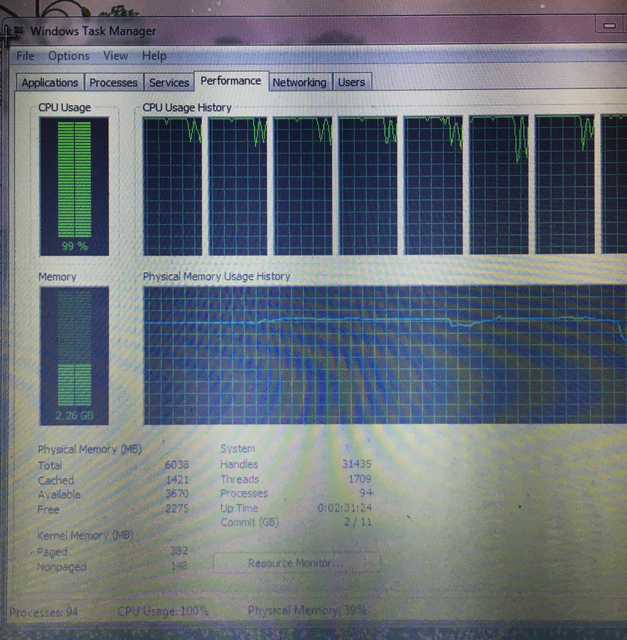
I don't know if it's a driver issue or not. There are no yellow marks in device manager. I have never had it freeze up this bad while doing these normal things that it crashed. I also have a fan aimed directly at the laptop just in case overheating was the issue...but it still did the same thing it did yesterday.
Currently I'm watching something on chrome on youtube and no freezing yet. I'm not sure if firefox is to blame for this or not? I did encounter a strange hiccup a few weeks ago when firefox refused to open but after thoroughly uninstalling it and reinstalling with new profiles it opened fine again.
If you want my computer information I do have my model listed.
Today something very similar happened. This time again I was just watching a video on youtube at the same resolution and the audio became stuck sounding I had the task manager open and was able to capture the cpu usage....I don't know about the processes because the computer was almost totally not responsive. It did not crash but I was able to close all of the browser windows, slowly, but I was able to. . I attached what the task manager looked like.
I don't know if it's a driver issue or not. There are no yellow marks in device manager. I have never had it freeze up this bad while doing these normal things that it crashed. I also have a fan aimed directly at the laptop just in case overheating was the issue...but it still did the same thing it did yesterday.
Currently I'm watching something on chrome on youtube and no freezing yet. I'm not sure if firefox is to blame for this or not? I did encounter a strange hiccup a few weeks ago when firefox refused to open but after thoroughly uninstalling it and reinstalling with new profiles it opened fine again.
If you want my computer information I do have my model listed.
My Computer
- Computer type
- Laptop
- Computer Manufacturer/Model Number
- Dell INSPIRION N7110
- OS
- Windows 7 Home Premium 64bit
- CPU
- Intel Core i7-2670QM CPU@ 2.20GHz 2.20GHz
- Memory
- 6.00GB
- Graphics Card(s)
- Intel HD Graphics 3000
- Antivirus
- Trend Micro Titanium Internet Security


