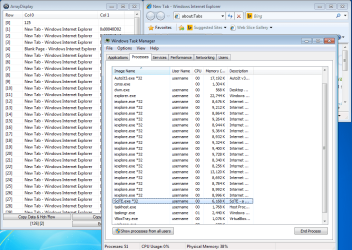
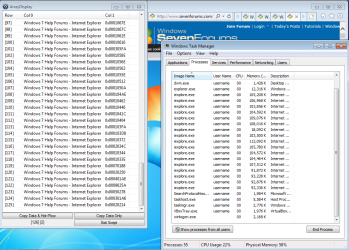
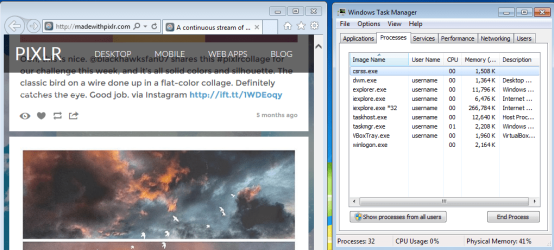
Recently I have encountered an issue of one or more extra iexplore.exe *32 in my task manager window, that use high physical memory, when I open Internet Explorer. If I close the instance of IE I originally opened, they all will close as well. However if I browse on IE for a while, eventually the extra iexplore.exe *32 (single or multiples) get so high, that pages stop loading proper.
Things I have tried to fix the issue:
- Manually close the extra iexplore.exe *32 in the Task Manager. They immediately open again, and begin rising, unless I close the original IE I opened. Then they will all close.
-I have ran various virus scans including Malwarebytes, AVG, SUPERAntiSpyware, Spybot A&D, and Kaspersky. And even ran CCleaner after a scan with both Spybot and SUPERAntiSpyware.
-The problem, although primarily effecting IE, seems to go beyond. I attempted to browse through Google Chrome, and began getting multiple instances of it opening in the Task Manager window.
- At one point during my poking around the internet for a solution, someone had a similar issue, and it was recommended that they try temporarily disabling IE Add-ons, to see if it was the source of the problem. I tried this, and it did not correct the issue. In fact, I am pretty sure it reactivated the add-ons, without me having to go back in, and turn them back on.
As stated before, the main issue with this multiple iexplore.exe *32, is that it increases the Physical Memory to a point where pages will stop loading.
Any advice or assistance on this would be appreciated. I am a bit of a computer tech novice, but have been able to problem solve many issues over the years, with various computers, by just poking around, and researching online.
Thank you in advance.
CMJ
Things I have tried to fix the issue:
- Manually close the extra iexplore.exe *32 in the Task Manager. They immediately open again, and begin rising, unless I close the original IE I opened. Then they will all close.
-I have ran various virus scans including Malwarebytes, AVG, SUPERAntiSpyware, Spybot A&D, and Kaspersky. And even ran CCleaner after a scan with both Spybot and SUPERAntiSpyware.
-The problem, although primarily effecting IE, seems to go beyond. I attempted to browse through Google Chrome, and began getting multiple instances of it opening in the Task Manager window.
- At one point during my poking around the internet for a solution, someone had a similar issue, and it was recommended that they try temporarily disabling IE Add-ons, to see if it was the source of the problem. I tried this, and it did not correct the issue. In fact, I am pretty sure it reactivated the add-ons, without me having to go back in, and turn them back on.
As stated before, the main issue with this multiple iexplore.exe *32, is that it increases the Physical Memory to a point where pages will stop loading.
Any advice or assistance on this would be appreciated. I am a bit of a computer tech novice, but have been able to problem solve many issues over the years, with various computers, by just poking around, and researching online.
Thank you in advance.
CMJ
My Computer
- Computer type
- Laptop
- OS
- Windows 7 Home Premium