How to remove Windows 10 upgrade updates in Windows 7 and 8

My Computer My Computer

Computer type
PC/Desktop
Computer Manufacturer/Model Number
Custom assembled by me :}
OS
Win-7-Pro64bit 7-H-Prem-64bit
CPU
i7-5930K 2nd i9-9940x both water blocked VRM's too
Motherboard
ASUS SABERTOOTH X99 2nd ASUS x299 Apex
Memory
Trident-z 3200C14 2nd Trident-z 3600C16
Graphics Card(s)
EVGA 1080ti ftw3 2nd Titan Xp both water blocked
Sound Card
Built-in Realtek
Monitor(s) Displays
1-AOC G2460PG 24"G-Sync 144Hz/ 2nd 1-ASUS VG248QE 24" 144Hz
Screen Resolution
1920 x 1080 144Hz
Hard Drives
2-Samsung M.2 Evo & Evo Plus
2-Samsung 850 EVO 500GB SSD's/ 3-2.5 W.D. Black 1tb-&3-1tb/3-3.5 WD Black 1tb hdd's
PSU
EVGA SuperNOVA 1000-P2 2nd 1200-P2
Case
2-Corsair Obsidian Series 450D Black ATX Mid Tower
Cooling
Custom water loops
Keyboard
Logitech G710+/ 2nd Logitech G910
Mouse
2-RedDragon M901 Perdition 16400 dpi Gaming mouse = wired
Internet Speed
Comcast Ping 19ms 89.31mbps download speed 6.12mbps upload
Antivirus
Malwarebytes Pro/ Superantispyware Pro
Browser
FireFox & Pale moon
Other Info
2nd ASUS X299 Apex/Intel i9-9940x with Custom water loop/7H-Prem-x64/Corsair 450D case/Ram Trident-z 3600C16 4x8gb / Samsung970Evo plus 500gb SSD/Dual ssd EZ swap evo/PSU EVGA SuperNova 1200w-P2 80+Platinum/GPU Titan Xp /8-ML-140 on push-pull on 2-280GTX rads
Thanks for keeping the list for us.
 

My Computer My Computer

Computer type
PC/Desktop
Computer Manufacturer/Model Number
Custom Build
OS
Windows 7 Home Premium 32-Bit - Build 7600 SP1
CPU
Intel Core i3-2120 3.30Ghz
Motherboard
Asus P8Z68-V LX Intel Z68 Socket H2 ATX
Memory
Kingston 4 GB DDR3 1333 mhz
Graphics Card(s)
AMD Radeon HD6670
Sound Card
Sound Blaster Audigy SE 24-Bit
Monitor(s) Displays
Asus VE228
Screen Resolution
1440 X 900
Hard Drives
OCZ Vertex 3 120 GB Sata 3 SSD ==
Kingston SH103/S3 120 G Hyper X 120 GB SSD ==
Western Digital 500 GB Caviar Green 7200 RPM ==
PSU
Corsair CX600M == 600 Watt
Case
NZXT Apollo - Silver with Clear Side Panel
Cooling
Three 120 mm Fans
Keyboard
Microsoft Natural 4000
Mouse
Microsoft Custom Optical 3000
Internet Speed
AT&T Fiber Optic Wireless Network
Antivirus
Microsoft Security Essentials
Browser
Chrome
Other Info
120 mm Blue LED Fan -- Three Blue LED Lazer Light Sticks
Some of those updates are not related to win-10.
 

My Computer My Computer

Computer type
PC/Desktop
Computer Manufacturer/Model Number
Custom assembled by me :}
OS
Win-7-Pro64bit 7-H-Prem-64bit
CPU
i7-5930K 2nd i9-9940x both water blocked VRM's too
Motherboard
ASUS SABERTOOTH X99 2nd ASUS x299 Apex
Memory
Trident-z 3200C14 2nd Trident-z 3600C16
Graphics Card(s)
EVGA 1080ti ftw3 2nd Titan Xp both water blocked
Sound Card
Built-in Realtek
Monitor(s) Displays
1-AOC G2460PG 24"G-Sync 144Hz/ 2nd 1-ASUS VG248QE 24" 144Hz
Screen Resolution
1920 x 1080 144Hz
Hard Drives
2-Samsung M.2 Evo & Evo Plus
2-Samsung 850 EVO 500GB SSD's/ 3-2.5 W.D. Black 1tb-&3-1tb/3-3.5 WD Black 1tb hdd's
PSU
EVGA SuperNOVA 1000-P2 2nd 1200-P2
Case
2-Corsair Obsidian Series 450D Black ATX Mid Tower
Cooling
Custom water loops
Keyboard
Logitech G710+/ 2nd Logitech G910
Mouse
2-RedDragon M901 Perdition 16400 dpi Gaming mouse = wired
Internet Speed
Comcast Ping 19ms 89.31mbps download speed 6.12mbps upload
Antivirus
Malwarebytes Pro/ Superantispyware Pro
Browser
FireFox & Pale moon
Other Info
2nd ASUS X299 Apex/Intel i9-9940x with Custom water loop/7H-Prem-x64/Corsair 450D case/Ram Trident-z 3600C16 4x8gb / Samsung970Evo plus 500gb SSD/Dual ssd EZ swap evo/PSU EVGA SuperNova 1200w-P2 80+Platinum/GPU Titan Xp /8-ML-140 on push-pull on 2-280GTX rads

My Computer My Computer

Computer type
PC/Desktop
Computer Manufacturer/Model Number
Home Built
OS
Windows `10 Professional 64bit
CPU
Intel i5 [email protected]
Motherboard
MSI P67A-GD55 (MS7681)
Memory
Corsair Vengeance DDR3 1600 16G
Graphics Card(s)
NVIDIA GeForce GT520 1GHz
Sound Card
Realtek High Definition Audio
Monitor(s) Displays
Haans G 241
Screen Resolution
1600X1024
Hard Drives
Crucial MX100 256GB SSD
PSU
OCZ ModXStream Modular High Performance 500 Watt
Case
Rosewill Challenger-U3
Cooling
Just Fans
Keyboard
Kensington K64338B
Mouse
Microsoft wheel mouse 1.1A
Internet Speed
240.0 Mbps
Antivirus
ESET Internet Security
Browser
Firefox
Other Info
SuperAntiSpyware-Pro
Malwarebytes (Premium)
Kerish Doctor
just found 12 " important " updates listed. They were not there Yesterday but appeared now, dd 12 Th of January 2016, so two days late;

Thelma, I got the same ones (except the Visual C++ update). Here's what they are (sorted by number):


  1. KB3126036 - Silverlight: stop remote exploit via malicious links

  1. KB3108664 - stop elevation-of-privilege (EoP) attacks
  2. KB3109560 - stop elevation-of-privilege (EoP) attacks
  3. KB3110329 - stop elevation-of-privilege (EoP) attacks
  4. KB3121212 - Kernel Security Update
  5. KB3121918 - stop elevation-of-privilege (EoP) attacks
  6. KB3123479 - Deprecation of SHA-1 hashing algorithm
  7. KB3124000 - Kernel mode drivers Security Update
  8. KB3124001 - Kernel mode drivers Security Update
  9. KB3124275 - Cumulative Security Update for Internet Explorer 11
  10. KB890830 - Windows Malicious Software Removal Tool x64 - January 2016

I only got a single Win10-related one this month: KB2952664. Re-hid it once again.
 
Last edited:

My Computer My Computer

Computer type
PC/Desktop
OS
Win7 Ult x64
CPU
AMD Phenon II Black 955
Motherboard
Asus M5A99X EVO
Memory
8 GB DDR3 1600
Graphics Card(s)
MSI GTX 550-Ti
Hard Drives
Samsung 850 Pro 512 GB (system)
WD 1 TB Black (data)
PSU
Seasonic G-650 Gold
Cooling
Cooler Master 212+; positive pressure sys: (3) 200mm fans
Other Info
Imaging programs: Image for Windows & Drive Snapshot
Aug article updated on Jan 13: How to manage Windows 10 notification and upgrade options https://support.microsoft.com/en-us/kb/3080351

Has Micro$oft decided to be helpful...? Or, maybe... has it been embarrassed by GWX Control Panel?

In short, the article provides info (except item 4) that was provided months ago in the thread and elsewhere:

1). "manage the Windows 10 upgrade"
a). Automatically by installing KB3035583 and (KB3065987 / KB3065988)

b). Stopping it via​

  • Group Policy: "Turn off the upgrade to the latest version of Windows through Windows Update."
  • Registry: "HKLM\SOFTWARE\Policies\Microsoft\Windows\WindowsUpdate" | DWORD value: DisableOSUpgrade = 1

2
). "Hide the Get Windows 10 app"
a). Automatically done on Enterprise/RT/Embedded editions of Windows 7/8/8.1

b). Suppressing it via registry: "HKLM\Software\Policies\Microsoft\Windows\Gwx" | DWORD value: DisableGwx = 1​

3
). "Enable the Get Windows 10 app." Instructions include creation of a scheduled Task to

  • "determine whether your device meets all the prerequisites" (checks for installation of KB3035583 and (KB3065987 / KB3065988),
  • "and then it will turn on the Get Windows 10 app as appropriate." (deletes "DisableGwx” registry key)


4). "How to bypass the Unattend screen in Windows 8.1 Update" that runs when KB3065988 is installed:
Instructions given for modifying the "Unattend.xml file" that causes the system prompts users to reserve a copy of Windows 10 as part of the OOBE process that occurs at the first startup cycle."​
 
Last edited:

My Computer My Computer

Computer type
PC/Desktop
OS
Win7 Ult x64
CPU
AMD Phenon II Black 955
Motherboard
Asus M5A99X EVO
Memory
8 GB DDR3 1600
Graphics Card(s)
MSI GTX 550-Ti
Hard Drives
Samsung 850 Pro 512 GB (system)
WD 1 TB Black (data)
PSU
Seasonic G-650 Gold
Cooling
Cooler Master 212+; positive pressure sys: (3) 200mm fans
Other Info
Imaging programs: Image for Windows & Drive Snapshot
FYI, on Jan. 11, Woody Leonard posted a highly interesting article: How 'Get Windows 10' sets its hooks into Windows 7 and 8.1 (link)

It takes a look at some of the things the notorious KB3035583 update does behind the scenes. Especially noteworthy are 7 processes set to run by Task Scheduler. Of particular interest, Woody reports on what the creator of GWX Control Panel has discovered:
Mayfield found that the DisableGWX Registry entry merely prevents the Get Windows 10 icon in the system tray from appearing. "Having this entry in place does not prevent the KB 3035583 patch from being installed, and it doesn't prevent the other background tasks associated with the patch from running."

More damning, Mayfield found that the refreshgwxconfig-B task resets the AllowOSUpgrade setting every time it runs. ....

Most damning: Uninstalling KB 3035583 doesn't uninstall any of the files in the GWX folder or remove the scheduled tasks. Uninstalling it merely rolls you back to an earlier version of KB 3035583.

In short, I've never seen such a robust "Potentially Unwanted Program."

This underscores a point that a poster here attempted to communicate back in Nov. To wit:
I was simply attempting to highlight the potential problem with removing all of those Windows Update Clients AND depending on that GPO setting. As you mentioned, there have been posts where people had various registry settings* and yet they had W10 ready to install. ....

*that GPO is just another registry setting.

Little wonder then that M$ just published an article (see my previous post) on "managing" Windows 10 Upgrade which suggests it's sufficient to set the "DisableGWX" registry key.

Smells like nothing more than PR to me. Color me "shocked"... NOT
 

My Computer My Computer

Computer type
PC/Desktop
OS
Win7 Ult x64
CPU
AMD Phenon II Black 955
Motherboard
Asus M5A99X EVO
Memory
8 GB DDR3 1600
Graphics Card(s)
MSI GTX 550-Ti
Hard Drives
Samsung 850 Pro 512 GB (system)
WD 1 TB Black (data)
PSU
Seasonic G-650 Gold
Cooling
Cooler Master 212+; positive pressure sys: (3) 200mm fans
Other Info
Imaging programs: Image for Windows & Drive Snapshot
jelson,

"I looked at installation of KB 3035583 on brand-spanking-new Windows 7 SP1..."

"Then I ran exactly one update -- KB 3035583 -- on all of the PCs."

"Uninstalling KB 3035583 doesn't uninstall any of the files in the GWX folder or remove the scheduled tasks. Uninstalling it merely rolls you back to an earlier version of KB 3035583."

Those statements must not apply to the same W7 computer. I don't see how the term "roll back" can be applied to a computer that only has one version of KB3035583 installed. It would have been nice if Woody Leonard would have mentioned where he saw this older version KB3035583 (e.g. in the list of installed updates).

When I attempted to duplicate Woody Leonard's findings on a fresh install of W7 pro 64bit SP1, uninstalling KB3035583 DID remove the windows\system32\GWX folder AND all of the scheduled tasks that Woody Leonard mentioned.


Also, Woody Leonard states that he applied four registry settings...

I looked at installation of KB 3035583 on brand-spanking-new Windows 7 SP1 and Windows 8.1 Update 1 PCs. I adjusted the Registry settings as prescribed on fresh installs of Home and Pro. Then I ran exactly one update -- KB 3035583 -- on all of the PCs. Sure enough, the Get Windows 10 icon didn't appear in the system tray, but all of the Get Windows 10 accoutrements (described below) are installed and fully functional.
...but did not install the updates that actually read some of those settings.

For example, how would you expect DisableOSUpgrade to do anything if KB3080351 is not installed?

This was the point that I was making in the post where you quoted me: "I was simply attempting to highlight the potential problem with removing all of those Windows Update Clients AND depending on that GPO setting."


Edit:
It would have been nice if Woody Leonard had mentioned where he got KB3035583 from. If it came from the Windows Update process, then what version of the Windows Update Agent/Client was installed at the time? W7/SP1 will not update until you update the WU Agent/Client:

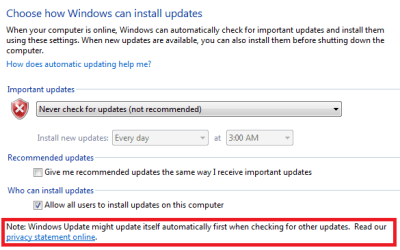
WU1.PNG

The image below is from a previous post of mine.
378225d1450562562-windows-update-stuck-scanning-updates-forever-wu.png


That Windows Update Agent seems to be pre-SP1 ("7600"). The Windows Update software is now called the Windows Update Client. Many people hoping to avoid all things related to W10 and telemetry are not installing any of the newer versions of the WU Client. MS can install any update to that WU Client without any user approval/interaction.

WU2.PNG
 
Last edited:

My Computer My Computer

Computer type
Laptop
Computer Manufacturer/Model Number
Employer provided Dell Latitude
OS
W7 Pro SP1 64bit
CPU
i7
Memory
8GB
Graphics Card(s)
Intel HD Graphics
Hard Drives
crappy SSD
Antivirus
Employer mandated Symantec Endpoint Protection
Browser
Pale Moon 64bit, IE11 64bit & Chrome 64bit
jelson, ....
Also, Woody Leonard states that he applied four registry settings...

I looked at installation of KB 3035583 on brand-spanking-new Windows 7 SP1 and Windows 8.1 Update 1 PCs. I adjusted the Registry settings as prescribed on fresh installs of Home and Pro. Then I ran exactly one update -- KB 3035583 -- on all of the PCs. Sure enough, the Get Windows 10 icon didn't appear in the system tray, but all of the Get Windows 10 accoutrements (described below) are installed and fully functional.
...but did not install the updates that actually read those settings.

For example, how would you expect DisableOSUpgrade to do anything if KB3080351 is not installed?

This was the point that I was making in the post where you quoted me: "I was simply attempting to highlight the potential problem with removing all of those Windows Update Clients AND depending on that GPO setting."

Yep... I immediately thought of your previous posts when I read the article.


P.S. Thanks for sharing your research on the claims in the Woody article. Perhaps, you might consider posting what your found in the article's Comments.
 
Last edited:

My Computer My Computer

Computer type
PC/Desktop
OS
Win7 Ult x64
CPU
AMD Phenon II Black 955
Motherboard
Asus M5A99X EVO
Memory
8 GB DDR3 1600
Graphics Card(s)
MSI GTX 550-Ti
Hard Drives
Samsung 850 Pro 512 GB (system)
WD 1 TB Black (data)
PSU
Seasonic G-650 Gold
Cooling
Cooler Master 212+; positive pressure sys: (3) 200mm fans
Other Info
Imaging programs: Image for Windows & Drive Snapshot
Thrashzone -- I have your list of Updates above to avoid, but is there a running list anywhere that adds to the list if new ones are issued by Microsoft?

I asked the same when I joined the thread and the answer was no. Many have posted their own list of hidden updates but these generally include KBs which were not installed for reasons other than Win 10 and telemetry.

These are on everyone's list:

KB 3035583 - According to Microsoft, this update enables "additional capabilities for Windows Update notifications when new updates are available".

KB3068708 - Described as "This update introduces the Diagnostics and Telemetry tracking service to existing devices. By applying this service, you can add benefits from the latest version of Windows to systems that have not yet upgraded. The update also supports applications that are subscribed to Visual Studio Application Insights."

KB3075249 - Described as "This article describes an update that adds telemetry points to consent.exe in Windows 8.1 Windows RT 8.1, Windows Server 2012 R2, Windows 7 Service Pack 1 (SP1), and Windows Server 2008 R2 SP1." Consent.exe is the User Account Control (UAC) feature that asks your approval for disk access.

KB3080149 - Described as "This package updates the Diagnostics and Telemetry tracking service to existing devices.
This service provides benefits from the latest version of Windows to systems that have not yet upgraded. The update
also supports applications that are subscribed to Visual Studio Application Insights."

KB 2952664 - Labeled a compatibility upgrade for upgrading Windows 7, its purpose is to "make improvements to the current operating system in order to ease the upgrade experience to the latest version of Windows".

KB 2976978 - A compatibility update for Windows 8.1 and Windows 8 which "performs diagnostics on the Windows system [..] to determine whether compatibility issues may be encountered when the latest Windows operating system is installed.

KB 3021917 - Does the same as KB 2976978 but on Windows 7.

KB 3044374 - This update for Windows 8.1 enables systems to upgrade from the current operating system to a later version of Windows.

KB 2990214 - Does the same as KB 3044374 but on Windows 7.

KB 3022345 - Update to enable the Diagnostics Tracking Service in Windows (Windows 7 SP1, Windows 8

Every few pages someone will post their current lists, so if ya read last few pages you should get a decent idea of what others are not installing.
 

My Computer My Computer

Computer Manufacturer/Model Number
Home Built
OS
Windows 7 - 64 bit
CPU
i7 920
Motherboard
Asus Rampage II Extreme
Memory
Mushkin 998692
Graphics Card(s)
GTX 295 FTW Edition 1792MB
Sound Card
Sounblaster Xi Fi Extreme
Monitor(s) Displays
Dekk U2410
Hard Drives
Seagate 7200.12
PSU
Antec SG-850
Case
Antec 1200
Cooling
Prolimatech Megashadow
Thank you for this.
 

My Computer My Computer

Computer type
PC/Desktop
Computer Manufacturer/Model Number
Home Built
OS
Windows `10 Professional 64bit
CPU
Intel i5 [email protected]
Motherboard
MSI P67A-GD55 (MS7681)
Memory
Corsair Vengeance DDR3 1600 16G
Graphics Card(s)
NVIDIA GeForce GT520 1GHz
Sound Card
Realtek High Definition Audio
Monitor(s) Displays
Haans G 241
Screen Resolution
1600X1024
Hard Drives
Crucial MX100 256GB SSD
PSU
OCZ ModXStream Modular High Performance 500 Watt
Case
Rosewill Challenger-U3
Cooling
Just Fans
Keyboard
Kensington K64338B
Mouse
Microsoft wheel mouse 1.1A
Internet Speed
240.0 Mbps
Antivirus
ESET Internet Security
Browser
Firefox
Other Info
SuperAntiSpyware-Pro
Malwarebytes (Premium)
Kerish Doctor
Looks like "Win anything but 10" will not be supported on Skylake and newer chips

Microsoft updates support policy: New CPUs will require Windows 10 | ZDNet

In today's blog post, Microsoft says it's seeing "unprecedented demand from our enterprise customers" in Windows 10.

The major "demand" seems to be MS demanding that everyone who doesn't want it install it anyway. And yet buy an OEM copy of say Win 7, it costs a lot more than Win10. So if 10 is so much better, why are they charging less for it ?
 

My Computer My Computer

Computer Manufacturer/Model Number
Home Built
OS
Windows 7 - 64 bit
CPU
i7 920
Motherboard
Asus Rampage II Extreme
Memory
Mushkin 998692
Graphics Card(s)
GTX 295 FTW Edition 1792MB
Sound Card
Sounblaster Xi Fi Extreme
Monitor(s) Displays
Dekk U2410
Hard Drives
Seagate 7200.12
PSU
Antec SG-850
Case
Antec 1200
Cooling
Prolimatech Megashadow
Looks like "Win anything but 10" will not be supported on Skylake and newer chips

Microsoft updates support policy: New CPUs will require Windows 10 | ZDNet

In today's blog post, Microsoft says it's seeing "unprecedented demand from our enterprise customers" in Windows 10.

The major "demand" seems to be MS demanding that everyone who doesn't want it install it anyway. And yet buy an OEM copy of say Win 7, it costs a lot more than Win10. So if 10 is so much better, why are they charging less for it ?

I just thought I was P.O.ed with M$py. Now, I'm furiously enraged with the miserable, misbegotten, no good for nothing, cotton pickin', stinkin', rotten, dirty, pieces of work! (Actually, my feelings are stronger but Mama and the TOS here told me not to use those words). I was looking forward to Skylake-e and it's reputed increased number of PCI-e lanes and SATA ports. I wonder if Skylake (Cloudlake, considering M$py's penchant for cloud computing?) will allow Win 7 to run in a Linux VM?

Nutella and his cretinous cronies can go south! I'll even provide the handbasket!
 

My Computer My Computer

Computer type
PC/Desktop
Computer Manufacturer/Model Number
Custom Build
OS
Win 7 Ultimate 64 bit
CPU
Intel i7-3930K
Motherboard
ASUS P9X79 WS
Memory
Kingston HyperX Genesis 32GB Kit (8x4GB Modules) 1600MHz DDR
Graphics Card(s)
MSI R7850 Twin Frozr 2GD5/OC Radeon HD 7850 2GB 256-bit GDDR
Sound Card
Asus Xonar Essence STX
Monitor(s) Displays
3x Asus VG248QE 24", Vizio 32" TV
Screen Resolution
1920 x 1080, ?
Hard Drives
Samsung 128GB 840 Pro SSD (1),
Samsung 4TB 850 EVO SSDs (4)
Samsung 4TB 850 EVO SSDs (16) external backup drives used in 2.5" hot swap bays in the computer.
PSU
Corsair HX750w
Case
Antec Two Hundred v2 (modified)
Cooling
Cooler Master GeminII S524 120mm (fan replaced with a 140mm)
Keyboard
Logitech G510s
Mouse
Logitech M525 (two in use)
Internet Speed
=< 32Mbps down, 8Mbps up
Antivirus
AVAST!, MBAM, SAS, Spybot S&D (all but MBAM free) Glary Util
Browser
IE11
Other Info
LSI 9211-8i HBA card (8 SATA III ports), 2.5" & 3.5" Hot Swap Bays, HooToo HT-CR001 PCI-E to USB 3.0 Internal Hub + 6 Slot Card Reader, and LG Model CH12LS28 BD-ROM Optical Drive. Also, ScanSnap S1500 ADF duplexing scanner, Canon 9000F flat bed scanner, Corsair SP2500 2.1 speakers, Samsung CLP 415nw laser color printer, Cyberpower PP2200SW UPS

My Computer My Computer

Computer type
PC/Desktop
Computer Manufacturer/Model Number
Dell All in one Inspiron 2020
OS
W10 32 bit, XUbuntu 18.xx 64 bit
CPU
Intel(R) Celeron(R) CPU G1620T @ 2.40GHz, 2400 Mhz
Motherboard
Dell
Memory
4GB
Graphics Card(s)
Intel HD graphics
Sound Card
High Definition Audio Device
Monitor(s) Displays
20 inch Screen
Screen Resolution
W7=1280 x 720 & Linux Mint Xfce=1360 x 768
Hard Drives
500 GB hard drive
Keyboard
Usb
Mouse
Usb
Internet Speed
High-Speed
Antivirus
MSE
Browser
Main Browser Firefox
Other Info
I have done a clean install of Windows 7 using Dell re-installation disk (Dell sent me one). I also use Free Macrium reflect backup and restore.
.... Many have posted their own list of hidden updates but these generally include KBs which were not installed for reasons other than Win 10 and telemetry.

These are on everyone's list:
KB 3035583 ....
KB 3068708 ....
KB 3075249 ....
KB 3080149 ....
KB 2952664 ....
KB 2976978 .... / KB 3021917 ....
KB 3044374 .... / KB 2990214 ....
KB 3022345 ....
Every few pages someone will post their current lists, so if ya read last few pages you should get a decent idea of what others are not installing.

Nicely done! Your list has all the W10-related updates for Win7 that I've hidden except for
KB 3046480 (helps determine if .NET Framework 1.1 will be migrated during W10 Upgrade)
... yet it only lists the first of the Windows Update Client (WUC) updates: 3044374 & 2990214

I didn't document the Win 8/8.1 ones, but this is my list of all the Win7 WUC updates (I've hidden them all):

  • KB 2990214 - Apr '15 - WUC: enables ability to upgrade to Win10
  • KB 3050265 - Jun '15 - WUC: allows Group Policy to set "DisableOS Upgrade" key (replaces 2990214)
  • KB 3065987 - Jul '15 - WUC: unspecified "improvements" (replaces 3050265)
  • KB 3075851 - Aug '15 - WUC: fixes mess due to KB3065987 [cuts down WUC memory usage, but hides Update notifications if GWX app is active] (replaces 3065987)
  • KB 3083324 - Sep '15 - WUC: unspecified "improvements" (replaces 3075851)
  • KB 3083710 - Oct '15 - WUC: unspecified "improvements" (replaces 3083324)
  • KB 3102810 - Nov '15 - WUC: fixes slow updates & high CPU usage (doesn't replace any previous updates)
  • KB 3112343 Dec '15 WUC: fix for issues with 3050265, e.g., "8007000E" error message (doesn't replace any previous updates)
P.S. FYI, before I grew sufficiently wary of M$, I did install 2990214 and later 3075851. Later I uninstalled them and found that doing so cleared my WU history. :(
 
Last edited:

My Computer My Computer

Computer type
PC/Desktop
OS
Win7 Ult x64
CPU
AMD Phenon II Black 955
Motherboard
Asus M5A99X EVO
Memory
8 GB DDR3 1600
Graphics Card(s)
MSI GTX 550-Ti
Hard Drives
Samsung 850 Pro 512 GB (system)
WD 1 TB Black (data)
PSU
Seasonic G-650 Gold
Cooling
Cooler Master 212+; positive pressure sys: (3) 200mm fans
Other Info
Imaging programs: Image for Windows & Drive Snapshot
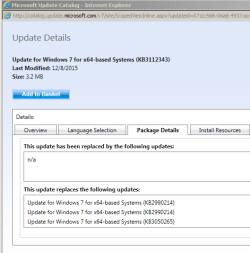
KB 3112343 Dec '15 WUC: fix for issues with 3050265, e.g., "8007000E" error message (doesn't replace any previous updates)
I understand that the website that you linked to states...
"This update doesn't replace a previously released update."
...but Windows Update Catalog states that it does:

Capture.PNG

Also, the list of files that are updated indicates that it replaces previous WUCs.
 

My Computer My Computer

Computer type
Laptop
Computer Manufacturer/Model Number
Employer provided Dell Latitude
OS
W7 Pro SP1 64bit
CPU
i7
Memory
8GB
Graphics Card(s)
Intel HD Graphics
Hard Drives
crappy SSD
Antivirus
Employer mandated Symantec Endpoint Protection
Browser
Pale Moon 64bit, IE11 64bit & Chrome 64bit
KB 3112343 Dec '15 WUC: fix for issues with 3050265, e.g., "8007000E" error message (doesn't replace any previous updates)
I understand that the website that you linked to states...
"This update doesn't replace a previously released update."
...but Windows Update Catalog states that it does:

Also, the list of files that are updated indicates that it replaces previous WUCs.

Hahahaha... just goes to show that Microsoft's descriptions of their updates leaves something to be desired. ;)

BTW, thanks for pointing to a way to check which updates are being replaced... but it appears I'd need to be using "XP or Windows Server 2003 and later" to access the Microsoft Update Catalog site.
 
Last edited:

My Computer My Computer

Computer type
PC/Desktop
OS
Win7 Ult x64
CPU
AMD Phenon II Black 955
Motherboard
Asus M5A99X EVO
Memory
8 GB DDR3 1600
Graphics Card(s)
MSI GTX 550-Ti
Hard Drives
Samsung 850 Pro 512 GB (system)
WD 1 TB Black (data)
PSU
Seasonic G-650 Gold
Cooling
Cooler Master 212+; positive pressure sys: (3) 200mm fans
Other Info
Imaging programs: Image for Windows & Drive Snapshot

My Computer My Computer

Computer type
Laptop
Computer Manufacturer/Model Number
Employer provided Dell Latitude
OS
W7 Pro SP1 64bit
CPU
i7
Memory
8GB
Graphics Card(s)
Intel HD Graphics
Hard Drives
crappy SSD
Antivirus
Employer mandated Symantec Endpoint Protection
Browser
Pale Moon 64bit, IE11 64bit & Chrome 64bit
Looks like "Win anything but 10" will not be supported on Skylake and newer chips

Microsoft updates support policy: New CPUs will require Windows 10 | ZDNet

In today's blog post, Microsoft says it's seeing "unprecedented demand from our enterprise customers" in Windows 10.
The major "demand" seems to be MS demanding that everyone who doesn't want it install it anyway. And yet buy an OEM copy of say Win 7, it costs a lot more than Win10. So if 10 is so much better, why are they charging less for it ?

I'm guessing the 'demand' is M$ demanding to the makers that newer chips only work with Win10 and nothing else. :sarc:
 

My Computer My Computer

Computer type
PC/Desktop
Computer Manufacturer/Model Number
Dell Inspiron
OS
Windows 7 Home Premium 64bit
Browser
Lunascape

My Computer My Computer

Computer type
PC/Desktop
OS
Win7 Ult x64
CPU
AMD Phenon II Black 955
Motherboard
Asus M5A99X EVO
Memory
8 GB DDR3 1600
Graphics Card(s)
MSI GTX 550-Ti
Hard Drives
Samsung 850 Pro 512 GB (system)
WD 1 TB Black (data)
PSU
Seasonic G-650 Gold
Cooling
Cooler Master 212+; positive pressure sys: (3) 200mm fans
Other Info
Imaging programs: Image for Windows & Drive Snapshot
Back
Top