Sluggish computer after fresh install: Any suggestions?

Harlem

New member
Member
Local time
5:22 PM
Messages
55
Hi guys, today I have / may upgrade my laptop.
It's basically a laptop swap, so a free upgrade lets say. The upgrade isn't massive, but enough to make me want to do it. (Better graphics card and processor a newer model of an i5 2.5Ghz (Benchmark score marginally better))

Anyway, As the hard drive in my old laptop was a bigger one, I swapped it into this laptop, and then gave the laptop a fresh copy of windows 7. Installed all drivers with the latest ones, and updated windows to its most recent updates.

The only downgrade I have so far is the RAM. I've gone from 8GB to 4GB. I did swap the ram, but apparently this newer laptop wont accept that RAM (I can only assume it has something to do with the Mhz, as the one in this newer laptop is higher. So, If I decide to keep this laptop, I will buy another 4GB stick soon, but I want to see if I can figure out what is going on first.

So basically. This laptop, although supposed to be slightly quicker, seems to be considerably slower.
Quite often, when I click to do things, it takes a while to load. I know it doesn't sound a lot, but I've waited over 15 seconds for certain things to load up, which are normally instant on my old laptop.

I've noticed the fan kick in a bit more often, and puts out more heat than my old laptop, and in task manager, my memory usage is often between 3-3.7GB, even when I'm not doing anything.

Apart from adding the extra RAM, is there any other suggestions or reasons as to why it seems quite a lot slower.

Thank you
 

My Computer My Computer

OS
Windows 7 Home 64-Bit
in task manager, my memory usage is often between 3-3.7GB, even when I'm not doing anything.

What is the CPU %, and when showing All Processes, which processes are using CPU and RAM? Does it happen in Safe Mode?
 

My Computer My Computer

Computer type
PC/Desktop
Computer Manufacturer/Model Number
dell precision t3400 tower
OS
Linux Lite 3.2 x64; Windows 7, 8.1
CPU
Core2Duo 2.4
Memory
6GB ddr2
Graphics Card(s)
nVidia
Hard Drives
120gb SSD, 1TB HD, 2TB HD; sata II
Internet Speed
12/2
Browser
Vivaldi, Slimjet (Chromium) x64
As of right now, I have just restarted my computer.

The only things open of note, is this single google chrome windows, and running in the background is steam.
As it stands:

CPU running between 8-14% (CPU shows everything at 00)
Memory running between 2.4-2.9GB (Chrome 41k, Chrome 31k, Chrome 25k, Steam 20k - Everything else is negligible)

To be honest, for general browsing, everything seems ok. The issue is the fan. It is just constantly going, nothing strenuous, but has an irritating constant noise.

My laptop is mostly used for Football Manager, now on my usual Laptop, it runs perfectly well, but what I have found so far is that it runs at a much slower rate

When I run this programme:
CPU running between 40-80%
Memory running between 3.5-3.8GB (FM Using 600k)

When using this programme, everything is sluggish, in and out of the game. Once the game has loaded up, loading up my last save is taking about 2minutes to load, whereas I'm used to it loading within about 10-12 seconds.
There is a page called scouting within the game, that brings up the player list. Usually an instant load time, but takes about 15-18 seconds

When the game is loaded, the fan really starts to go, giving out some heat, and making a louder, more noticeable, constant noise. The game itself has a recommendation of 2GB.

I have not tried safe mode as of yet
 

My Computer My Computer

OS
Windows 7 Home 64-Bit
This is with "show processes from all users" enabled in Task Manager? If everything shown is at 0%, something hidden is running.

Is your radiator clean? Please fill in at least the basics of your system specs.
 

My Computer My Computer

Computer type
PC/Desktop
Computer Manufacturer/Model Number
dell precision t3400 tower
OS
Linux Lite 3.2 x64; Windows 7, 8.1
CPU
Core2Duo 2.4
Memory
6GB ddr2
Graphics Card(s)
nVidia
Hard Drives
120gb SSD, 1TB HD, 2TB HD; sata II
Internet Speed
12/2
Browser
Vivaldi, Slimjet (Chromium) x64
Thanks for your reply.

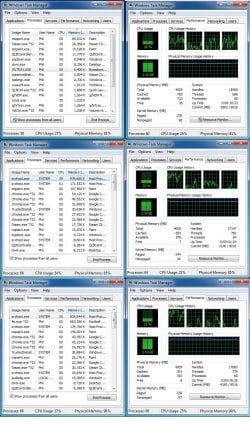
I've taken the screenshots in 3 stages

Stage 1: Laptop turned onm but nothing opened apart from 2 MS Paint tabs
Stage 2: Same as stage one, but with Chrome open with 2 tabs
Stage 3: Same as earlier, but now with football manager open aswell

Stage 1: Laptop run fine. Fan was going, but it was running fine.
Stage 2: Started to get sluggish. Clicking between tabs sometimes made the Chrome window 'Not Responding'
Stage 3: Starts to become frustrating to work around. Everything has a pause before it does what asked.

As for the fan, clean as a whistle. Under the hood, the laptop is immaculate.

Specs wise:
Intel Core i5 4200m 2.50Ghz
4GB RAM
1TB HDD
HD 4600 Graphics

Now, obviously, the issue is partly down to only have 4GB of ram, which I will upgrade if I decide to keep the laptop, but also, it seems the SVCHOST is what is killing its performance


*****

As an edit. Since finding out about the SVCHOST, did a bit of research, and after a hotfix, I have solved that problem, so I am getting somewhere!

I think upping the ram may be the final piece of the puzzle.
Programmes I use just take a while to warm up it seems. Football manager for example runs sluggish for a few minutes, but then seems to run on par if not slightly better than my older laptop.

So hopefully, the RAM will sort this problem out, fingers ccrossed.
Just wish the fan wasn't so loud haha
 

Attachments

  • processes.jpg
    processes.jpg
    250.1 KB · Views: 2
Last edited:

My Computer My Computer

OS
Windows 7 Home 64-Bit
As of right now, I have just restarted my computer.

The only things open of note, is this single google chrome windows, and running in the background is steam.
As it stands:

CPU running between 8-14% (CPU shows everything at 00)
Memory running between 2.4-2.9GB (Chrome 41k, Chrome 31k, Chrome 25k, Steam 20k - Everything else is negligible)

To be honest, for general browsing, everything seems ok. The issue is the fan. It is just constantly going, nothing strenuous, but has an irritating constant noise.
..........
My fan is on all the time that the machine is awake, never any variation in sound level - I don't play games. (Windows 7 Home Premium). Is this normal?
 

My Computer My Computer

Computer type
PC/Desktop
Computer Manufacturer/Model Number
Gigabyte ATX case with 500 W power supply GZ-M1
OS
Windows 7 Home Premium 64bit
CPU
Intel Pentium Edition G3220 3.0 GHz
Motherboard
Gigabyte Socket 1150 MicroATX Mot Ultra Durable, GA-H81M-S2H
Memory
8 GB DDR3 1600 MHz DIMM
Graphics Card(s)
Not Known
Sound Card
Not known
Monitor(s) Displays
Samsung LS24D590 23.6"
Screen Resolution
1920 x 1080
Hard Drives
256 GB Solid State Drive (C: on which Windows 7 is installed)-
1 TB internal conventional HD (X:)-
Two WD "Elements" " 2TB USB drives as backups
PSU
500 W
Case
Gigabyte ATX case
Cooling
Several fans!
Keyboard
Accuratus 301 USB Compact, white.
Mouse
Microsoft Basic Optical Mouse v2.0, two-button, tethered
Internet Speed
10 to 12 Mb per second
Antivirus
Kaspersky Internet Security 2016, Malwarebytes (paid)
Browser
Firefox (ocassionally Safari)
Other Info
The 256 GB SSD (C:) also has Adobe Photoshop CS6 and InDesign CS6, MS Office, Adobe Lightroom, and other small programs.
My fan is on all the time that the machine is awake, never any variation in sound level - I don't play games. (Windows 7 Home Premium). Is this normal?

The fan being on all the time is probably normal. The one on this newer laptop just seems to be quite a bit louder, and puts out a quite a bit more heat.

I guess its just how this laptop is really. My older Samsung laptop was just so quiet and cool always
 

My Computer My Computer

OS
Windows 7 Home 64-Bit
Ok, so I've installed more ram, now back up to 8GB.

Laptop is running much better. My only real frustration now is, when loaded, things run fine, but loading them takes some time.

I timed how long it took Football manager to open when I clicked it. 2:36 minutes (Usually was around 20-30seconds)
With Chrome, when I open it, I get a blank white screen for around 5-10 seconds before I can usually do something.

Frustrating, but I guess, bearable

Edit: closed down FM, waited a few minutes, and opened it up again, took 15seconds. I guess this machine just needs to warm up lol.

Anyway, thanks for all help and suggestions :)
 

My Computer My Computer

OS
Windows 7 Home 64-Bit
Back
Top