Notepad++ - Selecting Text to End of Line

foggy

New member
Local time
3:31 PM
Messages
11
Hi,

I don't know if this is the proper forum. I did want to post this question at the NPP forum, but I don't have any of the accounts required for registering (Github, Facebook, etc.), so I thought I'd ask here. If no one has an answer, no big deal. :)

Anyway, I don't use NPP for coding. Mainly for writing. I like the simplicity of a plain text editor for that. But all other editors I've used (including Word 2007 and other word processors) allow me to select text to the end of a "line" by using "shift + end." But NPP works differently. That's why I put "line" in quotes. NPP treats a line like a paragraph, as if it were one, long, unwrapped line of text/code rather than as a single run of text that ends at the right-hand margin. Placing the cursor within a paragraph and hitting "Shift + End" will select the entire remainder of the paragraph.

This behavior, apparently, explains why NPP also displays the column numbers as it does. (A 'column' appearing just a few characters in from the left-hand margin toward the end of a paragraph might be column number 753 instead of column 6.)

In any case, I'd like to know if it's possible to use NPP the way I would normally use other editors, i.e. by using "shift + end" (or some other keyboard shortcut I haven't been able to find in NPP or the NPP wiki) to select text extending to the right-hand margin only, not fully to the end of a paragraph.

Thanks for any input!
 

My Computer My Computer

At a glance

Windows 7 Pro 64-bit
Computer type
PC/Desktop
Computer Manufacturer/Model Number
Custom
OS
Windows 7 Pro 64-bit
Interesting question! I've used NPP for a long time, but for selecting text I simply highlight with the mouse. The margins you see vary with the size of the NPP window in use, and, afaik, there's no way to set them with the text editor, so maybe that's why a keyboard shortcut isn't possible.
 

My Computer My Computer

At a glance

Windows 7 Home Premium SP1i36 GBATI Radeon
Computer Manufacturer/Model Number
Dell Inspiron 580s
OS
Windows 7 Home Premium SP1
CPU
i3
Memory
6 GB
Graphics Card(s)
ATI Radeon
Interesting question! I've used NPP for a long time, but for selecting text I simply highlight with the mouse. The margins you see vary with the size of the NPP window in use, and, afaik, there's no way to set them with the text editor, so maybe that's why a keyboard shortcut isn't possible.

Thanks for your reply, gini. For myself, I find it a lot easier simply to use the keyboard shortcut for such text selecting (if I'm doing so as I'm typing away on a document). So "shift + end/home" or "ctrl + shift + end/home" come very naturally for me. And I understand what you say about the margins, but that's something pretty much common to all text editors & word processors of which I'm aware when you have word wrap on. But all the other editors I've used (e.g. Word, WriteMonkey, Metapad, Notepad, Wordpad, etc.) work the same way: "shift + end" will only select the text on the line on which the blinking cursor is located and will only extend as far as the right margin, however wide the margin may be. That's what makes NPP so odd. It's the first editor I've used that thinks the "end" is the end of the paragraph. IOW it's selecting all text up to the next line-break or paragraph and not what we would think of as a normal "line" of text. Strange. I can live with it if I have to, since I do like NPP's other features. But I would like to figure a way to get it to work like all the other editors in this regard if I can. Anyway, thanks again for your comment. :-)
 

My Computer My Computer

At a glance

Windows 7 Pro 64-bit
Computer type
PC/Desktop
Computer Manufacturer/Model Number
Custom
OS
Windows 7 Pro 64-bit
Last edited:

My Computer My Computer

At a glance

Windows 10 Pro x64, Windows 8.1 Pro x64, Wind...INTEL i9-7920X LGA 206664 GB (4 X 16 GB) G-Skill V Series DDR4 3200 ...EVGA GTX 1060 SC 3 GB
Computer type
PC/Desktop
Computer Manufacturer/Model Number
Custom Built
OS
Windows 10 Pro x64, Windows 8.1 Pro x64, Windows 7 Ultimate x64 SP1,
CPU
INTEL i9-7920X LGA 2066
Motherboard
Gigabyte X299-WU8 F3
Memory
64 GB (4 X 16 GB) G-Skill V Series DDR4 3200 Quad Channel
Graphics Card(s)
EVGA GTX 1060 SC 3 GB
Sound Card
Realtek Onboard ALC1220
Monitor(s) Displays
2 x Samsung S27E310
Screen Resolution
1920x1080
Hard Drives
Samsung 2 x 970 EVO Plus 500 GB NVMe
1 x 6TB WD 6003FZBX SATA
1 x 6TB WD 60EFRX SATA
12 x 3TB WD 30EFRX SATA
PSU
Seasonic X-1050
Case
Thermaltake Armor+
Cooling
Corsair H80i V2 Liquid AOI Cooler
Keyboard
Logitech G510s
Mouse
Logitech MX Master 2S
Internet Speed
200 Mb/s
Antivirus
ESET NOD32 13.1
Browser
EDGE (Dev, Canary, Beta), Chrome
Other Info
ASUS RT-AC68U router
Malwarebytes 4.0.4
I think i understand what foggy is asking about.
The difference i see is if Word Wrap is enabled, it might select text differently than other programs.

NPP always selects everything including the wrapped text, no matter what the "Word Wrap" setting is.
Some other editors do not select the "wrapped text lines", and only select text to the end of the "displayed text line".

It's not an issue for me because i do the same as gini in post #2
but for selecting text I simply highlight with the mouse
I would like to see NPP have a Print Preview, but i never found that feature.
 

My Computer My Computer

At a glance

Multi-Boot W7_Pro_x64 W8.1_Pro_x64 W10_Pro_x6...AMD Athlon II x4 6206GB GSkill DDR2 800AMD 4670 GPU + AMD 4200 IGP
Computer type
PC/Desktop
Computer Manufacturer/Model Number
home built
OS
Multi-Boot W7_Pro_x64 W8.1_Pro_x64 W10_Pro_x64 +Linux_VMs +Chromium_VM
CPU
AMD Athlon II x4 620
Motherboard
Gigabyte GA-MA785G-UD3H
Memory
6GB GSkill DDR2 800
Graphics Card(s)
AMD 4670 GPU + AMD 4200 IGP
Sound Card
on board Realtek ALC889A
Monitor(s) Displays
RCA 40" LCD TV, Insignia 32" LCD TV, HP 15" LCD monitor
Screen Resolution
1680 x 1050
Hard Drives
OCZ Vertex 3 120GB,
Samsung F3 1TB (3),
Several others - WD, Seagate, Hitachi, ...
PSU
Corsair 500 W
Case
Rosewill mid tower
Cooling
CM 90mm rifle
Keyboard
Gyration wireless, Logitech wireless, Dell USB wired
Mouse
Gyration wireless, Logitech wireless, V7 USB wired
Internet Speed
Spectrum - 100Mbps D / 10Mbps U
Antivirus
Avast, MBAM3, EMET, WinPatrol
Browser
Pale Moon, Firefox, IE
Other Info
2 multi-boot PC's
Mainly HTPC/Office/Gen purpose (no gaming).
Trendnet USB KVM.
LG DVD burner/Blue Ray Player.
Tray system for removable SATA backup drives.

Not currently OCd, under-volted.
I use Hybrid sleep, rarely re-boot or shutdown.

Hauppauge HD-PVR, Avermedia PCIe TV Tuner, Hauppauge PCI TV Tuner.
I use EMEditor instead of Notepad++ but I can say that for any text editor that i have used:

Single Click: Inserts cursor
Another Single Click: Highlights one word
Double Click: Highlights line
Triple Click: Highlights paragraph (for some not all text editors)

Also depends upon correct punctuation
 

My Computer My Computer

At a glance

Microsoft Windows 7 Home Premium 64-bit 7601 ...AMD C-60 APU with Radeon(tm) HD Graphics4.00 GBAMD Radeon HD 6290 Graphics
Computer type
Laptop
Computer Manufacturer/Model Number
ASUS
OS
Microsoft Windows 7 Home Premium 64-bit 7601 Multiprocessor Free Service Pack 1
CPU
AMD C-60 APU with Radeon(tm) HD Graphics
Motherboard
ASUSTeK COMPUTER INC. X501U
Memory
4.00 GB
Graphics Card(s)
AMD Radeon HD 6290 Graphics
Sound Card
(1) AMD High Definition Audio Device (2) Realtek High Defi
Screen Resolution
1366 x 768 x 32 bits (4294967296 colors) @ 60 Hz
Hard Drives
Hitachi HTS545050A7E380 SATA Disk Device
Antivirus
Comodo CIS & FW, SecureAplus App Whitelisting, Threatfire
Browser
Cyberfox 64bit, Opera 64bit, Airfox
Other Info
Spy-The-Spy, HitmanPro.Alert, Norton Connect Safe, MJRegWatcher, BitDefender TrafficLight, Voodoo Shield, Zemana AntiMalware
I use EMEditor instead of Notepad++ but I can say that for any text editor that i have used:

Single Click: Inserts cursor
Another Single Click: Highlights one word
Double Click: Highlights line
Triple Click: Highlights paragraph (for some not all text editors)

Also depends upon correct punctuation

Thanks for the EMEditor tip !
I see they have a portable version, so i'll have to give it a try.
:)

I still use an old unsupported text editor (CEDT), but i like it and it works for me.
 

My Computer My Computer

At a glance

Multi-Boot W7_Pro_x64 W8.1_Pro_x64 W10_Pro_x6...AMD Athlon II x4 6206GB GSkill DDR2 800AMD 4670 GPU + AMD 4200 IGP
Computer type
PC/Desktop
Computer Manufacturer/Model Number
home built
OS
Multi-Boot W7_Pro_x64 W8.1_Pro_x64 W10_Pro_x64 +Linux_VMs +Chromium_VM
CPU
AMD Athlon II x4 620
Motherboard
Gigabyte GA-MA785G-UD3H
Memory
6GB GSkill DDR2 800
Graphics Card(s)
AMD 4670 GPU + AMD 4200 IGP
Sound Card
on board Realtek ALC889A
Monitor(s) Displays
RCA 40" LCD TV, Insignia 32" LCD TV, HP 15" LCD monitor
Screen Resolution
1680 x 1050
Hard Drives
OCZ Vertex 3 120GB,
Samsung F3 1TB (3),
Several others - WD, Seagate, Hitachi, ...
PSU
Corsair 500 W
Case
Rosewill mid tower
Cooling
CM 90mm rifle
Keyboard
Gyration wireless, Logitech wireless, Dell USB wired
Mouse
Gyration wireless, Logitech wireless, V7 USB wired
Internet Speed
Spectrum - 100Mbps D / 10Mbps U
Antivirus
Avast, MBAM3, EMET, WinPatrol
Browser
Pale Moon, Firefox, IE
Other Info
2 multi-boot PC's
Mainly HTPC/Office/Gen purpose (no gaming).
Trendnet USB KVM.
LG DVD burner/Blue Ray Player.
Tray system for removable SATA backup drives.

Not currently OCd, under-volted.
I use Hybrid sleep, rarely re-boot or shutdown.

Hauppauge HD-PVR, Avermedia PCIe TV Tuner, Hauppauge PCI TV Tuner.

My Computer My Computer

At a glance

Windows 7 Pro 64-bit
Computer type
PC/Desktop
Computer Manufacturer/Model Number
Custom
OS
Windows 7 Pro 64-bit
Thanks also to DavidE and Callender for your comments.

Yes, David, you understood my concern. Fortunately, pbcopter's link did the trick.

Callender, for NPP a double-click selects the word and a triple-click selects the whole paragraph. Nothing click-wise selects only the displayed line. :( But things are back to normal for me now anyway, so I can't complain.
Thanks again for all your input. Problem solved. :)
 

My Computer My Computer

At a glance

Windows 7 Pro 64-bit
Computer type
PC/Desktop
Computer Manufacturer/Model Number
Custom
OS
Windows 7 Pro 64-bit
Thanks for the EMEditor tip !
I see they have a portable version, so i'll have to give it a try.
:)

I still use an old unsupported text editor (CEDT), but i like it and it works for me.

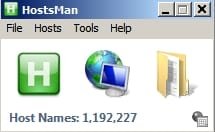
The thing about EMEditor (free version) is that it opens/ edits huge text files in an instant.

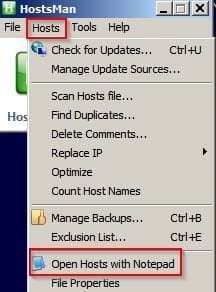
If I use Notepad to open my Hosts file it takes forever so that was the main reason I switched.

HostsMan.jpg

HostsMan2.jpg

There is a way of forcing any application like the above to open files using EMEditor instead of Notepad.

Registry Editor.jpg

If you create a new key named notepad.exe here:

HKEY_LOCAL_MACHINE\SOFTWARE\Microsoft\Windows NT\CurrentVersion\Image File Execution Options

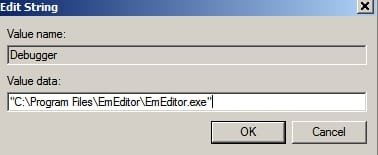
Then create a new String Value in the right pane, name it Debugger, then enter the following:

Edit String.jpg

EMEditor will launch instead of Notepad any time that Notepad tries to run.

The same method can be used to replace Notepad with other text editors, Just add the path to the executable.
 
Last edited:

My Computer My Computer

At a glance

Microsoft Windows 7 Home Premium 64-bit 7601 ...AMD C-60 APU with Radeon(tm) HD Graphics4.00 GBAMD Radeon HD 6290 Graphics
Computer type
Laptop
Computer Manufacturer/Model Number
ASUS
OS
Microsoft Windows 7 Home Premium 64-bit 7601 Multiprocessor Free Service Pack 1
CPU
AMD C-60 APU with Radeon(tm) HD Graphics
Motherboard
ASUSTeK COMPUTER INC. X501U
Memory
4.00 GB
Graphics Card(s)
AMD Radeon HD 6290 Graphics
Sound Card
(1) AMD High Definition Audio Device (2) Realtek High Defi
Screen Resolution
1366 x 768 x 32 bits (4294967296 colors) @ 60 Hz
Hard Drives
Hitachi HTS545050A7E380 SATA Disk Device
Antivirus
Comodo CIS & FW, SecureAplus App Whitelisting, Threatfire
Browser
Cyberfox 64bit, Opera 64bit, Airfox
Other Info
Spy-The-Spy, HitmanPro.Alert, Norton Connect Safe, MJRegWatcher, BitDefender TrafficLight, Voodoo Shield, Zemana AntiMalware
Back
Top