Solved Added 2nd HDD, Now Programs Won't Open & Hanging at Logging Off

Excessiive

New member
Local time
4:46 AM
Messages
6
As the long title says I just purchased a second HDD to go along with my SSD (System drive) and HDD (Storage drive). SSD is a Samsung 840 Pro. First HDD is a WD Caviar Black 1TB and the new one is WD Blue 1TB.

The OS is on the SSD but I have the folders/locations like Desktop, Documents, Downloads, Music, and Movies all on the storage drive. This way all the core programs are on the SSD. The new HDD is to store all my games on and that's all that's on there for now, I have my Steam and Origin Libraries on it.

Everything was working perfectly fine before installing the new hard drive. Now I'm having issues with programs not opening with the exception being Chrome. iTunes, Steam, Origin etc all don't open but their processes run. When this happens the computer also doesn't shut down as it hangs at Logging Off so I'm forced to hold down the power button until it shuts down.

Now the strange thing is this happens and if I keep restarting it, eventually all works as normal. However the next time I start up it goes back to the same problem with programs not opening and then hanging at Logging Off.

I've noticed two things that happen when I'm having the errors that may help find out the problem. On the problem start ups, if I open Computer to look at the drives it all appears fine, and then I click on a folder such as Documents and then back to the Computer page, the two optical drive slots, CD Rom and BD Rom both turn into blank white pages. The other thing that happens is when I go to the disk management page I the endless search for virtual disks problem.

I'm going to try and unplug my new HDD and plug it back in and maybe try it in another motherboard slot. I've already tried the normal solutions to the program not opening like running Malwarebytes to search for problems and scanned for disk errors but to no avail. What I'm confused about is why is this happening randomly and working eventually if I keep restarting. I didn't touch the other two drives when I installed the new one so why would those be affected? As I said all the .exe's are on the SSD so I'm not sure why they're suddenly having problems.

I've just tried switching the SATA port for the new HDD and checked all other connections and it didn't help.

I know this is a long post but any help would be greatly appreciated.
 

My Computer My Computer

At a glance

Windows 7 Professional x64Intel Core i7 4770k32 GB Corsair VengeanceEVGA GTX 660
Computer type
PC/Desktop
Computer Manufacturer/Model Number
Custom Build
OS
Windows 7 Professional x64
CPU
Intel Core i7 4770k
Motherboard
Asus Z87-C
Memory
32 GB Corsair Vengeance
Graphics Card(s)
EVGA GTX 660
Hard Drives
Samsung 840 Pro (System Drive)
WD Caviar Black 1 TB (Storage Drive)
WD Blue 1 TB (Storage Drive)
Browser
Chrome
The assigned drive letters may have changed when you added the drive. Use a utility or Windows Disk Management to reassign the drive back to the previous order plus the new partition(s).

Regards,
GEWB
 

My Computer My Computer

At a glance

Linux Mint / XP / Win7 Home, Pro, Ultimate / ...
Computer type
PC/Desktop
Computer Manufacturer/Model Number
(7 different computers booting up to 10 systems)
OS
Linux Mint / XP / Win7 Home, Pro, Ultimate / Win8.1 / Win10
Other Info
Four desktops, two laptops, one notebook and one tablet
The drive letters are all still the same. It does seem like it could be an issue with the indexing getting all jumbled up but that wouldn't explain why it works perfectly normal if I restart it enough times. The main problem with this though is that sometimes I have to shut it down with the power button 5+ times before I get it working properly.
 

My Computer My Computer

At a glance

Windows 7 Professional x64Intel Core i7 4770k32 GB Corsair VengeanceEVGA GTX 660
Computer type
PC/Desktop
Computer Manufacturer/Model Number
Custom Build
OS
Windows 7 Professional x64
CPU
Intel Core i7 4770k
Motherboard
Asus Z87-C
Memory
32 GB Corsair Vengeance
Graphics Card(s)
EVGA GTX 660
Hard Drives
Samsung 840 Pro (System Drive)
WD Caviar Black 1 TB (Storage Drive)
WD Blue 1 TB (Storage Drive)
Browser
Chrome
If you pull the new hard drive is everything back to OK again? The only thing I can think of is a BIOS flash. Make sure all the HD connections are clean and good. Try reseating the RAM.
 

My Computer My Computer

At a glance

Linux Lite 3.2 x64; Windows 7, 8.1Core2Duo 2.46GB ddr2nVidia
Computer type
PC/Desktop
Computer Manufacturer/Model Number
dell precision t3400 tower
OS
Linux Lite 3.2 x64; Windows 7, 8.1
CPU
Core2Duo 2.4
Memory
6GB ddr2
Graphics Card(s)
nVidia
Hard Drives
120gb SSD, 1TB HD, 2TB HD; sata II
Internet Speed
12/2
Browser
Vivaldi, Slimjet (Chromium) x64
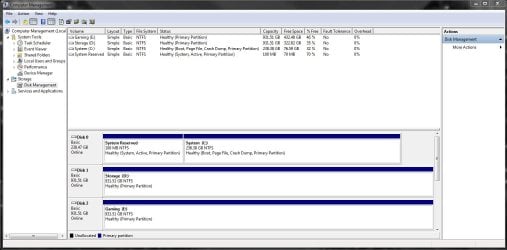
Can you post a picture of disk management
 

My Computer My Computer

At a glance

Vista, Windows7, Mint Mate, Zorin, Windows 8from 1.6GHz Duo to i7
Computer Manufacturer/Model Number
HP, Dell, Gateway, Toshiba - 4 laptops and 2 desktops
OS
Vista, Windows7, Mint Mate, Zorin, Windows 8
CPU
from 1.6GHz Duo to i7
Monitor(s) Displays
2x HP w2207
Hard Drives
5x HDD, 7x SSD, 12x Externals
Keyboard
with trackball - no mices
Mouse
Trackball mice
Internet Speed
DSL 6000
I'll give that a try Paul.

Here's the disk management.
 

Attachments

  • Disk Management.JPG
    Disk Management.JPG
    105.7 KB · Views: 10

My Computer My Computer

At a glance

Windows 7 Professional x64Intel Core i7 4770k32 GB Corsair VengeanceEVGA GTX 660
Computer type
PC/Desktop
Computer Manufacturer/Model Number
Custom Build
OS
Windows 7 Professional x64
CPU
Intel Core i7 4770k
Motherboard
Asus Z87-C
Memory
32 GB Corsair Vengeance
Graphics Card(s)
EVGA GTX 660
Hard Drives
Samsung 840 Pro (System Drive)
WD Caviar Black 1 TB (Storage Drive)
WD Blue 1 TB (Storage Drive)
Browser
Chrome
That looks all very good. The problem is a real mystery.
 

My Computer My Computer

At a glance

Vista, Windows7, Mint Mate, Zorin, Windows 8from 1.6GHz Duo to i7
Computer Manufacturer/Model Number
HP, Dell, Gateway, Toshiba - 4 laptops and 2 desktops
OS
Vista, Windows7, Mint Mate, Zorin, Windows 8
CPU
from 1.6GHz Duo to i7
Monitor(s) Displays
2x HP w2207
Hard Drives
5x HDD, 7x SSD, 12x Externals
Keyboard
with trackball - no mices
Mouse
Trackball mice
Internet Speed
DSL 6000
If you pull the new hard drive is everything back to OK again? The only thing I can think of is a BIOS flash. Make sure all the HD connections are clean and good. Try reseating the RAM.


Removed the HDD to see if it was the issue and but didn't work. Also tried flashing the BIOS which was quite old but still didn't fix it. All connections are solid and the original SSD connection was never altered in the first place so this is really baffling me. I'm starting to think I'm going to have to reinstall Windows if that would even help this. If I did a new install and then restored my system off an external drive would this problem come back you think?

Anyone else have any ideas? I'm going to contact Microsoft support when they're next open. Thanks for the help so far I appreciate any and all suggestions.
 

My Computer My Computer

At a glance

Windows 7 Professional x64Intel Core i7 4770k32 GB Corsair VengeanceEVGA GTX 660
Computer type
PC/Desktop
Computer Manufacturer/Model Number
Custom Build
OS
Windows 7 Professional x64
CPU
Intel Core i7 4770k
Motherboard
Asus Z87-C
Memory
32 GB Corsair Vengeance
Graphics Card(s)
EVGA GTX 660
Hard Drives
Samsung 840 Pro (System Drive)
WD Caviar Black 1 TB (Storage Drive)
WD Blue 1 TB (Storage Drive)
Browser
Chrome
The next thing I would try is to pull the optical drives. Windows is having a problem accessing them, and perhaps one of them is causing the hangs. Worth a try.

If that doesn't change anything, you could try reverting to a restore point, or Last known good configuration.

As a MB control, you could run a linux live distro off a dvd or usb stick and see how it performs. I recommend linux lite.
 

My Computer My Computer

At a glance

Linux Lite 3.2 x64; Windows 7, 8.1Core2Duo 2.46GB ddr2nVidia
Computer type
PC/Desktop
Computer Manufacturer/Model Number
dell precision t3400 tower
OS
Linux Lite 3.2 x64; Windows 7, 8.1
CPU
Core2Duo 2.4
Memory
6GB ddr2
Graphics Card(s)
nVidia
Hard Drives
120gb SSD, 1TB HD, 2TB HD; sata II
Internet Speed
12/2
Browser
Vivaldi, Slimjet (Chromium) x64
The next thing I would try is to pull the optical drives.
Along this line, what is the capacity of your Power Supply? Maybe it can't handle the extra load, or you might try a different plug location (from the PSU).

Your BIOS might also have a System Info display showing the various voltages.
 

My Computer My Computer

At a glance

Windows 7 Professional 64bitIntel Core i7 4600M @ 2.90GHz16.0GB Dual-Channel DDR3 @ 797MHz (11-11-11-28)Intel HD Graphics 4600 (Dell) 2048MB ATI AMD ...
Computer type
Laptop
Computer Manufacturer/Model Number
Dell Latitude E6540 Laptop
OS
Windows 7 Professional 64bit
CPU
Intel Core i7 4600M @ 2.90GHz
Motherboard
Dell Inc. 0CYT5F (SOCKET 0)
Memory
16.0GB Dual-Channel DDR3 @ 797MHz (11-11-11-28)
Graphics Card(s)
Intel HD Graphics 4600 (Dell) 2048MB ATI AMD Radeon HD 8790M
Sound Card
Realtek High Definition Audio
Monitor(s) Displays
HP ZR30w (2560x1600@60Hz)
Hard Drives
256GB LITEONIT LMT-256M6M-41 mm SATA (SSD)
1TB Samsung SSD 860 EVO mSATA SATA (SSD)
2TB USB 3.0 USB Device
115GB SanDisk Ultra Fit USB
Other Info
Multiple Dell E-Port Plus II Port Replicator/Docking Stations 0Y72NH USB 3.0 + 130W AC Adapters
Along this line, what is the capacity of your Power Supply? Maybe it can't handle the extra load, or you might try a different plug location (from the PSU).

That's a great point. When you pulled the new hard drive, did you disconnect its power cable as well?
 

My Computer My Computer

At a glance

Linux Lite 3.2 x64; Windows 7, 8.1Core2Duo 2.46GB ddr2nVidia
Computer type
PC/Desktop
Computer Manufacturer/Model Number
dell precision t3400 tower
OS
Linux Lite 3.2 x64; Windows 7, 8.1
CPU
Core2Duo 2.4
Memory
6GB ddr2
Graphics Card(s)
nVidia
Hard Drives
120gb SSD, 1TB HD, 2TB HD; sata II
Internet Speed
12/2
Browser
Vivaldi, Slimjet (Chromium) x64
The next thing I would try is to pull the optical drives. Windows is having a problem accessing them, and perhaps one of them is causing the hangs. Worth a try.

If that doesn't change anything, you could try reverting to a restore point, or Last known good configuration.

As a MB control, you could run a linux live distro off a dvd or usb stick and see how it performs. I recommend linux lite.

The next thing I would try is to pull the optical drives.
Along this line, what is the capacity of your Power Supply? Maybe it can't handle the extra load, or you might try a different plug location (from the PSU).

Your BIOS might also have a System Info display showing the various voltages.

Removed my optical drive and disabled the virtual BD rom drive and bang it worked. Thanks so much for the help everyone. Now I was trying to think what could be causing that all of the sudden as I built this back in the beginning of the summer 2013 and it hasn't given me a problem yet. It's a 750W PSU so it definitely shouldn't be an issue as I'm running a GTX 660 and not SLI GTX 980 TI or anything like the cool kids. I could give a look to see if anything was suddenly overdrawing power if that's even possible.
 

My Computer My Computer

At a glance

Windows 7 Professional x64Intel Core i7 4770k32 GB Corsair VengeanceEVGA GTX 660
Computer type
PC/Desktop
Computer Manufacturer/Model Number
Custom Build
OS
Windows 7 Professional x64
CPU
Intel Core i7 4770k
Motherboard
Asus Z87-C
Memory
32 GB Corsair Vengeance
Graphics Card(s)
EVGA GTX 660
Hard Drives
Samsung 840 Pro (System Drive)
WD Caviar Black 1 TB (Storage Drive)
WD Blue 1 TB (Storage Drive)
Browser
Chrome
Along this line, what is the capacity of your Power Supply? Maybe it can't handle the extra load, or you might try a different plug location (from the PSU).

That's a great point. When you pulled the new hard drive, did you disconnect its power cable as well?

I did right after I just tried pulling the sata cable at first thinking that could be a problem but it didn't help. When I pulled the optical drive I left the power plug in and it started working so I definitely think it had something to do with the sata connection between the optical drive and motherboard.
 

My Computer My Computer

At a glance

Windows 7 Professional x64Intel Core i7 4770k32 GB Corsair VengeanceEVGA GTX 660
Computer type
PC/Desktop
Computer Manufacturer/Model Number
Custom Build
OS
Windows 7 Professional x64
CPU
Intel Core i7 4770k
Motherboard
Asus Z87-C
Memory
32 GB Corsair Vengeance
Graphics Card(s)
EVGA GTX 660
Hard Drives
Samsung 840 Pro (System Drive)
WD Caviar Black 1 TB (Storage Drive)
WD Blue 1 TB (Storage Drive)
Browser
Chrome
Very cool. I suppose the next thing is to try a different optical drive.
 

My Computer My Computer

At a glance

Linux Lite 3.2 x64; Windows 7, 8.1Core2Duo 2.46GB ddr2nVidia
Computer type
PC/Desktop
Computer Manufacturer/Model Number
dell precision t3400 tower
OS
Linux Lite 3.2 x64; Windows 7, 8.1
CPU
Core2Duo 2.4
Memory
6GB ddr2
Graphics Card(s)
nVidia
Hard Drives
120gb SSD, 1TB HD, 2TB HD; sata II
Internet Speed
12/2
Browser
Vivaldi, Slimjet (Chromium) x64
Back
Top