Solved Dell XPS8300 - no sound

alfanoen

New member
Local time
4:08 AM
Messages
4
Location
Staten Island, NY
Since my XPS 8300 is almost 5 years old,I am guessing that the onboard sound AMD HD Audio Device may have died of old age. I am a retired Senior Help Desk Analyst (retired in 2001) so I not technically challenged. I've run through all the troubleshooting guides, services are running, uninstalled the device and rebooted, etc.

If anyone knows of some obscure fix or test (Dell Testing doesn't run, just hangs there), I would appreciate a response. If there is no magic bullet, I guess it's time for either a sound card or a new PC (I hate to give this one up, it has run so good).
 

My Computer My Computer

At a glance

Windows 7 Proessional 64 Bit Svc Pack 1Intel i5-2310 2.9Ghz4 GBAMD Radeon HD 6450
Computer type
PC/Desktop
Computer Manufacturer/Model Number
Dell XPS 8300
OS
Windows 7 Proessional 64 Bit Svc Pack 1
CPU
Intel i5-2310 2.9Ghz
Memory
4 GB
Graphics Card(s)
AMD Radeon HD 6450
Monitor(s) Displays
ViewSonic VS2250 (Dual Monitors)
Hard Drives
WDC @D10EALX-759BA1 1TB
Samsung HD103SJ 1TB+
Seagate Backup Plus Desk USB Device
Keyboard
Logitech wireless
Mouse
Logitech wireless
Internet Speed
FIOS 300 mbs
Antivirus
MSEI
Browser
IE 9, Chrome
Well, the AMD HD Audio is ONLY for HDMI audio. It is not the PC's "sound card".
The sound in a Dell XPS8300 is either Realtek or if you have an optional sound card it is a SoundBlaster.

Here is the link to the Dell downloads. Reinstall Realtek or SoundBlaster as applicable and see if that helps.
Product Support | Dell US

BTW, I'm a retired LAN/WAN Network and hardware help desk manager.
 

My Computer My Computer

At a glance

Windows 10 64 bitIntel i7 6700K16GB Corsair DominatorIntel CPU Graphics
Computer type
PC/Desktop
Computer Manufacturer/Model Number
My Own Build
OS
Windows 10 64 bit
CPU
Intel i7 6700K
Motherboard
ASUS ROG Maximus VIII Hero
Memory
16GB Corsair Dominator
Graphics Card(s)
Intel CPU Graphics
Sound Card
RealTek
Monitor(s) Displays
27" Dell S2719dgf
Screen Resolution
2560X1440
Hard Drives
1 TB Samsung 850 EVO SSD for Win 10 Pro
500GB Samsung 850 EVO SSD for Win 10 Insider
2 TB drive for backup
PSU
EVGA Supernova 750G2
Case
BeQuiet Silent Base 600
Cooling
Deepcool Captain 120EX
Keyboard
Microsoft Wireless 2000
Mouse
Microsoft wireless
Internet Speed
100 MB/sec (Cable)
Antivirus
Microsoft Defender and Malwarebytes
Browser
Edge/Firefox
Other Info
Cakewalk (Sonar) by BandLab and Studio One 4.1 Pro recording studio software. MOTU 896Mk3 Hybrid recording interface, Frontier Tranzport wireless control unit, Behringer X-Touch Control Surface.
Five USB connected optical drives for CD Audio production using Nero BurningROM
My mistake

Fireberd, thanks for the fast response. I actually knew that AMD was HDMI and Realtek was the sound from reading one of your older responses and I should have included that in my original post.

I had downloaded and installed the latest version of Realtek Audio over a year ago, when I still had sound. One of the steps I took before posting was to reinstall it on the outside chance that something became corrupt but that did not resolve the problem.

I've moved the jack around from front speaker to rear speaker, side speaker, etc. My speakers are integrated into my ViewSonic monitor. I thought about trying speakers but I have two VS monitors, so I moved the jack to my second monitor without any luck. I may scout around for my old Altec speakers to see if they work but I am not very optimistic.

I'm still guessing that the onboard hardware fizzled out but I have no way of confirming that. My Help Desk action was also LAN/WAN, mainframe (AS-400) and software issues. Since hardware was your forte, do you know whether or not I can test the onboard hardware?
 

My Computer My Computer

At a glance

Windows 7 Proessional 64 Bit Svc Pack 1Intel i5-2310 2.9Ghz4 GBAMD Radeon HD 6450
Computer type
PC/Desktop
Computer Manufacturer/Model Number
Dell XPS 8300
OS
Windows 7 Proessional 64 Bit Svc Pack 1
CPU
Intel i5-2310 2.9Ghz
Memory
4 GB
Graphics Card(s)
AMD Radeon HD 6450
Monitor(s) Displays
ViewSonic VS2250 (Dual Monitors)
Hard Drives
WDC @D10EALX-759BA1 1TB
Samsung HD103SJ 1TB+
Seagate Backup Plus Desk USB Device
Keyboard
Logitech wireless
Mouse
Logitech wireless
Internet Speed
FIOS 300 mbs
Antivirus
MSEI
Browser
IE 9, Chrome
Hi:

@fireberd is the expert on this, but I will just pop in with my similar experience on a Dell XPS8500 several months ago.

TMALSS, an unexpected shutdown (unrelated issue) and cold restart left me with no sound.
Running the Dell F12 diagnostics showed that all the hardware was working OK.
Drivers were all current.
After an unexpectedly helpful call to live Dell support, it turned out that the HDMI had mysteriously re-enabled itself during the restart and was "conflicting with" RealTek audio.
After a bit of trial-and-error troubleshooting, disabling the HDMI "audio" via device manager restored proper audio output.
We surmised that it was a "hiccup" during the restart after the unexpected shutdown.

That was my silversurfer, non-technical "short" version of the story.
I can look up my notes if you need more detail.:)

Cheers,
MM
 

My Computer My Computer

At a glance

OEM Windows 7 Ult (x64) SP1Intel Core-i7 3770 @ 3.4 GHz16 GB DDR3 SDRAM @ 1333 MHzNVidia GeForce GT620 1 GB
Computer type
PC/Desktop
Computer Manufacturer/Model Number
Dell Studio XPS 8500
OS
OEM Windows 7 Ult (x64) SP1
CPU
Intel Core-i7 3770 @ 3.4 GHz
Motherboard
"Dell" branded
Memory
16 GB DDR3 SDRAM @ 1333 MHz
Graphics Card(s)
NVidia GeForce GT620 1 GB
Sound Card
THX TruStudio PC
Monitor(s) Displays
Dell U2410 Full HD
Hard Drives
2.0 TB SATA2 @ 7200 RPM
PSU
350W
Keyboard
MS 4000 Ergon - Wired
Mouse
Logitech Anywhere MX
Internet Speed
Cable HSI w/Turbo (router)
Antivirus
KIS-MBAM Premium-MBAE Premium
Browser
Fx (current version); IE
Other Info
And a Win7/64 Pro laptop; And a Win10/64 Pro desktop.
Thanks, MM.

If the Dell diagnostics, on the hard drive, do not run you can try the Dell on-line diagnostics.

Diagnostics
http://www.sevenforums.com/tutorials/9733-screenshots-files-upload-post-seven-forums.html

I've been both hardware and Operations/Software. Our systems were all IBM, such as 3725 and 3745 Comm Processors, IBM 3270 "dumb terminals", Token Ring LAN's with Novell Netware servers (I was Novell CNE certified in 1995). Our central site processors were all IBM 3090's and similar. I was the Midwest regional manager in Kansas City and my area was basically everything west of the Mississippi to the Rockies.
If you have a Headset you can try that in the GREEN speaker jack on the rear and see if get sound.

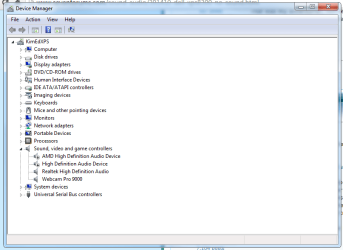
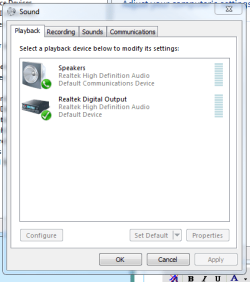
Post a screenshot of the Device Manager, Sound, Video and Game Controllers section. Also a screenshot of the Sound Panel, Playback section.
 

My Computer My Computer

At a glance

Windows 10 64 bitIntel i7 6700K16GB Corsair DominatorIntel CPU Graphics
Computer type
PC/Desktop
Computer Manufacturer/Model Number
My Own Build
OS
Windows 10 64 bit
CPU
Intel i7 6700K
Motherboard
ASUS ROG Maximus VIII Hero
Memory
16GB Corsair Dominator
Graphics Card(s)
Intel CPU Graphics
Sound Card
RealTek
Monitor(s) Displays
27" Dell S2719dgf
Screen Resolution
2560X1440
Hard Drives
1 TB Samsung 850 EVO SSD for Win 10 Pro
500GB Samsung 850 EVO SSD for Win 10 Insider
2 TB drive for backup
PSU
EVGA Supernova 750G2
Case
BeQuiet Silent Base 600
Cooling
Deepcool Captain 120EX
Keyboard
Microsoft Wireless 2000
Mouse
Microsoft wireless
Internet Speed
100 MB/sec (Cable)
Antivirus
Microsoft Defender and Malwarebytes
Browser
Edge/Firefox
Other Info
Cakewalk (Sonar) by BandLab and Studio One 4.1 Pro recording studio software. MOTU 896Mk3 Hybrid recording interface, Frontier Tranzport wireless control unit, Behringer X-Touch Control Surface.
Five USB connected optical drives for CD Audio production using Nero BurningROM
The F12 Dell diagnostics allow one to test ALL the hardware, including sound card and speakers, not just the hard drive.;)
Once I knew that the hardware was OK, it was just a question of tracking down what was blocking the Realtek output.
Additional troubleshooting via Device Manager (etc.) narrowed it down.
The "fix" was quite simple.
And -- shockingly -- the Dell tech was both knowledgeable and helpful.:D
I probably would not have been able to blunder my way to the solution without his help.

I will look up my detailed notes, if they are needed or might be helpful.

Cheers,
MM
 

My Computer My Computer

At a glance

OEM Windows 7 Ult (x64) SP1Intel Core-i7 3770 @ 3.4 GHz16 GB DDR3 SDRAM @ 1333 MHzNVidia GeForce GT620 1 GB
Computer type
PC/Desktop
Computer Manufacturer/Model Number
Dell Studio XPS 8500
OS
OEM Windows 7 Ult (x64) SP1
CPU
Intel Core-i7 3770 @ 3.4 GHz
Motherboard
"Dell" branded
Memory
16 GB DDR3 SDRAM @ 1333 MHz
Graphics Card(s)
NVidia GeForce GT620 1 GB
Sound Card
THX TruStudio PC
Monitor(s) Displays
Dell U2410 Full HD
Hard Drives
2.0 TB SATA2 @ 7200 RPM
PSU
350W
Keyboard
MS 4000 Ergon - Wired
Mouse
Logitech Anywhere MX
Internet Speed
Cable HSI w/Turbo (router)
Antivirus
KIS-MBAM Premium-MBAE Premium
Browser
Fx (current version); IE
Other Info
And a Win7/64 Pro laptop; And a Win10/64 Pro desktop.
XPS 8300 no sound

Fireberd, Moxie, I apologize for being MIA, my furnace shut down on Saturday, the coldest day of the year. I've got it running but have to do a permanent fix later. Anyway back to the no sound saga. I rand the F12 Diags, everything passed. I disabled the AMD HD device and still no sound. I have tried several times to run the Dell online Diags several times before I posted but it just hangs up in the "Checking for Support Assist" which I don't have installed. It just hangs there and never installs the tool. I finally reached the conclusion that I should search for it manually. I downloaded and installed it. I am about to run Dell Support Assist. In the meantime, I am uploading the screenshots that you asked for Fireberd. Thanks for the help from both of you. I will let you know the results of the diags.
 

Attachments

  • Devie Manager.PNG
    Devie Manager.PNG
    23.2 KB · Views: 0
  • Sound Panel.PNG
    Sound Panel.PNG
    14.8 KB · Views: 14

My Computer My Computer

At a glance

Windows 7 Proessional 64 Bit Svc Pack 1Intel i5-2310 2.9Ghz4 GBAMD Radeon HD 6450
Computer type
PC/Desktop
Computer Manufacturer/Model Number
Dell XPS 8300
OS
Windows 7 Proessional 64 Bit Svc Pack 1
CPU
Intel i5-2310 2.9Ghz
Memory
4 GB
Graphics Card(s)
AMD Radeon HD 6450
Monitor(s) Displays
ViewSonic VS2250 (Dual Monitors)
Hard Drives
WDC @D10EALX-759BA1 1TB
Samsung HD103SJ 1TB+
Seagate Backup Plus Desk USB Device
Keyboard
Logitech wireless
Mouse
Logitech wireless
Internet Speed
FIOS 300 mbs
Antivirus
MSEI
Browser
IE 9, Chrome
Disable the High Definition Audio Device and also the Webcam. Restart the PC and after Windows starts check the Sound Playback panel. I've seen cases of the Web Cam causing this problem. Who knows what the High Definition Audio Device is.

As shown the Digital out is set as the default playback device. The "Speakers" should be set to Default device and show "Realtek High Definition Audio and Default Device, NOT the Default Communications Device as shown.
 

My Computer My Computer

At a glance

Windows 10 64 bitIntel i7 6700K16GB Corsair DominatorIntel CPU Graphics
Computer type
PC/Desktop
Computer Manufacturer/Model Number
My Own Build
OS
Windows 10 64 bit
CPU
Intel i7 6700K
Motherboard
ASUS ROG Maximus VIII Hero
Memory
16GB Corsair Dominator
Graphics Card(s)
Intel CPU Graphics
Sound Card
RealTek
Monitor(s) Displays
27" Dell S2719dgf
Screen Resolution
2560X1440
Hard Drives
1 TB Samsung 850 EVO SSD for Win 10 Pro
500GB Samsung 850 EVO SSD for Win 10 Insider
2 TB drive for backup
PSU
EVGA Supernova 750G2
Case
BeQuiet Silent Base 600
Cooling
Deepcool Captain 120EX
Keyboard
Microsoft Wireless 2000
Mouse
Microsoft wireless
Internet Speed
100 MB/sec (Cable)
Antivirus
Microsoft Defender and Malwarebytes
Browser
Edge/Firefox
Other Info
Cakewalk (Sonar) by BandLab and Studio One 4.1 Pro recording studio software. MOTU 896Mk3 Hybrid recording interface, Frontier Tranzport wireless control unit, Behringer X-Touch Control Surface.
Five USB connected optical drives for CD Audio production using Nero BurningROM
Disable the High Definition Audio Device and also the Webcam. Restart the PC and after Windows starts check the Sound Playback panel. I've seen cases of the Web Cam causing this problem. Who knows what the High Definition Audio Device is.

As shown the Digital out is set as the default playback device. The "Speakers" should be set to Default device and show "Realtek High Definition Audio and Default Device, NOT the Default Communications Device as shown.

LOL!
You beat me to it, @fireberd.:)

I just pulled up my notes from last August and that was, indeed, the fix.
In my case it was NVidia High-Def Audio.
But disabling that solved the problem for me.
The fix was stable after both a warm reboot and a cold restart.
No further issues since then.

YMMV, but that would be my inexpert suggestion, as well.

I hope you get both your furnace and your computer working!

MM
 

My Computer My Computer

At a glance

OEM Windows 7 Ult (x64) SP1Intel Core-i7 3770 @ 3.4 GHz16 GB DDR3 SDRAM @ 1333 MHzNVidia GeForce GT620 1 GB
Computer type
PC/Desktop
Computer Manufacturer/Model Number
Dell Studio XPS 8500
OS
OEM Windows 7 Ult (x64) SP1
CPU
Intel Core-i7 3770 @ 3.4 GHz
Motherboard
"Dell" branded
Memory
16 GB DDR3 SDRAM @ 1333 MHz
Graphics Card(s)
NVidia GeForce GT620 1 GB
Sound Card
THX TruStudio PC
Monitor(s) Displays
Dell U2410 Full HD
Hard Drives
2.0 TB SATA2 @ 7200 RPM
PSU
350W
Keyboard
MS 4000 Ergon - Wired
Mouse
Logitech Anywhere MX
Internet Speed
Cable HSI w/Turbo (router)
Antivirus
KIS-MBAM Premium-MBAE Premium
Browser
Fx (current version); IE
Other Info
And a Win7/64 Pro laptop; And a Win10/64 Pro desktop.
MoxieMomma, don't sell yourself short. You are still up there with the experts. Okay folks, I ran into are really confusing situation. I ran the Diags and Realtek HD Audio hit a snag. I found an old pair of Harmon Kardon speakers attached to an older PC. I replaced the integrated Monitor speaker jack with the HK's. I made speakers the default as you suggested Fireberd and lo and behold the HK's restored sound but the Realtek HD Audio disappeared from the Sound Panel. I swapped out the HK's for the Integrated Monitor speakers and that works now also. I did not touch the Webcam since it has been there for several months and I need it to attend Video conference PTSD sessions with my Psyche (I'm a disabled Vet). I needed the sound for those sessions. For now I am going to leave it as is and when I get some time, still have to repipe the condensation flow from my furnace, I will tinker with it. I wish I were as sharp as MoxieMomma and took detailed notes but my attention span is miniscule lol. Thanks for the help and advice folks. Peace.
 

My Computer My Computer

At a glance

Windows 7 Proessional 64 Bit Svc Pack 1Intel i5-2310 2.9Ghz4 GBAMD Radeon HD 6450
Computer type
PC/Desktop
Computer Manufacturer/Model Number
Dell XPS 8300
OS
Windows 7 Proessional 64 Bit Svc Pack 1
CPU
Intel i5-2310 2.9Ghz
Memory
4 GB
Graphics Card(s)
AMD Radeon HD 6450
Monitor(s) Displays
ViewSonic VS2250 (Dual Monitors)
Hard Drives
WDC @D10EALX-759BA1 1TB
Samsung HD103SJ 1TB+
Seagate Backup Plus Desk USB Device
Keyboard
Logitech wireless
Mouse
Logitech wireless
Internet Speed
FIOS 300 mbs
Antivirus
MSEI
Browser
IE 9, Chrome
Thanks for your kind words, @alfanoen.
It was @fireberd who had the detailed solution.

still have to repipe the condensation flow from my furnace
Be sure to check for leaks -- carbon monoxide is deadly.:(

Glad you got it sorted.

Cheers,
MM
 

My Computer My Computer

At a glance

OEM Windows 7 Ult (x64) SP1Intel Core-i7 3770 @ 3.4 GHz16 GB DDR3 SDRAM @ 1333 MHzNVidia GeForce GT620 1 GB
Computer type
PC/Desktop
Computer Manufacturer/Model Number
Dell Studio XPS 8500
OS
OEM Windows 7 Ult (x64) SP1
CPU
Intel Core-i7 3770 @ 3.4 GHz
Motherboard
"Dell" branded
Memory
16 GB DDR3 SDRAM @ 1333 MHz
Graphics Card(s)
NVidia GeForce GT620 1 GB
Sound Card
THX TruStudio PC
Monitor(s) Displays
Dell U2410 Full HD
Hard Drives
2.0 TB SATA2 @ 7200 RPM
PSU
350W
Keyboard
MS 4000 Ergon - Wired
Mouse
Logitech Anywhere MX
Internet Speed
Cable HSI w/Turbo (router)
Antivirus
KIS-MBAM Premium-MBAE Premium
Browser
Fx (current version); IE
Other Info
And a Win7/64 Pro laptop; And a Win10/64 Pro desktop.
Back
Top