Solved How do I disable the Screen orientation hotkeys?

SynthGrid

New member
Local time
11:10 AM
Messages
3
This hotkey annoys me. A certain game I play involves using Ctrl, Alt, and the arrow keys. I constantly find myself accidentally pressing one of the screen rotation hotkeys, which interrupts my game and messes up my screen.

I've looked high and low for ways to disable this, and none have helped. There are no "graphics options" when I right click my desktop, and I can't find any Intel related graphics options. I don't have nVidia, either.
When I do 'msconfig' in Run, there is no Toshiba Rotation thingy to disable either.

I'm at my wits end.. Any help? :banghead:

:picnic:
 

My Computer My Computer

Computer type
Laptop
Computer Manufacturer/Model Number
HP
OS
Windows 7 Starter 32bit (Hewlett-Packard Manufactured)
CPU
Intel(R) Atom(TM) CPU N450 @ 1.66 GHz
Motherboard
Not sure of at the moment.
Memory
1024MB RAM
Graphics Card(s)
Intel(R) Graphics Media Accelerator 3150
Antivirus
None
Browser
Mozilla Firefox
Bump.. I really need to disable this hotkey.
 

My Computer My Computer

Computer type
Laptop
Computer Manufacturer/Model Number
HP
OS
Windows 7 Starter 32bit (Hewlett-Packard Manufactured)
CPU
Intel(R) Atom(TM) CPU N450 @ 1.66 GHz
Motherboard
Not sure of at the moment.
Memory
1024MB RAM
Graphics Card(s)
Intel(R) Graphics Media Accelerator 3150
Antivirus
None
Browser
Mozilla Firefox
This hotkey annoys me. A certain game I play involves using Ctrl, Alt, and the arrow keys. I constantly find myself accidentally pressing one of the screen rotation hotkeys, which interrupts my game and messes up my screen.

I've looked high and low for ways to disable this, and none have helped. There are no "graphics options" when I right click my desktop, and I can't find any Intel related graphics options. I don't have nVidia, either.
When I do 'msconfig' in Run, there is no Toshiba Rotation thingy to disable either.

I'm at my wits end.. Any help? :banghead:

:picnic:

Hi SynthGrid and welcome to WSF.

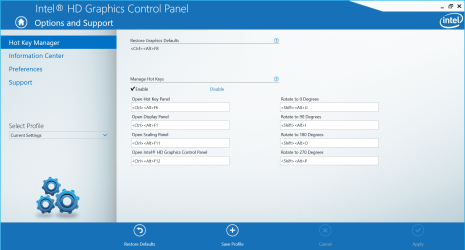
It should be on the task bar by the clock. If it isn't you may have take it out of the startup in "msconfig" You'll find Under Options and Support Hotkey Functionality. Uncheck enable.
 

Attachments

  • intel.JPG
    intel.JPG
    81.9 KB · Views: 1

My Computer My Computer

Computer type
PC/Desktop
Computer Manufacturer/Model Number
Custom Built By Me.
OS
Windows 10 Pro 64 bit
CPU
AMD FX 9590 8 Core Black Edition
Motherboard
MSI 990FXA GAMING (MS-7893)
Memory
Corsair Vengeance 16GB DDR3
Graphics Card(s)
AMD Radeon (TM) R9 380 Gaming Series
Sound Card
AMD High Definition
Monitor(s) Displays
Samsung 32" 60Hz 4ms Curved PLS LED
Screen Resolution
1920 X 1080
Hard Drives
C: 223 GB SSD = E: 465 GB HDD = F: 931 GB HDD = G: 149 GB HDD = H: 931 GB HDD
PSU
EVGA Supernova NEX750B 750W ATX EPS12V 80PLUS Bronze
Case
Cool Master
Cooling
Noctua NH-D15 Premium Cooler with 2x NF-A15 PWM 140mm Fan
Internet Speed
Fiber Optic: Download 332.7 Mbps / Upload 331.5 Mbps
Antivirus
Windows Defender
Browser
Slimjet (64bit)
This hotkey annoys me. A certain game I play involves using Ctrl, Alt, and the arrow keys. I constantly find myself accidentally pressing one of the screen rotation hotkeys, which interrupts my game and messes up my screen.

I've looked high and low for ways to disable this, and none have helped. There are no "graphics options" when I right click my desktop, and I can't find any Intel related graphics options. I don't have nVidia, either.
When I do 'msconfig' in Run, there is no Toshiba Rotation thingy to disable either.

I'm at my wits end.. Any help? :banghead:

:picnic:

Hi SynthGrid and welcome to WSF.

It should be on the task bar by the clock. If it isn't you may have take it out of the startup in "msconfig" You'll find Under Options and Support Hotkey Functionality. Uncheck enable.

Ah, it worked. I can finally disable it.. Thank you!! :D:D
 

My Computer My Computer

Computer type
Laptop
Computer Manufacturer/Model Number
HP
OS
Windows 7 Starter 32bit (Hewlett-Packard Manufactured)
CPU
Intel(R) Atom(TM) CPU N450 @ 1.66 GHz
Motherboard
Not sure of at the moment.
Memory
1024MB RAM
Graphics Card(s)
Intel(R) Graphics Media Accelerator 3150
Antivirus
None
Browser
Mozilla Firefox
In my Acer computer (Windows 10, bought a couple of years back), the Hotkey Manager is located in a different place. When you right click on your desktop, select "Graphics Properties..." (this is the Intel Graphics program), then select "Options and Support" and click "Hotkey Manager on the left side panel. You will find the screen rotation / orientation hotkeys on the right side.
 

Attachments

  • intel hd graphics screen rotation orientaton hotkeys.PNG
    intel hd graphics screen rotation orientaton hotkeys.PNG
    258.3 KB · Views: 1

My Computer My Computer

Computer type
PC/Desktop
OS
Windows 10
Back
Top