Solved getting rid of a partition

littlepeaks

New member
Local time
1:21 PM
Messages
8
Location
Colorado Springs
I would like to get my system the way I want it before I attempt to upgrade to Windows 10.
I have Norton Security Suite installed on my PC. In Norton's infinite wisdom, it started doing backups. Since I didn't have an external drive attached to my PC, it created a disk partition on my hard drive on which to do backups (that's really helpful if my HD crashes). I found out how to turn backups off, and now would like to get rid of that partition. How do I do that? (BTW I am now using Acronis to back up to an external drive, if anything goes wrong). TIA
 

My Computer My Computer

At a glance

Windows 7 Home Premium 64 bitI7 -9306 GBATI Radeon HD 5670
Computer type
PC/Desktop
Computer Manufacturer/Model Number
Dell Studio XPS 9100
OS
Windows 7 Home Premium 64 bit
CPU
I7 -930
Memory
6 GB
Graphics Card(s)
ATI Radeon HD 5670
Hard Drives
1.5 TB Serial ATA2
Antivirus
Norton Security Suite
Browser
SeaMonkey

My Computer My Computer

At a glance

Win7 Ultimate X64Intel i5 3570K8GB DDR3 1600Onboard
Computer type
PC/Desktop
Computer Manufacturer/Model Number
Pauly Special
OS
Win7 Ultimate X64
CPU
Intel i5 3570K
Motherboard
Gigabyte Z77X-DS3H
Memory
8GB DDR3 1600
Graphics Card(s)
Onboard
Sound Card
Onboard
Screen Resolution
1280x1024
Hard Drives
Samsung 840 Evo SSD (OS)
1TB Spinner (Data)
PSU
800W Arctic
Case
Cooler Master
Cooling
3x120mm Fans
Keyboard
MS Wireless
Mouse
MS Wireless
Internet Speed
20M
Just right click on it in disk management and choose delete volume.
 

My Computer My Computer

At a glance

Windows 10 Pro x64Intel Core i7 6700KGSkill TridentZ RGB 16GB 3600 16-16-16-36EVGA GTX 980 Ti SC x2
Computer type
PC/Desktop
Computer Manufacturer/Model Number
Skylake Special #666
OS
Windows 10 Pro x64
CPU
Intel Core i7 6700K
Motherboard
Asus Sabertooth Z170 Mark 1
Memory
GSkill TridentZ RGB 16GB 3600 16-16-16-36
Graphics Card(s)
EVGA GTX 980 Ti SC x2
Sound Card
Realtek High Definition
Monitor(s) Displays
AOC G2460PG
Screen Resolution
1920 x 1080 144Hz
Hard Drives
Samsung 860 Pro 256GB, Seagate Barracuda 4TB x2
PSU
EVGA 1000 P2, EVGA White Custom Braided Cables
Case
Corsair Vengeance C70 Gunmetal Black
Cooling
Corsair H100i v2, Corsair ML120 x2, Thermal Grizzly Kryonaut
Keyboard
Logitech G910 Orion Spectrum
Mouse
Logitech G700s
Internet Speed
Verizon Fios Quantum Gateway 75/75
Antivirus
Windows Defender, Malwarebytes Free 3.8.3
Browser
Chrome
Other Info
Corsair SP120 x4, LG Blu-ray Drive, Durabrand HT-395 100 Watt Dolby Digital Amp, Corsair H2100 Wireless 7.1 Headset
Pauly --

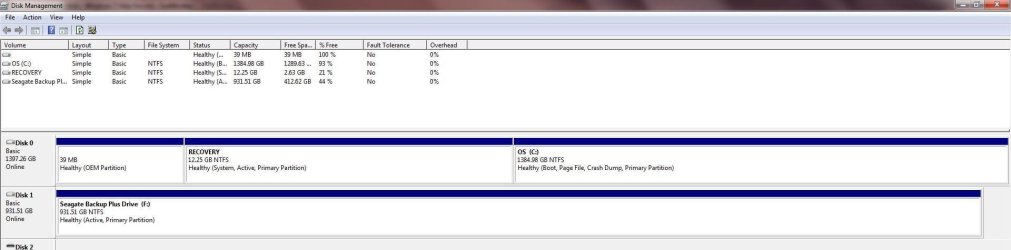
Here's a screen shot (attached) from disk management -- I cropped it to save space.
While we're looking at it, I hope "RECOVERY" isn't something Acronis created on the HD (don't think it is).
Also, what is the 39MB OEM partition? (I have a Dell with Windows 7 preinstalled)
HTH
 

Attachments

  • Disk_Management.jpg
    Disk_Management.jpg
    71.4 KB · Views: 10

My Computer My Computer

At a glance

Windows 7 Home Premium 64 bitI7 -9306 GBATI Radeon HD 5670
Computer type
PC/Desktop
Computer Manufacturer/Model Number
Dell Studio XPS 9100
OS
Windows 7 Home Premium 64 bit
CPU
I7 -930
Memory
6 GB
Graphics Card(s)
ATI Radeon HD 5670
Hard Drives
1.5 TB Serial ATA2
Antivirus
Norton Security Suite
Browser
SeaMonkey
If you crop the DM, we can't see if there are errors.
 

My Computer My Computer

At a glance

Windows 7 Home Premium 32-Bit - Build 7600 SP1Intel Core i3-2120 3.30GhzKingston 4 GB DDR3 1333 mhzAMD Radeon HD6670
Computer type
PC/Desktop
Computer Manufacturer/Model Number
Custom Build
OS
Windows 7 Home Premium 32-Bit - Build 7600 SP1
CPU
Intel Core i3-2120 3.30Ghz
Motherboard
Asus P8Z68-V LX Intel Z68 Socket H2 ATX
Memory
Kingston 4 GB DDR3 1333 mhz
Graphics Card(s)
AMD Radeon HD6670
Sound Card
Sound Blaster Audigy SE 24-Bit
Monitor(s) Displays
Asus VE228
Screen Resolution
1440 X 900
Hard Drives
OCZ Vertex 3 120 GB Sata 3 SSD ==
Kingston SH103/S3 120 G Hyper X 120 GB SSD ==
Western Digital 500 GB Caviar Green 7200 RPM ==
PSU
Corsair CX600M == 600 Watt
Case
NZXT Apollo - Silver with Clear Side Panel
Cooling
Three 120 mm Fans
Keyboard
Microsoft Natural 4000
Mouse
Microsoft Custom Optical 3000
Internet Speed
AT&T Fiber Optic Wireless Network
Antivirus
Microsoft Security Essentials
Browser
Chrome
Other Info
120 mm Blue LED Fan -- Three Blue LED Lazer Light Sticks
Hi,
You'll need to completely uninstall Norton Before attempting a upgrade to win-10

Also did you refer to the manufactures website to see if your machine is compatible they are the ones that make drivers for it not M$
Also to make sure your manufacture system recovery partitions are not zapped in the upgrade this is part of the manufactures compatibility testing they will know.

But as far as the F partition
It's marked as active that needs to be undone
Which might be taken care of by right clicking and click on Delete volume
That should turn it into Unallocated space virify if that also removes the active flag.
 

My Computer My Computer

At a glance

Win-7-Pro64bit 7-H-Prem-64biti7-5930K 2nd i9-9940x both water blocked VRM'...Trident-z 3200C14 2nd Trident-z 3600C16EVGA 1080ti ftw3 2nd Titan Xp both water blocked
Computer type
PC/Desktop
Computer Manufacturer/Model Number
Custom assembled by me :}
OS
Win-7-Pro64bit 7-H-Prem-64bit
CPU
i7-5930K 2nd i9-9940x both water blocked VRM's too
Motherboard
ASUS SABERTOOTH X99 2nd ASUS x299 Apex
Memory
Trident-z 3200C14 2nd Trident-z 3600C16
Graphics Card(s)
EVGA 1080ti ftw3 2nd Titan Xp both water blocked
Sound Card
Built-in Realtek
Monitor(s) Displays
1-AOC G2460PG 24"G-Sync 144Hz/ 2nd 1-ASUS VG248QE 24" 144Hz
Screen Resolution
1920 x 1080 144Hz
Hard Drives
2-Samsung M.2 Evo & Evo Plus
2-Samsung 850 EVO 500GB SSD's/ 3-2.5 W.D. Black 1tb-&3-1tb/3-3.5 WD Black 1tb hdd's
PSU
EVGA SuperNOVA 1000-P2 2nd 1200-P2
Case
2-Corsair Obsidian Series 450D Black ATX Mid Tower
Cooling
Custom water loops
Keyboard
Logitech G710+/ 2nd Logitech G910
Mouse
2-RedDragon M901 Perdition 16400 dpi Gaming mouse = wired
Internet Speed
Comcast Ping 19ms 89.31mbps download speed 6.12mbps upload
Antivirus
Malwarebytes Pro/ Superantispyware Pro
Browser
FireFox & Pale moon
Other Info
2nd ASUS X299 Apex/Intel i9-9940x with Custom water loop/7H-Prem-x64/Corsair 450D case/Ram Trident-z 3600C16 4x8gb / Samsung970Evo plus 500gb SSD/Dual ssd EZ swap evo/PSU EVGA SuperNova 1200w-P2 80+Platinum/GPU Titan Xp /8-ML-140 on push-pull on 2-280GTX rads
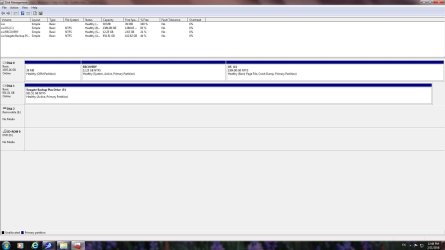
Here's the uncropped screen, bigmck.

Thrashzone, I intend to disconnect F: (the external backup drive), and everything else, except for the keyboard, monitor, and mouse, before I try upgrading to Windows 10.
 

Attachments

  • dm.jpg
    dm.jpg
    101.9 KB · Views: 8

My Computer My Computer

At a glance

Windows 7 Home Premium 64 bitI7 -9306 GBATI Radeon HD 5670
Computer type
PC/Desktop
Computer Manufacturer/Model Number
Dell Studio XPS 9100
OS
Windows 7 Home Premium 64 bit
CPU
I7 -930
Memory
6 GB
Graphics Card(s)
ATI Radeon HD 5670
Hard Drives
1.5 TB Serial ATA2
Antivirus
Norton Security Suite
Browser
SeaMonkey
Hi,
You need to unmark as active first and restart your machine to make sure it's not dependent

Either way you still need to completely remove Norton not just disable.
 

My Computer My Computer

At a glance

Win-7-Pro64bit 7-H-Prem-64biti7-5930K 2nd i9-9940x both water blocked VRM'...Trident-z 3200C14 2nd Trident-z 3600C16EVGA 1080ti ftw3 2nd Titan Xp both water blocked
Computer type
PC/Desktop
Computer Manufacturer/Model Number
Custom assembled by me :}
OS
Win-7-Pro64bit 7-H-Prem-64bit
CPU
i7-5930K 2nd i9-9940x both water blocked VRM's too
Motherboard
ASUS SABERTOOTH X99 2nd ASUS x299 Apex
Memory
Trident-z 3200C14 2nd Trident-z 3600C16
Graphics Card(s)
EVGA 1080ti ftw3 2nd Titan Xp both water blocked
Sound Card
Built-in Realtek
Monitor(s) Displays
1-AOC G2460PG 24"G-Sync 144Hz/ 2nd 1-ASUS VG248QE 24" 144Hz
Screen Resolution
1920 x 1080 144Hz
Hard Drives
2-Samsung M.2 Evo & Evo Plus
2-Samsung 850 EVO 500GB SSD's/ 3-2.5 W.D. Black 1tb-&3-1tb/3-3.5 WD Black 1tb hdd's
PSU
EVGA SuperNOVA 1000-P2 2nd 1200-P2
Case
2-Corsair Obsidian Series 450D Black ATX Mid Tower
Cooling
Custom water loops
Keyboard
Logitech G710+/ 2nd Logitech G910
Mouse
2-RedDragon M901 Perdition 16400 dpi Gaming mouse = wired
Internet Speed
Comcast Ping 19ms 89.31mbps download speed 6.12mbps upload
Antivirus
Malwarebytes Pro/ Superantispyware Pro
Browser
FireFox & Pale moon
Other Info
2nd ASUS X299 Apex/Intel i9-9940x with Custom water loop/7H-Prem-x64/Corsair 450D case/Ram Trident-z 3600C16 4x8gb / Samsung970Evo plus 500gb SSD/Dual ssd EZ swap evo/PSU EVGA SuperNova 1200w-P2 80+Platinum/GPU Titan Xp /8-ML-140 on push-pull on 2-280GTX rads
I have Norton Security Suite installed on my PC. In Norton's infinite wisdom, it started doing backups. Since I didn't have an external drive attached to my PC, it created a disk partition on my hard drive on which to do backups (that's really helpful if my HD crashes). I found out how to turn backups off, and now would like to get rid of that partition.

In your screen prints i don't see a partition i believe Norton would have created :confused:
What partition do you think Norton created ?

If you haven't done so already, i would create the Manufactures Recovery disc set, before making changes.
 

My Computer My Computer

At a glance

Multi-Boot W7_Pro_x64 W8.1_Pro_x64 W10_Pro_x6...AMD Athlon II x4 6206GB GSkill DDR2 800AMD 4670 GPU + AMD 4200 IGP
Computer type
PC/Desktop
Computer Manufacturer/Model Number
home built
OS
Multi-Boot W7_Pro_x64 W8.1_Pro_x64 W10_Pro_x64 +Linux_VMs +Chromium_VM
CPU
AMD Athlon II x4 620
Motherboard
Gigabyte GA-MA785G-UD3H
Memory
6GB GSkill DDR2 800
Graphics Card(s)
AMD 4670 GPU + AMD 4200 IGP
Sound Card
on board Realtek ALC889A
Monitor(s) Displays
RCA 40" LCD TV, Insignia 32" LCD TV, HP 15" LCD monitor
Screen Resolution
1680 x 1050
Hard Drives
OCZ Vertex 3 120GB,
Samsung F3 1TB (3),
Several others - WD, Seagate, Hitachi, ...
PSU
Corsair 500 W
Case
Rosewill mid tower
Cooling
CM 90mm rifle
Keyboard
Gyration wireless, Logitech wireless, Dell USB wired
Mouse
Gyration wireless, Logitech wireless, V7 USB wired
Internet Speed
Spectrum - 100Mbps D / 10Mbps U
Antivirus
Avast, MBAM3, EMET, WinPatrol
Browser
Pale Moon, Firefox, IE
Other Info
2 multi-boot PC's
Mainly HTPC/Office/Gen purpose (no gaming).
Trendnet USB KVM.
LG DVD burner/Blue Ray Player.
Tray system for removable SATA backup drives.

Not currently OCd, under-volted.
I use Hybrid sleep, rarely re-boot or shutdown.

Hauppauge HD-PVR, Avermedia PCIe TV Tuner, Hauppauge PCI TV Tuner.
I would like to get my system the way I want it before I attempt to upgrade to Windows 10.
I have Norton Security Suite installed on my PC. In Norton's infinite wisdom, it started doing backups. Since I didn't have an external drive attached to my PC, it created a disk partition on my hard drive on which to do backups (that's really helpful if my HD crashes).
I don't know what you're describing.

Your screenshot shows two disks... one is your internal hard drive and the second is an external 1TB "backup" drive (Seagate). Is this a "portable" USB backup drive you bought and plugged in? Are you describing an earlier previous situation where Norton somehow created a "backup partition" on your internal hard drive and didn't tell you, and then just started taking regular automatic backups to it? Seems a bit of a stretch to imagine that.

In any case I don't see this backup partition you're speaking of. I only see the internal hard drive (with no such backup partition on it) as well as the external 1TB Seagate drive... which is what you'd want for taking backups.

I wonder if that Seagate external drive came with its own backup software, which you actually installed but didn't realize it? I'm not a Norton user but I didn't know it provided backup software. In contrast I just bought a WD MyPassport 1TB external USB drive for a friend and it actually did come with WD backup software on it, available for installation. I didn't install the software because I use different backup software (Macrium Reflect for "system image" backups, and NovaBACKUP for "data" folder/file backups). I only bought the WD drive as the target for the backups, but had no intention of using the WD-provided backup software.

As far as the external drive showing "active", well that's not really harmful although it might confuse you. The "active" partition on your internal hard drive is where Boot Manager lives, and is the partition where the BIOS will go to start the boot process. Since your internal drive is no doubt shown first in BIOS boot sequence (in order to locate the "active" partition where it is assumed Boot Manager lives) the fact that your external drive also shows an "active" partition isn't going to do any harm. The BIOS will discover the "active" partition and Boot Manager on the first drive in the boot sequence list, and all will be just fine.


I found out how to turn backups off, and now would like to get rid of that partition. How do I do that?
I still don't know what partition you're talking about. The "recovery" partition on the internal drive is no doubt provided by your hardware vendor when you bought the machine, in order to use "recovery media" (e.g. bootable CD or USB) to restore the original Win7 OS to "factory" state if you should ever want to or need to.

Interestingly, that "recovery" partition (which is 12GB, much larger than the standard "system reserved" of 100MB which is normally the "active" partition) is marked "active", so Boot Manager must live there along with the rest of whatever the manufacturer provided to do a complete "factory reset". 12GB is insufficient for use as a real ongoing "backup" target partition. It is about standard size for the "factory reset" recovery... not for regular normal periodic backups. That's what your external 1TB drive is for.

So, just to really be sure we understand your objective... are you wanting to wipe everything out and just install Win10 from scratch and start all over? Do you want to install Win10 as a second bootable OS on your current Win7 system? Do you have real valuable irreplaceable DATA that you must preserve, and reinstall into your newly created Win10 environment?

I don't see this so-called Norton backup partition you complain about.

 

My Computer My Computer

At a glance

Windows 7 Pro x64 (1), Win7 Pro X64 (2)i5-3350p 3.1Ghz/6MB-cache (1); E8400 3.0Ghz/6...8GB PC3-12800 DDR3 (1); 4GB PC3-10600 DDR3 (2)ATI HD7750 (1), (see TV cards); ATI R7 250 (2)
Computer type
PC/Desktop
Computer Manufacturer/Model Number
Home-built, two systems (1) and (2)
OS
Windows 7 Pro x64 (1), Win7 Pro X64 (2)
CPU
i5-3350p 3.1Ghz/6MB-cache (1); E8400 3.0Ghz/6MB-cache (2)
Motherboard
ASUS P8Z77-V Pro (1); ASUS P5Q3 (2)
Memory
8GB PC3-12800 DDR3 (1); 4GB PC3-10600 DDR3 (2)
Graphics Card(s)
ATI HD7750 (1), (see TV cards); ATI R7 250 (2)
Sound Card
Realtek ALC892 HD Audio (1); Realtek ALC1200 HD Audio (2)
Monitor(s) Displays
Eizo HD2441W LCD, Eizo S2433W (1); Eizo 24" S2433W (2)
Screen Resolution
1920x1200, 1920x1200 (1); 1920x1200 (2)
Hard Drives
(1) 1TB SATA-II (7200RPM), 2x2TB SATA-III (7200RPM), 250GB SATA-III (10000RPM) for OS; 2x2TB external USB 3.0

(2) 320GB SATA-II (7200RPM), 750GB SATA-II (7200RPM), 150GB SATA-II (10000RPM) for OS; 2TB external USB 3.0
PSU
Nesteq ECS-6001 600W (1); Nesteq ECS-5001 500W (2)
Case
Acousti-Case 360 (1) and (2)
Cooling
Noctua NH-U12P SE2 for CPU, 2x120mm case fans (1) and (2)
Keyboard
IBM PS/2 (1) and (2)
Mouse
Logitech MX Revolution wireless (1); Microsoft wired (2)
Internet Speed
100mbps down / 10mbps up
Antivirus
Microsoft Security Essentials; Malwarebyte Anti-Malware Pro
Browser
Firefox
Other Info
Ceton InfiniTV 4-tuner cablecard-enabled TV card as well as Hauppauge HVR-2250 OTA/ATSC 2-tuner TV card in (1), running under Win7 WMC
OK. For some reason, I thought I had a backup partition -- I guess not. So let's mark this as solved, before we start spinning wildly off topic. I appreciate everyone's input. Will uninstall Norton, before trying upgrade to Windows 10. Probably will wait a few more months until we are closer to the Windows 10 cutoff date to do this.
 

My Computer My Computer

At a glance

Windows 7 Home Premium 64 bitI7 -9306 GBATI Radeon HD 5670
Computer type
PC/Desktop
Computer Manufacturer/Model Number
Dell Studio XPS 9100
OS
Windows 7 Home Premium 64 bit
CPU
I7 -930
Memory
6 GB
Graphics Card(s)
ATI Radeon HD 5670
Hard Drives
1.5 TB Serial ATA2
Antivirus
Norton Security Suite
Browser
SeaMonkey
Hi,
As soon as Dell says your machine has full compatibility = go for it :)
 

My Computer My Computer

At a glance

Win-7-Pro64bit 7-H-Prem-64biti7-5930K 2nd i9-9940x both water blocked VRM'...Trident-z 3200C14 2nd Trident-z 3600C16EVGA 1080ti ftw3 2nd Titan Xp both water blocked
Computer type
PC/Desktop
Computer Manufacturer/Model Number
Custom assembled by me :}
OS
Win-7-Pro64bit 7-H-Prem-64bit
CPU
i7-5930K 2nd i9-9940x both water blocked VRM's too
Motherboard
ASUS SABERTOOTH X99 2nd ASUS x299 Apex
Memory
Trident-z 3200C14 2nd Trident-z 3600C16
Graphics Card(s)
EVGA 1080ti ftw3 2nd Titan Xp both water blocked
Sound Card
Built-in Realtek
Monitor(s) Displays
1-AOC G2460PG 24"G-Sync 144Hz/ 2nd 1-ASUS VG248QE 24" 144Hz
Screen Resolution
1920 x 1080 144Hz
Hard Drives
2-Samsung M.2 Evo & Evo Plus
2-Samsung 850 EVO 500GB SSD's/ 3-2.5 W.D. Black 1tb-&3-1tb/3-3.5 WD Black 1tb hdd's
PSU
EVGA SuperNOVA 1000-P2 2nd 1200-P2
Case
2-Corsair Obsidian Series 450D Black ATX Mid Tower
Cooling
Custom water loops
Keyboard
Logitech G710+/ 2nd Logitech G910
Mouse
2-RedDragon M901 Perdition 16400 dpi Gaming mouse = wired
Internet Speed
Comcast Ping 19ms 89.31mbps download speed 6.12mbps upload
Antivirus
Malwarebytes Pro/ Superantispyware Pro
Browser
FireFox & Pale moon
Other Info
2nd ASUS X299 Apex/Intel i9-9940x with Custom water loop/7H-Prem-x64/Corsair 450D case/Ram Trident-z 3600C16 4x8gb / Samsung970Evo plus 500gb SSD/Dual ssd EZ swap evo/PSU EVGA SuperNova 1200w-P2 80+Platinum/GPU Titan Xp /8-ML-140 on push-pull on 2-280GTX rads
Back
Top