Solved Look what I just found with Firefox.

Layback Bear

3 Brain Cells
Guru
Gold Member
VIP
Local time
2:44 PM
Messages
24,243
Location
Northern Ohio
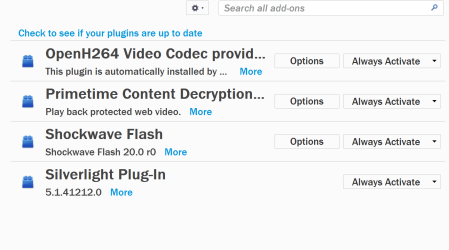
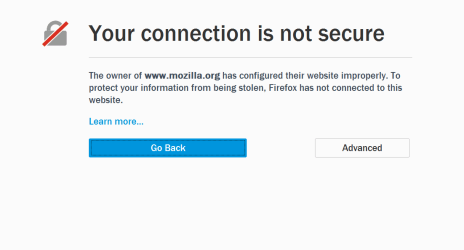
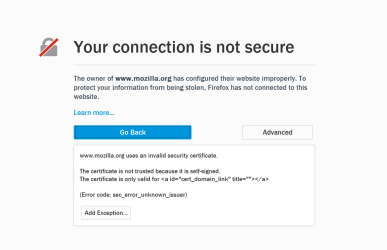
As I always do a couple times a day, I check to make sure that Firefox and the add on were up to date and got this. Checking for Firefox updates worked fine but as soon as I went to check add ons I get those pictures. I have not changed anything and I have very few add ons.


Add ons.PNG

Firefox Updates for addon.PNG

Firefox Update for addon 2.PNG
 

My Computer My Computer

At a glance

Windows 10 Pro. 64/ version 1709 Windows 7 Pr...Intel i7-6800K @ 4.3Corsair Platinum 16 gig @2400EVGA GTX 1070 OC
Computer type
PC/Desktop
Computer Manufacturer/Model Number
Home made Desktop
OS
Windows 10 Pro. 64/ version 1709 Windows 7 Pro/64
CPU
Intel i7-6800K @ 4.3
Motherboard
ASUS X-99 Deluxe II
Memory
Corsair Platinum 16 gig @2400
Graphics Card(s)
EVGA GTX 1070 OC
Monitor(s) Displays
Asus 27" LED LCD/VE278Q
Screen Resolution
1920-1080 or 1280-720 HDMI
Hard Drives
INTEL SSD 730-240 Gb Sata 3.0/
PSU
EVGA Platium 1200W
Case
Phanteks Luxe Tempered Glass 8 fans/ one radiator
Cooling
XSPC/ Water Cooled CPU
Keyboard
Das 4 Professional
Mouse
Logitech M705/MX Anywhere 2-S
Internet Speed
100 mbits
Antivirus
Microsoft Security Essentials/ Malwarebytes Premium 3.0/ SAS
Browser
I.E. 11 default/Firefox/ ISP Time Warner Cable/Spectrum
Other Info
LG BluRay Burner/
Sound system-KLipsch-THX/
Icy Dock ssd Hot Swap bays.
I don't see that either by goto mozilla.org directly or by clicking Check... in Plugins. All looks normal here.
 

My Computer My Computer

At a glance

Windows 7 Professional 64bitIntel Core i7 4600M @ 2.90GHz16.0GB Dual-Channel DDR3 @ 797MHz (11-11-11-28)Intel HD Graphics 4600 (Dell) 2048MB ATI AMD ...
Computer type
Laptop
Computer Manufacturer/Model Number
Dell Latitude E6540 Laptop
OS
Windows 7 Professional 64bit
CPU
Intel Core i7 4600M @ 2.90GHz
Motherboard
Dell Inc. 0CYT5F (SOCKET 0)
Memory
16.0GB Dual-Channel DDR3 @ 797MHz (11-11-11-28)
Graphics Card(s)
Intel HD Graphics 4600 (Dell) 2048MB ATI AMD Radeon HD 8790M
Sound Card
Realtek High Definition Audio
Monitor(s) Displays
HP ZR30w (2560x1600@60Hz)
Hard Drives
256GB LITEONIT LMT-256M6M-41 mm SATA (SSD)
1TB Samsung SSD 860 EVO mSATA SATA (SSD)
2TB USB 3.0 USB Device
115GB SanDisk Ultra Fit USB
Other Info
Multiple Dell E-Port Plus II Port Replicator/Docking Stations 0Y72NH USB 3.0 + 130W AC Adapters

My Computer My Computer

At a glance

Microsoft Windows 7 Home Premium 64-bit 7601 ...AMD C-60 APU with Radeon(tm) HD Graphics4.00 GBAMD Radeon HD 6290 Graphics
Computer type
Laptop
Computer Manufacturer/Model Number
ASUS
OS
Microsoft Windows 7 Home Premium 64-bit 7601 Multiprocessor Free Service Pack 1
CPU
AMD C-60 APU with Radeon(tm) HD Graphics
Motherboard
ASUSTeK COMPUTER INC. X501U
Memory
4.00 GB
Graphics Card(s)
AMD Radeon HD 6290 Graphics
Sound Card
(1) AMD High Definition Audio Device (2) Realtek High Defi
Screen Resolution
1366 x 768 x 32 bits (4294967296 colors) @ 60 Hz
Hard Drives
Hitachi HTS545050A7E380 SATA Disk Device
Antivirus
Comodo CIS & FW, SecureAplus App Whitelisting, Threatfire
Browser
Cyberfox 64bit, Opera 64bit, Airfox
Other Info
Spy-The-Spy, HitmanPro.Alert, Norton Connect Safe, MJRegWatcher, BitDefender TrafficLight, Voodoo Shield, Zemana AntiMalware

My Computer My Computer

At a glance

Microsoft Windows 7 Home Premium 64-bit 7601 ...AMD C-60 APU with Radeon(tm) HD Graphics4.00 GBAMD Radeon HD 6290 Graphics
Computer type
Laptop
Computer Manufacturer/Model Number
ASUS
OS
Microsoft Windows 7 Home Premium 64-bit 7601 Multiprocessor Free Service Pack 1
CPU
AMD C-60 APU with Radeon(tm) HD Graphics
Motherboard
ASUSTeK COMPUTER INC. X501U
Memory
4.00 GB
Graphics Card(s)
AMD Radeon HD 6290 Graphics
Sound Card
(1) AMD High Definition Audio Device (2) Realtek High Defi
Screen Resolution
1366 x 768 x 32 bits (4294967296 colors) @ 60 Hz
Hard Drives
Hitachi HTS545050A7E380 SATA Disk Device
Antivirus
Comodo CIS & FW, SecureAplus App Whitelisting, Threatfire
Browser
Cyberfox 64bit, Opera 64bit, Airfox
Other Info
Spy-The-Spy, HitmanPro.Alert, Norton Connect Safe, MJRegWatcher, BitDefender TrafficLight, Voodoo Shield, Zemana AntiMalware
I always used this page to check the main plugins:

https://www.mozilla.org/en-US/plugincheck/

I just just the above and got the same picture in my first post.

I ran Malwarebytes found no problem. I Will do some more scans and shift to my other computer.

Strange my other computer doesn't have the problem.
I will give a restore point a try.
 

My Computer My Computer

At a glance

Windows 10 Pro. 64/ version 1709 Windows 7 Pr...Intel i7-6800K @ 4.3Corsair Platinum 16 gig @2400EVGA GTX 1070 OC
Computer type
PC/Desktop
Computer Manufacturer/Model Number
Home made Desktop
OS
Windows 10 Pro. 64/ version 1709 Windows 7 Pro/64
CPU
Intel i7-6800K @ 4.3
Motherboard
ASUS X-99 Deluxe II
Memory
Corsair Platinum 16 gig @2400
Graphics Card(s)
EVGA GTX 1070 OC
Monitor(s) Displays
Asus 27" LED LCD/VE278Q
Screen Resolution
1920-1080 or 1280-720 HDMI
Hard Drives
INTEL SSD 730-240 Gb Sata 3.0/
PSU
EVGA Platium 1200W
Case
Phanteks Luxe Tempered Glass 8 fans/ one radiator
Cooling
XSPC/ Water Cooled CPU
Keyboard
Das 4 Professional
Mouse
Logitech M705/MX Anywhere 2-S
Internet Speed
100 mbits
Antivirus
Microsoft Security Essentials/ Malwarebytes Premium 3.0/ SAS
Browser
I.E. 11 default/Firefox/ ISP Time Warner Cable/Spectrum
Other Info
LG BluRay Burner/
Sound system-KLipsch-THX/
Icy Dock ssd Hot Swap bays.
Well I went back to basics. I rebooted and the problem went away.
Scans show no little bad guys.

Chris may I ask why you disable those things?
 

My Computer My Computer

At a glance

Windows 10 Pro. 64/ version 1709 Windows 7 Pr...Intel i7-6800K @ 4.3Corsair Platinum 16 gig @2400EVGA GTX 1070 OC
Computer type
PC/Desktop
Computer Manufacturer/Model Number
Home made Desktop
OS
Windows 10 Pro. 64/ version 1709 Windows 7 Pro/64
CPU
Intel i7-6800K @ 4.3
Motherboard
ASUS X-99 Deluxe II
Memory
Corsair Platinum 16 gig @2400
Graphics Card(s)
EVGA GTX 1070 OC
Monitor(s) Displays
Asus 27" LED LCD/VE278Q
Screen Resolution
1920-1080 or 1280-720 HDMI
Hard Drives
INTEL SSD 730-240 Gb Sata 3.0/
PSU
EVGA Platium 1200W
Case
Phanteks Luxe Tempered Glass 8 fans/ one radiator
Cooling
XSPC/ Water Cooled CPU
Keyboard
Das 4 Professional
Mouse
Logitech M705/MX Anywhere 2-S
Internet Speed
100 mbits
Antivirus
Microsoft Security Essentials/ Malwarebytes Premium 3.0/ SAS
Browser
I.E. 11 default/Firefox/ ISP Time Warner Cable/Spectrum
Other Info
LG BluRay Burner/
Sound system-KLipsch-THX/
Icy Dock ssd Hot Swap bays.
Chris may I ask why you disable those things?

If I don't need it I disable it where possible. I re-enable on an as an when needed basis. Why? Just to keep things working a little faster.
 

My Computer My Computer

At a glance

Microsoft Windows 7 Home Premium 64-bit 7601 ...AMD C-60 APU with Radeon(tm) HD Graphics4.00 GBAMD Radeon HD 6290 Graphics
Computer type
Laptop
Computer Manufacturer/Model Number
ASUS
OS
Microsoft Windows 7 Home Premium 64-bit 7601 Multiprocessor Free Service Pack 1
CPU
AMD C-60 APU with Radeon(tm) HD Graphics
Motherboard
ASUSTeK COMPUTER INC. X501U
Memory
4.00 GB
Graphics Card(s)
AMD Radeon HD 6290 Graphics
Sound Card
(1) AMD High Definition Audio Device (2) Realtek High Defi
Screen Resolution
1366 x 768 x 32 bits (4294967296 colors) @ 60 Hz
Hard Drives
Hitachi HTS545050A7E380 SATA Disk Device
Antivirus
Comodo CIS & FW, SecureAplus App Whitelisting, Threatfire
Browser
Cyberfox 64bit, Opera 64bit, Airfox
Other Info
Spy-The-Spy, HitmanPro.Alert, Norton Connect Safe, MJRegWatcher, BitDefender TrafficLight, Voodoo Shield, Zemana AntiMalware
FWIW I used to fiddle with add-ons & plugins a lot but since I just let FF auto-update things I've not had a lick of trouble, so am glad to just let it do its thing.
 

My Computer My Computer

At a glance

Windows 7 Professional 64bitIntel Core i7 4600M @ 2.90GHz16.0GB Dual-Channel DDR3 @ 797MHz (11-11-11-28)Intel HD Graphics 4600 (Dell) 2048MB ATI AMD ...
Computer type
Laptop
Computer Manufacturer/Model Number
Dell Latitude E6540 Laptop
OS
Windows 7 Professional 64bit
CPU
Intel Core i7 4600M @ 2.90GHz
Motherboard
Dell Inc. 0CYT5F (SOCKET 0)
Memory
16.0GB Dual-Channel DDR3 @ 797MHz (11-11-11-28)
Graphics Card(s)
Intel HD Graphics 4600 (Dell) 2048MB ATI AMD Radeon HD 8790M
Sound Card
Realtek High Definition Audio
Monitor(s) Displays
HP ZR30w (2560x1600@60Hz)
Hard Drives
256GB LITEONIT LMT-256M6M-41 mm SATA (SSD)
1TB Samsung SSD 860 EVO mSATA SATA (SSD)
2TB USB 3.0 USB Device
115GB SanDisk Ultra Fit USB
Other Info
Multiple Dell E-Port Plus II Port Replicator/Docking Stations 0Y72NH USB 3.0 + 130W AC Adapters
About the plugins, the Cisco one is for WebRTC, the other one is for playing DRM content, if you don't use any of those features, you can disable them via about:config, in this setting:
media.gmp-provider.enabled (set this to false and restart firefox)

That will remove those plugins if you don't need them.

About the secure conection problems, it seems they are changing some certificates, that's why Firefox tends to do that... seems they will fix it for next releases (FF45 more or less)
 

My Computer My Computer

At a glance

Microsoft Windows 7 Home Premium SP1 64-bit B...AMD Athlon 64 X2 5200+ Dual Core CPU @ 2.7 Gh...2x2 GB DDR2 PC-5300 (667 Mhz) Kingston ValueRAMXFX ATI Radeon HD 4350 GPU (512 MB + 512 MB HM)
Computer type
PC/Desktop
Computer Manufacturer/Model Number
Assembled Desktop PC
OS
Microsoft Windows 7 Home Premium SP1 64-bit Build 7600
CPU
AMD Athlon 64 X2 5200+ Dual Core CPU @ 2.7 Ghz (Brisbane)
Motherboard
PCChips A13G+ v3.0
Memory
2x2 GB DDR2 PC-5300 (667 Mhz) Kingston ValueRAM
Graphics Card(s)
XFX ATI Radeon HD 4350 GPU (512 MB + 512 MB HM)
Sound Card
Realtek High Definition Audio Driver ALC660 @ MCP61S
Monitor(s) Displays
HP S2031 20" LED HD Widescreen Display Monitor
Screen Resolution
1600 x 900 px
Hard Drives
Maxtor Diamond Max 10 (160 GB, 7200 RPM, SATA-II Hard Disk)
Western Digital Scorpion Blue (250 GB, 5400 RPM, SATA-II External Hard Disk - Personal Data)
Toshiba MQ01ABD050 (500 GB, 5400 RPM, SATA-II External Hard Disk - Software & ISOs)
PSU
Pixxo Transformer 850W 80+ Certification PSU
Case
Compaq 5BW353 Case
Cooling
Many solutions, see other info...
Keyboard
Green Leaf (Mitzu) Standard Keyboard
Mouse
Microsoft USB Lasser Pointing Device
Internet Speed
10 MB
Antivirus
Avast Antivirus Free
Browser
Firefox, Chrome, Internet Explorer
Other Info
Windows Experience Index Result: 3.8 of 7.9.

Cooling solutions:
- AVC @ 2000/5000 RPM Copper Heatpipes (For Athlon 64 X2 6000+ CPU used in an Athlon 64 X2 5200+)
- Rear Fan 80 mm @ 2700 RPM for heat extraction
- Manhatan Chipset Cooler @ 4700/7200 RPM (For nVidia Chipset in MoBo)
- Foxconn @ 2500 RPM (Old Pentium III heatsink fan) in XFX ATI Radeon HD 4350
Thanks folks for all your input.
I personally don't do auto update for anything. That is why I new I shouldn't of had and changes.
Maybe I just caught Firefox in the middle of doing something at there end.
 

My Computer My Computer

At a glance

Windows 10 Pro. 64/ version 1709 Windows 7 Pr...Intel i7-6800K @ 4.3Corsair Platinum 16 gig @2400EVGA GTX 1070 OC
Computer type
PC/Desktop
Computer Manufacturer/Model Number
Home made Desktop
OS
Windows 10 Pro. 64/ version 1709 Windows 7 Pro/64
CPU
Intel i7-6800K @ 4.3
Motherboard
ASUS X-99 Deluxe II
Memory
Corsair Platinum 16 gig @2400
Graphics Card(s)
EVGA GTX 1070 OC
Monitor(s) Displays
Asus 27" LED LCD/VE278Q
Screen Resolution
1920-1080 or 1280-720 HDMI
Hard Drives
INTEL SSD 730-240 Gb Sata 3.0/
PSU
EVGA Platium 1200W
Case
Phanteks Luxe Tempered Glass 8 fans/ one radiator
Cooling
XSPC/ Water Cooled CPU
Keyboard
Das 4 Professional
Mouse
Logitech M705/MX Anywhere 2-S
Internet Speed
100 mbits
Antivirus
Microsoft Security Essentials/ Malwarebytes Premium 3.0/ SAS
Browser
I.E. 11 default/Firefox/ ISP Time Warner Cable/Spectrum
Other Info
LG BluRay Burner/
Sound system-KLipsch-THX/
Icy Dock ssd Hot Swap bays.
FWIW I used to fiddle with add-ons & plugins a lot but since I just let FF auto-update things I've not had a lick of trouble, so am glad to just let it do its thing.

I see your reasoning. :)

Some of us prefer to create more than one profile - say the default profile plus a couple of tweaked profiles that can be used as and when needed. Along with profile backups that can be restored or elements of them that can be selectively restored in the event of any issues - profile elements can even be selectively restored after a clean install of Firefox if it decides to act up.
 

My Computer My Computer

At a glance

Microsoft Windows 7 Home Premium 64-bit 7601 ...AMD C-60 APU with Radeon(tm) HD Graphics4.00 GBAMD Radeon HD 6290 Graphics
Computer type
Laptop
Computer Manufacturer/Model Number
ASUS
OS
Microsoft Windows 7 Home Premium 64-bit 7601 Multiprocessor Free Service Pack 1
CPU
AMD C-60 APU with Radeon(tm) HD Graphics
Motherboard
ASUSTeK COMPUTER INC. X501U
Memory
4.00 GB
Graphics Card(s)
AMD Radeon HD 6290 Graphics
Sound Card
(1) AMD High Definition Audio Device (2) Realtek High Defi
Screen Resolution
1366 x 768 x 32 bits (4294967296 colors) @ 60 Hz
Hard Drives
Hitachi HTS545050A7E380 SATA Disk Device
Antivirus
Comodo CIS & FW, SecureAplus App Whitelisting, Threatfire
Browser
Cyberfox 64bit, Opera 64bit, Airfox
Other Info
Spy-The-Spy, HitmanPro.Alert, Norton Connect Safe, MJRegWatcher, BitDefender TrafficLight, Voodoo Shield, Zemana AntiMalware
In my case, I just manually backup important aspects of the browser, in fact, you can even create a user.js file to quicly restore any settings you changed, even those in about:config.

In case anyone wonders what to backup, here is my list:

key3.db (stored passwords encryption key, in case you use master password)
logins.json (stored passwords)
places.sqlite (bookmarks)
user.js (your customized prefs) or prefs.js (your main changed prefs)
chrome folder with userContent.css and a JPEG (This is just me, I just customized my about:tabs page with a background, adaptive tiles that stretch to almost any screen resolution and other effects)

prefs.js is best for a quick backup and restore, while user.js is good for editing and setting only the prefferences you want restored, for example, here is mine:
Code:
user_pref("beacon.enabled", false);
user_pref("browser.customizemode.tip0.shown", true);
user_pref("browser.download.lastDir", "D:\\Users\\FerchogtX\\Downloads");
user_pref("browser.download.panel.shown", true);
user_pref("browser.download.useDownloadDir", false);
user_pref("browser.startup.homepage", "about:newtab");
user_pref("browser.tabs.remote.autostart", true);
user_pref("browser.taskbar.previews.enable", true);
user_pref("browser.uiCustomization.state", "{\"placements\":{\"PanelUI-contents\":[\"edit-controls\",\"zoom-controls\",\"new-window-button\",\"privatebrowsing-button\",\"save-page-button\",\"print-button\",\"history-panelmenu\",\"fullscreen-button\",\"find-button\",\"preferences-button\",\"add-ons-button\",\"developer-button\",\"ublock0-button\"],\"addon-bar\":[\"addonbar-closebutton\",\"status-bar\"],\"PersonalToolbar\":[\"personal-bookmarks\"],\"nav-bar\":[\"urlbar-container\",\"search-container\",\"bookmarks-menu-button\",\"pocket-button\",\"downloads-button\",\"home-button\",\"loop-button\"],\"TabsToolbar\":[\"tabbrowser-tabs\",\"new-tab-button\",\"alltabs-button\"],\"toolbar-menubar\":[\"menubar-items\"]},\"seen\":[\"ublock0-button\"],\"dirtyAreaCache\":[\"PersonalToolbar\",\"nav-bar\",\"TabsToolbar\",\"toolbar-menubar\",\"PanelUI-contents\",\"addon-bar\"],\"currentVersion\":4,\"newElementCount\":0}");
user_pref("browser.urlbar.suggest.searches", true);
user_pref("devtools.responsiveUI.currentPreset", "320x480");
user_pref("devtools.responsiveUI.customHeight", 160);
user_pref("devtools.responsiveUI.customWidth", 240);
user_pref("devtools.responsiveUI.rotate", false);
user_pref("devtools.telemetry.tools.opened.version", "{\"DEVTOOLS_TOOLBOX_OPENED_PER_USER_FLAG\":\"43.0.4\",\"DEVTOOLS_OS_ENUMERATED_PER_USER\":\"43.0.4\",\"DEVTOOLS_OS_IS_64_BITS_PER_USER\":\"43.0.4\",\"DEVTOOLS_SCREEN_RESOLUTION_ENUMERATED_PER_USER\":\"43.0.4\",\"DEVTOOLS_INSPECTOR_OPENED_PER_USER_FLAG\":\"43.0.4\",\"DEVTOOLS_RULEVIEW_OPENED_PER_USER_FLAG\":\"43.0.4\",\"DEVTOOLS_OPTIONS_OPENED_PER_USER_FLAG\":\"42.0\",\"DEVTOOLS_RESPONSIVE_OPENED_PER_USER_FLAG\":\"43.0.1\",\"DEVTOOLS_COMPUTEDVIEW_OPENED_PER_USER_FLAG\":\"43.0.4\",\"DEVTOOLS_STYLEEDITOR_OPENED_PER_USER_FLAG\":\"43.0.4\",\"DEVTOOLS_JSDEBUGGER_OPENED_PER_USER_FLAG\":\"43.0.4\"}");
user_pref("devtools.theme", "dark");
user_pref("devtools.toolbox.host", "window");
user_pref("devtools.toolbox.previousHost", "bottom");
user_pref("devtools.toolbox.selectedTool", "inspector");
user_pref("devtools.toolsidebar-width.inspector", 0);
user_pref("dom.ipc.plugins.flash.disable-protected-mode", true);
user_pref("general.smoothScroll", false);
user_pref("layers.async-pan-zoom.enabled", true);
user_pref("layers.offmainthreadcomposition.testing.enabled", true);
user_pref("layout.spellcheckDefault", 0);
user_pref("privacy.donottrackheader.enabled", true);
user_pref("privacy.trackingprotection.enabled", true);

Also, when you want to restore a Profile, first create the folder (either in the default %appdata% location, or a custom one, you can make Firefox to point to that place later with the switch -profilemanager) then you place this files before doing a new profile (so that passwords don't get reseted), then you create your profile, Firefox will start with all your settings restored.

In my case, I also enable experimental features, like Electrolisys, so I just leave this as an example, pretty much.
 

My Computer My Computer

At a glance

Microsoft Windows 7 Home Premium SP1 64-bit B...AMD Athlon 64 X2 5200+ Dual Core CPU @ 2.7 Gh...2x2 GB DDR2 PC-5300 (667 Mhz) Kingston ValueRAMXFX ATI Radeon HD 4350 GPU (512 MB + 512 MB HM)
Computer type
PC/Desktop
Computer Manufacturer/Model Number
Assembled Desktop PC
OS
Microsoft Windows 7 Home Premium SP1 64-bit Build 7600
CPU
AMD Athlon 64 X2 5200+ Dual Core CPU @ 2.7 Ghz (Brisbane)
Motherboard
PCChips A13G+ v3.0
Memory
2x2 GB DDR2 PC-5300 (667 Mhz) Kingston ValueRAM
Graphics Card(s)
XFX ATI Radeon HD 4350 GPU (512 MB + 512 MB HM)
Sound Card
Realtek High Definition Audio Driver ALC660 @ MCP61S
Monitor(s) Displays
HP S2031 20" LED HD Widescreen Display Monitor
Screen Resolution
1600 x 900 px
Hard Drives
Maxtor Diamond Max 10 (160 GB, 7200 RPM, SATA-II Hard Disk)
Western Digital Scorpion Blue (250 GB, 5400 RPM, SATA-II External Hard Disk - Personal Data)
Toshiba MQ01ABD050 (500 GB, 5400 RPM, SATA-II External Hard Disk - Software & ISOs)
PSU
Pixxo Transformer 850W 80+ Certification PSU
Case
Compaq 5BW353 Case
Cooling
Many solutions, see other info...
Keyboard
Green Leaf (Mitzu) Standard Keyboard
Mouse
Microsoft USB Lasser Pointing Device
Internet Speed
10 MB
Antivirus
Avast Antivirus Free
Browser
Firefox, Chrome, Internet Explorer
Other Info
Windows Experience Index Result: 3.8 of 7.9.

Cooling solutions:
- AVC @ 2000/5000 RPM Copper Heatpipes (For Athlon 64 X2 6000+ CPU used in an Athlon 64 X2 5200+)
- Rear Fan 80 mm @ 2700 RPM for heat extraction
- Manhatan Chipset Cooler @ 4700/7200 RPM (For nVidia Chipset in MoBo)
- Foxconn @ 2500 RPM (Old Pentium III heatsink fan) in XFX ATI Radeon HD 4350
In my case, I just manually backup important aspects of the browser, in fact, you can even create a user.js file to quicly restore any settings you changed, even those in about:config.

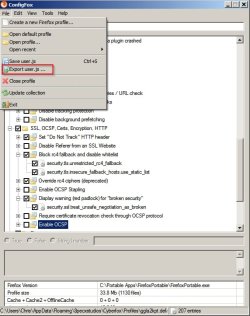
You might be interested in ConfigFox. Works with FF and variants - just point it at the profile.

ConfigFox.jpg
 

My Computer My Computer

At a glance

Microsoft Windows 7 Home Premium 64-bit 7601 ...AMD C-60 APU with Radeon(tm) HD Graphics4.00 GBAMD Radeon HD 6290 Graphics
Computer type
Laptop
Computer Manufacturer/Model Number
ASUS
OS
Microsoft Windows 7 Home Premium 64-bit 7601 Multiprocessor Free Service Pack 1
CPU
AMD C-60 APU with Radeon(tm) HD Graphics
Motherboard
ASUSTeK COMPUTER INC. X501U
Memory
4.00 GB
Graphics Card(s)
AMD Radeon HD 6290 Graphics
Sound Card
(1) AMD High Definition Audio Device (2) Realtek High Defi
Screen Resolution
1366 x 768 x 32 bits (4294967296 colors) @ 60 Hz
Hard Drives
Hitachi HTS545050A7E380 SATA Disk Device
Antivirus
Comodo CIS & FW, SecureAplus App Whitelisting, Threatfire
Browser
Cyberfox 64bit, Opera 64bit, Airfox
Other Info
Spy-The-Spy, HitmanPro.Alert, Norton Connect Safe, MJRegWatcher, BitDefender TrafficLight, Voodoo Shield, Zemana AntiMalware
Worths a try, thanks for this finding Call!
 

My Computer My Computer

At a glance

Microsoft Windows 7 Home Premium SP1 64-bit B...AMD Athlon 64 X2 5200+ Dual Core CPU @ 2.7 Gh...2x2 GB DDR2 PC-5300 (667 Mhz) Kingston ValueRAMXFX ATI Radeon HD 4350 GPU (512 MB + 512 MB HM)
Computer type
PC/Desktop
Computer Manufacturer/Model Number
Assembled Desktop PC
OS
Microsoft Windows 7 Home Premium SP1 64-bit Build 7600
CPU
AMD Athlon 64 X2 5200+ Dual Core CPU @ 2.7 Ghz (Brisbane)
Motherboard
PCChips A13G+ v3.0
Memory
2x2 GB DDR2 PC-5300 (667 Mhz) Kingston ValueRAM
Graphics Card(s)
XFX ATI Radeon HD 4350 GPU (512 MB + 512 MB HM)
Sound Card
Realtek High Definition Audio Driver ALC660 @ MCP61S
Monitor(s) Displays
HP S2031 20" LED HD Widescreen Display Monitor
Screen Resolution
1600 x 900 px
Hard Drives
Maxtor Diamond Max 10 (160 GB, 7200 RPM, SATA-II Hard Disk)
Western Digital Scorpion Blue (250 GB, 5400 RPM, SATA-II External Hard Disk - Personal Data)
Toshiba MQ01ABD050 (500 GB, 5400 RPM, SATA-II External Hard Disk - Software & ISOs)
PSU
Pixxo Transformer 850W 80+ Certification PSU
Case
Compaq 5BW353 Case
Cooling
Many solutions, see other info...
Keyboard
Green Leaf (Mitzu) Standard Keyboard
Mouse
Microsoft USB Lasser Pointing Device
Internet Speed
10 MB
Antivirus
Avast Antivirus Free
Browser
Firefox, Chrome, Internet Explorer
Other Info
Windows Experience Index Result: 3.8 of 7.9.

Cooling solutions:
- AVC @ 2000/5000 RPM Copper Heatpipes (For Athlon 64 X2 6000+ CPU used in an Athlon 64 X2 5200+)
- Rear Fan 80 mm @ 2700 RPM for heat extraction
- Manhatan Chipset Cooler @ 4700/7200 RPM (For nVidia Chipset in MoBo)
- Foxconn @ 2500 RPM (Old Pentium III heatsink fan) in XFX ATI Radeon HD 4350
Back
Top