
Latest Windows Update Client - Windows Update Agent

UsernameIssues

a.k.a. UNI
Guru
Gold Member
Local time
2:06 PM
Messages
8,138
Anyone doing a fresh install of Windows 7 should manually install SP1 (if needed).

The Windows Update Agent was renamed to Windows Update Client.

Manually requesting a search for Windows Updates on a Windows 7 computer with SP1 install should prompt the user to install a pre-SP1 Windows Update (WU) Agent (7.6.7600.320). Seems odd.

That old WU Agent worked just fine until Microsoft changed the update servers. The info coming back from the servers seems to now cause high RAM/CPU usage for some computers... but that old WU Agent should eventually get the job done. The computer might be useless for any other task for 24+ hours.

You can skip installing that old WU Agent and manually install the latest WU Client instead. Or, you can manually install the latest WU Client over top of that old WU Agent.

However, below is what I encountered when I went to install the latest Windows Update Client on a W7 pro 64bit SP1 computer.

I started by using these search terms in Google:
"Windows Update Client" "March 2016" "Windows 7"
As this post ages, replace "March 2016" with the current month/year.
If that does not find the desired KB, try the previous month.

That lead me to this link for March 2016: KB3138612.

The W7 pro 64bit SP1 computer has IE8 installed by default.

Visiting KB3138612 via IE8 got me this:
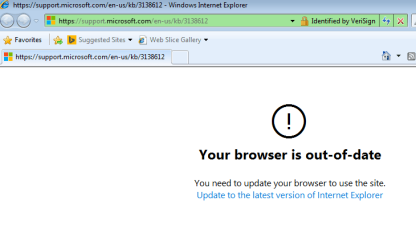
WU1.PNG


Clicking on the link to update the browser got me this:
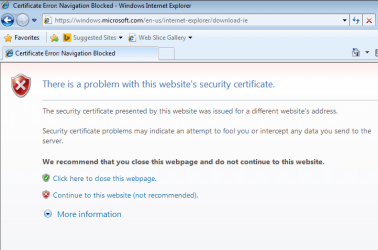
WU2.PNG


Clicking on the link to "Continue to this website" got me this:
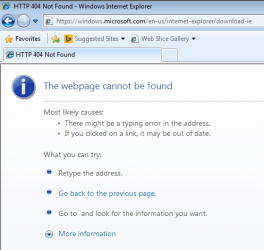
WU3.PNG


I am not a happy camper at this point.


Here are the direct links to the downloads to the WU Client for March 2016:

All supported x86-based versions of Windows 7
download.gif
Download the package now.

All supported x64-based versions of Windows 7
download.gif
Download the package now.
 

My Computer My Computer

Computer type
Laptop
Computer Manufacturer/Model Number
Employer provided Dell Latitude
OS
W7 Pro SP1 64bit
CPU
i7
Memory
8GB
Graphics Card(s)
Intel HD Graphics
Hard Drives
crappy SSD
Antivirus
Employer mandated Symantec Endpoint Protection
Browser
Pale Moon 64bit, IE11 64bit & Chrome 64bit
Haha some great work done by Microsoft :rolleyes:

There should be a more official way to look for updates. I searched around and actually found a list of most recent updates by Microsoft. However the descriptions for most of them are identical, though it is interesting to note that the description for 'KB3138612' actually says 'Supersedes: KB3135445'
https://support.microsoft.com/en-us/kb/894199
I found an unofficially updated link that has the proper titles so I guess using both to find the newest update and cross referencing may be a good idea
Windows 7 articles, fixes and updates - Year 2016

Anyways it's quite interesting that these unexpected issues and odd dead ends are showing up; guess it shouldn't be a surprise now... Like there's support for anything that's not new these days... :huh:
 

My Computer My Computer

Computer type
PC/Desktop
OS
w7 x64
My WUC works just fine, and I refuse to update it.
 

My Computer My Computer

Computer type
PC/Desktop
Computer Manufacturer/Model Number
Skylake Special #666
OS
Windows 10 Pro x64
CPU
Intel Core i7 6700K
Motherboard
Asus Sabertooth Z170 Mark 1
Memory
GSkill TridentZ RGB 16GB 3600 16-16-16-36
Graphics Card(s)
EVGA GTX 980 Ti SC x2
Sound Card
Realtek High Definition
Monitor(s) Displays
AOC G2460PG
Screen Resolution
1920 x 1080 144Hz
Hard Drives
Samsung 860 Pro 256GB, Seagate Barracuda 4TB x2
PSU
EVGA 1000 P2, EVGA White Custom Braided Cables
Case
Corsair Vengeance C70 Gunmetal Black
Cooling
Corsair H100i v2, Corsair ML120 x2, Thermal Grizzly Kryonaut
Keyboard
Logitech G910 Orion Spectrum
Mouse
Logitech G700s
Internet Speed
Verizon Fios Quantum Gateway 75/75
Antivirus
Windows Defender, Malwarebytes Free 3.8.3
Browser
Chrome
Other Info
Corsair SP120 x4, LG Blu-ray Drive, Durabrand HT-395 100 Watt Dolby Digital Amp, Corsair H2100 Wireless 7.1 Headset
When I saw it includes "Wu.upgrade.ps.dll" I hide it.

Regards,
GEWB
 

My Computer My Computer

Computer type
PC/Desktop
Computer Manufacturer/Model Number
(7 different computers booting up to 10 systems)
OS
Linux Mint / XP / Win7 Home, Pro, Ultimate / Win8.1 / Win10
Other Info
Four desktops, two laptops, one notebook and one tablet

My Computer My Computer

Computer type
Laptop
Computer Manufacturer/Model Number
Employer provided Dell Latitude
OS
W7 Pro SP1 64bit
CPU
i7
Memory
8GB
Graphics Card(s)
Intel HD Graphics
Hard Drives
crappy SSD
Antivirus
Employer mandated Symantec Endpoint Protection
Browser
Pale Moon 64bit, IE11 64bit & Chrome 64bit
When I saw it includes "Wu.upgrade.ps.dll" I hide it.

Regards,
GEWB

What will you do if MS decides to update the WUC automatically?

View attachment 383090

Restore, then never update again.

Yes I am serious. As I no longer allow Windows on the Internet except to update a few (four?) must-have programs I'm not very concerned - all my "everyday" work is now done in Linux.

Regards,
GEWB
 

My Computer My Computer

Computer type
PC/Desktop
Computer Manufacturer/Model Number
(7 different computers booting up to 10 systems)
OS
Linux Mint / XP / Win7 Home, Pro, Ultimate / Win8.1 / Win10
Other Info
Four desktops, two laptops, one notebook and one tablet
THANK YOU!! I tried all sort of suggested solution and nothing worked until I stumbled on this thread. I should have known better than searching somewhere else to find solutions for any windows related problem. Windows Forums rocks!!!!
 

My Computer My Computer

OS
Windows 7
@Usenameissues,

I had the same problem after a "Clean install."

Installed a few updates, then installed SP1. I ran Windows Update, again. This time it downloaded Windows Update Agent 7.6.760.320. I let it run for 2 hours, "Searching for Updates" but never seemed to stop looking.

At this point, I then searched for the latest version of "Window Update Client." Downloaded it, ran Windows Update. This time Windows Update starting working. After scanning for only a few minutes, it found 233 Updates (998.9 MB) which I'm currently installing.

Will update results later.

John
 
Last edited:

My Computers My Computers

System One System Two

  • Computer type
    PC/Desktop
    Computer Manufacturer/Model Number
    HP Pavilion 6751c
    OS
    Win7, Win10, Win11
    Internet Speed
    100 Mbps
    Antivirus
    Norton 360
    Browser
    IE 11
  • Computer type
    PC/Desktop
    System Manufacturer/Model Number
    HP ENVY 750-514 & Dell XPS 8960
    OS
    Win7, Win10, Win11
    Antivirus
    Norton 360
Hey guys can you help me out.
My Windows 7 x64 pre-SP1, will this give me update problems?

I found two ways to handle this

1. install following two updates/rollups
3020369
3172605

2. update the WU agent (as I thought and then landed back here)

Which one is better?

I only need a working WU service to use Windows Update Minitool. I am sorry but I do not like MS roll-ups. I'm also in dubio what to do. I need a working WU to get updates through Update manager, But also afraid the latest of the latest means trouble in the near future.
 

My Computer My Computer

Computer type
Laptop
Computer Manufacturer/Model Number
Asus
OS
Windows7
CPU
i5
Memory
4GB
Graphics Card(s)
Intel 7 series
Hard Drives
SSD
So this article suggests if I use the standalone Windows7 update agent installer, it will install ver .256 for RTM, and .320 for setups including SP1. The .256 is the correct version without issues right?
 

My Computer My Computer

Computer type
Laptop
Computer Manufacturer/Model Number
Asus
OS
Windows7
CPU
i5
Memory
4GB
Graphics Card(s)
Intel 7 series
Hard Drives
SSD
Back
Top
