Solved Are you serious right now?(Windows 10 forced)

Status
Not open for further replies.
It doesn`t matter if you install every update under the sun, you still have to click the "Get Windows 10" icon to get it, can we please close this stupid thread. LOL

Microsoft, please go back to selling your product, no more free upgrades, For the love of God, Please :cry:
 

My Computer My Computer

At a glance

Windows 10 Pro x64Intel Core i7 6700KGSkill TridentZ RGB 16GB 3600 16-16-16-36EVGA GTX 980 Ti SC x2
Computer type
PC/Desktop
Computer Manufacturer/Model Number
Skylake Special #666
OS
Windows 10 Pro x64
CPU
Intel Core i7 6700K
Motherboard
Asus Sabertooth Z170 Mark 1
Memory
GSkill TridentZ RGB 16GB 3600 16-16-16-36
Graphics Card(s)
EVGA GTX 980 Ti SC x2
Sound Card
Realtek High Definition
Monitor(s) Displays
AOC G2460PG
Screen Resolution
1920 x 1080 144Hz
Hard Drives
Samsung 860 Pro 256GB, Seagate Barracuda 4TB x2
PSU
EVGA 1000 P2, EVGA White Custom Braided Cables
Case
Corsair Vengeance C70 Gunmetal Black
Cooling
Corsair H100i v2, Corsair ML120 x2, Thermal Grizzly Kryonaut
Keyboard
Logitech G910 Orion Spectrum
Mouse
Logitech G700s
Internet Speed
Verizon Fios Quantum Gateway 75/75
Antivirus
Windows Defender, Malwarebytes Free 3.8.3
Browser
Chrome
Other Info
Corsair SP120 x4, LG Blu-ray Drive, Durabrand HT-395 100 Watt Dolby Digital Amp, Corsair H2100 Wireless 7.1 Headset
If you look at my screenshots above, the upgrade to Windows 10 is an optional update. Optional updates do not get automatically installed by Windows, but only installed by the user that left it checked when they manually checked for and installed updates themselves.

If you look at my screenshot, at least on this particular test machine, "Upgrade to Windows 10 Pro, Version 1511, 10586" appears as a checked, Optional, update. The check signifies that it will be installed the next time Auto Update runs.

More to the point, if I UNcheck "Upgrade to Windows 10 Pro, Version 1511, 10586" and run any piece of Windows Update, the item gets checked again.

Read the article. It's chilling. (In my universe, anyway.)
 

My Computer My Computer

At a glance

Many OSs on multiple platforms
Computer type
PC/Desktop
OS
Many OSs on multiple platforms
It doesn`t matter if you install every update under the sun, you still have to click the "Get Windows 10" icon to get it, can we please close this stupid thread. LOL

That's simply not true.
 

My Computer My Computer

At a glance

Many OSs on multiple platforms
Computer type
PC/Desktop
OS
Many OSs on multiple platforms

My Computer My Computer

At a glance

64-bit Windows 11 Pro for WorkstationsIntel i7-8700K OC'd to 5 GHz64 GB (4x16GB) G.SKILL TridentZ RGB DDR4 3600...ASUS ROG-STRIX-GTX1080TI-O11G-GAMING
Computer type
PC/Desktop
Computer Manufacturer/Model Number
Self built custom
OS
64-bit Windows 11 Pro for Workstations
CPU
Intel i7-8700K OC'd to 5 GHz
Motherboard
ASUS ROG Maximus XI Formula Z390
Memory
64 GB (4x16GB) G.SKILL TridentZ RGB DDR4 3600 MHz
Graphics Card(s)
ASUS ROG-STRIX-GTX1080TI-O11G-GAMING
Sound Card
Integrated
Monitor(s) Displays
2 x Samsung Odyssey G7 27"
Screen Resolution
2560x1440
Hard Drives
1TB Samsung 990 PRO M.2,
4TB Samsung 990 PRO PRO M.2,
TerraMaster F8 SSD Plus NAS
PSU
Seasonic Prime Titanium 850W
Case
Thermaltake Core P3
Cooling
Corsair Hydro H115i
Keyboard
Logitech wireless K800
Mouse
Logitech MX Master 4
Internet Speed
2 Gb/s Download and 100 Mb/s Upload
Antivirus
Malwarebyte Anti-Malware Premium
Browser
Google Chrome
Other Info
Logitech Z625 speaker system,
Logitech BRIO 4K Pro webcam,
HP Color LaserJet Pro MFP M477fdn,
APC SMART-UPS RT 1000 XL - SURT1000XLI,
Galaxy S23 Plus phone
It doesn`t matter if you install every update under the sun, you still have to click the "Get Windows 10" icon to get it, can we please close this stupid thread. LOL

That's simply not true.

Really?

Please explain the screenshots I posted earlier at the link below.

http://www.sevenforums.com/general-...indows-10-forced-post3228040.html#post3228040

Sure. Those shots of the Optional updates was taken in early February. Microsoft's updating changed, for many people, on Friday March 11 - and it changed again on Sunday. Read my article.

Microsoft's playing fast and loose with the old Windows Update rules.
 

My Computer My Computer

At a glance

Many OSs on multiple platforms
Computer type
PC/Desktop
OS
Many OSs on multiple platforms
If you look at my screenshots above, the upgrade to Windows 10 is an optional update. Optional updates do not get automatically installed by Windows, but only installed by the user that left it checked when they manually checked for and installed updates themselves.

If you look at my screenshot, at least on this particular test machine, "Upgrade to Windows 10 Pro, Version 1511, 10586" appears as a checked, Optional, update. The check signifies that it will be installed the next time Auto Update runs.

More to the point, if I UNcheck "Upgrade to Windows 10 Pro, Version 1511, 10586" and run any piece of Windows Update, the item gets checked again.

Read the article. It's chilling. (In my universe, anyway.)

I don't see that in your article. I see it checked as an "Optional" update.

Optional updates do not get automatically installed by Windows. Instead, only when the user manually installs it.
 

My Computer My Computer

At a glance

64-bit Windows 11 Pro for WorkstationsIntel i7-8700K OC'd to 5 GHz64 GB (4x16GB) G.SKILL TridentZ RGB DDR4 3600...ASUS ROG-STRIX-GTX1080TI-O11G-GAMING
Computer type
PC/Desktop
Computer Manufacturer/Model Number
Self built custom
OS
64-bit Windows 11 Pro for Workstations
CPU
Intel i7-8700K OC'd to 5 GHz
Motherboard
ASUS ROG Maximus XI Formula Z390
Memory
64 GB (4x16GB) G.SKILL TridentZ RGB DDR4 3600 MHz
Graphics Card(s)
ASUS ROG-STRIX-GTX1080TI-O11G-GAMING
Sound Card
Integrated
Monitor(s) Displays
2 x Samsung Odyssey G7 27"
Screen Resolution
2560x1440
Hard Drives
1TB Samsung 990 PRO M.2,
4TB Samsung 990 PRO PRO M.2,
TerraMaster F8 SSD Plus NAS
PSU
Seasonic Prime Titanium 850W
Case
Thermaltake Core P3
Cooling
Corsair Hydro H115i
Keyboard
Logitech wireless K800
Mouse
Logitech MX Master 4
Internet Speed
2 Gb/s Download and 100 Mb/s Upload
Antivirus
Malwarebyte Anti-Malware Premium
Browser
Google Chrome
Other Info
Logitech Z625 speaker system,
Logitech BRIO 4K Pro webcam,
HP Color LaserJet Pro MFP M477fdn,
APC SMART-UPS RT 1000 XL - SURT1000XLI,
Galaxy S23 Plus phone
I'll tell you why I think it is forced..........Because we are told to trust MS and update to keep our computer safe. So a lot of people do that without even thinking it might be a new OS. They don't read in PC forums and are not up to date on the changes. They just use it as a tool. If I had been as computer illiterate as I was in 1996 I would have clicked OK. And I read that some of W 10 is already uploaded to your PC and doesn't always work when it is removed. I do not if that is factual.
 

My Computer My Computer

At a glance

W 7 Home Premium
Computer type
PC/Desktop
Computer Manufacturer/Model Number
HP
OS
W 7 Home Premium
Browser
IE and Firefox
One thing I've noticed is that people who do not like Win 10 for whatever reason only attack Win 10 and MS for the way they are distributing Win 10 and are not attacking people for liking Win 10. However, it's people who like Win 10 who have been attacking people who don't like Win 10 by insulting them, using cracks like tin foil hats, etc.

Frankly, I don't give the north end of a south bound furry little rodent whether someone likes Win 10 or not. There are perfectly good reasons for both sides of the argument but resorting to personal attacks against forum members, using cheap shots, insults, pranks, etc. is childish, nonproductive and tiresome.
 

My Computer My Computer

At a glance

Win 7 Ultimate 64 bitIntel i7-3930KKingston HyperX Genesis 32GB Kit (8x4GB Modul...MSI R7850 Twin Frozr 2GD5/OC Radeon HD 7850 2...
Computer type
PC/Desktop
Computer Manufacturer/Model Number
Custom Build
OS
Win 7 Ultimate 64 bit
CPU
Intel i7-3930K
Motherboard
ASUS P9X79 WS
Memory
Kingston HyperX Genesis 32GB Kit (8x4GB Modules) 1600MHz DDR
Graphics Card(s)
MSI R7850 Twin Frozr 2GD5/OC Radeon HD 7850 2GB 256-bit GDDR
Sound Card
Asus Xonar Essence STX
Monitor(s) Displays
3x Asus VG248QE 24", Vizio 32" TV
Screen Resolution
1920 x 1080, ?
Hard Drives
Samsung 128GB 840 Pro SSD (1),
Samsung 4TB 850 EVO SSDs (4)
Samsung 4TB 850 EVO SSDs (16) external backup drives used in 2.5" hot swap bays in the computer.
PSU
Corsair HX750w
Case
Antec Two Hundred v2 (modified)
Cooling
Cooler Master GeminII S524 120mm (fan replaced with a 140mm)
Keyboard
Logitech G510s
Mouse
Logitech M525 (two in use)
Internet Speed
=< 32Mbps down, 8Mbps up
Antivirus
AVAST!, MBAM, SAS, Spybot S&D (all but MBAM free) Glary Util
Browser
IE11
Other Info
LSI 9211-8i HBA card (8 SATA III ports), 2.5" & 3.5" Hot Swap Bays, HooToo HT-CR001 PCI-E to USB 3.0 Internal Hub + 6 Slot Card Reader, and LG Model CH12LS28 BD-ROM Optical Drive. Also, ScanSnap S1500 ADF duplexing scanner, Canon 9000F flat bed scanner, Corsair SP2500 2.1 speakers, Samsung CLP 415nw laser color printer, Cyberpower PP2200SW UPS
I don't see that in your article. I see it checked as an "Optional" update.

Option updates do not get automatically installed by Windows. Instead, only when the user manually installs it.

That's correct. It appears, in bold, checked, in the Optional category.

Windows Update installs checked items, whether they're Optional or Important, whether the user checked them or not. Trust me on this. Better, test it if you have a Win7 machine handy.
 

My Computer My Computer

At a glance

Many OSs on multiple platforms
Computer type
PC/Desktop
OS
Many OSs on multiple platforms
I don't see that in your article. I see it checked as an "Optional" update.

Option updates do not get automatically installed by Windows. Instead, only when the user manually installs it.

That's correct. It appears, in bold, checked, in the Optional category.

Windows Update installs checked items, whether they're Optional or Important, whether the user checked them or not. Trust me on this. Better, test it if you have a Win7 machine handy.

Yep, Windows will install checked "Optional" items only when the user manually installs them.

I've already tested this on several W7 and W8 VMs that are 100% fully updated. Not a one installs "Optional" updates automatically.
 

My Computer My Computer

At a glance

64-bit Windows 11 Pro for WorkstationsIntel i7-8700K OC'd to 5 GHz64 GB (4x16GB) G.SKILL TridentZ RGB DDR4 3600...ASUS ROG-STRIX-GTX1080TI-O11G-GAMING
Computer type
PC/Desktop
Computer Manufacturer/Model Number
Self built custom
OS
64-bit Windows 11 Pro for Workstations
CPU
Intel i7-8700K OC'd to 5 GHz
Motherboard
ASUS ROG Maximus XI Formula Z390
Memory
64 GB (4x16GB) G.SKILL TridentZ RGB DDR4 3600 MHz
Graphics Card(s)
ASUS ROG-STRIX-GTX1080TI-O11G-GAMING
Sound Card
Integrated
Monitor(s) Displays
2 x Samsung Odyssey G7 27"
Screen Resolution
2560x1440
Hard Drives
1TB Samsung 990 PRO M.2,
4TB Samsung 990 PRO PRO M.2,
TerraMaster F8 SSD Plus NAS
PSU
Seasonic Prime Titanium 850W
Case
Thermaltake Core P3
Cooling
Corsair Hydro H115i
Keyboard
Logitech wireless K800
Mouse
Logitech MX Master 4
Internet Speed
2 Gb/s Download and 100 Mb/s Upload
Antivirus
Malwarebyte Anti-Malware Premium
Browser
Google Chrome
Other Info
Logitech Z625 speaker system,
Logitech BRIO 4K Pro webcam,
HP Color LaserJet Pro MFP M477fdn,
APC SMART-UPS RT 1000 XL - SURT1000XLI,
Galaxy S23 Plus phone
One thing I've noticed is that people who do not like Win 10 for whatever reason only attack Win 10 and MS for the way they are distributing Win 10 and are not attacking people for liking Win 10. However, it's people who like Win 10 who have been attacking people who don't like Win 10 by insulting them, using cracks like tin foil hats, etc.

Frankly, I don't give the north end of a south bound furry little rodent whether someone likes Win 10 or not. There are perfectly good reasons for both sides of the argument but resorting to personal attacks against forum members, using cheap shots, insults, pranks, etc. is childish, nonproductive and tiresome.

... and note that I not only use Windows 10, and have every day for a year, all of my production machines run Windows 10, and I wrote a 1,000-page book about Windows 10, using Windows 10.

It's a great operating system, if you don't mind the snooping and the lack of control over updates.

This Windows 7 forced upgrade stuff is way over the top.
 

My Computer My Computer

At a glance

Many OSs on multiple platforms
Computer type
PC/Desktop
OS
Many OSs on multiple platforms
Yep, Windows will install checked "Optional" items only when the user manually installs them.

I've already tested this on several W7 and W8 VMs that are 100% fully updated. Not a one installs "Optional" updates automatically.

Not so. Windows Update will install any checked update - whether the user checked it, or Microsoft checked it.
 

My Computer My Computer

At a glance

Many OSs on multiple platforms
Computer type
PC/Desktop
OS
Many OSs on multiple platforms
This Windows 7 forced upgrade stuff is way over the top.

Claiming it's forced on you is way over the top. Especially when you have proof posted here showing otherwise.

I welcome any 100% undeniable proof showing it forced on you, and not from user error.
 

My Computer My Computer

At a glance

64-bit Windows 11 Pro for WorkstationsIntel i7-8700K OC'd to 5 GHz64 GB (4x16GB) G.SKILL TridentZ RGB DDR4 3600...ASUS ROG-STRIX-GTX1080TI-O11G-GAMING
Computer type
PC/Desktop
Computer Manufacturer/Model Number
Self built custom
OS
64-bit Windows 11 Pro for Workstations
CPU
Intel i7-8700K OC'd to 5 GHz
Motherboard
ASUS ROG Maximus XI Formula Z390
Memory
64 GB (4x16GB) G.SKILL TridentZ RGB DDR4 3600 MHz
Graphics Card(s)
ASUS ROG-STRIX-GTX1080TI-O11G-GAMING
Sound Card
Integrated
Monitor(s) Displays
2 x Samsung Odyssey G7 27"
Screen Resolution
2560x1440
Hard Drives
1TB Samsung 990 PRO M.2,
4TB Samsung 990 PRO PRO M.2,
TerraMaster F8 SSD Plus NAS
PSU
Seasonic Prime Titanium 850W
Case
Thermaltake Core P3
Cooling
Corsair Hydro H115i
Keyboard
Logitech wireless K800
Mouse
Logitech MX Master 4
Internet Speed
2 Gb/s Download and 100 Mb/s Upload
Antivirus
Malwarebyte Anti-Malware Premium
Browser
Google Chrome
Other Info
Logitech Z625 speaker system,
Logitech BRIO 4K Pro webcam,
HP Color LaserJet Pro MFP M477fdn,
APC SMART-UPS RT 1000 XL - SURT1000XLI,
Galaxy S23 Plus phone
If you look at my screenshots above, the upgrade to Windows 10 is an optional update. Optional updates do not get automatically installed by Windows, but only installed by the user that left it checked when they manually checked for and installed updates themselves.

If you look at my screenshot, at least on this particular test machine, "Upgrade to Windows 10 Pro, Version 1511, 10586" appears as a checked, Optional, update. The check signifies that it will be installed the next time Auto Update runs.

More to the point, if I UNcheck "Upgrade to Windows 10 Pro, Version 1511, 10586" and run any piece of Windows Update, the item gets checked again.

Read the article. It's chilling. (In my universe, anyway.)

RE: Your article.

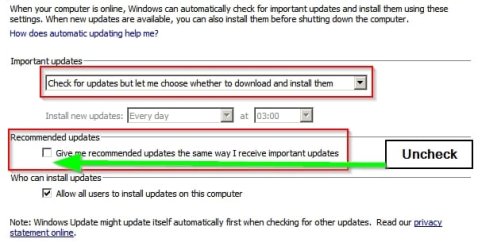
It's a clean machine, with all the defaults. Windows Automatic Update, for example, is set to Install Updates Automatically (Recommended). Recommended updates is set to "Give me recommended updates the same way I receive important updates."

I could be wrong but that surely that setting makes optional updates become important updates and thus will be checked and downloaded.

If the user has the following settings then nothing optional is downloaded without the user's say so.

Change settings.jpg

See posts #3 & #4 here:

http://www.sevenforums.com/windows-...ter-being-hidden-post3158756.html#post3158756
 

My Computer My Computer

At a glance

Microsoft Windows 7 Home Premium 64-bit 7601 ...AMD C-60 APU with Radeon(tm) HD Graphics4.00 GBAMD Radeon HD 6290 Graphics
Computer type
Laptop
Computer Manufacturer/Model Number
ASUS
OS
Microsoft Windows 7 Home Premium 64-bit 7601 Multiprocessor Free Service Pack 1
CPU
AMD C-60 APU with Radeon(tm) HD Graphics
Motherboard
ASUSTeK COMPUTER INC. X501U
Memory
4.00 GB
Graphics Card(s)
AMD Radeon HD 6290 Graphics
Sound Card
(1) AMD High Definition Audio Device (2) Realtek High Defi
Screen Resolution
1366 x 768 x 32 bits (4294967296 colors) @ 60 Hz
Hard Drives
Hitachi HTS545050A7E380 SATA Disk Device
Antivirus
Comodo CIS & FW, SecureAplus App Whitelisting, Threatfire
Browser
Cyberfox 64bit, Opera 64bit, Airfox
Other Info
Spy-The-Spy, HitmanPro.Alert, Norton Connect Safe, MJRegWatcher, BitDefender TrafficLight, Voodoo Shield, Zemana AntiMalware
I could be wrong but that surely that setting makes optional updates become important updates and thus will be checked and downloaded.

If the user has the following settings then nothing optional is downloaded without the user's say so.


See posts #3 & #4 here:

http://www.sevenforums.com/windows-...ter-being-hidden-post3158756.html#post3158756

I thought so, too, so I unchecked "Give me recommended updates the same way I receive important updates" and ran Windows Update again. As described in the article, WU checked the box again.

Microsoft changed the behavior of Windows Update over the weekend. I've been documenting Windows Update, in print, for more than a decade. I know it well - and it's changed.

This is the first "Recommended, Optional" patch I can recall. It works differently.
 

My Computer My Computer

At a glance

Many OSs on multiple platforms
Computer type
PC/Desktop
OS
Many OSs on multiple platforms
If you look at my screenshots above, the upgrade to Windows 10 is an optional update. Optional updates do not get automatically installed by Windows, but only installed by the user that left it checked when they manually checked for and installed updates themselves.

If you look at my screenshot, at least on this particular test machine, "Upgrade to Windows 10 Pro, Version 1511, 10586" appears as a checked, Optional, update. The check signifies that it will be installed the next time Auto Update runs.

More to the point, if I UNcheck "Upgrade to Windows 10 Pro, Version 1511, 10586" and run any piece of Windows Update, the item gets checked again.

Read the article. It's chilling. (In my universe, anyway.)

RE: Your article.

It's a clean machine, with all the defaults. Windows Automatic Update, for example, is set to Install Updates Automatically (Recommended). Recommended updates is set to "Give me recommended updates the same way I receive important updates."
I could be wrong but that surely that setting makes optional updates become important updates and thus will be checked and downloaded.

If the user has the following settings then nothing optional is downloaded without the user's say so.
See posts #3 & #4 here:

http://www.sevenforums.com/windows-...ter-being-hidden-post3158756.html#post3158756


That even caught me off guard. I think it needs to be worded differently.

I like windows 10 but I also like windows 7 and I also like Linux as well. I am an oddball.
 

My Computer My Computer

At a glance

W10 32 bit, XUbuntu 18.xx 64 bitIntel(R) Celeron(R) CPU G1620T @ 2.40GHz, 240...4GBIntel HD graphics
Computer type
PC/Desktop
Computer Manufacturer/Model Number
Dell All in one Inspiron 2020
OS
W10 32 bit, XUbuntu 18.xx 64 bit
CPU
Intel(R) Celeron(R) CPU G1620T @ 2.40GHz, 2400 Mhz
Motherboard
Dell
Memory
4GB
Graphics Card(s)
Intel HD graphics
Sound Card
High Definition Audio Device
Monitor(s) Displays
20 inch Screen
Screen Resolution
W7=1280 x 720 & Linux Mint Xfce=1360 x 768
Hard Drives
500 GB hard drive
Keyboard
Usb
Mouse
Usb
Internet Speed
High-Speed
Antivirus
MSE
Browser
Main Browser Firefox
Other Info
I have done a clean install of Windows 7 using Dell re-installation disk (Dell sent me one). I also use Free Macrium reflect backup and restore.
If you look at my screenshot, at least on this particular test machine, "Upgrade to Windows 10 Pro, Version 1511, 10586" appears as a checked, Optional, update. The check signifies that it will be installed the next time Auto Update runs.

More to the point, if I UNcheck "Upgrade to Windows 10 Pro, Version 1511, 10586" and run any piece of Windows Update, the item gets checked again.

Read the article. It's chilling. (In my universe, anyway.)

RE: Your article.

It's a clean machine, with all the defaults. Windows Automatic Update, for example, is set to Install Updates Automatically (Recommended). Recommended updates is set to "Give me recommended updates the same way I receive important updates."
I could be wrong but that surely that setting makes optional updates become important updates and thus will be checked and downloaded.

If the user has the following settings then nothing optional is downloaded without the user's say so.
See posts #3 & #4 here:

http://www.sevenforums.com/windows-...ter-being-hidden-post3158756.html#post3158756


That even caught me off guard. I think it needs to be worded differently.

I like windows 10 but I also like windows 7 and I also like Linux as well. I am an oddball.

I'm an Oddball, but if that caught you out you're a dumb ass :zip:
 

My Computer My Computer

At a glance

NT4Cyrix 2338 MegVoodoo
OS
NT4
CPU
Cyrix 233
Motherboard
Jetway
Memory
8 Meg
Graphics Card(s)
Voodoo
Sound Card
SB16
Monitor(s) Displays
14" CRT
Screen Resolution
800x600
Hard Drives
40meg
Keyboard
Yes
Mouse
Yes
Internet Speed
56k
I welcome any 100% undeniable proof showing it forced on you, and not from user error.

Do you have a clean Win7 machine handy? Go into WU's "Select updates to install" and uncheck "Upgrade to Windows10 Pro, version 1511,10586." Click OK.

Now click "Check for updates" on the left.

WU will tell you to "Upgrade to Windows 10"

Now, click on the link marked "Show all available updates." See how "Upgrade to Windows10 Pro, version 1511,10586" is checked?
 

My Computer My Computer

At a glance

Many OSs on multiple platforms
Computer type
PC/Desktop
OS
Many OSs on multiple platforms
I do agree Lady that many people don't watch what is going on with their system and let things happen or choose them to happen not knowing what they are doing. Yes, Microsoft just loves those kinds of customers.

Any information about computing is only a few ticks away on the internet if one wants to learn.
Those people don't seem to have a problem finding and using FaceBook, Tweeter ect.

All we can do is give guidance to those that want to learn. If those people just want to poke and go that was their choice.

We can't make people learn and gain knowledge. That is something they will have to choose.
Kind of like buying a new car. One is given a owners manual but no body can make them read it.

I learn new things most every day; only because I choose to.
I PM a member just today to ask some questions on Clean Install. He does more Clean Installs in one week than I do in a year. I wanted to learn and the answers I receive did help me with my questions.
I'm acting on what I learned as we speak.

Why anybody would think they can buy one of the most technical pieces of equipment known to mankind and think their is nothing to learn to operate it properly is be on me.
 

My Computer My Computer

At a glance

Windows 10 Pro. 64/ version 1709 Windows 7 Pr...Intel i7-6800K @ 4.3Corsair Platinum 16 gig @2400EVGA GTX 1070 OC
Computer type
PC/Desktop
Computer Manufacturer/Model Number
Home made Desktop
OS
Windows 10 Pro. 64/ version 1709 Windows 7 Pro/64
CPU
Intel i7-6800K @ 4.3
Motherboard
ASUS X-99 Deluxe II
Memory
Corsair Platinum 16 gig @2400
Graphics Card(s)
EVGA GTX 1070 OC
Monitor(s) Displays
Asus 27" LED LCD/VE278Q
Screen Resolution
1920-1080 or 1280-720 HDMI
Hard Drives
INTEL SSD 730-240 Gb Sata 3.0/
PSU
EVGA Platium 1200W
Case
Phanteks Luxe Tempered Glass 8 fans/ one radiator
Cooling
XSPC/ Water Cooled CPU
Keyboard
Das 4 Professional
Mouse
Logitech M705/MX Anywhere 2-S
Internet Speed
100 mbits
Antivirus
Microsoft Security Essentials/ Malwarebytes Premium 3.0/ SAS
Browser
I.E. 11 default/Firefox/ ISP Time Warner Cable/Spectrum
Other Info
LG BluRay Burner/
Sound system-KLipsch-THX/
Icy Dock ssd Hot Swap bays.
Status
Not open for further replies.
Back
Top