Win7 Updates malfunctioning AGAIN

Benteke

Member
Local time
6:15 AM
Messages
121
Location
Way Out West
Originally, after a reinstall, I could not get updates to do anything. Torchwood helped me solve that issue and I've been updating ever since. Yesterday however, I tried to download ONE update and after an hour of nothing, I aborted the update. I also noticed that my cpu & ram were running much higher than normal. When I disabled the win update in Tskmgr, cpu & ram returned to normal.

Any ideas/suggestions???

Thanks
 

My Computer

Computer type
Laptop
Computer Manufacturer/Model Number
Fujitsu LifeBook AH550
OS
Windows 7 Home Premium x64 SP1
Hi,
A 32 bit system was acting up Friday and what I finally did Saturday :p
Was to go to windows update settings and make sure the box
Give me recommended updates the same way as Important updates was Unchecked

Then just switched the top setting to automatic
Set the install schedule for a few hours from when I changed the setting and on that day.
Then restarted the machine.

And it worked and got me this months round which was about 16 Important updates :)

So exactly which update through a fit ?
I also have no idea which thread Torchwood was helping you on ?

Lastly since it was not offered as Optional I did install this after the other updates install for good measure
https://support.microsoft.com/en-us/kb/3135445
 

My Computer

Computer type
PC/Desktop
Computer Manufacturer/Model Number
Custom assembled by me :}
OS
Win-7-Pro64bit 7-H-Prem-64bit
CPU
i7-5930K 2nd i9-9940x both water blocked VRM's too
Motherboard
ASUS SABERTOOTH X99 2nd ASUS x299 Apex
Memory
Trident-z 3200C14 2nd Trident-z 3600C16
Graphics Card(s)
EVGA 1080ti ftw3 2nd Titan Xp both water blocked
Sound Card
Built-in Realtek
Monitor(s) Displays
1-AOC G2460PG 24"G-Sync 144Hz/ 2nd 1-ASUS VG248QE 24" 144Hz
Screen Resolution
1920 x 1080 144Hz
Hard Drives
2-Samsung M.2 Evo & Evo Plus
2-Samsung 850 EVO 500GB SSD's/ 3-2.5 W.D. Black 1tb-&3-1tb/3-3.5 WD Black 1tb hdd's
PSU
EVGA SuperNOVA 1000-P2 2nd 1200-P2
Case
2-Corsair Obsidian Series 450D Black ATX Mid Tower
Cooling
Custom water loops
Keyboard
Logitech G710+/ 2nd Logitech G910
Mouse
2-RedDragon M901 Perdition 16400 dpi Gaming mouse = wired
Internet Speed
Comcast Ping 19ms 89.31mbps download speed 6.12mbps upload
Antivirus
Malwarebytes Pro/ Superantispyware Pro
Browser
FireFox & Pale moon
Other Info
2nd ASUS X299 Apex/Intel i9-9940x with Custom water loop/7H-Prem-x64/Corsair 450D case/Ram Trident-z 3600C16 4x8gb / Samsung970Evo plus 500gb SSD/Dual ssd EZ swap evo/PSU EVGA SuperNova 1200w-P2 80+Platinum/GPU Titan Xp /8-ML-140 on push-pull on 2-280GTX rads
After installing the KB3135445 (WU Client) on my own system I had to run the MS fixit tool for WU twice after restarting both times in order to get WU to work again... However the upside is it only took 1 hour this time to find any updates rather than the usual 3hours + so I am happy about that...

I would say though since I had to run the fixit tool to anyone who's WU Client is working correctly and does not take hours on end to fetch updates I think I would just leave it alone personally.
 

My Computer

Computer type
Laptop
Computer Manufacturer/Model Number
Sony
OS
Windows 7 x64 SP1
CPU
Intel
Motherboard
Sony
Memory
4gb
Graphics Card(s)
Nvidia
Hard Drives
WD
Internet Speed
Dial up wasn't as bad as this !
Antivirus
Avast
Browser
Firefox
Yea most of it I guess is just making sure these services are running and on automatic :/
Which by setting to auto download default and restarting issues might be cured without resetting windows updates which I believe just compounds the problem more than helping :/
Background Intelligent Transfer services
Cryptographic
Windows Installer
Windows Update
 

My Computer

Computer type
PC/Desktop
Computer Manufacturer/Model Number
Custom assembled by me :}
OS
Win-7-Pro64bit 7-H-Prem-64bit
CPU
i7-5930K 2nd i9-9940x both water blocked VRM's too
Motherboard
ASUS SABERTOOTH X99 2nd ASUS x299 Apex
Memory
Trident-z 3200C14 2nd Trident-z 3600C16
Graphics Card(s)
EVGA 1080ti ftw3 2nd Titan Xp both water blocked
Sound Card
Built-in Realtek
Monitor(s) Displays
1-AOC G2460PG 24"G-Sync 144Hz/ 2nd 1-ASUS VG248QE 24" 144Hz
Screen Resolution
1920 x 1080 144Hz
Hard Drives
2-Samsung M.2 Evo & Evo Plus
2-Samsung 850 EVO 500GB SSD's/ 3-2.5 W.D. Black 1tb-&3-1tb/3-3.5 WD Black 1tb hdd's
PSU
EVGA SuperNOVA 1000-P2 2nd 1200-P2
Case
2-Corsair Obsidian Series 450D Black ATX Mid Tower
Cooling
Custom water loops
Keyboard
Logitech G710+/ 2nd Logitech G910
Mouse
2-RedDragon M901 Perdition 16400 dpi Gaming mouse = wired
Internet Speed
Comcast Ping 19ms 89.31mbps download speed 6.12mbps upload
Antivirus
Malwarebytes Pro/ Superantispyware Pro
Browser
FireFox & Pale moon
Other Info
2nd ASUS X299 Apex/Intel i9-9940x with Custom water loop/7H-Prem-x64/Corsair 450D case/Ram Trident-z 3600C16 4x8gb / Samsung970Evo plus 500gb SSD/Dual ssd EZ swap evo/PSU EVGA SuperNova 1200w-P2 80+Platinum/GPU Titan Xp /8-ML-140 on push-pull on 2-280GTX rads
Yea most of it I guess is just making sure these services are running and on automatic :/
Which by setting to auto download default and restarting issues might be cured without resetting windows updates which I believe just compounds the problem more than helping :/
Background Intelligent Transfer services
Cryptographic
Windows Installer
Windows Update

Yeah that seems logical leave the system to do what it wants to do when it wants to do it and it wont complain along with the user watching the clock, a bit risky given the current climate if you don't want telemetry and Win10 junk though but looks like the GWX tool thingy seems to cure that problem... so far at least.

With the next system I get to repair I shall try that setting WU to automatic, I normally start with:
KB3083324 - Windows Update Client Windows 7
And then work my way down the actual WU Client updates until one works semi normally and then stick with that, as you well know though every system is different...:)
 

My Computer

Computer type
Laptop
Computer Manufacturer/Model Number
Sony
OS
Windows 7 x64 SP1
CPU
Intel
Motherboard
Sony
Memory
4gb
Graphics Card(s)
Nvidia
Hard Drives
WD
Internet Speed
Dial up wasn't as bad as this !
Antivirus
Avast
Browser
Firefox
Yep both my 64 bit installs actually find the updates without any issues at all on Check for updates but let me decide whether to download and install them
Of course the recommended the same way box is and has always been unchecked on all systems

Same recommended/ optional updates have been excluded on all of them
Except the 32 bit system does not have Net framework 4.5.2 on it and the others do because a program or game requires it to be installed.

It is pretty weird :confused:
 

My Computer

Computer type
PC/Desktop
Computer Manufacturer/Model Number
Custom assembled by me :}
OS
Win-7-Pro64bit 7-H-Prem-64bit
CPU
i7-5930K 2nd i9-9940x both water blocked VRM's too
Motherboard
ASUS SABERTOOTH X99 2nd ASUS x299 Apex
Memory
Trident-z 3200C14 2nd Trident-z 3600C16
Graphics Card(s)
EVGA 1080ti ftw3 2nd Titan Xp both water blocked
Sound Card
Built-in Realtek
Monitor(s) Displays
1-AOC G2460PG 24"G-Sync 144Hz/ 2nd 1-ASUS VG248QE 24" 144Hz
Screen Resolution
1920 x 1080 144Hz
Hard Drives
2-Samsung M.2 Evo & Evo Plus
2-Samsung 850 EVO 500GB SSD's/ 3-2.5 W.D. Black 1tb-&3-1tb/3-3.5 WD Black 1tb hdd's
PSU
EVGA SuperNOVA 1000-P2 2nd 1200-P2
Case
2-Corsair Obsidian Series 450D Black ATX Mid Tower
Cooling
Custom water loops
Keyboard
Logitech G710+/ 2nd Logitech G910
Mouse
2-RedDragon M901 Perdition 16400 dpi Gaming mouse = wired
Internet Speed
Comcast Ping 19ms 89.31mbps download speed 6.12mbps upload
Antivirus
Malwarebytes Pro/ Superantispyware Pro
Browser
FireFox & Pale moon
Other Info
2nd ASUS X299 Apex/Intel i9-9940x with Custom water loop/7H-Prem-x64/Corsair 450D case/Ram Trident-z 3600C16 4x8gb / Samsung970Evo plus 500gb SSD/Dual ssd EZ swap evo/PSU EVGA SuperNova 1200w-P2 80+Platinum/GPU Titan Xp /8-ML-140 on push-pull on 2-280GTX rads
Yep both my 64 bit installs actually find the updates without any issues at all on Check for updates but let me decide whether to download and install them
Of course the recommended the same way box is and has always been unchecked on all systems

Same recommended/ optional updates have been excluded on all of them
Except the 32 bit system does not have Net framework 4.5.2 on it and the others do because a program or game requires it to be installed.

It is pretty weird :confused:

Yes funny you should say that as I have now noticed (since you just mentioned) that Net framework 4.5.2 does seem to play some sort of part in all this for whatever reason that is beyond me... again I am going to pay more close attention the next time as this does seem to be a factor come to think...
 

My Computer

Computer type
Laptop
Computer Manufacturer/Model Number
Sony
OS
Windows 7 x64 SP1
CPU
Intel
Motherboard
Sony
Memory
4gb
Graphics Card(s)
Nvidia
Hard Drives
WD
Internet Speed
Dial up wasn't as bad as this !
Antivirus
Avast
Browser
Firefox
Yep to makes things more fun M$ released Net frame work 4.6.1 as well :)
So far it's absence hasn't effected the 64 bit machines = yet possibly ;)
 

My Computer

Computer type
PC/Desktop
Computer Manufacturer/Model Number
Custom assembled by me :}
OS
Win-7-Pro64bit 7-H-Prem-64bit
CPU
i7-5930K 2nd i9-9940x both water blocked VRM's too
Motherboard
ASUS SABERTOOTH X99 2nd ASUS x299 Apex
Memory
Trident-z 3200C14 2nd Trident-z 3600C16
Graphics Card(s)
EVGA 1080ti ftw3 2nd Titan Xp both water blocked
Sound Card
Built-in Realtek
Monitor(s) Displays
1-AOC G2460PG 24"G-Sync 144Hz/ 2nd 1-ASUS VG248QE 24" 144Hz
Screen Resolution
1920 x 1080 144Hz
Hard Drives
2-Samsung M.2 Evo & Evo Plus
2-Samsung 850 EVO 500GB SSD's/ 3-2.5 W.D. Black 1tb-&3-1tb/3-3.5 WD Black 1tb hdd's
PSU
EVGA SuperNOVA 1000-P2 2nd 1200-P2
Case
2-Corsair Obsidian Series 450D Black ATX Mid Tower
Cooling
Custom water loops
Keyboard
Logitech G710+/ 2nd Logitech G910
Mouse
2-RedDragon M901 Perdition 16400 dpi Gaming mouse = wired
Internet Speed
Comcast Ping 19ms 89.31mbps download speed 6.12mbps upload
Antivirus
Malwarebytes Pro/ Superantispyware Pro
Browser
FireFox & Pale moon
Other Info
2nd ASUS X299 Apex/Intel i9-9940x with Custom water loop/7H-Prem-x64/Corsair 450D case/Ram Trident-z 3600C16 4x8gb / Samsung970Evo plus 500gb SSD/Dual ssd EZ swap evo/PSU EVGA SuperNova 1200w-P2 80+Platinum/GPU Titan Xp /8-ML-140 on push-pull on 2-280GTX rads
RE: Services. Defaults are:

Windows Updates (Automatic Delayed Start)
BITS (Manual)
Cryptopgraphic (Auto)

That's what I have and everything works.

I did previously have an issue where BITS would not start when called by Windows Updates.

RE: Problems with Windows Updates returning after fixing. This has happened many times on my machine during the last year. Finally everything works and has worked for 3 months now without issues.

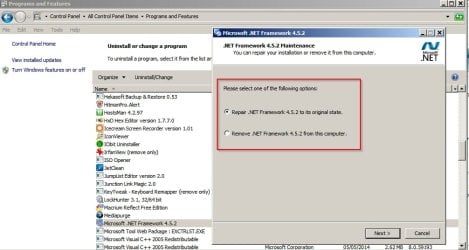
RE: NET Framework. It's interesting that you mention it. On my machine I only noticed a problem when running a third party uninstall tool:

Clicking on Change/ Repair resulted in a message that Windows could not "Change/ repair or uninstall" this program. I forget the exact wording.

NET Framework.jpg

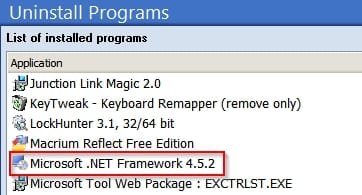
The third party uninstaller shows a list of programs:

NET Framework 2.jpg

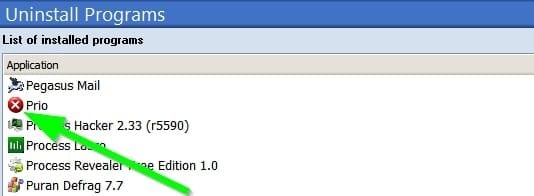
Problem programs or partial installs are shown with a cross against them like this:

NET Framework 3.jpg

That's when I first noticed the NET Framework problem - now fixed.

RE: Windows Updates.

I found it best to fully remove all WU Client updates followed by Disk Cleanup (To include windows updates cleanup) and run MicrosoftFixit50202.msi two or three times including disconnecting network adapter for the last run.

Then download and force install some recent version of WU Client but once installed disable WU service and wait 24 hours before re-enabling then running an update check.

Edit: Keep the WU Client version that was installed in order to get things working and hide any other WU Client updates that show up.
 
Last edited:

My Computer

Computer type
Laptop
Computer Manufacturer/Model Number
ASUS
OS
Microsoft Windows 7 Home Premium 64-bit 7601 Multiprocessor Free Service Pack 1
CPU
AMD C-60 APU with Radeon(tm) HD Graphics
Motherboard
ASUSTeK COMPUTER INC. X501U
Memory
4.00 GB
Graphics Card(s)
AMD Radeon HD 6290 Graphics
Sound Card
(1) AMD High Definition Audio Device (2) Realtek High Defi
Screen Resolution
1366 x 768 x 32 bits (4294967296 colors) @ 60 Hz
Hard Drives
Hitachi HTS545050A7E380 SATA Disk Device
Antivirus
Comodo CIS & FW, SecureAplus App Whitelisting, Threatfire
Browser
Cyberfox 64bit, Opera 64bit, Airfox
Other Info
Spy-The-Spy, HitmanPro.Alert, Norton Connect Safe, MJRegWatcher, BitDefender TrafficLight, Voodoo Shield, Zemana AntiMalware
Yea I was referring to the auto download and install default settings where the 4 items would be set to auto.
The only related to win-10 Important update was KB3112343
And as long as you have used Brink's disable os upgrades it might not even be offered and or installed
Upgrade to Windows 10 Update - Enable or Disable in Windows 7 or 8.1 - Windows 10 Forums

So auto download.... as long as the give me recommended... is unchecked is okay for now to use if having an issue getting updates.

That may change soon though :p
I switched the settings back to check but not download.... soon after a successful install of the most recent round ;)
The 32 bit system is hardly used pretty much only for banking and on the road use which I don't do much anymore traveling anyway.
 

My Computer

Computer type
PC/Desktop
Computer Manufacturer/Model Number
Custom assembled by me :}
OS
Win-7-Pro64bit 7-H-Prem-64bit
CPU
i7-5930K 2nd i9-9940x both water blocked VRM's too
Motherboard
ASUS SABERTOOTH X99 2nd ASUS x299 Apex
Memory
Trident-z 3200C14 2nd Trident-z 3600C16
Graphics Card(s)
EVGA 1080ti ftw3 2nd Titan Xp both water blocked
Sound Card
Built-in Realtek
Monitor(s) Displays
1-AOC G2460PG 24"G-Sync 144Hz/ 2nd 1-ASUS VG248QE 24" 144Hz
Screen Resolution
1920 x 1080 144Hz
Hard Drives
2-Samsung M.2 Evo & Evo Plus
2-Samsung 850 EVO 500GB SSD's/ 3-2.5 W.D. Black 1tb-&3-1tb/3-3.5 WD Black 1tb hdd's
PSU
EVGA SuperNOVA 1000-P2 2nd 1200-P2
Case
2-Corsair Obsidian Series 450D Black ATX Mid Tower
Cooling
Custom water loops
Keyboard
Logitech G710+/ 2nd Logitech G910
Mouse
2-RedDragon M901 Perdition 16400 dpi Gaming mouse = wired
Internet Speed
Comcast Ping 19ms 89.31mbps download speed 6.12mbps upload
Antivirus
Malwarebytes Pro/ Superantispyware Pro
Browser
FireFox & Pale moon
Other Info
2nd ASUS X299 Apex/Intel i9-9940x with Custom water loop/7H-Prem-x64/Corsair 450D case/Ram Trident-z 3600C16 4x8gb / Samsung970Evo plus 500gb SSD/Dual ssd EZ swap evo/PSU EVGA SuperNova 1200w-P2 80+Platinum/GPU Titan Xp /8-ML-140 on push-pull on 2-280GTX rads
Hi,
A 32 bit system was acting up Friday and what I finally did Saturday :p
Was to go to windows update settings and make sure the box
Give me recommended updates the same way as Important updates was Unchecked

Then just switched the top setting to automatic
Set the install schedule for a few hours from when I changed the setting and on that day.
Then restarted the machine.

And it worked and got me this months round which was about 16 Important updates :)

So exactly which update through a fit ?
I also have no idea which thread Torchwood was helping you on ?

Lastly since it was not offered as Optional I did install this after the other updates install for good measure
https://support.microsoft.com/en-us/kb/3135445

Thanks ThrashZone, the update I was trying to install was (KB3072305)

Here is the thread where Roy was helping me Windows 7 Update error
 

My Computer

Computer type
Laptop
Computer Manufacturer/Model Number
Fujitsu LifeBook AH550
OS
Windows 7 Home Premium x64 SP1
updates

Mine took ages to update yesterday check/download/install.
I just think they wanna bully us into a W10.. IT only took me 2 1/2 hours to download and install my latest TP version....

Roy
 

My Computer

Computer type
PC/Desktop
Computer Manufacturer/Model Number
medionl/Aspire 6930G/acer x55a
OS
W7 home premium 32bit/W7HP 64bit/w10 tp insider ring
CPU
E5300 dual core
Motherboard
medion MS7366
Memory
3gb
Graphics Card(s)
Nvidia Geforce 7100 Nforce 630i
Monitor(s) Displays
avixc
Internet Speed
n (isp resticted to 72)
Antivirus
mse/pands
Browser
palemoon
Other Info
Belkin Fd7050 n USB using Railink RT2870 drivers, more upto date
Okay, I managed to install the updates today. Yesterday, they wouldn't DL and my cpu was pegged @ ~60%. Today, they installed normally (about 10mins) and cpu load was normal. Not sure why but am thankful nonetheless. :D
 

My Computer

Computer type
Laptop
Computer Manufacturer/Model Number
Fujitsu LifeBook AH550
OS
Windows 7 Home Premium x64 SP1
Hi
Since M$ changed to it's new update system it has been very weird experience for a lot of people :mad2:
 

My Computer

Computer type
PC/Desktop
Computer Manufacturer/Model Number
Custom assembled by me :}
OS
Win-7-Pro64bit 7-H-Prem-64bit
CPU
i7-5930K 2nd i9-9940x both water blocked VRM's too
Motherboard
ASUS SABERTOOTH X99 2nd ASUS x299 Apex
Memory
Trident-z 3200C14 2nd Trident-z 3600C16
Graphics Card(s)
EVGA 1080ti ftw3 2nd Titan Xp both water blocked
Sound Card
Built-in Realtek
Monitor(s) Displays
1-AOC G2460PG 24"G-Sync 144Hz/ 2nd 1-ASUS VG248QE 24" 144Hz
Screen Resolution
1920 x 1080 144Hz
Hard Drives
2-Samsung M.2 Evo & Evo Plus
2-Samsung 850 EVO 500GB SSD's/ 3-2.5 W.D. Black 1tb-&3-1tb/3-3.5 WD Black 1tb hdd's
PSU
EVGA SuperNOVA 1000-P2 2nd 1200-P2
Case
2-Corsair Obsidian Series 450D Black ATX Mid Tower
Cooling
Custom water loops
Keyboard
Logitech G710+/ 2nd Logitech G910
Mouse
2-RedDragon M901 Perdition 16400 dpi Gaming mouse = wired
Internet Speed
Comcast Ping 19ms 89.31mbps download speed 6.12mbps upload
Antivirus
Malwarebytes Pro/ Superantispyware Pro
Browser
FireFox & Pale moon
Other Info
2nd ASUS X299 Apex/Intel i9-9940x with Custom water loop/7H-Prem-x64/Corsair 450D case/Ram Trident-z 3600C16 4x8gb / Samsung970Evo plus 500gb SSD/Dual ssd EZ swap evo/PSU EVGA SuperNova 1200w-P2 80+Platinum/GPU Titan Xp /8-ML-140 on push-pull on 2-280GTX rads
Mine took ages to update yesterday check/download/install.
I just think they wanna bully us into a W10.. IT only took me 2 1/2 hours to download and install my latest TP version....

Roy

Whatever the specifics SOMETHING STRANGE is going on with Windows Update for Windows 7!

I've noticed on TWO different computers (not networked together) both are stable and have been trouble free for years and now BOTH have odd results when trying to use WU to install updates, (I have not used any method to reset or fix it) On BOTH units when you even try to download a small update oddly the windows servers will SHUT OFF AT ABOUT 75% downloaded for EVERY update no matter what the size actually is, I kid you not this definitely seems to be originating with Microsoft servers! I've watched on my modem as the Microsoft servers turn off and deny service. Again TWO different NON networked computers with healthy valid installs of genuine 7 Home Premium.

I went over to Microsoft Community forums on the Windows 7 updates forum and LOTS of users are reporting VERY similar issues to ours, OBVIOUSLY this is a MS issue and NOT individual computer owners. Not only that I would say that since the end of last year there has been some kind of issue going on.

WHAT IS GOING ON MS!???:mad::rolleyes::(
 
Last edited:

My Computer

Computer Manufacturer/Model Number
hp pavilion 6680t
OS
win 7 home premium 64 bit
CPU
core i5 760
Motherboard
iona (from MSI)
Memory
6 gb
Graphics Card(s)
ati 5450
Sound Card
real tek 888
Yep Chrome can't get to some M$ sites I've read so it seems most likely server issues.
 

My Computer

Computer type
PC/Desktop
Computer Manufacturer/Model Number
Custom assembled by me :}
OS
Win-7-Pro64bit 7-H-Prem-64bit
CPU
i7-5930K 2nd i9-9940x both water blocked VRM's too
Motherboard
ASUS SABERTOOTH X99 2nd ASUS x299 Apex
Memory
Trident-z 3200C14 2nd Trident-z 3600C16
Graphics Card(s)
EVGA 1080ti ftw3 2nd Titan Xp both water blocked
Sound Card
Built-in Realtek
Monitor(s) Displays
1-AOC G2460PG 24"G-Sync 144Hz/ 2nd 1-ASUS VG248QE 24" 144Hz
Screen Resolution
1920 x 1080 144Hz
Hard Drives
2-Samsung M.2 Evo & Evo Plus
2-Samsung 850 EVO 500GB SSD's/ 3-2.5 W.D. Black 1tb-&3-1tb/3-3.5 WD Black 1tb hdd's
PSU
EVGA SuperNOVA 1000-P2 2nd 1200-P2
Case
2-Corsair Obsidian Series 450D Black ATX Mid Tower
Cooling
Custom water loops
Keyboard
Logitech G710+/ 2nd Logitech G910
Mouse
2-RedDragon M901 Perdition 16400 dpi Gaming mouse = wired
Internet Speed
Comcast Ping 19ms 89.31mbps download speed 6.12mbps upload
Antivirus
Malwarebytes Pro/ Superantispyware Pro
Browser
FireFox & Pale moon
Other Info
2nd ASUS X299 Apex/Intel i9-9940x with Custom water loop/7H-Prem-x64/Corsair 450D case/Ram Trident-z 3600C16 4x8gb / Samsung970Evo plus 500gb SSD/Dual ssd EZ swap evo/PSU EVGA SuperNova 1200w-P2 80+Platinum/GPU Titan Xp /8-ML-140 on push-pull on 2-280GTX rads
UPDATE:

Same problem happening again! Had 13 Important updates, clicked to start downloading, 90 mins later was still showing 13 updates downloading, 0 KB total 0% complete. Tried to update Win Defender, same thing.... Bar reached the quarter mark after a few seconds and remained there for the next 30 mins.

Some things I've noticed:-
1) WU NEVER informs me that I have new updates available. I have to manually check for updates. (Yes, the WU service is running & I have it set to check for updates but let me choose whether to DL & install)
2) The cpu & memory peg @ 25-30% & 45-50% respectively without any apps/browsers etc running. (cpu & mem are usually @ 0% & 20%)
3) As soon as I disable WU in taskmgr, cpu fall to 0% & mem to 20%)


RE: Services. Defaults are:

Windows Updates (Automatic Delayed Start)
BITS (Manual)
Cryptopgraphic (Auto)

That's what I have and everything works.

I did previously have an issue where BITS would not start when called by Windows Updates.

RE: Problems with Windows Updates returning after fixing. This has happened many times on my machine during the last year. Finally everything works and has worked for 3 months now without issues.

Only difference in my services from the ones you listed is BITS is set to auto delayed start.
 

My Computer

Computer type
Laptop
Computer Manufacturer/Model Number
Fujitsu LifeBook AH550
OS
Windows 7 Home Premium x64 SP1
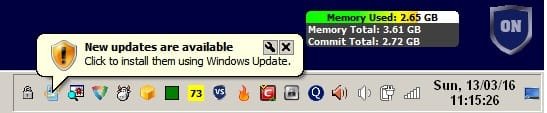
BITS should be set to Manual. That's the default setting. Also regarding WU notifications - mine started working again after the latest round of updates this month.

Updates Notify.jpg

That was after installing .NET Framework 4.6.1 as one of the available updates this month along with KB 3138612 - Mar 2016 Windows Update Client.
 

My Computer

Computer type
Laptop
Computer Manufacturer/Model Number
ASUS
OS
Microsoft Windows 7 Home Premium 64-bit 7601 Multiprocessor Free Service Pack 1
CPU
AMD C-60 APU with Radeon(tm) HD Graphics
Motherboard
ASUSTeK COMPUTER INC. X501U
Memory
4.00 GB
Graphics Card(s)
AMD Radeon HD 6290 Graphics
Sound Card
(1) AMD High Definition Audio Device (2) Realtek High Defi
Screen Resolution
1366 x 768 x 32 bits (4294967296 colors) @ 60 Hz
Hard Drives
Hitachi HTS545050A7E380 SATA Disk Device
Antivirus
Comodo CIS & FW, SecureAplus App Whitelisting, Threatfire
Browser
Cyberfox 64bit, Opera 64bit, Airfox
Other Info
Spy-The-Spy, HitmanPro.Alert, Norton Connect Safe, MJRegWatcher, BitDefender TrafficLight, Voodoo Shield, Zemana AntiMalware
BITS should be set to Manual. That's the default setting. Also regarding WU notifications - mine started working again after the latest round of updates this month.

Okay, good to know... I'll set BITS to manual.... Not sure why it's set to auto (delayed Start), if manual is the default.... I don't recall messing with 'services' since my last Win7 reinstall.
 

My Computer

Computer type
Laptop
Computer Manufacturer/Model Number
Fujitsu LifeBook AH550
OS
Windows 7 Home Premium x64 SP1

My Computer

Computer type
Laptop
Computer Manufacturer/Model Number
ASUS
OS
Microsoft Windows 7 Home Premium 64-bit 7601 Multiprocessor Free Service Pack 1
CPU
AMD C-60 APU with Radeon(tm) HD Graphics
Motherboard
ASUSTeK COMPUTER INC. X501U
Memory
4.00 GB
Graphics Card(s)
AMD Radeon HD 6290 Graphics
Sound Card
(1) AMD High Definition Audio Device (2) Realtek High Defi
Screen Resolution
1366 x 768 x 32 bits (4294967296 colors) @ 60 Hz
Hard Drives
Hitachi HTS545050A7E380 SATA Disk Device
Antivirus
Comodo CIS & FW, SecureAplus App Whitelisting, Threatfire
Browser
Cyberfox 64bit, Opera 64bit, Airfox
Other Info
Spy-The-Spy, HitmanPro.Alert, Norton Connect Safe, MJRegWatcher, BitDefender TrafficLight, Voodoo Shield, Zemana AntiMalware
Back
Top