Solved Cant connect to the Internet

Hello all ,that adapters here . At least I think that's what it is , its only the size of a USB drive . I was expecting summit bigger , been in all weekend shifting the couch n wotnot .
 

My Computer My Computer

Computer type
PC/Desktop
Computer Manufacturer/Model Number
Custom build
OS
Microsoft Windows 10 Pro 64-bit 17134 Multiprocessor Free
CPU
Intel(R) Core(TM) i7-4790K CPU @ 4.00GHz
Motherboard
MSI Z97 PC Mate(MS-7850)
Memory
16.00 GB
Graphics Card(s)
Intel(R) HD Graphics 4600
Sound Card
(1) High Definition Audio Device (2) USB Audio Device
Screen Resolution
1920 x 1080 x 32 bits (4294967296 colors) @ 60 Hz
Hard Drives
ST10000VN0004-2GS11L
Antivirus
Kaspersky
Browser
Plusnet
You should be able to insert the Dongle into a USB port and it may load it's own drivers, if not then insert the Disk that came with the dongle and follow instructions to install.

Once installed the notification area on the right hand end of the taskbar should have a network item, clicking on this should show a list of all the nearby wireless routers. look for the one starting with PlusNet (the actual name should be printed on the back of the router, and the password (key) is there also. Enter the key when you are asked for it and you should then be on the Net :)
 

My Computers My Computers

System One System Two

  • Computer type
    PC/Desktop
    Computer Manufacturer/Model Number
    ChillBlast - Custom to my design
    OS
    Windows 11 Pro x64 [Latest Release and Release Preview]
    CPU
    Ryzen 9 5950X, 3.8 - 5.2 MHz
    Motherboard
    Asus Prime X570-Pro
    Memory
    64GB [2 x 32GB] DDR4 3200MHz
    Graphics Card(s)
    4GB NVIDIA GEFORCE GTX 1650 Ti
    Sound Card
    On-board SPDIF to 5.1 System + HDMI [5.1 system]
    Monitor(s) Displays
    32" UHD 32 Bit HDR Monitor + 43" UHD 4K 32Bit HDR TV
    Screen Resolution
    2 x 3840 x 2160 @60Hz
    Hard Drives
    1TB M2 SSD OS, 500GB Fast Access SSD, 2 x 8TB Data + Various Externals from 1TB to 4TB, 10TB NAS
    PSU
    NZXT C750 80 PLUS Gold 750W Modular PSU
    Case
    Workstation Case [Matt Black]
    Cooling
    NZXT Kraken X63 280mm CPU Cooler +2x Quiet Case fans
    Keyboard
    Logitech Wireless MX Keys & K400 + others
    Mouse
    Logitech Wireless MX Master 3S
    Internet Speed
    920 MB Down 50 MB Up
    Antivirus
    BitDefender Total Security Pro
    Browser
    Chrome (always run latest Non-Beta)
    Other Info
    Also run ...
    Laptop - Quad 8GB - Windows 10 Pro x64
    Nexus 7 Android tablet x2
    Samsung 10.2" tablet
    Blackview TAB 8 4G Android Tablet c/w Keyboard
    Wacom Intuos Pro Medium Pen Pad
    Wacom Intuos Pro Small Pen Pad
    Wacom Expresskeys Remote
    Loopdeck+ Graphics Controller
    Shuttle Pro v2 Control
  • Computer type
    Laptop
    System Manufacturer/Model Number
    Dell XPS 17 10750H
    OS
    Windows 11 Pro x64 Latest RP
    CPU
    Intel I7 10750H 5.0GHz
    Motherboard
    Dell XPS
    Memory
    32GB [2x16GB] DDR4 2933 MHz
    Graphics Card(s)
    nVidia GTX1650Ti 4 GB GDDR6
    Sound Card
    Stock [Realtek] 4 Speaker
    Monitor(s) Displays
    17" IPS UHD+ Infinity Edge Touchscreen
    Screen Resolution
    3840 x 2400
    Hard Drives
    2TB M2 NVMe, 4TB External + various 500GB & 1TB External NVMe (also have access to spinner HDD from
    PSU
    Stock
    Case
    Stock XPS Aluminium & Carbon Fibre
    Cooling
    Stock - Active Fan Control
    Keyboard
    Backlit + Various Logitech
    Mouse
    Stock Track Pad + Logitech MX Trackball
    Internet Speed
    72 MB Down 18MB Up
    Browser
    Chrome
    Other Info
    Also run ...
    Laptop - Quad 8GB - Windows 10 Pro x64
    Nexus 7 Android tablet x2
    10.2" tablet
    Sony Z3 Android Smartphone
    Wacom Intuos Pro Medium Pen Pad
    Wacom Intuos Pro Small Pen Pad
    Wacom Expresskeys Remote
    Loopdeck+ Graphics Controller
    Shuttle Pro v2 Control Pad
    10TB NAS
OK Barman58 , will sign off here and give it a go .
 

My Computer My Computer

Computer type
PC/Desktop
Computer Manufacturer/Model Number
Custom build
OS
Microsoft Windows 10 Pro 64-bit 17134 Multiprocessor Free
CPU
Intel(R) Core(TM) i7-4790K CPU @ 4.00GHz
Motherboard
MSI Z97 PC Mate(MS-7850)
Memory
16.00 GB
Graphics Card(s)
Intel(R) HD Graphics 4600
Sound Card
(1) High Definition Audio Device (2) USB Audio Device
Screen Resolution
1920 x 1080 x 32 bits (4294967296 colors) @ 60 Hz
Hard Drives
ST10000VN0004-2GS11L
Antivirus
Kaspersky
Browser
Plusnet
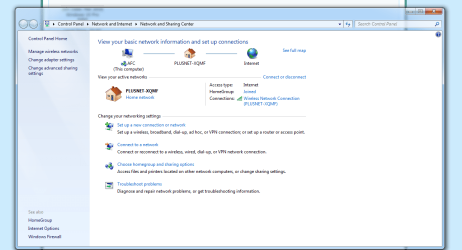
Hello Barman58 , i'm glad to say i'm now online . I disconnected Windows 10 started 7 then put The Network USB Adapter in the port it failed to load the drivers tried again same result . I then put the CD in the drive it started to load the drivers , didn't get far seemed to stick on Now Installing Ciso EAP-FAST , I exited the CD , then tried again it went on for about 20 minutes still on the Now Installing Ciso EAP-FAST so i cancelled it . I restarted the PC went into setting changed the Boot option to USB\CD summit like that and the drivers installed . I could see Plusnet . I went downstairs to watch Hyacynth . Came back Upstairs , couldn't see the drivers so loaded them again same as last time . I clicked on connect then had to put a pass key in which was on a card on the back of the router , I think that was the way I did it . You will know how things work , one last thing i'v got The NetThe Network USB Adapterwork USB Adapter still in the USB port . The first time I got online the web page was ok then I removed The Network USB Adapter and it said something about no connection so I put The Network USB Adapter back in , it's still there now . Many thanks Barman58 for having the patients , understanding and explaining things clearly . Thank you very much .
 

Attachments

  • Plusnet wi-fi.PNG
    Plusnet wi-fi.PNG
    45.8 KB · Views: 0

My Computer My Computer

Computer type
PC/Desktop
Computer Manufacturer/Model Number
Custom build
OS
Microsoft Windows 10 Pro 64-bit 17134 Multiprocessor Free
CPU
Intel(R) Core(TM) i7-4790K CPU @ 4.00GHz
Motherboard
MSI Z97 PC Mate(MS-7850)
Memory
16.00 GB
Graphics Card(s)
Intel(R) HD Graphics 4600
Sound Card
(1) High Definition Audio Device (2) USB Audio Device
Screen Resolution
1920 x 1080 x 32 bits (4294967296 colors) @ 60 Hz
Hard Drives
ST10000VN0004-2GS11L
Antivirus
Kaspersky
Browser
Plusnet
Will log-off now Thanks once again Barman58 , at least now I can do a New Windows 10 Disc , I think the set-up will just be the same with that . I can come on here if I need any help and advice . Barman58 Thank you very much .
 

My Computer My Computer

Computer type
PC/Desktop
Computer Manufacturer/Model Number
Custom build
OS
Microsoft Windows 10 Pro 64-bit 17134 Multiprocessor Free
CPU
Intel(R) Core(TM) i7-4790K CPU @ 4.00GHz
Motherboard
MSI Z97 PC Mate(MS-7850)
Memory
16.00 GB
Graphics Card(s)
Intel(R) HD Graphics 4600
Sound Card
(1) High Definition Audio Device (2) USB Audio Device
Screen Resolution
1920 x 1080 x 32 bits (4294967296 colors) @ 60 Hz
Hard Drives
ST10000VN0004-2GS11L
Antivirus
Kaspersky
Browser
Plusnet
You're welcome, As you have found out, you need the dongle in the PC at all times that you want to access the internet - Also don't be Alarmed /Surprised if you get a lot of Updates offered to you as now Windows 7 is a relatively old OS and will want to update itself. This is needed if you go the upgrade install for your New Win 10 install, although I would suggest a fresh install over the "damaged Windows 10 Install you already have "

There are full instructions Step By Step for all the windows 10 upgrade options on our Sister Site Windows 10 Tutorials
 

My Computers My Computers

System One System Two

  • Computer type
    PC/Desktop
    Computer Manufacturer/Model Number
    ChillBlast - Custom to my design
    OS
    Windows 11 Pro x64 [Latest Release and Release Preview]
    CPU
    Ryzen 9 5950X, 3.8 - 5.2 MHz
    Motherboard
    Asus Prime X570-Pro
    Memory
    64GB [2 x 32GB] DDR4 3200MHz
    Graphics Card(s)
    4GB NVIDIA GEFORCE GTX 1650 Ti
    Sound Card
    On-board SPDIF to 5.1 System + HDMI [5.1 system]
    Monitor(s) Displays
    32" UHD 32 Bit HDR Monitor + 43" UHD 4K 32Bit HDR TV
    Screen Resolution
    2 x 3840 x 2160 @60Hz
    Hard Drives
    1TB M2 SSD OS, 500GB Fast Access SSD, 2 x 8TB Data + Various Externals from 1TB to 4TB, 10TB NAS
    PSU
    NZXT C750 80 PLUS Gold 750W Modular PSU
    Case
    Workstation Case [Matt Black]
    Cooling
    NZXT Kraken X63 280mm CPU Cooler +2x Quiet Case fans
    Keyboard
    Logitech Wireless MX Keys & K400 + others
    Mouse
    Logitech Wireless MX Master 3S
    Internet Speed
    920 MB Down 50 MB Up
    Antivirus
    BitDefender Total Security Pro
    Browser
    Chrome (always run latest Non-Beta)
    Other Info
    Also run ...
    Laptop - Quad 8GB - Windows 10 Pro x64
    Nexus 7 Android tablet x2
    Samsung 10.2" tablet
    Blackview TAB 8 4G Android Tablet c/w Keyboard
    Wacom Intuos Pro Medium Pen Pad
    Wacom Intuos Pro Small Pen Pad
    Wacom Expresskeys Remote
    Loopdeck+ Graphics Controller
    Shuttle Pro v2 Control
  • Computer type
    Laptop
    System Manufacturer/Model Number
    Dell XPS 17 10750H
    OS
    Windows 11 Pro x64 Latest RP
    CPU
    Intel I7 10750H 5.0GHz
    Motherboard
    Dell XPS
    Memory
    32GB [2x16GB] DDR4 2933 MHz
    Graphics Card(s)
    nVidia GTX1650Ti 4 GB GDDR6
    Sound Card
    Stock [Realtek] 4 Speaker
    Monitor(s) Displays
    17" IPS UHD+ Infinity Edge Touchscreen
    Screen Resolution
    3840 x 2400
    Hard Drives
    2TB M2 NVMe, 4TB External + various 500GB & 1TB External NVMe (also have access to spinner HDD from
    PSU
    Stock
    Case
    Stock XPS Aluminium & Carbon Fibre
    Cooling
    Stock - Active Fan Control
    Keyboard
    Backlit + Various Logitech
    Mouse
    Stock Track Pad + Logitech MX Trackball
    Internet Speed
    72 MB Down 18MB Up
    Browser
    Chrome
    Other Info
    Also run ...
    Laptop - Quad 8GB - Windows 10 Pro x64
    Nexus 7 Android tablet x2
    10.2" tablet
    Sony Z3 Android Smartphone
    Wacom Intuos Pro Medium Pen Pad
    Wacom Intuos Pro Small Pen Pad
    Wacom Expresskeys Remote
    Loopdeck+ Graphics Controller
    Shuttle Pro v2 Control Pad
    10TB NAS
Mornin Barman58 , I tried to visit this site earlier but everytime I clicked on a question mine or any other all the text vanished and I was left with a blank page , I managed to Install windows important updates by clicking the icon down the bottom right of the toolbar Important message . I then updated the windows drivers there was 6 in total which took about 15 - 20 minutes . I had to shut the PC down to get the updates , I then restarted and was to to restart for the updates to be installed which I did . Now everything seems OK . At first I searched for latest internet explorer for windows 7 64 bit , and tried to install it but nothing happened . I'm going to try again later I think it said internet explorer 11 for windows 7 64 bit , will that be right .
 

My Computer My Computer

Computer type
PC/Desktop
Computer Manufacturer/Model Number
Custom build
OS
Microsoft Windows 10 Pro 64-bit 17134 Multiprocessor Free
CPU
Intel(R) Core(TM) i7-4790K CPU @ 4.00GHz
Motherboard
MSI Z97 PC Mate(MS-7850)
Memory
16.00 GB
Graphics Card(s)
Intel(R) HD Graphics 4600
Sound Card
(1) High Definition Audio Device (2) USB Audio Device
Screen Resolution
1920 x 1080 x 32 bits (4294967296 colors) @ 60 Hz
Hard Drives
ST10000VN0004-2GS11L
Antivirus
Kaspersky
Browser
Plusnet

My Computer My Computer

Computer type
PC/Desktop
Computer Manufacturer/Model Number
Skylake Special #666
OS
Windows 10 Pro x64
CPU
Intel Core i7 6700K
Motherboard
Asus Sabertooth Z170 Mark 1
Memory
GSkill TridentZ RGB 16GB 3600 16-16-16-36
Graphics Card(s)
EVGA GTX 980 Ti SC x2
Sound Card
Realtek High Definition
Monitor(s) Displays
AOC G2460PG
Screen Resolution
1920 x 1080 144Hz
Hard Drives
Samsung 860 Pro 256GB, Seagate Barracuda 4TB x2
PSU
EVGA 1000 P2, EVGA White Custom Braided Cables
Case
Corsair Vengeance C70 Gunmetal Black
Cooling
Corsair H100i v2, Corsair ML120 x2, Thermal Grizzly Kryonaut
Keyboard
Logitech G910 Orion Spectrum
Mouse
Logitech G700s
Internet Speed
Verizon Fios Quantum Gateway 75/75
Antivirus
Windows Defender, Malwarebytes Free 3.8.3
Browser
Chrome
Other Info
Corsair SP120 x4, LG Blu-ray Drive, Durabrand HT-395 100 Watt Dolby Digital Amp, Corsair H2100 Wireless 7.1 Headset
AddRAM when i try to install the file it says Operating system is not supported . You need windows 7 SP1 or server 2008 R2 SP1 to install Internet Explorer 11 .
 

My Computer My Computer

Computer type
PC/Desktop
Computer Manufacturer/Model Number
Custom build
OS
Microsoft Windows 10 Pro 64-bit 17134 Multiprocessor Free
CPU
Intel(R) Core(TM) i7-4790K CPU @ 4.00GHz
Motherboard
MSI Z97 PC Mate(MS-7850)
Memory
16.00 GB
Graphics Card(s)
Intel(R) HD Graphics 4600
Sound Card
(1) High Definition Audio Device (2) USB Audio Device
Screen Resolution
1920 x 1080 x 32 bits (4294967296 colors) @ 60 Hz
Hard Drives
ST10000VN0004-2GS11L
Antivirus
Kaspersky
Browser
Plusnet
You're welcome, As you have found out, you need the dongle in the PC at all times that you want to access the internet - Also don't be Alarmed /Surprised if you get a lot of Updates offered to you as now Windows 7 is a relatively old OS and will want to update itself. This is needed if you go the upgrade install for your New Win 10 install, although I would suggest a fresh install over the "damaged Windows 10 Install you already have "

There are full instructions Step By Step for all the windows 10 upgrade options on our Sister Site Windows 10 Tutorials


Barman58 does this meen If i remove the Dongle to burn a USB Drive will I have to install it again when i want to use the Internet ??
 

My Computer My Computer

Computer type
PC/Desktop
Computer Manufacturer/Model Number
Custom build
OS
Microsoft Windows 10 Pro 64-bit 17134 Multiprocessor Free
CPU
Intel(R) Core(TM) i7-4790K CPU @ 4.00GHz
Motherboard
MSI Z97 PC Mate(MS-7850)
Memory
16.00 GB
Graphics Card(s)
Intel(R) HD Graphics 4600
Sound Card
(1) High Definition Audio Device (2) USB Audio Device
Screen Resolution
1920 x 1080 x 32 bits (4294967296 colors) @ 60 Hz
Hard Drives
ST10000VN0004-2GS11L
Antivirus
Kaspersky
Browser
Plusnet
NO,
You just have to let the first pile of updates, 1 of them will be Service pack 1, update your comp.

Roy
 

My Computer My Computer

Computer type
PC/Desktop
Computer Manufacturer/Model Number
medionl/Aspire 6930G/acer x55a
OS
W7 home premium 32bit/W7HP 64bit/w10 tp insider ring
CPU
E5300 dual core
Motherboard
medion MS7366
Memory
3gb
Graphics Card(s)
Nvidia Geforce 7100 Nforce 630i
Monitor(s) Displays
avixc
Internet Speed
n (isp resticted to 72)
Antivirus
mse/pands
Browser
palemoon
Other Info
Belkin Fd7050 n USB using Railink RT2870 drivers, more upto date
NO,
You just have to let the first pile of updates, 1 of them will be Service pack 1, update your comp.

Roy

All done and working , thank you very much . One last question I have Windows 7 on a USB Drive the 1st one I done and it worked . Will I be able to copy from one USB Drive to another , or can you load different versions of Windows etc on the same USB Drive and choose which version to Install It's just that the USB Drive I put the Windows 7 on was 64GB . Thank you very much for the help of you and anybody else on this site .
 

My Computer My Computer

Computer type
PC/Desktop
Computer Manufacturer/Model Number
Custom build
OS
Microsoft Windows 10 Pro 64-bit 17134 Multiprocessor Free
CPU
Intel(R) Core(TM) i7-4790K CPU @ 4.00GHz
Motherboard
MSI Z97 PC Mate(MS-7850)
Memory
16.00 GB
Graphics Card(s)
Intel(R) HD Graphics 4600
Sound Card
(1) High Definition Audio Device (2) USB Audio Device
Screen Resolution
1920 x 1080 x 32 bits (4294967296 colors) @ 60 Hz
Hard Drives
ST10000VN0004-2GS11L
Antivirus
Kaspersky
Browser
Plusnet
You can create multi install USB sticks (or DVDs), but it's not a straightforward process, and I think it may be frowned upon by Microsoft,

You are better off creating individual sticks for each version, most versions will fit on a 4GB USB stick, so it's not a great expense :)

I personally keep a number of .ISO files for installs and just load them onto sticks as I need them

EDIT
alex's coding playground » Download allows you to make a backup .ISO file from the USB you have if you want to store it for the future and re-use your 64 GB stick
 

My Computers My Computers

System One System Two

  • Computer type
    PC/Desktop
    Computer Manufacturer/Model Number
    ChillBlast - Custom to my design
    OS
    Windows 11 Pro x64 [Latest Release and Release Preview]
    CPU
    Ryzen 9 5950X, 3.8 - 5.2 MHz
    Motherboard
    Asus Prime X570-Pro
    Memory
    64GB [2 x 32GB] DDR4 3200MHz
    Graphics Card(s)
    4GB NVIDIA GEFORCE GTX 1650 Ti
    Sound Card
    On-board SPDIF to 5.1 System + HDMI [5.1 system]
    Monitor(s) Displays
    32" UHD 32 Bit HDR Monitor + 43" UHD 4K 32Bit HDR TV
    Screen Resolution
    2 x 3840 x 2160 @60Hz
    Hard Drives
    1TB M2 SSD OS, 500GB Fast Access SSD, 2 x 8TB Data + Various Externals from 1TB to 4TB, 10TB NAS
    PSU
    NZXT C750 80 PLUS Gold 750W Modular PSU
    Case
    Workstation Case [Matt Black]
    Cooling
    NZXT Kraken X63 280mm CPU Cooler +2x Quiet Case fans
    Keyboard
    Logitech Wireless MX Keys & K400 + others
    Mouse
    Logitech Wireless MX Master 3S
    Internet Speed
    920 MB Down 50 MB Up
    Antivirus
    BitDefender Total Security Pro
    Browser
    Chrome (always run latest Non-Beta)
    Other Info
    Also run ...
    Laptop - Quad 8GB - Windows 10 Pro x64
    Nexus 7 Android tablet x2
    Samsung 10.2" tablet
    Blackview TAB 8 4G Android Tablet c/w Keyboard
    Wacom Intuos Pro Medium Pen Pad
    Wacom Intuos Pro Small Pen Pad
    Wacom Expresskeys Remote
    Loopdeck+ Graphics Controller
    Shuttle Pro v2 Control
  • Computer type
    Laptop
    System Manufacturer/Model Number
    Dell XPS 17 10750H
    OS
    Windows 11 Pro x64 Latest RP
    CPU
    Intel I7 10750H 5.0GHz
    Motherboard
    Dell XPS
    Memory
    32GB [2x16GB] DDR4 2933 MHz
    Graphics Card(s)
    nVidia GTX1650Ti 4 GB GDDR6
    Sound Card
    Stock [Realtek] 4 Speaker
    Monitor(s) Displays
    17" IPS UHD+ Infinity Edge Touchscreen
    Screen Resolution
    3840 x 2400
    Hard Drives
    2TB M2 NVMe, 4TB External + various 500GB & 1TB External NVMe (also have access to spinner HDD from
    PSU
    Stock
    Case
    Stock XPS Aluminium & Carbon Fibre
    Cooling
    Stock - Active Fan Control
    Keyboard
    Backlit + Various Logitech
    Mouse
    Stock Track Pad + Logitech MX Trackball
    Internet Speed
    72 MB Down 18MB Up
    Browser
    Chrome
    Other Info
    Also run ...
    Laptop - Quad 8GB - Windows 10 Pro x64
    Nexus 7 Android tablet x2
    10.2" tablet
    Sony Z3 Android Smartphone
    Wacom Intuos Pro Medium Pen Pad
    Wacom Intuos Pro Small Pen Pad
    Wacom Expresskeys Remote
    Loopdeck+ Graphics Controller
    Shuttle Pro v2 Control Pad
    10TB NAS
AddRAM when i try to install the file it says Operating system is not supported . You need windows 7 SP1 or server 2008 R2 SP1 to install Internet Explorer 11 .

Then obviously you haven`t installed Service Pack 1 yet, no ????

You should have used an installer with Service Pack 1, all you had to do was ask :)

Forget IE11 for now, just install Chrome.
 

My Computer My Computer

Computer type
PC/Desktop
Computer Manufacturer/Model Number
Skylake Special #666
OS
Windows 10 Pro x64
CPU
Intel Core i7 6700K
Motherboard
Asus Sabertooth Z170 Mark 1
Memory
GSkill TridentZ RGB 16GB 3600 16-16-16-36
Graphics Card(s)
EVGA GTX 980 Ti SC x2
Sound Card
Realtek High Definition
Monitor(s) Displays
AOC G2460PG
Screen Resolution
1920 x 1080 144Hz
Hard Drives
Samsung 860 Pro 256GB, Seagate Barracuda 4TB x2
PSU
EVGA 1000 P2, EVGA White Custom Braided Cables
Case
Corsair Vengeance C70 Gunmetal Black
Cooling
Corsair H100i v2, Corsair ML120 x2, Thermal Grizzly Kryonaut
Keyboard
Logitech G910 Orion Spectrum
Mouse
Logitech G700s
Internet Speed
Verizon Fios Quantum Gateway 75/75
Antivirus
Windows Defender, Malwarebytes Free 3.8.3
Browser
Chrome
Other Info
Corsair SP120 x4, LG Blu-ray Drive, Durabrand HT-395 100 Watt Dolby Digital Amp, Corsair H2100 Wireless 7.1 Headset
NO,
You just have to let the first pile of updates, 1 of them will be Service pack 1, update your comp.

Roy

All done and working , thank you very much . One last question I have Windows 7 on a USB Drive the 1st one I done and it worked . Will I be able to copy from one USB Drive to another , or can you load different versions of Windows etc on the same USB Drive and choose which version to Install It's just that the USB Drive I put the Windows 7 on was 64GB . Thank you very much for the help of you and anybody else on this site .

A 64 GB usb stick is a waste for that purpose, as mentioned you can create an all in one installer with both 32 and 64 bit versions all on 1 dvd.

It`s all covered in the tutorials :)
 

My Computer My Computer

Computer type
PC/Desktop
Computer Manufacturer/Model Number
Skylake Special #666
OS
Windows 10 Pro x64
CPU
Intel Core i7 6700K
Motherboard
Asus Sabertooth Z170 Mark 1
Memory
GSkill TridentZ RGB 16GB 3600 16-16-16-36
Graphics Card(s)
EVGA GTX 980 Ti SC x2
Sound Card
Realtek High Definition
Monitor(s) Displays
AOC G2460PG
Screen Resolution
1920 x 1080 144Hz
Hard Drives
Samsung 860 Pro 256GB, Seagate Barracuda 4TB x2
PSU
EVGA 1000 P2, EVGA White Custom Braided Cables
Case
Corsair Vengeance C70 Gunmetal Black
Cooling
Corsair H100i v2, Corsair ML120 x2, Thermal Grizzly Kryonaut
Keyboard
Logitech G910 Orion Spectrum
Mouse
Logitech G700s
Internet Speed
Verizon Fios Quantum Gateway 75/75
Antivirus
Windows Defender, Malwarebytes Free 3.8.3
Browser
Chrome
Other Info
Corsair SP120 x4, LG Blu-ray Drive, Durabrand HT-395 100 Watt Dolby Digital Amp, Corsair H2100 Wireless 7.1 Headset
You can create multi install USB sticks (or DVDs), but it's not a straightforward process, and I think it may be frowned upon by Microsoft,

You are better off creating individual sticks for each version, most versions will fit on a 4GB USB stick, so it's not a great expense :)

I personally keep a number of .ISO files for installs and just load them onto sticks as I need them

EDIT
alex's coding playground » Download allows you to make a backup .ISO file from the USB you have if you want to store it for the future and re-use your 64 GB stick

Afternoon Barman58 , I have always used dvd's to burn and install windows whatever version . I built this PC as I had a bit spare cash at the time and it looked easy on YOUTUBE . Widows 10 installed OK till I deleted the Admin rights . But every time I put a burnt DVD Windows 7 in the spare harddrive all I got was press any key to reboot . You know what I meen . I watched someone on Youtube and took the specs for a gaming PC on Ebay , so the parts would hopefully match up . The only bit I was unsure of was where the start leads went as it was a slightly different motherboard to mine , he said if you get them in the wrong order the PC wont start and you will have to do them again . But everything seems ok , That,s why I decided to try a USB flash drive because all the DVD's I tried didn't install probly 6 or 7 in all . I kept the windows 7 and the USB drive ( which at first didn't work ) , after trying all the burnt dvd's again before chucking them . I was left with the USB drive and to my surprise it worked , and windows 7 installed . I bought it in Argos they had a sale on I bought the larger size thinking I could maybe use it for storage or to transfer programmes or videos from another hardrive . That's why I came to use the USB drive in the first place , iv since got some from Amazon , so they are there if I want them . When you see people on Youtube and other websites saying download from here burn to dvd and Windows 7 or windows 10 , they forget to mention you will be on about 96 hours downloading updates etc and then another 4 months trying to fathom out how to install them in the first place . Happy days , I think I might just do without that Netgear Nighthawk router or go to another site . I'm going to mark this as closed . Thanks to everyone for their help .
 

My Computer My Computer

Computer type
PC/Desktop
Computer Manufacturer/Model Number
Custom build
OS
Microsoft Windows 10 Pro 64-bit 17134 Multiprocessor Free
CPU
Intel(R) Core(TM) i7-4790K CPU @ 4.00GHz
Motherboard
MSI Z97 PC Mate(MS-7850)
Memory
16.00 GB
Graphics Card(s)
Intel(R) HD Graphics 4600
Sound Card
(1) High Definition Audio Device (2) USB Audio Device
Screen Resolution
1920 x 1080 x 32 bits (4294967296 colors) @ 60 Hz
Hard Drives
ST10000VN0004-2GS11L
Antivirus
Kaspersky
Browser
Plusnet
Back
Top