WLM 2012 Migration to new system from HD image

nonmsguy

New member
Local time
4:15 PM
Messages
3
I am looking for the best route to do a Windows Live Mail 2012 from "windows essentials," migration of email, contacts and accounts.

First, NO "live messenger" login is used, so all this stuff is resident on the old disk image. No part of the "live/online/cloud" portion of this is used. It is 100% local with POP3/SMTP account(s) for each user(s).

Second, I have an image of the old HD of WP7SP1 and all the "user" folders.

Lastly, the goal is to suck in the old email, contacts, and accounts from the old WLM setup and turn the system back over.

New system, with a complete new install for WP7SP1 (8 or 10 is not a choice here, due to users preferences, and I respect that, they are not options). Everything else all old software, printers etc. has been reinstalled fresh from CD's... The last thing I need to do is copy over old data files, and this WLM thing. The old data files (docx, etc. no issue), I don't use WLM or WIN for that matter on a regular basis so I've not clue on what the best route to move this stuff is.

I've seen various things about copying this or that folder(s), etc..

Export/Import is NOT an option as the OLD system will NOT boot, it dies at some point due to something, and WLM won't run in "safe mode" out of memory or some other error pops up every time.

Is there some program that can be run on the new system and suck in the WLM setup for each user?

Changing programs is just not in the cards for these users. I've slogged that battle, and I don't wish to repeat it, I just want to import this stuff, turn this thing back to them and send them on their way.

Most of the stuff I've seen relies on the fact that you can Export/Import from a the old WORKING WLM, which I don't have that option. I have the image of the HD with the data, its mounted and readable as a 2nd drive.

Backups from the old system, I am concerned may reintroduce what ever error causes the system to just hard lock after boot.

Copy folders?
Easy Transfer?
Some other program(s)?
Something else better?

Ideas?

Thanks.
 

My Computer My Computer

At a glance

Windows 7 Ultimate x64AMD Athlon II X2 25512GBIntegrated graphics using ATI Radeon 4200
Computer type
PC/Desktop
Computer Manufacturer/Model Number
HP p6633w
OS
Windows 7 Ultimate x64
CPU
AMD Athlon II X2 255
Motherboard
N-Alvorix-RS880-uATX (Alvorix)
Memory
12GB
Graphics Card(s)
Integrated graphics using ATI Radeon 4200
Antivirus
AVG
Browser
FF 44
Hello and welcome nonmsguy just so I have this right you want all of your WLM info put on another drive, fresh install or uninstall and reinstall or what?

Now I am just a simple minded person and the number of times I have done this for example on a clean install then install WLM from the Live listings - login with my Live/Microsoft account details and then when I add the accounts (my email addresses) to the application it automatically downloads a ton of stuff like my incoming messages, sent messages, contacts etc automatically. Being an avid user of this forum for example means I literally have hundreds of past in and out emails.

see my pic it might not be what you want but that is what I am getting the drift of.
 

Attachments

  • WLM.PNG
    WLM.PNG
    21.4 KB · Views: 3

My Computer My Computer

At a glance

Desk1 7 Home Prem / Desk2 10 Pro / Main lap A...Desk1 i5 3750K / Laptop i7 GTX 860M / Desk2 i...Desk1 8GB (1866) / Desk2 16GB (1333) / Laptop...Desk 1& 2NVidia GTX 650 & Laptops on board Intel
Computer type
PC/Desktop
Computer Manufacturer/Model Number
Own build (new) Desk1 / Asus ROG Win 7 / Desk2 1st build
OS
Desk1 7 Home Prem / Desk2 10 Pro / Main lap Asus ROG 10 Pro 2 laptop Toshiba 7 Pro Asus P2520 7 & 10
CPU
Desk1 i5 3750K / Laptop i7 GTX 860M / Desk2 i5 2500
Motherboard
Desk1 Asus P877-V / Desk2 Gigabyte H67 UD3H / Laptop ?
Memory
Desk1 8GB (1866) / Desk2 16GB (1333) / Laptop 8Gb DDR3
Graphics Card(s)
Desk 1& 2NVidia GTX 650 & Laptops on board Intel
Sound Card
Desk 1 & 2 -XONAR DG Realtek High Def audio Laptop
Monitor(s) Displays
Desk 1 Benq HD 2450 / Desk2 Philips 24" / Laptop 17.5"
Screen Resolution
1920x1080 D1 & D2 & Laptop 1
Hard Drives
Desk1 Samsung 120GB 830 SSD
Asus ROG 256GB 850 Pro SSD
Desk2 Samsung 840 256 SSD
Toshiba 120GB EVO
PSU
Desk 1 Corsair HX 1050/ Laptop ? / Desk 2 Corsair HX 650
Case
Desk 1 Cooler HAF XM ? Toshiba laptop / Desk2 Coolermaster
Cooling
Fans on all Desk1 -2 Desk2 - all Coolermasters 5 Laptop ?
Keyboard
Desk 1 MS Sidewinder X6 Desk 2 MS Sidewinder X 4
Mouse
Desk 1&2 - Gigabyte MS 900 gamer - laptop - Logitec wireless
Internet Speed
ADSL2+
Other Info
One other Desktop (tester) and spare Toshba laptop both with SSD's
Running Kaspersky 2016 ISS on all machines config'd identically
Logitec audio stereo systems on each machine (x3)
Canon MG5250MFC
Router/modem TP-Link running WPA2SK
1) Download WLM: Windows Essentials - Microsoft Windows

2) Install Mail only (unless other essentials apps are used)

3) Launch WLM to initialize it's folder structure
- don't add any info when prompted for an account
- exit WLM
- This sets up the necessary folders

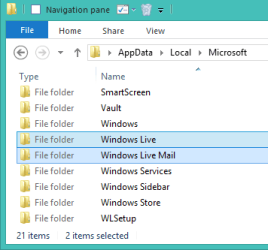
4) Navigate to %LOCALAPPDATA%\Microsoft
- you can put he above string in the address field of Explorer

WLM folders.png

5) rename two WLM folders
Windows Live to x-Windows Live
Windows Live Mail to x-Windows Live Mail

6) Copy the same two folders (Windows Live & Windows Live Mail) from your backup to the same location
%LOCALAPPDATA%\Microsoft\

7) Launch WLM
-everything should be ready to use.

Note: Make sure the one you grab has a sub-folder named Contacts in it
for example: %LOCALAPPDATA%\Microsoft\Windows Live\Contacts

Due to health issues, I won't be able to follow up, but John (ICIT2LOL) is a good resource.

Bill
.
 

My Computer My Computer

At a glance

x64 (6.3.9600) Win8.1 Pro & soon dual boot x6...AMD A6-3420M APU with Radeon(tm) HD Graphics6.00 GBAMD Radeon(TM) HD 6520G
Computer type
Laptop
Computer Manufacturer/Model Number
HP Pavilion dv6-6c10us
OS
x64 (6.3.9600) Win8.1 Pro & soon dual boot x64 (6.1.7601) Win7_SP1 HomePrem
CPU
AMD A6-3420M APU with Radeon(tm) HD Graphics
Motherboard
Hewlett-Packard 1805
Memory
6.00 GB
Graphics Card(s)
AMD Radeon(TM) HD 6520G
Sound Card
(1) AMD High Definition Audio Device (2) IDT High Definiti
Monitor(s) Displays
HP W2072a 20" LCD (1600 x 900) @ 60 Hz
Screen Resolution
1366 x 768 x 32 bits (4294967296 colors) @ 60 Hz
Hard Drives
ST640LM0 00 HM641JI SATA Disk Device
Keyboard
Logitech k520 wireless KB
Mouse
Logitech m320 wireless mouse (bundled with KB)
Internet Speed
15/5 | 54 MB Wireless 'n'
Antivirus
Realtime: Defender or Avast | On-demand: Malwarebytes, ESET
Browser
IE 11 on Win8, IE 10 on win 7
Other Info
Media: [Gimp, Audacity, VLC] || Comm: [WEmail 2012, Skype] || Productivity: [OpenOffice,| Textpad] || Utils: [Sysinternals, cCleaner, Speccy, Defraggler]
Hello Bill I didn't know of that method but yes I can follow if nomsguy needs any further help.
 

My Computer My Computer

At a glance

Desk1 7 Home Prem / Desk2 10 Pro / Main lap A...Desk1 i5 3750K / Laptop i7 GTX 860M / Desk2 i...Desk1 8GB (1866) / Desk2 16GB (1333) / Laptop...Desk 1& 2NVidia GTX 650 & Laptops on board Intel
Computer type
PC/Desktop
Computer Manufacturer/Model Number
Own build (new) Desk1 / Asus ROG Win 7 / Desk2 1st build
OS
Desk1 7 Home Prem / Desk2 10 Pro / Main lap Asus ROG 10 Pro 2 laptop Toshiba 7 Pro Asus P2520 7 & 10
CPU
Desk1 i5 3750K / Laptop i7 GTX 860M / Desk2 i5 2500
Motherboard
Desk1 Asus P877-V / Desk2 Gigabyte H67 UD3H / Laptop ?
Memory
Desk1 8GB (1866) / Desk2 16GB (1333) / Laptop 8Gb DDR3
Graphics Card(s)
Desk 1& 2NVidia GTX 650 & Laptops on board Intel
Sound Card
Desk 1 & 2 -XONAR DG Realtek High Def audio Laptop
Monitor(s) Displays
Desk 1 Benq HD 2450 / Desk2 Philips 24" / Laptop 17.5"
Screen Resolution
1920x1080 D1 & D2 & Laptop 1
Hard Drives
Desk1 Samsung 120GB 830 SSD
Asus ROG 256GB 850 Pro SSD
Desk2 Samsung 840 256 SSD
Toshiba 120GB EVO
PSU
Desk 1 Corsair HX 1050/ Laptop ? / Desk 2 Corsair HX 650
Case
Desk 1 Cooler HAF XM ? Toshiba laptop / Desk2 Coolermaster
Cooling
Fans on all Desk1 -2 Desk2 - all Coolermasters 5 Laptop ?
Keyboard
Desk 1 MS Sidewinder X6 Desk 2 MS Sidewinder X 4
Mouse
Desk 1&2 - Gigabyte MS 900 gamer - laptop - Logitec wireless
Internet Speed
ADSL2+
Other Info
One other Desktop (tester) and spare Toshba laptop both with SSD's
Running Kaspersky 2016 ISS on all machines config'd identically
Logitec audio stereo systems on each machine (x3)
Canon MG5250MFC
Router/modem TP-Link running WPA2SK
Hello and welcome nonmsguy just so I have this right you want all of your WLM info put on another drive, fresh install or uninstall and reinstall or what?

Now I am just a simple minded person and the number of times I have done this for example on a clean install then install WLM from the Live listings - login with my Live/Microsoft account details and then when I add the accounts (my email addresses) to the application it automatically downloads a ton of stuff like my incoming messages, sent messages, contacts etc automatically. Being an avid user of this forum for example means I literally have hundreds of past in and out emails.

see my pic it might not be what you want but that is what I am getting the drift of.

Thanks, but the users of this system do not use the "live/cloud" components of WLM2012. All mail and contacts is local stored. The email accounts are all POP3/SMTP. They have no "live logins" so there is nothing stored elsewhere for contacts.

Originally when this was "cleansed" as few years ago, export/import was an option. This time the system has been so fubar'd that is not an option.

Thanks.


1) Download WLM: Windows Essentials - Microsoft Windows

2) Install Mail only (unless other essentials apps are used)

3) Launch WLM to initialize it's folder structure
- don't add any info when prompted for an account
- exit WLM
- This sets up the necessary folders

4) Navigate to %LOCALAPPDATA%\Microsoft
- you can put he above string in the address field of Explorer

View attachment 385342

5) rename two WLM folders
Windows Live to x-Windows Live
Windows Live Mail to x-Windows Live Mail

6) Copy the same two folders (Windows Live & Windows Live Mail) from your backup to the same location
%LOCALAPPDATA%\Microsoft\

7) Launch WLM
-everything should be ready to use.

Note: Make sure the one you grab has a sub-folder named Contacts in it
for example: %LOCALAPPDATA%\Microsoft\Windows Live\Contacts

This appears to be the solution I need, Thanks. I will try this when I get to the system. I have WLM aka Windows Essentials installed, never been run. I am trying to build a "golden image" that I can put some place and then just reimage this back as needed.

Thanks.
 

My Computer My Computer

At a glance

Windows 7 Ultimate x64AMD Athlon II X2 25512GBIntegrated graphics using ATI Radeon 4200
Computer type
PC/Desktop
Computer Manufacturer/Model Number
HP p6633w
OS
Windows 7 Ultimate x64
CPU
AMD Athlon II X2 255
Motherboard
N-Alvorix-RS880-uATX (Alvorix)
Memory
12GB
Graphics Card(s)
Integrated graphics using ATI Radeon 4200
Antivirus
AVG
Browser
FF 44
2) Install Mail only (unless other essentials apps are used)

This process worked perfectly, except for POP3/SMTP passwords :( Hopefully they know and/or can find them.

So this is solved.

THANK YOU! :)
 

My Computer My Computer

At a glance

Windows 7 Ultimate x64AMD Athlon II X2 25512GBIntegrated graphics using ATI Radeon 4200
Computer type
PC/Desktop
Computer Manufacturer/Model Number
HP p6633w
OS
Windows 7 Ultimate x64
CPU
AMD Athlon II X2 255
Motherboard
N-Alvorix-RS880-uATX (Alvorix)
Memory
12GB
Graphics Card(s)
Integrated graphics using ATI Radeon 4200
Antivirus
AVG
Browser
FF 44
Back
Top