Simplifying updates for Windows 7 and 8.1

It's clear now, thanks. I wonder if the roll up includes all these framework updates or not?
 

My Computer My Computer

Computer type
Laptop
Computer Manufacturer/Model Number
Toshiba
OS
Windows 7 Home Premium 64
CPU
Intel T6400 Core 2 Duo
Memory
4GB
Graphics Card(s)
Intel 4500MHD
Yes it does... well all but a few anyway.
 

My Computer My Computer

Computer type
Laptop
Computer Manufacturer/Model Number
MSI PE60 6QE
OS
Win 10 Pro x64, Win 7 Pro x64
CPU
Intel Core i7-6700HQ Skylake
Motherboard
MSI MS-16J5
Memory
16gb Crucial DDR4
Graphics Card(s)
NVIDIA GeForce GTX 960M 2 GB
Screen Resolution
1920 x 1080
Hard Drives
Samsung 850 EVO 250 GB M.2 SSD (MZ-N5E250BW)
HGST 1TB @7200 RPM HTS721010A9E630
Case
Plastic
Keyboard
Got one...
Mouse
Yep, one of those too.
Internet Speed
FIOS 75/75
Antivirus
Defender
Browser
Chrome/FFox/Ex-PLODE-r/(L)Edge
Other Info
Defender, Custom Hosts, uBlock, regular backups w/ Macrium (Free)
If you want to call a cpu or ram getting devoured as watching a pot boil than yes.
Especially when it is obviously hung up with no network or disk activity.
This usually renders dual core machines useless.
I was referring to users that manually start the search process and periodically check the status of the search.

I've watched Resource Monitor and Process Monitor during the high CPU and high RAM WU issue... and you are right, there is almost no hard drive activity. There is some. Not enough to light up the hard drive light, but some. The same is true for network activity. Wireshark shows very little activity for hours... not enough to show in Task Manager. I was hoping to see the WU process try different MS servers, but I could not make much sense out of the traffic that was flowing.

Default activity is for windows to call home shortly after startup and the trait is nobody is home causing people to switch to Never check for updates.

But yea not many people would notice unless a machine is really slowed
When it's messed up 50% for dual core and 25% on a quad core "if lucky" it could be 100% usage where someone would really notice a slow down.

Most browsers like Chrome/ Firefox/ PaleMoon soak up the rest of the resources pretty darn fast with only 2-3-4-5... tabs open and the rest is soaked up by svchost :D
 

My Computer My Computer

Computer type
PC/Desktop
Computer Manufacturer/Model Number
Custom assembled by me :}
OS
Win-7-Pro64bit 7-H-Prem-64bit
CPU
i7-5930K 2nd i9-9940x both water blocked VRM's too
Motherboard
ASUS SABERTOOTH X99 2nd ASUS x299 Apex
Memory
Trident-z 3200C14 2nd Trident-z 3600C16
Graphics Card(s)
EVGA 1080ti ftw3 2nd Titan Xp both water blocked
Sound Card
Built-in Realtek
Monitor(s) Displays
1-AOC G2460PG 24"G-Sync 144Hz/ 2nd 1-ASUS VG248QE 24" 144Hz
Screen Resolution
1920 x 1080 144Hz
Hard Drives
2-Samsung M.2 Evo & Evo Plus
2-Samsung 850 EVO 500GB SSD's/ 3-2.5 W.D. Black 1tb-&3-1tb/3-3.5 WD Black 1tb hdd's
PSU
EVGA SuperNOVA 1000-P2 2nd 1200-P2
Case
2-Corsair Obsidian Series 450D Black ATX Mid Tower
Cooling
Custom water loops
Keyboard
Logitech G710+/ 2nd Logitech G910
Mouse
2-RedDragon M901 Perdition 16400 dpi Gaming mouse = wired
Internet Speed
Comcast Ping 19ms 89.31mbps download speed 6.12mbps upload
Antivirus
Malwarebytes Pro/ Superantispyware Pro
Browser
FireFox & Pale moon
Other Info
2nd ASUS X299 Apex/Intel i9-9940x with Custom water loop/7H-Prem-x64/Corsair 450D case/Ram Trident-z 3600C16 4x8gb / Samsung970Evo plus 500gb SSD/Dual ssd EZ swap evo/PSU EVGA SuperNova 1200w-P2 80+Platinum/GPU Titan Xp /8-ML-140 on push-pull on 2-280GTX rads
Default activity is for windows to call home shortly after startup and the trait is nobody is home causing people to switch to Never check for updates.

But yea not many people would notice unless a machine is really slowed
When it's messed up 50% for dual core and 25% on a quad core "if lucky" it could be 100% usage where someone would really notice a slow down.

Most browsers like Chrome/ Firefox/ PaleMoon soak up the rest of the resources pretty darn fast with only 2-3-4-5... tabs open and the rest is soaked up by svchost :D
On my main PC, the CPU and Motherboard temperatures jump by ~10 degrees C.
It took a few hours to get this month's updates.
 

My Computer My Computer

Computer type
PC/Desktop
Computer Manufacturer/Model Number
n/a
OS
W7 Ultimate SP1, LM19.2 MATE, W10 Home 1703, W10 Pro 1703 VM, #All 64 bit
CPU
AMD Phenom II x6 1100T, 3.3 GHz
Motherboard
ASUS M4A88T-M/USB3 (AM3)
Memory
12GB DDR3 1333 G-Skill (4GB x 2), G-Skill (2GB x 2)
Graphics Card(s)
NVIDIA GeForce GTX 660
Sound Card
Realtek?
Monitor(s) Displays
Samsung S23B350
Screen Resolution
1920x1080
Hard Drives
WD Green 2TB (SATA), WD Green 3TB (SATA), WD Blue 4TB (SATA), WD Blue 6TB (SATA)
PSU
Cooler Master
Case
Antec GX300 Tower
Cooling
3x Antec TRICOOL 120mm Fans
Mouse
Wired Optical
Internet Speed
DSL
Antivirus
Avast
Browser
Pale Moon (64 bit)
Other Info
2018-12-27 Upgraded HDDs
2015-12-10 Upgraded case, graphics card, storage
2015-08-15 Upgraded motherboard & RAM
2015-07-15 Upgraded LM17.1 to LM17.2
If you want to call a cpu or ram getting devoured as watching a pot boil than yes.
Especially when it is obviously hung up with no network or disk activity.
This usually renders dual core machines useless.


Ding, ding, ding! The daily double winner!


This is EXACTLY what happened to me!

I will say that installing the latest Windows Update Client version seems to help.
 

My Computer My Computer

Computer Manufacturer/Model Number
hp pavilion 6680t
OS
win 7 home premium 64 bit
CPU
core i5 760
Motherboard
iona (from MSI)
Memory
6 gb
Graphics Card(s)
ati 5450
Sound Card
real tek 888
Followup to my question (post 110). It was not posted here, it was a private response.

The Disk Cleanup Wizard in W7 does not recognize the "SP2" (convenience rollup) with a separate plugin.
 

My Computer My Computer

Computer type
PC/Desktop
Computer Manufacturer/Model Number
Custom build
OS
W7Pro/64
I have Win 7 home 64 bit and have had nothing but problems with updates. I also just did clean install on another drive, got through some of the updates and then poof, couldn't get the last 100. Do I need to remove all my current updates to install this rolling update package?
 

My Computer My Computer

Computer type
PC/Desktop
Computer Manufacturer/Model Number
Custom
OS
Windows 7 64 bit
CPU
Intel G3258
Motherboard
Gigabyte
Memory
8 mb
Hard Drives
Seagate
Antivirus
Avast
Browser
Firefox
It is an msu, so probably will just install those you haven't already got. Try it and see.Likely to take quite a while.

You could use simplix instead
 

My Computers My Computers

System One System Two

  • Computer type
    PC/Desktop
    OS
    7 X64
    CPU
    i5 8400
    Motherboard
    gigabyte b365m ds3h
    Memory
    2x8gb 3200mhz
    Hard Drives
    various
    PSU
    pure power 11 400w cm
    Case
    Coolermaster
    Cooling
    cryorig m9i
  • Computer type
    PC/Desktop
    OS
    7x64
    CPU
    g5400
    Motherboard
    ga b365m ds3h
    Memory
    8gb ddr4 2400
    PSU
    xfx pro 450w
You could use simplix instead

I just completed my first Simplix integration and am about to test it in a VM, very impressive... integrated 224 packages in 1:05 and another 10-15 mins to Optimize .WIM.

Did you fix the error you described here? Was it what I described in my reply to you here or other?
Also see my reply to johnny20 here:

What am I missing?

If you install the convienience rollup (I would in your position) first install KB3020369 (Servicing Stack update, prerequisite for rollup) and recommend installing KB2670838 (Platform Update, also a prerequisite for IE11) IE11, latest Cum Sec Update for IE11, KB3138612 (Latest Update Client) KB3145739 (updates Win32k.sys) & KB3153199 (Latest Kernel-Mode Drivers) BEFORE installing KB3125574.

HTH :)

Using the above sequence, be it installing or integrating, has helped me avoid the Windows Update woes that have plagued so many. 6-7 minutes first run WU on a fresh install/fresh test VM and subsequent checks take approx 2-4 minutes :D

HTH.
 
Last edited:

My Computer My Computer

Computer type
Laptop
Computer Manufacturer/Model Number
MSI PE60 6QE
OS
Win 10 Pro x64, Win 7 Pro x64
CPU
Intel Core i7-6700HQ Skylake
Motherboard
MSI MS-16J5
Memory
16gb Crucial DDR4
Graphics Card(s)
NVIDIA GeForce GTX 960M 2 GB
Screen Resolution
1920 x 1080
Hard Drives
Samsung 850 EVO 250 GB M.2 SSD (MZ-N5E250BW)
HGST 1TB @7200 RPM HTS721010A9E630
Case
Plastic
Keyboard
Got one...
Mouse
Yep, one of those too.
Internet Speed
FIOS 75/75
Antivirus
Defender
Browser
Chrome/FFox/Ex-PLODE-r/(L)Edge
Other Info
Defender, Custom Hosts, uBlock, regular backups w/ Macrium (Free)
I just completed my first Simplix integration and am about to test it in a VM, very impressive... integrated 224 packages in 1:05 and another 10-15 mins to Optimize .WIM.

Very nice! Installed in VM flawlessy had to install just a few problem & non-integratable updates. It did not install the Windows 10 Telemetry & Upgrade updates as promised. Disk Cleanup resulted in slight problem by removing both KB3072630 & KB3139923... 3072630 was actually superseded by 3139923 but it removed both,as it turns out 3139923 actually issued a V-2 after the pack was created so alls well there. SFC /Scannow returned no integrity violations. Windows Update performed quickly & efficiently, no problem there.

All in all I was very impressed with Simplix and will begin using it regularly ;)

simplix-installed.PNG
 

My Computer My Computer

Computer type
Laptop
Computer Manufacturer/Model Number
MSI PE60 6QE
OS
Win 10 Pro x64, Win 7 Pro x64
CPU
Intel Core i7-6700HQ Skylake
Motherboard
MSI MS-16J5
Memory
16gb Crucial DDR4
Graphics Card(s)
NVIDIA GeForce GTX 960M 2 GB
Screen Resolution
1920 x 1080
Hard Drives
Samsung 850 EVO 250 GB M.2 SSD (MZ-N5E250BW)
HGST 1TB @7200 RPM HTS721010A9E630
Case
Plastic
Keyboard
Got one...
Mouse
Yep, one of those too.
Internet Speed
FIOS 75/75
Antivirus
Defender
Browser
Chrome/FFox/Ex-PLODE-r/(L)Edge
Other Info
Defender, Custom Hosts, uBlock, regular backups w/ Macrium (Free)
Thanks for the Simplix heads up, helped me catch up on 6 months of updates I hadn't been doing due to all the failed/reverting issues and the crapware upgrade updates.
 

My Computer My Computer

Computer type
PC/Desktop
Computer Manufacturer/Model Number
HP Pavillion Elite HPE-590t
OS
Win7 Home Premium x64
CPU
Intel Core i7 Extreme 990X @ 3.47GHz x6
Motherboard
PEGATRON CORPORATION 2A86
Memory
16GB DDR3
Graphics Card(s)
NVidia GeForce GTX460
Monitor(s) Displays
Samsung SyncMaster 2443ewx
Screen Resolution
1920x1200
Hard Drives
160 GB SSD @ 2 TB 7200 Internal
750 GB HP, 2 TB WD, 2 TB Samsung External & 3 TB G-Tech firewire external
Sorry I can't read this whole thread. Am hoping someone will answer these specific questions as I have limited net access.

First of all I want to tell people that when I THOUGHT Windows Update was hanging, it was not hanging at all. In fact it is working (for me, anyway) it is just SUPER SLOW. I would choose 30-40 mb worth of updates on my 2mbps connection and it would just sit there saying 0%. What I figured out today (after doing a bunch of FixIts and etc - who knows if any of them worked), is that Update IS working but it's so friggin slow it takes like 10 min to even Start, and then takes like 15 min to download 7mb worth of updates! Now I know 2mbps is a slow connection speed but Update is way slower than that! I mean it takes me like 30 min to download 7mb! So apparently WIndows servers are super but SUPER S - L - O - W !

Okay now 2 questions regarding this "convenience roll up" or whatever it's called:
First of all does the ROLL UP include the dreaded KB 3035583 which I am told will sneak Windows 10 in on you without your wanting it?

Secondly I downloaded the 476MB KB3125574 roll up but am I correct that just double clicking and installing it is not how this works? There are images and ISO's and stuff that I don't know about that has to be done in order to install this?

According to Windows Update service it seems at this point I only have 12 or so updates left to update now that my update is working (albeit super slow). Minus those I have hidden over the years...

So is it then easier for me just to keep - slowly - downloading/installing the updates rather than use this 476mb roll up file?
 

My Computer My Computer

OS
7 Home Premium 64bit
Internet Speed
2mbps (Yes, only TWO!!)
Antivirus
Emsisoft pay version
Browser
Firefox and sometimes chrome
Hello PDSNICKLES.

1) It doesn't contain KB3035583

2) Just double click to install. I would advise switching Windows Update to "Never check" before installing the update or it might hang. And you need to install the servicing stack update FIRST or the convenience rollup won't install. https://support.microsoft.com/en-us/kb/3020369

Hope that helps?
 

My Computer My Computer

Computer type
PC/Desktop
Computer Manufacturer/Model Number
Custom Build
OS
Win 7 Ultimate, Win 8.1 Pro, Linux Mint 19 Cinnamon (All 64-Bit)
CPU
Intel i5 4690K
Motherboard
Gigabyte Z97X-UD3H
Memory
Corsair Vengeance LP 32GB DDR3
Graphics Card(s)
MSI GTX 1060 GAMING X 6GB
Sound Card
Onboard
Hard Drives
Samsung 850 EVO 250GB SSD (x2)
Samsung 860 EVO 1TB SSD (x2)
Crucial MX300 525GB SSD
WD Blue 2TB 5400rpm Intellipark Disabled (x2)
PSU
Corsair HX750i
Case
Phanteks Enthoo Pro
Cooling
CM Hyper 212 EVO on CPU, Noctua Redux NF-P14S 1500rpm (x6)
Keyboard
Corsair K70 RGB LUX
Mouse
Corsair Sabre RGB
Antivirus
Avast Free, MalwareBytes, SAS & CryptoPrevent
Browser
Chrome
Other Info
StarTech PEXESAT322I 2 Port PCI-E SATA Card
ASUS PCE-AC56 Dual-band AC1300 Wireless Card
Akasa FC.Six Manual Fan Controller
And a Partridge in a Pear Tree!
Hello PDSNICKLES.

1) ...I would advise switching Windows Update to "Never check" before installing the update or it might hang...It doesn't contain KB3035583

2) ... And you need to install the servicing stack update FIRST or the convenience rollup won't install.

Hope that helps?

To expand upon Brds7t7's answer:

1)
KB3125574 does not include Win 10 Telemetry KB's 2952664, 3021917 & 3033583;
KB3125574 does include KB's Win 10 Telemetry KB's3068708, 3075249 & 3080149.

2)
I also recommend installing/ check if already installed : KB3020369 (Svc Stack update, prerequisite), KB2670838 (Platform Update, prereq for IE11) IE11, KB3154070 (IE11 Cum Sec Update)KB3138612 (Latest WU Client) KB3145739 & KB3153199 (Latest Kernel-Mode Drivers) BEFORE you install KB3125574.

HTH
 

My Computer My Computer

Computer type
Laptop
Computer Manufacturer/Model Number
MSI PE60 6QE
OS
Win 10 Pro x64, Win 7 Pro x64
CPU
Intel Core i7-6700HQ Skylake
Motherboard
MSI MS-16J5
Memory
16gb Crucial DDR4
Graphics Card(s)
NVIDIA GeForce GTX 960M 2 GB
Screen Resolution
1920 x 1080
Hard Drives
Samsung 850 EVO 250 GB M.2 SSD (MZ-N5E250BW)
HGST 1TB @7200 RPM HTS721010A9E630
Case
Plastic
Keyboard
Got one...
Mouse
Yep, one of those too.
Internet Speed
FIOS 75/75
Antivirus
Defender
Browser
Chrome/FFox/Ex-PLODE-r/(L)Edge
Other Info
Defender, Custom Hosts, uBlock, regular backups w/ Macrium (Free)
Hello PDSNICKLES.

1) ...I would advise switching Windows Update to "Never check" before installing the update or it might hang...It doesn't contain KB3035583

2) ... And you need to install the servicing stack update FIRST or the convenience rollup won't install.

Hope that helps?

To expand upon Brds7t7's answer:

1)
KB3125574 does not include Win 10 Telemetry KB's 2952664, 3021917 & 3033583;
KB3125574 does include KB's Win 10 Telemetry KB's3068708, 3075249 & 3080149.

2)
I also recommend installing/ check if already installed : KB3020369 (Svc Stack update, prerequisite), KB2670838 (Platform Update, prereq for IE11) IE11, KB3154070 (IE11 Cum Sec Update)KB3138612 (Latest WU Client) KB3145739 & KB3153199 (Latest Kernel-Mode Drivers) BEFORE you install KB3125574.

HTH

The fact that the rollup contains some telemetry updates is enough for me to reject it. Thank you for clarifying that.
 

My Computer My Computer

Computer type
PC/Desktop
Computer Manufacturer/Model Number
Custom Build
OS
Win 7 Ultimate 64 bit
CPU
Intel i7-3930K
Motherboard
ASUS P9X79 WS
Memory
Kingston HyperX Genesis 32GB Kit (8x4GB Modules) 1600MHz DDR
Graphics Card(s)
MSI R7850 Twin Frozr 2GD5/OC Radeon HD 7850 2GB 256-bit GDDR
Sound Card
Asus Xonar Essence STX
Monitor(s) Displays
3x Asus VG248QE 24", Vizio 32" TV
Screen Resolution
1920 x 1080, ?
Hard Drives
Samsung 128GB 840 Pro SSD (1),
Samsung 4TB 850 EVO SSDs (4)
Samsung 4TB 850 EVO SSDs (16) external backup drives used in 2.5" hot swap bays in the computer.
PSU
Corsair HX750w
Case
Antec Two Hundred v2 (modified)
Cooling
Cooler Master GeminII S524 120mm (fan replaced with a 140mm)
Keyboard
Logitech G510s
Mouse
Logitech M525 (two in use)
Internet Speed
=< 32Mbps down, 8Mbps up
Antivirus
AVAST!, MBAM, SAS, Spybot S&D (all but MBAM free) Glary Util
Browser
IE11
Other Info
LSI 9211-8i HBA card (8 SATA III ports), 2.5" & 3.5" Hot Swap Bays, HooToo HT-CR001 PCI-E to USB 3.0 Internal Hub + 6 Slot Card Reader, and LG Model CH12LS28 BD-ROM Optical Drive. Also, ScanSnap S1500 ADF duplexing scanner, Canon 9000F flat bed scanner, Corsair SP2500 2.1 speakers, Samsung CLP 415nw laser color printer, Cyberpower PP2200SW UPS
The fact that the rollup contains some telemetry updates is enough for me to reject it. Thank you for clarifying that.

The telemetry tasks they (3 KBs) do include can easily be disabled in Task Manager FWIW:)

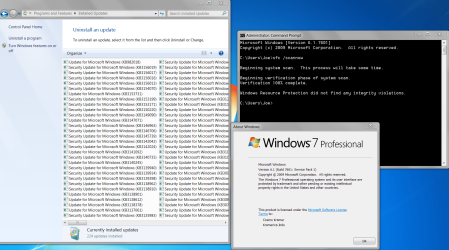
Installing Rollup & running subsequent Disk Cleanup/Windows Update Cleanup reduced # of installed updates listed from 227 pre-rollup to 67 post rollup and reclaimed about 2.5-3gb of disk space on my Win 7 Pro x64 (No Office) "Live System".
 

My Computer My Computer

Computer type
Laptop
Computer Manufacturer/Model Number
MSI PE60 6QE
OS
Win 10 Pro x64, Win 7 Pro x64
CPU
Intel Core i7-6700HQ Skylake
Motherboard
MSI MS-16J5
Memory
16gb Crucial DDR4
Graphics Card(s)
NVIDIA GeForce GTX 960M 2 GB
Screen Resolution
1920 x 1080
Hard Drives
Samsung 850 EVO 250 GB M.2 SSD (MZ-N5E250BW)
HGST 1TB @7200 RPM HTS721010A9E630
Case
Plastic
Keyboard
Got one...
Mouse
Yep, one of those too.
Internet Speed
FIOS 75/75
Antivirus
Defender
Browser
Chrome/FFox/Ex-PLODE-r/(L)Edge
Other Info
Defender, Custom Hosts, uBlock, regular backups w/ Macrium (Free)

My Computer My Computer

Computer type
PC/Desktop
Computer Manufacturer/Model Number
medionl/Aspire 6930G/acer x55a
OS
W7 home premium 32bit/W7HP 64bit/w10 tp insider ring
CPU
E5300 dual core
Motherboard
medion MS7366
Memory
3gb
Graphics Card(s)
Nvidia Geforce 7100 Nforce 630i
Monitor(s) Displays
avixc
Internet Speed
n (isp resticted to 72)
Antivirus
mse/pands
Browser
palemoon
Other Info
Belkin Fd7050 n USB using Railink RT2870 drivers, more upto date
Is there any reason to use this update if a person has a fully (current) updated system ?
To me it seems like it is for clean installs, or systems that are not up to date with Windows Updates.
 

My Computer My Computer

Computer type
PC/Desktop
Computer Manufacturer/Model Number
home built
OS
Multi-Boot W7_Pro_x64 W8.1_Pro_x64 W10_Pro_x64 +Linux_VMs +Chromium_VM
CPU
AMD Athlon II x4 620
Motherboard
Gigabyte GA-MA785G-UD3H
Memory
6GB GSkill DDR2 800
Graphics Card(s)
AMD 4670 GPU + AMD 4200 IGP
Sound Card
on board Realtek ALC889A
Monitor(s) Displays
RCA 40" LCD TV, Insignia 32" LCD TV, HP 15" LCD monitor
Screen Resolution
1680 x 1050
Hard Drives
OCZ Vertex 3 120GB,
Samsung F3 1TB (3),
Several others - WD, Seagate, Hitachi, ...
PSU
Corsair 500 W
Case
Rosewill mid tower
Cooling
CM 90mm rifle
Keyboard
Gyration wireless, Logitech wireless, Dell USB wired
Mouse
Gyration wireless, Logitech wireless, V7 USB wired
Internet Speed
Spectrum - 100Mbps D / 10Mbps U
Antivirus
Avast, MBAM3, EMET, WinPatrol
Browser
Pale Moon, Firefox, IE
Other Info
2 multi-boot PC's
Mainly HTPC/Office/Gen purpose (no gaming).
Trendnet USB KVM.
LG DVD burner/Blue Ray Player.
Tray system for removable SATA backup drives.

Not currently OCd, under-volted.
I use Hybrid sleep, rarely re-boot or shutdown.

Hauppauge HD-PVR, Avermedia PCIe TV Tuner, Hauppauge PCI TV Tuner.
Hello PDSNICKLES.

1) ...I would advise switching Windows Update to "Never check" before installing the update or it might hang...It doesn't contain KB3035583

2) ... And you need to install the servicing stack update FIRST or the convenience rollup won't install.

Hope that helps?

To expand upon Brds7t7's answer:

1)
KB3125574 does not include Win 10 Telemetry KB's 2952664, 3021917 & 3033583;
KB3125574 does include KB's Win 10 Telemetry KB's3068708, 3075249 & 3080149.

2)
I also recommend installing/ check if already installed : KB3020369 (Svc Stack update, prerequisite), KB2670838 (Platform Update, prereq for IE11) IE11, KB3154070 (IE11 Cum Sec Update)KB3138612 (Latest WU Client) KB3145739 & KB3153199 (Latest Kernel-Mode Drivers) BEFORE you install KB3125574.

HTH

The fact that the rollup contains some telemetry updates is enough for me to reject it. Thank you for clarifying that.

Lady, can those KB telemetry updates can be uninstalled via powershell? It would save a lot of people work when doing a clean install.
 

My Computer My Computer

Computer type
PC/Desktop
Computer Manufacturer/Model Number
Dell All in one Inspiron 2020
OS
W10 32 bit, XUbuntu 18.xx 64 bit
CPU
Intel(R) Celeron(R) CPU G1620T @ 2.40GHz, 2400 Mhz
Motherboard
Dell
Memory
4GB
Graphics Card(s)
Intel HD graphics
Sound Card
High Definition Audio Device
Monitor(s) Displays
20 inch Screen
Screen Resolution
W7=1280 x 720 & Linux Mint Xfce=1360 x 768
Hard Drives
500 GB hard drive
Keyboard
Usb
Mouse
Usb
Internet Speed
High-Speed
Antivirus
MSE
Browser
Main Browser Firefox
Other Info
I have done a clean install of Windows 7 using Dell re-installation disk (Dell sent me one). I also use Free Macrium reflect backup and restore.
To expand upon Brds7t7's answer:

1)
KB3125574 does not include Win 10 Telemetry KB's 2952664, 3021917 & 3033583;
KB3125574 does include KB's Win 10 Telemetry KB's3068708, 3075249 & 3080149.

2)
I also recommend installing/ check if already installed : KB3020369 (Svc Stack update, prerequisite), KB2670838 (Platform Update, prereq for IE11) IE11, KB3154070 (IE11 Cum Sec Update)KB3138612 (Latest WU Client) KB3145739 & KB3153199 (Latest Kernel-Mode Drivers) BEFORE you install KB3125574.

HTH

The fact that the rollup contains some telemetry updates is enough for me to reject it. Thank you for clarifying that.

Lady, can those KB telemetry updates can be uninstalled via powershell? It would save a lot of people work when doing a clean install.

Darned if I know! Heck, I don't even know what to look for to disable them in the task scheduler. :confused:
 

My Computer My Computer

Computer type
PC/Desktop
Computer Manufacturer/Model Number
Custom Build
OS
Win 7 Ultimate 64 bit
CPU
Intel i7-3930K
Motherboard
ASUS P9X79 WS
Memory
Kingston HyperX Genesis 32GB Kit (8x4GB Modules) 1600MHz DDR
Graphics Card(s)
MSI R7850 Twin Frozr 2GD5/OC Radeon HD 7850 2GB 256-bit GDDR
Sound Card
Asus Xonar Essence STX
Monitor(s) Displays
3x Asus VG248QE 24", Vizio 32" TV
Screen Resolution
1920 x 1080, ?
Hard Drives
Samsung 128GB 840 Pro SSD (1),
Samsung 4TB 850 EVO SSDs (4)
Samsung 4TB 850 EVO SSDs (16) external backup drives used in 2.5" hot swap bays in the computer.
PSU
Corsair HX750w
Case
Antec Two Hundred v2 (modified)
Cooling
Cooler Master GeminII S524 120mm (fan replaced with a 140mm)
Keyboard
Logitech G510s
Mouse
Logitech M525 (two in use)
Internet Speed
=< 32Mbps down, 8Mbps up
Antivirus
AVAST!, MBAM, SAS, Spybot S&D (all but MBAM free) Glary Util
Browser
IE11
Other Info
LSI 9211-8i HBA card (8 SATA III ports), 2.5" & 3.5" Hot Swap Bays, HooToo HT-CR001 PCI-E to USB 3.0 Internal Hub + 6 Slot Card Reader, and LG Model CH12LS28 BD-ROM Optical Drive. Also, ScanSnap S1500 ADF duplexing scanner, Canon 9000F flat bed scanner, Corsair SP2500 2.1 speakers, Samsung CLP 415nw laser color printer, Cyberpower PP2200SW UPS
Back
Top