Win 7 installation via (only) USB 3.0 ports

mane02

New member
Local time
5:30 AM
Messages
5
Hi Guys,

actually I'm struggeling with the installation of Win 7 Pro x64 on a MSI Cubi N, which has unfortunatly only USB 3.0 ports.

First I put the Win 7 setup from an iso image to a usb key of 4 GB space with the Microsoft usb and download tool. To work around the ubs 3.0 problem I added the usb 3.0 drivers (I got from the MSI homepage) to the boot.wim and install.wim with the help of "Win Toolkit" 1.5.4.4

Setup is starting and mouse and keyboard, plugged in via usb 3.0, are working as expected.

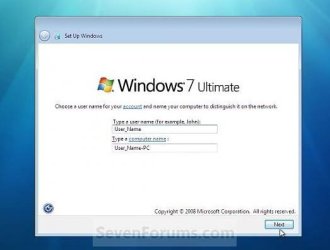
But after the installation comes my problem: When Win 7 is started the first time after the setup process (I mean, when it's first time started form the SSD and not the usb key, but somehow still within the setup process, if you want to say) I can see the mouse and keyboard are not active anymore, their little lights are off also and no more input can be made.

Hopefully you can explain to me, why are the drivers, I added, working within the setup process, but not in the (nearly) complete installation, allthough I added them to boot.wim AND install.wim???

Thanks alot,
Mane
 

My Computer My Computer

At a glance

Windows 7 Professional x64
Computer type
PC/Desktop
OS
Windows 7 Professional x64
Hi Guys,

actually I'm struggeling with the installation of Win 7 Pro x64 on a MSI Cubi N, which has unfortunatly only USB 3.0 ports.

First I put the Win 7 setup from an iso image to a usb key of 4 GB space with the Microsoft usb and download tool. To work around the ubs 3.0 problem I added the usb 3.0 drivers (I got from the MSI homepage) to the boot.wim and install.wim with the help of "Win Toolkit" 1.5.4.4

Setup is starting and mouse and keyboard, plugged in via usb 3.0, are working as expected.

But after the installation comes my problem: When Win 7 is started the first time after the setup process (I mean, when it's first time started form the SSD and not the usb key, but somehow still within the setup process, if you want to say) I can see the mouse and keyboard are not active anymore, their little lights are off also and no more input can be made.

Hopefully you can explain to me, why are the drivers, I added, working within the setup process, but not in the (nearly) complete installation, allthough I added them to boot.wim AND install.wim???

Thanks alot,
Mane

Hi Marie,you need to enable "xHCI Handoff" In your BIOS settings:

handoff.PNG

On my MSI PE60 it's under Advanced >> USB Configuration.
Source: Intel Communities.


Hope this helps. :)
 

My Computer My Computer

At a glance

Win 10 Pro x64, Win 7 Pro x64Intel Core i7-6700HQ Skylake16gb Crucial DDR4NVIDIA GeForce GTX 960M 2 GB
Computer type
Laptop
Computer Manufacturer/Model Number
MSI PE60 6QE
OS
Win 10 Pro x64, Win 7 Pro x64
CPU
Intel Core i7-6700HQ Skylake
Motherboard
MSI MS-16J5
Memory
16gb Crucial DDR4
Graphics Card(s)
NVIDIA GeForce GTX 960M 2 GB
Screen Resolution
1920 x 1080
Hard Drives
Samsung 850 EVO 250 GB M.2 SSD (MZ-N5E250BW)
HGST 1TB @7200 RPM HTS721010A9E630
Case
Plastic
Keyboard
Got one...
Mouse
Yep, one of those too.
Internet Speed
FIOS 75/75
Antivirus
Defender
Browser
Chrome/FFox/Ex-PLODE-r/(L)Edge
Other Info
Defender, Custom Hosts, uBlock, regular backups w/ Macrium (Free)
Are you getting to the window where you enter the user and computer name and your keyboard and mouse no longer work ?

If your mouse and keyboard are plugged into usb 3.0 ports, windows has not been able to install the 3.0 drivers for them yet so the ports aren`t gonna work for the keyboard and mouse yet.
 

Attachments

  • Capture.JPG
    Capture.JPG
    25.2 KB · Views: 53

My Computer My Computer

At a glance

Windows 10 Pro x64Intel Core i7 6700KGSkill TridentZ RGB 16GB 3600 16-16-16-36EVGA GTX 980 Ti SC x2
Computer type
PC/Desktop
Computer Manufacturer/Model Number
Skylake Special #666
OS
Windows 10 Pro x64
CPU
Intel Core i7 6700K
Motherboard
Asus Sabertooth Z170 Mark 1
Memory
GSkill TridentZ RGB 16GB 3600 16-16-16-36
Graphics Card(s)
EVGA GTX 980 Ti SC x2
Sound Card
Realtek High Definition
Monitor(s) Displays
AOC G2460PG
Screen Resolution
1920 x 1080 144Hz
Hard Drives
Samsung 860 Pro 256GB, Seagate Barracuda 4TB x2
PSU
EVGA 1000 P2, EVGA White Custom Braided Cables
Case
Corsair Vengeance C70 Gunmetal Black
Cooling
Corsair H100i v2, Corsair ML120 x2, Thermal Grizzly Kryonaut
Keyboard
Logitech G910 Orion Spectrum
Mouse
Logitech G700s
Internet Speed
Verizon Fios Quantum Gateway 75/75
Antivirus
Windows Defender, Malwarebytes Free 3.8.3
Browser
Chrome
Other Info
Corsair SP120 x4, LG Blu-ray Drive, Durabrand HT-395 100 Watt Dolby Digital Amp, Corsair H2100 Wireless 7.1 Headset
If your mouse and keyboard are plugged into usb 3.0 ports, windows has not been able to install the 3.0 drivers for them yet so the ports aren`t gonna work for the keyboard and mouse yet.

Yes, that's the point! So why, do you think, the drivers aren't loaded and do know a methode, to work around this problem?

Thanks!
Mane
 

My Computer My Computer

At a glance

Windows 7 Professional x64
Computer type
PC/Desktop
OS
Windows 7 Professional x64
Hope this helps. :)

Thanks for your answer. I will try, when I'm at home, but actually I can't imagine, that this will help. First of all, the BIOS, as far as I remember, has no option to en/disable the XHCI Hand-off explicitly and also the usb 3.0 is working at the beginning of the setup routine. So I think, it's more a driver problem. Or do you have another explanation or hint for me?

By the way, the Legacy USB Support is enabled in BIOS. Doesn't this may include the XHCI Hand-off?

Tanks!
Mane
 

My Computer My Computer

At a glance

Windows 7 Professional x64
Computer type
PC/Desktop
OS
Windows 7 Professional x64
Thanks for your answer. I will try, when I'm at home, but actually I can't imagine, that this will help. First of all, the BIOS, as far as I remember, has no option to en/disable the XHCI Hand-off explicitly and also the usb 3.0 is working at the beginning of the setup routine. So I think, it's more a driver problem. Or do you have another explanation or hint for me?

By the way, the Legacy USB Support is enabled in BIOS. Doesn't this may include the XHCI Hand-off?

Tanks!
Mane

Windows 7 doesn't natively support USB 3.0. However, the USB3 drivers integrated in boot.wim & install.wim enables USB 3.0 support. The BIOS "owns" the USB 3.0 (xHCI) controller when you first power on the PC (install from USB in this case). Eventually the OS loads (first reboot). The OS needs to obtain exclusive control of the USB 3.0 controller from the BIOS (xHCI handoff)... at least that's how I'm understanding it. When I first installed Win 7 on my laptop I ran into the same problem upon first reboot, after changing the BIOS setting it was smooth sailing.

As far as it being a "driver problem" I do know that I used the generic USB3 drivers from the Intel site and integrated them with DISM.exe.
 

My Computer My Computer

At a glance

Win 10 Pro x64, Win 7 Pro x64Intel Core i7-6700HQ Skylake16gb Crucial DDR4NVIDIA GeForce GTX 960M 2 GB
Computer type
Laptop
Computer Manufacturer/Model Number
MSI PE60 6QE
OS
Win 10 Pro x64, Win 7 Pro x64
CPU
Intel Core i7-6700HQ Skylake
Motherboard
MSI MS-16J5
Memory
16gb Crucial DDR4
Graphics Card(s)
NVIDIA GeForce GTX 960M 2 GB
Screen Resolution
1920 x 1080
Hard Drives
Samsung 850 EVO 250 GB M.2 SSD (MZ-N5E250BW)
HGST 1TB @7200 RPM HTS721010A9E630
Case
Plastic
Keyboard
Got one...
Mouse
Yep, one of those too.
Internet Speed
FIOS 75/75
Antivirus
Defender
Browser
Chrome/FFox/Ex-PLODE-r/(L)Edge
Other Info
Defender, Custom Hosts, uBlock, regular backups w/ Macrium (Free)
Windows 7 doesn't natively support USB 3.0. However, the USB3 drivers integrated in boot.wim & install.wim enables USB 3.0 support. The BIOS "owns" the USB 3.0 (xHCI) controller when you first power on the PC (install from USB in this case). Eventually the OS loads (first reboot). The OS needs to obtain exclusive control of the USB 3.0 controller from the BIOS (xHCI handoff).

Aah, I see, want you are meaning. I think, this looks reasoned to me. Thanks again! I'll try this, as soon as I'm at home, what unfortunately will be not until saturday.

May be you allow me an additional question. If it's nessecary for the OS the get the xHCI handed out by the BIOS, why should someone disable this hand off respecitvely why does Win 10 does not has need to this? The installation of Win 10 has worked without any problems ...

Thanks!
Mane
 

My Computer My Computer

At a glance

Windows 7 Professional x64
Computer type
PC/Desktop
OS
Windows 7 Professional x64
Aah, I see, want you are meaning. I think, this looks reasoned to me. Thanks again! I'll try this, as soon as I'm at home, what unfortunately will be not until saturday.

May be you allow me an additional question. If it's nessecary for the OS the get the xHCI handed out by the BIOS, why should someone disable this hand off respecitvely why does Win 10 does not has need to this? The installation of Win 10 has worked without any problems ...

Thanks!
Mane

It was disabled by default on my laptop probably because it came installed with Windows 10 which supports USB3 natively... an uneducated guess is I'm assuming that means the "handoff" is written into the OS's code...or something like that :p USB3 support became native as of Windows 8:
https://msdn.microsoft.com/en-us/li...067(v=vs.85).aspx?f=255&MSPPError=-2147217396
 

My Computer My Computer

At a glance

Win 10 Pro x64, Win 7 Pro x64Intel Core i7-6700HQ Skylake16gb Crucial DDR4NVIDIA GeForce GTX 960M 2 GB
Computer type
Laptop
Computer Manufacturer/Model Number
MSI PE60 6QE
OS
Win 10 Pro x64, Win 7 Pro x64
CPU
Intel Core i7-6700HQ Skylake
Motherboard
MSI MS-16J5
Memory
16gb Crucial DDR4
Graphics Card(s)
NVIDIA GeForce GTX 960M 2 GB
Screen Resolution
1920 x 1080
Hard Drives
Samsung 850 EVO 250 GB M.2 SSD (MZ-N5E250BW)
HGST 1TB @7200 RPM HTS721010A9E630
Case
Plastic
Keyboard
Got one...
Mouse
Yep, one of those too.
Internet Speed
FIOS 75/75
Antivirus
Defender
Browser
Chrome/FFox/Ex-PLODE-r/(L)Edge
Other Info
Defender, Custom Hosts, uBlock, regular backups w/ Macrium (Free)
If your mouse and keyboard are plugged into usb 3.0 ports, windows has not been able to install the 3.0 drivers for them yet so the ports aren`t gonna work for the keyboard and mouse yet.

Yes, that's the point! So why, do you think, the drivers aren't loaded and do know a methode, to work around this problem?

Thanks!
Mane

The 3.0 drivers you are talking about are the ones you integrated into the installer, that`s just so you can install with a usb stick into a 3.0 slot, you still have to install the 3.0 drivers in windows 7 after your install for 3.0 ports to work, this has always been the case with windows 7.

I can easily install windows 7 on my Z170 using a usb stick after setting it up with Asus`s EZ Installer, but the usb 3.0 ports still don`t work until I install the 3.0 drivers, fortunately I have the MB CD and of course the Sabertooth has 2.0 ports :)


Hope that clears it up for you.

The way around it is for the dumb#@@ motherboard manufacturers to keep putting usb 2.0 ports on them, if not then they should at least have a PS2 port on it.
 

My Computer My Computer

At a glance

Windows 10 Pro x64Intel Core i7 6700KGSkill TridentZ RGB 16GB 3600 16-16-16-36EVGA GTX 980 Ti SC x2
Computer type
PC/Desktop
Computer Manufacturer/Model Number
Skylake Special #666
OS
Windows 10 Pro x64
CPU
Intel Core i7 6700K
Motherboard
Asus Sabertooth Z170 Mark 1
Memory
GSkill TridentZ RGB 16GB 3600 16-16-16-36
Graphics Card(s)
EVGA GTX 980 Ti SC x2
Sound Card
Realtek High Definition
Monitor(s) Displays
AOC G2460PG
Screen Resolution
1920 x 1080 144Hz
Hard Drives
Samsung 860 Pro 256GB, Seagate Barracuda 4TB x2
PSU
EVGA 1000 P2, EVGA White Custom Braided Cables
Case
Corsair Vengeance C70 Gunmetal Black
Cooling
Corsair H100i v2, Corsair ML120 x2, Thermal Grizzly Kryonaut
Keyboard
Logitech G910 Orion Spectrum
Mouse
Logitech G700s
Internet Speed
Verizon Fios Quantum Gateway 75/75
Antivirus
Windows Defender, Malwarebytes Free 3.8.3
Browser
Chrome
Other Info
Corsair SP120 x4, LG Blu-ray Drive, Durabrand HT-395 100 Watt Dolby Digital Amp, Corsair H2100 Wireless 7.1 Headset
Hi Guys,

thanks a lot for your help! Unfortunatly I'm still not able, to get the USB working after installation of Win 7. So I gave up and installed Win 10, which is working fine. I've wasted enough time with this ... :(

At last I also tried to use the MSI Smart Tool, to include the USB 3.0 drivers into my stick, but this always throws an insignificant error msg... :confused:

Mane
 

My Computer My Computer

At a glance

Windows 7 Professional x64
Computer type
PC/Desktop
OS
Windows 7 Professional x64
Yep Windows 8 and 10 have the 3.0 drivers built into the installer, so no issues.

10 is fine once you customize it and find your way around, it`s just another OS :)

It`s a shame because Windows 7 is, and will always be the best OS ever made by MS :)
 

My Computer My Computer

At a glance

Windows 10 Pro x64Intel Core i7 6700KGSkill TridentZ RGB 16GB 3600 16-16-16-36EVGA GTX 980 Ti SC x2
Computer type
PC/Desktop
Computer Manufacturer/Model Number
Skylake Special #666
OS
Windows 10 Pro x64
CPU
Intel Core i7 6700K
Motherboard
Asus Sabertooth Z170 Mark 1
Memory
GSkill TridentZ RGB 16GB 3600 16-16-16-36
Graphics Card(s)
EVGA GTX 980 Ti SC x2
Sound Card
Realtek High Definition
Monitor(s) Displays
AOC G2460PG
Screen Resolution
1920 x 1080 144Hz
Hard Drives
Samsung 860 Pro 256GB, Seagate Barracuda 4TB x2
PSU
EVGA 1000 P2, EVGA White Custom Braided Cables
Case
Corsair Vengeance C70 Gunmetal Black
Cooling
Corsair H100i v2, Corsair ML120 x2, Thermal Grizzly Kryonaut
Keyboard
Logitech G910 Orion Spectrum
Mouse
Logitech G700s
Internet Speed
Verizon Fios Quantum Gateway 75/75
Antivirus
Windows Defender, Malwarebytes Free 3.8.3
Browser
Chrome
Other Info
Corsair SP120 x4, LG Blu-ray Drive, Durabrand HT-395 100 Watt Dolby Digital Amp, Corsair H2100 Wireless 7.1 Headset

My Computers My Computers

  • At a glance

    Windows 7 HP 64i5 6600K - 800MHz to 4200MHz4+4G GSkill DDR4 3000IG - Intel 530
    Computer type
    PC/Desktop
    Computer Manufacturer/Model Number
    custom build
    OS
    Windows 7 HP 64
    CPU
    i5 6600K - 800MHz to 4200MHz
    Motherboard
    GA-Z170-HD3P
    Memory
    4+4G GSkill DDR4 3000
    Graphics Card(s)
    IG - Intel 530
    Monitor(s) Displays
    Samsung 226BW
    Screen Resolution
    1680x1050
    Hard Drives
    (1) -1 SM951 – 128GB M.2 AHCI PCIe SSD drive for Windows 7 and Lubuntu
    (2) -1 WD SATA 3 - 1T for Data
    (3) -1 WD SATA 3 - 1T for backup
    PSU
    Thermaltake 450W TR2 gold
    Keyboard
    Old and good Chicony mechanical keyboard
    Mouse
    Logitech mX performance - 9 buttons (had to disable some)
    Internet Speed
    500Mb/s
    Browser
    Firefox 64
    Other Info
    TinyWall firewall
  • At a glance

    Windows 7 Proi7-4500U 800MHz to 3.0GHz(4+4)G DDR3 1600IG intel 4400 + NVIDIA GeForce GT 745M
    Computer type
    Laptop
    System Manufacturer/Model Number
    Asus Q550LF
    OS
    Windows 7 Pro
    CPU
    i7-4500U 800MHz to 3.0GHz
    Motherboard
    Asus Q550LF
    Memory
    (4+4)G DDR3 1600
    Graphics Card(s)
    IG intel 4400 + NVIDIA GeForce GT 745M
    Sound Card
    Realtek
    Monitor(s) Displays
    LG Display LP156WF4-SPH1
    Screen Resolution
    1920 x 1080
    Hard Drives
    BX500 120G SSD for Windows and programs +
    1T HDD for data
    Internet Speed
    500 Mb/s
    Browser
    Firefox
    Other Info
    TinyWall firewall
Back
Top