Hi Dragongirl92,
I do not know if you have solved your problem , but as a windows 7 and Toshiba Satellite user,using W7 Home premium 64 bit ,I will share what I know about factory reset .
Firstly backup any files and folders you can access to some sort of external drive USB/Disk etc.
You say you can access a folder named HDD recovery then you're in luck and you do not need to know your product key. Using your arrow keys scroll to this folder and hit your "Enter" button.This should initiate the HDD recovery folder, from hereon follow on screen instructions(you do realize this will erase all existing data on your Hard drive) .The process may take up to an hour or more.Note:Any bloatware you may have previously uninstalled will be re-installed by default.
When the process is fully finished and has gone through "First time setup"you will now have a clean desktop with only basic icons, you now need to find out whether or not your version of Windows 7 has service pack SP1.
To do this hit the "Windows" key+R buttons,this will open a "run command box".In the search box type "winver"and left click the OK button.This should open a dialogue box showing information about your version of Windows 7.If it says you have SP1 ignore next bit of info.
However before going any further you will need to connect your PC to the internet, click on router strength symbol in the tasktray , this will open available networks, select yours and click connect, a dialogue box should open requesting your router password/phrase,insert your password/phrase and your computer should connect.
Now supposing you do not have SP1 go to-https://support.microsoft.com/en-us/help/15090/windows-7-install-service-pack-1-sp1 and install same
Next go to "https://www.microsoft.com/en-gb/download/Internet-Explorer-11-for-Windows-7-details.aspx" and download appropriate version of IE11, again followed by installing same.
Now you need to update windows, firstly go "https://www.microsoft.com/en-us/download/details.aspx?id=49542" and download KB 3102810 again followed by installing.
Next go to "All programs"and open "Windows update"click on "check for updates".This process may take up to 24 hrs.If all goes well after update you will have a clean copy of Windows 7 Home Premium 32 or 64 bit as appropriate.
At this point you can re-instate any files or folders you saved previously.
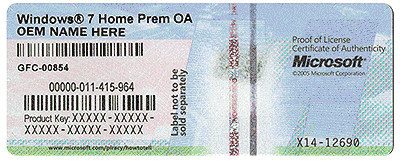
If you want to find your "product key" download and run "magical jellybean". This will find your product key and other info about windows .You can save this info where you like to keep it safe for future use.
Alternative way to update is to use "WSUS offline update".A tutorial for this can be found at
https://malwaretips.com/threads/tut...date-windows-using-wsus-offline-update.57320/.
Good Luck
Uniman