Startup Repair- windows cannot repair; Stuck in restart loop

dragongirl92

New member
Local time
11:46 PM
Messages
6
Hi,

I am unable to start up my laptop (Windows 7 Home Premium). TOSHIBA Satellite C660-1J6
It is stuck in a loop of 'attempting to repair this computer', which is unsuccessful and restarts.
There are no restore points to use.
I have received the BSOD which disappears quickly during startup.
I am able to start up in Safe Mode - however when I get to the login screen, the mouse and keyboard do not work.

I would highly appreciate any help or advice with this.
I am happy to reinstall windows as I have everything backed up. However I am unsure how to do so as I do not have a CD.

Kind regards
 

My Computer My Computer

At a glance

Windows 7 Home Premium
Computer type
PC/Desktop
OS
Windows 7 Home Premium
Firstly, a Windows 7 install disc is a dvd, not a cd.

You would have to find a working PC to download a Windows 7 Home Premium Service Pack 1 Iso File, either 32 or 64 bit, let`s assume you need 64 Bit.

After you have downloaded the iso file you have to burn it to a dvd at no faster then x4 speed. So the PC has to have a dvd burner and you`s need a blank dvd.

Everything you need is in the following links.

https://www.heidoc.net/joomla/techn...icrosoft-windows-and-office-iso-download-tool

Free ISO Burner

http://www.sevenforums.com/tutorials/1649-clean-install-windows-7-a.html

You can also use a usb stick to put the iso file on using Rufus. The usb stick must be at least 4 GB in size.

https://rufus.akeo.ie/

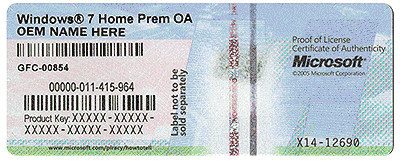
You must also have a readable key on your COA to activate windows after you install it.

You will also have to install at least your network/ethernet drivers to get online. Then get your other drivers, and run Windows Update, which will take a long time, sometimes 24 hours.

Have more questions, just ask :)
 

Attachments

  • COA-Certificate-of-Authenticity.gif
    COA-Certificate-of-Authenticity.gif
    707.8 KB · Views: 33

My Computer My Computer

At a glance

Windows 10 Pro x64Intel Core i7 6700KGSkill TridentZ RGB 16GB 3600 16-16-16-36EVGA GTX 980 Ti SC x2
Computer type
PC/Desktop
Computer Manufacturer/Model Number
Skylake Special #666
OS
Windows 10 Pro x64
CPU
Intel Core i7 6700K
Motherboard
Asus Sabertooth Z170 Mark 1
Memory
GSkill TridentZ RGB 16GB 3600 16-16-16-36
Graphics Card(s)
EVGA GTX 980 Ti SC x2
Sound Card
Realtek High Definition
Monitor(s) Displays
AOC G2460PG
Screen Resolution
1920 x 1080 144Hz
Hard Drives
Samsung 860 Pro 256GB, Seagate Barracuda 4TB x2
PSU
EVGA 1000 P2, EVGA White Custom Braided Cables
Case
Corsair Vengeance C70 Gunmetal Black
Cooling
Corsair H100i v2, Corsair ML120 x2, Thermal Grizzly Kryonaut
Keyboard
Logitech G910 Orion Spectrum
Mouse
Logitech G700s
Internet Speed
Verizon Fios Quantum Gateway 75/75
Antivirus
Windows Defender, Malwarebytes Free 3.8.3
Browser
Chrome
Other Info
Corsair SP120 x4, LG Blu-ray Drive, Durabrand HT-395 100 Watt Dolby Digital Amp, Corsair H2100 Wireless 7.1 Headset
Hi, thank you very much for your reply. I was indeed referring to the install disc, and incorrectly called it a CD. Apologies.

My remaining characters of theKey sticker on my laptop is somewhat faded. However, I can try identifying it. Is there another way of finding my Key number other than the sticker?

Thanks
 
Last edited:

My Computer My Computer

At a glance

Windows 7 Home Premium
Computer type
PC/Desktop
OS
Windows 7 Home Premium
My remaining characters of theKey sticker on my laptop is somewhat faded. However, I can try identifying it. Is there another way of finding my Key number other than the sticker?

Thanks
There are programs out there that do just that. Speccy is useful for other things as well.
 

My Computer My Computer

At a glance

7 x64 UltimateAMD Ryzen 516GB DDR4Radeon R7 360
Computer type
PC/Desktop
Computer Manufacturer/Model Number
Custom
OS
7 x64 Ultimate
CPU
AMD Ryzen 5
Motherboard
Gigabyte GA-AB350-Gaming
Memory
16GB DDR4
Graphics Card(s)
Radeon R7 360
Monitor(s) Displays
2 x Dell U2518D
Screen Resolution
2560x1440 2560x1440
Hard Drives
WD 500GB x2
Samsung SSD 128MB (OS)
XPG SX8200 Pro M.2 2280 1TB
PSU
Antec 500
Cooling
Hyper 212 EVO
Keyboard
Logitech cordless K800
Mouse
Logitech M510
Antivirus
Avira
Hi RogerR

Thank you for your response.

I cannot access Windows as it does not go beyond login page to use programs such as Speccy.

Regards
 

My Computer My Computer

At a glance

Windows 7 Home Premium
Computer type
PC/Desktop
OS
Windows 7 Home Premium

My Computer My Computer

At a glance

Multi-Boot W7_Pro_x64 W8.1_Pro_x64 W10_Pro_x6...AMD Athlon II x4 6206GB GSkill DDR2 800AMD 4670 GPU + AMD 4200 IGP
Computer type
PC/Desktop
Computer Manufacturer/Model Number
home built
OS
Multi-Boot W7_Pro_x64 W8.1_Pro_x64 W10_Pro_x64 +Linux_VMs +Chromium_VM
CPU
AMD Athlon II x4 620
Motherboard
Gigabyte GA-MA785G-UD3H
Memory
6GB GSkill DDR2 800
Graphics Card(s)
AMD 4670 GPU + AMD 4200 IGP
Sound Card
on board Realtek ALC889A
Monitor(s) Displays
RCA 40" LCD TV, Insignia 32" LCD TV, HP 15" LCD monitor
Screen Resolution
1680 x 1050
Hard Drives
OCZ Vertex 3 120GB,
Samsung F3 1TB (3),
Several others - WD, Seagate, Hitachi, ...
PSU
Corsair 500 W
Case
Rosewill mid tower
Cooling
CM 90mm rifle
Keyboard
Gyration wireless, Logitech wireless, Dell USB wired
Mouse
Gyration wireless, Logitech wireless, V7 USB wired
Internet Speed
Spectrum - 100Mbps D / 10Mbps U
Antivirus
Avast, MBAM3, EMET, WinPatrol
Browser
Pale Moon, Firefox, IE
Other Info
2 multi-boot PC's
Mainly HTPC/Office/Gen purpose (no gaming).
Trendnet USB KVM.
LG DVD burner/Blue Ray Player.
Tray system for removable SATA backup drives.

Not currently OCd, under-volted.
I use Hybrid sleep, rarely re-boot or shutdown.

Hauppauge HD-PVR, Avermedia PCIe TV Tuner, Hauppauge PCI TV Tuner.
Hi DavidE,

Thank you for your response! I will check out the link.

It is worth mentioning
- I am able to start up in Safe Mode, However when I get to logon screen the keyboard and mouse do not work. (built in, not wireless or usb)
- When I select System Image Recovery on System Recovery Options, and 'search for a driver' I am able to see my files and folders are present and there is a folder called HDD Recovery - I wonder if it is possible to take advantage of that?

I have copied the HDD Recovery folder into an external hard drive in case it would be useful?

Regards
 

My Computer My Computer

At a glance

Windows 7 Home Premium
Computer type
PC/Desktop
OS
Windows 7 Home Premium

My Computer My Computer

At a glance

W7 home premium 32bit/W7HP 64bit/w10 tp insid...E5300 dual core3gbNvidia Geforce 7100 Nforce 630i
Computer type
PC/Desktop
Computer Manufacturer/Model Number
medionl/Aspire 6930G/acer x55a
OS
W7 home premium 32bit/W7HP 64bit/w10 tp insider ring
CPU
E5300 dual core
Motherboard
medion MS7366
Memory
3gb
Graphics Card(s)
Nvidia Geforce 7100 Nforce 630i
Monitor(s) Displays
avixc
Internet Speed
n (isp resticted to 72)
Antivirus
mse/pands
Browser
palemoon
Other Info
Belkin Fd7050 n USB using Railink RT2870 drivers, more upto date
- When I select System Image Recovery on System Recovery Options, and 'search for a driver' I am able to see my files and folders are present and there is a folder called HDD Recovery - I wonder if it is possible to take advantage of that?

I downloaded the manual for the TOSHIBA Satellite C660-1J6 and i couldn't find any info on doing a factory recovery :(
Perhaps someone else with Toshiba experience can be more helpful.

It looks like @torchwood just found info in the Toshiba forum :D
 

My Computer My Computer

At a glance

Multi-Boot W7_Pro_x64 W8.1_Pro_x64 W10_Pro_x6...AMD Athlon II x4 6206GB GSkill DDR2 800AMD 4670 GPU + AMD 4200 IGP
Computer type
PC/Desktop
Computer Manufacturer/Model Number
home built
OS
Multi-Boot W7_Pro_x64 W8.1_Pro_x64 W10_Pro_x64 +Linux_VMs +Chromium_VM
CPU
AMD Athlon II x4 620
Motherboard
Gigabyte GA-MA785G-UD3H
Memory
6GB GSkill DDR2 800
Graphics Card(s)
AMD 4670 GPU + AMD 4200 IGP
Sound Card
on board Realtek ALC889A
Monitor(s) Displays
RCA 40" LCD TV, Insignia 32" LCD TV, HP 15" LCD monitor
Screen Resolution
1680 x 1050
Hard Drives
OCZ Vertex 3 120GB,
Samsung F3 1TB (3),
Several others - WD, Seagate, Hitachi, ...
PSU
Corsair 500 W
Case
Rosewill mid tower
Cooling
CM 90mm rifle
Keyboard
Gyration wireless, Logitech wireless, Dell USB wired
Mouse
Gyration wireless, Logitech wireless, V7 USB wired
Internet Speed
Spectrum - 100Mbps D / 10Mbps U
Antivirus
Avast, MBAM3, EMET, WinPatrol
Browser
Pale Moon, Firefox, IE
Other Info
2 multi-boot PC's
Mainly HTPC/Office/Gen purpose (no gaming).
Trendnet USB KVM.
LG DVD burner/Blue Ray Player.
Tray system for removable SATA backup drives.

Not currently OCd, under-volted.
I use Hybrid sleep, rarely re-boot or shutdown.

Hauppauge HD-PVR, Avermedia PCIe TV Tuner, Hauppauge PCI TV Tuner.
Hi DavidE,

Thank you for your response! I will check out the link.

It is worth mentioning
- I am able to start up in Safe Mode, However when I get to logon screen the keyboard and mouse do not work. (built in, not wireless or usb)

Try using your Arrow Keys or Tab Key
 

My Computer My Computer

At a glance

Windows 7 Home Premium 32-Bit - Build 7600 SP1Intel Core i3-2120 3.30GhzKingston 4 GB DDR3 1333 mhzAMD Radeon HD6670
Computer type
PC/Desktop
Computer Manufacturer/Model Number
Custom Build
OS
Windows 7 Home Premium 32-Bit - Build 7600 SP1
CPU
Intel Core i3-2120 3.30Ghz
Motherboard
Asus P8Z68-V LX Intel Z68 Socket H2 ATX
Memory
Kingston 4 GB DDR3 1333 mhz
Graphics Card(s)
AMD Radeon HD6670
Sound Card
Sound Blaster Audigy SE 24-Bit
Monitor(s) Displays
Asus VE228
Screen Resolution
1440 X 900
Hard Drives
OCZ Vertex 3 120 GB Sata 3 SSD ==
Kingston SH103/S3 120 G Hyper X 120 GB SSD ==
Western Digital 500 GB Caviar Green 7200 RPM ==
PSU
Corsair CX600M == 600 Watt
Case
NZXT Apollo - Silver with Clear Side Panel
Cooling
Three 120 mm Fans
Keyboard
Microsoft Natural 4000
Mouse
Microsoft Custom Optical 3000
Internet Speed
AT&T Fiber Optic Wireless Network
Antivirus
Microsoft Security Essentials
Browser
Chrome
Other Info
120 mm Blue LED Fan -- Three Blue LED Lazer Light Sticks
I cant use the arrow or tab keys as the keyboard does not work .
 

My Computer My Computer

At a glance

Windows 7 Home Premium
Computer type
PC/Desktop
OS
Windows 7 Home Premium
The HeiDoc software has several options of Windows 7 Home Premium to select.
How do I check which version to select? :confused:
Kind regards
 

My Computer My Computer

At a glance

Windows 7 Home Premium
Computer type
PC/Desktop
OS
Windows 7 Home Premium

My Computer My Computer

At a glance

Multi-Boot W7_Pro_x64 W8.1_Pro_x64 W10_Pro_x6...AMD Athlon II x4 6206GB GSkill DDR2 800AMD 4670 GPU + AMD 4200 IGP
Computer type
PC/Desktop
Computer Manufacturer/Model Number
home built
OS
Multi-Boot W7_Pro_x64 W8.1_Pro_x64 W10_Pro_x64 +Linux_VMs +Chromium_VM
CPU
AMD Athlon II x4 620
Motherboard
Gigabyte GA-MA785G-UD3H
Memory
6GB GSkill DDR2 800
Graphics Card(s)
AMD 4670 GPU + AMD 4200 IGP
Sound Card
on board Realtek ALC889A
Monitor(s) Displays
RCA 40" LCD TV, Insignia 32" LCD TV, HP 15" LCD monitor
Screen Resolution
1680 x 1050
Hard Drives
OCZ Vertex 3 120GB,
Samsung F3 1TB (3),
Several others - WD, Seagate, Hitachi, ...
PSU
Corsair 500 W
Case
Rosewill mid tower
Cooling
CM 90mm rifle
Keyboard
Gyration wireless, Logitech wireless, Dell USB wired
Mouse
Gyration wireless, Logitech wireless, V7 USB wired
Internet Speed
Spectrum - 100Mbps D / 10Mbps U
Antivirus
Avast, MBAM3, EMET, WinPatrol
Browser
Pale Moon, Firefox, IE
Other Info
2 multi-boot PC's
Mainly HTPC/Office/Gen purpose (no gaming).
Trendnet USB KVM.
LG DVD burner/Blue Ray Player.
Tray system for removable SATA backup drives.

Not currently OCd, under-volted.
I use Hybrid sleep, rarely re-boot or shutdown.

Hauppauge HD-PVR, Avermedia PCIe TV Tuner, Hauppauge PCI TV Tuner.
Have not read all posts, so if I have missed something, sorry. I am in a bit of a rush, got to go out. Found this, hope it helps:
https://backupmedia.toshiba.eu/

You can order a backup disc for your laptop direct from Toshiba.

EDIT: Just got back to this from yesterday, seems that David E made a similar reply. How did it go, dragongirl92? Please tell us if you fixed it, helps others.
 
Last edited:

My Computer My Computer

At a glance

Windows 7/64 HPremium.AMD FX-6300.Corsair (2x4) GB DDR3 CMXGX3M2A1337CL9.NVidia/Gigabyte GT730 (2GB) GDDR5.
Computer type
PC/Desktop
Computer Manufacturer/Model Number
bertison
OS
Windows 7/64 HPremium.
CPU
AMD FX-6300.
Motherboard
Asus M5A78L-M LE/USB3.
Memory
Corsair (2x4) GB DDR3 CMXGX3M2A1337CL9.
Graphics Card(s)
NVidia/Gigabyte GT730 (2GB) GDDR5.
Sound Card
Onboard.
Monitor(s) Displays
Iiyama PLE2407HDS.
Screen Resolution
1920 x 1280
Hard Drives
Desktop: 1TB. WD10EZEX-00BN5A0.
Zyxel nsa310 NAS: 2TB Seagate Barracuda 7200.14.
Cache Drive: Sandisk SDSSDRC032G.
Laptop Lenovo B50/80 128 GB SSD.
PSU
Corsair 750M.
Case
Coolermaster N300.
Cooling
FRONT: (2X) 140mm. TOP: (1x) 120mm. REAR: (1x) 120mm.
Keyboard
Logitech K290
Mouse
Trust Optical Wired
Internet Speed
15 Mb Down, 0.55 Up.
Antivirus
Kaspersky Total Security 2017, Hitman Pro.
Browser
Firefox.
Other Info
NETWORK:
Sky "Q box" and router.
Desktop & NAS - 30 Metres Cat6 Ethernet wired, via TP-Link 4-port switch.
Lenovo B50/80 Laptop, 2x Wileyfox phones, Lenovo TAB3-8 tablet - all wireless.
Grandchildren, their parents and friends as bandwidth 'parasites' at various times!
Hi Dragongirl92,
I do not know if you have solved your problem , but as a windows 7 and Toshiba Satellite user,using W7 Home premium 64 bit ,I will share what I know about factory reset .
Firstly backup any files and folders you can access to some sort of external drive USB/Disk etc.
You say you can access a folder named HDD recovery then you're in luck and you do not need to know your product key. Using your arrow keys scroll to this folder and hit your "Enter" button.This should initiate the HDD recovery folder, from hereon follow on screen instructions(you do realize this will erase all existing data on your Hard drive) .The process may take up to an hour or more.Note:Any bloatware you may have previously uninstalled will be re-installed by default.
When the process is fully finished and has gone through "First time setup"you will now have a clean desktop with only basic icons, you now need to find out whether or not your version of Windows 7 has service pack SP1.
To do this hit the "Windows" key+R buttons,this will open a "run command box".In the search box type "winver"and left click the OK button.This should open a dialogue box showing information about your version of Windows 7.If it says you have SP1 ignore next bit of info.
However before going any further you will need to connect your PC to the internet, click on router strength symbol in the tasktray , this will open available networks, select yours and click connect, a dialogue box should open requesting your router password/phrase,insert your password/phrase and your computer should connect.
Now supposing you do not have SP1 go to-https://support.microsoft.com/en-us/help/15090/windows-7-install-service-pack-1-sp1 and install same
Next go to "https://www.microsoft.com/en-gb/download/Internet-Explorer-11-for-Windows-7-details.aspx" and download appropriate version of IE11, again followed by installing same.
Now you need to update windows, firstly go "https://www.microsoft.com/en-us/download/details.aspx?id=49542" and download KB 3102810 again followed by installing.
Next go to "All programs"and open "Windows update"click on "check for updates".This process may take up to 24 hrs.If all goes well after update you will have a clean copy of Windows 7 Home Premium 32 or 64 bit as appropriate.
At this point you can re-instate any files or folders you saved previously.
If you want to find your "product key" download and run "magical jellybean". This will find your product key and other info about windows .You can save this info where you like to keep it safe for future use.


Alternative way to update is to use "WSUS offline update".A tutorial for this can be found at https://malwaretips.com/threads/tut...date-windows-using-wsus-offline-update.57320/.
Good Luck
Uniman

 
Last edited:

My Computer My Computer

At a glance

Windows 7 Home Premium 64bit.AMD E-300 APU
Computer type
Laptop
Computer Manufacturer/Model Number
Toshiba C660D
OS
Windows 7 Home Premium 64bit.
CPU
AMD E-300 APU
Antivirus
Kaspersky Internet security
Browser
Chrome/IE 11
Back
Top