
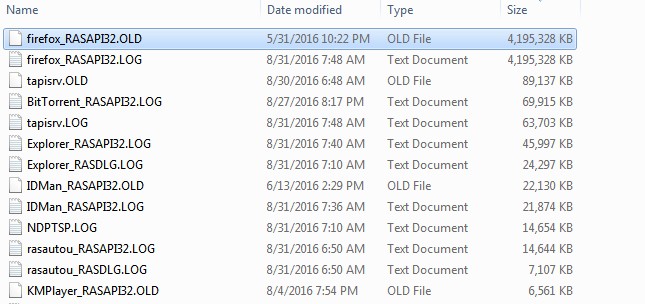
8Gig+ in tracing folder. Really getting annoying.

Sykat

New member
Local time
12:46 PM
Messages
3
My windows is getting old and haven't done a reinstall for a long time.. I did a mistake not giving enough space to C drive. My C drive is 35 GIG total. and windows folder is getting fatter everyday. I investigated it and found that, there is a folder called 'tracing' which is over 8 GIG and it seems there are some log files which are no use to me. can I delete those files? I really need to free up that space. I searched about it and didnt found anything useful.
Path: C:\Windows\tracing
screenshot:
q2avMOk.jpg
 

My Computer My Computer

Computer type
PC/Desktop
OS
Windows 7 Home premium 32 bit
bump!
 

My Computer My Computer

Computer type
PC/Desktop
OS
Windows 7 Home premium 32 bit
Hi and welcome to SevenForums,
It's a lot easier to clean install these days with the unofficial sp2
There are essentially 3 updates needed for a clean install of windows that will get you updated through April of 2016

KB3020369 & KB3172605 & KB3125574 all can be downloaded from the M$ catalog using internet explorer
Microsoft Update Catalog

https://blogs.technet.microsoft.com...17/simplifying-updates-for-windows-7-and-8-1/
When manually installing updates you need to switch your update settings to Never check for updates and restart the machine first.

After restart you will need to ensure the built in windows update service is stopped and set to manual first too or it will conflict with the stand alone installer.

Afterwards reset the windows updates service to what it was before and update settings to your preference and check for updates
Should be only 50 or so updates left to install.
 

My Computer My Computer

Computer type
PC/Desktop
Computer Manufacturer/Model Number
Custom assembled by me :}
OS
Win-7-Pro64bit 7-H-Prem-64bit
CPU
i7-5930K 2nd i9-9940x both water blocked VRM's too
Motherboard
ASUS SABERTOOTH X99 2nd ASUS x299 Apex
Memory
Trident-z 3200C14 2nd Trident-z 3600C16
Graphics Card(s)
EVGA 1080ti ftw3 2nd Titan Xp both water blocked
Sound Card
Built-in Realtek
Monitor(s) Displays
1-AOC G2460PG 24"G-Sync 144Hz/ 2nd 1-ASUS VG248QE 24" 144Hz
Screen Resolution
1920 x 1080 144Hz
Hard Drives
2-Samsung M.2 Evo & Evo Plus
2-Samsung 850 EVO 500GB SSD's/ 3-2.5 W.D. Black 1tb-&3-1tb/3-3.5 WD Black 1tb hdd's
PSU
EVGA SuperNOVA 1000-P2 2nd 1200-P2
Case
2-Corsair Obsidian Series 450D Black ATX Mid Tower
Cooling
Custom water loops
Keyboard
Logitech G710+/ 2nd Logitech G910
Mouse
2-RedDragon M901 Perdition 16400 dpi Gaming mouse = wired
Internet Speed
Comcast Ping 19ms 89.31mbps download speed 6.12mbps upload
Antivirus
Malwarebytes Pro/ Superantispyware Pro
Browser
FireFox & Pale moon
Other Info
2nd ASUS X299 Apex/Intel i9-9940x with Custom water loop/7H-Prem-x64/Corsair 450D case/Ram Trident-z 3600C16 4x8gb / Samsung970Evo plus 500gb SSD/Dual ssd EZ swap evo/PSU EVGA SuperNova 1200w-P2 80+Platinum/GPU Titan Xp /8-ML-140 on push-pull on 2-280GTX rads
Hi and welcome to SevenForums,
It's a lot easier to clean install these days with the unofficial sp2
There are essentially 3 updates needed for a clean install of windows that will get you updated through April of 2016

KB3020369 & KB3172605 & KB3125574 all can be downloaded from the M$ catalog using internet explorer
Microsoft Update Catalog

https://blogs.technet.microsoft.com...17/simplifying-updates-for-windows-7-and-8-1/
When manually installing updates you need to switch your update settings to Never check for updates and restart the machine first.

After restart you will need to ensure the built in windows update service is stopped and set to manual first too or it will conflict with the stand alone installer.

Afterwards reset the windows updates service to what it was before and update settings to your preference and check for updates
Should be only 50 or so updates left to install.
It does not actually answer my questions. All I have to know if those junk logs are important or not.
 

My Computer My Computer

Computer type
PC/Desktop
OS
Windows 7 Home premium 32 bit
Sykat. You should be able to delete those files as most of them are text files. The .OLD files are from previous version that you may have updated of changed in the past, so you should be able to delete them as well.

You say that deleting these will give you an extra 8GB of space, but you need to keep in mind that Windows needs at least 10% of free disc space to work properly. 35GB of disc space is just not big enough for Windows. You would well advised to look at getting a much bigger disc, such as a 250GB as an example & then do a fresh install of Windows. If you decide to update the drive, you should seriously consider a SSD.
 

My Computer My Computer

Computer type
PC/Desktop
Computer Manufacturer/Model Number
Self built using existing case
OS
Windows 7 Home Premium 64 bit sp1
CPU
Intel i5 3570 3.4Ghz Ivy Bridge SKT 1155 quad core
Motherboard
Gigabyte Z77-HD3 SKT 1155 2xSata 3, 4x USB 3.0
Memory
G-Skill Rip Jaws 16Gb (8x2) DDR3 -1600 PC3 12800 CL 10 red
Graphics Card(s)
Gigabyte NVIDIA GT610 1Gb DDR3 810/1200 PCI-E 2.0 Silent
Sound Card
NVIDIA High Definition & Realtech High Definition Audio
Monitor(s) Displays
2 x Philips 226V4L 16:9 aspect ratio
Screen Resolution
1920 x 1080 HD
Hard Drives
Samsung 840 Pro 256gb SSD, SATA 3.
Hitachi Touro Portable 1tb, USB 3.0 HDD used for image b/ups.
PSU
Corsair VS450
Case
Codeng
Cooling
PSU fan & CPU fan
Keyboard
Logitech
Mouse
Logitech Wireless trackball M570
Internet Speed
Wireless 3G. 3mg down & 550kb up.
Antivirus
Bitdefender Internet Security 2020
Browser
Opera (Current Version) & Firefox
Other Info
MS Office 2013 Pro. Davis weather station software. MGE Nova 600 avr UPS.
Sykat. How large is your had drive? You can download EaseUS Partition Master FREE and resize the C:\ partition. If the drive is large enough and you have enough free space. look into it!
 
Last edited:

My Computer My Computer

Computer type
PC/Desktop
Computer Manufacturer/Model Number
Custom Built By Me.
OS
Windows 10 Pro 64 bit
CPU
AMD FX 9590 8 Core Black Edition
Motherboard
MSI 990FXA GAMING (MS-7893)
Memory
Corsair Vengeance 16GB DDR3
Graphics Card(s)
AMD Radeon (TM) R9 380 Gaming Series
Sound Card
AMD High Definition
Monitor(s) Displays
Samsung 32" 60Hz 4ms Curved PLS LED
Screen Resolution
1920 X 1080
Hard Drives
C: 223 GB SSD = E: 465 GB HDD = F: 931 GB HDD = G: 149 GB HDD = H: 931 GB HDD
PSU
EVGA Supernova NEX750B 750W ATX EPS12V 80PLUS Bronze
Case
Cool Master
Cooling
Noctua NH-D15 Premium Cooler with 2x NF-A15 PWM 140mm Fan
Internet Speed
Fiber Optic: Download 332.7 Mbps / Upload 331.5 Mbps
Antivirus
Windows Defender
Browser
Slimjet (64bit)

My Computers My Computers

System One System Two

Back
Top