- Local time
- 5:07 AM
- Messages
- 60
Greetings Gents,
Well I'm back with a new issue. If you read my last post's that talked about cleaning up the BAG registry entries that's been going fine with no issues. Now my new issue may or may not be related to it but I need your advice about it.
Problem:
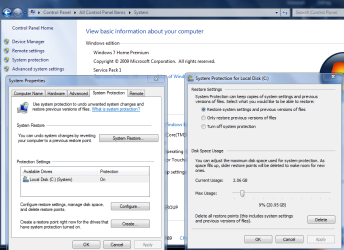
Last night I was checking Windows Event logs and notice an error "Event ID 16388 and 8193" and both were attributed to "Windows Failed to make a restore point" at a system checkpoint. So after I investigated the issue the protection for "Local Disk (C: ) (System)" was OFF. It was on and I never turned it off! So I turned it back ON and made a restore point "as all the others had been deleted" rebooted and checked to make sure it remained ON. (It Did)
I have however noticed a new listing that wasn't there before in the "Protecting Settings" which is a folder (C: ) (Missing) and it's protection is set to ON and I can't configure it's "Disk Space Usage" as it reads 0 bytes. Now I'm assuming this "(C: ) (Missing)" folder is actually the SSD's 100mb "System Reserved" as it used to be greyed out in Disk Management and now it's not.
So I ran SFC and found and repaired some corrupt system files (CBS Log files attached) but that folder still shows. I Rebooted and ran SFC again and it found no violations but that log file still shows Windows moving things around in the "WinSxS" which I assume is normal.
So my questions are:
1. What turned System Protection OFF?
2. How that folder "(C: ) (Missing)" got created and what to do about it?
3. Any issues in the CBS log files attached?
4. Could either "CCleaner Enhanced" (though I did not check mark any of the new settings yet and uninstalled as a precaution) or "Priv Shell Bag Analyzer/Cleaner" (Which I've run before with no issues) caused this as neither touch the "Restore Points" unless you tell it too and those settings are not Checkmarked?
**NOTE**
The system is running and booting fine so I have no issues in that regard and Event Viewer is showing no events for System restore (or anything else) in the last few reboots.
I'm attaching 2 log files to this post!
CBSLog1 <------- First log created which fix the access violations.
CBSLog2 <------- Found no Violations but still moving stuff in the WinSxS folder
Any Thoughts?
Well I'm back with a new issue. If you read my last post's that talked about cleaning up the BAG registry entries that's been going fine with no issues. Now my new issue may or may not be related to it but I need your advice about it.
Problem:
Last night I was checking Windows Event logs and notice an error "Event ID 16388 and 8193" and both were attributed to "Windows Failed to make a restore point" at a system checkpoint. So after I investigated the issue the protection for "Local Disk (C: ) (System)" was OFF. It was on and I never turned it off! So I turned it back ON and made a restore point "as all the others had been deleted" rebooted and checked to make sure it remained ON. (It Did)
I have however noticed a new listing that wasn't there before in the "Protecting Settings" which is a folder (C: ) (Missing) and it's protection is set to ON and I can't configure it's "Disk Space Usage" as it reads 0 bytes. Now I'm assuming this "(C: ) (Missing)" folder is actually the SSD's 100mb "System Reserved" as it used to be greyed out in Disk Management and now it's not.
So I ran SFC and found and repaired some corrupt system files (CBS Log files attached) but that folder still shows. I Rebooted and ran SFC again and it found no violations but that log file still shows Windows moving things around in the "WinSxS" which I assume is normal.
So my questions are:
1. What turned System Protection OFF?
2. How that folder "(C: ) (Missing)" got created and what to do about it?
3. Any issues in the CBS log files attached?
4. Could either "CCleaner Enhanced" (though I did not check mark any of the new settings yet and uninstalled as a precaution) or "Priv Shell Bag Analyzer/Cleaner" (Which I've run before with no issues) caused this as neither touch the "Restore Points" unless you tell it too and those settings are not Checkmarked?
**NOTE**
The system is running and booting fine so I have no issues in that regard and Event Viewer is showing no events for System restore (or anything else) in the last few reboots.
I'm attaching 2 log files to this post!
CBSLog1 <------- First log created which fix the access violations.
CBSLog2 <------- Found no Violations but still moving stuff in the WinSxS folder
Any Thoughts?
My Computer
At a glance
Windows 7 Pro 64bit SP1+UpdatesIntel I3 6100G.Skill Ripjaws V Series 16GB (2 x 8GB) DDR4 ...MSI GTX 960 GAMING 100ME 2GB
- Computer type
- PC/Desktop
- Computer Manufacturer/Model Number
- Custom Build
- OS
- Windows 7 Pro 64bit SP1+Updates
- CPU
- Intel I3 6100
- Motherboard
- MSI Z170a Gaming 3 Bios ver a.4
- Memory
- G.Skill Ripjaws V Series 16GB (2 x 8GB) DDR4 2133mhz
- Graphics Card(s)
- MSI GTX 960 GAMING 100ME 2GB
- Sound Card
- X-Fi xtremegamer fatal1ty pro series
- Monitor(s) Displays
- LG 32MP58HQ-P 32"
- Screen Resolution
- 1920X1080
- Hard Drives
- Samsung 850EVO SSD 250GB
4 WD HD
- PSU
- EVGA SuperNova 650 G2 650w
- Case
- Thermaltake Armor II Tower
- Cooling
- 6 Fan air cooled modded case
- Keyboard
- Logitech G15
- Mouse
- Logitech G5
- Internet Speed
- Cable 120MB/3MB
- Antivirus
- Avast Ver 12.1.2272
- Browser
- Chrome