SSD hard drive, deleted and quick formatted volumes

henrikkhach

New member
Local time
10:21 AM
Messages
28
Hi everyone

I had a SSD hard drive on my pc. It had 3 prtitions on it. I desides to create a one partioned drive, so i deleted partitions and at the end i quick formatted the whole disk. Unfortunately i had some important files on one of the volumes. I must mention that i didn't write anything on this hard drive after formatting.

Now i need to recover my lost files.

I tested "Recover My Files v.5" and "EaseUs Data recovery". Unfortunately they foun nothing at all.

Then i tested Partition Recovery Wizard in "AOMEI Partition Assistant" and again no results.

Have i destroyed all my files or still there is a recovery chance?

thanks in advance
 

My Computer My Computer

At a glance

win 7 64bit
Computer type
PC/Desktop
Computer Manufacturer/Model Number
asus
OS
win 7 64bit
Hard Drives
samsun evo840 evo850
Antivirus
norton
Browser
firefox

My Computers My Computers

  • At a glance

    Windows 7 HP 64i5 6600K - 800MHz to 4200MHz4+4G GSkill DDR4 3000IG - Intel 530
    Computer type
    PC/Desktop
    Computer Manufacturer/Model Number
    custom build
    OS
    Windows 7 HP 64
    CPU
    i5 6600K - 800MHz to 4200MHz
    Motherboard
    GA-Z170-HD3P
    Memory
    4+4G GSkill DDR4 3000
    Graphics Card(s)
    IG - Intel 530
    Monitor(s) Displays
    Samsung 226BW
    Screen Resolution
    1680x1050
    Hard Drives
    (1) -1 SM951 – 128GB M.2 AHCI PCIe SSD drive for Windows 7 and Lubuntu
    (2) -1 WD SATA 3 - 1T for Data
    (3) -1 WD SATA 3 - 1T for backup
    PSU
    Thermaltake 450W TR2 gold
    Keyboard
    Old and good Chicony mechanical keyboard
    Mouse
    Logitech mX performance - 9 buttons (had to disable some)
    Internet Speed
    500Mb/s
    Browser
    Firefox 64
    Other Info
    TinyWall firewall
  • At a glance

    Windows 7 Proi7-4500U 800MHz to 3.0GHz(4+4)G DDR3 1600IG intel 4400 + NVIDIA GeForce GT 745M
    Computer type
    Laptop
    System Manufacturer/Model Number
    Asus Q550LF
    OS
    Windows 7 Pro
    CPU
    i7-4500U 800MHz to 3.0GHz
    Motherboard
    Asus Q550LF
    Memory
    (4+4)G DDR3 1600
    Graphics Card(s)
    IG intel 4400 + NVIDIA GeForce GT 745M
    Sound Card
    Realtek
    Monitor(s) Displays
    LG Display LP156WF4-SPH1
    Screen Resolution
    1920 x 1080
    Hard Drives
    BX500 120G SSD for Windows and programs +
    1T HDD for data
    Internet Speed
    500 Mb/s
    Browser
    Firefox
    Other Info
    TinyWall firewall
Time in Armenia now is around 9 A.M. You haven't logged in after your first post 14 hours ago. Good. I just saw your post.

Despair not. If you have only deleted the partitions and quickformatted it, all your data should still be there. We shall try to get it.

Just post a screenshot of Windows Disk Management showing your SSD. I believe it is internally connected on your desktop.
Disk Management : http://www.sevenforums.com/tutorials/274797-disk-management-post-screen-capture-image.html

Upload to sevenforums http://www.sevenforums.com/tutorials/9733-screenshots-files-upload-post-seven-forums.html

Using snipping tool : How to Use the Snipping Tool in Vista

Also tell me the extent of each volume (partition) that was there on the SSD.
 

My Computer My Computer

At a glance

Windows 7 Home Premium 32 bit
OS
Windows 7 Home Premium 32 bit
Time in Armenia now is around 9 A.M. You haven't logged in after your first post 14 hours ago. Good. I just saw your post.

Despair not. If you have only deleted the partitions and quickformatted it, all your data should still be there. We shall try to get it.

Just post a screenshot of Windows Disk Management showing your SSD. I believe it is internally connected on your desktop.
http://www.sevenforums.com/tutorials/274797-disk-management-post-screen-capture-image.html

Upload to sevenforums http://www.sevenforums.com/tutorials/9733-screenshots-files-upload-post-seven-forums.html

Using snipping tool : How to Use the Snipping Tool in Vista

Also tell me the extent of each volume (partition) that was there on the SSD.


Hi,

Thanks for your reply

I'll do it soon
 

My Computer My Computer

At a glance

win 7 64bit
Computer type
PC/Desktop
Computer Manufacturer/Model Number
asus
OS
win 7 64bit
Hard Drives
samsun evo840 evo850
Antivirus
norton
Browser
firefox
Time in Armenia now is around 9 A.M. You haven't logged in after your first post 14 hours ago. Good. I just saw your post.

Despair not. If you have only deleted the partitions and quickformatted it, all your data should still be there. We shall try to get it.

Just post a screenshot of Windows Disk Management showing your SSD. I believe it is internally connected on your desktop.
Disk Management : http://www.sevenforums.com/tutorials/274797-disk-management-post-screen-capture-image.html

Upload to sevenforums http://www.sevenforums.com/tutorials/9733-screenshots-files-upload-post-seven-forums.html

Using snipping tool : How to Use the Snipping Tool in Vista

Also tell me the extent of each volume (partition) that was there on the SSD.

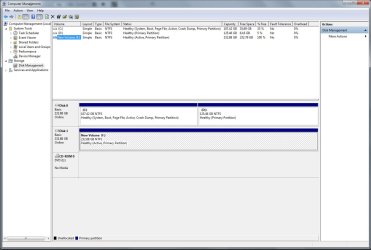
This is the comp. management screenshot. Drive F is the mentioned drive.

comp_mng_screen.jpg
 

My Computer My Computer

At a glance

win 7 64bit
Computer type
PC/Desktop
Computer Manufacturer/Model Number
asus
OS
win 7 64bit
Hard Drives
samsun evo840 evo850
Antivirus
norton
Browser
firefox
What was the extent of each partition in the 250GB SSD and what was the data in those partitions?

In which partition do you have the important data to be recovered, first,second or third?

Did you delete all the partitions one by one using Windows Disk Management?

Did you also quick format it with/in Windows Disk Management?

Did you make the new volume active deliberately?
 

My Computer My Computer

At a glance

Windows 7 Home Premium 32 bit
OS
Windows 7 Home Premium 32 bit
What was the extent of each partition in the 250GB SSD and what was the data in those partitions?

In which partition do you have the important data to be recovered, first,second or third?

Did you delete all the partitions one by one using Windows Disk Management?

Did you also quick format it with/in Windows Disk Management?

Did you make the new volume active deliberately?


What was the extent of each partition in the 250GB SSD and what was the data in those partitions?

I don't remember exactly, but the first was system reserved (i think 100 mb), the second was my os (i think 100 Gb), and the 3-rd was my main files (almost 125 Gb)


In which partition do you have the important data to be recovered, first,second or third?

The 3-rd one


Did you delete all the partitions one by one using Windows Disk Management?

Yes

Did you also quick format it with/in Windows Disk Management?

Yes after deleting all partitions I qick formatted whole drive.

Did you make the new volume active deliberately?

Yes, i thought maybe it could make a difference
 

My Computer My Computer

At a glance

win 7 64bit
Computer type
PC/Desktop
Computer Manufacturer/Model Number
asus
OS
win 7 64bit
Hard Drives
samsun evo840 evo850
Antivirus
norton
Browser
firefox
OK, fine. Don't worry.

I have still not decided whether to go with Partition Wizard or TestDisk to recover the partitions.My trial 750GB HDD is running the Partition Recovery Wizard. May take another 6 hours to complete after which I shall return and let you know. You may relax till then :) but download and install MiniTool Partition Wizard Free Edition 9.1 https://www.partitionwizard.com/download.html and be ready to run it, if I ask you to - not otherwise..
 

My Computer My Computer

At a glance

Windows 7 Home Premium 32 bit
OS
Windows 7 Home Premium 32 bit
OK, fine. Don't worry.

I have still not decided whether to go with Partition Wizard or TestDisk to recover the partitions.My trial 750GB HDD is running the Partition Recovery Wizard. May take another 6 hours to complete after which I shall return and let you know. You may relax till then :) but download and install MiniTool Partition Wizard Free Edition 9.1 https://www.partitionwizard.com/download.html and be ready to run it, if I ask you to - not otherwise..
Thanks for your kindness
Ok i'll wait.

But unfortunately earlier i have tested this software's partition recovery tool, but there were no results.

But i'll wait for your suggestions.

Thanks again
 

My Computer My Computer

At a glance

win 7 64bit
Computer type
PC/Desktop
Computer Manufacturer/Model Number
asus
OS
win 7 64bit
Hard Drives
samsun evo840 evo850
Antivirus
norton
Browser
firefox
I know you had used the Partition Recovery Wizard in AOMEI Partition Assistant. Most probably you only did a Quick Scan and not a Full Scan. ( Its just a guess)

Now get going. Let us see what MiniTool Partition Wizard Free Edition 9.1 does.
Launch PartitionWizard, on the left Pane click on Partition Recovery Wizard > Next > Select your 250GB SSD > Next > Full Disk > Next > Full scan > Next. Allow the fullscan to complete. You will get a window showing all the found partitions like the one below.

18-09-2016 17-13-55.jpg

Post a screenshot of that Window . Note: A full scan of 250GB may take 2 to 3+ hours.Wait till it completes.

I will be online and give further instructions after seeing the found partitions. Do not Cancel /close Partition Wizard. If you do, heavens may not fall , but you may have to run it again :)
 
Last edited:

My Computer My Computer

At a glance

Windows 7 Home Premium 32 bit
OS
Windows 7 Home Premium 32 bit
When you launch Partition Wizard, right click on the new volume of the 250GB SSD, and set it inactive. Click on the Apply button on the top menu bar to make the change.

Afterwards run Partition Recovery Wizard as indicated in my previous post.
 

My Computer My Computer

At a glance

Windows 7 Home Premium 32 bit
OS
Windows 7 Home Premium 32 bit
When you launch Partition Wizard, right click on the new volume of the 250GB SSD, and set it inactive. Click on the Apply button on the top menu bar to make the change.

Afterwards run Partition Recovery Wizard as indicated in my previous post.

Hi,

First of all, sorry for the delay. It's because of my work time.

I did exactly what you said.

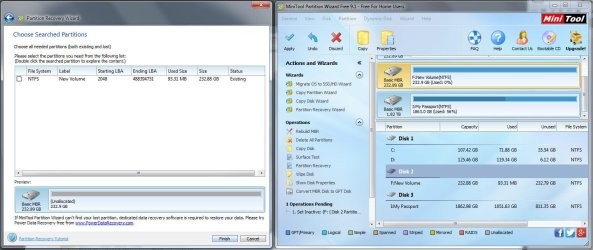
and the result:

comp_mng_screen_2.jpg
 

My Computer My Computer

At a glance

win 7 64bit
Computer type
PC/Desktop
Computer Manufacturer/Model Number
asus
OS
win 7 64bit
Hard Drives
samsun evo840 evo850
Antivirus
norton
Browser
firefox
Did you run a full scan ?

"Launch Partition Wizard, on the left Pane click on Partition Recovery Wizard > Next > Select your 250GB SSD > Next > Full Disk > Next > Full scan > Next. Allow the full scan to complete. "

How long did it take?

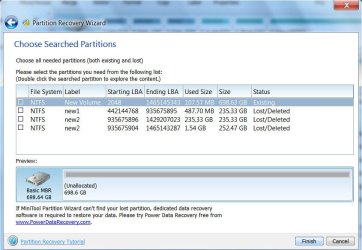
If what you had done is only a quick format the volume boot record of the second and third partition will still be intact and Partition Recovery Wizard will find it on a full scan as in the screenshot I posted in my post #10. I recovered both those partitions and could see all data.

( I deleted the three partitions in my trial 750GB HDD and did a quick format. Running Full scan found the second and third partitions as in the screenshot )

In your case I find no trace of the second and third partition.
 

My Computer My Computer

At a glance

Windows 7 Home Premium 32 bit
OS
Windows 7 Home Premium 32 bit
Did you run a full scan ?

"Launch Partition Wizard, on the left Pane click on Partition Recovery Wizard > Next > Select your 250GB SSD > Next > Full Disk > Next > Full scan > Next. Allow the full scan to complete. "

How long did it take?

If what you had done is only a quick format the volume boot record of the second and third partition will still be intact and Partition Recovery Wizard will find it on a full scan as in the screenshot I posted in my post #10. I recovered both those partitions and could see all data.

( I deleted the three partitions in my trial 750GB HDD and did a quick format. Running Full scan found the second and third partitions as in the screenshot )

In your case I find no trace of the second and third partition.


surprisingly it took almost 45 min.
I did all processes step by step as you said.

i don't understand what's happened and have no idea.
 

My Computer My Computer

At a glance

win 7 64bit
Computer type
PC/Desktop
Computer Manufacturer/Model Number
asus
OS
win 7 64bit
Hard Drives
samsun evo840 evo850
Antivirus
norton
Browser
firefox
OK, we now have to take recourse to other methods. But before that I have to confirm that the volume boot record of the second partition really does not exist. It involves some maths. So let me work it out and come back.
 

My Computer My Computer

At a glance

Windows 7 Home Premium 32 bit
OS
Windows 7 Home Premium 32 bit
OK, we now have to take recourse to other methods. But before that I have to confirm that the volume boot record of the second partition really does not exist. It involves some maths. So let me work it out and come back.

ok. thank you so much

I'll be waiting
 

My Computer My Computer

At a glance

win 7 64bit
Computer type
PC/Desktop
Computer Manufacturer/Model Number
asus
OS
win 7 64bit
Hard Drives
samsun evo840 evo850
Antivirus
norton
Browser
firefox
OK, here we go.

Run Partition Recovery Wizard again.

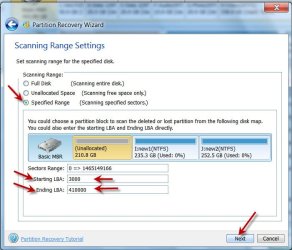
Click on Partition Recovery Wizard on the left pane > Next > select your 250GB SSD > Next > select Specified Range, Input staring LBA 3000. ending LBA 410000 ( four hundred and ten thousand) > Next > Full Scan > Next Take a screenshot of Found partitions Window. After taking the screenshot click on Cancel and close PW. post screenshot

19-09-2016 12-56-49.jpg

( We are searching 200MB beyond LBA 3000 to see whether at the end of the first 100MB system reserved partition, it finds the volume boot record of the second partition. If it does not find any, then I have to take that something beyond a quick format had happened wiping out the Volume Boot Record of the second and third partition, making Partition Recovery impossible. We have to resort to data recovery procedures.)
 

My Computer My Computer

At a glance

Windows 7 Home Premium 32 bit
OS
Windows 7 Home Premium 32 bit
OK, here we go.

Run Partition Recovery Wizard again.

Click on Partition Recovery Wizard on the left pane > Next > select your 250GB SSD > Next > select Specified Range, Input staring LBA 3000. ending LBA 410000 ( four hundred and ten thousand) > Next > Full Scan > Next Take a screenshot of Found partitions Window. After taking the screenshot click on Cancel and close PW. post screenshot

View attachment 391862

( We are searching 200MB beyond LBA 3000 to see whether at the end of the first 100MB system reserved partition, it finds the volume boot record of the second partition. If it does not find any, then I have to take that something beyond a quick format had happened wiping out the Volume Boot Record of the second and third partition, making Partition Recovery impossible. We have to resort to data recovery procedures.)

ok, I'm doing it.
i will send the screenshot as soon as it finished.
 

My Computer My Computer

At a glance

win 7 64bit
Computer type
PC/Desktop
Computer Manufacturer/Model Number
asus
OS
win 7 64bit
Hard Drives
samsun evo840 evo850
Antivirus
norton
Browser
firefox
OK, here we go.

Run Partition Recovery Wizard again.

Click on Partition Recovery Wizard on the left pane > Next > select your 250GB SSD > Next > select Specified Range, Input staring LBA 3000. ending LBA 410000 ( four hundred and ten thousand) > Next > Full Scan > Next Take a screenshot of Found partitions Window. After taking the screenshot click on Cancel and close PW. post screenshot

View attachment 391862

( We are searching 200MB beyond LBA 3000 to see whether at the end of the first 100MB system reserved partition, it finds the volume boot record of the second partition. If it does not find any, then I have to take that something beyond a quick format had happened wiping out the Volume Boot Record of the second and third partition, making Partition Recovery impossible. We have to resort to data recovery procedures.)

the result

comp_mng_screen_3.jpg
 

My Computer My Computer

At a glance

win 7 64bit
Computer type
PC/Desktop
Computer Manufacturer/Model Number
asus
OS
win 7 64bit
Hard Drives
samsun evo840 evo850
Antivirus
norton
Browser
firefox
There is something strange here. If you had specified LBA range 3000 to 410000 to scan, why is it showing the partition starting at 2048??????

Can you please repeat? This time post the screenshot of scan range settings where you had fixed the range ( the same window I had posted in post #17) and the resulting Found partitions Window after the range is scanned.

Note: I am now running TestDisk on my trial HDD and again it may take sometime to finish. So I will return again to this thread only after I had formulated the next strategy and tried it myself under simulated conditions.

After posting the above information, you may download TestDisk 7.0 ( Windows) ( and not the beta version 7.1) from TestDisk Download - CGSecurity extract it to your C: drive and keep it.
 

My Computer My Computer

At a glance

Windows 7 Home Premium 32 bit
OS
Windows 7 Home Premium 32 bit
Back
Top