LNK shortcuts do not cause a security prompt when double clicked on from the Favorites Bar folder... even after installing KB3185319.
They do, and always have.
The LNK files that I tested did not create the security prompt. Once the LNK shortcut is in the FAV folder, ICACLS shows the Mandatory Label (LOW) - no matter where the shortcut was created.
Create LNK on the desktop
ICACLS reports no label at all
Copy LNK to the FAV folder...
ICACLS reports "LOW"
Double click on the LNK while it is in the FAV folder...
...no security prompt.
The same is true if the LNK is cut from the desktop and pasted into the FAV folder.
Creating the LNK directly in the FAV folder changed nothing during my testing.
It took a while, but I think that I have figured out why we are not seeing the same thing. It depends on the what the LNK shortcut points to. Point the LNK to a TXT file and there should be no security warning. I was testing with real life LNK files that I keep in my FAV folder structure. Those LNK files point to AutoIt scripts that are not compiled (e.g. text files).
If the LNK file points to the EXE for Notepad, then you get a security prompt if the LNK is in the FAV folder.
A URL file is a text file in the INI file format:
Code:
[{000214A0-0000-0000-C000-000000000046}]
Prop3=19,11
[InternetShortcut]
URL=https://www.youtube-nocookie.com/v/
IDList=
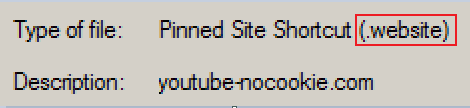
A WEBSITE file is a text file in the INI file format:
Code:
[{000214A0-0000-0000-C000-000000000046}]
Prop4=31,youtube-nocookie.com
Prop3=19,11
[{A7AF692E-098D-4C08-A225-D433CA835ED0}]
Prop5=3,0
Prop9=19,0
[InternetShortcut]
URL=https://www.youtube-nocookie.com/v/
IDList=
[{9F4C2855-9F79-4B39-A8D0-E1D42DE1D5F3}]
Prop5=8,Microsoft.Website.70569F39.3845F787
But these text files are dangerous?
And scripts aren't?
Much to my surprise, dragging a URL shortcut from Windows (file) Explorer and dropping it into a browser's window does not cause the security prompt.
I also have an explanation for this. And you might realise this isn’t so surprising.
Okay - I can see what you are saying about what Explorer does not know. I'm not disagreeing with you, but here are my observations:
Explorer does not know if the URL text file is going to be dropped...
...onto an empty spot on the desktop (e.g. move file) - no warning
...onto a browser's window (e.g. open file) - no warning
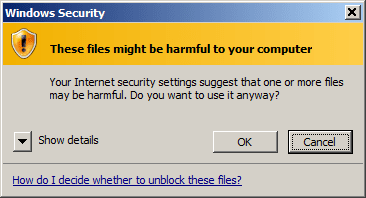
...onto a LNK file for a browser - you get a warning
IE and Pale Moon went to the website.
Chrome showed the text inside the URL/INI file.
...onto a LNK file for notepad - same warning as shown above - but you can right click on the URL file and use Send to > Notepad. It opens without a warning.
Double click on an LNK file that points to Notepad's EXE and you'll get a warning. Double click on an LNK file that points to a TXT file and you can open Notepad without a warning. Explorer is the app that starts the EXE associated with TXT files. It knows what the default verb is for TXT files. It knows that the file is going to be opening Notepad.
Open the properties for a URL file via right click - no warning.
Select/highlight the URL file and...
...select Explorer's Organize menu, then Properties - warning
...turn on Explorer's detail pane - warning
...turn off Explorer's detail pane - warning






 That's great news!

