SSD hard drive, deleted and quick formatted volumes

jumanji, is it possible that henri's SSD was using encryption involving a Windows user account's password -- EFS?
 

My Computer My Computer

At a glance

Windows 7 Professional 64-bitDesktop i5; Acers i5 & i7desktop 16GB; 1 Acer 8GB & 1 Acer 16GB
Computer type
PC/Desktop
Computer Manufacturer/Model Number
Antec desktop; Acer Aspire laptops
OS
Windows 7 Professional 64-bit
CPU
Desktop i5; Acers i5 & i7
Memory
desktop 16GB; 1 Acer 8GB & 1 Acer 16GB
Hard Drives
1TB split into 2 equal partitions [OS and data] usable by RJS
Internet Speed
AT&T DSL
Browser
FF, GChrome, msIE
Other Info
Windows 7 Firewall, Emsisoft AM/AV, MSE [scan-only], SpywareBlaster, Ruiware/BillP combine
Honestly ,Roland, I had no idea whatsoever about something called EFS :). On a casual read, I understand that it is not a full-disk encryption but a file level encryption to be implemented by enabling it in Advanced attributes for each file by the user..

In any case it is the OP who has to answer that question. Let us see his answer.

I would presume even if a file is encrypted by EFS, the Volume Boot Record (VBR), which is not a user-accessible file, could not be encrypted and it should be possible to recover the partitions from the VBRs and may be a data recovery program would still recover an encrypted file.
 

My Computer My Computer

At a glance

Windows 7 Home Premium 32 bit
OS
Windows 7 Home Premium 32 bit
Honestly ,Roland, I had no idea whatsoever about something called EFS :). On a casual read, I understand that it is not a full-disk encryption but a file level encryption to be implemented by enabling it in Advanced attributes for each file by the user...
?I was wondering if EFS was being used, then would the files created by end-user or written to by end-user be encrypted?
 

My Computer My Computer

At a glance

Windows 7 Professional 64-bitDesktop i5; Acers i5 & i7desktop 16GB; 1 Acer 8GB & 1 Acer 16GB
Computer type
PC/Desktop
Computer Manufacturer/Model Number
Antec desktop; Acer Aspire laptops
OS
Windows 7 Professional 64-bit
CPU
Desktop i5; Acers i5 & i7
Memory
desktop 16GB; 1 Acer 8GB & 1 Acer 16GB
Hard Drives
1TB split into 2 equal partitions [OS and data] usable by RJS
Internet Speed
AT&T DSL
Browser
FF, GChrome, msIE
Other Info
Windows 7 Firewall, Emsisoft AM/AV, MSE [scan-only], SpywareBlaster, Ruiware/BillP combine
As I understand, the file is not encrypted when written. It is only later, a user has to select the file he wants to encrypt , go into the Properties > Advanced and implement it.

27-09-2016 07-07-36.jpg

This user selected file encryption is not controlled by Windows but by the NTFS File System in the HDD/SDD. So it will continue to be encrypted and accessible only to that user and user linked Password. I am not going to break my head further on this aspect unless there is a need and a user reports he had employed EFS for some files.. In any case in such an instance and if the partition recovery is successful, the user can create an account with the original user name and password to access the encrypted files.
 

My Computer My Computer

At a glance

Windows 7 Home Premium 32 bit
OS
Windows 7 Home Premium 32 bit
jumanji - you're aok!! Always good to see you in these forums! :) Have a great week, see ya in the papers! :)
 

My Computer My Computer

At a glance

Windows 7 Professional 64-bitDesktop i5; Acers i5 & i7desktop 16GB; 1 Acer 8GB & 1 Acer 16GB
Computer type
PC/Desktop
Computer Manufacturer/Model Number
Antec desktop; Acer Aspire laptops
OS
Windows 7 Professional 64-bit
CPU
Desktop i5; Acers i5 & i7
Memory
desktop 16GB; 1 Acer 8GB & 1 Acer 16GB
Hard Drives
1TB split into 2 equal partitions [OS and data] usable by RJS
Internet Speed
AT&T DSL
Browser
FF, GChrome, msIE
Other Info
Windows 7 Firewall, Emsisoft AM/AV, MSE [scan-only], SpywareBlaster, Ruiware/BillP combine
Finally,I could find sometime only today to write my concluding post.

If you haven't yet formatted your SSD and it still remains in the last quickformatted condition, you can examine the drive with bootice. It is not going to recover any data but it will only facilitate viewng the sectors of your SSD to check whether the boot records of the second and third partition still exist at their start sector and whether the other sectors are populated with data.

If you have 64 bit Windows download v1.3.3.2 x64 from 【BOOTICE v1.3.3.2: 功能强大的启动维护工具】-å*é€¸è½©
Extract the RAR file into a folder named bootice64. ( You can create the folder anywhere in your system, even on a pendrive) You will get a single BOOTICEx64.exe file which you will run.

To familiarise with bootice: http://www.sevenforums.com/hardware-devices/310295-lost-partitions.html#post2584426

Note: While you can read the whole post, you are not going to save any sector. You are only going to examine the sectors.

Check what is there in Sector 0. (The screenshot below shows Sector 0 of my 750GB HDD. When you created a simple volume encompassing the whole drive a new 16byte partition table is written into sector 0 after wiping out the three 16byte partition tables there. That partition table defines the start point and end point of the partition.) The partition table is highlighted in green. You will see the current partition table in your SSD.

View attachment 392122

(The following 48bytes field can accommodate three more 16byte partition tables. So one can have only a total of four partitions in an MBR drive.)

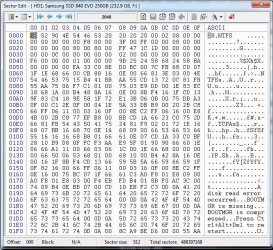
When you quickformatted the drive, it would have wiped the volume boot record of your previous first partition at 2048 and would have written a new Volume Boot Record (NTFS File system) consistent with the partition table in sector 0. ( The first partition always starts at sector 2048) The screenshot below shows the volume boot record at sector 2048 on my drive )

View attachment 392123

Creating a single simple volume and quickformatting it makes only these two changes on these two sectors.

So the volume boot record of the second and third partition at their start points as well as data in all the sectors will still remain unaffected.

Using bootice you can now do a search.

To be continued after a break .........

.


Hi dear Jumanji
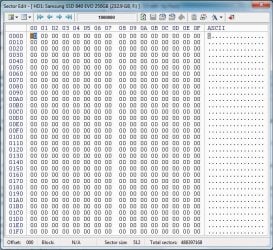
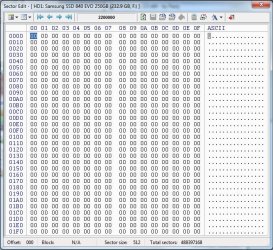
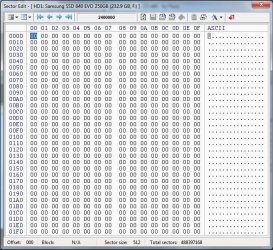
I think something has happened to my ssd, as i said i'm not an expert in this field and these numbers and tables have no meanings to me, but i think i have lost my all data. have a look at these screenshots.

comp_mng_screen_15.jpg

comp_mng_screen_16.jpg

comp_mng_screen_17.jpg

comp_mng_screen_18.jpg

comp_mng_screen_19.jpg

comp_mng_screen_20.jpg
 

My Computer My Computer

At a glance

win 7 64bit
Computer type
PC/Desktop
Computer Manufacturer/Model Number
asus
OS
win 7 64bit
Hard Drives
samsun evo840 evo850
Antivirus
norton
Browser
firefox
Yes, it is all 00s everywhere except Sector 0 and 2048 (QuickFormat creation), as would happen with a complete wipe.
 

My Computer My Computer

At a glance

Windows 7 Home Premium 32 bit
OS
Windows 7 Home Premium 32 bit
Yes, it is all 00s everywhere except Sector 0 and 2048 (QuickFormat creation), as would happen with a complete wipe.

However i'm thankful for all your endeavour, i'm sorry that we couldn't solve this problem.
But i'm glad that i found a good friend and will be more glad of keeping in touch with you.
I don't know weather you have read details that i wrote about Armenia in this post

http://www.sevenforums.com/hardware...ed-quick-formatted-volumes-4.html#post3285119

but i'll give you my contacts.

email: [email protected]
FB: https://www.facebook.com/henrik.khach
Instagram: https://www.instagram.com/henrikkhach/

Henrik Khachatoorian
Graphic Designer
 

My Computer My Computer

At a glance

win 7 64bit
Computer type
PC/Desktop
Computer Manufacturer/Model Number
asus
OS
win 7 64bit
Hard Drives
samsun evo840 evo850
Antivirus
norton
Browser
firefox
Back
Top