unable to open vista partition

bossmayank619

New member
hi i have installed vista and windows 7 dual boot ... but i am unable to open the vista partition on windows 7 ... any idea ?
 

My Computer

Computer Manufacturer/Model Number
Customised
OS
Windows 8 Pro x64
CPU
i5 Processor 2320 3.0GHz
Motherboard
Intel DH67BL
Memory
8 GB DDR2
Graphics Card(s)
Internal Intel HD
Sound Card
Realtek
Monitor(s) Displays
Samsung 22inch LED Monitor
Screen Resolution
1920 * 1080
Hard Drives
1TB Seagate, 2TB Seagate, 2TB WD
PSU
Cooler Master Glite Power 350w
Case
Cooler Master
Cooling
Cooler Master Glite Power
Keyboard
Logitech Wireless K220
Mouse
Logitech Wireless K220
Internet Speed
2 MBPS
Other Info
Microsoft Office 2010 Pro Plus
hi i have installed vista and windows 7 dual boot ... but i am unable to open the vista partition on windows 7 ... any idea ?

Windows security is based on user GUIDs not user names. Your best bet is to take ownership of the root and make sure your machine names are identical between the partitions. If you need specific steps write back here -- I should be on most of the night.
 

My Computer

Computer type
Laptop
Computer Manufacturer/Model Number
Apple
OS
El Capitan / Windows 10
CPU
i7-4980HQ
Memory
16GB
Graphics Card(s)
Iris 5200
yes i would love to
 

My Computer

Computer Manufacturer/Model Number
Customised
OS
Windows 8 Pro x64
CPU
i5 Processor 2320 3.0GHz
Motherboard
Intel DH67BL
Memory
8 GB DDR2
Graphics Card(s)
Internal Intel HD
Sound Card
Realtek
Monitor(s) Displays
Samsung 22inch LED Monitor
Screen Resolution
1920 * 1080
Hard Drives
1TB Seagate, 2TB Seagate, 2TB WD
PSU
Cooler Master Glite Power 350w
Case
Cooler Master
Cooling
Cooler Master Glite Power
Keyboard
Logitech Wireless K220
Mouse
Logitech Wireless K220
Internet Speed
2 MBPS
Other Info
Microsoft Office 2010 Pro Plus
Hi,

Are you able to see the Vista partition ?

If not, give it a drive letter in Disk Management.

SIW2
 

My Computers

System One System Two

  • Computer type
    PC/Desktop
    OS
    7 X64
    CPU
    i5 8400
    Motherboard
    gigabyte b365m ds3h
    Memory
    2x8gb 3200mhz
    Hard Drives
    various
    PSU
    pure power 11 400w cm
    Case
    Coolermaster
    Cooling
    cryorig m9i
  • Computer type
    PC/Desktop
    OS
    7x64
    CPU
    g5400
    Motherboard
    ga b365m ds3h
    Memory
    8gb ddr4 2400
    PSU
    xfx pro 450w

My Computer

Computer type
Laptop
Computer Manufacturer/Model Number
Apple
OS
El Capitan / Windows 10
CPU
i7-4980HQ
Memory
16GB
Graphics Card(s)
Iris 5200
well i see it as local disc c NTFS no size or anything. but strange when i install anything it goes into f drive that is windows 7 partition even when the path shows as c\program . do i still have to give it a drive letter.
 

My Computer

Computer Manufacturer/Model Number
Customised
OS
Windows 8 Pro x64
CPU
i5 Processor 2320 3.0GHz
Motherboard
Intel DH67BL
Memory
8 GB DDR2
Graphics Card(s)
Internal Intel HD
Sound Card
Realtek
Monitor(s) Displays
Samsung 22inch LED Monitor
Screen Resolution
1920 * 1080
Hard Drives
1TB Seagate, 2TB Seagate, 2TB WD
PSU
Cooler Master Glite Power 350w
Case
Cooler Master
Cooling
Cooler Master Glite Power
Keyboard
Logitech Wireless K220
Mouse
Logitech Wireless K220
Internet Speed
2 MBPS
Other Info
Microsoft Office 2010 Pro Plus
Hi bossmayank,

well i see it as local disc c NTFS no size or anything.


When you look from Vista all drives will be visible, if you look from 7 the Vista C:\ drive will be hidden I suppose as an attempt to stop people from accidentally deleting things.


but strange when i install anything it goes into f drive that is windows 7 partition even when the path shows as c\program

When you install anything from 7, it will install into the 7, C:\ Partition as C is the default install Partition, but obviously you cannot have two drive C`s Hence the confusion and the drive letter F:\ which should correspond to the Vista F:\

do i still have to give it a drive letter.

No I think you would be best to leave it as it is, so that you do not mess anything up

All other partitions (except C:\ and F:\) could be changed so that the partition letters are the same from Vista and 7 This will help if you want to use a particular folder for example for music as it will be in the same place regardless from which OS

I hope this makes some sort of sense

Pooch :confused::confused:
 

My Computer

Computer Manufacturer/Model Number
Something I threw together
OS
Windows 7 Ultimate x64
CPU
Intel Core i7-2600K
Motherboard
Asus P8P67
Memory
16 GB G Skill F3-10666 CL9D-4GBRL
Graphics Card(s)
ATI Radeon HD 6870
Sound Card
ATI Radeon HDMI / Realtek ALC892
Monitor(s) Displays
2 x 22" standard monitors / LG32LC56v TV to watch films
Screen Resolution
1920 x1080
Hard Drives
2 x OCZ Vertex2 111.79GB
3 x Samsung103SJ
1 x Samsung103UJ
1 x WD3200BEVT
1 x Hitachi5K320-160
PSU
Thermaltake Toughpower Cable Management 750W
Case
Antec 300
Cooling
Noctua NH-U12P SE2 and 5 120mm Case fans
Keyboard
Microsoft Comfort Curve Keyboard 2000
Mouse
Hama M3110 / Logitech M305
Internet Speed
16000
Other Info
I have also used Fedora, Suse, Ubuntu Linux
And all other Windows from 95 to date except ME
well i see it as local disc c NTFS no size or anything. but strange when i install anything it goes into f drive that is windows 7 partition even when the path shows as c\program . do i still have to give it a drive letter.

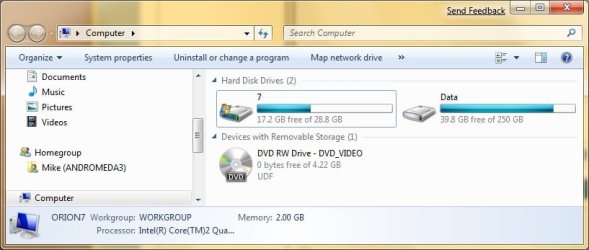
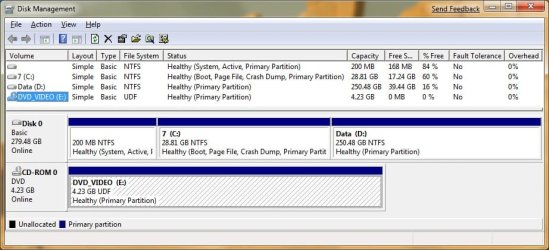
Please post the following screen shots:

1) Explorer "Computer" viewUntitled.jpg
2) Run diskmgmt.msc Untitled2.jpg
 

My Computer

Computer type
Laptop
Computer Manufacturer/Model Number
Apple
OS
El Capitan / Windows 10
CPU
i7-4980HQ
Memory
16GB
Graphics Card(s)
Iris 5200
well thats why i though but in windows 7 the vista partition shows as local drive c and windows 7 partition still shows as f: but i`ll try that take ownerhsip thing to work and check if i can still get into my vista partition through that.
 

My Computer

Computer Manufacturer/Model Number
Customised
OS
Windows 8 Pro x64
CPU
i5 Processor 2320 3.0GHz
Motherboard
Intel DH67BL
Memory
8 GB DDR2
Graphics Card(s)
Internal Intel HD
Sound Card
Realtek
Monitor(s) Displays
Samsung 22inch LED Monitor
Screen Resolution
1920 * 1080
Hard Drives
1TB Seagate, 2TB Seagate, 2TB WD
PSU
Cooler Master Glite Power 350w
Case
Cooler Master
Cooling
Cooler Master Glite Power
Keyboard
Logitech Wireless K220
Mouse
Logitech Wireless K220
Internet Speed
2 MBPS
Other Info
Microsoft Office 2010 Pro Plus
nope the take ownership didnt worked i get take ownership opyion everywhere other then the local drives so luck.:(
 

My Computer

Computer Manufacturer/Model Number
Customised
OS
Windows 8 Pro x64
CPU
i5 Processor 2320 3.0GHz
Motherboard
Intel DH67BL
Memory
8 GB DDR2
Graphics Card(s)
Internal Intel HD
Sound Card
Realtek
Monitor(s) Displays
Samsung 22inch LED Monitor
Screen Resolution
1920 * 1080
Hard Drives
1TB Seagate, 2TB Seagate, 2TB WD
PSU
Cooler Master Glite Power 350w
Case
Cooler Master
Cooling
Cooler Master Glite Power
Keyboard
Logitech Wireless K220
Mouse
Logitech Wireless K220
Internet Speed
2 MBPS
Other Info
Microsoft Office 2010 Pro Plus
But these details should not be needed! presumably you can boot Vista, from your dual boot menu?
 

My Computer

Computer Manufacturer/Model Number
Three desktops and one laptop with good specs..
OS
Vista and now 7 in 32 and 64 bit.
But these details should not be needed! presumably you can boot Vista, from your dual boot menu?

yes i can boot into vista and win 7 both. and if that matters i installed win 7 starting the installation from within windows vista.:rolleyes:
 

My Computer

Computer Manufacturer/Model Number
Customised
OS
Windows 8 Pro x64
CPU
i5 Processor 2320 3.0GHz
Motherboard
Intel DH67BL
Memory
8 GB DDR2
Graphics Card(s)
Internal Intel HD
Sound Card
Realtek
Monitor(s) Displays
Samsung 22inch LED Monitor
Screen Resolution
1920 * 1080
Hard Drives
1TB Seagate, 2TB Seagate, 2TB WD
PSU
Cooler Master Glite Power 350w
Case
Cooler Master
Cooling
Cooler Master Glite Power
Keyboard
Logitech Wireless K220
Mouse
Logitech Wireless K220
Internet Speed
2 MBPS
Other Info
Microsoft Office 2010 Pro Plus
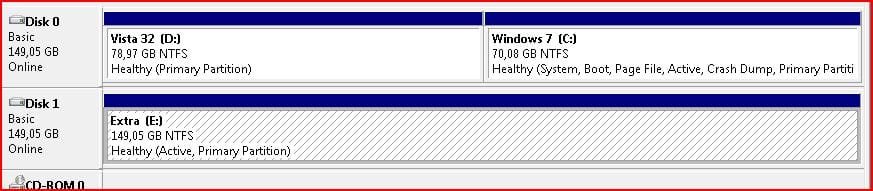
Give each of the two partitions a name (Win7 and Vista) for the prupose of easier identification.
Open disk management (Through the Administrative Tools - Computer management, and see what each partition gives as its properties. A screen shot or snipping tool image would be useful.
This is mine, for example.
 

Attachments

  • Capture.JPG
    Capture.JPG
    51 KB · Views: 40

My Computer

Computer Manufacturer/Model Number
Three desktops and one laptop with good specs..
OS
Vista and now 7 in 32 and 64 bit.
No I think you would be best to leave it as it is, so that you do not mess anything up

All other partitions (except C:\ and F:\) could be changed so that the partition letters are the same from Vista and 7 This will help if you want to use a particular folder for example for music as it will be in the same place regardless from which OS

I hope this makes some sort of sense

Pooch :confused::confused:[/quote]
well good information but lot of search on internet and everything still i am not able to see the vista partition in windows 7 and also it is not happening win 7 music folder and windows vista music folder is not same they are not getting shared as mentioned in above post

:confused::confused::confused:
 

My Computer

Computer Manufacturer/Model Number
Customised
OS
Windows 8 Pro x64
CPU
i5 Processor 2320 3.0GHz
Motherboard
Intel DH67BL
Memory
8 GB DDR2
Graphics Card(s)
Internal Intel HD
Sound Card
Realtek
Monitor(s) Displays
Samsung 22inch LED Monitor
Screen Resolution
1920 * 1080
Hard Drives
1TB Seagate, 2TB Seagate, 2TB WD
PSU
Cooler Master Glite Power 350w
Case
Cooler Master
Cooling
Cooler Master Glite Power
Keyboard
Logitech Wireless K220
Mouse
Logitech Wireless K220
Internet Speed
2 MBPS
Other Info
Microsoft Office 2010 Pro Plus
no go no success this is kind a irritating all my stuff is in windows vista partition and after so many things is tried i am not able to access my vista partition from win 7 and i am unable to provide any drive letter as strangely it shows letter c already assigned to the vista partition and win 7 as X drive as i originally installed it in windows vista. is anybody been able to find resolve for it. i am using bcd edit if that makes any diff.
 

My Computer

Computer Manufacturer/Model Number
Customised
OS
Windows 8 Pro x64
CPU
i5 Processor 2320 3.0GHz
Motherboard
Intel DH67BL
Memory
8 GB DDR2
Graphics Card(s)
Internal Intel HD
Sound Card
Realtek
Monitor(s) Displays
Samsung 22inch LED Monitor
Screen Resolution
1920 * 1080
Hard Drives
1TB Seagate, 2TB Seagate, 2TB WD
PSU
Cooler Master Glite Power 350w
Case
Cooler Master
Cooling
Cooler Master Glite Power
Keyboard
Logitech Wireless K220
Mouse
Logitech Wireless K220
Internet Speed
2 MBPS
Other Info
Microsoft Office 2010 Pro Plus
well good information but lot of search on internet and everything still i am not able to see the vista partition in windows 7 and also it is not happening win 7 music folder and windows vista music folder is not same they are not getting shared as mentioned in above post

:confused::confused::confused:

No you will not see these folders as they are on their respective C:/ drives
Make a copy of these folders (or a link) onto another partition, I presume you have more than just the two. and they will then be visible.

no go no success this is kind a irritating all my stuff is in windows vista partition and after so many things is tried i am not able to access my vista partition from win 7 and i am unable to provide any drive letter as strangely it shows letter c already assigned to the vista partition and win 7 as X drive as i originally installed it in windows vista. is anybody been able to find resolve for it. i am using bcd edit if that makes any diff.

The only answer I can see is to install Se7en again but not to start the installation from vista
 

My Computer

Computer Manufacturer/Model Number
Something I threw together
OS
Windows 7 Ultimate x64
CPU
Intel Core i7-2600K
Motherboard
Asus P8P67
Memory
16 GB G Skill F3-10666 CL9D-4GBRL
Graphics Card(s)
ATI Radeon HD 6870
Sound Card
ATI Radeon HDMI / Realtek ALC892
Monitor(s) Displays
2 x 22" standard monitors / LG32LC56v TV to watch films
Screen Resolution
1920 x1080
Hard Drives
2 x OCZ Vertex2 111.79GB
3 x Samsung103SJ
1 x Samsung103UJ
1 x WD3200BEVT
1 x Hitachi5K320-160
PSU
Thermaltake Toughpower Cable Management 750W
Case
Antec 300
Cooling
Noctua NH-U12P SE2 and 5 120mm Case fans
Keyboard
Microsoft Comfort Curve Keyboard 2000
Mouse
Hama M3110 / Logitech M305
Internet Speed
16000
Other Info
I have also used Fedora, Suse, Ubuntu Linux
And all other Windows from 95 to date except ME
well i tried but no matter in what way i burn the windows 7 disc but i still get that error while installing it from the disc but when i installed it mounting the dvd it worked so any fix for that ?
 

My Computer

Computer Manufacturer/Model Number
Customised
OS
Windows 8 Pro x64
CPU
i5 Processor 2320 3.0GHz
Motherboard
Intel DH67BL
Memory
8 GB DDR2
Graphics Card(s)
Internal Intel HD
Sound Card
Realtek
Monitor(s) Displays
Samsung 22inch LED Monitor
Screen Resolution
1920 * 1080
Hard Drives
1TB Seagate, 2TB Seagate, 2TB WD
PSU
Cooler Master Glite Power 350w
Case
Cooler Master
Cooling
Cooler Master Glite Power
Keyboard
Logitech Wireless K220
Mouse
Logitech Wireless K220
Internet Speed
2 MBPS
Other Info
Microsoft Office 2010 Pro Plus
no go no success this is kind a irritating all my stuff is in windows vista partition and after so many things is tried i am not able to access my vista partition from win 7 and i am unable to provide any drive letter as strangely it shows letter c already assigned to the vista partition and win 7 as X drive as i originally installed it in windows vista. is anybody been able to find resolve for it. i am using bcd edit if that makes any diff.

Never, ever use X as the drive. That's the drive that WinPE uses by default and it will confuse the hell out of the install.

open an elevated command prompt, type diskpart and enter the following:

list volume
this will list the logical volumes avaiable -- make note of the one containing Vista

select volume n
substitute the Vista volume number for n

assign
this should either change the volume letting you access it or complain -- let us know either way
 

My Computer

Computer type
Laptop
Computer Manufacturer/Model Number
Apple
OS
El Capitan / Windows 10
CPU
i7-4980HQ
Memory
16GB
Graphics Card(s)
Iris 5200
well i tried but no matter in what way i burn the windows 7 disc but i still get that error while installing it from the disc but when i installed it mounting the dvd it worked so any fix for that ?

Hello bossmayank619

Since you're using bcdedit, please post a screenshot of the result when running bcdedit in cmd.
 

My Computer

Computer Manufacturer/Model Number
ENIAC
OS
Windows 7 RC 7100 32bit/64bit
CPU
Intel Core2Duo E4500 2.20 GHz
Motherboard
ASUS P5LD2-X/1333
Memory
2x1GB Kinsgston DDR2 800MHz
Graphics Card(s)
Nvidia 8500GT
Sound Card
Onboard High Definition Audio Device
Monitor(s) Displays
Sony Bravia 42"
Case
LINKW 2222
Cooling
Standard Intel
Keyboard
Some cheap one
Mouse
Microsoft Intellimouse something
Internet Speed
24MBps ADSL
Sorry i would like to correct myself windows 7 is not X it is F ... and on your suggestions i have changed drive X to M ... also i guess this whole mess is because i have installed windows 7 by virtually mounting the ISO from the windows vista itself. i am downloading the ISO again and will burn it on a dvd hope it works this time last time ii wasted 6 dvd`s and it never worked. :confused: . but windows 7 rock so the efforts are still on . :sick: need to go ....


Never, ever use X as the drive. That's the drive that WinPE uses by default and it will confuse the hell out of the install.

open an elevated command prompt, type diskpart and enter the following:

list volume
this will list the logical volumes avaiable -- make note of the one containing Vista

select volume n
substitute the Vista volume number for n

assign
this should either change the volume letting you access it or complain -- let us know either way
 

My Computer

Computer Manufacturer/Model Number
Customised
OS
Windows 8 Pro x64
CPU
i5 Processor 2320 3.0GHz
Motherboard
Intel DH67BL
Memory
8 GB DDR2
Graphics Card(s)
Internal Intel HD
Sound Card
Realtek
Monitor(s) Displays
Samsung 22inch LED Monitor
Screen Resolution
1920 * 1080
Hard Drives
1TB Seagate, 2TB Seagate, 2TB WD
PSU
Cooler Master Glite Power 350w
Case
Cooler Master
Cooling
Cooler Master Glite Power
Keyboard
Logitech Wireless K220
Mouse
Logitech Wireless K220
Internet Speed
2 MBPS
Other Info
Microsoft Office 2010 Pro Plus
Back
Top