
If I'm not wrong, the active partition was actually SYSTEM at first. I then tried making Windows C: the active partition instead, in attempt to resolve the error by Windows Boot Manager in which Windows cannot verify the digital signature for this file for \Windows\System32\winload.exe.
Okay, I guess I missed the proper sequence of events in the earlier posts.
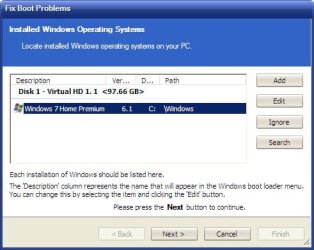
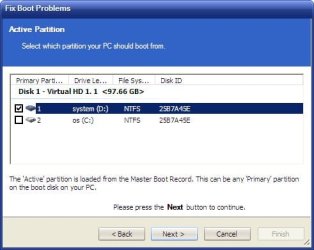
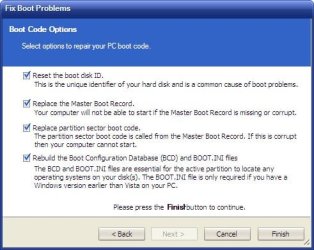
So if making SYSTEM active doesn't resolve the issue, note that it is possible to bypass SYSTEM and make your Windows partition boot directly. As I read it, that's what you were in fact trying to do as an alternative, but Microsoft's tools failed you. Microsoft's command-line tools are okay if you just need a simple adjustment to get things going again, but if you're not sure exactly what's wrong sometimes more of a shotgun approach works better. Macrium Reflect has just such a tool, and it's worked for me better than similar tools from other vendors.
I don't know what utility you use for partition imaging, but Macrium Reflect is one of the better ones. Like many such utilities, it requires you to make Rescue media if you want to restore a Windows partition from a backup image. While that's pretty standard for utilities like that, what sets Macrium apart is its handy, "Fix Windows boot problems" button. In your case that button can come in handy even though you're not restoring from a backup.
If you make your Windows partition the active partition and boot a Macrium Rescue CD or bootable flash drive, you can click Macrium's "Restore" tab, then select "Fix Windows boot problems". In one fell swoop it will overwrite the most common parts that prevent a system from booting. (It might even do it with SYSTEM active, but I've never had occasion to test that scenario.)
FTR, I use this Macrium tool when converting new Win8.x/10 machines from GPT partitions back to the more forgiving MBR style. I image just the OS partition, wipe the disk of all partitions, create a new, MBR-style partition, and restore the contents of the image into it. Of course, it won't boot like that because the original GPT system used a bunch of extra partitions to boot the system. But by booting a Macrium CD and making a couple clicks, the OS partition will thereafter boot just fine as a MBR partition.
If Macrium can fix that kind of extreme conversion, I don't think it should have any trouble fixing your system. So give Macrium a try if all else fails.
My Computer
At a glance
Windows 7/8.1/10 multibootIntel Core i7-770048GB (2x16GB Crucial DDR4-3200 + 2x8GB Hynix ...Intel HD630 + AMD Radeon R7 450 PCIe
- Computer type
- PC/Desktop
- Computer Manufacturer/Model Number
- Dell Optiplex 7050
- OS
- Windows 7/8.1/10 multiboot
- CPU
- Intel Core i7-7700
- Motherboard
- Dell, Intel Q270 chipset
- Memory
- 48GB (2x16GB Crucial DDR4-3200 + 2x8GB Hynix DDR4-2400)
- Graphics Card(s)
- Intel HD630 + AMD Radeon R7 450 PCIe
- Monitor(s) Displays
- Asus VC279 (27")
- Screen Resolution
- 1920x1080
- Hard Drives
- Toshiba M.2 NVMe (256GB),
Samsung 960 Evo (500GB),
WD Red Plus 80EFBX (8TB)
 , laptops might differ.
 )
)


