Solved Gadgets Disappear after Windows Update

Homeuser66

New member
Member
VIP
Local time
8:25 AM
Messages
183
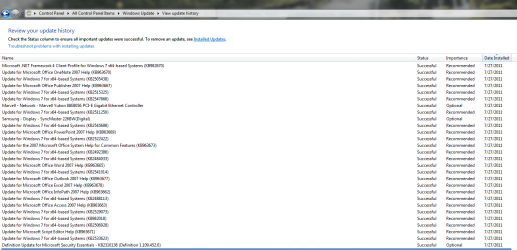
Hi, I use a few gadgets to monitor my system temps. I can't seem to find the fix to this new issue. I just recently updated MS Windows 7 x64 with the following Updates:

Updates.png


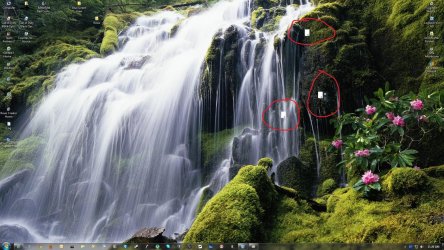
Since then, some of my monitoring gadgets are not working correctly, circled in red:(see Insert)

Gadgets.jpg


I have restarted the comp and uninstalled and reinstalled the gadgets and that don't seem to help. Anyone else have this issue or the fix?

Thanks for your help in advance!
 

My Computer My Computer

Computer type
PC/Desktop
Computer Manufacturer/Model Number
ASUS-Self Built
OS
Windows 10 Anniversary, Linux & still Windows 7 Professional x64
CPU
Intel i7-920 2.67 GHz
Motherboard
ASUS-Rampage II Extreme Mobo
Memory
12 GB
Graphics Card(s)
EVGA Nvidia 970 GTX
Sound Card
Supreme FX X-fi-Audigy
Monitor(s) Displays
BenQ XL2730Z,Samsung SyncMaster PX2370 LED,Samsung 226BW LCD
Screen Resolution
2560 x 1440, LED-1920x1080, LCD-1680x1050
Hard Drives
4 internal :
1x TB SSD Samsung Evo
1x 1 TB
1x 3 TB
1x 4 TB
3 TB External
PSU
Coolermaster 750 watt PSU
Case
Thermaltake-Spedo case
Cooling
8 Cooling Fans on case and inside case
Keyboard
Logitech G-15 and G-13
Mouse
Logitech G-9 Optical and Logitech Mx-Revolutiom
Internet Speed
DSL

My Computer My Computer

Computer type
PC/Desktop
Computer Manufacturer/Model Number
Self built custom
OS
64-bit Windows 11 Pro for Workstations
CPU
Intel i7-8700K OC'd to 5 GHz
Motherboard
ASUS ROG Maximus XI Formula Z390
Memory
64 GB (4x16GB) G.SKILL TridentZ RGB DDR4 3600 MHz
Graphics Card(s)
ASUS ROG-STRIX-GTX1080TI-O11G-GAMING
Sound Card
Integrated
Monitor(s) Displays
2 x Samsung Odyssey G7 27"
Screen Resolution
2560x1440
Hard Drives
1TB Samsung 990 PRO M.2,
4TB Samsung 990 PRO PRO M.2,
TerraMaster F8 SSD Plus NAS
PSU
Seasonic Prime Titanium 850W
Case
Thermaltake Core P3
Cooling
Corsair Hydro H115i
Keyboard
Logitech wireless K800
Mouse
Logitech MX Master 4
Internet Speed
2 Gb/s Download and 100 Mb/s Upload
Antivirus
Malwarebyte Anti-Malware Premium
Browser
Google Chrome
Other Info
Logitech Z625 speaker system,
Logitech BRIO 4K Pro webcam,
HP Color LaserJet Pro MFP M477fdn,
APC SMART-UPS RT 1000 XL - SURT1000XLI,
Galaxy S23 Plus phone
Thanks Brink! I just installed it and now restarting....I'll post my status in a few.

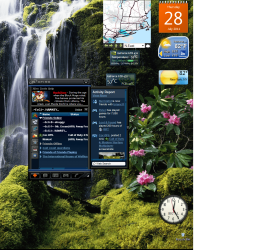
No, that didn't work....I do have other working gadgets...it's just the CPU Gadget and the Video Card Gadgets.

no.png
 

My Computer My Computer

Computer type
PC/Desktop
Computer Manufacturer/Model Number
ASUS-Self Built
OS
Windows 10 Anniversary, Linux & still Windows 7 Professional x64
CPU
Intel i7-920 2.67 GHz
Motherboard
ASUS-Rampage II Extreme Mobo
Memory
12 GB
Graphics Card(s)
EVGA Nvidia 970 GTX
Sound Card
Supreme FX X-fi-Audigy
Monitor(s) Displays
BenQ XL2730Z,Samsung SyncMaster PX2370 LED,Samsung 226BW LCD
Screen Resolution
2560 x 1440, LED-1920x1080, LCD-1680x1050
Hard Drives
4 internal :
1x TB SSD Samsung Evo
1x 1 TB
1x 3 TB
1x 4 TB
3 TB External
PSU
Coolermaster 750 watt PSU
Case
Thermaltake-Spedo case
Cooling
8 Cooling Fans on case and inside case
Keyboard
Logitech G-15 and G-13
Mouse
Logitech G-9 Optical and Logitech Mx-Revolutiom
Internet Speed
DSL
Update: It seems to be only a few select gadgets. The GPU Gadget and the CPU Gadget. I can run a different one without any issues..They just don't have the features I need...lol
 

My Computer My Computer

Computer type
PC/Desktop
Computer Manufacturer/Model Number
ASUS-Self Built
OS
Windows 10 Anniversary, Linux & still Windows 7 Professional x64
CPU
Intel i7-920 2.67 GHz
Motherboard
ASUS-Rampage II Extreme Mobo
Memory
12 GB
Graphics Card(s)
EVGA Nvidia 970 GTX
Sound Card
Supreme FX X-fi-Audigy
Monitor(s) Displays
BenQ XL2730Z,Samsung SyncMaster PX2370 LED,Samsung 226BW LCD
Screen Resolution
2560 x 1440, LED-1920x1080, LCD-1680x1050
Hard Drives
4 internal :
1x TB SSD Samsung Evo
1x 1 TB
1x 3 TB
1x 4 TB
3 TB External
PSU
Coolermaster 750 watt PSU
Case
Thermaltake-Spedo case
Cooling
8 Cooling Fans on case and inside case
Keyboard
Logitech G-15 and G-13
Mouse
Logitech G-9 Optical and Logitech Mx-Revolutiom
Internet Speed
DSL

My Computer My Computer

Computer type
PC/Desktop
Computer Manufacturer/Model Number
Self built custom
OS
64-bit Windows 11 Pro for Workstations
CPU
Intel i7-8700K OC'd to 5 GHz
Motherboard
ASUS ROG Maximus XI Formula Z390
Memory
64 GB (4x16GB) G.SKILL TridentZ RGB DDR4 3600 MHz
Graphics Card(s)
ASUS ROG-STRIX-GTX1080TI-O11G-GAMING
Sound Card
Integrated
Monitor(s) Displays
2 x Samsung Odyssey G7 27"
Screen Resolution
2560x1440
Hard Drives
1TB Samsung 990 PRO M.2,
4TB Samsung 990 PRO PRO M.2,
TerraMaster F8 SSD Plus NAS
PSU
Seasonic Prime Titanium 850W
Case
Thermaltake Core P3
Cooling
Corsair Hydro H115i
Keyboard
Logitech wireless K800
Mouse
Logitech MX Master 4
Internet Speed
2 Gb/s Download and 100 Mb/s Upload
Antivirus
Malwarebyte Anti-Malware Premium
Browser
Google Chrome
Other Info
Logitech Z625 speaker system,
Logitech BRIO 4K Pro webcam,
HP Color LaserJet Pro MFP M477fdn,
APC SMART-UPS RT 1000 XL - SURT1000XLI,
Galaxy S23 Plus phone
You might double check to make sure that they have an exception added to allow them through your firewall to see if that may be the issue.

Nope, they aren't even here. But they also don't access the internet....so I don't see how this would help...Thanks anyway though...I'll have to uninstall each update to find the culprit....
 

My Computer My Computer

Computer type
PC/Desktop
Computer Manufacturer/Model Number
ASUS-Self Built
OS
Windows 10 Anniversary, Linux & still Windows 7 Professional x64
CPU
Intel i7-920 2.67 GHz
Motherboard
ASUS-Rampage II Extreme Mobo
Memory
12 GB
Graphics Card(s)
EVGA Nvidia 970 GTX
Sound Card
Supreme FX X-fi-Audigy
Monitor(s) Displays
BenQ XL2730Z,Samsung SyncMaster PX2370 LED,Samsung 226BW LCD
Screen Resolution
2560 x 1440, LED-1920x1080, LCD-1680x1050
Hard Drives
4 internal :
1x TB SSD Samsung Evo
1x 1 TB
1x 3 TB
1x 4 TB
3 TB External
PSU
Coolermaster 750 watt PSU
Case
Thermaltake-Spedo case
Cooling
8 Cooling Fans on case and inside case
Keyboard
Logitech G-15 and G-13
Mouse
Logitech G-9 Optical and Logitech Mx-Revolutiom
Internet Speed
DSL
Try this:

Start> In search box type

Regedit

navigate to

HKEY_CURRENT_USER\Software\Microsoft\Windows\CurrentVersion\Internet Settings\Zones\

Look to see if there is a little graphic subkey between \Zones and subkey 0. If so, delete it. Restart your computer and see if that fixes the problem.

A Guy
 

My Computer My Computer

Computer type
PC/Desktop
OS
Windows 10 Home x64
CPU
INTEL Core i5-750 Quad-Core 3.37GHz
Motherboard
ASUS P7P55D
Memory
HyperX Fury Black Series 8GB (2 x 4GB) 1866Mhz
Graphics Card(s)
EVGA GeForce GTX 750 Superclocked 1GB 128-Bit GDDR5
Monitor(s) Displays
LG 32MA68HY 32" IPS
Screen Resolution
1920 x 1080
Hard Drives
Samsung 840 Evo 120GB, SEAGATE 500GB Barracuda® 7200.12, SATA 3 Gb/s, 7200 RPM, 16MB cache
PSU
ANTEC TruePower New TP-550, 80 PLUS, 550W
Case
ANTEC Three Hundred Illusion
Cooling
COOLER MASTER Hyper 212 Plus, 4 x 120mm 1 x 140mm Noctua's
Internet Speed
85 + Mbps
Antivirus
Avast
Browser
Vivaldi
Thanks, but no...there wasn't anything there. Just Zones, 0, 1, 2, 3, 4. I think, it's just some gadgets need an update as well... I still haven't had time to pick out the culprit by uninstalling each update till I find it. But I will soon...I'm getting Uverse internet tomorrow, so I won't be able to get online, so I'll try it tomorrow and post back.

Am I the only one with this issue?
 

My Computer My Computer

Computer type
PC/Desktop
Computer Manufacturer/Model Number
ASUS-Self Built
OS
Windows 10 Anniversary, Linux & still Windows 7 Professional x64
CPU
Intel i7-920 2.67 GHz
Motherboard
ASUS-Rampage II Extreme Mobo
Memory
12 GB
Graphics Card(s)
EVGA Nvidia 970 GTX
Sound Card
Supreme FX X-fi-Audigy
Monitor(s) Displays
BenQ XL2730Z,Samsung SyncMaster PX2370 LED,Samsung 226BW LCD
Screen Resolution
2560 x 1440, LED-1920x1080, LCD-1680x1050
Hard Drives
4 internal :
1x TB SSD Samsung Evo
1x 1 TB
1x 3 TB
1x 4 TB
3 TB External
PSU
Coolermaster 750 watt PSU
Case
Thermaltake-Spedo case
Cooling
8 Cooling Fans on case and inside case
Keyboard
Logitech G-15 and G-13
Mouse
Logitech G-9 Optical and Logitech Mx-Revolutiom
Internet Speed
DSL
No, you have not been the only one. But searches all point to Adobe updates, AV programs, etc. For this last batch of Windows updates, yes, you appear to be the only one I could find having them caused by that. A Guy
 

My Computer My Computer

Computer type
PC/Desktop
OS
Windows 10 Home x64
CPU
INTEL Core i5-750 Quad-Core 3.37GHz
Motherboard
ASUS P7P55D
Memory
HyperX Fury Black Series 8GB (2 x 4GB) 1866Mhz
Graphics Card(s)
EVGA GeForce GTX 750 Superclocked 1GB 128-Bit GDDR5
Monitor(s) Displays
LG 32MA68HY 32" IPS
Screen Resolution
1920 x 1080
Hard Drives
Samsung 840 Evo 120GB, SEAGATE 500GB Barracuda® 7200.12, SATA 3 Gb/s, 7200 RPM, 16MB cache
PSU
ANTEC TruePower New TP-550, 80 PLUS, 550W
Case
ANTEC Three Hundred Illusion
Cooling
COOLER MASTER Hyper 212 Plus, 4 x 120mm 1 x 140mm Noctua's
Internet Speed
85 + Mbps
Antivirus
Avast
Browser
Vivaldi
Ohh...Ok, maybe it could have been Adobe flash...not sure....But I do know, that after I updated windows and restarted...that's when it happened....today is the day I'll figure it out...
 

My Computer My Computer

Computer type
PC/Desktop
Computer Manufacturer/Model Number
ASUS-Self Built
OS
Windows 10 Anniversary, Linux & still Windows 7 Professional x64
CPU
Intel i7-920 2.67 GHz
Motherboard
ASUS-Rampage II Extreme Mobo
Memory
12 GB
Graphics Card(s)
EVGA Nvidia 970 GTX
Sound Card
Supreme FX X-fi-Audigy
Monitor(s) Displays
BenQ XL2730Z,Samsung SyncMaster PX2370 LED,Samsung 226BW LCD
Screen Resolution
2560 x 1440, LED-1920x1080, LCD-1680x1050
Hard Drives
4 internal :
1x TB SSD Samsung Evo
1x 1 TB
1x 3 TB
1x 4 TB
3 TB External
PSU
Coolermaster 750 watt PSU
Case
Thermaltake-Spedo case
Cooling
8 Cooling Fans on case and inside case
Keyboard
Logitech G-15 and G-13
Mouse
Logitech G-9 Optical and Logitech Mx-Revolutiom
Internet Speed
DSL
Ok, I uninstalled all updates for that day, even Adobe Flash...uninstalled the gadgets and reinstalled them and they still don't work....I guess a good old reformat will do the trick!...lol
 

My Computer My Computer

Computer type
PC/Desktop
Computer Manufacturer/Model Number
ASUS-Self Built
OS
Windows 10 Anniversary, Linux & still Windows 7 Professional x64
CPU
Intel i7-920 2.67 GHz
Motherboard
ASUS-Rampage II Extreme Mobo
Memory
12 GB
Graphics Card(s)
EVGA Nvidia 970 GTX
Sound Card
Supreme FX X-fi-Audigy
Monitor(s) Displays
BenQ XL2730Z,Samsung SyncMaster PX2370 LED,Samsung 226BW LCD
Screen Resolution
2560 x 1440, LED-1920x1080, LCD-1680x1050
Hard Drives
4 internal :
1x TB SSD Samsung Evo
1x 1 TB
1x 3 TB
1x 4 TB
3 TB External
PSU
Coolermaster 750 watt PSU
Case
Thermaltake-Spedo case
Cooling
8 Cooling Fans on case and inside case
Keyboard
Logitech G-15 and G-13
Mouse
Logitech G-9 Optical and Logitech Mx-Revolutiom
Internet Speed
DSL

My Computer My Computer

Computer type
PC/Desktop
OS
Windows 10 Home x64
CPU
INTEL Core i5-750 Quad-Core 3.37GHz
Motherboard
ASUS P7P55D
Memory
HyperX Fury Black Series 8GB (2 x 4GB) 1866Mhz
Graphics Card(s)
EVGA GeForce GTX 750 Superclocked 1GB 128-Bit GDDR5
Monitor(s) Displays
LG 32MA68HY 32" IPS
Screen Resolution
1920 x 1080
Hard Drives
Samsung 840 Evo 120GB, SEAGATE 500GB Barracuda® 7200.12, SATA 3 Gb/s, 7200 RPM, 16MB cache
PSU
ANTEC TruePower New TP-550, 80 PLUS, 550W
Case
ANTEC Three Hundred Illusion
Cooling
COOLER MASTER Hyper 212 Plus, 4 x 120mm 1 x 140mm Noctua's
Internet Speed
85 + Mbps
Antivirus
Avast
Browser
Vivaldi
Yeah, Thanks! But I just formatted Sunday....Tried everything but what you just posted, so I'm not sure if that would have worked or not...Thank you for the help!...So far, with updates, it's working...so I don't know what the issue was...
 

My Computer My Computer

Computer type
PC/Desktop
Computer Manufacturer/Model Number
ASUS-Self Built
OS
Windows 10 Anniversary, Linux & still Windows 7 Professional x64
CPU
Intel i7-920 2.67 GHz
Motherboard
ASUS-Rampage II Extreme Mobo
Memory
12 GB
Graphics Card(s)
EVGA Nvidia 970 GTX
Sound Card
Supreme FX X-fi-Audigy
Monitor(s) Displays
BenQ XL2730Z,Samsung SyncMaster PX2370 LED,Samsung 226BW LCD
Screen Resolution
2560 x 1440, LED-1920x1080, LCD-1680x1050
Hard Drives
4 internal :
1x TB SSD Samsung Evo
1x 1 TB
1x 3 TB
1x 4 TB
3 TB External
PSU
Coolermaster 750 watt PSU
Case
Thermaltake-Spedo case
Cooling
8 Cooling Fans on case and inside case
Keyboard
Logitech G-15 and G-13
Mouse
Logitech G-9 Optical and Logitech Mx-Revolutiom
Internet Speed
DSL
Well, that is the ultimate fix. Suggest looking into a 2nd hard drive, and an imaging program like Acronis True Image, or the free Macrium Reflect. Having complete images is the ultimate insurance against such a problem, or a nasty infection. Glad you are back to normal though :)

A Guy
 

My Computer My Computer

Computer type
PC/Desktop
OS
Windows 10 Home x64
CPU
INTEL Core i5-750 Quad-Core 3.37GHz
Motherboard
ASUS P7P55D
Memory
HyperX Fury Black Series 8GB (2 x 4GB) 1866Mhz
Graphics Card(s)
EVGA GeForce GTX 750 Superclocked 1GB 128-Bit GDDR5
Monitor(s) Displays
LG 32MA68HY 32" IPS
Screen Resolution
1920 x 1080
Hard Drives
Samsung 840 Evo 120GB, SEAGATE 500GB Barracuda® 7200.12, SATA 3 Gb/s, 7200 RPM, 16MB cache
PSU
ANTEC TruePower New TP-550, 80 PLUS, 550W
Case
ANTEC Three Hundred Illusion
Cooling
COOLER MASTER Hyper 212 Plus, 4 x 120mm 1 x 140mm Noctua's
Internet Speed
85 + Mbps
Antivirus
Avast
Browser
Vivaldi
Yeah, I suppose you're right. I have 4 internal HDD's all for storage, and I also have Acronis....I just never liked to use it..But I probably should....
 

My Computer My Computer

Computer type
PC/Desktop
Computer Manufacturer/Model Number
ASUS-Self Built
OS
Windows 10 Anniversary, Linux & still Windows 7 Professional x64
CPU
Intel i7-920 2.67 GHz
Motherboard
ASUS-Rampage II Extreme Mobo
Memory
12 GB
Graphics Card(s)
EVGA Nvidia 970 GTX
Sound Card
Supreme FX X-fi-Audigy
Monitor(s) Displays
BenQ XL2730Z,Samsung SyncMaster PX2370 LED,Samsung 226BW LCD
Screen Resolution
2560 x 1440, LED-1920x1080, LCD-1680x1050
Hard Drives
4 internal :
1x TB SSD Samsung Evo
1x 1 TB
1x 3 TB
1x 4 TB
3 TB External
PSU
Coolermaster 750 watt PSU
Case
Thermaltake-Spedo case
Cooling
8 Cooling Fans on case and inside case
Keyboard
Logitech G-15 and G-13
Mouse
Logitech G-9 Optical and Logitech Mx-Revolutiom
Internet Speed
DSL
Some gadgets no longer working

Mmh I have the exact same issue:
Other gadgets are still working, but "All CPU meter" and "Outlook Appointments" gadgets are broken since this morning. To my knowledge I didn't get any updates yesterday, so i have absolutely no idea what might have gone wrong.
Tried all the above except reinstall (not an option for me) and they still won't work :(
 

My Computer My Computer

OS
Windows 7 Pro x64 / Ubuntu 10.10 64bit
I uninstalled Flash player too...someone mentioned to wait for an updated All CPU Meter and others...I didn't want to...it was easier for me to just re-install...If you find out what caused it, please let me know....The only thing I can think of, is a corrupt update or a conflict with the updates and gadgets....but for now, everything is perfect again..
 
Last edited by a moderator:

My Computer My Computer

Computer type
PC/Desktop
Computer Manufacturer/Model Number
ASUS-Self Built
OS
Windows 10 Anniversary, Linux & still Windows 7 Professional x64
CPU
Intel i7-920 2.67 GHz
Motherboard
ASUS-Rampage II Extreme Mobo
Memory
12 GB
Graphics Card(s)
EVGA Nvidia 970 GTX
Sound Card
Supreme FX X-fi-Audigy
Monitor(s) Displays
BenQ XL2730Z,Samsung SyncMaster PX2370 LED,Samsung 226BW LCD
Screen Resolution
2560 x 1440, LED-1920x1080, LCD-1680x1050
Hard Drives
4 internal :
1x TB SSD Samsung Evo
1x 1 TB
1x 3 TB
1x 4 TB
3 TB External
PSU
Coolermaster 750 watt PSU
Case
Thermaltake-Spedo case
Cooling
8 Cooling Fans on case and inside case
Keyboard
Logitech G-15 and G-13
Mouse
Logitech G-9 Optical and Logitech Mx-Revolutiom
Internet Speed
DSL
This thread is marked "Solved" but it is anything but, as I hardly consider the OP having reformatted his drive and reinstalled Windows entirely just to get a couple of gadgets working again "solved". Problem gone, yes . . . solved, no. Too bad too, as I am having a related problem to this and it most definitely is due to the most recent set of Windows updates.

After doing the update my problem is that, while all my gadgets do work …


  • none of the "settings" buttons on the gadgets work, which is to say, the little icon that looks like a wrench which is off to the (right) side and near the top of each gadget; clicking that button does absolutely nothing—the button appears to depress and come back up normally, but nothing happens—and this on every single gadget I have open, all 6 of them; and …

  • when I right-click the Desktop and choose "Gadgets", once again, absolutely nothing happens

As this happened right after doing a Windows Update today, and because I created a restore point out of habit right before doing said update, I chose to backtrack to just before the update, which succeeded, and then I checked the gadget behavior, and, surprise surprise, everything was back to normal.

I then installed the same two updates again, and then checked the gadget behavior again, and (you guessed it) the exact same gadget problems appeared again. So I have no doubt at all it is related to these two specific Windows updates.

The two updates are :


  • Windows Malicious Software Removal Tool x64 - November 2016 (KB890830), ironically enough :sarc:
  • November, 2016 Security Monthly Quality Rollup for Windows 7 for x64-based Systems (KB3197868)

None of the suggestions I read here and elsewhere (they are so far essentially the same) changed anything, including :


  • turning off the Gadget Platform in "Turn Windows features on or off", rebooting, turning the Gadget Platform on again, and rebooting again . . . didn't change a thing

  • Registry suggestions : ensuring there is no "funny" key under HKCU\Software\Microsoft\Windows\CurrentVersion\Internet Settings\Zones above the 0 Key, or adding a double-word key called AllowElevatedProcess with the value 1 under HKLM\SOFTWARE\Microsoft\Windows\CurrentVersion\Sidebar\Settings . . . again, to no effect

I do, however, know one thing that is absolutely guaranteed to fix this problem, and that's uninstalling those two Windows updates by going back to that pre-update restore point I created, again, and I will have to do exactly that if I can't find another, better solution . . . but I haven't yet given up looking for the ideal solution to this, and if I do find it, I will update this post with it.


∗∗∗∗∗∗∗∗∗∗∗∗∗∗∗∗∗∗∗∗∗∗∗∗∗∗∗∗∗∗∗∗∗∗∗∗∗∗∗∗∗∗
  UPDATE   UPDATE   UPDATE   UPDATE   UPDATE
∗∗∗∗∗∗∗∗∗∗∗∗∗∗∗∗∗∗∗∗∗∗∗∗∗∗∗∗∗∗∗∗∗∗∗∗∗∗∗∗∗∗


This did it :

① Killing the sidebar process, to begin with
② Re-registering four (4) Windows (general) DLLs
③ Re-registering two (2) Windows Sidebar-specific DLLs
④ Deleting one (1) registry key
⑤ Rebooting


Here are the specifics of the five steps above, in command line format. They can be executed individually and consecutively in an elevated command shell, or grouped together in a .BAT or .CMD file :


taskkill /im sidebar.exe /f

regsvr32 msxml3.dll
regsvr32 scrrun.dll
regsvr32 jscript.dll
regsvr32 atl.dll


regsvr32 "%programfiles%\windows sidebar\sbdrop.dll"
regsvr32 "%programfiles%\windows sidebar\wlsrvc.dll"


reg delete "HKEY_CURRENT_USER\Software\Microsoft\Windows\CurrentVersion\Internet Settings\Zones" /f

shutdown /f /r /t 0


After the restart in step ⑤, problem(s) fixed! Individual gadget setting "buttons" work again (all of them), and right-click-Gadgets from the Desktop also works. And no need to uninstall today's Windows updates.  :party::cool:

 
Last edited:

My Computer My Computer

OS
Windows® 7 (64-bit)
CPU
intel® Core™ i5-4690 @ 3.50 GHz
Motherboard
GIGABYTE™ H97-D3H
Memory
8 GB DDR3
This thread is marked "Solved" but it is anything but, as I hardly consider the OP having reformatted his drive and reinstalled Windows entirely just to get a couple of gadgets working again "solved". Problem gone, yes . . . solved, no. Too bad too, as I am having a related problem to this and it most definitely is due to the most recent set of Windows updates.

After doing the update my problem is that, while all my gadgets do work …


  • none of the "settings" buttons on the gadgets work, which is to say, the little icon that looks like a wrench which is off to the (right) side and near the top of each gadget; clicking that button does absolutely nothing—the button appears to depress and come back up normally, but nothing happens—and this on every single gadget I have open, all 6 of them; and …

  • when I right-click the Desktop and choose "Gadgets", once again, absolutely nothing happens

As this happened right after doing a Windows Update today, and because I created a restore point out of habit right before doing said update, I chose to backtrack to just before the update, which succeeded, and then I checked the gadget behavior, and, surprise surprise, everything was back to normal.

I then installed the same two updates again, and then checked the gadget behavior again, and (you guessed it) the exact same gadget problems appeared again. So I have no doubt at all it is related to these two specific Windows updates.

The two updates are :


  • Windows Malicious Software Removal Tool x64 - November 2016 (KB890830), ironically enough :sarc:
  • November, 2016 Security Monthly Quality Rollup for Windows 7 for x64-based Systems (KB3197868)

None of the suggestions I read here and elsewhere (they are so far essentially the same) changed anything, including :


  • turning off the Gadget Platform in "Turn Windows features on or off", rebooting, turning the Gadget Platform on again, and rebooting again . . . didn't change a thing

  • Registry suggestions : ensuring there is no "funny" key under HKCU\Software\Microsoft\Windows\CurrentVersion\Internet Settings\Zones above the 0 Key, or adding a double-word key called AllowElevatedProcess with the value 1 under HKLM\SOFTWARE\Microsoft\Windows\CurrentVersion\Sidebar\Settings . . . again, to no effect

  • registering some .dll s again, can't remember which exactly and too lazy to look it up again, but is related to this and was suggested to someone else by Microsoft . . . yet again, no change

I do, however, know one thing that is absolutely guaranteed to fix this problem, and that's uninstalling those two Windows updates by going back to that pre-update restore point I created, again, and I will have to do exactly that if I can't find another, better solution . . . but I haven't yet given up looking for the ideal solution to this, and if I do find it, I will update this post with it.


∗∗∗∗∗∗∗∗∗∗∗∗∗∗∗∗∗∗∗∗∗∗∗∗∗∗∗∗∗∗∗∗∗∗∗∗∗∗∗∗∗∗
  UPDATE   UPDATE   UPDATE   UPDATE   UPDATE
∗∗∗∗∗∗∗∗∗∗∗∗∗∗∗∗∗∗∗∗∗∗∗∗∗∗∗∗∗∗∗∗∗∗∗∗∗∗∗∗∗∗


This did it :

① Killing the sidebar process, to begin with
② Re-registering four (4) Windows (general) DLLs
③ Re-registering two (2) Windows Sidebar-specific DLLs
④ Deleting one (1) registry key
⑤ Rebooting


Here are the specifics of the five steps above, in command line format. They can be executed individually and consecutively in an elevated command shell, or grouped together in a .BAT or .CMD file :


taskkill /im sidebar.exe /f

regsvr32 msxml3.dll
regsvr32 scrrun.dll
regsvr32 jscript.dll
regsvr32 atl.dll


regsvr32 "%programfiles%\windows sidebar\sbdrop.dll"
regsvr32 "%programfiles%\windows sidebar\wlsrvc.dll"


reg delete "HKEY_CURRENT_USER\Software\Microsoft\Windows\CurrentVersion\Internet Settings\Zones" /f

shutdown /f /r /t 0


After the restart in step ⑤, problem(s) fixed! Individual gadget setting "buttons" work again (all of them), and right-click-Gadgets from the Desktop also works. And no need to uninstall today's Windows updates.  :party::cool:


Hi, Thanks for your help! I have actually moved on...Different OS now-Linux and Windows 10....lol....I still have Windows 7 on an older PC just to use as a Tech Support Simulator (instead of virtual box) for friends and Family. Most Gadgets are no longer supported due to security issues...But I still thank you typing your same issues and even better, fix!
 

My Computer My Computer

Computer type
PC/Desktop
Computer Manufacturer/Model Number
ASUS-Self Built
OS
Windows 10 Anniversary, Linux & still Windows 7 Professional x64
CPU
Intel i7-920 2.67 GHz
Motherboard
ASUS-Rampage II Extreme Mobo
Memory
12 GB
Graphics Card(s)
EVGA Nvidia 970 GTX
Sound Card
Supreme FX X-fi-Audigy
Monitor(s) Displays
BenQ XL2730Z,Samsung SyncMaster PX2370 LED,Samsung 226BW LCD
Screen Resolution
2560 x 1440, LED-1920x1080, LCD-1680x1050
Hard Drives
4 internal :
1x TB SSD Samsung Evo
1x 1 TB
1x 3 TB
1x 4 TB
3 TB External
PSU
Coolermaster 750 watt PSU
Case
Thermaltake-Spedo case
Cooling
8 Cooling Fans on case and inside case
Keyboard
Logitech G-15 and G-13
Mouse
Logitech G-9 Optical and Logitech Mx-Revolutiom
Internet Speed
DSL
Hi, Thanks for your help! I have actually moved on...Different OS now-Linux and Windows 10....lol....

Sure hope so, as your original post is over 5 years old, haha. I tend to post to threads relevant to an issue I'm having even if the original post is old, because people still end up visiting it via their Google search results (as I did) when it's their turn to have the problem (I say "when" not "if" because this is Windows after all :sarc: :D)

I've actually stayed away from Windows 10 on purpose, partly because I have so much history with Windows 7 and everything that entails in terms of familiarity, tricks, hacks, etc, partly because I'd rather wait for it to have been out a little longer, and partly just out of inertia. But I know I'll be switching at some point before Microsoft stops supporting 7. Like the day before. ;)
 

My Computer My Computer

OS
Windows® 7 (64-bit)
CPU
intel® Core™ i5-4690 @ 3.50 GHz
Motherboard
GIGABYTE™ H97-D3H
Memory
8 GB DDR3
Back
Top