Solved Upgrading CPU on an ASUS Laptop

TheDeerDude

New member
Power User
VIP
Local time
12:34 PM
Messages
204
Hello!

I recently got my hands on an old laptop, in a lovely condition, barely used.
It's an ASUS X50IJ-SX036. It'll make a very nice machine for web browsing and lighter tasks like that and so!

I've already bought some new RAM for it and replaced the hard drive, now I'm looking to upgrade the processor which is at 100% when watching YouTube videos.

I would like to upgrade from Intel Celeron T3000 to Intel Core 2 Duo T9300

How would I make sure that the new CPU will be compatible? I know the sockets are the same.

Will this new CPU work in this laptop?

CPU-Upgrade: Intel Celeron T3000 CPU
 

My Computer My Computer

OS
Windows 7 x64
I'm not able to find an Asus X50IJ-SX036 laptop anywhere online. Do you mean an Asus K50IJ?
 

My Computer My Computer

Computer type
PC/Desktop
Computer Manufacturer/Model Number
Dell XPS 8700
OS
Microsoft Windows 10 Professional 64-bit
CPU
Intel(R) Core(TM) i7-4790 CPU @ 3.60GHz
Motherboard
Dell Inc.
Memory
8.00 GB
Graphics Card(s)
NVIDIA GeForce GT 720
Monitor(s) Displays
3 x LG Flatron E2350
Screen Resolution
1920 x 1080 x 32 bits (4294967296 colors) @ 60 Hz
Hard Drives
1 TB Seagate
Keyboard
Dell Wired Keyboard
Mouse
Logitech M705
Antivirus
Trend Micro
Yeah! that'll do. I believe X50IJ has different models, just like "Compaq Presario CQ70" has different ones like "CQ70-211EM" ASUS website seems to be very unorganized with missing information.

The K and X seem to be interchangable, too.
 
Last edited:

My Computer My Computer

OS
Windows 7 x64
Kinda tricky de-soldering and then soldering in a new CPU,
 

My Computer My Computer

Computer type
PC/Desktop
Computer Manufacturer/Model Number
Compac
OS
Microsoft Windows 7 Ultimate 32-bit 7601
CPU
Intel(R) Pentium(R) Dual CPU E2160 @ 1.80GHz
Motherboard
MSI Boston
Memory
4.00 GB
Graphics Card(s)
(1) VNC Mirror Driver (2) Intel(R) G33/G31 Express Chipset
Sound Card
Disabled
Monitor(s) Displays
Headless
Screen Resolution
1280 x 960 x 32 bits (4294967296 colors) @ 60 Hz
Hard Drives
ST3320820AS ATA Device
Keyboard
Headless
Mouse
Headless
Antivirus
Malwarebytes pro
Other Info
Also
Windows 8.1 Laptop and Desktop both Acer
Kinda tricky de-soldering and then soldering in a new CPU,

This is an old laptop. Unlike modern cheap-ass laptops, it uses a socket (Socket P) to hold the CPU in place. No need for soldering, just need a flathead screwdriver.

I just want to make sure that replacing Intel Celeron T3000 with Intel Core 2 Duo T9300 is possible and that the new CPU will be compatible with the chipset and BIOS.

And maybe, I'd like to know if I'll get much if any better performance from the new CPU?
 
Last edited:

My Computer My Computer

OS
Windows 7 x64
Well as far as I know there`s one way to know if a cpu is supported by the motherboard, and that is to find the spec or spec upgrades info on the internet, I`m not sure if any spec sheet for a Laptop will actually show a cpu upgrade.

If you can`t find anything then it`s just gonna be trial and error.

I would think you`d see a good improvement with a Core 2 Duo, have you compared the specs of each cpu ?
 

My Computer My Computer

Computer type
PC/Desktop
Computer Manufacturer/Model Number
Skylake Special #666
OS
Windows 10 Pro x64
CPU
Intel Core i7 6700K
Motherboard
Asus Sabertooth Z170 Mark 1
Memory
GSkill TridentZ RGB 16GB 3600 16-16-16-36
Graphics Card(s)
EVGA GTX 980 Ti SC x2
Sound Card
Realtek High Definition
Monitor(s) Displays
AOC G2460PG
Screen Resolution
1920 x 1080 144Hz
Hard Drives
Samsung 860 Pro 256GB, Seagate Barracuda 4TB x2
PSU
EVGA 1000 P2, EVGA White Custom Braided Cables
Case
Corsair Vengeance C70 Gunmetal Black
Cooling
Corsair H100i v2, Corsair ML120 x2, Thermal Grizzly Kryonaut
Keyboard
Logitech G910 Orion Spectrum
Mouse
Logitech G700s
Internet Speed
Verizon Fios Quantum Gateway 75/75
Antivirus
Windows Defender, Malwarebytes Free 3.8.3
Browser
Chrome
Other Info
Corsair SP120 x4, LG Blu-ray Drive, Durabrand HT-395 100 Watt Dolby Digital Amp, Corsair H2100 Wireless 7.1 Headset
Why yes, of course I have compared them both. Using CPUBoss, not reliable as I've been told, but gives a quick overview and comparison of each one.

I did some research but couldn't find any other information than the link I posted in the first post. ASUS doesn't seem to provide such documents, or to even have such information, however upon stumbling across the following thread, I am positive that it will work:
Asus K50IJ cpu upgrade | NotebookReview

I guess I'll give it a shot. It won't cost much. I'll make sure to get back and let you guys know how it came out! in the meantime, feel free to contribute to this thread.

I am hoping the new CPU with much higher clock speed and L2 cache will give me better performance with this laptop
 

My Computer My Computer

OS
Windows 7 x64
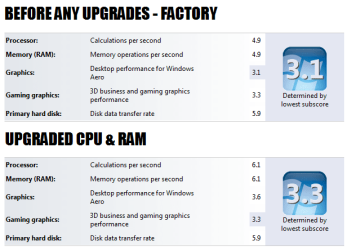
The CPU took a while to arrive, but I've got it installed now. Works like a charm :p
The laptop is insanely fast compared to before upgrading RAM and CPU.
 

Attachments

  • wei.png
    wei.png
    21.2 KB · Views: 28

My Computer My Computer

OS
Windows 7 x64
But how about the temperature?
T9300 works good?
Have the same situation, want to upgrade from t3000 to 9300 and i'm curious if it's complete compatible
 

My Computer My Computer

Computer type
Laptop
Computer Manufacturer/Model Number
ASUS K50IJ
OS
Windows 10

My Computers My Computers

System One System Two

  • Computer type
    PC/Desktop
    Computer Manufacturer/Model Number
    custom build
    OS
    Windows 7 HP 64
    CPU
    i5 6600K - 800MHz to 4200MHz
    Motherboard
    GA-Z170-HD3P
    Memory
    4+4G GSkill DDR4 3000
    Graphics Card(s)
    IG - Intel 530
    Monitor(s) Displays
    Samsung 226BW
    Screen Resolution
    1680x1050
    Hard Drives
    (1) -1 SM951 – 128GB M.2 AHCI PCIe SSD drive for Windows 7 and Lubuntu
    (2) -1 WD SATA 3 - 1T for Data
    (3) -1 WD SATA 3 - 1T for backup
    PSU
    Thermaltake 450W TR2 gold
    Keyboard
    Old and good Chicony mechanical keyboard
    Mouse
    Logitech mX performance - 9 buttons (had to disable some)
    Internet Speed
    500Mb/s
    Browser
    Firefox 64
    Other Info
    TinyWall firewall
  • Computer type
    Laptop
    System Manufacturer/Model Number
    Asus Q550LF
    OS
    Windows 7 Pro
    CPU
    i7-4500U 800MHz to 3.0GHz
    Motherboard
    Asus Q550LF
    Memory
    (4+4)G DDR3 1600
    Graphics Card(s)
    IG intel 4400 + NVIDIA GeForce GT 745M
    Sound Card
    Realtek
    Monitor(s) Displays
    LG Display LP156WF4-SPH1
    Screen Resolution
    1920 x 1080
    Hard Drives
    BX500 120G SSD for Windows and programs +
    1T HDD for data
    Internet Speed
    500 Mb/s
    Browser
    Firefox
    Other Info
    TinyWall firewall
Stone Cold. Compared to some.

HeQuE,
The T9300 is such a great upgrade from the T3000. I can watch HD videos on YouTube now. (not the 60fps, those lag) and I've seen a significant improvement in some games I play (Algodoo, a CPU-intensive physics simulator, Minecraft, Sims 2)

It has been a few months and I have had no issues what so ever, and I use my ASUS as my main laptop, daily.

The temperatures are just fine. When browsing web, or watching videos the fan doesn't even come on. It is only when I do CPU-heavy tasks that it turns on, rarely at a full blast. I haven't had it overheat, or even get as hot as my HP Pavilion DV6 does, and I did the same things to both; disassemble, clean the fan, clean the heatsink, apply new thermal paste.

Both the T3000 and T9300 have the same wattage (30W) so I really wouldn't worry about heat being an issue, I can reassure you from my own experience that it is extremely unlikely that you'll have any heat problems if you clean the fan, heatsink and apply a good-quality thermal paste, properly.

Right now, after using the laptop for about 8 hours, I have two web browsers open, plenty of tabs, some other programs.. and as I'm writing this, the CPU temp is 36°C (96°F) I cannot remember the highest temperature I ever got, but I don't remember it ever hitting 80°C.

Some more specific information:
Model: ASUS K50IJ-SX036
Upgraded from Intel Celeron T3000 to Intel Core 2 Duo T9300

Megahertz07,
Great tool! my temperature monitor of choice. It's a shame it hasn't been updated in so long though. Still works, however.

While I wouldn't worry about the temperatures because of the upgrade, I would monitor the temperatures after the upgrade for some time, to make sure they're fine, just in case there wasn't enough thermal paste, or some other issue like an unplugged fan (happens sometimes... haha)

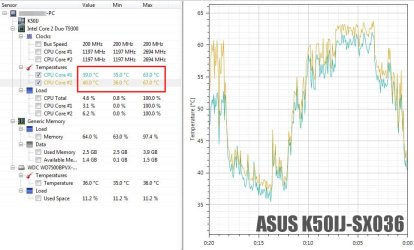
Here's a screenshot from OHM. Past 20 minutes. At its lowest temp, I was writing this post. At the highest, I was messing around in Minecraft and had a Full HD movie playing in VLC.

< see attached image >
 

Attachments

  • Capture.JPG
    Capture.JPG
    86.8 KB · Views: 3

My Computer My Computer

OS
Windows 7 x64
Open hardware monitor has just released a new version that is compatible with new hardware.
 

My Computers My Computers

System One System Two

  • Computer type
    PC/Desktop
    Computer Manufacturer/Model Number
    custom build
    OS
    Windows 7 HP 64
    CPU
    i5 6600K - 800MHz to 4200MHz
    Motherboard
    GA-Z170-HD3P
    Memory
    4+4G GSkill DDR4 3000
    Graphics Card(s)
    IG - Intel 530
    Monitor(s) Displays
    Samsung 226BW
    Screen Resolution
    1680x1050
    Hard Drives
    (1) -1 SM951 – 128GB M.2 AHCI PCIe SSD drive for Windows 7 and Lubuntu
    (2) -1 WD SATA 3 - 1T for Data
    (3) -1 WD SATA 3 - 1T for backup
    PSU
    Thermaltake 450W TR2 gold
    Keyboard
    Old and good Chicony mechanical keyboard
    Mouse
    Logitech mX performance - 9 buttons (had to disable some)
    Internet Speed
    500Mb/s
    Browser
    Firefox 64
    Other Info
    TinyWall firewall
  • Computer type
    Laptop
    System Manufacturer/Model Number
    Asus Q550LF
    OS
    Windows 7 Pro
    CPU
    i7-4500U 800MHz to 3.0GHz
    Motherboard
    Asus Q550LF
    Memory
    (4+4)G DDR3 1600
    Graphics Card(s)
    IG intel 4400 + NVIDIA GeForce GT 745M
    Sound Card
    Realtek
    Monitor(s) Displays
    LG Display LP156WF4-SPH1
    Screen Resolution
    1920 x 1080
    Hard Drives
    BX500 120G SSD for Windows and programs +
    1T HDD for data
    Internet Speed
    500 Mb/s
    Browser
    Firefox
    Other Info
    TinyWall firewall
Open hardware monitor has just released a new version that is compatible with new hardware.

That's wonderful, I can confirm. I haven't checked their website in a while. Very happy to see that the project is not dead!

Thanks

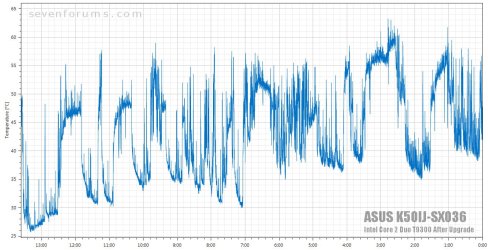
Here's a temperature graph from today, the whole day. Hasn't even hit 70°C < see attached picture >
 

Attachments

  • allday.jpg
    allday.jpg
    150.9 KB · Views: 2
Last edited:

My Computer My Computer

OS
Windows 7 x64
Back
Top