
Latest Version of Malwarebytes

Hi:

Ummm, version 1.75 has not been supported for a long time.
It may still be getting database updates, but I'm not sure.

Version 2.x has been out since March 2014.
It runs on everything from XP to 10.

I highly encourage you to upgrade to 2.2.1.1043, rather than staying with 1.75.
2.2.1.1043 is stable and much more capable than 1.75.
You are far less protected with 1.75 than you would be with 2.2.1.1043.
And, if 1.75 is not receiving updates any longer, the risk of both F/Ps and F/Ns increases substantially.
It would be unhelpful to run 1.75 without current databases.

Alas, in part of the strong-arm tactics to force users to upgrade to MB3, it seems they are no longer offering the installer for 2.2.1.1043 at the MBAM product page or anywhere on the main site.
Perhaps there is a hidden link tucked away somewhere.
As of this moment, it's still available at bleepingcomputer and probably at other 3rd-party sites, such as filehippo or majorgeeks.
I would be VERY careful getting it anywhere else (including cnet), as the file may come with unwanted PUPs or worse....

Cheers,
MM

Thanks. Version 1.75 is still supported with full definition updating provided.

The reason I haven't upgraded to 2.x before is that every time I've considered doing so there has been some problem or other with it, and for a long time it seemed as if it was still in beta in all but name. Bear in mind I'm only interested in the free version, the forced quarantine aspect of the paid version has been off-putting and many people regard manual scans with the free version coupled with live protection from a separate AV program as giving adequate cover for most needs.

If you're saying that those issues have now been addressed and that 2.x is now fully reliable then I'll certainly look again at upgrading to it now rather than waiting for 3.x to settle down, but I've never had a single problem with 1.75 and I'm one of the "if it ain't broke, don't fix it" brigade! If they withdrew all support including definition updates for 1.75 then of course I'd drop it immediately.
 

My Computer My Computer

Computer type
PC/Desktop
Computer Manufacturer/Model Number
Custom build by PC Specialist
OS
Windows 7 Home Premium 64
CPU
AMD Phenom II X4 955
Motherboard
Asus M4A78T-E
Memory
8GB Corsair XMS3 DDR3
Graphics Card(s)
Gigabyte Geforce GTX 960 2GB
Sound Card
SB Audigy
Monitor(s) Displays
BenQ 24"
Screen Resolution
1920 x 1080
Hard Drives
500GB Serial ATA
PSU
1010W Quiet Quad Rail
Case
Antec 900
Cooling
Fenrir
Keyboard
Corsair
Mouse
Logitech
Internet Speed
20mbps
Antivirus
MSE plus MBAM 2.x Free
Browser
Chrome
Other Info
Second desktop different spec but similar level.
Hi:

No, 1.75 is no longer supported.

It might -- as of today -- get database updates.
But I would not expect that to last much longer.
Heck, they plan to mothball MBAM2 in just 6 months.
So I do not know what they plan to do with 1.75, as far as providing databases between now and June 2017.

Malwarebytes | Malwarebytes Support - Home Products Lifecyle Policy

Version 2 has been out since March 2014.
Version 2.2.1.1043 has been out since at least March of 2016.
Version 1.75 lacks many scanning and protection features present in 2.2.1.1043.
It's not just about "databases" and "signatures".
And it has not received performance, stability or security patches since 2014.

So, yeah, I understand the reluctance to upgrade.
I'm not a "bleeding edge" early adopter, either.
And I am in no hurry to move to MB3.
But there's no compelling reason to stay now with a version of MBAM that was outdated nearly 3 years ago.

If and when you upgrade, going from 1.75 to 3.x will be a REAL shocker.
Doing so from 2.2.1.1043 will be less of a jolt.

It's up to you, but it's a false sense of comfort to think that 1.75 is protecting you as well as 2.2.1.1043.

Cheers,
MM
 
Last edited:

My Computer My Computer

Computer type
PC/Desktop
Computer Manufacturer/Model Number
Dell Studio XPS 8500
OS
OEM Windows 7 Ult (x64) SP1
CPU
Intel Core-i7 3770 @ 3.4 GHz
Motherboard
"Dell" branded
Memory
16 GB DDR3 SDRAM @ 1333 MHz
Graphics Card(s)
NVidia GeForce GT620 1 GB
Sound Card
THX TruStudio PC
Monitor(s) Displays
Dell U2410 Full HD
Hard Drives
2.0 TB SATA2 @ 7200 RPM
PSU
350W
Keyboard
MS 4000 Ergon - Wired
Mouse
Logitech Anywhere MX
Internet Speed
Cable HSI w/Turbo (router)
Antivirus
KIS-MBAM Premium-MBAE Premium
Browser
Fx (current version); IE
Other Info
And a Win7/64 Pro laptop; And a Win10/64 Pro desktop.
Thanks MM.

As for support, there's no "might be" about current database support for 1.75, it's definitely still provided as I update it every time I scan. Mind you, I'm surprised it's still happening and I think that it was almost certainly extended beyond the initial intended period because of teething troubles with 2.x. As soon as I saw the initial announcement of 3.x my first reaction was to anticipate all support for 1.75 coming to an abrupt end.

I shall therefore aim to upgrade to 2.x after all the Christmas rush is over, initially on one machine to see how it goes. That's something I've been thinking about doing recently, with that timescale in mind. Do you have any tips on the recommended settings in terms of the extra things like rootkit detection which I seem to recall slowed the scanning down and caused some initial issues? What's the modern equivalent of the "Quick" scan on 1.75? Are those extra features included in the free version?

Thanks for your time.
 

My Computer My Computer

Computer type
PC/Desktop
Computer Manufacturer/Model Number
Custom build by PC Specialist
OS
Windows 7 Home Premium 64
CPU
AMD Phenom II X4 955
Motherboard
Asus M4A78T-E
Memory
8GB Corsair XMS3 DDR3
Graphics Card(s)
Gigabyte Geforce GTX 960 2GB
Sound Card
SB Audigy
Monitor(s) Displays
BenQ 24"
Screen Resolution
1920 x 1080
Hard Drives
500GB Serial ATA
PSU
1010W Quiet Quad Rail
Case
Antec 900
Cooling
Fenrir
Keyboard
Corsair
Mouse
Logitech
Internet Speed
20mbps
Antivirus
MSE plus MBAM 2.x Free
Browser
Chrome
Other Info
Second desktop different spec but similar level.
Still playing around with 3.0 and experiencing some odd behavior. Might have to revert back to the previous version.

There is a way to disable program update in the settings control page should users want to opt-out of the auto-update to the 3.0 version.

Wow, this new version is closer to being a resource hog.
 
Last edited:

My Computer My Computer

Computer type
PC/Desktop
OS
Windows 7 Home 64-bit
I'm still using v1.75 (free) on my PC and haven't had definition file update problems so far.
I'll update my PC when this is required.
I do have v2 on another PC and it only seems to do a full scan.
I'm hoping that it is the definition file updates that are more critical than the version update. I also run Malwarebytes Anti-Rootkit from time to time.
 

My Computer My Computer

Computer type
PC/Desktop
Computer Manufacturer/Model Number
Own build
OS
Windows 7x64 Home Premium SP1
CPU
Intel i7 2600k
Motherboard
ASUS P8Z68 Deluxe
Memory
G.Skill Ripjaws (DDR3-1600) 2x4GB
Graphics Card(s)
Nvidia GeForce GTS 450; Intel HD Graphics 3000(GT2+)
Monitor(s) Displays
Dell Ultrasharp IPS panel U2311H, Samsung SyncMaster P2350
Screen Resolution
1920x1080
Hard Drives
Samsung 850 Pro SSD 256GB, Samsung SSD 840 120GB, Seagates 1TB Barracuda ST31000528AS x2
PSU
Seasonic M12II 520W
Case
Lian Li Lancool PC-K60
Cooling
Case: 1x120mm, 3x140mm CPU: Hyper 212+
Keyboard
Logitech MK520 (wireless)
Mouse
Logitech MK520
Internet Speed
6-7 Mbps
Antivirus
Norton Security Premium, Malwarebytes on 2 (MSE on 3rd PC)
Browser
FireFox
Other Info
Audio: Logitech Z523 2.1

I'm not entirely clear from that link when definition updates will stop being released. I assume it's at the End of Life as it certainly hasn't been at the End of Maintenance, and I'm also puzzled as to why they haven't reported the release of this Product Lifecycle Policy on their forum, so far as I can see. Does it not qualify as "Malwarebytes News"? No pop-up window when you open a product launcher?
 

My Computer My Computer

Computer type
PC/Desktop
Computer Manufacturer/Model Number
Custom build by PC Specialist
OS
Windows 7 Home Premium 64
CPU
AMD Phenom II X4 955
Motherboard
Asus M4A78T-E
Memory
8GB Corsair XMS3 DDR3
Graphics Card(s)
Gigabyte Geforce GTX 960 2GB
Sound Card
SB Audigy
Monitor(s) Displays
BenQ 24"
Screen Resolution
1920 x 1080
Hard Drives
500GB Serial ATA
PSU
1010W Quiet Quad Rail
Case
Antec 900
Cooling
Fenrir
Keyboard
Corsair
Mouse
Logitech
Internet Speed
20mbps
Antivirus
MSE plus MBAM 2.x Free
Browser
Chrome
Other Info
Second desktop different spec but similar level.

I'm not entirely clear from that link when definition updates will stop being released. I assume it's at the End of Life as it certainly hasn't been at the End of Maintenance, and I'm also puzzled as to why they haven't reported the release of this Product Lifecycle Policy on their forum, so far as I can see. Does it not qualify as "Malwarebytes News"? No pop-up window when you open a product launcher?

I think they're saying that it will be at their discretion when they stop providing definition updates after the End of Life date.

This new version is a drag because they it actually acts like a anti-virus software. So, if you are already running a different anti-virus program, it will be incompatible and create some havoc on your machine. And as far as I know, there isn't a way to disable the antivirus portion of the MBAM.

If this is the future of Malwarebyte products, they will lose customers who already prefer a different security software that offers a separate anti-virus protection.
 

My Computer My Computer

Computer type
PC/Desktop
OS
Windows 7 Home 64-bit

I'm not entirely clear from that link when definition updates will stop being released. I assume it's at the End of Life as it certainly hasn't been at the End of Maintenance, and I'm also puzzled as to why they haven't reported the release of this Product Lifecycle Policy on their forum, so far as I can see. Does it not qualify as "Malwarebytes News"? No pop-up window when you open a product launcher?

I think they're saying that it will be at their discretion when they stop providing definition updates after the End of Life date.

This new version is a drag because they it actually acts like a anti-virus software. So, if you are already running a different anti-virus program, it will be incompatible and create some havoc on your machine. And as far as I know, there isn't a way to disable the antivirus portion of the MBAM.

If this is the future of Malwarebyte products, they will lose customers who already prefer a different security software that offers a separate anti-virus protection.

I think a lot of people have been fearful of the way that Malwarebytes are buying up other types of products and combining them into their own as a single product. It's always been seen as a good thing in the security software arena not to "put all your eggs in one basket" but to rely on several distinct products so that if one misses something it's picked up by another. The way everything is being combined into one single Malwarebytes product runs contrary to that. Indeed, MBAM has been consistently marketed very much on the basis that it was an Anti-Malware product and not just another Anti-Virus program, and as such was complementary to such programs rather than an alternative to them.

Also, it's one thing for Malwarebytes to say that their AV element will be compatible with other AV programs, but will the developers of those other programs agree that their product is compatible with the Malwarebytes product? I suspect not, and where will that leave the user?
 

My Computer My Computer

Computer type
PC/Desktop
Computer Manufacturer/Model Number
Custom build by PC Specialist
OS
Windows 7 Home Premium 64
CPU
AMD Phenom II X4 955
Motherboard
Asus M4A78T-E
Memory
8GB Corsair XMS3 DDR3
Graphics Card(s)
Gigabyte Geforce GTX 960 2GB
Sound Card
SB Audigy
Monitor(s) Displays
BenQ 24"
Screen Resolution
1920 x 1080
Hard Drives
500GB Serial ATA
PSU
1010W Quiet Quad Rail
Case
Antec 900
Cooling
Fenrir
Keyboard
Corsair
Mouse
Logitech
Internet Speed
20mbps
Antivirus
MSE plus MBAM 2.x Free
Browser
Chrome
Other Info
Second desktop different spec but similar level.
I'm not entirely clear from that link when definition updates will stop being released. I assume it's at the End of Life as it certainly hasn't been at the End of Maintenance, and I'm also puzzled as to why they haven't reported the release of this Product Lifecycle Policy on their forum, so far as I can see. Does it not qualify as "Malwarebytes News"? No pop-up window when you open a product launcher?

I think they're saying that it will be at their discretion when they stop providing definition updates after the End of Life date.

This new version is a drag because they it actually acts like a anti-virus software. So, if you are already running a different anti-virus program, it will be incompatible and create some havoc on your machine. And as far as I know, there isn't a way to disable the antivirus portion of the MBAM.

If this is the future of Malwarebyte products, they will lose customers who already prefer a different security software that offers a separate anti-virus protection.

I think a lot of people have been fearful of the way that Malwarebytes are buying up other types of products and combining them into their own as a single product. It's always been seen as a good thing in the security software arena not to "put all your eggs in one basket" but to rely on several distinct products so that if one misses something it's picked up by another. The way everything is being combined into one single Malwarebytes product runs contrary to that. Indeed, MBAM has been consistently marketed very much on the basis that it was an Anti-Malware product and not just another Anti-Virus program, and as such was complementary to such programs rather than an alternative to them.

Also, it's one thing for Malwarebytes to say that their AV element will be compatible with other AV programs, but will the developers of those other programs agree that their product is compatible with the Malwarebytes product? I suspect not, and where will that leave the user?

You're right. There has been talk already that Kaspersky and McAfee, which both having worked alongside MBAM, is now having conflicts with the new version. When I noticed a slow down in system performance and freezing, I looked at the Action Center and it said there were two Virus protection and two Spyware protection agents running that were causing the problems.

I think if Malwarebytes wanted to jump into the antivirus or create their own security suite software, they should do so independently of MBAM. That way users have a choice in what kind of protection they prefer.
 

My Computer My Computer

Computer type
PC/Desktop
OS
Windows 7 Home 64-bit
I'm still using v1.75 (free) on my PC and haven't had definition file update problems so far.
I'll update my PC when this is required.
I do have v2 on another PC and it only seems to do a full scan.
I'm hoping that it is the definition file updates that are more critical than the version update. I also run Malwarebytes Anti-Rootkit from time to time.

For those of you still running a version that was outdated nearly 3 years ago, please see my previous reply, quoted below.

I tried my best to explain that the protection has MUCH more to do than "database" updates.
The scanning engines, heuristics and other features "under the hood" for version 2 are much more robust than in version 1.75. (I used to have a list of all the performance/stability/security enhancements for 2 vs. 1, but TBH, it's been such a long time since v1 was replaced, I cannot find it.)
For one thing, anti-rootkit scanning is BUILT-IN to version 2, making it unnecessary to run MBAR-BETA (Malwarebytes Anti-Rootkit BETA) as a standalone. (MBAR-BETA is not intended for casual DIY use by home users without expert guidance -- see disclaimer HERE.)

The point is that 1.75 may still be getting "database" updates for a little while longer.
But that does not mean it is providing good protection or cleanup capability.
The version 2 program itself -- in terms of its scanning engines, anti-rootkit, heuristics and many other features -- provides better protection & cleanup than version 1.75.
Version 2 was released nearly 3 years ago.
The last build was released nearly a year ago.
It was and is stable.
It runs on all Windows platforms (except Insider builds of Win10), even pre-SSE2 processors under XP.

There is simply no reason in December 2016 to run a weaker, less capable version of MBAM that outdated nearly 3 years ago. It can NOT provide the same level of protection OR malware removal.

If you have a valid, legal, 1-PC, lifetime license for version 1.75 (the only type that was sold back then), then it can be updated to version 2 (and later to version 3).
I do not work for Malwarebytes and I, too, share concerns about MB3.
But having worked at their forum for nearly 7 years, with nearly 23K posts, I respectfully suggest that you consider updating to version 2.2.1.1043 while you still can.
The longer you wait, the more of an adjustment it will be for the UI/UX and the more likely you will run into problems migrating your license.

Running 1.75 will only convey a false sense of protection, since "database updates" are only a small part of the protection afforded by the more up-to-date program version.

But, it's up to you, as always.


Hi:

No, 1.75 is no longer supported.

It might -- as of today -- get database updates.
But I would not expect that to last much longer.
Heck, they plan to mothball MBAM2 in just 6 months.
So I do not know what they plan to do with 1.75, as far as providing databases between now and June 2017.

Malwarebytes | Malwarebytes Support - Home Products Lifecyle Policy

Version 2 has been out since March 2014.
Version 2.2.1.1043 has been out since at least March of 2016.
Version 1.75 lacks many scanning and protection features present in 2.2.1.1043.
It's not just about "databases" and "signatures".
And it has not received performance, stability or security patches since 2014.

So, yeah, I understand the reluctance to upgrade.
I'm not a "bleeding edge" early adopter, either.
And I am in no hurry to move to MB3.
But there's no compelling reason to stay now with a version of MBAM that was outdated nearly 3 years ago.

If and when you upgrade, going from 1.75 to 3.x will be a REAL shocker.
Doing so from 2.2.1.1043 will be less of a jolt.

It's up to you, but it's a false sense of comfort to think that 1.75 is protecting you as well as 2.2.1.1043.

Cheers,
MM

Good luck,

MM
 

My Computer My Computer

Computer type
PC/Desktop
Computer Manufacturer/Model Number
Dell Studio XPS 8500
OS
OEM Windows 7 Ult (x64) SP1
CPU
Intel Core-i7 3770 @ 3.4 GHz
Motherboard
"Dell" branded
Memory
16 GB DDR3 SDRAM @ 1333 MHz
Graphics Card(s)
NVidia GeForce GT620 1 GB
Sound Card
THX TruStudio PC
Monitor(s) Displays
Dell U2410 Full HD
Hard Drives
2.0 TB SATA2 @ 7200 RPM
PSU
350W
Keyboard
MS 4000 Ergon - Wired
Mouse
Logitech Anywhere MX
Internet Speed
Cable HSI w/Turbo (router)
Antivirus
KIS-MBAM Premium-MBAE Premium
Browser
Fx (current version); IE
Other Info
And a Win7/64 Pro laptop; And a Win10/64 Pro desktop.
Hi,
Combining malware & antivirus protection just simplifies it for users so if and when mbam works out the bugs it probably will be a nice product.
Personally 2.0 has for the most part been fine all except some custom scheduling for updating is all I've ever had and pretty much still have issues with it doing
But I've since scrapped the need for mbam pro/ premium updating it's self and just do it manually since that is just too tough for it to do for some odd reason that even mbam support can't figure out no matter how many times one clean removes and reinstalls :p

What really needs to be changed is the silly deactivate before removing mbam
That is such a childish requirement it's insane :)
 

My Computer My Computer

Computer type
PC/Desktop
Computer Manufacturer/Model Number
Custom assembled by me :}
OS
Win-7-Pro64bit 7-H-Prem-64bit
CPU
i7-5930K 2nd i9-9940x both water blocked VRM's too
Motherboard
ASUS SABERTOOTH X99 2nd ASUS x299 Apex
Memory
Trident-z 3200C14 2nd Trident-z 3600C16
Graphics Card(s)
EVGA 1080ti ftw3 2nd Titan Xp both water blocked
Sound Card
Built-in Realtek
Monitor(s) Displays
1-AOC G2460PG 24"G-Sync 144Hz/ 2nd 1-ASUS VG248QE 24" 144Hz
Screen Resolution
1920 x 1080 144Hz
Hard Drives
2-Samsung M.2 Evo & Evo Plus
2-Samsung 850 EVO 500GB SSD's/ 3-2.5 W.D. Black 1tb-&3-1tb/3-3.5 WD Black 1tb hdd's
PSU
EVGA SuperNOVA 1000-P2 2nd 1200-P2
Case
2-Corsair Obsidian Series 450D Black ATX Mid Tower
Cooling
Custom water loops
Keyboard
Logitech G710+/ 2nd Logitech G910
Mouse
2-RedDragon M901 Perdition 16400 dpi Gaming mouse = wired
Internet Speed
Comcast Ping 19ms 89.31mbps download speed 6.12mbps upload
Antivirus
Malwarebytes Pro/ Superantispyware Pro
Browser
FireFox & Pale moon
Other Info
2nd ASUS X299 Apex/Intel i9-9940x with Custom water loop/7H-Prem-x64/Corsair 450D case/Ram Trident-z 3600C16 4x8gb / Samsung970Evo plus 500gb SSD/Dual ssd EZ swap evo/PSU EVGA SuperNova 1200w-P2 80+Platinum/GPU Titan Xp /8-ML-140 on push-pull on 2-280GTX rads
What really needs to be changed is the silly deactivate before removing mbam
That is such a childish requirement it's insane :)
That's license validation step, so that the license can be re-activated without penalty.
Adobe does it.
Many other security vendors do it.
MS requires one to phone activate for their OS/software when the # of activations exceeds the limit.
It's to prevent piracy.
There may be other ways to enforce license validation, but that is how they have done it.

-----------------

Combining malware & antivirus protection just simplifies it for users so if and when mbam works out the bugs it probably will be a nice product.
As far as whether MB3 really is an "AV" or just an "AV replacement" (as they have claimed), or neither of those, one of their own forum experts recently posted THIS.

Until AV comparatives and other outside testing confirms that MB3 performs well head-to-head against longstanding, reputable, high-performing, fully-flagged AVs as SOLE protection, then the claims of "AV replacement" seem only to be marketing taglines.
And even the company does not claim that MB3 is an "AV".
Their niche has always been largely non-viral malware.
They have added anti-exploit and anti-ransomware.
But they have not said much/anything at all about true "anti-virus" capability.
(Unfortunately, this fancy wording about "AV replacement" does not seem to have prevented a significant number of compatibility problems with real AVs. Time will tell...)

It's a leap of faith at the moment to trust this new, unstable product for sole protection.
The company certainly enjoys a longstanding favorable reputation with their previous offerings.
Each user must research the upsides and downsides and make a decision about when/whether to update.

EDIT: There's also the valid question as to whether one can/should trust a single application as sole protection, no matter how good it is. That flies in the face of the longstanding recommendation for complementary, layered protection. A single program that claims to do it all is NOT layered or complementary protection. "Layers" connotes at least two different applications...

I, too, hope that the new product will someday soon live up to the hype, hopefully before the company mothballs their stable, flagship product.

Cheers,
MM
 
Last edited:

My Computer My Computer

Computer type
PC/Desktop
Computer Manufacturer/Model Number
Dell Studio XPS 8500
OS
OEM Windows 7 Ult (x64) SP1
CPU
Intel Core-i7 3770 @ 3.4 GHz
Motherboard
"Dell" branded
Memory
16 GB DDR3 SDRAM @ 1333 MHz
Graphics Card(s)
NVidia GeForce GT620 1 GB
Sound Card
THX TruStudio PC
Monitor(s) Displays
Dell U2410 Full HD
Hard Drives
2.0 TB SATA2 @ 7200 RPM
PSU
350W
Keyboard
MS 4000 Ergon - Wired
Mouse
Logitech Anywhere MX
Internet Speed
Cable HSI w/Turbo (router)
Antivirus
KIS-MBAM Premium-MBAE Premium
Browser
Fx (current version); IE
Other Info
And a Win7/64 Pro laptop; And a Win10/64 Pro desktop.
Hi,
Well the statement I got was mbam pro one could essentially use the same key on three machines with this 3 times activation too :p
As long as the first hoop is always used to deactivate it before removal.

It shouldn't be too tough to phone back to the mbam home planet to confirm a activation key that is being used on a machine and if another one is also using it
Win-10 I've heard using an amazing thing called an ip address in it's auto activation process too :p
 

My Computer My Computer

Computer type
PC/Desktop
Computer Manufacturer/Model Number
Custom assembled by me :}
OS
Win-7-Pro64bit 7-H-Prem-64bit
CPU
i7-5930K 2nd i9-9940x both water blocked VRM's too
Motherboard
ASUS SABERTOOTH X99 2nd ASUS x299 Apex
Memory
Trident-z 3200C14 2nd Trident-z 3600C16
Graphics Card(s)
EVGA 1080ti ftw3 2nd Titan Xp both water blocked
Sound Card
Built-in Realtek
Monitor(s) Displays
1-AOC G2460PG 24"G-Sync 144Hz/ 2nd 1-ASUS VG248QE 24" 144Hz
Screen Resolution
1920 x 1080 144Hz
Hard Drives
2-Samsung M.2 Evo & Evo Plus
2-Samsung 850 EVO 500GB SSD's/ 3-2.5 W.D. Black 1tb-&3-1tb/3-3.5 WD Black 1tb hdd's
PSU
EVGA SuperNOVA 1000-P2 2nd 1200-P2
Case
2-Corsair Obsidian Series 450D Black ATX Mid Tower
Cooling
Custom water loops
Keyboard
Logitech G710+/ 2nd Logitech G910
Mouse
2-RedDragon M901 Perdition 16400 dpi Gaming mouse = wired
Internet Speed
Comcast Ping 19ms 89.31mbps download speed 6.12mbps upload
Antivirus
Malwarebytes Pro/ Superantispyware Pro
Browser
FireFox & Pale moon
Other Info
2nd ASUS X299 Apex/Intel i9-9940x with Custom water loop/7H-Prem-x64/Corsair 450D case/Ram Trident-z 3600C16 4x8gb / Samsung970Evo plus 500gb SSD/Dual ssd EZ swap evo/PSU EVGA SuperNova 1200w-P2 80+Platinum/GPU Titan Xp /8-ML-140 on push-pull on 2-280GTX rads
Each company does it differently.
And it's much harder at the back end than it appears to the end user.
I won't defend or attack the way they choose to enforce license validation.
Adobe and other publishers have long required "deactivation" before uninstalling their licensed products, so it's not a new model.

I will say that licensing has been a complicated mess ever since they started to enforce it.
This was further complicated by the number of times they changed their licensing model.
100s of forum posts and who-knows-how-many help desk tickets have arisen out of that.
And then there was the "amnesty program" that offered free licenses to those with cracked/pirated licenses, both unintentional and deliberate.

Which brings me to this:
Different licenses, purchased at different times, are valid for different numbers of computers.

An "original", 1-PC lifetime license (sold before March 2014 and for a short while/via promo after that) can be activated on only ONE system at a time. Nothing new there.

An "up-to-3 PC" subscription license (roughly March 2014 until September 2015) can be activated on up to 3 PCs in the same household at one time and must be renewed. Nothing new there, either.

A 1 PC, subscription license (after September 2015) can be activated on only one system at a time and must be renewed. Nothing new there, either.

There never was a MULTI-PC "lifetime" license -- any such license is fake. Absolutely nothing new there.

I have a feeling that some folks who refuse to upgrade from 1.75 to 2.2.1.1043 might be using an illegal license, for whatever reason. Alas, the amnesty program that would have gotten them a free, new, legal license ended long, long ago. So, yes, if they try to upgrade an illegal 1.75 Pro license either to MBAM2 Premium or MB3 Premium, they will be out of luck. The company was more than generous with their amnesty program.

Whatever the company uses for licensing and validation is up to them. Every time they change the model (as they are doing now by incorporating MBAE Premium into MB3 Premium), they make more of a mess. I guess they will need to address that....

...Until they change the policy again.

MM
 

My Computer My Computer

Computer type
PC/Desktop
Computer Manufacturer/Model Number
Dell Studio XPS 8500
OS
OEM Windows 7 Ult (x64) SP1
CPU
Intel Core-i7 3770 @ 3.4 GHz
Motherboard
"Dell" branded
Memory
16 GB DDR3 SDRAM @ 1333 MHz
Graphics Card(s)
NVidia GeForce GT620 1 GB
Sound Card
THX TruStudio PC
Monitor(s) Displays
Dell U2410 Full HD
Hard Drives
2.0 TB SATA2 @ 7200 RPM
PSU
350W
Keyboard
MS 4000 Ergon - Wired
Mouse
Logitech Anywhere MX
Internet Speed
Cable HSI w/Turbo (router)
Antivirus
KIS-MBAM Premium-MBAE Premium
Browser
Fx (current version); IE
Other Info
And a Win7/64 Pro laptop; And a Win10/64 Pro desktop.
Thanks for your continued advice, MM.

I have now installed MBAM 2.2.1 (Free) on my secondary machine without issues, and have run an initial Threat Scan ok.

A couple of queries - by default the rootkit part of the scan is unchecked, is that correct and should regular or occasional rootkit scans be done? Do they take much longer and are there any issues associated with them? The Threat Scan took about 11 minutes, incidentally.

Also, by default the Explorer context menu entry is checked - is that correct and what does it mean?

I'd hope given modern standards on these things that the latest version would have tooltip descriptions of these sorts of things. Possibly something to bear in mind when providing any beta feedback?
 

My Computer My Computer

Computer type
PC/Desktop
Computer Manufacturer/Model Number
Custom build by PC Specialist
OS
Windows 7 Home Premium 64
CPU
AMD Phenom II X4 955
Motherboard
Asus M4A78T-E
Memory
8GB Corsair XMS3 DDR3
Graphics Card(s)
Gigabyte Geforce GTX 960 2GB
Sound Card
SB Audigy
Monitor(s) Displays
BenQ 24"
Screen Resolution
1920 x 1080
Hard Drives
500GB Serial ATA
PSU
1010W Quiet Quad Rail
Case
Antec 900
Cooling
Fenrir
Keyboard
Corsair
Mouse
Logitech
Internet Speed
20mbps
Antivirus
MSE plus MBAM 2.x Free
Browser
Chrome
Other Info
Second desktop different spec but similar level.
Hi:

Rootkit scanning is disabled by default.
TMALSS it's up to the user whether or not to enable it.
It will -- by necessity -- increase scan times a bit.
So, if "fast scans" are very important to you (as they are for some users), then you may wish to leave it disabled.
(If your drive is encrypted by Bitlocker or any of several robust, 3rd-party encryption products, it would be pretty hard -- though not impossible -- to pick up a root-kit. So it will not be needed.)

Context menu scanning setting changed many times over the years between default ON and default OFF.
If you enable it, you might want to reboot the computer to be sure it sticks.
(Having said that, flat file scanning like that is a task better suited to your AV, especially since MBAM does not target many malicious file types that are covered by a traditional AV.)

As for tooltips/popups: most of those were eliminated over the years by user request.
MOST unfortunately, however, I am shocked to see that the company has summarily removed nearly all of their helpful user guides and KB articles for MBAM2.
This is VERY disappointing, as many users will need or want to continue to run version 2 until it is EOS/EOL. They seem to be sweeping it under the rug even before the 6-month deadline approaches.
THIS is all I can find.
I can only shake my head in disbelief and disappointment.

MM

P.S.
MBAM Free and MB3 are only manual, on-demand scanners to help remove infection already on the system. If you want real-time protection alongside your AV to help prevent infection, you need a paid license.
 

My Computer My Computer

Computer type
PC/Desktop
Computer Manufacturer/Model Number
Dell Studio XPS 8500
OS
OEM Windows 7 Ult (x64) SP1
CPU
Intel Core-i7 3770 @ 3.4 GHz
Motherboard
"Dell" branded
Memory
16 GB DDR3 SDRAM @ 1333 MHz
Graphics Card(s)
NVidia GeForce GT620 1 GB
Sound Card
THX TruStudio PC
Monitor(s) Displays
Dell U2410 Full HD
Hard Drives
2.0 TB SATA2 @ 7200 RPM
PSU
350W
Keyboard
MS 4000 Ergon - Wired
Mouse
Logitech Anywhere MX
Internet Speed
Cable HSI w/Turbo (router)
Antivirus
KIS-MBAM Premium-MBAE Premium
Browser
Fx (current version); IE
Other Info
And a Win7/64 Pro laptop; And a Win10/64 Pro desktop.
Indeed, MM, it is disappointing to find that on hitting on the link in the 1.75 dashboard to learn more about version 2 the link is to a page that no longer exists, and if you click on "Home Use" or somesuch it takes you to a page offering only the version 3 beta. References on the forum to version 2 have been removed and it took me a while to find a download link for it. It's beginning to look as if Malwarebytes are adopting the Microsoft approach of deciding for us what we will use and when. Thanks, however, for finding that guide.

I appreciate your comments about the free version versus the paid licence, but I'm happy with my AV running live and with MBAM being run manually, as in fact was recommended when I last chatted to my local repair centre. One thing that has always put me off the paid version is the inability to avoid automatic quarantining of detected items as that is something that can wreak havoc on the system over a detection that may turn out to be a false positive!
 

My Computer My Computer

Computer type
PC/Desktop
Computer Manufacturer/Model Number
Custom build by PC Specialist
OS
Windows 7 Home Premium 64
CPU
AMD Phenom II X4 955
Motherboard
Asus M4A78T-E
Memory
8GB Corsair XMS3 DDR3
Graphics Card(s)
Gigabyte Geforce GTX 960 2GB
Sound Card
SB Audigy
Monitor(s) Displays
BenQ 24"
Screen Resolution
1920 x 1080
Hard Drives
500GB Serial ATA
PSU
1010W Quiet Quad Rail
Case
Antec 900
Cooling
Fenrir
Keyboard
Corsair
Mouse
Logitech
Internet Speed
20mbps
Antivirus
MSE plus MBAM 2.x Free
Browser
Chrome
Other Info
Second desktop different spec but similar level.
Indeed, MM, it is disappointing to find that on hitting on the link in the 1.75 dashboard to learn more about version 2 the link is to a page that no longer exists, and if you click on "Home Use" or somesuch it takes you to a page offering only the version 3 beta. References on the forum to version 2 have been removed and it took me a while to find a download link for it. It's beginning to look as if Malwarebytes are adopting the Microsoft approach of deciding for us what we will use and when. Thanks, however, for finding that guide.

Not surprising for version 1.75, as it was outdated nearly 3 years ago.
VERY disappointing to see that Malwarebytes has adopted a "scorched earth" policy for their own products.
I can download KIS2015 from their own website now.
I can easily find Kasperky's own KB for their legacy products going back at least that far, with no problem either.

But Malwarebytes seems to very much foisting and forcing their new, unproven product on their customers. Yes, it does resemble recent activities by MS. We all know how well that worked.

I appreciate your comments about the free version versus the paid licence, but I'm happy with my AV running live and with MBAM being run manually, as in fact was recommended when I last chatted to my local repair centre.

Sorry, but that is old, outdated and inaccurate information.
MBAM (1 and 2) was designed specifically to run alongside a real-time AV to target certain non-viral threats not covered by the traditional AVs, especially zero-day and zero-hour threats.
That is the concept of "layered" protection.

Cleanup after the fact is always less desirable and sometimes less effective ("too late" when it comes to ransomware).


One thing that has always put me off the paid version is the inability to avoid automatic quarantining of detected items as that is something that can wreak havoc on the system over a detection that may turn out to be a false positive!
Sorry, but that's backwards.
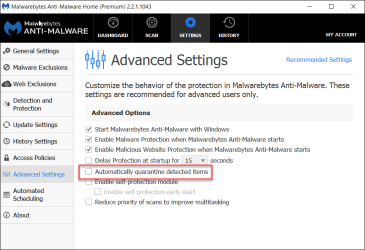
MBAM Premium does indeed afford the user the ability to disable automatic quarantine.
(MBAM Free does not, if I recall correctly.)
Although they have not had a really, really bad false-positive in a very, very long time, many Premium users prefer to disable automatic quarantine.
See screen shot, where it is disabled.
So, if you upgrade to paid, you'll have the ability to disable automatic quarantine.

Cheers,
MM
 

Attachments

  • Q1-2016-12-10_10-29-05.png
    Q1-2016-12-10_10-29-05.png
    25.9 KB · Views: 0

My Computer My Computer

Computer type
PC/Desktop
Computer Manufacturer/Model Number
Dell Studio XPS 8500
OS
OEM Windows 7 Ult (x64) SP1
CPU
Intel Core-i7 3770 @ 3.4 GHz
Motherboard
"Dell" branded
Memory
16 GB DDR3 SDRAM @ 1333 MHz
Graphics Card(s)
NVidia GeForce GT620 1 GB
Sound Card
THX TruStudio PC
Monitor(s) Displays
Dell U2410 Full HD
Hard Drives
2.0 TB SATA2 @ 7200 RPM
PSU
350W
Keyboard
MS 4000 Ergon - Wired
Mouse
Logitech Anywhere MX
Internet Speed
Cable HSI w/Turbo (router)
Antivirus
KIS-MBAM Premium-MBAE Premium
Browser
Fx (current version); IE
Other Info
And a Win7/64 Pro laptop; And a Win10/64 Pro desktop.
Is disabling automatic quarantining in the Premium version absolute, i.e. it doesn't merely give a limited time option in which to avoid automatic quarantine? There was a discussion some time ago about only having a few seconds in which to hit the "decline quarantine" button but perhaps that was in relation to the paid-for version 1.75, I really can't remember the details.
 

My Computer My Computer

Computer type
PC/Desktop
Computer Manufacturer/Model Number
Custom build by PC Specialist
OS
Windows 7 Home Premium 64
CPU
AMD Phenom II X4 955
Motherboard
Asus M4A78T-E
Memory
8GB Corsair XMS3 DDR3
Graphics Card(s)
Gigabyte Geforce GTX 960 2GB
Sound Card
SB Audigy
Monitor(s) Displays
BenQ 24"
Screen Resolution
1920 x 1080
Hard Drives
500GB Serial ATA
PSU
1010W Quiet Quad Rail
Case
Antec 900
Cooling
Fenrir
Keyboard
Corsair
Mouse
Logitech
Internet Speed
20mbps
Antivirus
MSE plus MBAM 2.x Free
Browser
Chrome
Other Info
Second desktop different spec but similar level.
Hi:

Yes, there was discussion, but it was many years ago.

I think the behavior is different from REAL-TIME protection (where there may be a time limit before an automatic action is taken, if the user does not intervene) and a SCAN (where there is not).

TBH, I do not recall the details and I have no way to test.
(Perhaps check the MBAM forum and for threads started by a user, shrugged. IIRC he was one of many who were interested in that feature/function.)

However, it does remain the case that one needs a paid, Premium license in order to be able to change "Advanced" settings, such as automatic quarantine.
With MBAM Free, the user has NO control over those "Advanced" settings.

And all of this will be moot soon enough, as they force version 2 into oblivion.

I expect that they may have already changed and will likely change again some of these settings and features for MB3.

MM
 

My Computer My Computer

Computer type
PC/Desktop
Computer Manufacturer/Model Number
Dell Studio XPS 8500
OS
OEM Windows 7 Ult (x64) SP1
CPU
Intel Core-i7 3770 @ 3.4 GHz
Motherboard
"Dell" branded
Memory
16 GB DDR3 SDRAM @ 1333 MHz
Graphics Card(s)
NVidia GeForce GT620 1 GB
Sound Card
THX TruStudio PC
Monitor(s) Displays
Dell U2410 Full HD
Hard Drives
2.0 TB SATA2 @ 7200 RPM
PSU
350W
Keyboard
MS 4000 Ergon - Wired
Mouse
Logitech Anywhere MX
Internet Speed
Cable HSI w/Turbo (router)
Antivirus
KIS-MBAM Premium-MBAE Premium
Browser
Fx (current version); IE
Other Info
And a Win7/64 Pro laptop; And a Win10/64 Pro desktop.
Back
Top