
You are using an out of date browser. It may not display this or other websites correctly.
You should upgrade or use an alternative browser.
You should upgrade or use an alternative browser.
How can I detect the other partition of my USB?
- Thread starter yargd
- Start date


Hello yargd mate I don't really know what you mean by detecting it because in the attached pic it is there labelled E:.
Now have you tried giving the other larger partition a letter?? if not do that and then right click on both and use the Explore in the PW program it will pull down what is in that partition.
If this is not what you mean let us know.
Now have you tried giving the other larger partition a letter?? if not do that and then right click on both and use the Explore in the PW program it will pull down what is in that partition.
If this is not what you mean let us know.
My Computer
At a glance
Desk1 7 Home Prem / Desk2 10 Pro / Main lap A...Desk1 i5 3750K / Laptop i7 GTX 860M / Desk2 i...Desk1 8GB (1866) / Desk2 16GB (1333) / Laptop...Desk 1& 2NVidia GTX 650 & Laptops on board Intel
- Computer type
- PC/Desktop
- Computer Manufacturer/Model Number
- Own build (new) Desk1 / Asus ROG Win 7 / Desk2 1st build
- OS
- Desk1 7 Home Prem / Desk2 10 Pro / Main lap Asus ROG 10 Pro 2 laptop Toshiba 7 Pro Asus P2520 7 & 10
- CPU
- Desk1 i5 3750K / Laptop i7 GTX 860M / Desk2 i5 2500
- Motherboard
- Desk1 Asus P877-V / Desk2 Gigabyte H67 UD3H / Laptop ?
- Memory
- Desk1 8GB (1866) / Desk2 16GB (1333) / Laptop 8Gb DDR3
- Graphics Card(s)
- Desk 1& 2NVidia GTX 650 & Laptops on board Intel
- Sound Card
- Desk 1 & 2 -XONAR DG Realtek High Def audio Laptop
- Monitor(s) Displays
- Desk 1 Benq HD 2450 / Desk2 Philips 24" / Laptop 17.5"
- Screen Resolution
- 1920x1080 D1 & D2 & Laptop 1
- Hard Drives
- Desk1 Samsung 120GB 830 SSD
Asus ROG 256GB 850 Pro SSD
Desk2 Samsung 840 256 SSD
Toshiba 120GB EVO
- PSU
- Desk 1 Corsair HX 1050/ Laptop ? / Desk 2 Corsair HX 650
- Case
- Desk 1 Cooler HAF XM ? Toshiba laptop / Desk2 Coolermaster
- Cooling
- Fans on all Desk1 -2 Desk2 - all Coolermasters 5 Laptop ?
- Keyboard
- Desk 1 MS Sidewinder X6 Desk 2 MS Sidewinder X 4
- Mouse
- Desk 1&2 - Gigabyte MS 900 gamer - laptop - Logitec wireless
- Internet Speed
- ADSL2+
- Other Info
- One other Desktop (tester) and spare Toshba laptop both with SSD's
Running Kaspersky 2016 ISS on all machines config'd identically
Logitec audio stereo systems on each machine (x3)
Canon MG5250MFC
Router/modem TP-Link running WPA2SK

- Local time
- 7:57 PM
- Messages
- 5,915
Hmmmm..... . No details at all. Nothing to say how you partitioned a flash drive?
When and wherefrom did you buy that 128GB Kingston flash drive? And for what price? Can you tell us the exact model name/number? It will be fine if you can show it in the Kingston website.
To me it looks like a fake drive. I may be wrong too. Please verify the product here How To Identify Kingston Product | Kingston
Alternatively, backup all data in the E: drive, delete both partitions and try to format it with Partition Wizard. . Report the results.
BTW, I see you are using Partition Wizard Professional 9.1. Did you buy a valid license? Just curious.
And again, please upload full screenshots always to SevenForum Servers and not to any third party servers. Screenshots and Files - Upload and Post in Seven Forums
. No details at all. Nothing to say how you partitioned a flash drive?When and wherefrom did you buy that 128GB Kingston flash drive? And for what price? Can you tell us the exact model name/number? It will be fine if you can show it in the Kingston website.
To me it looks like a fake drive. I may be wrong too. Please verify the product here How To Identify Kingston Product | Kingston
Alternatively, backup all data in the E: drive, delete both partitions and try to format it with Partition Wizard. . Report the results.
BTW, I see you are using Partition Wizard Professional 9.1. Did you buy a valid license? Just curious.
And again, please upload full screenshots always to SevenForum Servers and not to any third party servers. Screenshots and Files - Upload and Post in Seven Forums
My Computer
At a glance
Windows 7 Home Premium 32 bit
- OS
- Windows 7 Home Premium 32 bit
Hmmmm.....
yes I bought the license.
I split my 128gb USB into 2 partitions: 10gb and 118gb. The problem is the 10gb showed up, but the 118gb partition didn't show up. How am I going to use the 118gb partition to store data?
My usb is a normal working usb not fake. I can use it as 1 128gb partition but not 2 partitions as I mentioned above.
My Computer
At a glance
Window 7 Pro
- Computer type
- PC/Desktop
- OS
- Window 7 Pro
Have you tried what ICIT2LOL suggested? It clearly doesn't have a letter in your screenshot,
Drive Letter - Add, Change, or Remove in Windows
Now have you tried giving the other larger partition a letter??
Drive Letter - Add, Change, or Remove in Windows
My Computer
At a glance
Win 10 Pro x64Intel I5-2500K @3.3GHz16GB G.Skill Ripjaws X (4x4GB)EVGA GeForce 750 Ti SC 2GB
- Computer type
- PC/Desktop
- Computer Manufacturer/Model Number
- Self Built
- OS
- Win 10 Pro x64
- CPU
- Intel I5-2500K @3.3GHz
- Motherboard
- Asrock P67 Extreme4
- Memory
- 16GB G.Skill Ripjaws X (4x4GB)
- Graphics Card(s)
- EVGA GeForce 750 Ti SC 2GB
- Sound Card
- ASUS Xonar DG 5.1 Channels 24-bit 96KHz PCI Interface Sound
- Monitor(s) Displays
- auria eq2367
- Screen Resolution
- 1920 x 1080
- Hard Drives
- 250GB Samsung 850 EVO SSD
1TB WD Blue
1TB Hitachi
- PSU
- SeaSonic X 650W 80 Plus Gold
- Case
- Corsair Obsidian 750D
- Cooling
- Corsair H60, Three 140mm case fans
- Keyboard
- Logitech Wireless Keyboard K520
- Mouse
- Logitech Wireless Mouse M310
- Internet Speed
- Wave Broadband ~ 100 dn 5 up
- Antivirus
- Windows Defender, Malwarebytes Premium
- Browser
- Edge, IE11, Chrome
- Other Info
- Laptop specs: HP g7-1365dx /
CPU: AMD A6-3420M APU with Radeon(tm) HD Graphics /
RAM: Crucial 8Gb (2x4Gb) /
SSD: Crucial M4-CT128M4SSD2 ATA Device/ FW 000F /
GFX: AMD Radeon HD 6520G /
OS: Windows 10 Pro x64
Have you tried what ICIT2LOL suggested? It clearly doesn't have a letter in your screenshot,
[/URL]
I did but one of the partition keep losing its letter, even in Partition Wizzard.
This is the error message in Disk Management.

My Computer
At a glance
Window 7 Pro
- Computer type
- PC/Desktop
- OS
- Window 7 Pro
- Local time
- 7:57 PM
- Messages
- 5,915
You most probably created that partition using Partition Wizard. Right?
When you did it you would have definitely got a message that Windows will see only one partition that is first. Did you or did you not?
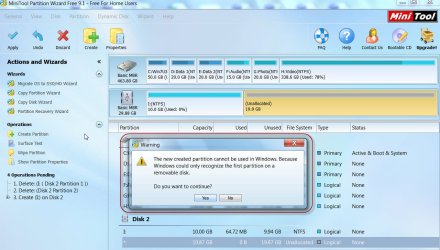
It is not possible to see both the partitions in Windows,
If you want to access the other partition, use Partition Wizard, right click on the 10GB partition and hide it. Then give a drive letter to the 118GB partition.. Apply.
Now Windows will see your 118GB partition.
As far as I know , there is no way you can see both the partitions in Windows. You have to hide one to see the other.
If you find a way to view both partitions in Windows. , let me know. I am willing to learn.
When you did it you would have definitely got a message that Windows will see only one partition that is first. Did you or did you not?
It is not possible to see both the partitions in Windows,
If you want to access the other partition, use Partition Wizard, right click on the 10GB partition and hide it. Then give a drive letter to the 118GB partition.. Apply.
Now Windows will see your 118GB partition.
As far as I know , there is no way you can see both the partitions in Windows. You have to hide one to see the other.
If you find a way to view both partitions in Windows. , let me know. I am willing to learn
.
Last edited:
My Computer
At a glance
Windows 7 Home Premium 32 bit
- OS
- Windows 7 Home Premium 32 bit
If you find a way to view both partitions in Windows. , let me know. I am willing to learn
This is exactly what I'm trying to do lol
My Computer
At a glance
Window 7 Pro
- Computer type
- PC/Desktop
- OS
- Window 7 Pro
- Local time
- 7:57 PM
- Messages
- 5,915
You have to do a firmware hack to make the flash drive appear as a HDD. But such firmware hacks may not work with all brands of flash drives and you may even ruin your flash drive attempting such hacks.. So I would not recommend any such hacks. Use your flash drive as it is intended to be used - no partitions or if you insist on having many partitions use the safe method of hiding all other partitions each time.
My Computer
At a glance
Windows 7 Home Premium 32 bit
- OS
- Windows 7 Home Premium 32 bit
Similar threads
- Replies
- 6
- Views
- 2K
- Replies
- 9
- Views
- 6K
- Replies
- 5
- Views
- 2K

- Replies
- 3
- Views
- 4K

- Replies
- 15
- Views
- 4K
