Solved Disk problem warnings, but checkdisk says it's all okay?

unicornspc

New member
Local time
3:18 PM
Messages
10
Hi,
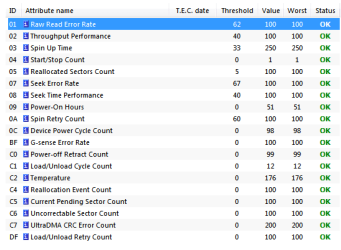
I keep getting warnings "Windows detected a hard disk problem", but when I run check disk there is 0 bad files and 0 bad sectors. After I run check I stop getting warnings for about a day, then it comes back. Can anyone help?
 

My Computer My Computer

At a glance

Windows 7 Professional 64bit
Computer type
Laptop
Computer Manufacturer/Model Number
Asus
OS
Windows 7 Professional 64bit
Antivirus
Microsoft Security Essentials
What make HD do you have? Generally I would try to download a disk diagnostic program from the maker of the drive. It might be giving off false SMART data. I know I had a Seagate drive that looked like it was about to die if I displayed the SMART info. But it ran for years with no problem.

If you are not getting retries to read or write that drive it is likely false information. Also see if the HD maker has a forum. There may be similar reports from other HD owners on the forum with possible work-arounds or driver updates.
 

My Computer My Computer

At a glance

Windows 7 32 bitAMD 5200+ dual core2 GBNVidia GeForce 6150SE 128 MB
Computer Manufacturer/Model Number
HP Media Center
OS
Windows 7 32 bit
CPU
AMD 5200+ dual core
Memory
2 GB
Graphics Card(s)
NVidia GeForce 6150SE 128 MB
Monitor(s) Displays
CRT
Screen Resolution
1280x1024
Hard Drives
500 GB Sata internal :

SIIG USB 3.0 docking stations w/WD Caviar Black 6 Gb/s drives
Keyboard
PS/2
Mouse
PS/2 Wheel Mouse
Other Info
SIIG USB 3.0 PCIexpress card.
It's Hitachi on an ASUS laptop, I'll see to find their tools to scan it and report back. Thank you for the response.
 

My Computer My Computer

At a glance

Windows 7 Professional 64bit
Computer type
Laptop
Computer Manufacturer/Model Number
Asus
OS
Windows 7 Professional 64bit
Antivirus
Microsoft Security Essentials
Sure thing. Let us know what you find out.
 

My Computer My Computer

At a glance

Windows 7 32 bitAMD 5200+ dual core2 GBNVidia GeForce 6150SE 128 MB
Computer Manufacturer/Model Number
HP Media Center
OS
Windows 7 32 bit
CPU
AMD 5200+ dual core
Memory
2 GB
Graphics Card(s)
NVidia GeForce 6150SE 128 MB
Monitor(s) Displays
CRT
Screen Resolution
1280x1024
Hard Drives
500 GB Sata internal :

SIIG USB 3.0 docking stations w/WD Caviar Black 6 Gb/s drives
Keyboard
PS/2
Mouse
PS/2 Wheel Mouse
Other Info
SIIG USB 3.0 PCIexpress card.
Please tell us you have been routinely, weekly, making full image backups of your OS partition and your data partition onto affordable and reliable external media using Macrium Reflect or anything similar. If not, please begin a routine weekly backup program -- thus saving your OS and your data. Any HD can implode with moderate to little warning.
 

My Computer My Computer

At a glance

Windows 7 Professional 64-bitDesktop i5; Acers i5 & i7desktop 16GB; 1 Acer 8GB & 1 Acer 16GB
Computer type
PC/Desktop
Computer Manufacturer/Model Number
Antec desktop; Acer Aspire laptops
OS
Windows 7 Professional 64-bit
CPU
Desktop i5; Acers i5 & i7
Memory
desktop 16GB; 1 Acer 8GB & 1 Acer 16GB
Hard Drives
1TB split into 2 equal partitions [OS and data] usable by RJS
Internet Speed
AT&T DSL
Browser
FF, GChrome, msIE
Other Info
Windows 7 Firewall, Emsisoft AM/AV, MSE [scan-only], SpywareBlaster, Ruiware/BillP combine
I made backup of my data a few weeks ago on an external hard disk, but I'm not that computer literate to know what Macrium Reflect is/how it works, does that enable you to boot from external hard disk? I'm afraid, what if I go do that but it overwrites all my data and internal disk dies just then? Then I lose my data. I don't have other external disks.

Can you recommend something to scan this with, I was looking and am lost. Couldn't find a good link for what seems to be their tools.

P.S. I have dual boot, I have Ubuntu also on the computer if that is relevant anyhow.
 

My Computer My Computer

At a glance

Windows 7 Professional 64bit
Computer type
Laptop
Computer Manufacturer/Model Number
Asus
OS
Windows 7 Professional 64bit
Antivirus
Microsoft Security Essentials
Macrium Reflect or almost all other backup/restore programs can be Portable [existing only on usb and dvd boots] and can be safely installed on any internal hard-drive. Use Portable version if data recovery is looming on the horizon.
 
Last edited:

My Computer My Computer

At a glance

Windows 7 Professional 64-bitDesktop i5; Acers i5 & i7desktop 16GB; 1 Acer 8GB & 1 Acer 16GB
Computer type
PC/Desktop
Computer Manufacturer/Model Number
Antec desktop; Acer Aspire laptops
OS
Windows 7 Professional 64-bit
CPU
Desktop i5; Acers i5 & i7
Memory
desktop 16GB; 1 Acer 8GB & 1 Acer 16GB
Hard Drives
1TB split into 2 equal partitions [OS and data] usable by RJS
Internet Speed
AT&T DSL
Browser
FF, GChrome, msIE
Other Info
Windows 7 Firewall, Emsisoft AM/AV, MSE [scan-only], SpywareBlaster, Ruiware/BillP combine
I've never used software for backups, I simply copy my data, so I wouldn't know what to do with it. lol :)
I will look more into this.
 
Last edited:

My Computer My Computer

At a glance

Windows 7 Professional 64bit
Computer type
Laptop
Computer Manufacturer/Model Number
Asus
OS
Windows 7 Professional 64bit
Antivirus
Microsoft Security Essentials
Finally downloaded that tool for scanning, it's in iso format. I looked around hoping I could find it in another but that's what it is. I'll be back later with report.
 
Last edited:

My Computer My Computer

At a glance

Windows 7 Professional 64bit
Computer type
Laptop
Computer Manufacturer/Model Number
Asus
OS
Windows 7 Professional 64bit
Antivirus
Microsoft Security Essentials
It refuses to be mounted... it took me so much time and bloatware one after another wont mount it! :mad:
It's really giving me trouble with installation...
 

My Computer My Computer

At a glance

Windows 7 Professional 64bit
Computer type
Laptop
Computer Manufacturer/Model Number
Asus
OS
Windows 7 Professional 64bit
Antivirus
Microsoft Security Essentials
Finally mounted, it says it's not compatible. Tried to run different files, none works. I wanted the manufacturer's software but it does not work so I'll use a few others.
It failed short drive self test (Seagate), passed SMART, still testing. Ariolic it passed and says ok, but it mentioned some bad blocks.
 

Attachments

  • 1.png
    1.png
    10 KB · Views: 12
  • 2.png
    2.png
    9.9 KB · Views: 12
Last edited:

My Computer My Computer

At a glance

Windows 7 Professional 64bit
Computer type
Laptop
Computer Manufacturer/Model Number
Asus
OS
Windows 7 Professional 64bit
Antivirus
Microsoft Security Essentials
"Windows detected a hard disk problem"

As Roland mentioned, its best if you assume your hard drive is about to die. It may have no bad sectors despite that. Also do start > run > cmd > enter > sfc /scannow > enter. Also run a full virus scan.

I'd save your data right now since its now two weeks out of date.

It sounds like you are having trouble doing an image backup. Me, I never do them, but rather just include a programs folder in my data backup that includes iso images of all my programs - its no big deal to reinstall everything in my case. Once your data is backed up you need to always know the answer to this question: if I have to reinstall windows AND all my programs, how will I do it?
 

My Computer My Computer

At a glance

Win7 pro x64stock i7 7700kCorsair Vengeance LPX 16GB (2x8GB) DDR4 @ 320...integrated Intel HD 630
Computer type
PC/Desktop
Computer Manufacturer/Model Number
diy
OS
Win7 pro x64
CPU
stock i7 7700k
Motherboard
Gigabyte Z270N-WIFI mini-ITX
Memory
Corsair Vengeance LPX 16GB (2x8GB) DDR4 @ 3200MHz
Graphics Card(s)
integrated Intel HD 630
Sound Card
onboard Realtek ALC1220
Monitor(s) Displays
two vertically mounted samsung 55" 4k un55mu8000
Screen Resolution
1920x1280
Hard Drives
256GB Samsung EVO 960 M.2 pci-e NVMe SSD
PSU
SilverStone Nightjar ST45NF 450Watt Fanless
Case
No case. Motherboard is mounted directly onto power supply
Cooling
Evercool low profile 815EP with Panaflow 12L fan at 7v
Keyboard
Ortek MCK-86 mini
Mouse
Belkin 5-button USB
Internet Speed
spectrum 400mbps
I did sfc scan already, that was alright. I scanned for virus, it was okay, now scanning with Malwarebytes as well.
I was just looking into other threads, Roland mentioned there that if you just replace HDD you can use your external backup to get everything on the new disk, I can set boot up in bios no prob, but I think the rest surpasses my skills. Still looking around to see how to do it.
My data is backed up but system isn't. It would be really cool if I could just transfer all onto a new disk.
 

My Computer My Computer

At a glance

Windows 7 Professional 64bit
Computer type
Laptop
Computer Manufacturer/Model Number
Asus
OS
Windows 7 Professional 64bit
Antivirus
Microsoft Security Essentials

My Computer My Computer

At a glance

Win7 pro x64stock i7 7700kCorsair Vengeance LPX 16GB (2x8GB) DDR4 @ 320...integrated Intel HD 630
Computer type
PC/Desktop
Computer Manufacturer/Model Number
diy
OS
Win7 pro x64
CPU
stock i7 7700k
Motherboard
Gigabyte Z270N-WIFI mini-ITX
Memory
Corsair Vengeance LPX 16GB (2x8GB) DDR4 @ 3200MHz
Graphics Card(s)
integrated Intel HD 630
Sound Card
onboard Realtek ALC1220
Monitor(s) Displays
two vertically mounted samsung 55" 4k un55mu8000
Screen Resolution
1920x1280
Hard Drives
256GB Samsung EVO 960 M.2 pci-e NVMe SSD
PSU
SilverStone Nightjar ST45NF 450Watt Fanless
Case
No case. Motherboard is mounted directly onto power supply
Cooling
Evercool low profile 815EP with Panaflow 12L fan at 7v
Keyboard
Ortek MCK-86 mini
Mouse
Belkin 5-button USB
Internet Speed
spectrum 400mbps
I'll have to go to a pro to replace hdd first. I know about some things so I might sound like I know something but about a lot of things I know nothing.

There's also another problem. I have dual boot (ubuntu) on, but I dont want it on the next disk or to reduce the Windows partitions size. Don't know yet how it works. I emailed the official service for Asus here, will see if they have the same hdd model and also maybe they can clone it for me.
 
Last edited:

My Computer My Computer

At a glance

Windows 7 Professional 64bit
Computer type
Laptop
Computer Manufacturer/Model Number
Asus
OS
Windows 7 Professional 64bit
Antivirus
Microsoft Security Essentials
I will consider this thread resolved since you all gave me sufficient information to act on, if I ask something else it is not really on topic because it's questions about cloning systems so I better continue there. Appreciate all responses.
 

My Computer My Computer

At a glance

Windows 7 Professional 64bit
Computer type
Laptop
Computer Manufacturer/Model Number
Asus
OS
Windows 7 Professional 64bit
Antivirus
Microsoft Security Essentials
Back
Top