Solved No more C: drive space

ebuzz

New member
Local time
11:27 AM
Messages
35
I have an SSD drive in my PC that is allocated as my C: drive. I don't remember it's exact size right now, but that may not matter b/c it's almost out of room whatever its size!
I also have two other drives: a 1TB SSD drive and a 1 TB HDD which both have lots of room.
I try to install new programs to the other 2 drives, but as you know, even if you do that, stuff still gets put on the C: drive and some programs don't give you the option of installing anywhere but the C: drive.
Is there any way to fix that without deleting programs?
Can I move things off the C?
What other options are available since if the C: gets full, what then?

Thanks! :)
 

My Computer

Computer type
PC/Desktop
Computer Manufacturer/Model Number
Home made
OS
Microsoft Windows 7 Professional 64-bit 7601 Multiprocessor Free Service Pack 1
CPU
Intel(R) Core(TM) i7-2600 CPU @ 3.40GHz
Motherboard
ASUSTeK Computer INC. P8P67 EVO
Memory
16.00 GB
Graphics Card(s)
NVIDIA GeForce GTX 560 Ti
Sound Card
(1) NVIDIA High Definition Audio (2) NVIDIA High Definitio
Monitor(s) Displays
BenQ
Screen Resolution
2560 x 1440 x 32 bits (4294967296 colors) @ 59 Hz
Hard Drives
(1) Maxtor 6Y120P0 ATA Device (2) OCZ-AGILITY3 ATA Device (3) OCZ-VERTEX3 ATA Device (4) WDC WD1002FAEX-00Z3A0 ATA Device (5) ST310005 24AS SCSI Disk Device (6) Generic- SD/MMC/MS/MSPRO USB Device (7) Lexar CF USB_3_0 Read USB Device (
PSU
PC Power Silencer MkII 950W
Case
Corsair
Cooling
Corsair H60
Keyboard
Logitec
Mouse
Logitec
Antivirus
AVG
Browser
IE

My Computer

Computer type
PC/Desktop
Computer Manufacturer/Model Number
Home made
OS
Microsoft Windows 7 Professional 64-bit 7601 Multiprocessor Free Service Pack 1
CPU
Intel(R) Core(TM) i7-2600 CPU @ 3.40GHz
Motherboard
ASUSTeK Computer INC. P8P67 EVO
Memory
16.00 GB
Graphics Card(s)
NVIDIA GeForce GTX 560 Ti
Sound Card
(1) NVIDIA High Definition Audio (2) NVIDIA High Definitio
Monitor(s) Displays
BenQ
Screen Resolution
2560 x 1440 x 32 bits (4294967296 colors) @ 59 Hz
Hard Drives
(1) Maxtor 6Y120P0 ATA Device (2) OCZ-AGILITY3 ATA Device (3) OCZ-VERTEX3 ATA Device (4) WDC WD1002FAEX-00Z3A0 ATA Device (5) ST310005 24AS SCSI Disk Device (6) Generic- SD/MMC/MS/MSPRO USB Device (7) Lexar CF USB_3_0 Read USB Device (
PSU
PC Power Silencer MkII 950W
Case
Corsair
Cooling
Corsair H60
Keyboard
Logitec
Mouse
Logitec
Antivirus
AVG
Browser
IE
It seems that you may have to get a larger SSD. Trying to gain space on the main Operating System drive by removing parts of the Operating System is a recipe for disaster. You can of course transfer your personal files to another drive, but you probably have done that already.

You could reduce the Page File size & disable Hibernate & reduce the number of System Restores saved.

It is best to have you software programs on the main OS drive as loading them is much quicker.

You could create an Operating System image, using Macrium Reflect as an example to one of your large drives. Then replace the SSD with a much larger one & transfer the image onto the new drive. This will save all your installed software programs & leave you with a system that is exactly like your present one, but with plenty of room to spare.
 

My Computer

Computer type
PC/Desktop
Computer Manufacturer/Model Number
Self built using existing case
OS
Windows 7 Home Premium 64 bit sp1
CPU
Intel i5 3570 3.4Ghz Ivy Bridge SKT 1155 quad core
Motherboard
Gigabyte Z77-HD3 SKT 1155 2xSata 3, 4x USB 3.0
Memory
G-Skill Rip Jaws 16Gb (8x2) DDR3 -1600 PC3 12800 CL 10 red
Graphics Card(s)
Gigabyte NVIDIA GT610 1Gb DDR3 810/1200 PCI-E 2.0 Silent
Sound Card
NVIDIA High Definition & Realtech High Definition Audio
Monitor(s) Displays
2 x Philips 226V4L 16:9 aspect ratio
Screen Resolution
1920 x 1080 HD
Hard Drives
Samsung 840 Pro 256gb SSD, SATA 3.
Hitachi Touro Portable 1tb, USB 3.0 HDD used for image b/ups.
PSU
Corsair VS450
Case
Codeng
Cooling
PSU fan & CPU fan
Keyboard
Logitech
Mouse
Logitech Wireless trackball M570
Internet Speed
Wireless 3G. 3mg down & 550kb up.
Antivirus
Bitdefender Internet Security 2020
Browser
Opera (Current Version) & Firefox
Other Info
MS Office 2013 Pro. Davis weather station software. MGE Nova 600 avr UPS.
Leave Windows Prime operations be; unless you are sevenforum's Callender or eightforum's Dalchina. I think getting a bigger SSD is your best bet, along with the adjunct advice of cloning the old SSD onto the new SSD.
 
Last edited:

My Computer

Computer type
PC/Desktop
Computer Manufacturer/Model Number
Antec desktop; Acer Aspire laptops
OS
Windows 7 Professional 64-bit
CPU
Desktop i5; Acers i5 & i7
Memory
desktop 16GB; 1 Acer 8GB & 1 Acer 16GB
Hard Drives
1TB split into 2 equal partitions [OS and data] usable by RJS
Internet Speed
AT&T DSL
Browser
FF, GChrome, msIE
Other Info
Windows 7 Firewall, Emsisoft AM/AV, MSE [scan-only], SpywareBlaster, Ruiware/BillP combine

My Computer

Computer type
PC/Desktop
Computer Manufacturer/Model Number
Home made Desktop
OS
Windows 10 Pro. 64/ version 1709 Windows 7 Pro/64
CPU
Intel i7-6800K @ 4.3
Motherboard
ASUS X-99 Deluxe II
Memory
Corsair Platinum 16 gig @2400
Graphics Card(s)
EVGA GTX 1070 OC
Monitor(s) Displays
Asus 27" LED LCD/VE278Q
Screen Resolution
1920-1080 or 1280-720 HDMI
Hard Drives
INTEL SSD 730-240 Gb Sata 3.0/
PSU
EVGA Platium 1200W
Case
Phanteks Luxe Tempered Glass 8 fans/ one radiator
Cooling
XSPC/ Water Cooled CPU
Keyboard
Das 4 Professional
Mouse
Logitech M705/MX Anywhere 2-S
Internet Speed
100 mbits
Antivirus
Microsoft Security Essentials/ Malwarebytes Premium 3.0/ SAS
Browser
I.E. 11 default/Firefox/ ISP Time Warner Cable/Spectrum
Other Info
LG BluRay Burner/
Sound system-KLipsch-THX/
Icy Dock ssd Hot Swap bays.
I think that the bigger SSD drive is the only way to go. When I get home tonight I'll follow up with your suggestions and post the results here later.
Thanks
 

My Computer

Computer type
PC/Desktop
Computer Manufacturer/Model Number
Home made
OS
Microsoft Windows 7 Professional 64-bit 7601 Multiprocessor Free Service Pack 1
CPU
Intel(R) Core(TM) i7-2600 CPU @ 3.40GHz
Motherboard
ASUSTeK Computer INC. P8P67 EVO
Memory
16.00 GB
Graphics Card(s)
NVIDIA GeForce GTX 560 Ti
Sound Card
(1) NVIDIA High Definition Audio (2) NVIDIA High Definitio
Monitor(s) Displays
BenQ
Screen Resolution
2560 x 1440 x 32 bits (4294967296 colors) @ 59 Hz
Hard Drives
(1) Maxtor 6Y120P0 ATA Device (2) OCZ-AGILITY3 ATA Device (3) OCZ-VERTEX3 ATA Device (4) WDC WD1002FAEX-00Z3A0 ATA Device (5) ST310005 24AS SCSI Disk Device (6) Generic- SD/MMC/MS/MSPRO USB Device (7) Lexar CF USB_3_0 Read USB Device (
PSU
PC Power Silencer MkII 950W
Case
Corsair
Cooling
Corsair H60
Keyboard
Logitec
Mouse
Logitec
Antivirus
AVG
Browser
IE

My Computer

Computer type
PC/Desktop
Computer Manufacturer/Model Number
Home made
OS
Microsoft Windows 7 Professional 64-bit 7601 Multiprocessor Free Service Pack 1
CPU
Intel(R) Core(TM) i7-2600 CPU @ 3.40GHz
Motherboard
ASUSTeK Computer INC. P8P67 EVO
Memory
16.00 GB
Graphics Card(s)
NVIDIA GeForce GTX 560 Ti
Sound Card
(1) NVIDIA High Definition Audio (2) NVIDIA High Definitio
Monitor(s) Displays
BenQ
Screen Resolution
2560 x 1440 x 32 bits (4294967296 colors) @ 59 Hz
Hard Drives
(1) Maxtor 6Y120P0 ATA Device (2) OCZ-AGILITY3 ATA Device (3) OCZ-VERTEX3 ATA Device (4) WDC WD1002FAEX-00Z3A0 ATA Device (5) ST310005 24AS SCSI Disk Device (6) Generic- SD/MMC/MS/MSPRO USB Device (7) Lexar CF USB_3_0 Read USB Device (
PSU
PC Power Silencer MkII 950W
Case
Corsair
Cooling
Corsair H60
Keyboard
Logitec
Mouse
Logitec
Antivirus
AVG
Browser
IE
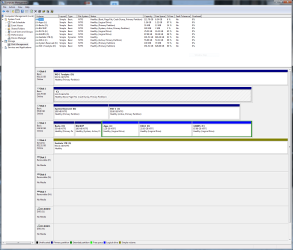
What a mess. Never seen such a mess in Disk Management.

Disk 1 has the 'C' partition
Disk 3 has 'System' on Backup partition.
Disk 2 'Reserve' is partition 'K'. I have not idea what it is doing.
Disk 4 is 'Dynamic' for what ever reason.

My suggestion would be to start over. I would suggest a ssd of 120 GB or larger.
Install the ssd you want Windows 7 installed, to port "0" where WD 1 'D' is hooked up now.
Unhook all other drives and do a Clean install.

Then you can hook up the other drives one at a time and set them up properly.
I believe this would be the simplest way to get thing proper.

It would also be handy if we had more information about your system.
Please complete this tutorial by Brink.

System Info - See Your System Specs - Windows 7 Help Forums


Jack
 

My Computer

Computer type
PC/Desktop
Computer Manufacturer/Model Number
Home made Desktop
OS
Windows 10 Pro. 64/ version 1709 Windows 7 Pro/64
CPU
Intel i7-6800K @ 4.3
Motherboard
ASUS X-99 Deluxe II
Memory
Corsair Platinum 16 gig @2400
Graphics Card(s)
EVGA GTX 1070 OC
Monitor(s) Displays
Asus 27" LED LCD/VE278Q
Screen Resolution
1920-1080 or 1280-720 HDMI
Hard Drives
INTEL SSD 730-240 Gb Sata 3.0/
PSU
EVGA Platium 1200W
Case
Phanteks Luxe Tempered Glass 8 fans/ one radiator
Cooling
XSPC/ Water Cooled CPU
Keyboard
Das 4 Professional
Mouse
Logitech M705/MX Anywhere 2-S
Internet Speed
100 mbits
Antivirus
Microsoft Security Essentials/ Malwarebytes Premium 3.0/ SAS
Browser
I.E. 11 default/Firefox/ ISP Time Warner Cable/Spectrum
Other Info
LG BluRay Burner/
Sound system-KLipsch-THX/
Icy Dock ssd Hot Swap bays.
What a mess. Never seen such a mess in Disk Management.

Disk 1 has the 'C' partition
Disk 3 has 'System' on Backup partition.
Disk 2 'Reserve' is partition 'K'. I have not idea what it is doing.
Disk 4 is 'Dynamic' for what ever reason.

My suggestion would be to start over. I would suggest a ssd of 120 GB or larger.
Install the ssd you want Windows 7 installed, to port "0" where WD 1 'D' is hooked up now.
Unhook all other drives and do a Clean install.

Then you can hook up the other drives one at a time and set them up properly.
I believe this would be the simplest way to get thing proper.

It would also be handy if we had more information about your system.
Please complete this tutorial by Brink.

System Info - See Your System Specs - Windows 7 Help Forums


Jack

:cry::cry::cry:

Cold!!! But maybe true. I built this PC myself and installed the all the drives. I don't know how the drivers were assigned their letters. I did put the C drive in first and installed Win 7, but have no idea how the others were assigned letters.
So I understand correctly, to start over I:
1) unhook all the drives
2) plug the new SSD drive into the connections currently housing the current C drive?;
3) Install Win 7 to that new drive (if so, won't I have to reinstall all programs?);
4) plug in all the other drives?
5) can I then reform what was the C drive so it's just another available drive?
 

My Computer

Computer type
PC/Desktop
Computer Manufacturer/Model Number
Home made
OS
Microsoft Windows 7 Professional 64-bit 7601 Multiprocessor Free Service Pack 1
CPU
Intel(R) Core(TM) i7-2600 CPU @ 3.40GHz
Motherboard
ASUSTeK Computer INC. P8P67 EVO
Memory
16.00 GB
Graphics Card(s)
NVIDIA GeForce GTX 560 Ti
Sound Card
(1) NVIDIA High Definition Audio (2) NVIDIA High Definitio
Monitor(s) Displays
BenQ
Screen Resolution
2560 x 1440 x 32 bits (4294967296 colors) @ 59 Hz
Hard Drives
(1) Maxtor 6Y120P0 ATA Device (2) OCZ-AGILITY3 ATA Device (3) OCZ-VERTEX3 ATA Device (4) WDC WD1002FAEX-00Z3A0 ATA Device (5) ST310005 24AS SCSI Disk Device (6) Generic- SD/MMC/MS/MSPRO USB Device (7) Lexar CF USB_3_0 Read USB Device (
PSU
PC Power Silencer MkII 950W
Case
Corsair
Cooling
Corsair H60
Keyboard
Logitec
Mouse
Logitec
Antivirus
AVG
Browser
IE
Read my post #9 again.

Jack
 

My Computer

Computer type
PC/Desktop
Computer Manufacturer/Model Number
Home made Desktop
OS
Windows 10 Pro. 64/ version 1709 Windows 7 Pro/64
CPU
Intel i7-6800K @ 4.3
Motherboard
ASUS X-99 Deluxe II
Memory
Corsair Platinum 16 gig @2400
Graphics Card(s)
EVGA GTX 1070 OC
Monitor(s) Displays
Asus 27" LED LCD/VE278Q
Screen Resolution
1920-1080 or 1280-720 HDMI
Hard Drives
INTEL SSD 730-240 Gb Sata 3.0/
PSU
EVGA Platium 1200W
Case
Phanteks Luxe Tempered Glass 8 fans/ one radiator
Cooling
XSPC/ Water Cooled CPU
Keyboard
Das 4 Professional
Mouse
Logitech M705/MX Anywhere 2-S
Internet Speed
100 mbits
Antivirus
Microsoft Security Essentials/ Malwarebytes Premium 3.0/ SAS
Browser
I.E. 11 default/Firefox/ ISP Time Warner Cable/Spectrum
Other Info
LG BluRay Burner/
Sound system-KLipsch-THX/
Icy Dock ssd Hot Swap bays.

My Computer

Computer type
PC/Desktop
Computer Manufacturer/Model Number
Home made
OS
Microsoft Windows 7 Professional 64-bit 7601 Multiprocessor Free Service Pack 1
CPU
Intel(R) Core(TM) i7-2600 CPU @ 3.40GHz
Motherboard
ASUSTeK Computer INC. P8P67 EVO
Memory
16.00 GB
Graphics Card(s)
NVIDIA GeForce GTX 560 Ti
Sound Card
(1) NVIDIA High Definition Audio (2) NVIDIA High Definitio
Monitor(s) Displays
BenQ
Screen Resolution
2560 x 1440 x 32 bits (4294967296 colors) @ 59 Hz
Hard Drives
(1) Maxtor 6Y120P0 ATA Device (2) OCZ-AGILITY3 ATA Device (3) OCZ-VERTEX3 ATA Device (4) WDC WD1002FAEX-00Z3A0 ATA Device (5) ST310005 24AS SCSI Disk Device (6) Generic- SD/MMC/MS/MSPRO USB Device (7) Lexar CF USB_3_0 Read USB Device (
PSU
PC Power Silencer MkII 950W
Case
Corsair
Cooling
Corsair H60
Keyboard
Logitec
Mouse
Logitec
Antivirus
AVG
Browser
IE

My Computer

Computer type
PC/Desktop
Computer Manufacturer/Model Number
Home made Desktop
OS
Windows 10 Pro. 64/ version 1709 Windows 7 Pro/64
CPU
Intel i7-6800K @ 4.3
Motherboard
ASUS X-99 Deluxe II
Memory
Corsair Platinum 16 gig @2400
Graphics Card(s)
EVGA GTX 1070 OC
Monitor(s) Displays
Asus 27" LED LCD/VE278Q
Screen Resolution
1920-1080 or 1280-720 HDMI
Hard Drives
INTEL SSD 730-240 Gb Sata 3.0/
PSU
EVGA Platium 1200W
Case
Phanteks Luxe Tempered Glass 8 fans/ one radiator
Cooling
XSPC/ Water Cooled CPU
Keyboard
Das 4 Professional
Mouse
Logitech M705/MX Anywhere 2-S
Internet Speed
100 mbits
Antivirus
Microsoft Security Essentials/ Malwarebytes Premium 3.0/ SAS
Browser
I.E. 11 default/Firefox/ ISP Time Warner Cable/Spectrum
Other Info
LG BluRay Burner/
Sound system-KLipsch-THX/
Icy Dock ssd Hot Swap bays.

My Computer

Computer type
PC/Desktop
Computer Manufacturer/Model Number
Home made
OS
Microsoft Windows 7 Professional 64-bit 7601 Multiprocessor Free Service Pack 1
CPU
Intel(R) Core(TM) i7-2600 CPU @ 3.40GHz
Motherboard
ASUSTeK Computer INC. P8P67 EVO
Memory
16.00 GB
Graphics Card(s)
NVIDIA GeForce GTX 560 Ti
Sound Card
(1) NVIDIA High Definition Audio (2) NVIDIA High Definitio
Monitor(s) Displays
BenQ
Screen Resolution
2560 x 1440 x 32 bits (4294967296 colors) @ 59 Hz
Hard Drives
(1) Maxtor 6Y120P0 ATA Device (2) OCZ-AGILITY3 ATA Device (3) OCZ-VERTEX3 ATA Device (4) WDC WD1002FAEX-00Z3A0 ATA Device (5) ST310005 24AS SCSI Disk Device (6) Generic- SD/MMC/MS/MSPRO USB Device (7) Lexar CF USB_3_0 Read USB Device (
PSU
PC Power Silencer MkII 950W
Case
Corsair
Cooling
Corsair H60
Keyboard
Logitec
Mouse
Logitec
Antivirus
AVG
Browser
IE
You can use Aomei backupper free (standard) version.

Boot media already made here:

17514x64.iso

A23x86.iso
 

My Computers

System One System Two

  • Computer type
    PC/Desktop
    OS
    7 X64
    CPU
    i5 8400
    Motherboard
    gigabyte b365m ds3h
    Memory
    2x8gb 3200mhz
    Hard Drives
    various
    PSU
    pure power 11 400w cm
    Case
    Coolermaster
    Cooling
    cryorig m9i
  • Computer type
    PC/Desktop
    OS
    7x64
    CPU
    g5400
    Motherboard
    ga b365m ds3h
    Memory
    8gb ddr4 2400
    PSU
    xfx pro 450w
You can use Aomei backupper free (standard) version.

Boot media already made here:

17514x64.iso

A23x86.iso

And that will allow me to make an image of my C: drive, install a larger SSD drive as a C: and then copy the image and all is good?
But I got this message when clicking on those links:
Secure Connection Failed

An error occurred during a connection to onedrive.live.com. Invalid OCSP signing certificate in OCSP response. Error code: SEC_ERROR_OCSP_INVALID_SIGNING_CERT

The page you are trying to view cannot be shown because the authenticity of the received data could not be verified.
Please contact the website owners to inform them of this problem.
 

My Computer

Computer type
PC/Desktop
Computer Manufacturer/Model Number
Home made
OS
Microsoft Windows 7 Professional 64-bit 7601 Multiprocessor Free Service Pack 1
CPU
Intel(R) Core(TM) i7-2600 CPU @ 3.40GHz
Motherboard
ASUSTeK Computer INC. P8P67 EVO
Memory
16.00 GB
Graphics Card(s)
NVIDIA GeForce GTX 560 Ti
Sound Card
(1) NVIDIA High Definition Audio (2) NVIDIA High Definitio
Monitor(s) Displays
BenQ
Screen Resolution
2560 x 1440 x 32 bits (4294967296 colors) @ 59 Hz
Hard Drives
(1) Maxtor 6Y120P0 ATA Device (2) OCZ-AGILITY3 ATA Device (3) OCZ-VERTEX3 ATA Device (4) WDC WD1002FAEX-00Z3A0 ATA Device (5) ST310005 24AS SCSI Disk Device (6) Generic- SD/MMC/MS/MSPRO USB Device (7) Lexar CF USB_3_0 Read USB Device (
PSU
PC Power Silencer MkII 950W
Case
Corsair
Cooling
Corsair H60
Keyboard
Logitec
Mouse
Logitec
Antivirus
AVG
Browser
IE

My Computer

Computer type
PC/Desktop
Computer Manufacturer/Model Number
diy
OS
Win7 pro x64
CPU
stock i7 7700k
Motherboard
Gigabyte Z270N-WIFI mini-ITX
Memory
Corsair Vengeance LPX 16GB (2x8GB) DDR4 @ 3200MHz
Graphics Card(s)
integrated Intel HD 630
Sound Card
onboard Realtek ALC1220
Monitor(s) Displays
two vertically mounted samsung 55" 4k un55mu8000
Screen Resolution
1920x1280
Hard Drives
256GB Samsung EVO 960 M.2 pci-e NVMe SSD
PSU
SilverStone Nightjar ST45NF 450Watt Fanless
Case
No case. Motherboard is mounted directly onto power supply
Cooling
Evercool low profile 815EP with Panaflow 12L fan at 7v
Keyboard
Ortek MCK-86 mini
Mouse
Belkin 5-button USB
Internet Speed
spectrum 400mbps
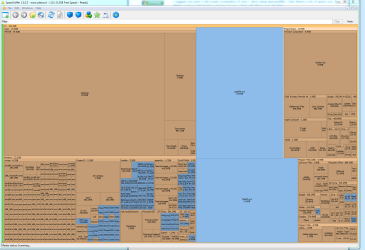
I suggest you post a full screen screenshot of your c drive using spacesniffer. I bet there's a lot of space you can delete or move and having a picture of your c drive will tell us your situation
Wow, I have no idea what all that is but hows this:

C-capture.PNG
 

My Computer

Computer type
PC/Desktop
Computer Manufacturer/Model Number
Home made
OS
Microsoft Windows 7 Professional 64-bit 7601 Multiprocessor Free Service Pack 1
CPU
Intel(R) Core(TM) i7-2600 CPU @ 3.40GHz
Motherboard
ASUSTeK Computer INC. P8P67 EVO
Memory
16.00 GB
Graphics Card(s)
NVIDIA GeForce GTX 560 Ti
Sound Card
(1) NVIDIA High Definition Audio (2) NVIDIA High Definitio
Monitor(s) Displays
BenQ
Screen Resolution
2560 x 1440 x 32 bits (4294967296 colors) @ 59 Hz
Hard Drives
(1) Maxtor 6Y120P0 ATA Device (2) OCZ-AGILITY3 ATA Device (3) OCZ-VERTEX3 ATA Device (4) WDC WD1002FAEX-00Z3A0 ATA Device (5) ST310005 24AS SCSI Disk Device (6) Generic- SD/MMC/MS/MSPRO USB Device (7) Lexar CF USB_3_0 Read USB Device (
PSU
PC Power Silencer MkII 950W
Case
Corsair
Cooling
Corsair H60
Keyboard
Logitec
Mouse
Logitec
Antivirus
AVG
Browser
IE
hiberfil.sys is taking up 12GB. Disabling hibernation will eliminate it. Really do not need hibernation on a desktop machine.

Hibernate - Enable or Disable - Windows 7 Help Forums

or just do start > run > cmd > powercfg.exe -h off

once hibernation is disabled, hiberfil.sys should be gone upon reboot. If not, you can just delete it within spacesniffer by hitting right-click>delete

nvidia stuff is taking up 6GB. Check this out..

Cleaning up old NVIDIA driver files to save disk space (2017 edition) - GameplayInside

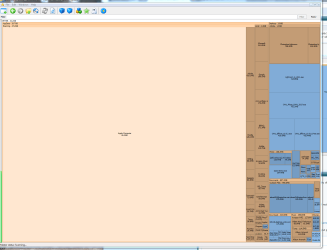
suggest you click on the 34.6GB PETER to see what is underneath it, and post a screenshot of that detail.
 

My Computer

Computer type
PC/Desktop
Computer Manufacturer/Model Number
diy
OS
Win7 pro x64
CPU
stock i7 7700k
Motherboard
Gigabyte Z270N-WIFI mini-ITX
Memory
Corsair Vengeance LPX 16GB (2x8GB) DDR4 @ 3200MHz
Graphics Card(s)
integrated Intel HD 630
Sound Card
onboard Realtek ALC1220
Monitor(s) Displays
two vertically mounted samsung 55" 4k un55mu8000
Screen Resolution
1920x1280
Hard Drives
256GB Samsung EVO 960 M.2 pci-e NVMe SSD
PSU
SilverStone Nightjar ST45NF 450Watt Fanless
Case
No case. Motherboard is mounted directly onto power supply
Cooling
Evercool low profile 815EP with Panaflow 12L fan at 7v
Keyboard
Ortek MCK-86 mini
Mouse
Belkin 5-button USB
Internet Speed
spectrum 400mbps
OK here's the Peters
 

Attachments

  • Peters.PNG
    Peters.PNG
    51 KB · Views: 4

My Computer

Computer type
PC/Desktop
Computer Manufacturer/Model Number
Home made
OS
Microsoft Windows 7 Professional 64-bit 7601 Multiprocessor Free Service Pack 1
CPU
Intel(R) Core(TM) i7-2600 CPU @ 3.40GHz
Motherboard
ASUSTeK Computer INC. P8P67 EVO
Memory
16.00 GB
Graphics Card(s)
NVIDIA GeForce GTX 560 Ti
Sound Card
(1) NVIDIA High Definition Audio (2) NVIDIA High Definitio
Monitor(s) Displays
BenQ
Screen Resolution
2560 x 1440 x 32 bits (4294967296 colors) @ 59 Hz
Hard Drives
(1) Maxtor 6Y120P0 ATA Device (2) OCZ-AGILITY3 ATA Device (3) OCZ-VERTEX3 ATA Device (4) WDC WD1002FAEX-00Z3A0 ATA Device (5) ST310005 24AS SCSI Disk Device (6) Generic- SD/MMC/MS/MSPRO USB Device (7) Lexar CF USB_3_0 Read USB Device (
PSU
PC Power Silencer MkII 950W
Case
Corsair
Cooling
Corsair H60
Keyboard
Logitec
Mouse
Logitec
Antivirus
AVG
Browser
IE
Back
Top