Frequent random PC freeze, non-memory related, non-BSOD

4101

New member
Local time
1:59 PM
Messages
7
Hello friends!

I browsed and looked this forum. I hope this is in the right place and in the right format. Specs are in my profile! I hope I provided you with enough information. Feel free to ask for more if necessary. I did try the hotfix, but the file said it was not applicable to my computer.

The problem
Random full-on freeze. Used to happen once every couple of days, to daily, to multiple times per day. My PC becomes entirely non-responsive and I have to hard shut-down the machine, sadly. Tends to happen all the time, but I think it happens the most when I jump from one screen/tab to another (not sure).

Background
I reformatted my PC and reinstalled Windows 64 Home Premium 64bit several months ago, I believe in February or March. And that's when it innitially started acting up. Having been busy with school and work, I hadn't bothered to fix it yet. Not thoroughly. However, since this is also my music production PC, I have lost important work on more than one occasion. I've used Windows 7 since I built this PC in 2012 and never had any issues on previous occasions. It only started after installing this one.

Memtest86+
Performed overnight. Came out clean after 9 cycles.

Diagnostic report

Code:
Diagnostic Report (1.9.0027.0):
-----------------------------------------
Windows Validation Data-->

Validation Code: 0
Cached Online Validation Code: 0x0
Windows Product Key: *****-*****-4GVY8-3TJWV-P4F47
Windows Product Key Hash: 4YlLCbAf5ZDassoGQ726+inL3s4=
Windows Product ID: 00359-OEM-8703836-59668
Windows Product ID Type: 3
Windows License Type: OEM System Builder
Windows OS version: 6.1.7601.2.00010300.1.0.003
ID: {0C128370-2C0B-428B-A6F4-7A2703B4D794}(3)
Is Admin: Yes
TestCab: 0x0
LegitcheckControl ActiveX: N/A, hr = 0x80070002
Signed By: N/A, hr = 0x80070002
Product Name: Windows 7 Home Premium
Architecture: 0x00000009
Build lab: 7601.win7sp1_ldr.170427-1518
TTS Error: 
Validation Diagnostic: 
Resolution Status: N/A

Vista WgaER Data-->
ThreatID(s): N/A, hr = 0x80070002
Version: N/A, hr = 0x80070002

Windows XP Notifications Data-->
Cached Result: N/A, hr = 0x80070002
File Exists: No
Version: N/A, hr = 0x80070002
WgaTray.exe Signed By: N/A, hr = 0x80070002
WgaLogon.dll Signed By: N/A, hr = 0x80070002

OGA Notifications Data-->
Cached Result: N/A, hr = 0x80070002
Version: N/A, hr = 0x80070002
OGAExec.exe Signed By: N/A, hr = 0x80070002
OGAAddin.dll Signed By: N/A, hr = 0x80070002

OGA Data-->
Office Status: 109 N/A
OGA Version: N/A, 0x80070002
Signed By: N/A, hr = 0x80070002
Office Diagnostics: 025D1FF3-364-80041010_025D1FF3-229-80041010_025D1FF3-230-1_025D1FF3-517-80040154_025D1FF3-237-80040154_025D1FF3-238-2_025D1FF3-244-80070002_025D1FF3-258-3

Browser Data-->
Proxy settings: N/A
User Agent: Mozilla/4.0 (compatible; MSIE 8.0; Win32)
Default Browser: C:\Program Files (x86)\Mozilla Firefox\firefox.exe
Download signed ActiveX controls: Prompt
Download unsigned ActiveX controls: Disabled
Run ActiveX controls and plug-ins: Allowed
Initialize and script ActiveX controls not marked as safe: Disabled
Allow scripting of Internet Explorer Webbrowser control: Disabled
Active scripting: Allowed
Script ActiveX controls marked as safe for scripting: Allowed

File Scan Data-->

Other data-->
Office Details: <GenuineResults><MachineData><UGUID>{0C128370-2C0B-428B-A6F4-7A2703B4D794}</UGUID><Version>1.9.0027.0</Version><OS>6.1.7601.2.00010300.1.0.003</OS><Architecture>x64</Architecture><PKey>*****-*****-*****-*****-P4F47</PKey><PID>00359-OEM-8703836-59668</PID><PIDType>3</PIDType><SID>S-1-5-21-2466754845-67791445-3758226245</SID><SYSTEM><Manufacturer>System manufacturer</Manufacturer><Model>System Product Name</Model></SYSTEM><BIOS><Manufacturer>American Megatrends Inc.</Manufacturer><Version>0801</Version><SMBIOSVersion major="2" minor="7"/><Date>20120216000000.000000+000</Date></BIOS><HWID>2BED3F07018400FE</HWID><UserLCID>0413</UserLCID><SystemLCID>0413</SystemLCID><TimeZone>West-Europa (standaardtijd)(GMT+01:00)</TimeZone><iJoin>0</iJoin><SBID><stat>3</stat><msppid></msppid><name></name><model></model></SBID><OEM/><GANotification/></MachineData><Software><Office><Result>109</Result><Products/><Applications/></Office></Software></GenuineResults>  

Spsys.log Content: 0x80070002

Licensing Data-->
Versie van Software Licensing-service: 6.1.7601.17514

Naam: Windows(R) 7, HomePremium edition
Beschrijving: Windows Operating System - Windows(R) 7, OEM_COA_NSLP channel
Activerings-id: 586bc076-c93d-429a-afe5-a69fbc644e88
Toepassings-id55c92734-d682-4d71-983e-d6ec3f16059f
Uitgebreide PID: 00359-00174-038-359668-02-1043-7601.0000-0562017
Installatie-id007183111085357171530971560671363191994426190465238291
URL van processorcertificaat: http://go.microsoft.com/fwlink/?LinkID=88338
URL van computercertificaat: http://go.microsoft.com/fwlink/?LinkID=88339
URL van gebruikte licentie: http://go.microsoft.com/fwlink/?LinkID=88341
URL van productcodecertificaat: http://go.microsoft.com/fwlink/?LinkID=88340
Gedeeltelijke productcode: P4F47
Licentiestatus: licentie
Resterend aantal nieuwe Windows-activeringen: 3
Vertrouwde tijd: 4-6-2017 17:00:53

Windows Activation Technologies-->
HrOffline: 0x00000000
HrOnline: 0x00000000
HealthStatus: 0x0000000000000000
Event Time Stamp: 5:28:2017 13:12
ActiveX: Registered, Version: 7.1.7600.16395
Admin Service: Registered, Version: 7.1.7600.16395
HealthStatus Bitmask Output:


HWID Data-->
HWID Hash Current: NgAAAAEABAABAAEAAQADAAAAAQABAAEAln3GbhIjClNkxxLCdMRCBzomWivKxHluGUuy2i5z

OEM Activation 1.0 Data-->
N/A

OEM Activation 2.0 Data-->
BIOS valid for OA 2.0: yes, but no SLIC table
Windows marker version: N/A
OEMID and OEMTableID Consistent: N/A
BIOS Information: 
  ACPI Table Name    OEMID Value    OEMTableID Value
  APIC            ALASKA        A M I
  FACP            ALASKA        A M I
  HPET            ALASKA        A M I
  MCFG            ALASKA        A M I
  SSDT            SataRe        SataTabl
  SSDT            SataRe        SataTabl
  SSDT            SataRe        SataTabl
  DMAR            INTEL         SNB 
  BGRT            ALASKA        A M I
 

My Computer My Computer

At a glance

Windows 7 Home Premium 64bitIntel Core i7-2600 3.4FGHzCorsair XMS3 DDR3,1600-8GBMotherboard's built-in GPU
Computer type
PC/Desktop
Computer Manufacturer/Model Number
custom
OS
Windows 7 Home Premium 64bit
CPU
Intel Core i7-2600 3.4FGHz
Motherboard
Asus P8Z77-M PRO,s1155
Memory
Corsair XMS3 DDR3,1600-8GB
Graphics Card(s)
Motherboard's built-in GPU
Hard Drives
Corsair Force 3 GT - 120GB for OS
Antivirus
Adaware latest version
Browser
Mozilla Firefox latest version
Hi,
Use Clean boot,
Troubleshoot Application Conflicts by Performing a Clean Startup
Click Start and type in the search box,
msconfig
Click on the suggestion on top or hit the Enter key,
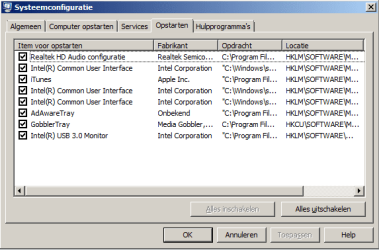
Go to the Startup section and take some screen shots for a complete list,
Go to the Services section and on the bottom left Check the box to Hide All Microsoft services,
Repeat the screen shots,
See the links above my signature on how to take and upload screen shots here,
Cheers.
 

My Computer My Computer

At a glance

Win-7-Pro64bit 7-H-Prem-64biti7-5930K 2nd i9-9940x both water blocked VRM'...Trident-z 3200C14 2nd Trident-z 3600C16EVGA 1080ti ftw3 2nd Titan Xp both water blocked
Computer type
PC/Desktop
Computer Manufacturer/Model Number
Custom assembled by me :}
OS
Win-7-Pro64bit 7-H-Prem-64bit
CPU
i7-5930K 2nd i9-9940x both water blocked VRM's too
Motherboard
ASUS SABERTOOTH X99 2nd ASUS x299 Apex
Memory
Trident-z 3200C14 2nd Trident-z 3600C16
Graphics Card(s)
EVGA 1080ti ftw3 2nd Titan Xp both water blocked
Sound Card
Built-in Realtek
Monitor(s) Displays
1-AOC G2460PG 24"G-Sync 144Hz/ 2nd 1-ASUS VG248QE 24" 144Hz
Screen Resolution
1920 x 1080 144Hz
Hard Drives
2-Samsung M.2 Evo & Evo Plus
2-Samsung 850 EVO 500GB SSD's/ 3-2.5 W.D. Black 1tb-&3-1tb/3-3.5 WD Black 1tb hdd's
PSU
EVGA SuperNOVA 1000-P2 2nd 1200-P2
Case
2-Corsair Obsidian Series 450D Black ATX Mid Tower
Cooling
Custom water loops
Keyboard
Logitech G710+/ 2nd Logitech G910
Mouse
2-RedDragon M901 Perdition 16400 dpi Gaming mouse = wired
Internet Speed
Comcast Ping 19ms 89.31mbps download speed 6.12mbps upload
Antivirus
Malwarebytes Pro/ Superantispyware Pro
Browser
FireFox & Pale moon
Other Info
2nd ASUS X299 Apex/Intel i9-9940x with Custom water loop/7H-Prem-x64/Corsair 450D case/Ram Trident-z 3600C16 4x8gb / Samsung970Evo plus 500gb SSD/Dual ssd EZ swap evo/PSU EVGA SuperNova 1200w-P2 80+Platinum/GPU Titan Xp /8-ML-140 on push-pull on 2-280GTX rads
Hi,
Use Clean boot,
Troubleshoot Application Conflicts by Performing a Clean Startup
Click Start and type in the search box,
msconfig
Click on the suggestion on top or hit the Enter key,
Go to the Startup section and take some screen shots for a complete list,
Go to the Services section and on the bottom left Check the box to Hide All Microsoft services,
Repeat the screen shots,
See the links above my signature on how to take and upload screen shots here,
Cheers.

Hi, thanks for your response!

services.png

startup.png

I hope this helps!
 

My Computer My Computer

At a glance

Windows 7 Home Premium 64bitIntel Core i7-2600 3.4FGHzCorsair XMS3 DDR3,1600-8GBMotherboard's built-in GPU
Computer type
PC/Desktop
Computer Manufacturer/Model Number
custom
OS
Windows 7 Home Premium 64bit
CPU
Intel Core i7-2600 3.4FGHz
Motherboard
Asus P8Z77-M PRO,s1155
Memory
Corsair XMS3 DDR3,1600-8GB
Graphics Card(s)
Motherboard's built-in GPU
Hard Drives
Corsair Force 3 GT - 120GB for OS
Antivirus
Adaware latest version
Browser
Mozilla Firefox latest version
Sorry for the bump, but this keeps happening and it's getting bad. All these hard-resets cannot be great. Can someone help me please?
 

My Computer My Computer

At a glance

Windows 7 Home Premium 64bitIntel Core i7-2600 3.4FGHzCorsair XMS3 DDR3,1600-8GBMotherboard's built-in GPU
Computer type
PC/Desktop
Computer Manufacturer/Model Number
custom
OS
Windows 7 Home Premium 64bit
CPU
Intel Core i7-2600 3.4FGHz
Motherboard
Asus P8Z77-M PRO,s1155
Memory
Corsair XMS3 DDR3,1600-8GB
Graphics Card(s)
Motherboard's built-in GPU
Hard Drives
Corsair Force 3 GT - 120GB for OS
Antivirus
Adaware latest version
Browser
Mozilla Firefox latest version
Hi,
Did you uncheck everything except your antivirus program and see if that made any difference ?
Follow the clean boot tutorial
You can also try safe mode with networking too.
 

My Computer My Computer

At a glance

Win-7-Pro64bit 7-H-Prem-64biti7-5930K 2nd i9-9940x both water blocked VRM'...Trident-z 3200C14 2nd Trident-z 3600C16EVGA 1080ti ftw3 2nd Titan Xp both water blocked
Computer type
PC/Desktop
Computer Manufacturer/Model Number
Custom assembled by me :}
OS
Win-7-Pro64bit 7-H-Prem-64bit
CPU
i7-5930K 2nd i9-9940x both water blocked VRM's too
Motherboard
ASUS SABERTOOTH X99 2nd ASUS x299 Apex
Memory
Trident-z 3200C14 2nd Trident-z 3600C16
Graphics Card(s)
EVGA 1080ti ftw3 2nd Titan Xp both water blocked
Sound Card
Built-in Realtek
Monitor(s) Displays
1-AOC G2460PG 24"G-Sync 144Hz/ 2nd 1-ASUS VG248QE 24" 144Hz
Screen Resolution
1920 x 1080 144Hz
Hard Drives
2-Samsung M.2 Evo & Evo Plus
2-Samsung 850 EVO 500GB SSD's/ 3-2.5 W.D. Black 1tb-&3-1tb/3-3.5 WD Black 1tb hdd's
PSU
EVGA SuperNOVA 1000-P2 2nd 1200-P2
Case
2-Corsair Obsidian Series 450D Black ATX Mid Tower
Cooling
Custom water loops
Keyboard
Logitech G710+/ 2nd Logitech G910
Mouse
2-RedDragon M901 Perdition 16400 dpi Gaming mouse = wired
Internet Speed
Comcast Ping 19ms 89.31mbps download speed 6.12mbps upload
Antivirus
Malwarebytes Pro/ Superantispyware Pro
Browser
FireFox & Pale moon
Other Info
2nd ASUS X299 Apex/Intel i9-9940x with Custom water loop/7H-Prem-x64/Corsair 450D case/Ram Trident-z 3600C16 4x8gb / Samsung970Evo plus 500gb SSD/Dual ssd EZ swap evo/PSU EVGA SuperNova 1200w-P2 80+Platinum/GPU Titan Xp /8-ML-140 on push-pull on 2-280GTX rads
Sorry for the bump, but this keeps happening and it's getting bad. All these hard-resets cannot be great. Can someone help me please?
Have your power supply checked. I've found over the years, a flaky power supply can cause a lot of weird stuff to happen.
 

My Computer My Computer

At a glance

Win7Pro x64i5 2540m16gb PC3 12800nVidia 4200 1gb
Computer type
Laptop
Computer Manufacturer/Model Number
Lenovo T420
OS
Win7Pro x64
CPU
i5 2540m
Motherboard
4236dn1
Memory
16gb PC3 12800
Graphics Card(s)
nVidia 4200 1gb
Screen Resolution
1920x1080
Hard Drives
HGST HTS721010A9E630 1tb/7200rpm/32cache
Antivirus
Avast! Of course
Browser
Firefox Portable
Hi,
Did you uncheck everything except your antivirus program and see if that made any difference ?
Follow the clean boot tutorial
You can also try safe mode with networking too.

Hi thank you for your help. I've been away a few days. I'll have a look. I did not think that a regular cleanboot would've made a difference since these appear to usually be aimed at checking after recent software updates?


Have your power supply checked. I've found over the years, a flaky power supply can cause a lot of weird stuff to happen.

Hi thank you for your response!

I am open to it. But this only started happening after I reinstalled Windows 7. I could have a look, but it would be quite a coincidence if the power supply started acting up then and only then.
 

My Computer My Computer

At a glance

Windows 7 Home Premium 64bitIntel Core i7-2600 3.4FGHzCorsair XMS3 DDR3,1600-8GBMotherboard's built-in GPU
Computer type
PC/Desktop
Computer Manufacturer/Model Number
custom
OS
Windows 7 Home Premium 64bit
CPU
Intel Core i7-2600 3.4FGHz
Motherboard
Asus P8Z77-M PRO,s1155
Memory
Corsair XMS3 DDR3,1600-8GB
Graphics Card(s)
Motherboard's built-in GPU
Hard Drives
Corsair Force 3 GT - 120GB for OS
Antivirus
Adaware latest version
Browser
Mozilla Firefox latest version
Hi thank you for your help. I've been away a few days. I'll have a look. I did not think that a regular cleanboot would've made a difference since these appear to usually be aimed at checking after recent software updates?
The reason that you do a clean boot is to minimize the amount of extra baggage and variables in your system. You disable all but the most critical start up functions and boot to see if the problem continues. If it does not, you add the start up items back in one at a time until you find the one that is causing the problem.

Most of the time, this will work. If it doesn't, there are other places that we can look, but at least we will have ruled out any start up programs.
 

My Computer My Computer

At a glance

Win 7 Pro x64/Win 10 Pro x64 dual bootAMD FX 8350 Vishera @ 420016 GB Mushkin Blackline DDR3-2400 @ 1866 (9-1...XFX Radeon R9 280 Double D Black Edition
Computer type
PC/Desktop
Computer Manufacturer/Model Number
Mellon Labs (custom build)
OS
Win 7 Pro x64/Win 10 Pro x64 dual boot
CPU
AMD FX 8350 Vishera @ 4200
Motherboard
ASUS M5A97 R2.0
Memory
16 GB Mushkin Blackline DDR3-2400 @ 1866 (9-10-10-10-31)
Graphics Card(s)
XFX Radeon R9 280 Double D Black Edition
Sound Card
Realtek HD Audio on MB. Sounds great.
Monitor(s) Displays
Acer 24", Acer 22"
Screen Resolution
3840 x 1080
Hard Drives
1 x Mushkin Chronos 120 GB SSD (Win 10)
1 x Samsung 850 EVO 250 GB SSD (Win 7)
1 x WD 1TB SATA Blue
1 x WD 1TB SATA Green
PSU
Corsair TX-750
Case
CoolerMaster HAF 912+
Cooling
Coolermaster Seidon 240M Liquid AIO. 6 case fans
Keyboard
Logitech G710+
Mouse
Logitech G500s
Internet Speed
Much better since I got fiber, but still way overpriced.
Antivirus
MSE, Malware Bytes for scanning
Browser
Firefox
Other Info
Corsair VOID USB headphones.

A Mellon Labs X-1 - LCD Smartie driven system status display.

Brought to you by the letter E
The reason that you do a clean boot is to minimize the amount of extra baggage and variables in your system. You disable all but the most critical start up functions and boot to see if the problem continues. If it does not, you add the start up items back in one at a time until you find the one that is causing the problem.

Most of the time, this will work. If it doesn't, there are other places that we can look, but at least we will have ruled out any start up programs.

Great. Thank you! I did. But I noticed the only process that reset itself into 'on' after the clean boot was 'ASUS System Service Control Service'. I left it there to maybe figure out if that's what's causing the freeze... and it froze again. I will try removing it and see what happens.
 

My Computer My Computer

At a glance

Windows 7 Home Premium 64bitIntel Core i7-2600 3.4FGHzCorsair XMS3 DDR3,1600-8GBMotherboard's built-in GPU
Computer type
PC/Desktop
Computer Manufacturer/Model Number
custom
OS
Windows 7 Home Premium 64bit
CPU
Intel Core i7-2600 3.4FGHz
Motherboard
Asus P8Z77-M PRO,s1155
Memory
Corsair XMS3 DDR3,1600-8GB
Graphics Card(s)
Motherboard's built-in GPU
Hard Drives
Corsair Force 3 GT - 120GB for OS
Antivirus
Adaware latest version
Browser
Mozilla Firefox latest version
Some information that can help.

I use Asus motherboards but do not use this because of the problems it caused.

AsSysCtrlService.exe Windows process - What is it?

What is AsSysCtrlService.exe?

The genuine AsSysCtrlService.exe file is a software component of AI Suite II by ASUS.
AI Suite II is a utility program suite that features tools for tweaking the system performance. AsSysCtrlService.exe launches the System Control Service. This is not an essential Windows process and can be disabled if known to create problems. AI Suite II is a collection of freeware utility programs designed to work with the Windows platform. The programs include ASUS System Information, a system diagnostic tool; ASUS PC Probe II, a file manager; ASUS Update, used to keep ASUS components up-to-date; ASUS Fan Xpert, a fan speed tool; and ASUS MyLogo, a logo editor. ASUS is a Chinese personal computer vendor that manufactures everything from desktops and laptops to mobile phones, monitors, optical storage devices, and graphics cards. In 2013, it was the world's fifth largest computer seller, in terms of sales. The company began launching graphics cards in 2005 with their initial PhysX accelerator card. ASUS was founded in Taipei in 1989 by T.H. Tung, Ted Hsu, Wayne Hsieh and M.T. Liao, all previously employed by Acer. The company is currently headquartered in Taipei, Taiwan.


My Computer My Computer

At a glance

Windows 10 Pro. 64/ version 1709 Windows 7 Pr...Intel i7-6800K @ 4.3Corsair Platinum 16 gig @2400EVGA GTX 1070 OC
Computer type
PC/Desktop
Computer Manufacturer/Model Number
Home made Desktop
OS
Windows 10 Pro. 64/ version 1709 Windows 7 Pro/64
CPU
Intel i7-6800K @ 4.3
Motherboard
ASUS X-99 Deluxe II
Memory
Corsair Platinum 16 gig @2400
Graphics Card(s)
EVGA GTX 1070 OC
Monitor(s) Displays
Asus 27" LED LCD/VE278Q
Screen Resolution
1920-1080 or 1280-720 HDMI
Hard Drives
INTEL SSD 730-240 Gb Sata 3.0/
PSU
EVGA Platium 1200W
Case
Phanteks Luxe Tempered Glass 8 fans/ one radiator
Cooling
XSPC/ Water Cooled CPU
Keyboard
Das 4 Professional
Mouse
Logitech M705/MX Anywhere 2-S
Internet Speed
100 mbits
Antivirus
Microsoft Security Essentials/ Malwarebytes Premium 3.0/ SAS
Browser
I.E. 11 default/Firefox/ ISP Time Warner Cable/Spectrum
Other Info
LG BluRay Burner/
Sound system-KLipsch-THX/
Icy Dock ssd Hot Swap bays.

My Computer My Computer

At a glance

Windows 7 Home Premium 64bitIntel Core i7-2600 3.4FGHzCorsair XMS3 DDR3,1600-8GBMotherboard's built-in GPU
Computer type
PC/Desktop
Computer Manufacturer/Model Number
custom
OS
Windows 7 Home Premium 64bit
CPU
Intel Core i7-2600 3.4FGHz
Motherboard
Asus P8Z77-M PRO,s1155
Memory
Corsair XMS3 DDR3,1600-8GB
Graphics Card(s)
Motherboard's built-in GPU
Hard Drives
Corsair Force 3 GT - 120GB for OS
Antivirus
Adaware latest version
Browser
Mozilla Firefox latest version
And I promptly got rid of it! But I kept getting the problem. I'm uninstalling Firefox. I tend to use that a lot and I think this happens when it's open. But it's always open so don't know if this is it.

So using Chrome instead of Firefox worked...... until 30 minutes ago. And in that span it froze 3 more times.
 

My Computer My Computer

At a glance

Windows 7 Home Premium 64bitIntel Core i7-2600 3.4FGHzCorsair XMS3 DDR3,1600-8GBMotherboard's built-in GPU
Computer type
PC/Desktop
Computer Manufacturer/Model Number
custom
OS
Windows 7 Home Premium 64bit
CPU
Intel Core i7-2600 3.4FGHz
Motherboard
Asus P8Z77-M PRO,s1155
Memory
Corsair XMS3 DDR3,1600-8GB
Graphics Card(s)
Motherboard's built-in GPU
Hard Drives
Corsair Force 3 GT - 120GB for OS
Antivirus
Adaware latest version
Browser
Mozilla Firefox latest version
Just to pass on my experience, I recently had a Z68 motherboard system and was getting many random freezes when using firefox. Never could figure out what was going wrong and decided to swap in a lan card, which made no difference, then swapped in a new board and the problem went away. No idea why the problem only manifested itself when browsing - other programs were all solid. Diagnosing motherboard problems is tough. fwiw
 

My Computer My Computer

At a glance

Win7 pro x64stock i7 7700kCorsair Vengeance LPX 16GB (2x8GB) DDR4 @ 320...integrated Intel HD 630
Computer type
PC/Desktop
Computer Manufacturer/Model Number
diy
OS
Win7 pro x64
CPU
stock i7 7700k
Motherboard
Gigabyte Z270N-WIFI mini-ITX
Memory
Corsair Vengeance LPX 16GB (2x8GB) DDR4 @ 3200MHz
Graphics Card(s)
integrated Intel HD 630
Sound Card
onboard Realtek ALC1220
Monitor(s) Displays
two vertically mounted samsung 55" 4k un55mu8000
Screen Resolution
1920x1280
Hard Drives
256GB Samsung EVO 960 M.2 pci-e NVMe SSD
PSU
SilverStone Nightjar ST45NF 450Watt Fanless
Case
No case. Motherboard is mounted directly onto power supply
Cooling
Evercool low profile 815EP with Panaflow 12L fan at 7v
Keyboard
Ortek MCK-86 mini
Mouse
Belkin 5-button USB
Internet Speed
spectrum 400mbps
Back
Top